
Athena Widget Set — C Language Interface
X Window System
X Version 11, Release 6.4
Chris
D. Peterson
formerly MIT X Consortium
X Window System is a trademark of X Consortium, Inc.
Copyright © 1985, 1986, 1987, 1988, 1989, 1991, 1994 X Consortium
Permission is hereby granted, free of charge, to any person obtaining a copy of this software and associated documentation files (the ‘‘Software’’), to deal in the Software without restriction, including without limitation the rights to use, copy, modify, merge, publish, distribute, sublicense, and/or sell copies of the Software, and to permit persons to whom the Software is furnished to do so, subject to the following conditions:
The above copyright notice and this permission notice shall be included in all copies or substantial portions of the Software.
THE SOFTWARE IS PROVIDED ‘‘AS IS’’, WITHOUT WARRANTY OF ANY KIND, EXPRESS OR IMPLIED, INCLUDING BUT NOT LIMITED TO THE WARRANTIES OF MERCHANTABILITY, FITNESS FOR A PARTICULAR PURPOSE AND NONINFRINGEMENT. IN NO EVENT SHALL THE X CONSORTIUM BE LIABLE FOR ANY CLAIM, DAMAGES OR OTHER LIABILITY, WHETHER IN AN ACTION OF CONTRACT, TORT OR OTHERWISE, ARISING FROM, OUT OF OR IN CONNECTION WITH THE SOFTWARE OR THE USE OR OTHER DEALINGS IN THE SOFTWARE.
Except as contained in this notice, the name of the X Consortium shall not be used in advertising or otherwise to promote the sale, use or other dealings in this Software without prior written authorization from the X Consortium.
Copyright © 1985, 1986, 1987, 1988, 1989, 1991 Digital Equipment Corporation, Maynard, Massachusetts.
Permission to use, copy, modify and distribute this documentation for any purpose and without fee is hereby granted, provided that the above copyright notice appears in all copies and that both that copyright notice and this permission notice appear in supporting documentation, and that the name of Digital not be used in in advertising or publicity pertaining to distribution of the software without specific, written prior permission. Digital makes no representations about the suitability of the software described herein for any purpose. It is provided ‘‘as is’’ without express or implied warranty.
Acknowledgments
Many thanks go to Ralph Swick (Project Athena / Digital) who has contributed much time and effort to this widget set. Previous versions of the widget set are largely due to his time and effort. Many of the improvements that I have been able to make are because he provided a solid foundation to build upon. While much of the effort has been Ralph’s, many other people have contributed to the code.
Mark
Ackerman (formerly Project Athena)
Donna Converse (MIT X Consortium)
Jim Fulton (formerly MIT X Consortium)
Loretta Guarino-Reid (Digital WSL)
Charles Haynes (Digital WSL)
Rich Hyde (Digital WSL)
Mary Larson (Digital UEG)
Joel McCormack (Digital WSL)
Ron Newman (formerly Project Athena)
Jeanne Rich (Digital WSL)
Terry Weissman (formerly Digital WSL)
While not much remains of the X10 toolkit, many of the ideas for this widget set come from that original version. The design and implementation of the X10 toolkit were done by:
Mike
Gancarz (formerly Digital UEG)
Charles Haynes (Digital WSL)
Phil Karlton (formerly Digital WSL)
Kathleen Langone (Digital UEG)
Mary Larson (Digital UEG)
Ram Rao (Digital UEG)
Smokey Wallace (formerly Digital WSL)
Terry Weissman (formerly Digital WSL)
I have used the formatting ideas, and some of the words from previous versions of this document. The X11R3 Athena widget document was written by:
Ralph R.
Swick (Project Athena/ Digital)
Terry Weissman (formerly Digital WSL)
Al Mento (Digital UEG)
Putting this manual together was a major task in and of itself. I would like to thank Ralph Swick, Donna Converse, and Jim Fulton for taking the time to help convert my technical knowledge into legible text. A special thanks to Jean Diaz (O’Reilly and Associates) for spending nearly a month with me working out all the annoying little details.
Chris D.
Peterson
MIT X Consortium 1989
The R5 edition of this document has been edited by the research staff of the MIT X Consortium, with significant contributions by Jim Fulton (NCD).
Donna
Converse
MIT X Consortium 1991
The R6 edition of this document has been edited to reflect changes brought about by research staff of the Omron Corporation, with special recognition to Li Yuhong, Seiji Kuwari, and Hiroshi Kuribayashi for the X11R5/contrib/lib/Xaw internationalization that inspired this version.
Frank
Sheeran
Omron Corporation 1994
Chapter 1
Athena Widgets and The Intrinsics
The X Toolkit is made up of two distinct pieces, the Xt Intrinsics and a widget set. The Athena widget set is a sample implementation of a widget set built upon the Intrinsics. In the X Toolkit, a widget is the combination of an X window or subwindow and its associated input and output semantics.
Because the Intrinsics provide the same basic functionality to all widget sets it may be possible to use widgets from the Athena widget set with other widget sets based upon the Intrinsics. Since widget sets may also implement private protocols, all functionality may not be available when mixing and matching widget sets. For information about the Intrinsics, see the X Toolkit Intrinsics — C Language Interface.
The Athena widget set is a library package layered on top of the Intrinsics and Xlib that provides a set of user interface tools sufficient to build a wide variety of applications. This layer extends the basic abstractions provided by X and provides the next layer of functionality primarily by supplying a cohesive set of sample widgets. Although the Intrinsics are a Consortium standard, there is no standard widget set.
To the extent possible, the Intrinsics are "policy-free". The application environment and widget set, not the Intrinsics, define, implement, and enforce:
|
• |
Policy |
||
|
• |
Consistency |
||
|
• |
Style |
Each individual widget implementation defines its own policy. The X Toolkit design allows for, but does not necessarily encourage, the free mixing of radically differing widget implementations.
The X Toolkit provides tools that simplify the design of application user interfaces in the X Window System programming environment. It assists application programmers by providing a set of common underlying user-interface functions. It also lets widget programmers modify existing widgets, by subclassing, or add new widgets. By using the X Toolkit in their applications, programmers can present a similar user interface across applications to all workstation users.
The X Toolkit consists of:
|
• |
A set of Intrinsics functions for building widgets |
|
|
• |
An architectural model for constructing widgets |
|
|
• |
A widget set for application programming |
While the majority of the Intrinsics functions are intended for the widget programmer, a subset of the Intrinsics functions are to be used by application programmers (see X Toolkit Intrinsics — C Language Interface). The architectural model lets the widget programmer design new widgets by using the Intrinsics and by combining other widgets. The application interface layers built on top of the X Toolkit include a coordinated set of widgets and composition policies. Some of these widgets and policies are specific to a single application domain, and others are common to a variety of applications.
The remainder of this chapter discusses the X Toolkit and Athena widget set:
|
• |
Terminology |
||
|
• |
Model |
||
|
• |
Conventions used in this manual |
||
|
• |
Format of the Widget Reference Chapters |
In addition to the terms already defined for X programming (see Xlib — C Language X Interface), the following terms are specific to the Intrinsics and Athena widget set and used throughout this document.
Application programmer
A programmer who uses the X Toolkit to produce an application user interface.
Child
A widget that is contained within another "parent" widget.
Class
The general group to which a specific object belongs.
Client
A function that uses a widget in an application or for composing other widgets.
FullName
The name of a widget instance appended to the full name of its parent.
Instance
A specific widget object as opposed to a general widget class.
Method
A function or procedure implemented by a widget class.
Name
The name that is specific to an instance of a widget for a given client. This name is specified at creation time and cannot be modified.
Object
A data abstraction consisting of private data and private and public functions that operate on the private data. Users of the abstraction can interact with the object only through calls to the object’s public functions. In the X Toolkit, some of the object’s public functions are called directly by the application, while others are called indirectly when the application calls the common Intrinsics functions. In general, if a function is common to all widgets, an application uses a single Intrinsics function to invoke the function for all types of widgets. If a function is unique to a single widget type, the widget exports the function.
Parent
A widget that contains at least one other ("child") widget. A parent widget is also known as a composite widget.
Resource
A named piece of data in a widget that can be set by a client, by an application, or by user defaults.
Superclass
A larger class of which a specific class is a member. All members of a class are also members of the superclass.
User
A person interacting with a workstation.
Widget
An object providing a user-interface abstraction (for example, a Scrollbar widget).
Widget class
The general group to which a specific widget belongs, otherwise known as the type of the widget.
Widget programmer
A programmer who adds new widgets to the X Toolkit.
The underlying architectural model is based on the following premises:
|
Widgets are X windows |
Every user-interface widget is associated with an X window. The X window ID for a widget is readily available from the widget. Standard Xlib calls can be used by widgets for many of their input and output operations.
|
Information hiding |
The data for every widget is private to the widget and its subclasses. That is, the data is neither directly accessible nor visible outside of the module implementing the widget. All program interaction with the widget is performed by a set of operations (methods) that are defined for the widget.
|
Widget semantics and widget layout geometry |
Widget semantics are clearly separated from widget layout geometry. Widgets are concerned with implementing specific user-interface semantics. They have little control over issues such as their size or placement relative to other widget peers. Mechanisms are provided for associating geometric managers with widgets and for widgets to make suggestions about their own geometry.
|
• |
All resources available to the widgets are listed with each widget. Many of these are available to more than one widget class due to the object oriented nature of the Intrinsics. The new resources for each widget are listed in bold text, and the inherited resources are listed in plain text. |
|
|
• |
Global symbols are printed in bold and can be function names, symbols defined in include files, or structure names. Arguments are printed in italics. |
|
|
• |
Each function is introduced by a general discussion that distinguishes it from other functions. The function declaration itself follows, and each argument is specifically explained. General discussion of the function, if any is required, follows the arguments. Where applicable, the last paragraph of the explanation lists the return values of the function. |
|
|
• |
To eliminate any ambiguity between those arguments that you pass and those that a function returns to you, the explanations for all arguments that you pass start with the word specifies or, in the case of multiple arguments, the word specify. The explanations for all arguments that are returned to you start with the word returns or, in the case of multiple arguments, the word return. The explanations for all arguments that you can pass and are returned start with the words specifies and returns. |
|
|
• |
Any pointer to a structure that is used to return a value is designated as such by the _return suffix as part of its name. All other pointers passed to these functions are used for reading only. A few arguments use pointers to structures that are used for both input and output and are indicated by using the _in_out suffix. |
The majority of this document is a reference guide for the Athena widget set. Chapters three through six give the programmer all information necessary to use the widgets. The layout of the chapters follows a specific pattern to allow the programmer to easily find the desired information.
The first few pages of every chapter give an overview of the widgets in that section. Widgets are grouped into chapters by functionality.
|
Chapter 3 |
Simple Widgets
|
Chapter 4 |
Menus
|
Chapter 5 |
Text Widgets
|
Chapter 6 |
Composite and Constraint Widget
Following the introduction will be a description of each widget in that chapter. When no functional grouping is obvious the widgets are listed in alphabetical order, such as in chapters three and six.
The first section of each widget’s description is a table that contains general information about this widget class. Here is the table for the Box widget, and an explanation of all the entries.
Application Header file<X11/Xaw/Box.h>
|
Class Header file |
<X11/Xaw/BoxP.h> |
|
Class |
boxWidgetClass |
|
Class Name |
Box |
|
Superclass |
Composite |
|
Application Header File |
This file must be included when an application uses this widget. It usually contains the class definition, and some resource macros. This is often called the ‘‘public’’ header file.
|
Class Header File |
This file will only be used by widget programmers. It will need to be included by any widget that subclasses this widget. This is often called the ‘‘private’’ header file. |
|
|
Class |
This is the widget class of this widget. This global symbol is passed to XtCreateWidget so that the Intrinsics will know which type of widget to create. |
|
|
Class Name |
This is the resource name of this class. This name can be used in a resource file to match any widget of this class. |
|
|
Superclass |
This is the superclass that this widget class is descended from. If you understand how the superclass works it will allow you to more quickly understand what this widget does, since much of its functionality may be inherited from its superclass. |
After this table follows a general description of the default behavior of this widget, as seen by the user. In many cases this functionality may be overridden by the application programmer, or by the user.
The next section is a table showing the name, class, type and default value of each resource that is available to this widget. There is also a column containing notes describing special restrictions placed upon individual resources.
|
A |
This resource may be automatically adjusted when another resource is changed. |
|
|
C |
This resource is only settable at widget creation time, and may not be modified with XtSetValues. |
|
|
D |
Do not modify this resource. While setting this resource will work, it can cause unexpected behavior. When this symbol appears there is another, preferred, interface provided by the X Toolkit. |
|
|
R |
This resource is READ-ONLY, and may not be modified. |
After the resource table is a detailed description of every resource available to that widget. Many of these are redundant, but printing them with each widget saves page flipping. The names of the resources that are inherited are printed in plain text, while the names of the resources that are new to this class are printed in bold. If you have already read the description of the superclass you need only pay attention to the resources printed in bold.
For each composite widget there is a section on layout semantics that follows the resource description. This section will describe the effect of constraint resources on the layout of the children, as well as a general description of where it prefers to place its children.
Descriptions of default translations and action routines come next, for widgets to which they apply. The last item in each widget’s documentation is the description of all convenience routines provided by the widget.
Chapter 2
Using Widgets
Widgets serve as the primary tools for building a user interface or application environment. The Athena widget set consists of primitive widgets that contain no children (for example, a command button) and composite widgets which may contain one or more widget children (for example, a Box widget).
The remaining chapters explain the widgets that are provided by the Athena widget set. These user-interface components serve as an interface for application programmers who do not want to implement their own widgets. In addition, they serve as a starting point for those widget programmers who, using the Intrinsics mechanisms, want to implement alternative application programming interfaces.
This chapter is a brief introduction to widget programming. The examples provided use the Athena widgets, though most of the concepts will apply to all widget sets. Although there are several programming interfaces to the X Toolkit, only one is described here. A full description of the programming interface is provided in the document X Toolkit Intrinsics — C Language Interface.
If it is desirable that the application take advantage of internationalization (i18n), you must establish locale with XtSetLanguageProc before XtDisplayInitialize or XtAppInitialize is called. For full details, please refer to the document X Toolkit Intrinsics — C Language Interface, section 2.2. However, the following simplest-case call is sufficient in many or most applications.
|
XtSetLanguageProc(NULL, NULL, NULL); |
Most notably, this will affect the Standard C locale, determine which resource files will be loaded, and what fonts will be required of FontSet specifications. In many cases, the addition of this line is the only source change required to internationalize Xaw programs, and will not disturb the function of programs in the default "C" locale.
You must
call a toolkit initialization function before invoking any
other toolkit routines (besides locale setting, above).
XtAppInitialize opens the X server connection, parses
the command line, and creates an initial widget that will
serve as the root of a tree of widgets created by this
application.
Widget XtAppInitialize(app_context_return,
application_class, options,
num_options,
|
argc_in_out, argv_in_out, fallback_resources, args, num_args) |
XtAppContext
*app_context_return;
String application_class;
XrmOptionDescRec options[];
Cardinal num_options;
int *argc_in_out;
String *argv_in_out[];
String *fallback_resources;
ArgList args;
Cardinal num_args;
|
app_con_return |
Returns the application context of this application, if non-NULL. |
application_class
|
Specifies the class name of this application, which is usually the generic name for all instances of this application. A useful convention is to form the class name by capitalizing the first letter of the application name. For example, the application named ‘‘xman’’ has a class name of ‘‘Xman’’. |
||
|
options |
Specifies how to parse the command line for any application-specific resources. The options argument is passed as a parameter to XrmParseCommand. For further information, see Xlib — C Language X Interface. |
|
|
num_options |
Specifies the number of entries in the options list. |
|
|
argc_in_out |
Specifies a pointer to the number of command line parameters. |
|
|
argv_in_out |
Specifies the command line parameters. |
fallback_resources
|
Specifies resource values to be used if the site-wide application class defaults file cannot be opened, or NULL. |
||
|
args |
Specifies the argument list to use when creating the Application shell. |
|
|
num_args |
Specifies the number of arguments in args. |
This function will remove the command line arguments that the toolkit reads from argc_in_out, and argv_in_out. It will then attempt to open the display. If the display cannot be opened, an error message is issued and XtAppInitialize terminates the application. Once the display is opened, all resources are read from the locations specified by the Intrinsics. This function returns an ApplicationShell widget to be used as the root of the application’s widget tree.
Creating a widget is a three-step process. First, the widget instance is allocated, and various instance-specific attributes are set by using XtCreateWidget. Second, the widget’s parent is informed of the new child by using XtManageChild. Finally, X windows are created for the parent and all its children by using XtRealizeWidget and specifying the top-most widget. The first two steps can be combined by using XtCreateManagedWidget. In addition, XtRealizeWidget is automatically called when the child becomes managed if the parent is already realized.
To allocate,
initialize, and manage a widget, use
XtCreateManagedWidget.
Widget XtCreateManagedWidget(name,
widget_class, parent, args,
num_args)
String name;
WidgetClass widget_class;
Widget parent;
ArgList args;
Cardinal num_args;
|
name |
Specifies the instance name for the created widget that is used for retrieving widget resources. |
widget_class
|
Specifies the widget class pointer for the created widget. |
||
|
parent |
Specifies the parent widget ID. |
|
|
args |
Specifies the argument list. The argument list is a variable-length list composed of name and value pairs that contain information pertaining to the specific widget instance being created. For further information, see Section 2.7.2. |
|
|
num_args |
Specifies the number of arguments in the argument list. If the num_args is zero, the argument list is never referenced. |
When a widget instance is successfully created, the widget identifier is returned to the application. If an error is encountered, the XtError routine is invoked to inform the user of the error.
For further information, see X Toolkit Intrinsics — C Language Interface.
The value for the cursorName resource is specified in the resource database as a string, and is of the following forms:
|
• |
A standard X cursor name from < X11/cursorfont.h >. The names in cursorfont.h each describe a specific cursor. The resource names for these cursors are exactly like the names in this file except the XC_ is not used. The cursor definition XC_gumby has a resource name of gumby. |
|
|
• |
Glyphs, as in FONT font-name glyph-index [[ font-name ] glyph-index ]. The first font and glyph specify the cursor source pixmap. The second font and glyph specify the cursor mask pixmap. The mask font defaults to the source font, and the mask glyph index defaults to the source glyph index. |
|
|
• |
A relative or absolute file name. If a relative or absolute file name is specified, that file is used to create the source pixmap. Then the string "Mask" is appended to locate the cursor mask pixmap. If the "Mask" file does not exist, the suffix "msk" is tried. If "msk" fails, no cursor mask will be used. If the filename does not start with ’/’ or ’./’ the the bitmap file path is used (see section 2.4.3). |
The string-to-pixel converter takes any name that is acceptable to XParseColor (see Xlib — C Language X Interface). In addition this routine understands the special toolkit symbols ‘XtDefaultForeground’ and ‘XtDefaultBackground’, described in X Toolkit Intrinsics — C Language Interface. In short the acceptable pixel names are:
|
• |
Any color name for the rgb.txt file (typically in the directory /usr/lib/X11 on POSIX systems). |
|
|
• |
A numeric specification of the form #<red><green><blue> where these numeric values are hexadecimal digits (both upper and lower case). |
|
|
• |
The special strings ‘XtDefaultForeground’ and ‘XtDefaultBackground’ |
The string-to-bitmap converter attempts to locate a file containing bitmap data whose name is specified by the input string. If the file name is relative (i.e. does not begin with / or ./), the directories to be searched are specified in the bitmapFilePath resource--class BitmapFilePath. This resource specifies a colon (:) separated list of directories that will be searched for the named bitmap or cursor glyph (see section 2.4.1). The bitmapFilePath resource is global to the application, and may not be specified differently for each widget that wishes to convert a cursor to bitmap. In addition to the directories specified in the bitmapFilePath resource a default directory is searched. When using POSIX the default directory is /usr/include/X11/bitmaps.
The XtRealizeWidget function performs two tasks:
|
• |
Calculates the geometry constraints of all managed descendants of this widget. The actual calculation is put off until realize time for performance reasons. |
|
|
• |
Creates an X window for the widget and, if it is a composite widget, realizes each of its managed children. |
void XtRealizeWidget(w)
Widget w;
|
w |
Specifies the widget. |
For further information about this function, see the X Toolkit Intrinsics — C Language Interface.
Now that the
application has created, managed and realized its widgets,
it is ready to process the events that will be delivered by
the X Server to this client. A function call that will
process the events is XtAppMainLoop.
void XtAppMainLoop(app_context)
XtAppContext app_context;
|
app_context |
Specifies the application context of this application. The value is normally returned by XtAppInitialize.
This function never returns: it is an infinite loop that processes the X events. User input can be handled through callback procedures and application defined action routines. More details are provided in X Toolkit Intrinsics — C Language Interface.
By default,
widget windows are mapped (made viewable) automatically by
XtRealizeWidget. This behavior can be disabled by
using XtSetMappedWhenManaged, making the client
responsible for calling XtMapWidget to make the
widget viewable.
void XtSetMappedWhenManaged(w,
map_when_managed)
Widget w;
Boolean map_when_managed;
|
w |
Specifies the widget. |
map_when_managed
|
Specifies the new value. If map_when_managed is True, the widget is mapped automatically when it is realized. If map_when_managed is False, the client must call XtMapWidget or make a second call to XtSetMappedWhenManaged to cause the child window to be mapped. |
The
definition for XtMapWidget is:
void XtMapWidget(w)
Widget w;
|
w |
Specifies the widget. |
When you are
creating several children in sequence for a previously
realized common parent it is generally more efficient to
construct a list of children as they are created (using
XtCreateWidget) and then use XtManageChildren
to request that their parent managed them all at once. By
managing a list of children at one time, the parent can
avoid wasteful duplication of geometry processing and the
associated ‘‘screen flash’’.
void XtManageChildren(children, num_children)
WidgetList children;
Cardinal num_children;
|
children |
Specifies a list of children to add. |
num_children
|
Specifies the number of children to add. |
If the parent is already visible on the screen, it is especially important to batch updates so that the minimum amount of visible window reconfiguration is performed.
For further information about these functions, see the X Toolkit Intrinsics — C Language Interface.
To destroy a
widget instance of any type, use XtDestroyWidget.
void XtDestroyWidget(w)
Widget w;
|
w |
Specifies the widget. |
XtDestroyWidget destroys the widget and recursively destroys any children that it may have, including the windows created by its children. After calling XtDestroyWidget, no further references should be made to the widget or any children that the destroyed widget may have had.
To retrieve
the current value of a resource attribute associated with a
widget instance, use XtGetValues.
void XtGetValues(w, args, num_args)
Widget w;
ArgList args;
Cardinal num_args;
|
w |
Specifies the widget. |
|
|
args |
Specifies a variable-length argument list of name and address pairs that contain the resource name and the address into which the resource value is stored. |
|
|
num_args |
Specifies the number of arguments in the argument list. |
The arguments and values passed in the argument list are dependent on the widget. Note that the caller is responsible for providing space into which the returned resource value is copied; the ArgList contains a pointer to this storage (e.g. x and y must be allocated as Position). For further information, see the X Toolkit Intrinsics — C Language Interface.
To modify
the current value of a resource attribute associated with a
widget instance, use XtSetValues.
void XtSetValues(w, args, num_args)
Widget w;
ArgList args;
Cardinal num_args;
|
w |
Specifies the widget. |
|
|
args |
Specifies an array of name and value pairs that contain the arguments to be modified and their new values. |
|
|
num_args |
Specifies the number of arguments in the argument list. |
The arguments and values that are passed will depend on the widget being modified. Some widgets may not allow certain resources to be modified after the widget instance has been created or realized. No notification is given if any part of a XtSetValues request is ignored.
For further information about these functions, see the X Toolkit Intrinsics — C Language Interface.
Note
The argument list entry for XtGetValues specifies the address to which the caller wants the value copied. The argument list entry for XtSetValues, however, contains the new value itself, if the size of value is less than sizeof(XtArgVal) (architecture dependent, but at least sizeof(long)); otherwise, it is a pointer to the value. String resources are always passed as pointers, regardless of the length of the string.
Widgets can
communicate changes in their state to their clients by means
of a callback facility. The format for a client’s
callback handler is:
void CallbackProc(w, client_data,
call_data)
Widget w;
XtPointer client_data;
XtPointer call_data;
|
w |
Specifies widget for which the callback is registered. |
client_data
|
Specifies arbitrary client-supplied data that the widget should pass back to the client when the widget executes the client’s callback procedure. This is a way for the client registering the callback to also register client-specific data: a pointer to additional information about the widget, a reason for invoking the callback, and so on. If no additional information is necessary, NULL may be passed as this argument. This field is also frequently known as the closure. |
||
|
call_data |
Specifies any callback-specific data the widget wants to pass to the client. For example, when Scrollbar executes its jumpProc callback list, it passes the current position of the thumb in call_data. |
Callbacks can be registered either by creating an argument containing the callback list described below or by using the special convenience routines XtAddCallback and XtAddCallbacks. When the widget is created, a pointer to a list of callback procedure and data pairs can be passed in the argument list to XtCreateWidget. The list is of type XtCallbackList:
typedef struct {
|
XtCallbackProc callback; |
||
|
XtPointer closure; |
} XtCallbackRec, *XtCallbackList;
The callback list must be allocated and initialized before calling XtCreateWidget. The end of the list is identified by an entry containing NULL in callback and closure. Once the widget is created, the client can change or de-allocate this list; the widget itself makes no further reference to it. The closure field contains the client_data passed to the callback when the callback list is executed.
The second
method for registering callbacks is to use
XtAddCallback after the widget has been created.
void XtAddCallback(w, callback_name, callback,
client_data)
Widget w;
String callback_name;
XtCallbackProc callback;
XtPointer client_data;
|
w |
Specifies the widget to add the callback to. |
callback_name
|
Specifies the callback list within the widget to append to. |
||
|
callback |
Specifies the callback procedure to add. |
client_data
|
Specifies the data to be passed to the callback when it is invoked. |
XtAddCallback adds the specified callback to the list for the named widget.
All widgets provide a callback list named destroyCallback where clients can register procedures that are to be executed when the widget is destroyed. The destroy callbacks are executed when the widget or an ancestor is destroyed. The call_data argument is unused for destroy callbacks.
This section provides some guidelines on how to set up an application program that uses the X Toolkit.
When writing an application that uses the X Toolkit, you should make sure that your application performs the following:
|
1. |
Include <X11/Intrinsic.h> in your application programs. This header file automatically includes <X11/Xlib.h>, so all Xlib functions also are defined. It may also be necessary to include < X11/StringDefs.h > when setting up argument lists, as many of the XtNsomething definitions are only defined in this file. |
|
|
2. |
Include the widget-specific header files for each widget type that you need to use. For example, <X11/Xaw/Label.h> and <X11/Xaw/Command.h>. |
|
|
3. |
Call the XtAppInitialize function before invoking any other toolkit or Xlib functions. For further information, see Section 2.1 and the X Toolkit Intrinsics — C Language Interface. |
|
|
4. |
To pass attributes to the widget creation routines that will override any site or user customizations, set up argument lists. In this document, a list of valid argument names is provided in the discussion of each widget. The names each have a global symbol defined that begins with XtN to help catch spelling errors. For example, XtNlabel is defined for the label resource of many widgets. |
For further information, see Section 2.9.2.2.
|
5. |
When the argument list is set up, create the widget with the XtCreateManagedWidget function. For further information, see Section 2.2 and the X Toolkit Intrinsics — C Language Interface. |
|
|
6. |
If the widget has any callback routines, set by the XtNcallback argument or the XtAddCallback function, declare these routines within the application. |
|
|
7. |
After creating the initial widget hierarchy, windows must be created for each widget by calling XtRealizeWidget on the top level widget. |
|
|
8. |
Most applications now sit in a loop processing events using XtAppMainLoop, for example: |
XtCreateManagedWidget(name,
class, parent, args, num_args);
XtRealizeWidget(shell);
XtAppMainLoop(app_context);
For information about this function, see the X Toolkit Intrinsics — C Language Interface.
|
9. |
Link your application with libXaw (the Athena widgets), libXmu (miscellaneous utilities), libXt (the X Toolkit Intrinsics), libSM (Session Management), libICE (Inter-Client Exchange), libXext (the extension library needed for the shape extension code which allows rounded Command buttons), and libX11 (the core X library). The following provides a sample command line: |
cc -o application application.c −lXaw −lXmu −lXt −lSM −lICE −lXext −lX11
The Intrinsics support two methods of changing the default resource values; the resource manager, and an argument list passed into XtCreateWidget. While resources values will get updated no matter which method you use, the two methods provide slightly different functionality.
|
Resource Manager |
This method picks up resource definitions described in Xlib — C Language X Interface from many different locations at run time. The locations most important to the application programmer are the fallback resources and the app-defaults file, (see X Toolkit Intrinsics — C Language Interface for the complete list). Since these resource are loaded at run time, they can be overridden by the user, allowing an application to be customized to fit the particular needs of each individual user. These values can also be modified without the need to rebuild the application, allowing rapid prototyping of user interfaces. Application programmers should use resources in preference to hard-coded values whenever possible.
|
Argument Lists |
The values passed into the widget at creation time via an argument list cannot be modified by the user, and allow no opportunity for customization. It is used to set resources that cannot be specified as strings (e.g. callback lists) or resources that should not be overridden (e.g. window depth) by the user. |
It is important for all X Toolkit application programmers to understand how to use the X Resource Manager to specify resources for widgets in an X application. This section will describe the most common methods used to specify these resources, and how to use the X Resource manager.
|
Xrdb |
The xrdb utility may be used to load a file containing resources into the X server. Once the resources are loaded, the resources will affect any new applications started on the display that they were loaded onto. |
|
|
Application |
Defaults
|
The application defaults (app-defaults) file (normally in /usr/lib/X11/app-defaults/classname) for an application is loaded whenever the application is started. |
The resource specification has two colon-separated parts, a name, and a value. The value is a string whose format is dependent on the resource specified by name. Name is constructed by appending a resource name to a full widget name.
The full widget name is a list of the name of every ancestor of the desired widget separated by periods (.). Each widget also has a class associated with it. A class is a type of widget (e.g. Label or Scrollbar or Box). Notice that class names, by convention, begin with capital letters and instance names begin with lower case letters. The class of any widget may be used in place of its name in a resource specification. Here are a few examples:
|
xman.form.button1 |
This is a fully specified resource name, and will affect only widgets called button1 that are children of widgets called form that are children of applications named xman. (Note that while typically two widgets that are siblings will have different names, it is not prohibited.)
|
Xman.Form.Command |
This will match any Command widget that is a child of a Form widget that is itself a child of an application of class Xman.
|
Xman.Form.button1 |
This is a mixed resource name with both widget names and classes specified.
This syntax allows an application programmer to specify any widget in the widget tree. To match more than one widget (for example a user may want to make all Command buttons blue), use an asterisk (*) instead of a period. When an asterisk is used, any number of widgets (including zero) may exist between the two widget names. For example:
|
Xman*Command |
This matches all Command widgets in the Xman application. |
|
|
Foo*button1 |
This matches any widget in the Foo application that is named button1. |
The root of all application widget trees is the widget returned by XtAppInitialize. Even though this is actually an ApplicationShell widget, the toolkit replaces its widget class with the class name of the application. The name of this widget is either the name used to invoke the application (argv[0]) or the name of the application specified using the standard -name command line option supported by the Intrinsics.
The last step in constructing the resource name is to append the name of the resource with either a period or asterisk to the full or partial widget name already constructed.
|
*foreground:Blue |
Specifies that all widgets in all applications will have a foreground color of blue. |
|
|
Xman*borderWidth:10 |
Specifies that all widgets in an application whose class is Xman will have a border width of 10 (pixels). |
xman.form.button1.label:Testing
|
Specifies that a particular widget in the xman application will have a label named Testing. |
An exclamation point (!) in the first column of a line indicates that the rest of the line should be treated as a comment.
Final Words
The Resource manager is a powerful tool that can be used very effectively to customize X Toolkit applications at run time by either the application programmer or the user. Some final points to note:
|
• |
An application programmer may add new resources to their application. These resources are associated with the global application, and not any particular widget. The X Toolkit function used for adding the application resources is XtGetApplicationResources. |
|
|
• |
Be careful when creating resource files. Since widgets will ignore resources that they do not understand, any spelling errors will cause a resource to have no effect. |
|
|
• |
Only one resource line will match any given resource. There is a set of precedence rules, which take the following general stance. |
|
• |
More specific overrides less specific, thus period always overrides asterisk. |
|
|
• |
Names on the left are more specific and override names on the right. |
|
|
• |
When resource specifications are exactly the same, user defaults |
|
|
will override program defaults. |
For a complete explanation of the rules of precedence, and other specific topics see X Toolkit Intrinsics — C Language Interface and Xlib — C Language X Interface.
To set up an argument list for the inline specification of widget attributes, you may use any of the four approaches discussed in this section. Each resource name has a global symbol associated with it. This global symbol has the form XtNresource name. For example, the symbol for ‘‘foreground’’ is XtNforeground. For further information, see the X Toolkit Intrinsics — C Language Interface.
Argument are specified by using the following structure:
typedef struct {
|
String name; |
||
|
XtArgVal value; |
} Arg, *ArgList;
The first approach is to statically initialize the argument list. For example:
static Arg arglist[] = {
|
{XtNwidth, (XtArgVal) 400}, |
||
|
{XtNheight, (XtArgVal) 300}, |
};
This approach is convenient for lists that do not need to be computed at runtime and makes adding or deleting new elements easy. The XtNumber macro is used to compute the number of elements in the argument list, preventing simple programming errors:
XtCreateWidget(name, class, parent, arglist, XtNumber(arglist));
The second approach is to use the XtSetArg macro. For example:
Arg
arglist[10];
XtSetArg(arglist[1], XtNwidth, 400);
XtSetArg(arglist[2], XtNheight, 300);
To make it easier to insert and delete entries, you also can use a variable index:
Arg
arglist[10];
Cardinal i=0;
XtSetArg(arglist[i], XtNwidth, 400); i++;
XtSetArg(arglist[i], XtNheight, 300); i++;
The i variable can then be used as the argument list count in the widget create function. In this example, XtNumber would return 10, not 2, and therefore is not useful.
Note
You should not use auto-increment or auto-decrement within the first argument to XtSetArg. As it is currently implemented, XtSetArg is a macro that dereferences the first argument twice.
The third approach is to individually set the elements of the argument list array:
Arg
arglist[10];
arglist[0].name = XtNwidth;
arglist[0].value = (XtArgVal) 400;
arglist[1].name = XtNheight;
arglist[1].value = (XtArgVal) 300;
Note that in this example, as in the previous example, XtNumber would return 10, not 2, and therefore would not be useful.
The fourth approach is to use a mixture of the first and third approaches: you can statically define the argument list but modify some entries at runtime. For example:
static Arg arglist[] = {
|
{XtNwidth, (XtArgVal) 400}, |
||
|
{XtNheight, (XtArgVal) NULL}, |
};
arglist[1].value = (XtArgVal) 300;
In this example, XtNumber can be used, as in the first approach, for easier code maintenance.
Chapter 3
Simple Widgets
Each of these widgets performs a specific user interface function. They are simple because they cannot have widget children—they may only be used as leaves of the widget tree. These widgets display information or take user input.
|
Command |
A push button that, when selected, may cause a specific action to take place. This widget can display a multi-line string or a bitmap or pixmap image. |
|
Grip |
A rectangle that, when selected, will cause an action to take place. |
|
Label |
A rectangle that can display a multi-line string or a bitmap or pixmap image. |
|
List |
A list of text strings presented in row column format that may be individually selected. When an element is selected an action may take place. |
|
Panner |
A rectangular area containing a slider that may be moved in two dimensions. Notification of movement may be continuous or discrete. |
|
Repeater |
A push button that triggers an action at an increasing rate when selected. This widget can display a multi-line string or a bitmap or pixmap image. |
|
Scrollbar |
A rectangular area containing a thumb that when slid along one dimension may cause a specific action to take place. The Scrollbar may be oriented horizontally or vertically. |
|
Simple |
The base class for most of the simple widgets. Provides a rectangular area with a settable mouse cursor and special border. |
|
StripChart |
A real time data graph that will automatically update and scroll. |
|
Toggle |
A push button that contains state information. Toggles may also be used as ‘‘radio buttons’’ to implement a ‘‘one of many’’ or ‘‘zero or one of many’’ group of buttons. This widget can display a multi-line string or a bitmap or pixmap image. |
When creating a Command widget instance, the following resources are retrieved from the argument list or from the resource database:
|
accelerators |
A list of event to action bindings to be executed by this widget, even though the event occurred in another widget. (See the X Toolkit Intrinsics — C Language Interface for details). |
ancestorSensitive
|
The sensitivity state of the ancestors of this widget. A widget is insensitive if either it or any of its ancestors is insensitive. This resource should not be changed with XtSetValues, although it may be queried. |
||
|
background |
A pixel value which indexes the widget’s colormap to derive the background color of the widget’s window. |
backgroundPixmap
|
The background pixmap of this widget’s window. If this resource is set to anything other than XtUnspecifiedPixmap, the pixmap specified will be used instead of the background color. |
||
|
bitmap |
A bitmap to display instead of the label. The default size of the widget will be just large enough to contain the bitmap and the widget’s internal width and height. The resource converter for this resource constructs bitmaps from the contents of files. (See Converting Bitmaps for details.) If this bitmap is one bit deep then the 1’s will be rendered in the foreground color, and the 0’s in the background color. If bitmap has a depth greater than one, it is copied directly into the window. |
|
|
borderColor |
A pixel value which indexes the widget’s colormap to derive the border color of the widget’s window. |
|
|
borderPixmap |
The border pixmap of this widget’s window. If this resource is set to anything other than XtUnspecifiedPixmap, the pixmap specified will be used instead of the border color. |
|
|
borderWidth |
The width of this widget’s window border. |
|
|
callback |
A list of routines to be called when the notify action is invoked. |
|
|
colormap |
The colormap that this widget will use. |
cornerRoundPercent
|
When a ShapeStyle of roundedRectangle is used, this resource controls the radius of the rounded corner. The radius of the rounded corners is specified as a percentage of the length of the shortest side of the widget. |
|
|
cursor |
The image that will be displayed as the pointer cursor whenever it is in this widget. The use of this resource is deprecated in favor of cursorName. |
|
cursorName |
The name of the symbol to use to represent the pointer cursor. This resource will override the cursor resource if both are specified. (See 2.4.1) |
|
depth |
The depth of this widget’s window. |
|
destroyCallback |
All functions on this list are called when this widget is destroyed. |
|
encoding |
The encoding method used by the value of the label resource. The value may be XawTextEncoding8bit or XawTextEncodingChar2b. When international is set to true this resource is not used. |
|
font |
The text font to use when displaying the label, when the international resource is false. |
|
fontSet |
The text font set to use when displaying the label, when the international resource is true. |
|
foreground |
A pixel value which indexes the widget’s colormap to derive the foreground color of the widget’s window. This color is also used to render all 1’s in a bitmap one plane deep. |
|
height |
|
|
width |
The height and width of this widget in pixels. |
highlightThickness
|
The thickness of the rectangle that is used to highlight the internal border of this widget, alerting the user that it is ready to be selected. The default value is 2 pixels if the shapeStyle is rectangle, and 0 Pixels (no highlighting) otherwise. |
insensitiveBorder
|
This pixmap will be tiled into the widget’s border if the widget becomes insensitive. |
||
|
internalHeight |
||
|
internalWidth |
The minimum amount of space to leave between the graphic and the vertical and horizontal edges of the window. |
|
|
international |
This is a boolean flag, only settable at widget creation time. A value of false signals the widget to use pre-R6 internationalization (specifically, the lack thereof), such as using fonts for displaying text, etc. A value of true directs the widget to act in an internationalized manner, such as utilizing font sets for displaying text, etc. |
|
|
justify |
Specifies left, center, or right alignment of graphic within the widget. This resource may be specified with the values XtJustifyLeft, XtJustifyCenter, or XtJustifyRight. A converter is registered for this resource that will convert the following strings: left, right, and center. This resource only has noticeable effect when the width of the widget is larger than necessary to display the graphic. Note that when the graphic is a multi-line label, the longest line will obey this justification while shorter lines will be left-justified with the longest one. |
|
|
label |
Specifies the text string to be displayed in the widget’s window if no bitmap is specified. The default is the name of this widget. Regardless of the value of encoding or international, a single newline character (1 byte) will cause a line break. |
|
|
leftBitmap |
Specifies a bitmap to display to the left of the graphic in the widget’s window. |
mappedWhenManaged
|
If this resource is True, then the widget’s window will automatically be mapped by the Toolkit when it is realized and managed. |
||
|
pointerColor |
A pixel value which indexes the widget’s colormap to derive the foreground color of the pointer symbol specified by the cursorName resource. |
pointerColorBackground
|
A pixel value which indexes the widget’s colormap to derive the background color of the pointer symbol specified by the cursorName resource. |
||
|
resize |
Specifies whether the widget should attempt to resize to its preferred dimensions whenever its resources are modified with XtSetValues. This attempt to resize may be denied by the parent of this widget. The parent is always free to resize the widget regardless of the state of this resource. |
|
|
screen |
The screen on which this widget is displayed. This is not a settable resource. |
|
|
sensitive |
Whether or not the toolkit should pass user events to this widget. The widget will not get input events if either ancestorSensitive or sensitive is False. |
|
|
shapeStyle |
Nonrectangular widgets may be created using this resource. Nonrectangular widgets are supported only on a server that supports the Shape Extension. If nonrectangular widgets are specified for a server lacking this extension, the shape is ignored and the widgets will be rectangular. The following shapes are currently supported: XmuShapeRectangle, XmuShapeOval, XmuShapeEllipse, and XmuShapeRoundedRectangle. A converter is registered for this resource that will convert the following strings: rectangle, oval, ellipse, and roundedRectangle. |
|
|
translations |
The event bindings associated with this widget. |
|
|
x |
||
|
y |
The location of the upper left outside corner of this widget in its parent. |
The Command widget supports the following actions:
|
• |
Switching the button’s interior between the foreground and background colors with set, unset, and reset. |
|
|
• |
Processing application callbacks with notify |
|
|
• |
Switching the internal border between highlighted and unhighlighted states with highlight and unhighlight |
The following are the default translation bindings used by the Command widget:
|
<EnterWindow>: |
highlight() |
|
|
<LeaveWindow>: |
reset() |
|
|
<Btn1Down>: |
set() |
|
|
<Btn1Up>: |
notify() unset() |
The full list of actions supported by Command is:
|
highlight(condition) |
Displays the internal highlight border in the color (foreground or background ) that contrasts with the interior color of the Command widget. The conditions WhenUnset and Always are understood by this action procedure. If no argument is passed, WhenUnset is assumed.
|
unhighlight() |
Displays the internal highlight border in the color (foreground or background ) that matches the interior color of the Command widget. |
|
|
set() |
Enters the set state, in which notify is possible. This action causes the button to display its interior in the foreground color. The label or bitmap is displayed in the background color. |
|
|
unset() |
Cancels the set state and displays the interior of the button in the background color. The label or bitmap is displayed in the foreground color. |
|
|
reset() |
Cancels any set or highlight and displays the interior of the button in the background color, with the label or bitmap displayed in the foreground color. |
|
|
notify() |
When the button is in the set state this action calls all functions in the callback list named by the callback resource. The value of the call_data argument passed to these functions is undefined. |
A very common alternative to registering callbacks is to augment a Command’s translations with an action performing the desired function. This often takes the form of:
*Myapp*save.translations: #augment <Btn1Down>,<Btn1Up>: Save()
Note
When a bitmap of depth greater that one (1) is specified the set(), unset(), and reset() actions have no effect, since there are no foreground and background colors used in a multi-plane pixmap.
When creating a Grip widget instance, the following resources are retrieved from the argument list or from the resource database:

|
accelerators |
A list of event to action bindings to be executed by this widget, even though the event occurred in another widget. (See the X Toolkit Intrinsics — C Language Interface for details). |
ancestorSensitive
|
The sensitivity state of the ancestors of this widget. A widget is insensitive if either it or any of its ancestors is insensitive. This resource should not be changed with XtSetValues, although it may be queried. |
||
|
background |
A pixel value which indexes the widget’s colormap to derive the background color of the widget’s window. |
backgroundPixmap
|
The background pixmap of this widget’s window. If this resource is set to anything other than XtUnspecifiedPixmap, the pixmap specified will be used instead of the background color. |
|
|
borderColor |
A pixel value which indexes the widget’s colormap to derive the border color of the widget’s window. |
|
borderPixmap |
The border pixmap of this widget’s window. If this resource is set to anything other than XtUnspecifiedPixmap, the pixmap specified will be used instead of the border color. |
|
borderWidth |
The width of this widget’s window border. |
|
callback |
All routines on this list are called whenever the GripAction action routine is invoked. The call_data contains all information passed to the action routine. A detailed description is given below in the Grip Actions section. |
|
colormap |
The colormap that this widget will use. |
|
cursor |
The image that will be displayed as the pointer cursor whenever it is in this widget. The use of this resource is deprecated in favor of cursorName. |
|
cursorName |
The name of the symbol to use to represent the pointer cursor. This resource will override the cursor resource if both are specified. (See 2.4.1) |
|
depth |
The depth of this widget’s window. |
|
destroyCallback |
All functions on this list are called when this widget is destroyed. |
|
foreground |
A pixel value which indexes the widget’s colormap to derive the color used to flood fill the entire Grip widget. |
|
height |
|
|
width |
The height and width of this widget in pixels. |
insensitiveBorder
|
This pixmap will be tiled into the widget’s border if the widget becomes insensitive. |
||
|
international |
This is a boolean flag, only settable at widget creation time. While not utilized in this widget, it can and should be checked by any subclasses that have behavior that should vary with locale. |
mappedWhenManaged
|
If this resource is True, then the widget’s window will automatically be mapped by the Toolkit when it is realized and managed. |
||
|
pointerColor |
A pixel value which indexes the widget’s colormap to derive the foreground color of the pointer symbol specified by the cursorName resource. |
pointerColorBackground
|
A pixel value which indexes the widget’s colormap to derive the background color of the pointer symbol specified by the cursorName resource. |
||
|
screen |
The screen on which this widget is displayed. This is not a settable resource. |
|
|
sensitive |
Whether or not the toolkit should pass user events to this widget. The widget will not get input events if either ancestorSensitive or sensitive is False. |
|
|
translations |
The event bindings associated with this widget. |
|
|
x |
||
|
y |
The location of the upper left outside corner of this widget in its parent. |
The Grip widget does not declare any default event translation bindings, but it does declare a single action routine named GripAction. The client specifies an arbitrary event translation table, optionally giving parameters to the GripAction routine.
The GripAction routine executes the callbacks on the callback list, passing as call_data a pointer to a XawGripCallData structure, defined in the Grip widget’s application header file.
typedef struct _XawGripCallData {
|
XEvent *event; |
||
|
String *params; |
||
|
Cardinal num_params; |
} XawGripCallDataRec,
*XawGripCallData,
GripCallDataRec, *GripCallData; /* supported for R4
compatibility */
In this structure, the event is a pointer to the input event that triggered the action. params and num_params give the string parameters specified in the translation table for the particular event binding.
The following is an example of a translation table that uses the GripAction:
|
<Btn1Down>: |
GripAction(press) |
|
|
<Btn1Motion>: |
GripAction(move) |
|
|
<Btn1Up>: |
GripAction(release) |
For a complete description of the format of translation tables, see the X Toolkit Intrinsics — C Language Interface.
When creating a Label widget instance, the following resources are retrieved from the argument list or from the resource database:

|
accelerators |
A list of event to action bindings to be executed by this widget, even though the event occurred in another widget. (See the X Toolkit Intrinsics — C Language Interface for details). |
ancestorSensitive
|
The sensitivity state of the ancestors of this widget. A widget is insensitive if either it or any of its ancestors is insensitive. This resource should not be changed with XtSetValues, although it may be queried. |
||
|
background |
A pixel value which indexes the widget’s colormap to derive the background color of the widget’s window. |
backgroundPixmap
|
The background pixmap of this widget’s window. If this resource is set to anything other than XtUnspecifiedPixmap, the pixmap specified will be used instead of the background color. |
|
|
bitmap |
A bitmap to display instead of the label. The default size of the widget will be just large enough to contain the bitmap and the widget’s internal width and height. The resource converter for this resource constructs bitmaps from the contents of files. (See Converting Bitmaps for details.) If this bitmap is one bit deep then the 1’s will be rendered in the foreground color, and the 0’s in the background color. If bitmap has a depth greater than one, it is copied directly into the window. |
|
borderColor |
A pixel value which indexes the widget’s colormap to derive the border color of the widget’s window. |
|
borderPixmap |
The border pixmap of this widget’s window. If this resource is set to anything other than XtUnspecifiedPixmap, the pixmap specified will be used instead of the border color. |
|
borderWidth |
The width of this widget’s window border. |
|
colormap |
The colormap that this widget will use. |
|
cursor |
The image that will be displayed as the pointer cursor whenever it is in this widget. The use of this resource is deprecated in favor of cursorName. |
|
cursorName |
The name of the symbol to use to represent the pointer cursor. This resource will override the cursor resource if both are specified. (See 2.4.1) |
|
depth |
The depth of this widget’s window. |
|
destroyCallback |
All functions on this list are called when this widget is destroyed. |
|
encoding |
The encoding method used by the value of the label resource. The value may be XawTextEncoding8bit or XawTextEncodingChar2b. When international is set to true this resource is not used. |
|
font |
The text font to use when displaying the label, when the international resource is false. |
|
fontSet |
The text font set to use when displaying the label, when the international resource is true. |
|
foreground |
A pixel value which indexes the widget’s colormap to derive the foreground color of the widget’s window. This color is also used to render all 1’s in a bitmap one plane deep. |
|
height |
|
|
width |
The height and width of this widget in pixels. |
insensitiveBorder
|
This pixmap will be tiled into the widget’s border if the widget becomes insensitive. |
||
|
internalHeight |
||
|
internalWidth |
The minimum amount of space to leave between the graphic and the vertical and horizontal edges of the window. |
|
|
international |
This is a boolean flag, only settable at widget creation time. A value of false signals the widget to use pre-R6 internationalization (specifically, the lack thereof), such as using fonts for displaying text, etc. A value of true directs the widget to act in an internationalized manner, such as utilizing font sets for displaying text, etc. |
|
|
justify |
Specifies left, center, or right alignment of graphic within the widget. This resource may be specified with the values XtJustifyLeft, XtJustifyCenter, or XtJustifyRight. A converter is registered for this resource that will convert the following strings: left, right, and center. This resource only has noticeable effect when the width of the widget is larger than necessary to display the graphic. Note that when the graphic is a multi-line label, the longest line will obey this justification while shorter lines will be left-justified with the longest one. |
|
|
label |
Specifies the text string to be displayed in the widget’s window if no bitmap is specified. The default is the name of this widget. Regardless of the value of encoding or international, a single newline character (1 byte) will cause a line break. |
|
|
leftBitmap |
Specifies a bitmap to display to the left of the graphic in the widget’s window. |
mappedWhenManaged
|
If this resource is True, then the widget’s window will automatically be mapped by the Toolkit when it is realized and managed. |
||
|
pointerColor |
A pixel value which indexes the widget’s colormap to derive the foreground color of the pointer symbol specified by the cursorName resource. |
pointerColorBackground
|
A pixel value which indexes the widget’s colormap to derive the background color of the pointer symbol specified by the cursorName resource. |
||
|
resize |
Specifies whether the widget should attempt to resize to its preferred dimensions whenever its resources are modified with XtSetValues. This attempt to resize may be denied by the parent of this widget. The parent is always free to resize the widget regardless of the state of this resource. |
|
|
screen |
The screen on which this widget is displayed. This is not a settable resource. |
|
|
sensitive |
Whether or not the toolkit should pass user events to this widget. The widget will not get input events if either ancestorSensitive or sensitive is False. |
|
|
translations |
The event bindings associated with this widget. |
|
|
x |
||
|
y |
The location of the upper left outside corner of this widget in its parent. |
Application header file<X11/Xaw/List.h>
|
Class header file |
<X11/Xaw/ListP.h> |
|
Class |
listWidgetClass |
|
Class Name |
List |
|
Superclass |
Simple |
The List widget contains a list of strings formatted into rows and columns. When one of the strings is selected, it is highlighted, and the List widget’s Notify action is invoked, calling all routines on its callback list. Only one string may be selected at a time.
When creating a List widget instance, the following resources are retrieved from the argument list or from the resource database:

|
accelerators |
A list of event to action bindings to be executed by this widget, even though the event occurred in another widget. (See the X Toolkit Intrinsics — C Language Interface for details). |
ancestorSensitive
|
The sensitivity state of the ancestors of this widget. A widget is insensitive if either it or any of its ancestors is insensitive. This resource should not be changed with XtSetValues, although it may be queried. |
||
|
background |
A pixel value which indexes the widget’s colormap to derive the background color of the widget’s window. |
backgroundPixmap
|
The background pixmap of this widget’s window. If this resource is set to anything other than XtUnspecifiedPixmap, the pixmap specified will be used instead of the background color. |
|
|
borderColor |
A pixel value which indexes the widget’s colormap to derive the border color of the widget’s window. |
|
borderPixmap |
The border pixmap of this widget’s window. If this resource is set to anything other than XtUnspecifiedPixmap, the pixmap specified will be used instead of the border color. |
|
borderWidth |
The width of this widget’s window border. |
|
callback |
All functions on this list are called whenever the notify action is invoked. The call_data argument contains information about the element selected and is described in detail in the List Callbacks section. |
|
colormap |
The colormap that this widget will use. |
|
columnSpacing |
|
|
rowSpacing |
The amount of space, in pixels, between each of the rows and columns in the list. |
|
cursor |
The image that will be displayed as the pointer cursor whenever it is in this widget. The use of this resource is deprecated in favor of cursorName. |
|
cursorName |
The name of the symbol to use to represent the pointer cursor. This resource will override the cursor resource if both are specified. (See 2.4.1) |
|
defaultColumns |
The default number of columns. This value is used when neither the width nor the height of the List widget is specified or when forceColumns is True. |
|
depth |
The depth of this widget’s window. |
|
destroyCallback |
All functions on this list are called when this widget is destroyed. |
|
font |
The text font to use when displaying the list, when the international resource is false. |
|
fontSet |
The text font set to use when displaying the list, when the international resource is true. |
|
forceColumns |
Forces the default number of columns to be used regardless of the List widget’s current size. |
|
foreground |
A pixel value which indexes the widget’s colormap to derive the color used to paint the text of the list elements. |
|
height |
|
|
width |
The height and width of this widget in pixels. |
insensitiveBorder
|
This pixmap will be tiled into the widget’s border if the widget becomes insensitive. |
||
|
internalHeight |
||
|
internalWidth |
The margin, in pixels, between the edges of the list and the corresponding edge of the List widget’s window. |
|
|
list |
An array of text strings displayed in the List widget. If numberStrings is zero (the default) then the list must be NULL terminated. If a value is not specified for the list, then numberStrings is set to 1, and the name of the widget is used as the list, and longest is set to the length of the name of the widget. The list is used in place, and must be available to the List widget for the lifetime of this widget, or until it is changed with XtSetValues or XawListChange. |
|
|
international |
This is a boolean flag, only settable at widget creation time. A value of false signals the widget to use pre-R6 internationalization (specifically, the lack thereof), such as using fonts for displaying text, etc. A value of true directs the widget to act in an internationalized manner, such as utilizing font sets for displaying text, etc. |
|
|
longest |
Specifies the width, in pixels, of the longest string in the current list. The List widget will compute this value if zero (the default) is specified. If this resource is set by hand, entries longer than this will be clipped to fit. |
mappedWhenManaged
|
If this resource is True, then the widget’s window will automatically be mapped by the Toolkit when it is realized and managed. |
||
|
numberStrings |
The number of strings in the current list. If a value of zero (the default) is specified, the List widget will compute it. When computing the number of strings the List widget assumes that the list is NULL terminated. |
|
|
pasteBuffer |
If this resource is set to True then the name of the currently selected list element will be put into CUT_BUFFER_0. |
|
|
pointerColor |
A pixel value which indexes the widget’s colormap to derive the foreground color of the pointer symbol specified by the cursorName resource. |
pointerColorBackground
|
A pixel value which indexes the widget’s colormap to derive the background color of the pointer symbol specified by the cursorName resource. |
||
|
screen |
The screen on which this widget is displayed. This is not a settable resource. |
|
|
sensitive |
Whether or not the toolkit should pass user events to this widget. The widget will not get input events if either ancestorSensitive or sensitive is False. |
|
|
translations |
The event bindings associated with this widget. |
|
|
verticalList |
If this resource is set to True then the list elements will be presented in column major order. |
|
|
x |
||
|
y |
The location of the upper left outside corner of this widget in its parent. |
The List widget supports the following actions:
|
• |
Highlighting and unhighlighting the list element under the pointer with Set and Unset |
|
|
• |
Processing application callbacks with Notify |
The following is the default translation table used by the List Widget:
|
<Btn1Down>,<Btn1Up>: |
Set() Notify() |
The full list of actions supported by List widget is:
|
Set() |
Sets the list element that is currently under the pointer. To inform the user that this element is currently set, it is drawn with foreground and background colors reversed. If this action is called when there is no list element under the cursor, the currently set element will be unset. |
|
|
Unset() |
Cancels the set state of the element under the pointer, and redraws it with normal foreground and background colors. |
|
|
Notify() |
Calls all callbacks on the List widget’s callback list. Information about the currently selected list element is passed in the call_data argument (see List Callbacks below). |
All procedures on the List widget’s callback list will have a XawListReturnStruct passed to them as call_data. The structure is defined in the List widget’s application header file.
typedef struct _XawListReturnStruct {
|
String string; |
/* string shown in the list. */ |
|
|
int list_index; |
/* index of the item selected. */ |
} XawListReturnStruct;
Note
The list_index item used to be called simply index. Unfortunately, this name collided with a global name defined on some operating systems, and had to be changed.
To change
the list that is displayed, use XawListChange.
void XawListChange(w, list, nitems,
longest, resize)
Widget w;
String * list;
int nitems, longest;
Boolean resize;
|
w |
Specifies the List widget. |
|
|
list |
Specifies the new list for the List widget to display. |
|
|
nitems |
Specifies the number of items in the list. If a value less than 1 is specified, list must be NULL terminated, and the number of items will be calculated by the List widget. |
|
|
longest |
Specifies the length of the longest item in the list in pixels. If a value less than 1 is specified, the List widget will calculate the value. |
|
|
resize |
Specifies a Boolean value that if True indicates that the List widget should try to resize itself after making the change. The constraints of the List widget’s parent are always enforced, regardless of the value specified here. |
XawListChange will unset all list elements that are currently set before the list is actually changed. The list is used in place, and must remain usable for the lifetime of the List widget, or until list has been changed again with this function or with XtSetValues.
To highlight
an item in the list, use XawListHighlight.
void XawListHighlight(w, item)
Widget w;
int item;
|
w |
Specifies the List widget. |
|
|
item |
Specifies an index into the current list that indicates the item to be highlighted. |
Only one item can be highlighted at a time. If an item is already highlighted when XawListHighlight is called, the highlighted item is unhighlighted before the new item is highlighted.
To
unhighlight the currently highlighted item in the list, use
XawListUnhighlight.
void XawListUnhighlight(w)
Widget w;
|
w |
Specifies the List widget. |
To retrieve
the list element that is currently set, use
XawListShowCurrent.
XawListReturnStruct *XawListShowCurrent(w)
Widget w;
|
w |
Specifies the List widget. |
XawListShowCurrent returns a pointer to an XawListReturnStruct structure, containing the currently highlighted item. If the value of the index member is XAW_LIST_NONE, the string member is undefined, and no item is currently selected.
Many programmers create a ‘‘scrolled list’’ by putting a List widget with many entries as a child of a Viewport widget. The List continues to create a window as big as its contents, but that big window is only visible where it intersects the parent Viewport’s window. (I.e., it is ‘‘clipped.’’)
While this is a useful technique, there is a serious drawback. X does not support windows above 32,767 pixels in width or height, but this height limit will be exceeded by a List’s window when the List has many entries (i.e., with a 12 point font, about 3000 entries would be too many.)
Application header file<X11/Xaw/Panner.h>
|
Class header file |
<X11/Xaw/PannerP.h> |
|
Class |
pannerWidgetClass |
|
Class Name |
Panner |
|
Superclass |
Simple |
A Panner widget is a rectangle, called the ‘‘canvas,’’ on which another rectangle, the ‘‘slider,’’ moves in two dimensions. It is often used with a Porthole widget to move, or ‘‘scroll,’’ a third widget in two dimensions, in which case the slider’s size and position gives feedback as to what portion of the third widget is visible.
The slider may be scrolled around the canvas by pressing, dragging, and releasing Button1; the default translation also enables scrolling via arrow keys and some other keys. While scrolling is in progress, the application receives notification through callback procedures. Notification may be done either continuously whenever the slider moves or discretely whenever the slider has been given a new location.
When creating a Panner widget instance, the following resources are retrieved from the argument list or from the resource database:
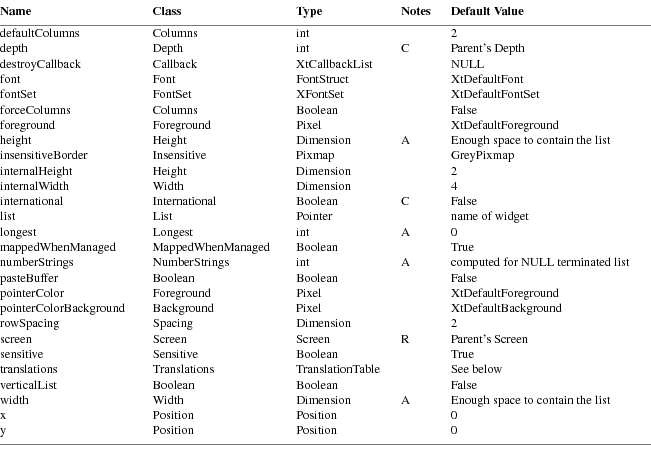
|
accelerators |
A list of event to action bindings to be executed by this widget, even though the event occurred in another widget. (See the X Toolkit Intrinsics — C Language Interface for details). |
|
|
allowOff |
Whether to allow the edges of the slider to go off the edges of the canvas. |
ancestorSensitive
|
The sensitivity state of the ancestors of this widget. A widget is insensitive if either it or any of its ancestors is insensitive. This resource should not be changed with XtSetValues, although it may be queried. |
||
|
background |
A pixel value which indexes the widget’s colormap to derive the background color of the widget’s window. |
backgroundPixmap
|
The background pixmap of this widget’s window. If this resource is set to anything other than XtUnspecifiedPixmap, the pixmap specified will be used instead of the background color. |
backgroundStipple
|
The name of a bitmap pattern to be used as the background for the area representing the canvas. |
|
|
borderColor |
A pixel value which indexes the widget’s colormap to derive the border color of the widget’s window. |
|
borderPixmap |
The border pixmap of this widget’s window. If this resource is set to anything other than XtUnspecifiedPixmap, the pixmap specified will be used instead of the border color. |
|
borderWidth |
The width of this widget’s window border. |
|
canvasHeight |
|
|
canvasWidth |
The size of the canvas. |
|
colormap |
The colormap that this widget will use. |
|
cursor |
The image that will be displayed as the pointer cursor whenever it is in this widget. The use of this resource is deprecated in favor of cursorName. |
|
cursorName |
The name of the symbol to use to represent the pointer cursor. This resource will override the cursor resource if both are specified. (See 2.4.1) |
|
defaultScale |
The percentage size that the Panner widget should have relative to the size of the canvas. |
|
depth |
The depth of this widget’s window. |
|
destroyCallback |
All functions on this list are called when this widget is destroyed. |
|
foreground |
A pixel value which indexes the widget’s colormap to derive the color used to draw the slider. |
|
height |
|
|
width |
The height and width of this widget in pixels. |
|
internalSpace |
The width of internal border in pixels between a slider representing the full size of the canvas and the edge of the Panner widget. |
|
international |
This is a boolean flag, only settable at widget creation time. While not utilized in this widget, it can and should be checked by any subclasses that have behavior that should vary with locale. |
|
lineWidth |
The width of the lines in the rubberbanding rectangle when rubberbanding is in effect instead of continuous scrolling. The default is 0. |
mappedWhenManaged
|
If this resource is True, then the widget’s window will automatically be mapped by the Toolkit when it is realized and managed. |
||
|
pointerColor |
A pixel value which indexes the widget’s colormap to derive the foreground color of the pointer symbol specified by the cursorName resource. |
pointerColorBackground
|
A pixel value which indexes the widget’s colormap to derive the background color of the pointer symbol specified by the cursorName resource. |
|
|
reportCallback |
All functions on this callback list are called when the notify action is invoked. See the Panner Actions section for details. |
|
resize |
Whether or not to resize the panner whenever the canvas size is changed so that the defaultScale is maintained. |
|
rubberBand |
Whether or not scrolling should be discrete (only moving a rubberbanded rectangle until the scrolling is done) or continuous (moving the slider itself). This controls whether or not the move action procedure also invokes the notify action procedure. |
|
screen |
The screen on which this widget is displayed. This is not a settable resource. |
|
sensitive |
Whether or not the toolkit should pass user events to this widget. The widget will not get input events if either ancestorSensitive or sensitive is False. |
|
shadowColor |
The color of the shadow underneath the slider. |
|
shadowThickness |
The width of the shadow underneath the slider. |
|
sliderX |
|
|
sliderY |
The location of the slider in the coordinates of the canvas. |
|
sliderHeight |
|
|
sliderWidth |
The size of the slider. |
|
translations |
The event bindings associated with this widget. |
|
x |
|
|
y |
The location of the upper left outside corner of this widget in its parent. |
The actions supported by the Panner widget are:
|
start() |
This action begins movement of the slider. |
|
|
stop() |
This action ends movement of the slider. |
|
|
abort() |
This action ends movement of the slider and restores it to the position it held when the start action was invoked. |
|
|
move() |
This action moves the outline of the slider (if the rubberBand resource is True) or the slider itself (by invoking the notify action procedure). |
|
|
page(xamount, |
yamount)
|
This action moves the slider by the specified amounts. The format for the amounts is a signed or unsigned floating-point number (e.g., +1.0 or −.5) followed by either p indicating pages (slider sizes), or c indicating canvas sizes. Thus, page(+0,+.5p) represents vertical movement down one-half the height of the slider and page(0,0) represents moving to the upper left corner of the canvas. |
|
|
notify() |
This action informs the application of the slider’s current position by invoking the reportCallback functions registered by the application. |
|
set(what,value) |
This action changes the behavior of the Panner. The what argument must currently be the string rubberband and controls the value of the rubberBand resource. The value argument may have one of the values on, off, or toggle. |
The default bindings for Panner are:
|
<Btn1Down>: |
start() |
|
|
<Btn1Motion>:move() |
||
|
<Btn1Up>: |
notify() stop() |
|
|
<Btn2Down>: |
abort() |
|
|
<Key>KP_Enter:set(rubberband,toggle) |
||
|
<Key>space: |
page(+1p,+1p) |
|
|
<Key>Delete:page(−1p,−1p) |
||
|
<Key>BackSpace:page(−1p,−1p) |
||
|
<Key>Left: |
page(−.5p,+0) |
|
|
<Key>Right: |
page(+.5p,+0) |
|
|
<Key>Up: |
page(+0,−.5p) |
|
|
<Key>Down: |
page(+0,+.5p) |
|
|
<Key>Home: |
page(0,0) |
The
functions registered on the reportCallback list are
invoked by the notify action as follows:
void ReportProc(panner, client_data,
report)
|
Widget panner; |
||
|
XtPointer client_data; |
||
|
XtPointer report; /* (XawPannerReport *) */ |
|
panner |
Specifies the Panner widget. |
client_data
|
Specifies the client data. |
||
|
report |
Specifies a pointer to an XawPannerReport structure containing the location and size of the slider and the size of the canvas. |
When creating a Repeater widget instance, the following resources are retrieved from the argument list or from the resource database:

|
accelerators |
A list of event to action bindings to be executed by this widget, even though the event occurred in another widget. (See the X Toolkit Intrinsics — C Language Interface for details). |
ancestorSensitive
|
The sensitivity state of the ancestors of this widget. A widget is insensitive if either it or any of its ancestors is insensitive. This resource should not be changed with XtSetValues, although it may be queried. |
||
|
background |
A pixel value which indexes the widget’s colormap to derive the background color of the widget’s window. |
backgroundPixmap
|
The background pixmap of this widget’s window. If this resource is set to anything other than XtUnspecifiedPixmap, the pixmap specified will be used instead of the background color. |
||
|
bitmap |
A bitmap to display instead of the label. The default size of the widget will be just large enough to contain the bitmap and the widget’s internal width and height. The resource converter for this resource constructs bitmaps from the contents of files. (See Converting Bitmaps for details.) If this bitmap is one bit deep then the 1’s will be rendered in the foreground color, and the 0’s in the background color. If bitmap has a depth greater than one, it is copied directly into the window. |
|
|
borderColor |
A pixel value which indexes the widget’s colormap to derive the border color of the widget’s window. |
|
|
borderPixmap |
The border pixmap of this widget’s window. If this resource is set to anything other than XtUnspecifiedPixmap, the pixmap specified will be used instead of the border color. |
|
|
borderWidth |
The width of this widget’s window border. |
|
|
callback |
A list of routines to be called when the notify action is invoked. |
|
|
colormap |
The colormap that this widget will use. |
cornerRoundPercent
|
When a ShapeStyle of roundedRectangle is used, this resource controls the radius of the rounded corner. The radius of the rounded corners is specified as a percentage of the length of the shortest side of the widget. |
|
|
cursor |
The image that will be displayed as the pointer cursor whenever it is in this widget. The use of this resource is deprecated in favor of cursorName. |
|
cursorName |
The name of the symbol to use to represent the pointer cursor. This resource will override the cursor resource if both are specified. (See 2.4.1) |
|
decay |
The number of milliseconds that should be subtracted from each succeeding interval while the Repeater button is being held down until the interval has reached minimumDelay milliseconds. |
|
depth |
The depth of this widget’s window. |
|
destroyCallback |
All functions on this list are called when this widget is destroyed. |
|
encoding |
The encoding method used by the value of the label resource. The value may be XawTextEncoding8bit or XawTextEncodingChar2b. When international is set to true this resource is not used. |
|
flash |
Whether or not to flash the Repeater button whenever the timer goes off. |
|
font |
The text font to use when displaying the label, when the international resource is false. |
|
fontSet |
The text font set to use when displaying the label, when the international resource is true. |
|
foreground |
A pixel value which indexes the widget’s colormap to derive the foreground color of the widget’s window. This color is also used to render all 1’s in a bitmap one plane deep. |
|
height |
|
|
width |
The height and width of this widget in pixels. |
highlightThickness
|
The thickness of the rectangle that is used to highlight the internal border of this widget, alerting the user that it is ready to be selected. The default value is 2 pixels if the shapeStyle is rectangle, and 0 Pixels (no highlighting) otherwise. |
||
|
initialDelay |
The number of milliseconds between the beginning of the Repeater button being held down and the first invocation of the callback function. |
insensitiveBorder
|
This pixmap will be tiled into the widget’s border if the widget becomes insensitive. |
||
|
internalHeight |
||
|
internalWidth |
The minimum amount of space to leave between the graphic and the vertical and horizontal edges of the window. |
|
|
international |
This is a boolean flag, only settable at widget creation time. A value of false signals the widget to use pre-R6 internationalization (specifically, the lack thereof), such as using fonts for displaying text, etc. A value of true directs the widget to act in an internationalized manner, such as utilizing font sets for displaying text, etc. |
|
|
justify |
Specifies left, center, or right alignment of graphic within the widget. This resource may be specified with the values XtJustifyLeft, XtJustifyCenter, or XtJustifyRight. A converter is registered for this resource that will convert the following strings: left, right, and center. This resource only has noticeable effect when the width of the widget is larger than necessary to display the graphic. Note that when the graphic is a multi-line label, the longest line will obey this justification while shorter lines will be left-justified with the longest one. |
|
|
label |
Specifies the text string to be displayed in the widget’s window if no bitmap is specified. The default is the name of this widget. Regardless of the value of encoding or international, a single newline character (1 byte) will cause a line break. |
|
|
leftBitmap |
Specifies a bitmap to display to the left of the graphic in the widget’s window. |
mappedWhenManaged
|
If this resource is True, then the widget’s window will automatically be mapped by the Toolkit when it is realized and managed. |
||
|
minimumDelay |
The minimum time between callbacks in milliseconds. |
|
|
pointerColor |
A pixel value which indexes the widget’s colormap to derive the foreground color of the pointer symbol specified by the cursorName resource. |
pointerColorBackground
|
A pixel value which indexes the widget’s colormap to derive the background color of the pointer symbol specified by the cursorName resource. |
||
|
repeatDelay |
The number of milliseconds between each callback after the first (minus an increasing number of decays). |
|
|
resize |
Specifies whether the widget should attempt to resize to its preferred dimensions whenever its resources are modified with XtSetValues. This attempt to resize may be denied by the parent of this widget. The parent is always free to resize the widget regardless of the state of this resource. |
|
|
screen |
The screen on which this widget is displayed. This is not a settable resource. |
|
|
sensitive |
Whether or not the toolkit should pass user events to this widget. The widget will not get input events if either ancestorSensitive or sensitive is False. |
|
|
shapeStyle |
Nonrectangular widgets may be created using this resource. Nonrectangular widgets are supported only on a server that supports the Shape Extension. If nonrectangular widgets are specified for a server lacking this extension, the shape is ignored and the widgets will be rectangular. The following shapes are currently supported: XmuShapeRectangle, XmuShapeOval, XmuShapeEllipse, and XmuShapeRoundedRectangle. A converter is registered for this resource that will convert the following strings: rectangle, oval, ellipse, and roundedRectangle. |
|
|
startCallback |
The list of functions to invoke by the start action (typically when the Repeater button is first pressed). The callback data parameter is set to NULL. |
|
|
stopCallback |
The list of functions to invoke by the stop action (typically when the Repeater button is released). The callback data parameter is set to NULL. |
|
|
translations |
The event bindings associated with this widget. |
|
|
x |
||
|
y |
The location of the upper left outside corner of this widget in its parent. |
The Repeater widget supports the following actions beyond those of the Command button:
|
start() |
This invokes the functions on the startCallback and callback lists and sets a timer to go off in initialDelay milliseconds. The timer will cause the callback functions to be invoked with increasing frequency until the stop action occurs. |
|
|
stop() |
This invokes the functions on the stopCallback list and prevents any further timers from occuring until the next start action. |
The following are the default translation bindings used by the Repeater widget:
|
<EnterWindow>: |
highlight() |
|
|
<LeaveWindow>: |
unhighlight() |
|
|
<Btn1Down>: |
set() start() |
|
|
<Btn1Up>: |
stop() unset() |
Application header file<X11/Xaw/Scrollbar.h>
|
Class header file |
<X11/Xaw/ScrollbarP.h> |
|
Class |
scrollbarWidgetClass |
|
Class Name |
Scrollbar |
|
Superclass |
Simple |
A Scrollbar widget is a rectangle, called the ‘‘canvas,’’ on which another rectangle, the ‘‘thumb,’’ moves in one dimension, either vertically or horizontally. A Scrollbar can be used alone, as a value generator, or it can be used within a composite widget (for example, a Viewport). When a Scrollbar is used to move, or ‘‘scroll,’’ the contents of another widget, the size and the position of the thumb usually give feedback as to what portion of the other widget’s contents are visible.
Each pointer button invokes a specific action. Pointer buttons 1 and 3 do not move the thumb automatically. Instead, they return the pixel position of the cursor on the scroll region. When pointer button 2 is clicked, the thumb moves to the current pointer position. When pointer button 2 is held down and the pointer is moved, the thumb follows the pointer.
The pointer cursor in the scroll region changes depending on the current action. When no pointer button is pressed, the cursor appears as a double-headed arrow that points in the direction that scrolling can occur. When pointer button 1 or 3 is pressed, the cursor appears as a single-headed arrow that points in the logical direction that the thumb will move. When pointer button 2 is pressed, the cursor appears as an arrow that points to the top or the left of the thumb.
When the user scrolls, the application receives notification through callback procedures. For both discrete scrolling actions, the callback returns the Scrollbar widget, the client_data, and the pixel position of the pointer when the button was released. For continuous scrolling, the callback routine returns the scroll bar widget, the client data, and the current relative position of the thumb. When the thumb is moved using pointer button 2, the callback procedure is invoked continuously. When either button 1 or 3 is pressed, the callback procedure is invoked only when the button is released and the client callback procedure is responsible for moving the thumb.
When creating a Scrollbar widget instance, the following resources are retrieved from the argument list or from the resource database:
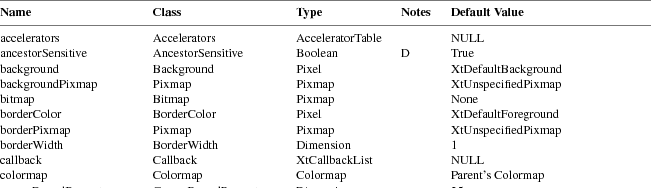
|
accelerators |
A list of event to action bindings to be executed by this widget, even though the event occurred in another widget. (See the X Toolkit Intrinsics — C Language Interface for details). |
ancestorSensitive
|
The sensitivity state of the ancestors of this widget. A widget is insensitive if either it or any of its ancestors is insensitive. This resource should not be changed with XtSetValues, although it may be queried. |
||
|
background |
A pixel value which indexes the widget’s colormap to derive the background color of the widget’s window. |
backgroundPixmap
|
The background pixmap of this widget’s window. If this resource is set to anything other than XtUnspecifiedPixmap, the pixmap specified will be used instead of the background color. |
|
|
borderColor |
A pixel value which indexes the widget’s colormap to derive the border color of the widget’s window. |
|
borderPixmap |
The border pixmap of this widget’s window. If this resource is set to anything other than XtUnspecifiedPixmap, the pixmap specified will be used instead of the border color. |
|
borderWidth |
The width of this widget’s window border. |
|
colormap |
The colormap that this widget will use. |
|
cursor |
The image that will be displayed as the pointer cursor whenever it is in this widget. The use of this resource is deprecated in favor of cursorName. |
|
cursorName |
The name of the symbol to use to represent the pointer cursor. This resource will override the cursor resource if both are specified. (See 2.4.1) |
|
depth |
The depth of this widget’s window. |
|
destroyCallback |
All functions on this list are called when this widget is destroyed. |
|
foreground |
A pixel value which indexes the widget’s colormap to derive the color used to draw the thumb. |
|
height |
|
|
width |
The height and width of this widget in pixels. |
insensitiveBorder
|
This pixmap will be tiled into the widget’s border if the widget becomes insensitive. |
||
|
international |
This is a boolean flag, only settable at widget creation time. While not utilized in this widget, it can and should be checked by any subclasses that have behavior that should vary with locale. |
|
|
jumpProc |
All functions on this callback list are called when the NotifyThumb action is invoked. See the Scrollbar Actions section for details. |
|
|
length |
The height of a vertical scrollbar or the width of a horizontal scrollbar. |
mappedWhenManaged
|
If this resource is True, then the widget’s window will automatically be mapped by the Toolkit when it is realized and managed. |
||
|
minimumThumb |
The smallest size, in pixels, to which the thumb can shrink. |
|
|
orientation |
The orientation is the direction that the thumb will be allowed to move. This value can be either XtorientVertical or XtorientHorizontal. A converter is registered for this resource that will convert the following strings: vertical and horizontal. |
|
|
pointerColor |
A pixel value which indexes the widget’s colormap to derive the foreground color of the pointer symbol specified by the cursorName resource. |
pointerColorBackground
|
A pixel value which indexes the widget’s colormap to derive the background color of the pointer symbol specified by the cursorName resource. |
||
|
screen |
The screen on which this widget is displayed. This is not a settable resource. |
|
|
scrollDCursor |
This cursor is used when scrolling backward in a vertical scrollbar. |
|
|
scrollHCursor |
This cursor is used when a horizontal scrollbar is inactive. |
|
|
scrollLCursor |
This cursor is used when scrolling forward in a horizontal scrollbar. |
|
|
scrollProc |
All functions on this callback list may be called when the NotifyScroll action is invoked. See the Scrollbar Actions section for details. |
|
|
scrollRCursor |
This cursor is used when scrolling backward in a horizontal scrollbar, or when thumbing a vertical scrollbar. |
|
|
scrollUCursor |
This cursor is used when scrolling forward in a vertical scrollbar, or when thumbing a horizontal scrollbar. |
|
|
scrollVCursor |
This cursor is used when a vertical scrollbar is inactive. |
|
|
sensitive |
Whether or not the toolkit should pass user events to this widget. The widget will not get input events if either ancestorSensitive or sensitive is False. |
|
|
shown |
This is the size of the thumb, expressed as a percentage (0.0 - 1.0) of the length of the scrollbar. |
|
|
thickness |
The width of a vertical scrollbar or the height of a horizontal scrollbar. |
|
|
thumb |
This pixmap is used to tile (or stipple) the thumb of the scrollbar. If no tiling is desired, then set this resource to None. This resource will accept either a bitmap or a pixmap that is the same depth as the window. The resource converter for this resource constructs bitmaps from the contents of files. (See Converting Bitmaps for details.) |
|
|
topOfThumb |
The location of the top of the thumb, as a percentage (0.0 - 1.0) of the length of the scrollbar. This resource was called top in previous versions of the Athena widget set. The name collided with the a Form widget constraint resource, and had to be changed. |
|
|
translations |
The event bindings associated with this widget. |
|
|
x |
||
|
y |
The location of the upper left outside corner of this widget in its parent. |
The actions supported by the Scrollbar widget are:
|
StartScroll(value) |
The possible values are Forward, Backward, or Continuous. This must be the first action to begin a new movement.
|
NotifyScroll(value) |
The possible values are Proportional or FullLength. If the argument to StartScroll was Forward or Backward, NotifyScroll executes the scrollProc callbacks and passes either; the position of the pointer, if value is Proportional, or the full length of the scroll bar, if value is FullLength. If the argument to StartScroll was Continuous, NotifyScroll returns without executing any callbacks.
|
EndScroll() |
This must be the last action after a movement is complete. |
|
|
MoveThumb() |
Repositions the Scrollbar’s thumb to the current pointer location. |
|
|
NotifyThumb |
()
|
Calls the jumpProc callbacks and passes the relative position of the pointer as a percentage of the scroll bar length. |
The default bindings for Scrollbar are:
|
<Btn1Down>: |
StartScroll(Forward) |
|
|
<Btn2Down>: |
StartScroll(Continuous) MoveThumb() NotifyThumb() |
|
|
<Btn3Down>: |
StartScroll(Backward) |
|
|
<Btn2Motion>:MoveThumb() NotifyThumb() |
||
|
<BtnUp>: |
NotifyScroll(Proportional) EndScroll() |
Examples of additional bindings a user might wish to specify in a resource file are:
*Scrollbar.Translations: \
|
~Meta<Key>space: |
StartScroll(Forward) NotifyScroll(FullLength) \n\ |
|
|
Meta<Key>space: |
StartScroll(Backward) NotifyScroll(FullLength) \n\ |
|
|
EndScroll() |
There are two callback lists provided by the Scrollbar widget. The procedural interface for these functions is described here.
The calling
interface to the scrollProc callback procedure is:
void ScrollProc(scrollbar, client_data,
position)
Widget scrollbar;
XtPointer client_data;
XtPointer position; /* int */
|
scrollbar |
Specifies the Scrollbar widget. |
client_data
|
Specifies the client data. |
||
|
position |
Specifies a pixel position in integer form. |
The scrollProc callback is used for incremental scrolling and is called by the NotifyScroll action. The position argument is a signed quantity and should be cast to an int when used. Using the default button bindings, button 1 returns a positive value, and button 3 returns a negative value. In both cases, the magnitude of the value is the distance of the pointer in pixels from the top (or left) of the Scrollbar. The value will never be greater than the length of the Scrollbar.
The calling
interface to the jumpProc callback procedure is:
void JumpProc(scrollbar, client_data,
percent)
Widget scrollbar;
XtPointer client_data;
XtPointer percent_ptr; /* float* */
|
scrollbar |
Specifies the ID of the scroll bar widget. |
client_data
|
Specifies the client data. |
percent_ptr
|
Specifies the floating point position of the thumb (0.0 − 1.0). |
The jumpProc callback is used to implement smooth scrolling and is called by the NotifyThumb action. Percent_ptr must be cast to a pointer to float before use; i.e.
|
float percent = *(float*)percent_ptr; |
With the default button bindings, button 2 moves the thumb interactively, and the jumpProc is called on each new position of the pointer, while the pointer button remains down. The value specified by percent_ptr is the current location of the thumb (from the top or left of the Scrollbar) expressed as a percentage of the length of the Scrollbar.
To set the
position and length of a Scrollbar thumb, use
XawScrollbarSetThumb.
void XawScrollbarSetThumb(w, top,
shown)
Widget w;
float top;
float shown;
|
w |
Specifies the Scrollbar widget. |
|
|
top |
Specifies the position of the top of the thumb as a fraction of the length of the Scrollbar. |
|
|
shown |
Specifies the length of the thumb as a fraction of the total length of the Scrollbar. |
XawScrollbarThumb moves the visible thumb to a new position (0.0 − 1.0) and length (0.0 − 1.0). Either the top or shown arguments can be specified as −1.0, in which case the current value is left unchanged. Values greater than 1.0 are truncated to 1.0.
If called from jumpProc, XawScrollbarSetThumb has no effect.
The shown and topOfThumb resources are of type float. These resources can be difficult to get into an argument list. The reason is that C performs an automatic cast of the float value to an integer value, usually truncating the important information. The following code fragment is one portable method of getting a float into an argument list.
|
top = 0.5; |
||
|
if (sizeof(float) > sizeof(XtArgVal)) { |
||
|
/* |
||
|
* If a float is larger than an XtArgVal then pass this |
||
|
* resource value by reference. |
||
|
*/ |
||
|
XtSetArg(args[0], XtNshown, &top); |
||
|
} |
||
|
else { |
||
|
/* |
||
|
* Convince C not to perform an automatic conversion, which |
||
|
* would truncate 0.5 to 0. |
||
|
*/ |
||
|
XtArgVal * l_top = (XtArgVal *) ⊤ |
||
|
XtSetArg(args[0], XtNshown, *l_top); |
||
|
} |
When creating a Simple widget instance, the following resources are retrieved from the argument list or from the resource database:
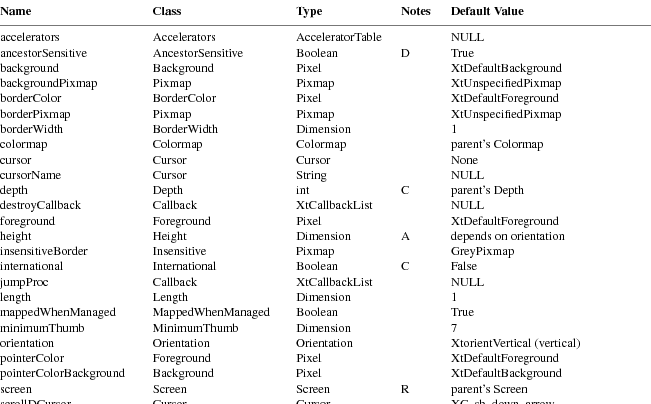
|
accelerators |
A list of event to action bindings to be executed by this widget, even though the event occurred in another widget. (See the X Toolkit Intrinsics — C Language Interface for details). |
ancestorSensitive
|
The sensitivity state of the ancestors of this widget. A widget is insensitive if either it or any of its ancestors is insensitive. This resource should not be changed with XtSetValues, although it may be queried. |
||
|
background |
A pixel value which indexes the widget’s colormap to derive the background color of the widget’s window. |
backgroundPixmap
|
The background pixmap of this widget’s window. If this resource is set to anything other than XtUnspecifiedPixmap, the pixmap specified will be used instead of the background color. |
|
|
borderColor |
A pixel value which indexes the widget’s colormap to derive the border color of the widget’s window. |
|
borderPixmap |
The border pixmap of this widget’s window. If this resource is set to anything other than XtUnspecifiedPixmap, the pixmap specified will be used instead of the border color. |
|
borderWidth |
The width of this widget’s window border. |
|
colormap |
The colormap that this widget will use. |
|
cursor |
The image that will be displayed as the pointer cursor whenever it is in this widget. The use of this resource is deprecated in favor of cursorName. |
|
cursorName |
The name of the symbol to use to represent the pointer cursor. This resource will override the cursor resource if both are specified. (See 2.4.1) |
|
depth |
The depth of this widget’s window. |
|
destroyCallback |
All functions on this list are called when this widget is destroyed. |
|
height |
|
|
width |
The height and width of this widget in pixels. |
insensitiveBorder
|
This pixmap will be tiled into the widget’s border if the widget becomes insensitive. |
||
|
international |
This is a boolean flag, only settable at widget creation time. While not utilized in this widget, it can and should be checked by any subclasses that have behavior that should vary with locale. |
mappedWhenManaged
|
If this resource is True, then the widget’s window will automatically be mapped by the Toolkit when it is realized and managed. |
||
|
pointerColor |
A pixel value which indexes the widget’s colormap to derive the foreground color of the pointer symbol specified by the cursorName resource. |
pointerColorBackground
|
A pixel value which indexes the widget’s colormap to derive the background color of the pointer symbol specified by the cursorName resource. |
||
|
screen |
The screen on which this widget is displayed. This is not a settable resource. |
|
|
sensitive |
Whether or not the toolkit should pass user events to this widget. The widget will not get input events if either ancestorSensitive or sensitive is False. |
|
|
translations |
The event bindings associated with this widget. |
|
|
x |
||
|
y |
The location of the upper left outside corner of this widget in its parent. |
When creating a StripChart widget instance, the following resources are retrieved from the argument list or from the resource database:

|
accelerators |
A list of event to action bindings to be executed by this widget, even though the event occurred in another widget. (See the X Toolkit Intrinsics — C Language Interface for details). |
ancestorSensitive
|
The sensitivity state of the ancestors of this widget. A widget is insensitive if either it or any of its ancestors is insensitive. This resource should not be changed with XtSetValues, although it may be queried. |
||
|
background |
A pixel value which indexes the widget’s colormap to derive the background color of the widget’s window. |
backgroundPixmap
|
The background pixmap of this widget’s window. If this resource is set to anything other than XtUnspecifiedPixmap, the pixmap specified will be used instead of the background color. |
|
|
borderColor |
A pixel value which indexes the widget’s colormap to derive the border color of the widget’s window. |
|
borderPixmap |
The border pixmap of this widget’s window. If this resource is set to anything other than XtUnspecifiedPixmap, the pixmap specified will be used instead of the border color. |
|
borderWidth |
The width of this widget’s window border. |
|
colormap |
The colormap that this widget will use. |
|
cursor |
The image that will be displayed as the pointer cursor whenever it is in this widget. The use of this resource is deprecated in favor of cursorName. |
|
cursorName |
The name of the symbol to use to represent the pointer cursor. This resource will override the cursor resource if both are specified. (See 2.4.1) |
|
depth |
The depth of this widget’s window. |
|
destroyCallback |
All functions on this list are called when this widget is destroyed. |
|
foreground |
A pixel value which indexes the widget’s colormap to derive the color that will be used to draw the graph. |
|
getValue |
A list of callback functions to call every update seconds. This list should contain one function, which returns the value to be graphed by the StripChart widget. The following section describes the procedural interface. Behavior when this list has more than one function is undefined. |
|
height |
|
|
width |
The height and width of this widget in pixels. |
|
highlight |
A pixel value which indexes the widget’s colormap to derive the color that will be used to draw the scale lines on the graph. |
insensitiveBorder
|
This pixmap will be tiled into the widget’s border if the widget becomes insensitive. |
||
|
international |
This is a boolean flag, only settable at widget creation time. While not utilized in this widget, it can and should be checked by any subclasses that have behavior that should vary with locale. |
|
|
jumpScroll |
When the graph reaches the right edge of the window it must be scrolled to the left. This resource specifies the number of pixels it will jump. Smooth scrolling can be achieved by setting this resource to 1. |
mappedWhenManaged
|
If this resource is True, then the widget’s window will automatically be mapped by the Toolkit when it is realized and managed. |
||
|
minScale |
The minimum scale for the graph. The number of divisions on the graph will always be greater than or equal to this value. |
|
|
pointerColor |
A pixel value which indexes the widget’s colormap to derive the foreground color of the pointer symbol specified by the cursorName resource. |
pointerColorBackground
|
A pixel value which indexes the widget’s colormap to derive the background color of the pointer symbol specified by the cursorName resource. |
||
|
screen |
The screen on which this widget is displayed. This is not a settable resource. |
|
|
sensitive |
Whether or not the toolkit should pass user events to this widget. The widget will not get input events if either ancestorSensitive or sensitive is False. |
|
|
translations |
The event bindings associated with this widget. |
|
|
update |
The number of seconds between graph updates. Each update is represented on the graph as a 1 pixel wide line. Every update seconds the getValue procedure will be used to get a new graph point, and this point will be added to the right end of the StripChart. |
|
|
x |
||
|
y |
The location of the upper left outside corner of this widget in its parent. |
The StripChart widget will call the application routine passed to it as the getValue callback function every update seconds to obtain another point for the StripChart graph.
The calling
interface for the getValue callback is:
void (*getValueProc)(w, client_data,
value)
Widget w;
XtPointer client_data;
XtPointer value; /* double * */
|
w |
Specifies the StripChart widget. |
client_data
|
Specifies the client data. |
||
|
value |
Returns a pointer to a double. The application should set the address pointed to by this argument to a double containing the value to be graphed on the StripChart. |
This function is used by the StripChart to call an application routine. The routine will pass the value to be graphed back to the the StripChart in the value field of this routine.
When creating a Toggle widget instance, the following resources are retrieved from the argument list or from the resource database:
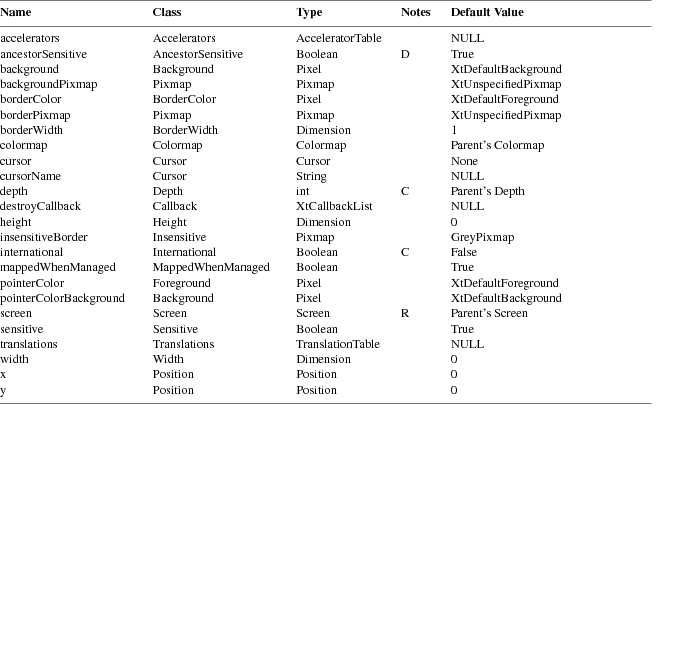
|
accelerators |
A list of event to action bindings to be executed by this widget, even though the event occurred in another widget. (See the X Toolkit Intrinsics — C Language Interface for details). |
ancestorSensitive
|
The sensitivity state of the ancestors of this widget. A widget is insensitive if either it or any of its ancestors is insensitive. This resource should not be changed with XtSetValues, although it may be queried. |
||
|
background |
A pixel value which indexes the widget’s colormap to derive the background color of the widget’s window. |
backgroundPixmap
|
The background pixmap of this widget’s window. If this resource is set to anything other than XtUnspecifiedPixmap, the pixmap specified will be used instead of the background color. |
||
|
bitmap |
A bitmap to display instead of the label. The default size of the widget will be just large enough to contain the bitmap and the widget’s internal width and height. The resource converter for this resource constructs bitmaps from the contents of files. (See Converting Bitmaps for details.) If this bitmap is one bit deep then the 1’s will be rendered in the foreground color, and the 0’s in the background color. If bitmap has a depth greater than one, it is copied directly into the window. |
|
|
borderColor |
A pixel value which indexes the widget’s colormap to derive the border color of the widget’s window. |
|
|
borderPixmap |
The border pixmap of this widget’s window. If this resource is set to anything other than XtUnspecifiedPixmap, the pixmap specified will be used instead of the border color. |
|
|
borderWidth |
The width of this widget’s window border. |
|
|
callback |
A list of routines to be called when the notify action is invoked. |
|
|
colormap |
The colormap that this widget will use. |
cornerRoundPercent
|
When a ShapeStyle of roundedRectangle is used, this resource controls the radius of the rounded corner. The radius of the rounded corners is specified as a percentage of the length of the shortest side of the widget. |
|
|
cursor |
The image that will be displayed as the pointer cursor whenever it is in this widget. The use of this resource is deprecated in favor of cursorName. |
|
cursorName |
The name of the symbol to use to represent the pointer cursor. This resource will override the cursor resource if both are specified. (See 2.4.1) |
|
depth |
The depth of this widget’s window. |
|
destroyCallback |
All functions on this list are called when this widget is destroyed. |
|
encoding |
The encoding method used by the value of the label resource. The value may be XawTextEncoding8bit or XawTextEncodingChar2b. When international is set to true this resource is not used. |
|
font |
The text font to use when displaying the label, when the international resource is false. |
|
fontSet |
The text font set to use when displaying the label, when the international resource is true. |
|
foreground |
A pixel value which indexes the widget’s colormap to derive the foreground color of the widget’s window. This color is also used to render all 1’s in a bitmap one plane deep. |
|
height |
|
|
width |
The height and width of this widget in pixels. |
highlightThickness
|
The thickness of the rectangle that is used to highlight the internal border of this widget, alerting the user that it is ready to be selected. The default value is 2 pixels if the shapeStyle is rectangle, and 0 Pixels (no highlighting) otherwise. |
insensitiveBorder
|
This pixmap will be tiled into the widget’s border if the widget becomes insensitive. |
||
|
internalHeight |
||
|
internalWidth |
The minimum amount of space to leave between the graphic and the vertical and horizontal edges of the window. |
|
|
international |
This is a boolean flag, only settable at widget creation time. A value of false signals the widget to use pre-R6 internationalization (specifically, the lack thereof), such as using fonts for displaying text, etc. A value of true directs the widget to act in an internationalized manner, such as utilizing font sets for displaying text, etc. |
|
|
justify |
Specifies left, center, or right alignment of graphic within the widget. This resource may be specified with the values XtJustifyLeft, XtJustifyCenter, or XtJustifyRight. A converter is registered for this resource that will convert the following strings: left, right, and center. This resource only has noticeable effect when the width of the widget is larger than necessary to display the graphic. Note that when the graphic is a multi-line label, the longest line will obey this justification while shorter lines will be left-justified with the longest one. |
|
|
label |
Specifies the text string to be displayed in the widget’s window if no bitmap is specified. The default is the name of this widget. Regardless of the value of encoding or international, a single newline character (1 byte) will cause a line break. |
|
|
leftBitmap |
Specifies a bitmap to display to the left of the graphic in the widget’s window. |
mappedWhenManaged
|
If this resource is True, then the widget’s window will automatically be mapped by the Toolkit when it is realized and managed. |
||
|
pointerColor |
A pixel value which indexes the widget’s colormap to derive the foreground color of the pointer symbol specified by the cursorName resource. |
pointerColorBackground
|
A pixel value which indexes the widget’s colormap to derive the background color of the pointer symbol specified by the cursorName resource. |
||
|
radioData |
Specifies the data that will be returned by XawToggleGetCurrent when this is the currently set widget in the radio group. This value is also used to identify the Toggle that will be set by a call to XawToggleSetCurrent. The value NULL will be returned by XawToggleGetCurrent if no widget in a radio group is currently set. Programmers must not specify NULL (or Zero) as radioData. |
|
|
radioGroup |
Specifies another Toggle widget that is in the radio group to which this Toggle widget should be added. A radio group is a group of at least two Toggle widgets, only one of which may be set at a time. If this value is NULL (the default) then the Toggle will not be part of any radio group and can change state without affecting any other Toggle widgets. If the widget specified in this resource is not already in a radio group then a new radio group will be created containing these two Toggle widgets. No Toggle widget can be in multiple radio groups. The behavior of a radio group of one toggle is undefined. A converter is registered which will convert widget names to widgets without caching. |
|
|
resize |
Specifies whether the widget should attempt to resize to its preferred dimensions whenever its resources are modified with XtSetValues. This attempt to resize may be denied by the parent of this widget. The parent is always free to resize the widget regardless of the state of this resource. |
|
|
screen |
The screen on which this widget is displayed. This is not a settable resource. |
|
|
sensitive |
Whether or not the toolkit should pass user events to this widget. The widget will not get input events if either ancestorSensitive or sensitive is False. |
|
|
shapeStyle |
Nonrectangular widgets may be created using this resource. Nonrectangular widgets are supported only on a server that supports the Shape Extension. If nonrectangular widgets are specified for a server lacking this extension, the shape is ignored and the widgets will be rectangular. The following shapes are currently supported: XmuShapeRectangle, XmuShapeOval, XmuShapeEllipse, and XmuShapeRoundedRectangle. A converter is registered for this resource that will convert the following strings: rectangle, oval, ellipse, and roundedRectangle. |
|
|
state |
Specifies whether the Toggle widget is set (True) or unset (False). |
|
|
translations |
The event bindings associated with this widget. |
|
|
x |
||
|
y |
The location of the upper left outside corner of this widget in its parent. |
The Toggle widget supports the following actions:
|
• |
Switching the Toggle widget between the foreground and background colors with set and unset and toggle |
|
|
• |
Processing application callbacks with notify |
|
|
• |
Switching the internal border between highlighted and unhighlighted states with highlight and unhighlight |
The following are the default translation bindings used by the Toggle widget:
|
<EnterWindow>: |
highlight(Always) |
|
|
<LeaveWindow>: |
unhighlight() |
|
|
<Btn1Down>,<Btn1Up>:toggle() notify() |
The full list of actions supported by Toggle is:
|
highlight(condition) |
Displays the internal highlight border in the color (foreground or background ) that contrasts with the interior color of the Toggle widget. The conditions WhenUnset and Always are understood by this action procedure. If no argument is passed then WhenUnset is assumed.
|
unhighlight() |
Displays the internal highlight border in the color (foreground or background ) that matches the interior color of the Toggle widget. |
|
|
set() |
Enters the set state, in which notify is possible. This action causes the Toggle widget to display its interior in the foreground color. The label or bitmap is displayed in the background color. |
|
|
unset() |
Cancels the set state and displays the interior of the Toggle widget in the background color. The label or bitmap is displayed in the foreground color. |
|
|
toggle() |
Changes the current state of the Toggle widget, causing to be set if it was previously unset, and unset if it was previously set. If the widget is to be set, and is in a radio group then this procedure may unset another Toggle widget causing all routines on its callback list to be invoked. The callback routines for the Toggle that is to be unset will be called before the one that is to be set. |
|
|
reset() |
Cancels any set or highlight and displays the interior of the Toggle widget in the background color, with the label displayed in the foreground color. |
|
|
notify() |
When the Toggle widget is in the set state this action calls all functions in the callback list named by the callback resource. The value of the call_data argument in these callback functions is undefined. |
Note
When a bitmap of depth greater that one (1) is specified the set(), unset(), and reset() actions have no effect, since there are no foreground and background colors used in a multi-plane pixmap.
There are typically two types of radio groups desired by applications. The default translations for the Toggle widget implement a "zero or one of many" radio group. This means that there may be no more than one Toggle widget active, but there need not be any Toggle widgets active.
The other type of radio group is "one of many" and has the more strict policy that there will always be exactly one radio button active. Toggle widgets can be used to provide this interface with a slight modification to the translation table of each Toggle in the group.
|
<EnterWindow>: |
highlight(Always) |
|
|
<LeaveWindow>: |
unhighlight() |
|
|
<Btn1Down>,<Btn1Up>:set() notify() |
This translation table will not allow any Toggle to be unset except as a result of another Toggle becoming set. It is the application programmer’s responsibility to choose an initial state for the radio group by setting the state resource of one of its member widgets to True.
The following functions allow easy access to the Toggle widget’s radio group functionality.
To enable an
application to change the Toggle’s radio group, add
the Toggle to a radio group, or remove the Toggle from a
radio group, use XawToggleChangeRadioGroup.
void XawToggleChangeRadioGroup(w, radio_group)
Widget w, radio_group;
|
w |
Specifies the Toggle widget. |
radio_group
|
Specifies any Toggle in the new radio group. If NULL then the Toggle will be removed from any radio group of which it is a member. |
If a Toggle is already set in the new radio group, and the Toggle to be added is also set then the previously set Toggle in the radio group is unset and its callback procedures are invoked.
To find the
currently selected Toggle in a radio group of Toggle widgets
use XawToggleGetCurrent.
XtPointer XawToggleGetCurrent(radio_group);
Widget radio_group;
|
radio_group |
Specifies any Toggle widget in the radio group.
The value returned by this function is the radioData of the Toggle in this radio group that is currently set. The default value for radioData is the name of that Toggle widget. If no Toggle is set in the radio group specified then NULL is returned.
To change
the Toggle that is currently set in a radio group use
XawToggleSetCurrent.
void XawToggleSetCurrent(radio_group,
radio_data);
Widget radio_group;
XtPointer radio_data;
|
radio_group |
Specifies any Toggle widget in the radio group.
|
radio_data |
Specifies the radioData identifying the Toggle that should be set in the radio group specified by the radio_group argument. |
XawToggleSetCurrent locates the Toggle widget to be set by matching radio_data against the radioData for each Toggle in the radio group. If none match, XawToggleSetCurrent returns without making any changes. If more than one Toggle matches, XawToggleSetCurrent will choose a Toggle to set arbitrarily. If this causes any Toggle widgets to change state, all routines in their callback lists will be invoked. The callback routines for a Toggle that is to be unset will be called before the one that is to be set.
To unset all
Toggle widgets in a radio group use
XawToggleUnsetCurrent.
void XawToggleUnsetCurrent(radio_group);
Widget radio_group;
|
radio_group |
Specifies any Toggle widget in the radio group.
If this causes a Toggle widget to change state, all routines on its callback list will be invoked.
Chapter 4
Menus
The Athena widget set provides support for single paned non-hierarchical popup and pulldown menus. Since menus are such a common user interface tool, support for them must be provided in even the most basic widget sets. In menuing as in other areas, the Athena Widget Set provides only basic functionality.
Menus in the Athena widget set are implemented as a menu container (the SimpleMenu widget) and a collection of objects that comprise the menu entries. The SimpleMenu widget is itself a direct subclass of the OverrideShell widget class, so no other shell is necessary when creating a menu. The managed children of a SimpleMenu must be subclasses of the Sme (Simple Menu Entry) object.
The Athena widget set provides three classes of Sme objects that may be used to build menus.
|
Sme |
The base class of all menu entries. It may be used as a menu entry itself to provide blank space in a menu. ‘‘Sme’’ means ‘‘Simple Menu Entry.’’ |
|
|
SmeBSB |
This menu entry provides a selectable entry containing a text string. A bitmap may also be placed in the left and right margins. ‘‘BSB’’ means ‘‘Bitmap String Bitmap.’’ |
|
|
SmeLine |
This menu entry provides an unselectable entry containing a separator line. |
The SimpleMenu widget informs the window manager that it should ignore its window by setting the Override Redirect flag. This is the correct behavior for the press-drag-release style of menu operation. If click-move-click or ‘‘pinable’’’ menus are desired it is the responsibility of the application programmer, using the SimpleMenu resources, to inform the window manager of the menu.
To allow easy creation of pulldown menus, a MenuButton widget is also provided as part of the Athena widget set.
The resources associated with the SimpleMenu widget control aspects that will affect the entire menu.

|
accelerators |
A list of event to action bindings to be executed by this widget, even though the event occurred in another widget. (See the X Toolkit Intrinsics — C Language Interface for details). |
ancestorSensitive
|
The sensitivity state of the ancestors of this widget. A widget is insensitive if either it or any of its ancestors is insensitive. This resource should not be changed with XtSetValues, although it may be queried. |
||
|
backingStore |
Determines what type of backing store will be used for the menu. Legal values for this resource are NotUseful, WhenMapped, and Always. These values are the backing-store integers defined in <X11/X.h>. A converter is registered for this resource that will convert the following strings: notUseful, whenMapped, always, and default. If default is specified (the default behavior) the server will use whatever it thinks is appropriate. |
|
|
background |
A pixel value which indexes the widget’s colormap to derive the background color of the widget’s window. |
backgroundPixmap
|
The background pixmap of this widget’s window. If this resource is set to anything other than XtUnspecifiedPixmap, the pixmap specified will be used instead of the background color. |
|
|
borderColor |
A pixel value which indexes the widget’s colormap to derive the border color of the widget’s window. |
|
borderPixmap |
The border pixmap of this widget’s window. If this resource is set to anything other than XtUnspecifiedPixmap, the pixmap specified will be used instead of the border color. |
|
borderWidth |
The width of this widget’s window border. |
|
bottomMargin |
|
|
topMargin |
The amount of space between the top or bottom of the menu and the menu entry closest to that edge. |
|
children |
A list of all this composite widget’s current children. |
|
colormap |
The colormap that this widget will use. |
|
cursor |
The shape of the mouse pointer whenever it is in this widget. |
|
depth |
The depth of this widget’s window. |
|
destroyCallback |
All functions on this list are called when this widget is destroyed. |
|
geometry |
If this resource is specified it will override the x, y, width and height of this widget. The format of this string is [<width>x<height>][{+ -} <xoffset> {+ -}<yoffset>]. |
|
height |
|
|
width |
The height and width of this widget in pixels. |
|
label |
This label will be placed at the top of the SimpleMenu, and may not be highlighted. The name of the label object is menuLabel. Using this name it is possible to modify the label’s attributes through the resource database. When the label is created, the label is hard coded to the value of label, and justify is hard coded as XtJustifyCenter. |
|
labelClass |
Specifies the type of Sme object created as the menu label. |
mappedWhenManaged
|
If this resource is True, then the widget’s window will automatically be mapped by the Toolkit when it is realized and managed. |
||
|
menuOnScreen |
If the menu is automatically positioned under the cursor with the XawPositionSimpleMenu action, and this resource is True, then the menu will always be fully visible on the screen. |
|
|
numChildren |
The number of children in this composite widget. |
overrideRedirect
|
Determines the value of the override_redirect attribute of the SimpleMenu’s window. The override_redirect attribute of a window determines whether or not a window manager may interpose itself between this window and the root window of the display. For more information see the Interclient Communications Conventions Manual. |
|
|
popdownCallback |
|
|
popupCallback |
These callback functions are called by the Xt Intrinsics whenever the shell is popped up or down (See X Toolkit Intrinsics — C Language Interface for details). |
|
popupOnEntry |
The XawPositionSimpleMenu action will, by default, popup the SimpleMenu with its label (or first entry) directly under the pointer. To popup the menu under another entry, set this resource to the menu entry that should be under the pointer, when the menu is popped up. This allows the application to offer the user a default menu entry that can be selected with out moving the pointer. |
|
rowHeight |
If this resources is zero (the default) then each menu entry will be given its desired height. If this resource has any other value then all menu entries will be forced to be rowHeight pixels high. |
|
saveUnder |
If this is True then save unders will be active on the menu’s window. |
|
screen |
The screen on which this widget is displayed. This is not a settable resource. |
|
sensitive |
Whether or not the toolkit should pass user events to this widget. The widget will not get input events if either ancestorSensitive or sensitive is False. |
|
translations |
The event bindings associated with this widget. |
|
x |
|
|
y |
The location of the upper left outside corner of this widget in its parent. |
The SimpleMenu widget supports the following actions:
|
• |
Switching the entry under the mouse pointer between the foreground and background colors with highlight and unhighlight |
|
|
• |
Processing menu entry callbacks with notify |
The following are the default translation bindings used by the SimpleMenu widget:
|
<EnterWindow>: |
highlight() |
|
|
<LeaveWindow>: |
unhighlight() |
|
|
<BtnMotion>: |
highlight() |
|
|
<BtnUp>: |
MenuPopdown() notify() unhighlight() |
The user can pop down the menu without activating any of the callback functions by releasing the pointer button when no menu item is highlighted.
The full list of actions supported by SimpleMenu is:
|
highlight() |
Highlight the menu entry that is currently under the pointer. Only a item that is highlighted will be notified when the notify action is invoked. The look of a highlighted entry is determined by the menu entry. |
|
|
unhighlight() |
Unhighlights the currently highlighted menu item, and returns it to its normal look. |
|
|
notify() |
Notifies the menu entry that is currently highlighted that is has been selected. It is the responsibility of the menu entry to take the appropriate action. |
|
|
MenuPopdown( |
menu)
|
This action is defined in X Toolkit Intrinsics — C Language Interface. |
If the SimpleMenu widget is to be used as a pulldown menu then the MenuButton widget, or some other outside means should be used to place the menu when it is popped up.
If popup menus are desired it will be necessary to add the XawPositionSimpleMenu and MenuPopup actions to the translation table of the widget that will be popping up the menu. The MenuPopup action is described in X Toolkit Intrinsics — C Language Interface. XawPositionSimpleMenu is a global action procedure registered by the SimpleMenu widget when the first one is created or the convenience routine XawSimpleMenuAddGlobalActions is called.
Translation writers should be aware that Xt does not register grabs on ‘‘don’t care’’ modifiers, and therefore the left hand side of the production should be written to exclude unspecified modifiers. For example these are the translations needed to popup some of xterm’s menus:
|
!Ctrl<Btn1Down>: XawPositionSimpleMenu(xterm) MenuPopup(xterm) |
||
|
!Ctrl<Btn2Down>: XawPositionSimpleMenu(modes) MenuPopup(modes) |
|
XawPositionSimpleMenu(menu) |
The XawPositionSimpleMenu routine will search for the menu name passed to it using XtNameToWidget starting with the widget invoking the action as the reference widget. If it is unsuccessful it will continue up the widget tree using each of the invoking widget’s ancestors as the reference widget. If it is still unsuccessful it will print a warning message and give up. XawPositionSimpleMenu will position the menu directly under the pointer cursor. The menu will be placed so that the pointer cursor is centered on the entry named by the popupOnEntry resource. If the menuOnScreen resource is True then the menu will always be fully visible on the screen.
The
XawPositionSimpleMenu action routine may often be
invoked before any menus have been created. This can occur
when an application uses dynamic menu creation. In these
cases an application will need to register this global
action routine by calling
XawSimpleMenuAddGlobalActions:
void XawSimpleMenuAddGlobalActions(app_con)
XtAppContext app_con;
|
app_con |
Specifies the application context in which this action should be registered. |
This function need only be called once per application and must be called before any widget that uses XawPositionSimpleMenu action is realized.
To get the
currently highlighted menu entry use
XawSimpleMenuGetActiveEntry:
Widget XawSimpleMenuGetActiveEntry(w)
Widget w;
|
w |
Specifies the SimpleMenu widget. |
This function returns the menu entry that is currently highlighted, or NULL if no entry is highlighted.
To clear the
SimpleMenu widget’s internal information about the
currently highlighted menu entry use
XawSimpleMenuClearActiveEntry:
Widget XawSimpleMenuClearActiveEntry(w)
Widget w;
|
w |
Specifies the SimpleMenu widget. |
This function unsets all internal references to the currently highlighted menu entry. It does not unhighlight or otherwise alter the appearance of the active entry. This function is primarily for use by implementors of menu entries.
Application Header file<X11/Xaw/SmeBSB.h>
|
Class Header file |
<X11/Xaw/SmeBSBP.h> |
|
Class |
smeBSBObjectClass |
|
Class Name |
SmeBSB |
|
Superclass |
Sme |
The SmeBSB object is used to create a menu entry that contains a string, and optional bitmaps in its left and right margins. Since each menu entry is an independent object, the application is able to change the font, color, height, and other attributes of the menu entries, on an entry by entry basis. The format of the string may either be the encoding of the 8 bit font utilized, or in a multi-byte encoding for use with a fontSet.
The resources associated with the SmeBSB object are defined in this section, and affect only the single menu entry specified by this object.

|
ancestorSensitive |
The sensitivity state of the ancestors of this widget. A widget is insensitive if either it or any of its ancestors is insensitive. This resource should not be changed with XtSetValues, although it may be queried.
|
callback |
All callback functions on this list are called when the SimpleMenu notifies this entry that the user has selected it. |
|
destroyCallback |
All functions on this list are called when this widget is destroyed. |
|
font |
The text font to use when displaying the label, when the international resource is false. |
|
fontSet |
The text font set to use when displaying the label, when the international resource is true. |
|
foreground |
A pixel value which indexes the SimpleMenu’s colormap to derive the foreground color of the menu entry’s window. This color is also used to render all 1’s in the left and right bitmaps. |
|
height |
|
|
width |
The height and width of this widget in pixels. Keep in mind that the SimpleMenu widget will force the width of all menu entries to be the width of the longest entry. |
|
international |
This is a boolean flag, only settable at widget creation time. A value of false signals the widget to use pre-R6 internationalization (specifically, the lack thereof), such as using fonts for displaying text, etc. A value of true directs the widget to act in an internationalized manner, such as utilizing font sets for displaying text, etc. |
|
justify |
How the label is to be rendered between the left and right margins when the space is wider than the actual text. This resource may be specified with the values XtJustifyLeft, XtJustifyCenter, or XtJustifyRight. When specifying the justification from a resource file the values left, center, or right may be used. |
|
label |
This is a the string that will be displayed in the menu entry. The exact location of this string within the bounds of the menu entry is controlled by the leftMargin, rightMargin, vertSpace, and justify resources. |
|
leftBitmap |
|
|
rightBitmap |
This is a name of a bitmap to display in the left or right margin of the menu entry. All 1’s in the bitmap will be rendered in the foreground color, and all 0’s will be drawn in the background color of the SimpleMenu widget. It is the programmers’ responsibility to make sure that the menu entry is tall enough, and the appropriate margin wide enough to accept the bitmap. If care is not taken the bitmap may extend into another menu entry, or into this entry’s label. |
|
leftMargin |
|
|
rightMargin |
This is the amount of space (in pixels) that will be left between the edge of the menu entry and the label string. |
|
sensitive |
Whether or not the toolkit should pass user events to this widget. The widget will not get input events if either ancestorSensitive or sensitive is False. |
|
vertSpace |
This is the amount of vertical padding, expressed as a percentage of the height of the font, that is to be placed around the label of a menu entry.. The label and bitmaps are always centered vertically within the menu. The default value for this resource (25) causes the default height to be 125% of the height of the font. |
Application Header file<X11/Xaw/SmeLine.h>
|
Class Header file |
<X11/Xaw/SmeLineP.h> |
|
Class |
smeLineObjectClass |
|
Class Name |
SmeLine |
|
Superclass |
Sme |
The SmeLine object is used to add a horizontal line or menu separator to a menu. Since each SmeLine is an independent object, the application is able to change the color, height, and other attributes of the SmeLine objects on an entry by entry basis. This object is not selectable, and will not highlight when the pointer cursor is over it.
The resources associated with the SmeLine object are defined in this section, and affect only the single menu entry specified by this object.

|
destroyCallback |
All functions on this list are called when this widget is destroyed. |
|
foreground |
A pixel value which indexes the SimpleMenu’s colormap to derive the foreground color used to draw the separator line. |
|
height |
|
|
width |
The height and width of this widget in pixels. Keep in mind that the SimpleMenu widget will force all menu items to be the width of the widest entry. Thus, setting the width is generally not very important. |
|
international |
This is a boolean flag, only settable at widget creation time. While not utilized in this widget, it can and should be checked by any subclasses that have behavior that should vary with locale. |
|
lineWidth |
The width of the horizontal line that is to be displayed. |
|
stipple |
If a bitmap is specified for this resource, the line will be stippled through it. This allows the menu separator to be rendered as something more exciting than just a line. For instance, if you define a stipple that is a chain link, then your menu separators will look like chains. |
Application Header file<X11/Xaw/Sme.h>
|
Class Header file |
<X11/Xaw/SmeP.h> |
|
Class |
smeObjectClass |
|
Class Name |
Sme |
|
Superclass |
RectObj |
The Sme object is the base class for all menu entries. While this object is mainly intended to be subclassed, it may be used in a menu to add blank space between menu entries.
The resources associated with the SmeLine object are defined in this section, and affect only the single menu entry specified by this object. There are no new resources added for this class, as it picks up all its resources from the RectObj class.

|
ancestorSensitive |
The sensitivity state of the ancestors of this widget. A widget is insensitive if either it or any of its ancestors is insensitive. This resource should not be changed with XtSetValues, although it may be queried.
|
destroyCallback |
All functions on this list are called when this widget is destroyed. |
|
height |
|
|
width |
The height and width of this widget in pixels. Keep in mind that the SimpleMenu widget will force all menu items to be the width of the widest entry. |
|
international |
This is a boolean flag, only settable at widget creation time. While not utilized in this widget, it can and should be checked by any subclasses that have behavior that should vary with locale. |
|
sensitive |
Whether or not the toolkit should pass user events to this widget. The widget will not get input events if either ancestorSensitive or sensitive is False. |
To Create a new Sme object class you will need to define three class methods. These methods allow the SimpleMenu to highlight and unhighlight the menu entry as the pointer cursor moves over it, as well as notify the entry when the user has selected it. All of these methods may be inherited from the Sme object, although the default semantics are not very interesting.
|
Highlight() |
Called to put the menu entry into the highlighted state.
|
Unhighlight() |
Called to return the widget to its normal (unhighlighted) state.
|
Notify() |
Called when the user selects this menu entry. |
Other then these methods, creating a new object is straight forward. Here is some information that may help you avoid some common mistakes.
|
1) |
Objects can be zero pixels high. |
|
|
2) |
Objects draw on their parent’s window, therefore the Drawing dimensions are different from those of widgets. For instance, y locations vary from y to y + height, not 0 to height. |
|
|
3) |
XtSetValues calls may come from the application while the Sme is highlighted, and if the SetValues method returns True, will result in an expose event. The SimpleMenu may later call the menu entry’s unhighlight procedure. However, due to the asynchronous nature of X, the expose event generated by XtSetValues will come after this unhighlight. |
|
|
4) |
Remember that your subclass of the Sme does not own the window. Share the space with other menu entries, and refrain from drawing outside the subclass’s own section of the menu. |
When creating a MenuButton widget instance, the following resources are retrieved from the argument list or from the resource database:

|
accelerators |
A list of event to action bindings to be executed by this widget, even though the event occurred in another widget. (See the X Toolkit Intrinsics — C Language Interface for details). |
ancestorSensitive
|
The sensitivity state of the ancestors of this widget. A widget is insensitive if either it or any of its ancestors is insensitive. This resource should not be changed with XtSetValues, although it may be queried. |
||
|
background |
A pixel value which indexes the widget’s colormap to derive the background color of the widget’s window. |
backgroundPixmap
|
The background pixmap of this widget’s window. If this resource is set to anything other than XtUnspecifiedPixmap, the pixmap specified will be used instead of the background color. |
||
|
bitmap |
A bitmap to display instead of the label. The default size of the widget will be just large enough to contain the bitmap and the widget’s internal width and height. The resource converter for this resource constructs bitmaps from the contents of files. (See Converting Bitmaps for details.) If this bitmap is one bit deep then the 1’s will be rendered in the foreground color, and the 0’s in the background color. If bitmap has a depth greater than one, it is copied directly into the window. |
|
|
borderColor |
A pixel value which indexes the widget’s colormap to derive the border color of the widget’s window. |
|
|
borderPixmap |
The border pixmap of this widget’s window. If this resource is set to anything other than XtUnspecifiedPixmap, the pixmap specified will be used instead of the border color. |
|
|
borderWidth |
The width of this widget’s window border. |
|
|
callback |
A list of routines to be called when the notify action is invoked. |
|
|
colormap |
The colormap that this widget will use. |
cornerRoundPercent
|
When a ShapeStyle of roundedRectangle is used, this resource controls the radius of the rounded corner. The radius of the rounded corners is specified as a percentage of the length of the shortest side of the widget. |
|
|
cursor |
The image that will be displayed as the pointer cursor whenever it is in this widget. The use of this resource is deprecated in favor of cursorName. |
|
cursorName |
The name of the symbol to use to represent the pointer cursor. This resource will override the cursor resource if both are specified. (See 2.4.1) |
|
depth |
The depth of this widget’s window. |
|
destroyCallback |
All functions on this list are called when this widget is destroyed. |
|
font |
The text font to use when displaying the label, when the international resource is false. |
|
fontSet |
The text font set to use when displaying the label, when the international resource is true. |
|
foreground |
A pixel value which indexes the widget’s colormap to derive the foreground color of the widget’s window. This color is also used to render all 1’s in a bitmap one plane deep. |
|
height |
|
|
width |
The height and width of this widget in pixels. |
highlightThickness
|
The thickness of the rectangle that is used to highlight the internal border of this widget, alerting the user that it is ready to be selected. The default value is 2 pixels if the shapeStyle is rectangle, and 0 Pixels (no highlighting) otherwise. |
insensitiveBorder
|
This pixmap will be tiled into the widget’s border if the widget becomes insensitive. |
||
|
internalHeight |
||
|
internalWidth |
The minimum amount of space to leave between the graphic and the vertical and horizontal edges of the window. |
|
|
international |
This is a boolean flag, only settable at widget creation time. A value of false signals the widget to use pre-R6 internationalization (specifically, the lack thereof), such as using fonts for displaying text, etc. A value of true directs the widget to act in an internationalized manner, such as utilizing font sets for displaying text, etc. |
|
|
justify |
Specifies left, center, or right alignment of graphic within the widget. This resource may be specified with the values XtJustifyLeft, XtJustifyCenter, or XtJustifyRight. A converter is registered for this resource that will convert the following strings: left, right, and center. This resource only has noticeable effect when the width of the widget is larger than necessary to display the graphic. Note that when the graphic is a multi-line label, the longest line will obey this justification while shorter lines will be left-justified with the longest one. |
|
|
label |
Specifies the text string to be displayed in the widget’s window if no bitmap is specified. The default is the name of this widget. Regardless of the value of encoding or international, a single newline character (1 byte) will cause a line break. |
mappedWhenManaged
|
If this resource is True, then the widget’s window will automatically be mapped by the Toolkit when it is realized and managed. |
||
|
menuName |
The name of a popup shell to popup as a menu. The MenuButton will search for this name using XtNameToWidget starting with itself as the reference widget. If the search is unsuccessful the widget will continue up the widget tree using each of its ancestors as the reference widget passed to XtNameToWidget. If no widget of called menuName is found by this algorithm, the widget will print a warning message and give up. When the menu is found it will be popped up exclusive and spring_loaded. The MenuButton widget does not copy the value of this resource into newly allocated memory. The application programmer must pass the resource value in nonvolatile memory. |
|
|
pointerColor |
A pixel value which indexes the widget’s colormap to derive the foreground color of the pointer symbol specified by the cursorName resource. |
pointerColorBackground
|
A pixel value which indexes the widget’s colormap to derive the background color of the pointer symbol specified by the cursorName resource. |
||
|
resize |
Specifies whether the widget should attempt to resize to its preferred dimensions whenever its resources are modified with XtSetValues. This attempt to resize may be denied by the parent of this widget. The parent is always free to resize the widget regardless of the state of this resource. |
|
|
screen |
The screen on which this widget is displayed. This is not a settable resource. |
|
|
sensitive |
Whether or not the toolkit should pass user events to this widget. The widget will not get input events if either ancestorSensitive or sensitive is False. |
|
|
shapeStyle |
Nonrectangular widgets may be created using this resource. Nonrectangular widgets are supported only on a server that supports the Shape Extension. If nonrectangular widgets are specified for a server lacking this extension, the shape is ignored and the widgets will be rectangular. The following shapes are currently supported: XmuShapeRectangle, XmuShapeOval, XmuShapeEllipse, and XmuShapeRoundedRectangle. A converter is registered for this resource that will convert the following strings: rectangle, oval, ellipse, and roundedRectangle. |
|
|
translations |
The event bindings associated with this widget. |
|
|
x |
||
|
y |
The location of the upper left outside corner of this widget in its parent. |
The MenuButton widget supports the following actions:
|
• |
Switching the button between the foreground and background colors with set and unset |
|
|
• |
Processing application callbacks with notify |
|
|
• |
Switching the internal border between highlighted and unhighlighted states with highlight and unhighlight |
|
|
• |
Popping up a menu with PopupMenu |
The following are the default translation bindings used by the MenuButton widget:
|
<EnterWindow>: |
highlight() |
|
|
<LeaveWindow>: |
reset() |
|
|
<BtnDown>: |
reset() PopupMenu( |
The full list of actions supported by MenuButton is:
|
highlight(condition) |
Displays the internal highlight border in the color (foreground or background ) that contrasts with the interior color of the Command widget. The conditions WhenUnset and Always are understood by this action procedure. If no argument is passed, WhenUnset is assumed.
|
unhighlight() |
Displays the internal highlight border in the color (XtNforeground or background ) that matches the interior color of the MenuButton widget. |
|
|
set() |
Enters the set state, in which notify is possible. This action causes the button to display its interior in the foreground color. The label or bitmap is displayed in the background color. |
|
|
unset() |
Cancels the set state and displays the interior of the button in the background color. The label or bitmap is displayed in the foreground color. |
|
|
reset() |
Cancels any set or highlight and displays the interior of the button in the background color, with the label displayed in the foreground color. |
|
|
notify() |
When the button is in the set state this action calls all functions in the callback list named by the callback resource. The value of the call_data argument in these callback functions is undefined. |
|
|
PopupMenu() |
Pops up the menu specified by the menuName resource. |
The MenuButton widget does not place a server grab on itself. Instead, PopupMenu is registered as a grab action. As a result, clients which popup menus without using XtMenuPopup or MenuPopup or PopupMenu in translations will fail to have a grab active. They should make a call to XtRegisterGrabAction on the appropriate action in the application initialization routine, or use a different translation.
Chapter 5
Text Widgets
The Text widget provides a window that will allow an application to display and edit one or more lines of text. Options are provided to allow the user to add Scrollbars to its window, search for a specific string, and modify the text in the buffer.
The Text widget is made up of a number of pieces; it was modularized to ease customization. The AsciiText widget class (actually not limited to ASCII but so named for compatibility) is be general enough to most needs. If more flexibility, special features, or extra functionality is needed, they can be added by implementing a new TextSource or TextSink, or by subclassing the Text Widget (See Section 5.8 for customization details.)
The words insertion point are used in this chapter to refer to the text caret. This is the symbol that is displayed between two characters in the file. The insertion point marks the location where any new characters will be added to the file. To avoid confusion the pointer cursor will always be referred to as the pointer.
The text widget supports three edit modes, controlling the types of modifications a user is allowed to make:
|
• |
Append-only |
||
|
• |
Editable |
||
|
• |
Read-only |
Read-only mode does not allow the user or the programmer to modify the text in the widget. While the entire string may be reset in read-only mode with XtSetValues, it cannot be modified via with XawTextReplace. Append-only and editable modes allow the text at the insertion point to be modified. The only difference is that text may only be added to or removed from the end of a buffer in append-only mode.
The default key bindings are patterned after those in the EMACS text editor:
|
Ctrl-a |
Beginning Of Line |
Meta-b |
Backward Word |
|
Ctrl-b |
Backward Character |
Meta-f |
Forward Word |
|
Ctrl-d |
Delete Next Character |
Meta-iInsert File |
|
|
Ctrl-e |
End Of Line |
Meta-k |
Kill To End Of Paragraph |
|
Ctrl-f |
Forward Character |
Meta-q |
Form Paragraph |
|
Ctrl-g |
Multiply Reset |
Meta-v |
Previous Page |
|
Ctrl-h |
Delete Previous Character |
Meta-yInsert Current Selection |
|
|
Ctrl-j |
Newline And Indent |
Meta-z |
Scroll One Line Down |
|
Ctrl-k |
Kill To End Of Line |
Meta-d |
Delete Next Word |
|
Ctrl-l |
Redraw Display |
Meta-D |
Kill Word |
|
Ctrl-m |
Newline |
Meta-h |
Delete Previous Word |
|
Ctrl-n |
Next Line |
Meta-H |
Backward Kill Word |
|
Ctrl-o |
Newline And Backup |
Meta-< |
Beginning Of File |
|
Ctrl-p |
Previous Line |
Meta-> |
End Of File |
|
Ctrl-r |
Search/Replace Backward |
Meta-]Forward Paragraph |
|
|
Ctrl-s |
Search/Replace Forward |
Meta-[Backward Paragraph |
|
|
Ctrl-t |
Transpose Characters |
||
|
Ctrl-u |
Multiply by 4 |
Meta-Delete |
Delete Previous Word |
|
Ctrl-v |
Next Page |
Meta-Shift DeleteKill Previous Word |
|
|
Ctrl-w |
Kill Selection |
Meta-Backspace |
Delete Previous Word |
|
Ctrl-y |
Unkill |
Meta-Shift BackspaceKill Previous Word |
|
|
Ctrl-z |
Scroll One Line Up |
||
|
Ctrl-\ |
Reconnect to input method |
||
|
Kanji |
Reconnect to input method |
In addition, the pointer may be used to cut and paste text:
|
Button 1 Down |
Start Selection |
|
|
Button 1 MotionAdjust Selection |
||
|
Button 1 Up |
End Selection (cut) |
|
|
Button 2 Down |
Insert Current Selection (paste) |
|
|
Button 3 Down |
Extend Current Selection |
|
|
Button 3 MotionAdjust Selection |
||
|
Button 3 Up |
End Selection (cut) |
Since all of these key and pointer bindings are set through the translations and resource manager, the user and the application programmer can modify them by changing the Text widget’s translations resource.
The Text widget provides a search popup that can be used to search for a string within the current Text widget. The popup can be activated by typing either Control-r or Control-s. If Control-s is used the search will be forward in the file from the current location of the insertion point; if Control-r is used the search will be backward. The activated popup is placed under the pointer. It has a number of buttons that allow both text searches and text replacements to be performed.
At the top of the search popup are two toggle buttons labeled backward and forward. One of these buttons will always be highlighted; this is the direction in which the search will be performed. The user can change the direction at any time by clicking on the appropriate button.
Directly under the buttons there are two text areas, one labeled Search for: and the other labeled Replace with:. If this is a read-only Text widget the Replace with: field will be insensitive and no replacements will be allowed. After each of these labels will be a text field. This field will allow the user to enter a string to search for and the string to replace it with. Only one of these text fields will have a window border around it; this is the active text field. Any key presses that occur when the focus in in the search popup will be directed to the active text field. There are also a few special key sequences:
|
Carriage Return: |
Execute the action, and pop down the search widget. |
|
|
Tab: |
Execute the action, then move to the next field. |
Shift Carriage Return:Execute the action, then move to the next field.
|
Control-q Tab: |
Enter a Tab into a text field. |
|
|
Control-c: |
Pop down the search popup. |
Using these special key sequences should allow simple searches without ever removing one’s hands from the keyboard.
Near the bottom of the search popup is a row of buttons. These buttons allow the same actions to to be performed as the key sequences, but the buttons will leave the popup active. This can be quite useful if many searches are being performed, as the popup will be left on the display. Since the search popup is a transient window, it may be picked up with the window manager and pulled off to the side for use at a later time.
|
Search |
Search for the specified string. |
|
|
Replace |
Replace the currently highlighted string with the string in the Replace with text field, and move onto the next occurrence of the Search for text field. The functionality is commonly referred to as query-replace. |
|
|
Replace-All |
Replace all occurrences of the search string with the replace string from the current insertion point position to the end (or beginning) of the file. There is no key sequence to perform this action. |
|
|
Cancel |
Remove the search popup from the screen. |
Finally, when international resource is true, there may be a pre-edit buffer below the button row, for composing input. Its presence is determined by the X locale in use and the VendorShell’s preeditType resource.
The widget hierarchy for the search popup is show below, all widgets are listed by class and instance name.
Text <name of Text widget>
|
TransientShell search |
||||
|
Form form |
||||
|
Label label1 |
||||
|
Label label2 |
||||
|
Toggle backwards |
||||
|
Toggle forwards |
||||
|
Label searchLabel |
||||
|
Text searchText |
||||
|
Label replaceLabel |
||||
|
Text replaceText |
||||
|
Command search |
||||
|
Command replaceOne |
||||
|
Command replaceAll |
||||
|
Command cancel |
To insert a file into a text widget, type the key sequence Meta-i, which will activate the file insert popup. This popup will appear under the pointer, and any text typed while the focus is in this popup will be redirected to the text field used for the filename. When the desired filename has been entered, click on Insert File, or type Carriage Return. The named file will then be inserted in the text widget beginning at the insertion point position. If an error occurs when opening the file, an error message will be printed, prompting the user to enter the filename again. The file insert may be aborted by clicking on Cancel. If Meta-i is typed at a text widget that is read-only, it will beep, as no file insertion is allowed.
The widget hierarchy for the file insert popup is show below; all widgets are listed by class and instance name.
Text <name of Text widget>
|
TransientShell insertFile |
||||
|
Form form |
||||
|
Label label |
||||
|
Text text |
||||
|
Command insert |
||||
|
Command cancel |
The text widgets have a text selection mechanism that allows the user to copy pieces of the text into the PRIMARY selection, and paste into the text widget some text that another application (or text widget) has put in the PRIMARY selection.
One method of selecting text is to press pointer button 1 on the beginning of the text to be selected, drag the pointer until all of the desired text is highlighted, and then release the button to activate the selection. Another method is to click pointer button 1 at one end of the text to be selected, then click pointer button 3 at the other end.
To modify a currently active selection, press pointer button 3 near either the end of the selection that you want to adjust. This end of the selection may be moved while holding down pointer button 3. When the proper area has been highlighted release the pointer button to activate the selection.
The selected text may now be pasted into another application, and will remain active until some other client makes a selection. To paste text that some other application has put into the PRIMARY selection use pointer button 2. First place the insertion point where you would like the text to be inserted, then click and release pointer button 2.
Rapidly clicking pointer button 1 the following number of times will adjust the selection as described.
|
Two |
Select the word under the pointer. A word boundary is defined by the Text widget to be a Space, Tab, or Carriage Return. |
|
|
Three |
Select the line under the pointer. |
|
|
Four |
Select the paragraph under the pointer. A paragraph boundary is defined by the text widget as two Carriage Returns in a row with only Spaces or Tabs between them. |
|
|
Five |
Select the entire text buffer. |
To unset the text selection, click pointer button 1 without moving it.
All editing functions are performed by translation manager actions that may be specified through the translations resource in the Text widget.
|
Insert Point Movement |
Delete |
||
|
forward-character |
delete-next-character |
||
|
backward-character |
delete-previous-character |
||
|
forward-word |
delete-next-word |
||
|
backward-word |
delete-previous-word |
||
|
forward-paragraph |
delete-selection |
||
|
backward-paragraph |
|||
|
beginning-of-line |
|||
|
end-of-line |
Selection |
||
|
next-line |
select-word |
||
|
previous-line |
select-all |
||
|
next-page |
select-start |
||
|
previous-page |
select-adjust |
||
|
beginning-of-file |
select-end |
||
|
end-of-file |
extend-start |
||
|
scroll-one-line-up |
extend-adjust |
||
|
scroll-one-line-down |
extend-end |
||
|
insert-selection |
|||
|
Miscellaneous |
New Line |
||
|
redraw-display |
newline-and-indent |
||
|
insert-file |
newline-and-backup |
||
|
insert-char |
newline |
||
|
insert-string |
|||
|
display-caret |
|||
|
focus-in |
Kill |
||
|
focus-in |
kill-word |
||
|
search |
backward-kill-word |
||
|
multiply |
kill-selection |
||
|
form-paragraph |
kill-to-end-of-line |
||
|
transpose-characters |
kill-paragraph |
||
|
no-op |
kill-to-end-of-paragraph |
||
|
XawWMProtocols |
|||
|
reconnect-im |
Most of the actions take no arguments, and unless otherwise noted you may assume this to be the case.
|
forward-character() |
|
|
backward-character() |
These actions move the insert point forward or backward one character in the buffer. If the insert point is at the end or beginning of a line this action will move the insert point to the next (or previous) line. |
|
forward-word() |
|
|
backward-word() |
These actions move the insert point to the next or previous word boundary. A word boundary is defined as a Space, Tab or Carriage Return. |
|
forward-paragraph() |
|
|
backward-paragraph() |
These actions move the insert point to the next or previous paragraph boundary. A paragraph boundary is defined as two Carriage Returns in a row with only Spaces or Tabs between them. |
|
beginning-of-line() |
|
|
end-of-line() |
These actions move to the beginning or end of the current line. If the insert point is already at the end or beginning of the line then no action is taken. |
|
next-line() |
|
|
previous-line() |
These actions move the insert point up or down one line. If the insert point is currently N characters from the beginning of the line then it will be N characters from the beginning of the next or previous line. If N is past the end of the line, the insert point is placed at the end of the line. |
|
next-page() |
|
|
previous-page() |
These actions move the insert point up or down one page in the file. One page is defined as the current height of the text widget. The insert point is always placed at the first character of the top line by this action. |
|
beginning-of-file() |
|
|
end-of-file() |
These actions place the insert point at the beginning or end of the current text buffer. The text widget is then scrolled the minimum amount necessary to make the new insert point location visible. |
|
scroll-one-line-up() |
scroll-one-line-down()
|
These actions scroll the current text field up or down by one line. They do not move the insert point. Other than the scrollbars this is the only way that the insert point may be moved off of the visible text area. The widget will be scrolled so that the insert point is back on the screen as soon as some other action is executed. |
|
delete-next-character() |
|
|
delete-previous-character() |
These actions remove the character immediately before or after the insert point. If a Carriage Return is removed then the next line is appended to the end of the current line.
|
delete-next-word() |
|
|
delete-previous-word() |
These actions remove all characters between the insert point location and the next word boundary. A word boundary is defined as a Space, Tab or Carriage Return.
|
delete-selection() |
This action removes all characters in the current selection. The selection can be set with the selection actions. |
|
select-word() |
This action selects the word in which the insert point is currently located. If the insert point is between words then it will select the previous word. |
|
|
select-all() |
This action selects the entire text buffer. |
|
|
select-start() |
This action sets the insert point to the current pointer location (if triggered by a button event) or text cursor location (if triggered by a key event). It will then begin a selection at this location. If many of these selection actions occur quickly in succession then the selection count mechanism will be invoked (see the section titled Text Selections for Application Programmers for details). |
|
|
select-adjust() |
This action allows a selection started with the select-start action to be modified, as described above. |
|
|
select-end(name[, |
name,...])
|
This action ends a text selection that began with the select-start action, and asserts ownership of the selection or selections specified. A name can be a selection (e.g., PRIMARY) or a cut buffer (e.g., CUT_BUFFER0). Note that case is important. If no names are specified, PRIMARY is asserted. |
||
|
extend-start() |
This action finds the nearest end of the current selection, and moves it to the current pointer location (if triggered by a button event) or text cursor location (if triggered by a key event). |
|
|
extend-adjust() |
This action allows a selection started with an extend-start action to be modified. |
|
|
extend-end(name[, |
name,...])
|
This action ends a text selection that began with the extend-start action, and asserts ownership of the selection or selections specified. A name can be a selection (e.g. PRIMARY) or a cut buffer (e.g CUT_BUFFER0). Note that case is important. If no names are given, PRIMARY is asserted. |
||
|
insert-selection( |
name[,name,...])
|
This action retrieves the value of the first (left-most) named selection that exists or the cut buffer that is not empty and inserts it into the Text widget at the current insert point location. A name can be a selection (e.g. PRIMARY) or a cut buffer (e.g CUT_BUFFER0). Note that case is important. |
|
newline-and-indent() |
This action inserts a newline into the text and adds spaces to that line to indent it to match the previous line. |
|
newline-and-backup() |
This action inserts a newline into the text after the insert point. |
|
newline() |
This action inserts a newline into the text before the insert point. |
|
kill-word() |
|
|
backward-kill-word() |
These actions act exactly like the delete-next-word and delete-previous-word actions, but they stuff the word that was killed into the kill buffer (CUT_BUFFER_1). |
|
kill-selection() |
This action deletes the current selection and stuffs the deleted text into the kill buffer (CUT_BUFFER_1). |
kill-to-end-of-line()
|
This action deletes the entire line to the right of the insert point position, and stuffs the deleted text into the kill buffer (CUT_BUFFER_1). |
||
|
kill-paragraph() |
This action deletes the current paragraph, if between paragraphs it deletes the paragraph above the insert point, and stuffs the deleted text into the kill buffer (CUT_BUFFER_1). |
kill-to-end-of-paragraph()
|
This action deletes everything between the current insert point location and the next paragraph boundary, and stuffs the deleted text into the kill buffer (CUT_BUFFER_1). |
|
redraw-display() |
This action recomputes the location of all the text lines on the display, scrolls the text to vertically center the line containing the insert point on the screen, clears the entire screen, and redisplays it. |
|
|
insert-file([ |
filename])
|
This action activates the insert file popup. The filename option specifies the default filename to put in the filename buffer of the popup. If no filename is specified the buffer is empty at startup. |
|
|
insert-char() |
This action may only be attached to a key event. When the international resource is false, this action calls XLookupString to translate the event into a (rebindable) Latin-1 character (sequence) and inserts it into the text at the insert point. When the international resource is true, characters are passed to the input method via XwcLookupString, and any committed string returned is inserted into the text at the insert point. |
|
insert-string(string |
[,string,...])
|
This action inserts each string into the text at the insert point location. Any string beginning with the characters "0x" followed by an even number of hexadecimal digits is interpreted as a hexadecimal constant and the corresponding string is inserted instead. This hexadecimal string may represent up to 50 8-bit characters. |
When theinternational resource is true, a hexadecimal string is intrepeted as being in a multi-byte encoding, and a hexadecimal or regular string will result in an error message if it is not legal in the current locale.
|
display-caret(state,when) |
This action allows the insert point to be turned on and off. The state argument specifies the desired state of the insert point. This value may be any of the string values accepted for Boolean resources (e.g. on, True, off, False, etc.). If no arguments are specified, the default value is True. The when argument specifies, for EnterNotify or LeaveNotify events whether or not the focus field in the event is to be examined. If the second argument is not specified, or specified as something other than always then if the action is bound to an EnterNotify or LeaveNotify event, the action will be taken only if the focus field is True. An augmented binding that might be useful is:
|
*Text.Translations: #override \ |
|||
|
<FocusIn>: |
display-caret(on) \n\ |
||
|
<FocusOut>: |
display-caret(off) |
|
focus-in() |
||
|
focus-out() |
These actions do not currently do anything. |
|
|
search(direction,[ |
string])
|
This action activates the search popup. The direction must be specified as either forward or backward. The string is optional and is used as an initial value for the Search for: string. For further explanation of the search widget see the section on Text Searches. |
||
|
multiply(value) |
The multiply action allows the user to multiply the effects of many of the text actions. Thus the following action sequence multiply(10) delete-next-word() will delete 10 words. It does not matter whether these actions take place in one event or many events. Using the default translations the key sequence Control-u, Control-d will delete 4 characters. Multiply actions can be chained, thus multiply(5) multiply(5) is the same as multiply(25). If the string reset is passed to the multiply action the effects of all previous multiplies are removed and a beep is sent to the display. |
|
|
form-paragraph() |
This action removes all the Carriage Returns from the current paragraph and reinserts them so that each line is as long as possible, while still fitting on the current screen. Lines are broken at word boundaries if at all possible. This action currently works only on Text widgets that use ASCII text. |
transpose-characters()
|
This action will swap the position of the character to the left of the insert point with the character to the right of the insert point. The insert point will then be advanced one character. |
||
|
no-op([action]) |
The no-op action makes no change to the text widget, and is mainly used to override translations. This action takes one optional argument. If this argument is RingBell then a beep is sent to the display. |
|
|
XawWMProtocols([ |
wm_protocol_name])
|
This action is written specifically for the file insertion and the search and replace dialog boxes. This action is attached to those shells by the Text widget, in order to handle ClientMessage events with the WM_PROTOCOLS atom in the detail field. This action supports WM_DELETE_WINDOW on the Text widget popups, and may support other window manager protocols if necessary in the future. The popup will be dismissed if the window manager sends a WM_DELETE_WINDOW request and there are no parameters in the action call, which is the default. The popup will also be dismissed if the parameters include the string ‘‘wm_delete_window,’’ and the event is a ClientMessage event requesting dismissal or is not a ClientMessage event. This action is not sensitive to the case of the strings passed as parameters. |
||
|
reconnect-im() |
When the international resource is true, input is usually passed to an input method, a separate process, for composing. Sometimes the connection to this process gets severed; this action will attempt to reconnect it. Causes for severage include network trouble, and the user explicitly killing one input method and starting a new one. This action may also establish first connection when the application is started before the input method. |
The default behavior of the text selection array is described in the section called Text Selections for Users. To modify the selections a programmer must construct a XawTextSelectType array (called the selection array), containing the selections desired, and pass this as the new value for the selectionTypes resource. The selection array may also be modified using the XawTextSetSelectionArray function. All selection arrays must end with the value XawselectNull. The selectionTypes resource has no converter registered and cannot be modified through the resource manager.
The array contains a list of entries that will be called when the user attempts to select text in rapid succession with the select-start action (usually by clicking a pointer button). The first entry in the selection array will be used when the select-start action is initially called. The next entry will be used when select-start is called again, and so on. If a timeout value (1/10 of a second) is exceeded, the the next select-start action will begin at the top of the selection array. When XawselectNull is reached the array is recycled beginning with the first element.

The default selectType array is:
{XawselectPosition, XawselectWord, XawselectLine, XawselectParagraph, XawselectAll, XawselectNull}
The selection array is not copied by the text widgets. The application must allocate space for the array and cannot deallocate or change it until the text widget is destroyed or until a new selection array is set.
The following translations are defaults built into every Text widget. They can be overridden, or replaced by specifying a new value for the Text widget’s translations resource.
|
Ctrl<Key>A: |
beginning-of-line() \n\ |
|
|
Ctrl<Key>B: |
backward-character() \n\ |
|
|
Ctrl<Key>D: |
delete-next-character() \n\ |
|
|
Ctrl<Key>E: |
end-of-line() \n\ |
|
|
Ctrl<Key>F: |
forward-character() \n\ |
|
|
Ctrl<Key>G: |
multiply(Reset) \n\ |
|
|
Ctrl<Key>H: |
delete-previous-character() \n\ |
|
|
Ctrl<Key>J: |
newline-and-indent() \n\ |
|
|
Ctrl<Key>K: |
kill-to-end-of-line() \n\ |
|
|
Ctrl<Key>L: |
redraw-display() \n\ |
|
|
Ctrl<Key>M: |
newline() \n\ |
|
|
Ctrl<Key>N: |
next-line() \n\ |
|
|
Ctrl<Key>O: |
newline-and-backup() \n\ |
|
|
Ctrl<Key>P: |
previous-line() \n\ |
|
|
Ctrl<Key>R: |
search(backward) \n\ |
|
|
Ctrl<Key>S: |
search(forward) \n\ |
|
|
Ctrl<Key>T: |
transpose-characters() \n\ |
|
|
Ctrl<Key>U: |
multiply(4) \n\ |
|
|
Ctrl<Key>V: |
next-page() \n\ |
|
|
Ctrl<Key>W: |
kill-selection() \n\ |
|
|
Ctrl<Key>Y: |
insert-selection(CUT_BUFFER1) \n\ |
|
|
Ctrl<Key>Z: |
scroll-one-line-up() \n\ |
|
|
Ctrl<Key>\: |
reconnect-im() \n\ |
|
|
Meta<Key>B: |
backward-word() \n\ |
|
|
Meta<Key>F: |
forward-word() \n\ |
|
|
Meta<Key>I: |
insert-file() \n\ |
|
|
Meta<Key>K: |
kill-to-end-of-paragraph() \n\ |
|
|
Meta<Key>Q: |
form-paragraph() \n\ |
|
|
Meta<Key>V: |
previous-page() \n\ |
|
|
Meta<Key>Y: |
insert-selection(PRIMARY, CUT_BUFFER0) \n\ |
|
|
Meta<Key>Z: |
scroll-one-line-down() \n\ |
|
|
:Meta<Key>d: |
delete-next-word() \n\ |
|
|
:Meta<Key>D: |
kill-word() \n\ |
|
|
:Meta<Key>h: |
delete-previous-word() \n\ |
|
|
:Meta<Key>H: |
backward-kill-word() \n\ |
|
|
:Meta<Key>\<: |
beginning-of-file() \n\ |
|
|
:Meta<Key>\>: |
end-of-file() \n\ |
|
|
:Meta<Key>]: |
forward-paragraph() \n\ |
|
|
:Meta<Key>[: |
backward-paragraph() \n\ |
|
|
~Shift Meta<Key>Delete:delete-previous-word() \n\ |
||
|
Shift Meta<Key>Delete:backward-kill-word() \n\ |
||
|
~Shift Meta<Key>Backspace:delete-previous-word() \n\ |
||
|
Shift Meta<Key>Backspace:backward-kill-word() \n\ |
||
|
<Key>Right: |
forward-character() \n\ |
|
|
<Key>Left: |
backward-character() \n\ |
|
|
<Key>Down: |
next-line() \n\ |
|
|
<Key>Up: |
previous-line() \n\ |
|
|
<Key>Delete: |
delete-previous-character() \n\ |
|
|
<Key>BackSpace: |
delete-previous-character() \n\ |
|
|
<Key>Linefeed: |
newline-and-indent() \n\ |
|
|
<Key>Return: |
newline() \n\ |
|
|
<Key>: |
insert-char() \n\ |
|
|
<Key>Kanji: |
reconnect-im() \n\ |
|
|
<FocusIn>: |
focus-in() \n\ |
|
|
<FocusOut>: |
focus-out() \n\ |
|
|
<Btn1Down>: |
select-start() \n\ |
|
|
<Btn1Motion>: |
extend-adjust() \n\ |
|
|
<Btn1Up>: |
extend-end(PRIMARY, CUT_BUFFER0) \n\ |
|
|
<Btn2Down>: |
insert-selection(PRIMARY, CUT_BUFFER0) \n\ |
|
|
<Btn3Down>: |
extend-start() \n\ |
|
|
<Btn3Motion>: |
extend-adjust() \n\ |
|
|
<Btn3Up>: |
extend-end(PRIMARY, CUT_BUFFER0) \n |
To select a
piece of text, use XawTextSetSelection:
void XawTextSetSelection(w, left,
right)
Widget w;
XawTextPosition left, right;
|
w |
Specifies the Text widget. |
|
|
left |
Specifies the character position at which the selection begins. |
|
|
right |
Specifies the character position at which the selection ends. |
See section 5.4 for a description of XawTextPosition. If redisplay is enabled, this function highlights the text and makes it the PRIMARY selection. This function does not have any effect on CUT_BUFFER0.
To
unhighlight previously highlighted text in a widget, use
XawTextUnsetSelection:
void XawTextUnsetSelection(w)
Widget w;
|
w |
Specifies the Text widget. |
To retrieve
the text that has been selected by this text widget use
XawTextGetSelectionPos:
void XawTextGetSelectionPos(w, begin_return,
end_return)
Widget w;
XawTextPosition *begin_return,
*end_return;
|
w |
Specifies the Text widget. |
begin_return
|
Returns the beginning of the text selection. |
|
|
end_return |
Returns the end of the text selection. |
See section 5.4 for a description of XawTextPosition. If the returned values are equal, no text is currently selected.
To modify
the text in an editable Text widget use
XawTextReplace:
int XawTextReplace(w, start, end,
text)
Widget w;
XawTextPosition start, end;
XawTextBlock *text;
|
w |
Specifies the Text widget. |
|
|
start |
Specifies the starting character position of the text replacement. |
|
|
end |
Specifies the ending character position of the text replacement. |
|
|
text |
Specifies the text to be inserted into the file. |
This function will not be able to replace text in read-only text widgets. It will also only be able to append text to an append-only text widget.
See section 5.4 for a description of XawTextPosition and XawTextBlock.
This function may return the following values:
|
XawEditDone |
The text replacement was successful. |
XawPositionError
|
The edit mode is XawtextAppend and start is not the position of the last character of the source. |
|
|
XawEditError |
Either the Source was read-only or the range to be deleted is larger than the length of the Source. |
The XawTextReplace arguments start and end represent the text source character positions for the existing text that is to be replaced by the text in the text block. The characters from start up to but not including end are deleted, and the characters specified on the text block are inserted in their place. If start and end are equal, no text is deleted and the new text is inserted after start.
To search
for a string in the Text widget, use XawTextSearch:
XawTextPosition XawTextSearch(w, dir,
text)
Widget w;
XawTextScanDirection dir;
XawTextBlock * text;
|
w |
Specifies the Text widget. |
|
|
dir |
Specifies the direction to search in. Legal values are XawsdLeft and XawsdRight. |
|
|
text |
Specifies a text block structure that contains the text to search for. |
See section 5.4 for a description of XawTextPosition and XawTextBlock. The XawTextSearch function will begin at the insertion point and search in the direction specified for a string that matches the one passed in text. If the string is found the location of the first character in the string is returned. If the string could not be found then the value XawTextSearchError is returned.
To redisplay
a range of characters, use XawTextInvalidate:
void XawTextInvalidate(w, from, to)
Widget w;
XawTextPosition from, to;
|
w |
Specifies the Text widget. |
|
|
from |
Specifies the start of the text to redisplay. |
|
|
to |
Specifies the end of the text to redisplay. |
See section 5.4 for a description of XawTextPosition. The XawTextInvalidate function causes the specified range of characters to be redisplayed immediately if redisplay is enabled or the next time that redisplay is enabled.
To enable
redisplay, use XawTextEnableRedisplay:
void XawTextEnableRedisplay(w)
Widget w;
|
w |
Specifies the Text widget. |
The XawTextEnableRedisplay function flushes any changes due to batched updates when XawTextDisableRedisplay was called and allows future changes to be reflected immediately.
To disable
redisplay while making several changes, use
XawTextDisableRedisplay.
void XawTextDisableRedisplay(w)
Widget w;
|
w |
Specifies the Text widget. |
The XawTextDisableRedisplay function causes all changes to be batched until either XawTextDisplay or XawTextEnableRedisplay is called.
To display
batched updates, use XawTextDisplay:
void XawTextDisplay(w)
Widget w;
|
w |
Specifies the Text widget. |
The XawTextDisplay function forces any accumulated updates to be displayed.
To obtain
the character position of the left-most character on the
first line displayed in the widget (the value of the
displayPosition resource), use
XawTextTopPosition.
XawTextPosition XawTextTopPosition(w)
Widget w;
|
w |
Specifies the Text widget. |
To assign a
new selection array to a text widget use
XawTextSetSelectionArray:
void XawTextSetSelectionArray(w, sarray)
Widget w;
XawTextSelectType * sarray;
|
w |
Specifies the Text widget. |
|
|
sarray |
Specifies a selection array as defined in the section called Text Selections for Application Programmers. |
Calling this function is equivalent to setting the value of the selectionTypes resource.
To move the
insertion point to the specified source position, use
XawTextSetInsertionPoint:
void XawTextSetInsertionPoint(w, position)
Widget w;
XawTextPosition position;
|
w |
Specifies the Text widget. |
|
|
position |
Specifies the new position for the insertion point. |
See section 5.4 for a description of XawTextPosition. The text will be scrolled vertically if necessary to make the line containing the insertion point visible. Calling this function is equivalent to setting the insertPosition resource.
To obtain
the current position of the insertion point, use
XawTextGetInsertionPoint:
XawTextPosition XawTextGetInsertionPoint(w)
Widget w;
|
w |
Specifies the Text widget. |
See section 5.4 for a description of XawTextPosition. The result is equivalent to retrieving the value of the insertPosition resource.
To replace
the text source in the specified widget, use
XawTextSetSource:
void XawTextSetSource(w, source,
position)
Widget w;
Widget source;
XawTextPosition position;
|
w |
Specifies the Text widget. |
|
|
source |
Specifies the text source object. |
|
|
position |
Specifies character position that will become the upper left hand corner of the displayed text. This is usually set to zero. |
See section 5.4 for a description of XawTextPosition. A display update will be performed if redisplay is enabled.
To obtain
the current text source for the specified widget, use
XawTextGetSource:
Widget XawTextGetSource(w)
Widget w;
|
w |
Specifies the Text widget. |
This function returns the text source that this Text widget is currently using.
To enable
and disable the insertion point, use
XawTextDisplayCaret:
void XawTextDisplayCaret(w, visible)
Widget w;
Boolean visible;
|
w |
Specifies the Text widget. |
|
|
visible |
Specifies whether or not the caret should be displayed. |
If visible is False the insertion point will be disabled. The marker is re-enabled either by setting visible to True, by calling XtSetValues, or by executing the display-caret action routine.
Application Header file<X11/Xaw/AsciiText.h>
|
ClassHeader file |
<X11/Xaw/AsciiTextP.h> |
|
Class |
asciiTextWidgetClass |
|
Class Name |
Text |
|
Superclass |
Text |
|
Sink Name |
textSink |
|
Source Name |
textSource |
For the ease of internationalization, the AsciiText widget class name has not been changed, although it is actually able to support non-ASCII locales. The AsciiText widget is really a collection of smaller parts. It includes the Text widget itself, a ‘‘Source’’ (which supports memory management), and a ‘‘Sink’’ (which handles the display). There are currently two supported sources, the AsciiSrc and MultiSrc, and two supported sinks, the AsciiSink and MultiSink. Some of the resources listed below are not actually resources of the AsciiText, but belong to the associated source or sink. This is is noted in the explanation of each resource where it applies. When specifying these resources in a resource file it is necessary to use *AsciiText*resource_name instead of *AsciiText.resource_name, since they actually belong to the children of the AsciiText widget, and not the AsciiText widget itself. However, these resources may be set directly on the AsciiText widget at widget creation time, or via XtSetValues.
When creating an AsciiText widget instance, the following resources are retrieved from the argument list or from the resource database:

|
accelerators |
A list of event to action bindings to be executed by this widget, even though the event occurred in another widget. (See the X Toolkit Intrinsics — C Language Interface for details). |
ancestorSensitive
|
The sensitivity state of the ancestors of this widget. A widget is insensitive if either it or any of its ancestors is insensitive. This resource should not be changed with XtSetValues, although it may be queried. |
||
|
autoFill |
If this resource is True the text widget will automatically break a line when the user attempts to type into the right margin. The attribute has no effect on files or text inserted into the text widget. It only checks to see if the action should be taken when a user enters a new character via the insert-character action. |
|
|
background |
A pixel value which indexes the widget’s colormap to derive the background color of the widget’s window. |
backgroundPixmap
|
The background pixmap of this widget’s window. If this resource is set to anything other than XtUnspecifiedPixmap, the pixmap specified will be used instead of the background color. |
|
|
borderColor |
A pixel value which indexes the widget’s colormap to derive the border color of the widget’s window. |
|
borderPixmap |
The border pixmap of this widget’s window. If this resource is set to anything other than XtUnspecifiedPixmap, the pixmap specified will be used instead of the border color. |
|
borderWidth |
The width of this widget’s window border. |
|
bottomMargin |
|
|
leftMargin |
|
|
rightMargin |
|
|
topMargin |
The amount of space, in pixels, between the edge of the window and the corresponding edge of the text within the window. If there is a scrollbar active on this edge, then this is the space between the text and the scrollbar. |
|
callback |
The callbacks registered on this resource will be called every time the text buffer changes, after the text has been updated. This is a resource of the associated source. |
|
colormap |
The colormap that this widget will use. |
|
cursor |
The image that will be displayed as the pointer cursor whenever it is in this widget. The use of this resource is deprecated in favor of cursorName. |
|
cursorName |
The name of the symbol to use to represent the pointer cursor. This resource will override the cursor resource if both are specified. (See 2.4.1) |
|
dataCompression |
The AsciiSrc uses an algorithm that may cause the text buffer to grow to about twice the size of the actual text over time, as the text is edited. On systems where CPU cycles are cheaper than memory, it is helpful to spend some extra time to compress this buffer back to its minimum size. If this resource is True, the AsciiSrc will compress its data to the minimum size required every time the text string is saved, or the value of the string is queried. This is a resource of the associated source. |
|
depth |
The depth of this widget’s window. |
|
destroyCallback |
All functions on this list are called when this widget is destroyed. |
|
displayCaret |
Whether or not to display the text insert point. |
displayNonprinting
|
If this resource is True, the Text widget will display all non-printable characters as the string ^@. If False, the Text widget will just leave a blank space where a non-printable character exists in the text buffer. This is a resource of the associated sink. |
|
|
displayPosition |
The position in the text buffer of the character that is currently displayed in the upper left hand corner of the text display. |
|
editType |
This is the type of editing that will be allowed in this text widget. Legal values are XawtextRead, XawtextEdit, and XawtextAppend. A converter is registered for this resource that will convert the following strings: read, edit, and append. This is a resource of the associated source. |
|
echo |
Whether or not to echo characters to the screen. The buffer can still be edited, but nothing is displayed. This mode can be useful for entering passwords and other sensitive information. This is a resource of the associated sink. |
|
font |
The text font to use when displaying the string, when the international resource is false. This is a resource of the associated sink. |
|
font |
The text font set to use when displaying the string, when the international resource is true. This is a resource of the associated sink. |
|
foreground |
A pixel value which indexes the Text widget’s colormap to derive the foreground color used by the text sink. This is a resource of the associated sink. |
|
height |
|
|
width |
The height and width of this widget in pixels. |
insensitiveBorder
|
This pixmap will be tiled into the widget’s border if the widget becomes insensitive. |
||
|
insertPosition |
This is the location of the insert point. It is expressed in characters from the beginning of the file. The cursor will always be forced to be on the screen. This resource may therefore be used to scroll the text display to a certain character position. |
|
|
length |
If the useStringInPlace resource is False this attribute has no effect. If that resource is True, however, then the length resource specifies the length of the buffer passed to the text widget in the string resource. This is a resource of the associated source. |
mappedWhenManaged
|
If this resource is True, then the widget’s window will automatically be mapped by the Toolkit when it is realized and managed. |
||
|
pointerColor |
A pixel value which indexes the widget’s colormap to derive the foreground color of the pointer symbol specified by the cursorName resource. |
pointerColorBackground
|
A pixel value which indexes the widget’s colormap to derive the background color of the pointer symbol specified by the cursorName resource. |
||
|
pieceSize |
This is the size of the internal chunks into which the text buffer is broken down for memory management. The larger this value the less segmented your memory will be, but the slower your editing will be. The text widgets will always allocate a chunk of memory this size to stuff the string into, so when using small strings, having this buffer large can waste memory. This resource has no effect if useStringInPlace is True. This is a resource of the associated source. |
|
|
resize |
Controls whether or not the Text widget attempts to resize itself when it is no longer able to display the full text buffer in the associated window. Any attempt by the Text widget to resize itself is always subject to the constraints imposed by its parent. The values XawtextResizeNever, XawtextResizeWidth, XawtextResizeHeight, and XawtextResizeBoth are all acceptable for this resource. A converter is registered for this resource that will convert the following strings: never, height, width, and both. |
|
|
screen |
The screen on which this widget is displayed. This is not a settable resource. |
scrollHorizontal
|
scrollVertical |
These resources control the placement of scrollbars on the left and bottom edge of the text widget. These resources accept the values XawtextScrollAlways, XawtextScrollWhenNeeded, and XawtextScrollNever. A converter is registered for this resource that will convert the following strings: always, never, and whenNeeded. If XawtextScrollWhenNeeded is specified, the appropriate scrollbar will only appear when there is text in the buffer that is not able to fit within the bounds of the current window. The scrollbar will disappear when the text once again fits within the window. |
|
|
selectTypes |
Specifies the selection type array that is used when multi-click is activated (see Text Selections for Application Programmers for details). This resource is used in place, and must not be freed until the widget is destroyed. There is no type converter registered for this resource, so it may not be set from the resource manager. |
|
|
sensitive |
Whether or not the toolkit should pass user events to this widget. The widget will not get input events if either ancestorSensitive or sensitive is False. |
|
|
string |
If type is XawAsciiString then this string contains the buffer to be displayed in the widget. If type is XawAsciiFile then the string contains the name of the file to be displayed. This string is normally copied by the text widget into internal memory, but may be used in place by setting the useStringInPlace resource. As of X11R4 this is a settable resource. This is a resource of the associated source. When the string resource is queried, using XtGetValues, and useStringInPlace is false, the value returned is valid until the next time the string resource is queried, or until the application writer calls XawAsciiSourceFreeString. If useStringInPlace is true, a pointer to the actual string is returned. See also section 5.6. |
|
|
textSink |
||
|
textSource |
These are the TextSink or TextSource objects used by this widget. When international is set to true the AsciiText widget initializes these resources to point to an MultiSink and MultiSrc respectively. When international is set to false the AsciiText widget initializes these resources to point to an AsciiSink and AsciiSrc respectively. |
|
|
translations |
The event bindings associated with this widget. |
|
|
type |
This resource may be either XawAsciiString or XawAsciiFile. The value of this resource determines whether the string resource contains the name of a file to be opened or a buffer to be displayed by the text widget. A converter has been registered for this resource and accepts the values string and file. This is a resource of the associated source. |
useStringInPlace
|
Setting this resource to True will disable the memory management provided by the Text widget, updating the string resource in place. Using the string in place can be much more efficient for text widgets that display static data, or where the programmer wishes to impose strict constraints on the contents of the string. When using the string in place be sure that: the length of the string is specified by setting the length resource, the type of the Text widget is XawAsciiString, and that the string exists for the lifetime of the text widget, or until it has been reset. Note: Since the MultiSrc and AsciiSrc have different data formats, use of this resource forces application code to be cognisant as to which of the two is being used. Application programming is simplified when use of this resource is avoided. This is a resource of the associated source. |
||
|
wrap |
When the text in any one line is wider than the window there are several possible actions. This resource allows the user to decide what will happen. The accepted values for this resource are XawtextWrapNever, XawtextWrapLine, and XawtextWrapWord. With XawtextWrapLine all text that is beyond the right edge of the window will be displayed on the next line. With XawtextWrapWord the same action occurs but the text is broken at a word boundary if possible. If no wrapping is enabled then the text will extend off the edge of the window, and a small rectangle will be painted in the right margin to alert the user that this line is too long. A converter is registered for this resource that will convert the following strings: never, word, and line. |
|
|
x |
||
|
y |
The location of the upper left outside corner of this widget in its parent. |
Application Header file<X11/Xaw/AsciiSrc.h> or <X11/Xaw/MultiSrc.h>
|
Class Header file |
<X11/Xaw/AsciiSrcP.h> or <X11/Xaw/MultiSrcP.h> |
|
Class |
asciiSrcObjectClass or multiSrcObjectClass |
|
Class Name |
AsciiSrc or MultiSrc |
|
Superclass |
TextSource |
The AsciiSrc or MultiSrc object is used by a text widget to read the text from a file or string in memory. Depending on its international resource, an AsciiText widget will create one or the other of these when the AsciiText itself is created. Both types are nearly identical; the following discussion applies to both, with MultiSrc differences noted only as they occur.
The AsciiSrc understands all Latin1 characters plus Tab and Carriage Return. The MultiSrc understands any set of character sets that the underlying X implementation’s internationalization handles.
The AsciiSrc can be either of two types: XawAsciiFile or XawAsciiString.
AsciiSrc objects of type XawAsciiFile read the text from a file and store it into an internal buffer. This buffer may then be modified, provided the text widget is in the correct edit mode, just as if it were a source of type XawAsciiString. Unlike R3 and earlier versions of the AsciiSrc, it is now possible to specify an editable disk source. The file is not updated, however, until a call to XawAsciiSave is made. When the source is in this mode the useStringInPlace resource is ignored.
AsciiSrc objects of type XawAsciiString have the text buffer implemented as a string. MultiSrc objects of type XawAsciiString have the text buffer implemented as a wide character string. The string owner is responsible for allocating and managing storage for the string.
In the default case for AsciiSrc objects of type XawAsciiString, the resource useStringInPlace is false, and the widget owns the string. The initial value of the string resource, and any update made by the application programmer to the string resource with XtSetValues, is copied into memory private to the widget, and managed internally by the widget. The application writer does not need to worry about running out of buffer space (subject to the total memory available to the application). The performance does not decay linearly as the buffer grows large, as is necessarily the case when the text buffer is used in place. The application writer must use XtGetValues to determine the contents of the text buffer, which will return a copy of the widget’s text buffer as it existed at the time of the XtGetValues call. This copy is not affected by subsequent updates to the text buffer, i.e., it is not updated as the user types input into the text buffer. This copy is freed upon the next call to XtGetValues to retrieve the string resource; however, to conserve memory, there is a convenience routine, XawAsciiSourceFreeString, allowing the application programmer to direct the widget to free the copy.
When the resource useStringInPlace is true and the AsciiSrc object is of type XawAsciiString, the application is the string owner. The widget will take the value of the string resource as its own text buffer, and the length resource indicates the buffer size. In this case the buffer contents change as the user types at the widget; it is not necessary to call XtGetValues on the string resource to determine the contents of the buffer--it will simply return the address of the application’s implementation of the text buffer.
When creating an AsciiSrc object instance, the following resources are retrieved from the argument list or from the resource database:
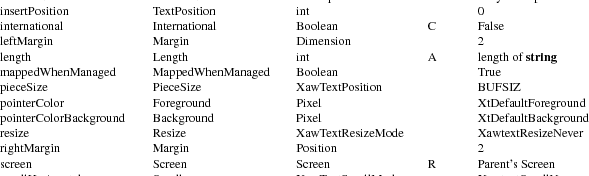
|
callback |
The callbacks registered on this resource will be called every time the text buffer changes, after the text has been updated. |
|
destroyCallback |
All functions on this list are called when this widget is destroyed. |
|
dataCompression |
The AsciiSrc uses an algorithm that may cause the text buffer to grow to about twice the size of the actual text over time, as the text is edited. On systems where CPU cycles are cheaper than memory, it is helpful to spend some extra time to compress this buffer back to its minimum size. If this resource is True, the AsciiSrc will compress its data to the minimum size required every time the text string is saved, or the value of the string is queried. |
|
editType |
This is the type of editing that will be allowed in this text widget. Legal values are XawtextRead, XawtextEdit, and XawtextAppend. A converter is registered for this resource that will convert the following strings: read, edit, and append. |
|
length |
If the useStringInPlace resource is False this attribute has no effect. If that resource is True, however, then the length resource specifies the length of the buffer passed to the text widget in the string resource. |
|
pieceSize |
This is the size of the internal chunks into which the text buffer is broken down for memory management. The larger this value the less segmented your memory will be, but the slower your editing will be. The text widgets will always allocate a chunk of memory this size to stuff the string into, so when using small strings, having this buffer large can waste memory. This resource has no effect if useStringInPlace is True. |
|
string |
If type is XawAsciiString then this string contains the buffer to be displayed in the widget. If type is XawAsciiFile then the string contains the name of the file to be displayed. This string is normally copied by the text widget into internal memory, but may be used in place by setting the useStringInPlace resource. As of X11R4 this is a settable resource. When the string resource is queried, using XtGetValues, and useStringInPlace is false, the value returned is valid until the next time the string resource is queried, or until the application writer calls XawAsciiSourceFreeString. If useStringInPlace is true, a pointer to the actual string is returned. See also section 5.6. |
|
type |
This resource may be either XawAsciiString or XawAsciiFile. The value of this resource determines whether the string resource contains the name of a file to be opened or a buffer to be displayed by the text widget. A converter has been registered for this resource and accepts the values string and file. |
useStringInPlace
|
Setting this resource to True will disable the memory management provided by the Text widget, updating the string resource in place. Using the string in place can be much more efficient for text widgets that display static data, or where the programmer wishes to impose strict constraints on the contents of the string. When using the string in place be sure that: the length of the string is specified by setting the length resource, the type of the Text widget is XawAsciiString, and that the string exists for the lifetime of the text widget, or until it has been reset. Note: Since the MultiSrc and AsciiSrc have different data formats, use of this resource forces application code to be cognisant as to which of the two is being used. Application programming is simplified when use of this resource is avoided. |
The AsciiSrc has a few convenience routines that allow the application programmer quicker or easier access to some of the commonly used functionality of the AsciiSrc.
When the
AsciiSrc widget is not in useStringInPlace mode space
must be allocated whenever the file is saved, or the string
is requested with a call to XtGetValues. This memory
is allocated on the fly, and remains valid until the next
time a string needs to be allocated. You may save memory by
freeing this string as soon as you are done with it by
calling XawAsciiSourceFreeString.
void XawAsciiSourceFreeString(w)
Widget w;
|
w |
Specifies the AsciiSrc object. |
This function will free the memory that contains the string pointer returned by XtGetValues. This will normally happen automatically when the next call to XtGetValues occurs, or when the widget is destroyed.
To save the
changes made in the current text source into a file use
XawAsciiSave.
Boolean XawAsciiSave(w)
Widget w;
|
w |
Specifies the AsciiSrc object. |
XawAsciiSave returns True if the save was successful. It will update the file named in the string resource. If the buffer has not been changed, no action will be taken. This function only works on an AsciiSrc of type XawAsciiFile.
To save the
contents of the current text buffer into a named file use
XawAsciiSaveAsFile.
Boolean XawAsciiSaveAsFile(w, name)
Widget w;
String name;
|
w |
Specifies the AsciiSrc object. |
|
|
name |
The name of the file to save the current buffer into. |
This function returns True if the save was successful. XawAsciiSaveAsFile will work with a buffer of either type XawAsciiString or type XawAsciiFile.
To find out
if the text buffer in an AsciiSrc object has changed since
the last time it was saved with XawAsciiSave or
queried use XawAsciiSourceChanged.
Boolean XawAsciiSourceChanged(w)
Widget w;
|
w |
Specifies the AsciiSrc object. |
This function will return True if the source has changed since the last time it was saved or queried. The internal change flag is reset whenever the string is queried via XtGetValues or the buffer is saved via XawAsciiSave.
Application Header file<X11/Xaw/AsciiSink.h>
|
Class Header file |
<X11/Xaw/AsciiSinkP.h> |
|
Class |
asciiSinkObjectClass |
|
Class Name |
AsciiSink |
|
Superclass |
TextSink |
The AsciiSink or MultiSink object is used by a text widget to render the text. Depending on its international resource, a AsciiText widget will create one or the other of these when the AsciiText itself is created. Both types are nearly identical; the following discussion applies to both, with MultiSink differences noted only as they occur. The AsciiSink will display all printing characters in an 8 bit font, along with handling Tab and Carriage Return. The name has been left as ‘‘AsciiSink’’ for compatibility. The MultiSink will display all printing characters in a font set, along with handling Tab and Carriage Return. The source object also reports the text window metrics to the text widgets.
When creating an AsciiSink object instance, the following resources are retrieved from the argument list or from the resource database:

|
background |
A pixel value which indexes the widget’s colormap to derive the background color of the widget’s window. This resource is retrieved by the AsciiSink instead of being copied from the Text widget. |
|
destroyCallback |
All functions on this list are called when this widget is destroyed. |
displayNonprinting
|
If this resource is True, the Text widget will display all non-printable characters as the string ^@. If False, the Text widget will just leave a blank space where a non-printable character exists in the text buffer. |
||
|
echo |
Whether or not to echo characters to the screen. The buffer can still be edited, but nothing is displayed. This mode can be useful for entering passwords and other sensitive information. |
|
|
font |
The text font to use when displaying the string. (This resource is present in the AsciiSink, but not the MultiSink.) |
|
|
fontSet |
The text font set to use when displaying the string. (This resource is present in the MultiSink, but not the AsciiSink.) |
The remainder of this chapter will describe customizing the Text widget. The Text widget may be customized by subclassing, or by creating new sources and sinks. Subclassing is described in detail in Chapter 7; this section will describe only those things that are specific to the Text widget. Attributes of the Text widget base class and creating new sources and sinks will be discussed.
The Text widget is made up of a number of different pieces, with the Text widget as the base widget class. It and the AsciiText widget are the only true "widgets" in the Text widget family. The other pieces (sources and sinks) are X Toolkit objects and have no window associated with them. No source or sink is useful unless assigned to a Text widget.
Each of the following pieces of the Text widget has a specific purpose, and will be, or has been, discussed in detail in this chapter:
|
Text |
This is the glue that binds everything else together. This widget reads the text data from the source, and displays the information in the sink. All translations and actions are handled in the Text widget itself. |
|
|
TextSink |
This object is responsible for displaying and clearing the drawing area. It also reports the configuration of the window that contains the drawing area. The TextSink does not have its own window; instead it does its drawing on the Text widget’s window. |
|
|
TextSrc |
This object is responsible for reading, editing and searching through the text buffer. |
|
|
AsciiSink |
This object is a subclass of the TextSink and knows how to display ASCII text. Support has been added to display any 8-bit character set, given the font. |
|
|
MultiSink |
This object is a subclass of the TextSink and knows how to display font sets. |
|
|
AsciiSrc |
This object is a subclass of the TextSrc and knows how to read strings and files. |
|
|
MultiSrc |
This object is a subclass of the TextSrc and knows how to read strings and multibyte files, converting them to wide characters based on locale. |
|
|
AsciiText |
This widget is a subclass of the Text widget. When created, the AsciiText automatically creates and attaches either an AsciiSrc and AsciiSink, or a MultiSrc and MultiSink, to itself. The AsciiText provides the simplest interface to the Athena Text widgets. |
Application Header file<X11/Xaw/Text.h>
|
Class Header file |
<X11/Xaw/TextP.h> |
|
Class |
textWidgetClass |
|
Class Name |
Text |
|
Superclass |
Simple |
The Text widget is the glue that binds all the other pieces together, it maintains the internal state of the displayed text, and acts as a mediator between the source and sink.
This section lists the resources that are actually part of the Text widget, and explains the functionality provided by each.
When creating a Text widget instance, the following resources are retrieved from the argument list or from the resource database:

|
accelerators |
A list of event to action bindings to be executed by this widget, even though the event occurred in another widget. (See the X Toolkit Intrinsics — C Language Interface for details). |
ancestorSensitive
|
The sensitivity state of the ancestors of this widget. A widget is insensitive if either it or any of its ancestors is insensitive. This resource should not be changed with XtSetValues, although it may be queried. |
||
|
autoFill |
If this resource is True the text widget will automatically break a line when the user attempts to type into the right margin. The attribute has no effect on files or text inserted into the text widget. It only checks to see if the action should be taken when a user enters a new character via the insert-character action. |
|
|
background |
A pixel value which indexes the widget’s colormap to derive the background color of the widget’s window. |
backgroundPixmap
|
The background pixmap of this widget’s window. If this resource is set to anything other than XtUnspecifiedPixmap, the pixmap specified will be used instead of the background color. |
|
|
borderColor |
A pixel value which indexes the widget’s colormap to derive the border color of the widget’s window. |
|
borderPixmap |
The border pixmap of this widget’s window. If this resource is set to anything other than XtUnspecifiedPixmap, the pixmap specified will be used instead of the border color. |
|
borderWidth |
The width of this widget’s window border. |
|
bottomMargin |
|
|
leftMargin |
|
|
rightMargin |
|
|
topMargin |
The amount of space, in pixels, between the edge of the window and the corresponding edge of the text within the window. If there is a scrollbar active on this edge, then this is the space between the text and the scrollbar. |
|
colormap |
The colormap that this widget will use. |
|
cursor |
The image that will be displayed as the pointer cursor whenever it is in this widget. The use of this resource is deprecated in favor of cursorName. |
|
cursorName |
The name of the symbol to use to represent the pointer cursor. This resource will override the cursor resource if both are specified. (See 2.4.1) |
|
depth |
The depth of this widget’s window. |
|
destroyCallback |
All functions on this list are called when this widget is destroyed. |
|
displayCaret |
Whether or not to display the text insert point. |
|
displayPosition |
The position in the text buffer of the character that is currently displayed in the upper left hand corner of the text display. |
|
height |
|
|
width |
The height and width of this widget in pixels. |
insensitiveBorder
|
This pixmap will be tiled into the widget’s border if the widget becomes insensitive. |
||
|
insertPosition |
This is the location of the insert point. It is expressed in characters from the beginning of the file. The cursor will always be forced to be on the screen. This resource may therefore be used to scroll the text display to a certain character position. |
mappedWhenManaged
|
If this resource is True, then the widget’s window will automatically be mapped by the Toolkit when it is realized and managed. |
||
|
pointerColor |
A pixel value which indexes the widget’s colormap to derive the foreground color of the pointer symbol specified by the cursorName resource. |
pointerColorBackground
|
A pixel value which indexes the widget’s colormap to derive the background color of the pointer symbol specified by the cursorName resource. |
||
|
resize |
Controls whether or not the Text widget attempts to resize itself when it is no longer able to display the full text buffer in the associated window. Any attempt by the Text widget to resize itself is always subject to the constraints imposed by its parent. The values XawtextResizeNever, XawtextResizeWidth, XawtextResizeHeight, and XawtextResizeBoth are all acceptable for this resource. A converter is registered for this resource that will convert the following strings: never, height, width, and both. |
|
|
screen |
The screen on which this widget is displayed. This is not a settable resource. |
scrollHorizontal
|
scrollVertical |
These resources control the placement of scrollbars on the left and bottom edge of the text widget. These resources accept the values XawtextScrollAlways, XawtextScrollWhenNeeded, and XawtextScrollNever. A converter is registered for this resource that will convert the following strings: always, never, and whenNeeded. If XawtextScrollWhenNeeded is specified, the appropriate scrollbar will only appear when there is text in the buffer that is not able to fit within the bounds of the current window. The scrollbar will disappear when the text once again fits within the window. |
|
|
selectTypes |
Specifies the selection type array that is used when multi-click is activated (see Text Selections for Application Programmers for details). This resource is used in place, and must not be freed until the widget is destroyed. There is no type converter registered for this resource, so it may not be set from the resource manager. |
|
|
sensitive |
Whether or not the toolkit should pass user events to this widget. The widget will not get input events if either ancestorSensitive or sensitive is False. |
|
|
textSink |
||
|
textSource |
These are the TextSink or TextSource objects used by this widget. When using the Text widget these MUST be set by the application programmer. |
|
|
translations |
The event bindings associated with this widget. |
|
|
wrap |
When the text in any one line is wider than the window there are several possible actions. This resource allows the user to decide what will happen. The accepted values for this resource are XawtextWrapNever, XawtextWrapLine, and XawtextWrapWord. With XawtextWrapLine all text that is beyond the right edge of the window will be displayed on the next line. With XawtextWrapWord the same action occurs but the text is broken at a word boundary if possible. If no wrapping is enabled then the text will extend off the edge of the window, and a small rectangle will be painted in the right margin to alert the user that this line is too long. A converter is registered for this resource that will convert the following strings: never, word, and line. |
unrealizeCallback
|
A list of callback functions which will be executed when the Text widget is unrealized. |
||
|
x |
||
|
y |
The location of the upper left outside corner of this widget in its parent. |
Application Header file<X11/Xaw/TextSrc.h>
|
Class Header file |
<X11/Xaw/TextSrcP.h> |
|
Class |
textSrcObjectClass |
|
Class Name |
TextSrc |
|
Superclass |
Object |
The TextSrc object is the root object for all text sources. Any new text source objects should be subclasses of the TextSrc Object. The TextSrc Class contains all methods the Text widget expects a text source to export.
Since all text sources will have some resources in common the TextSrc defines a few new resources.
When creating an TextSrc object instance, the following resources are retrieved from the argument list or from the resource database:

|
destroyCallback |
All functions on this list are called when this widget is destroyed. |
|
editType |
This is the type of editing that will be allowed in this text widget. Legal values are XawtextRead, XawtextEdit, and XawtextAppend. A converter is registered for this resource that will convert the following strings: read, edit, and append. |
The only purpose of the TextSrc Object is to be subclassed. It contains the minimum set of class methods that all text sources must have. All class methods of the TextSrc must be defined, as the Text widget uses them all. While all may be inherited, the direct descendant of TextSrc must specify some of them as TextSrc does not contain enough information to be a valid text source by itself. Do not try to use the TextSrc as a valid source for the Text widget; it is not intended to be used as a source by itself and bad things will probably happen.

To read the
text in a text source use the Read function:
XawTextPosition Read(w, pos,
text_return, length)
Widget w;
XawTextPosition pos;
XawTextBlock *text_return;
int length;
|
w |
Specifies the TextSrc object. |
|
|
pos |
Specifies the position of the first character to be read from the text buffer. |
|
|
text |
Returns the text read from the source. |
|
|
length |
Specifies the maximum number of characters the TextSrc should return to the application in text_return. |
This function returns the text position immediately after the characters read from the text buffer. The function is not required to read length characters if that many characters are in the file, it may break at any point that is convenient to the internal structure of the source. It may take several calls to Read before the desired portion of the text buffer is fully retrieved.
To replace
or edit the text in a text buffer use the Replace
function:
XawTextPosition Replace(w, start, end,
text)
Widget w;
XawTextPosition start, end;
XawTextBlock *text;
|
w |
Specifies the TextSrc object. |
|
|
start |
Specifies the position of the first character to be removed from the text buffer. This is also the location to begin inserting the new text. |
|
|
end |
Specifies the position immediately after the last character to be removed from the text buffer. |
|
|
text |
Specifies the text to be added to the text source. |
This function can return any of the following values:
|
XawEditDone |
The text replacement was successful. |
XawPositionError
|
The edit mode is XawtextAppend and start is not the last character of the source. |
|
|
XawEditError |
Either the Source was read-only or the range to be deleted is larger than the length of the Source. |
The Replace arguments start and end represent the text source character positions for the existing text that is to be replaced by the text in the text block. The characters from start up to but not including end are deleted, and the buffer specified by the text block is inserted in their place. If start and end are equal, no text is deleted and the new text is inserted after start.
To search
the text source for one of the predefined boundary types use
the Scan function:
XawTextPosition Scan(w, position, type,
dir, count, include)
Widget w;
XawTextPosition position;
XawTextScanType type;
XawTextScanDirection dir;
int count;
Boolean include;
|
w |
Specifies the TextSrc object. |
|
|
position |
Specifies the position to begin scanning the source. |
|
|
type |
Specifies the type of boundary to scan for, may be one of: XawstPosition, XawstWhiteSpace, XawstEOL, XawstParagraph, XawstAll. The exact meaning of these boundaries is left up to the individual text source. |
|
|
dir |
Specifies the direction to scan, may be either XawsdLeft to search backward, or XawsdRight to search forward. |
|
|
count |
Specifies the number of boundaries to scan for. |
|
|
include |
Specifies whether the boundary itself should be included in the scan. |
The Scan function returns the position in the text source of the desired boundary. It is expected to return a valid address for all calls made to it, thus if a particular request is made that would take the text widget beyond the end of the source it must return the position of that end.
To search
for a particular string use the Search function.
XawTextPosition Search(w, position,
dir, text)
Widget w;
XawTextPosition position;
XawTextScanDirection dir;
XawTextBlock *text;
|
w |
Specifies the TextSrc object. |
|
|
position |
Specifies the position to begin the search. |
|
|
dir |
Specifies the direction to search, may be either XawsdLeft to search backward, or XawsdRight to search forward. |
|
|
text |
Specifies a text block containing the text to search for. |
This function will search through the text buffer attempting to find a match for the string in the text block. If a match is found in the direction specified, then the character location of the first character in the string is returned. If no text was found then XawTextSearchError is returned.
While many
selection types are handled by the Text widget, text sources
may have selection types unknown to the Text widget. When a
selection conversion is requested by the X server the Text
widget will first call the ConvertSelection function,
to attempt the selection conversion.
Boolean ConvertSelections(w, selection,
target, type, value_return,
length_return, format_return)
Widget w;
Atom *selection, *target, *type;
caddr_t *value_return;
unsigned long *length_return;
int *format_return;
|
w |
Specifies the TextSrc object. |
|
|
selection |
Specifies the type of selection that was requested (e.g. PRIMARY). |
|
|
target |
Specifies the type of the selection that has been requested, which indicates the desired information about the selection (e.g. Filename, Text, Window). |
|
|
type |
Specifies a pointer to the atom into which the property type of the converted value of the selection is to be stored. For instance, either file name or text might have property type XA_STRING. |
value_return
|
Returns a pointer into which a pointer to the converted value of the selection is to be stored. The selection owner is responsible for allocating this storage. The memory is considered owned by the toolkit, and is freed by XtFree when the Intrinsics selection mechanism is done with it. |
length_return
|
Returns a pointer into which the number of elements in value is to be stored. The size of each element is determined by format. |
format_return
|
Returns a pointer into which the size in bits of the data elements of the selection value is to be stored. |
If this function returns True then the Text widget will assume that the source has taken care of converting the selection, Otherwise the Text widget will attempt to convert the selection itself.
If the
source needs to know when the text selection is modified it
should define a SetSelection procedure:
void SetSelection(w, start, end,
selection)
Widget w;
XawTextPosition start, end;
Atom selection;
|
w |
Specifies the TextSrc object. |
|
|
start |
Specifies the character position of the beginning of the new text selection. |
|
|
end |
Specifies the character position of the end of the new text selection. |
|
|
selection |
Specifies the type of selection that was requested (e.g. PRIMARY). |
Application Header file<X11/Xaw/TextSink.h>
|
Class Header file |
<X11/Xaw/TextSinkP.h> |
|
Class |
textSinkObjectClass |
|
Class Name |
TextSink |
|
Superclass |
Object |
The TextSink object is the root object for all text sinks. Any new text sink objects should be subclasses of the TextSink Object. The TextSink Class contains all methods that the Text widget expects a text sink to export.
Since all text sinks will have some resources in common, the TextSink defines a few new resources.
When creating an TextSink object instance, the following resources are retrieved from the argument list or from the resource database:

|
background |
A pixel value which indexes the widget’s colormap to derive the background color of the widget’s window. |
|
destroyCallback |
All functions on this list are called when this widget is destroyed. |
|
foreground |
A pixel value which indexes the Text widget’s colormap to derive the foreground color used by the text sink. |
The only purpose of the TextSink Object is to be subclassed. It contains the minimum set of class methods that all text sinks must have. While all may be inherited, the direct descendant of TextSink must specify some of them as TextSink does contain enough information to be a valid text sink by itself. Do not try to use the TextSink as a valid sink for the Text widget; it is not intended to be used as a sink by itself.

To display a
section of the text buffer contained in the text source use
the function DisplayText:
void DisplayText(w, x, y, pos1,
pos2, highlight)
Widget w;
Position x, y;
XawTextPosition pos1, pos2;
Boolean highlight;
|
w |
Specifies the TextSink object. |
|
|
x |
Specifies the x location to start drawing the text. |
|
|
y |
Specifies the y location to start drawing text. |
|
|
pos1 |
Specifies the location within the text source of the first character to be printed. |
|
|
pos2 |
Specifies the location within the text source of the last character to be printed. |
|
|
highlight |
Specifies whether or not to paint the text region highlighted. |
The Text widget will only pass one line at a time to the text sink, so this function does not need to know how to line feed the text. It is acceptable for this function to just ignore Carriage Returns. x and y denote the upper left hand corner of the first character to be displayed.
The function
that controls the display of the text cursor is
InsertCursor. This function will be called whenever
the text widget desires to change the state of, or move the
insert point.
void InsertCursor(w, x, y,
state)
Widget w;
Position x, y;
XawTextInsertState state;
|
w |
Specifies the TextSink object. |
|
|
x |
Specifies the x location of the cursor in Pixels. |
|
|
y |
Specifies the y location of the cursor in Pixels. |
|
|
state |
Specifies the state of the cursor, may be one of XawisOn or XawisOff. |
X and y denote the upper left hand corner of the insert point.
To clear a
portion of the Text window to its background color, the Text
widget will call ClearToBackground. The TextSink
object already defines this function as calling
XClearArea on the region passed. This behavior will
be used if you specify XtInheritClearToBackground for
this method.
void ClearToBackground(w, x, y,
width, height)
Widget w;
Position x, y;
Dimension width, height;
|
w |
Specifies the TextSink object. |
|
|
x |
Specifies the x location, in pixels, of the Region to clear. |
|
|
y |
Specifies the y location, in pixels, of the Region to clear. |
|
|
width |
Specifies the width, in pixels, of the Region to clear. |
|
|
height |
Specifies the height, in pixels, of the Region to clear. |
X and y denote the upper left hand corner of region to clear.
To find the
text character position that will be rendered at a given x
location the Text widget uses the function
FindPosition:
void FindPosition(w, fromPos, fromX,
width, stopAtWordBreak, pos_return,
width_return, height_return)
Widget w;
XawTextPosition fromPos;
int fromX, width;
Boolean stopAtWordBreak;
XawTextPosition *pos_return;
int *width_return, *height_return;
|
w |
Specifies the TextSink object. |
|
|
fromPos |
Specifies a reference position, usually the first character in this line. This character is always to the left of the desired character location. |
|
|
fromX |
Specifies the distance that the left edge of fromPos is from the left edge of the window. This is the reference x location for the reference position. |
|
|
width |
Specifies the distance, in pixels, from the reference position to the desired character position. |
stopAtWordBreak
|
Specifies whether or not the position that is returned should be forced to be on a word boundary. |
|
|
pos_return |
Returns the character position that corresponds to the location that has been specified, or the work break immediately to the left of the position if stopAtWordBreak is True. |
|
width_return |
Returns the actual distance between fromPos and pos_return. |
height_return
|
Returns the maximum height of the text between fromPos and pos_return. |
This function need make no attempt to deal with line feeds. The text widget will only call it one line at a time.
Another
means of finding a text position is provided by the
Resolve function:
void Resolve(w, fromPos, fromX,
width, pos_return)
Widget w;
XawTextPosition fromPos;
int fromX, width;
XawTextPosition *pos_return;
|
w |
Specifies the TextSink object. |
|
fromPos |
Specifies a reference position, usually the first character in this line. This character is always to the left of the desired character location. |
|
fromX |
Specifies the distance that the left edge of fromPos is from the left edge of the window. This is the reference x location for the reference position. |
|
width |
Specifies the distance, in pixels, from the reference position to the desired character position. |
|
pos_return |
Returns the character position that corresponds to the location that has been specified, or the word break immediately to the left if stopAtWordBreak is True. |
This function need make no attempt to deal with line feeds. The text widget will only call it one line at a time. This is a more convenient interface to the FindPosition function, and provides a subset of its functionality.
To find the
distance in pixels between two text positions on the same
line use the function FindDistance.
void FindDistance(w, fromPos, fromX,
toPos, width_return, pos_return,
height_return)
Widget w;
XawTextPosition fromPos, toPos;
int fromX;
XawTextPosition *pos_return;
int *width_return, *height_return;
|
w |
Specifies the TextSink object. |
|
|
fromPos |
Specifies the text buffer position, in characters, of the first position. |
|
|
fromX |
Specifies the distance that the left edge of fromPos is from the left edge of the window. This is the reference x location for the reference position. |
|
|
toPos |
Specifies the text buffer position, in characters, of the second position. |
|
|
resWidth |
Return the actual distance between fromPos and pos_return. |
|
|
resPos |
Returns the character position that corresponds to the actual character position used for toPos in the calculations. This may be different than toPos, for example if fromPos and toPos are on different lines in the file. |
height_return
|
Returns the maximum height of the text between fromPos and pos_return. |
This function need make no attempt to deal with line feeds. The Text widget will only call it one line at a time.
To find the
maximum number of lines that will fit into the current Text
widget, use the function MaxLines. The TextSink
already defines this function to compute the maximum number
of lines by using the height of font.
int MaxLines(w, height)
Widget w;
Dimension height;
|
w |
Specifies the TextSink object. |
|
|
height |
Specifies the height of the current drawing area. |
Returns the maximum number of lines that will fit in height.
To find the
height required for a given number of text lines, use the
function MaxHeight. The TextSink already defines this
function to compute the maximum height of the window by
using the height of font.
int MaxHeight(w, lines)
Widget w;
int lines;
|
w |
Specifies the TextSink object. |
|
|
height |
Specifies the height of the current drawing area. |
Returns the height that will be taken up by the number of lines passed.
To set the
tab stops for a text sink use the SetTabs function.
The TextSink already defines this function to set the tab x
location in pixels to be the number of characters times the
figure width of font.
void SetTabs(w, tab_count, tabs)
Widget w;
int tab_count, *tabs;
|
w |
Specifies the TextSink object. |
|
|
tab_count |
Specifies the number of tabs passed in tabs. |
|
|
tabs |
Specifies the position, in characters, of the tab stops. |
This function is responsible for the converting character positions passed to it into whatever internal positions the TextSink uses for tab placement.
To get the
size and location of the insert point use the
GetCursorBounds function.
void GetCursorBounds(w, rect_return)
Widget w;
XRectangle *rect_return;
|
w |
Specifies the TextSinkObject. |
rect_return
|
Returns the location and size of the insert point. |
Rect will be filled with the current size and location of the insert point.
Chapter 6
Composite and Constraint Widgets
These widgets may contain arbitrary widget children. They implement a policy for the size and location of their children.
|
Box |
This widget will pack its children as tightly as possible in non-overlapping rows. |
|
|
Dialog |
An implementation of a commonly used interaction semantic to prompt for auxiliary input from the user, such as a filename. |
|
|
Form |
A more sophisticated layout widget that allows the children to specify their positions relative to the other children, or to the edges of the Form. |
|
|
Paned |
Allows children to be tiled vertically or horizontally. Controls are also provided to allow the user to dynamically resize the individual panes. |
|
|
Porthole |
Allows viewing of a managed child which is as large as, or larger than its parent, typically under control of a Panner widget. |
|
|
Tree |
Provides geometry management of widgets arranged in a directed, acyclic graph. |
|
|
Viewport |
Consists of a frame, one or two scrollbars, and an inner window. The inner window can contain all the data that is to be displayed. This inner window will be clipped by the frame with the scrollbars controlling which section of the inner window is currently visible. |
The geometry management semantics provided by the X Toolkit give full control of the size and position of a widget to the parent of that widget. While the children are allowed to request a certain size or location, it is the parent who makes the final decision. Many of the composite widgets here will deny any geometry request from their children by default. If a child widget is not getting the expected size or location, it is most likely the parent disallowing a request, or implementing semantics slightly different than those expected by the application programmer.
If the application wishes to change the size or location of any widget it should make a call to XtSetValues. This will allow the widget to ask its parent for the new size or location. As noted above the parent is allowed to refuse this request, and the child must live with the result. If the application is unable to achieve the desired semantics, then perhaps it should use a different composite widget. Under no circumstances should an application programmer resort to XtMoveWidget or XtResizeWidget; these functions are exclusively for the use of Composite widget implementors.
For more information on geometry management consult the X Toolkit Intrinsics — C Language Interface.
Application Header file<X11/Xaw/Box.h>
|
Class Header file |
<X11/Xaw/BoxP.h> |
|
Class |
boxWidgetClass |
|
Class Name |
Box |
|
Superclass |
Composite |
The Box widget provides geometry management of arbitrary widgets in a box of a specified dimension. The children are rearranged when resizing events occur either on the Box or its children, or when children are managed or unmanaged. The Box widget always attempts to pack its children as tightly as possible within the geometry allowed by its parent.
Box widgets are commonly used to manage a related set of buttons and are often called ButtonBox widgets, but the children are not limited to buttons. The Box’s children are arranged on a background that has its own specified dimensions and color.
When creating a Box widget instance, the following resources are retrieved from the argument list or from the resource database:

|
accelerators |
A list of event to action bindings to be executed by this widget, even though the event occurred in another widget. (See the X Toolkit Intrinsics — C Language Interface for details). |
ancestorSensitive
|
The sensitivity state of the ancestors of this widget. A widget is insensitive if either it or any of its ancestors is insensitive. This resource should not be changed with XtSetValues, although it may be queried. |
||
|
background |
A pixel value which indexes the widget’s colormap to derive the background color of the widget’s window. |
backgroundPixmap
|
The background pixmap of this widget’s window. If this resource is set to anything other than XtUnspecifiedPixmap, the pixmap specified will be used instead of the background color. |
|
|
borderColor |
A pixel value which indexes the widget’s colormap to derive the border color of the widget’s window. |
|
borderPixmap |
The border pixmap of this widget’s window. If this resource is set to anything other than XtUnspecifiedPixmap, the pixmap specified will be used instead of the border color. |
|
borderWidth |
The width of this widget’s window border. |
|
children |
A list of all this composite widget’s current children. |
|
colormap |
The colormap that this widget will use. |
|
depth |
The depth of this widget’s window. |
|
destroyCallback |
All functions on this list are called when this widget is destroyed. |
|
height |
|
|
width |
The height and width of this widget in pixels. |
|
hSpace |
|
|
vSpace |
The amount of space, in pixels, to leave between the children. This resource specifies the amount of space left between the outermost children and the edge of the box. |
mappedWhenManaged
|
If this resource is True, then the widget’s window will automatically be mapped by the Toolkit when it is realized and managed. |
||
|
numChildren |
The number of children in this composite widget. |
|
|
orientation |
Specifies whether the preferred shape of the box (i.e. the result returned by the query_geometry class method) is tall and narrow XtorientVertical or short and wide XtorientHorizontal. When the Box is a child of a parent which enforces width constraints, it is usually better to specify XtorientVertical (the default). When the parent enforces height constraints, it is usually better to specify XtorientHorizontal. A converter is registered for this resource that will convert the following strings: horizontal and vertical. |
|
|
screen |
The screen on which this widget is displayed. This is not a settable resource. |
|
|
sensitive |
Whether or not the toolkit should pass user events to this widget. The widget will not get input events if either ancestorSensitive or sensitive is False. |
|
|
translations |
The event bindings associated with this widget. |
|
|
x |
||
|
y |
The location of the upper left outside corner of this widget in its parent. |
Each time a child is managed or unmanaged, the Box widget will attempt to reposition the remaining children to compact the box. Children are positioned in order left to right, top to bottom. The packing algorithm used depends on the orientation of the Box.
|
XtorientVertical |
When the next child does not fit on the current row, a new row is started. If a child is wider than the width of the box, the box will request a larger width from its parent and will begin the layout process from the beginning if a new width is granted.
|
XtorientHorizontal |
When the next child does not fit on the current row, the Box widens if possible (so as to keep children on a single row); otherwise a new row is started.
After positioning all children, the Box widget attempts to shrink its own size to the minimum dimensions required for the layout.
Application Header file<X11/Xaw/Dialog.h>
|
Class Header file |
<X11/Xaw/DialogP.h> |
|
Class |
dialogWidgetClass |
|
Class Name |
Dialog |
|
Superclass |
Form |
The Dialog widget implements a commonly used interaction semantic to prompt for auxiliary input from a user. For example, you can use a Dialog widget when an application requires a small piece of information, such as a filename, from the user. A Dialog widget, which is simply a special case of the Form widget, provides a convenient way to create a preconfigured form.
The typical Dialog widget contains three areas. The first line contains a description of the function of the Dialog widget, for example, the string Filename:. The second line contains an area into which the user types input. The third line can contain buttons that let the user confirm or cancel the Dialog input. Any of these areas may be omitted by the application.
When creating a Dialog widget instance, the following resources are retrieved from the argument list or the resource database:

|
accelerators |
A list of event to action bindings to be executed by this widget, even though the event occurred in another widget. (See the X Toolkit Intrinsics — C Language Interface for details). |
ancestorSensitive
|
The sensitivity state of the ancestors of this widget. A widget is insensitive if either it or any of its ancestors is insensitive. This resource should not be changed with XtSetValues, although it may be queried. |
||
|
background |
A pixel value which indexes the widget’s colormap to derive the background color of the widget’s window. |
backgroundPixmap
|
The background pixmap of this widget’s window. If this resource is set to anything other than XtUnspecifiedPixmap, the pixmap specified will be used instead of the background color. |
|
|
borderColor |
A pixel value which indexes the widget’s colormap to derive the border color of the widget’s window. |
|
borderPixmap |
The border pixmap of this widget’s window. If this resource is set to anything other than XtUnspecifiedPixmap, the pixmap specified will be used instead of the border color. |
|
borderWidth |
The width of this widget’s window border. |
|
children |
A list of all this composite widget’s current children. |
|
colormap |
The colormap that this widget will use. |
|
defaultDistance |
The default internal spacing for the children. This is the default value for the constraint resources horizDistance and vertDistance. |
|
depth |
The depth of this widget’s window. |
|
destroyCallback |
All functions on this list are called when this widget is destroyed. |
|
height |
|
|
width |
The height and width of this widget in pixels. |
|
icon |
A pixmap image to be displayed immediately to the left of the Dialog widget’s label. |
|
label |
A string to be displayed at the top of the Dialog widget. |
mappedWhenManaged
|
If this resource is True, then the widget’s window will automatically be mapped by the Toolkit when it is realized and managed. |
||
|
numChildren |
The number of children in this composite widget. |
|
|
screen |
The screen on which this widget is displayed. This is not a settable resource. |
|
|
sensitive |
Whether or not the toolkit should pass user events to this widget. The widget will not get input events if either ancestorSensitive or sensitive is False. |
|
|
translations |
The event bindings associated with this widget. |
|
|
value |
An initial value for the string field that the user will enter text into. By default, no text entry field is available to the user. Specifying an initial value for value activates the text entry field. If string input is desired, but no initial value is to be specified then set this resource to "" (empty string). |
|
|
x |
||
|
y |
The location of the upper left outside corner of this widget in its parent. |
Each child of the Dialog widget may request special layout resources be applied to it. These constraint resources allow the Dialog widget’s children to specify individual layout requirements.

|
bottom |
||
|
left |
||
|
right |
||
|
top |
What to do with this edge of the child when the parent is resized. This resource may be any edgeType. See Layout Semantics for details. |
|
|
fromHoriz |
||
|
fromVert |
Which widget this child should be placed underneath (or to the right of). If a value of NULL is specified then this widget will be positioned relative to the edge of the parent. |
|
|
horizDistance |
||
|
vertDistance |
The amount of space, in pixels, between this child and its left or upper neighbor. |
|
|
resizable |
If this resource is False then the parent widget will ignore all geometry request made by this child. The parent may still resize this child itself, however. |
The Dialog widget uses two different sets of layout semantics. One is used when initially laying out the children. The other is used when the Dialog is resized.
The first layout method uses the fromVert and fromHoriz resources to place the children of the Dialog. A single pass is made through the Dialog widget’s children in the order that they were created. Each child is then placed in the Dialog widget below or to the right of the widget specified by the fromVert and fromHoriz resources. The distance the new child is placed from its left or upper neighbor is determined by the horizDistance and vertDistance resources. This implies some things about how the order of creation affects the possible placement of the children. The Form widget registers a string to widget converter which does not postpone conversion and does not cache conversion results.
The second layout method is used when the Dialog is resized. It does not matter what causes this resize, and it is possible for a resize to happen before the widget becomes visible (due to constraints imposed by the parent of the Dialog). This layout method uses the bottom, top, left, and right resources. These resources are used to determine what will happen to each edge of the child when the Dialog is resized. If a value of XawChain<something> is specified, the the edge of the child will remain a fixed distance from the chain edge of the Dialog. For example if XawChainLeft is specified for the right resource of a child then the right edge of that child will remain a fixed distance from the left edge of the Dialog widget. If a value of XawRubber is specified, that edge will grow by the same percentage that the Dialog grew. For instance if the Dialog grows by 50% the left edge of the child (if specified as XawRubber will be 50% farther from the left edge of the Dialog). One must be very careful when specifying these resources, for when they are specified incorrectly children may overlap or completely occlude other children when the Dialog widget is resized.

If you wish to force the Dialog to never resize one or more of its children then set left and right to XawChainLeft and top and bottom to XawChainTop. This will cause the child to remain a fixed distance from the top and left edges of the Dialog, and to never resize.
The Dialog widget automatically sets the top and bottom resources for all Children that are subclasses of the Command widget, as well as the widget children that are used to contain the label, value, and icon. This policy allows the buttons at the bottom of the Dialog to interact correctly with the predefined children, and makes it possible for a client to simply create and manage a new Command button without having to specify its constraints.
The Dialog will also set fromLeft to the last button in the Dialog for each new button added to the Dialog widget.
The automatically added constraints cannot be overridden, as they are policy decisions of the Dialog widget. If a more flexible Dialog is desired, the application is free to use the Form widget to create its own Dialog policy.
The Dialog uses Label widgets to contain the label and icon. These widgets are named label and icon respectively. The Dialog value is contained in an AsciiText widget whose name is value. Using XtNameToWidget the application can change those resources associated with each of these widgets that are not available through the Dialog widget itself.
To return
the character string in the text field, use
XawDialogGetValueString.
String XawDialogGetValueString(w)
|
Widget w; |
|
w |
Specifies the Dialog widget. |
This function returns a copy of the value string of the Dialog widget. This string is allocated by the AsciiText widget and will remain valid and unchanged until another call to XawDialogGetValueString or an XtGetValues call on the value widget, when the string will be automatically freed, and a new string is returned. This string may be freed earlier by calling the function XawAsciiSourceFreeString.
To add a new
button to the Dialog widget use XawDialogAddButton.
void XawDialogAddButton(w, name, func,
client_data)
|
Widget w; |
||
|
String name; |
||
|
XtCallbackProc func; |
||
|
XtPointer client_data; |
|
w |
Specifies the Dialog widget. |
|
|
name |
Specifies the name of the new Command button to be added to the Dialog. |
|
|
func |
Specifies a callback function to be called when this button is activated. If NULL is specified then no callback is added. |
client_data
|
Specifies the client_data to be passed to the func. |
This function is merely a shorthand for the code sequence:
{
|
Widget button = XtCreateManagedWidget(name, commandWidgetClass, w, NULL, ZERO); |
||
|
XtAddCallback(button, XtNcallback, func, client_data); |
}
Application Header file<X11/Xaw/Form.h>
|
Class Header file |
<X11/Xaw/FormP.h> |
|
Class |
formWidgetClass |
|
Class Name |
Form |
|
Superclass |
Constraint |
The Form widget can contain an arbitrary number of children or subwidgets. The Form provides geometry management for its children, which allows individual control of the position of each child. Any combination of children can be added to a Form. The initial positions of the children may be computed relative to the positions of previously created children. When the Form is resized, it computes new positions and sizes for its children. This computation is based upon information provided when a child is added to the Form.
The default width of the Form is the minimum width needed to enclose the children after computing their initial layout, with a margin of defaultDistance at the right and bottom edges. If a width and height is assigned to the Form that is too small for the layout, the children will be clipped by the right and bottom edges of the Form.
When creating a Form widget instance, the following resources are retrieved from the argument list or from the resource database:

|
accelerators |
A list of event to action bindings to be executed by this widget, even though the event occurred in another widget. (See the X Toolkit Intrinsics — C Language Interface for details). |
ancestorSensitive
|
The sensitivity state of the ancestors of this widget. A widget is insensitive if either it or any of its ancestors is insensitive. This resource should not be changed with XtSetValues, although it may be queried. |
||
|
background |
A pixel value which indexes the widget’s colormap to derive the background color of the widget’s window. |
backgroundPixmap
|
The background pixmap of this widget’s window. If this resource is set to anything other than XtUnspecifiedPixmap, the pixmap specified will be used instead of the background color. |
|
|
borderColor |
A pixel value which indexes the widget’s colormap to derive the border color of the widget’s window. |
|
borderPixmap |
The border pixmap of this widget’s window. If this resource is set to anything other than XtUnspecifiedPixmap, the pixmap specified will be used instead of the border color. |
|
borderWidth |
The width of this widget’s window border. |
|
children |
A list of all this composite widget’s current children. |
|
colormap |
The colormap that this widget will use. |
|
defaultDistance |
The default internal spacing for the children. This is the default value for the constraint resources horizDistance and vertDistance. |
|
depth |
The depth of this widget’s window. |
|
destroyCallback |
All functions on this list are called when this widget is destroyed. |
|
height |
|
|
width |
The height and width of this widget in pixels. |
mappedWhenManaged
|
If this resource is True, then the widget’s window will automatically be mapped by the Toolkit when it is realized and managed. |
||
|
numChildren |
The number of children in this composite widget. |
|
|
screen |
The screen on which this widget is displayed. This is not a settable resource. |
|
|
sensitive |
Whether or not the toolkit should pass user events to this widget. The widget will not get input events if either ancestorSensitive or sensitive is False. |
|
|
translations |
The event bindings associated with this widget. |
|
|
x |
||
|
y |
The location of the upper left outside corner of this widget in its parent. |
Each child of the Form widget may request special layout resources be applied to it. These constraint resources allow the Form widget’s children to specify individual layout requirements.

|
bottom |
||
|
left |
||
|
right |
||
|
top |
What to do with this edge of the child when the parent is resized. This resource may be any edgeType. See Layout Semantics for details. |
|
|
fromHoriz |
||
|
fromVert |
Which widget this child should be placed underneath (or to the right of). If a value of NULL is specified then this widget will be positioned relative to the edge of the parent. |
|
|
horizDistance |
||
|
vertDistance |
The amount of space, in pixels, between this child and its left or upper neighbor. |
|
|
resizable |
If this resource is False then the parent widget will ignore all geometry request made by this child. The parent may still resize this child itself, however. |
The Form widget uses two different sets of layout semantics. One is used when initially laying out the children. The other is used when the Form is resized.
The first layout method uses the fromVert and fromHoriz resources to place the children of the Form. A single pass is made through the Form widget’s children in the order that they were created. Each child is then placed in the Form widget below or to the right of the widget specified by the fromVert and fromHoriz resources. The distance the new child is placed from its left or upper neighbor is determined by the horizDistance and vertDistance resources. This implies some things about how the order of creation affects the possible placement of the children. The Form widget registers a string to widget converter which does not postpone conversion and does not cache conversion results.
The second layout method is used when the Form is resized. It does not matter what causes this resize, and it is possible for a resize to happen before the widget becomes visible (due to constraints imposed by the parent of the Form). This layout method uses the bottom, top, left, and right resources. These resources are used to determine what will happen to each edge of the child when the Form is resized. If a value of XawChain<something> is specified, the the edge of the child will remain a fixed distance from the chain edge of the Form. For example if XawChainLeft is specified for the right resource of a child then the right edge of that child will remain a fixed distance from the left edge of the Form widget. If a value of XawRubber is specified, that edge will grow by the same percentage that the Form grew. For instance if the Form grows by 50% the left edge of the child (if specified as XawRubber will be 50% farther from the left edge of the Form). One must be very careful when specifying these resources, for when they are specified incorrectly children may overlap or completely occlude other children when the Form widget is resized.

If you wish to force the Form to never resize one or more of its children, then set left and right to XawChainLeft and top and bottom to XawChainTop. This will cause the child to remain a fixed distance from the top and left edges of the Form, and never to resize.
To force or
defer a re-layout of the Form, use XawFormDoLayout.
void XawFormDoLayout(w, do_layout)
Widget w;
Boolean do_layout;
|
w |
Specifies the Form widget. |
|
|
do_layout |
Specifies whether the layout of the Form widget is enabled (True) or disabled (False). |
When making several changes to the children of a Form widget after the Form has been realized, it is a good idea to disable relayout until after all changes have been made.
Application Header file<X11/Xaw/Paned.h>
|
Class Header file |
<X11/Xaw/PanedP.h> |
|
Class |
panedWidgetClass |
|
Class Name |
Paned |
|
Superclass |
Constraint |
The Paned widget manages children in a vertically or horizontally tiled fashion. The panes may be dynamically resized by the user by using the grips that appear near the right or bottom edge of the border between two panes.
The Paned widget may accept any widget class as a pane except Grip. Grip widgets have a special meaning for the Paned widget, and adding a Grip as its own pane will confuse the Paned widget.
The grips allow the panes to be resized by the user. The semantics of how these panes resize is somewhat complicated, and warrants further explanation here. When the mouse pointer is positioned on a grip and pressed, an arrow is displayed that indicates the pane that is to be to be resized. While keeping the mouse button down, the user can move the grip up and down (or left and right). This, in turn, changes the size of the pane. The size of the Paned widget will not change. Instead, it chooses another pane (or panes) to resize. For more details on which pane it chooses to resize, see Layout Semantics.
One pointer binding allows the border between two panes to be moved, without affecting any of the other panes. When this occurs the pointer will change to an arrow that points along the pane border.
The default bindings for the Paned widget’s grips are:

When creating a Paned widget instance, the following resources are retrieved from the argument list or the resource database:

|
accelerators |
A list of event to action bindings to be executed by this widget, even though the event occurred in another widget. (See the X Toolkit Intrinsics — C Language Interface for details). |
ancestorSensitive
|
The sensitivity state of the ancestors of this widget. A widget is insensitive if either it or any of its ancestors is insensitive. This resource should not be changed with XtSetValues, although it may be queried. |
||
|
background |
A pixel value which indexes the widget’s colormap to derive the background color of the widget’s window. |
backgroundPixmap
|
The background pixmap of this widget’s window. If this resource is set to anything other than XtUnspecifiedPixmap, the pixmap specified will be used instead of the background color. |
|
|
borderColor |
A pixel value which indexes the widget’s colormap to derive the border color of the widget’s window. |
|
borderPixmap |
The border pixmap of this widget’s window. If this resource is set to anything other than XtUnspecifiedPixmap, the pixmap specified will be used instead of the border color. |
|
borderWidth |
The width of this widget’s window border. |
|
children |
A list of all this composite widget’s current children. |
|
colormap |
The colormap that this widget will use. |
|
cursor |
The cursor to use when the mouse pointer is over the Paned widget, but not in any of its children (children may also inherit this cursor). It should be noted that the internal borders are actually part of the Paned widget, not the children. |
|
depth |
The depth of this widget’s window. |
|
destroyCallback |
All functions on this list are called when this widget is destroyed. |
|
gripCursor |
The cursor to use when the grips are not active. The default value is verticalGripCursor or horizontalGripCursor depending on the orientation of the Paned widget. |
|
gripIndent |
The amount of space left between the right (or bottom) edge of the Paned widget and all the grips. |
|
gripTranslation |
Translation table that will be applied to all grips. |
|
height |
|
|
width |
The height and width of this widget in pixels. |
horizontalBetweenCursor
|
verticalBetweenCursor |
The cursor to be used for the grip when changing the boundary between two panes. These resources allow the cursors to be different depending on the orientation of the Paned widget.
|
horizontalGripCursor |
|
|
verticalGripCursor |
The cursor to be used for the grips when they are not active. These resources allow the cursors to be different depending on the orientation of the Paned widget.
|
internalBorderColor |
A pixel value which indexes the widget’s colormap to derive the internal border color of the widget’s window. The class name of this resource allows Paned*BorderColor: blue to set the internal border color for the Paned widget. An optimization is invoked if internalBorderColor and background are the same, and the internal borders are not drawn. internalBorderWidth is still left between the panes, however.
|
internalBorderWidth |
The width of the internal borders. This is the amount of space left between the panes. The class name of this resource allows Paned*BorderWidth: 3 to set the internal border width for the Paned widget.
|
leftCursor |
||
|
rightCursor |
The cursor used to indicate which is the important pane to resize when the Paned widget is oriented horizontally. |
|
|
lowerCursor |
||
|
upperCursor |
The cursor used to indicate which is the important pane to resize when the Paned widget is oriented vertically. |
mappedWhenManaged
|
If this resource is True, then the widget’s window will automatically be mapped by the Toolkit when it is realized and managed. |
||
|
numChildren |
The number of children in this composite widget. This is not the same as the number of panes, since this also contains a grip for some of the panes, use XawPanedGetNumSub to retrieve the number of panes. |
|
|
orientation |
The orientation to stack the panes. This value can be either XtorientVertical or XtorientHorizontal. A converter is registered for this resource that will convert the following strings: vertical and horizontal. |
|
|
refigureMode |
This resource allows pane layout to be suspended. If this value is False, then no layout actions will be taken. This may improve efficiency when adding or removing more than one pane from the Paned widget. |
|
|
screen |
The screen on which this widget is displayed. This is not a settable resource. |
|
|
sensitive |
Whether or not the toolkit should pass user events to this widget. The widget will not get input events if either ancestorSensitive or sensitive is False. |
|
|
translations |
The event bindings associated with this widget. |
|
|
x |
||
|
y |
The location of the upper left outside corner of this widget in its parent. |
Each child of the Paned widget may request special layout resources be applied to it. These constraint resources allow the Paned widget’s children to specify individual layout requirements.

|
allowResize |
If this value is False the the Paned widget will disallow all geometry requests from this child. |
|
|
max |
||
|
min |
The absolute maximum or minimum size for this pane. These values will never be overridden by the Paned widget. This may cause some panes to be pushed off the bottom (or right) edge of the paned widget. |
preferredPaneSize
|
Normally the paned widget makes a QueryGeometry call on a child to determine the preferred size of the child’s pane. There are times when the application programmer or the user has a better idea of the preferred size of a pane. Setting this resource causes the value passed to be interpreted as the preferred size, in pixels, of this pane. |
resizeToPreferred
|
Determines whether or not to resize each pane to its preferred size when the Paned widget is resized. See Layout Semantics for details. |
||
|
showGrip |
If True then a grip will be shown for this pane. The grip associated with a pane is either below or to the right of the pane. No grip is ever shown for the last pane. |
|
|
skipAdjust |
This resource is used to determine which pane is forced to be resized. Setting this value to True makes this pane less likely to be forced to be resized. See Layout Semantics for details. |
In order to make effective use of the Paned widget it is helpful to know the rules it uses to determine which child will be resized in any given situation. There are three rules used to determine which child is resized. While these rules are always the same, the panes that are searched can change depending upon what caused the relayout.
Layout Rules
|
1 |
Do not let a pane grow larger than its max or smaller than its min. |
|
|
2 |
Do not adjust panes with skipAdjust set. |
|
|
3 |
Do not adjust panes away from their preferred size, although moving one closer to its preferred size is fine. |
When searching the children the Paned widget looks for panes that satisfy all the rules, and if unsuccessful then it eliminates rule 3 and then 2. Rule 1 is always enforced.
If the relayout is due to a resize or change in management then the panes are searched from bottom to top. If the relayout is due to grip movement then they are searched from the grip selected in the direction opposite the pane selected.
The pane above the grip is resized by invoking the GripAction with UpLeftPane specified. The panes below the grip are each checked against all rules, then rules 2 and 1 and finally against rule 1 only. No pane above the chosen pane will ever be resized.
The pane below the grip is resized by invoking the GripAction with LowRightPane specified. The panes above the grip are each checked in this case. No pane below the chosen pane will ever be resized.
Invoking GripAction with ThisBorderOnly specified just moves the border between the panes. No other panes are ever resized.
When the Pane widget is resized it must determine a new size for each pane. There are two methods of doing this. The Paned widget can either give each pane its preferred size and then resize the panes to fit, or it can use the current sizes and then resize the panes to fit. The resizeToPreferred resource allows the application to tell the Paned widget whether to query the child about its preferred size (subject to the the preferredPaneSize) or to use the current size when refiguring the pane locations after the pane has been resized.
There is one special case. All panes assume they should resize to their preferred size until the Paned widget becomes visible to the user.
The Paned widget always resizes its children to their preferred sizes when a new child is managed, or a geometry management request is honored. The Paned widget will first attempt to resize itself to contain its panes exactly. If this is not possible then it will hunt through the children, from bottom to top (right to left), for a pane to resize.
When a user resizes a pane with the grips, the Paned widget assumes that this new size is the preferred size of the pane.
The Paned widget has no action routines of its own, as all actions are handled through the grips. The grips are each assigned a default Translation table.
|
<Btn1Down>: |
GripAction(Start, UpLeftPane) |
|
|
<Btn2Down>: |
GripAction(Start, ThisBorderOnly) |
|
|
<Btn3Down>: |
GripAction(Start, LowRightPane) |
|
|
<Btn1Motion>: |
GripAction(Move, UpLeftPane) |
|
|
<Btn2Motion>: |
GripAction(Move, ThisBorderOnly) |
|
|
<Btn3Motion>: |
GripAction(Move, LowRightPane) |
|
|
Any<BtnUp>: |
GripAction(Commit) |
The Paned widget interprets the GripAction as taking two arguments. The first argument may be any of the following:
|
Start |
Sets up the Paned widget for resizing and changes the cursor of the grip. The second argument determines which pane will be resized, and can take on any of the three values shown above. |
|
|
Move |
The internal borders are drawn over the current pane locations to animate where the borders would actually be placed if you were to move this border as shown. The second argument must match the second argument that was passed to the Start action, that began this process. If these arguments are not passed, the behavior is undefined. |
|
|
Commit |
This argument causes the Paned widget to commit the changes selected by the previously started action. The cursor is changed back to the grip’s inactive cursor. No second argument is needed in this case. |
To enable or
disable a child’s request for pane resizing, use
XawPanedAllowResize:
void XawPanedAllowResize(w, allow_resize)
Widget w;
Boolean allow_resize;
|
w |
Specifies the child pane. |
allow_resize
|
Specifies whether or not resizing requests for this child will be granted by the Paned widget. |
If allow_resize is True, the Paned widget allows geometry requests from the child to change the pane’s height. If allow_resize is False, the Paned widget ignores geometry requests from the child to change the pane’s height. The default state is True before the Pane is realized and False after it is realized. This procedure is equivalent to changing the allowResize constraint resource for the child.
To change
the minimum and maximum height settings for a pane, use
XawPanedSetMinMax:
void XawPanedSetMinMax(w, min, max)
Widget w;
int min, max;
|
w |
Specifies the child pane. |
|
|
min |
Specifies the new minimum height of the child, expressed in pixels. |
|
|
max |
Specifies new maximum height of the child, expressed in pixels. |
This procedure is equivalent to setting the min and max constraint resources for the child.
To retrieve
the minimum and maximum height settings for a pane, use
XawPanedGetMinMax:
void XawPanedGetMinMax(w, min_return,
max_return)
Widget w;
int *min_return, *max_return;
|
w |
Specifies the child pane. |
|
min_return |
Returns the minimum height of the child, expressed in pixels. |
|
max_return |
Returns the maximum height of the child, expressed in pixels. |
This procedure is equivalent to getting the min and max resources for this child child.
To enable or
disable automatic recalculation of pane sizes and positions,
use XawPanedSetRefigureMode:
void XawPanedSetRefigureMode(w, mode)
Widget w;
Boolean mode;
|
w |
Specifies the Paned widget. |
|
|
mode |
Specifies whether the layout of the Paned widget is enabled (True) or disabled (False). |
When making several changes to the children of a Paned widget after the Paned has been realized, it is a good idea to disable relayout until after all changes have been made.
To retrieve
the number of panes in a paned widget use
XawPanedGetNumSub:
int XawPanedGetNumSub(w)
Widget w;
|
w |
Specifies the Paned widget. |
This function returns the number of panes in the Paned widget. This is not the same as the number of children, since the grips are also children of the Paned widget.
Application Header file<X11/Xaw/Porthole.h>
|
Class Header file |
<X11/Xaw/PortholeP.h> |
|
Class |
portholeWidgetClass |
|
Class Name |
Porthole |
|
Superclass |
Composite |
The Porthole widget provides geometry management of a list of arbitrary widgets, only one of which may be managed at any particular time. The managed child widget is reparented within the porthole and is moved around by the application (typically under the control of a Panner widget).
When creating a Porthole widget instance, the following resources are retrieved from the argument list or from the resource database:

|
accelerators |
A list of event to action bindings to be executed by this widget, even though the event occurred in another widget. (See the X Toolkit Intrinsics — C Language Interface for details). |
ancestorSensitive
|
The sensitivity state of the ancestors of this widget. A widget is insensitive if either it or any of its ancestors is insensitive. This resource should not be changed with XtSetValues, although it may be queried. |
||
|
background |
A pixel value which indexes the widget’s colormap to derive the background color of the widget’s window. |
backgroundPixmap
|
The background pixmap of this widget’s window. If this resource is set to anything other than XtUnspecifiedPixmap, the pixmap specified will be used instead of the background color. |
|
|
borderColor |
A pixel value which indexes the widget’s colormap to derive the border color of the widget’s window. |
|
borderPixmap |
The border pixmap of this widget’s window. If this resource is set to anything other than XtUnspecifiedPixmap, the pixmap specified will be used instead of the border color. |
|
borderWidth |
The width of this widget’s window border. |
|
children |
A list of all this composite widget’s current children. |
|
colormap |
The colormap that this widget will use. |
|
depth |
The depth of this widget’s window. |
|
destroyCallback |
All functions on this list are called when this widget is destroyed. |
|
height |
|
|
width |
The height and width of this widget in pixels. |
mappedWhenManaged
|
If this resource is True, then the widget’s window will automatically be mapped by the Toolkit when it is realized and managed. |
||
|
numChildren |
The number of children in this composite widget. |
|
|
reportCallback |
A list of functions to invoke whenever the managed child widget changes size or position. |
|
|
screen |
The screen on which this widget is displayed. This is not a settable resource. |
|
|
sensitive |
Whether or not the toolkit should pass user events to this widget. The widget will not get input events if either ancestorSensitive or sensitive is False. |
|
|
translations |
The event bindings associated with this widget. |
|
|
x |
||
|
y |
The location of the upper left outside corner of this widget in its parent. |
The Porthole widget allows its managed child to request any size that is as large or larger than the Porthole itself and any location so long as the child still obscures all of the Porthole. This widget typically is used with a Panner widget.
The
functions registered on the reportCallback list are
invoked whenever the managed child changes size or position:
void ReportProc(porthole, client_data,
report)
|
Widget porthole; |
||
|
XtPointer client_data; |
||
|
XtPointer report; /* (XawPannerReport *) */ |
|
porthole |
Specifies the Porthole widget. |
client_data
|
Specifies the client data. |
||
|
report |
Specifies a pointer to an XawPannerReport structure containing the location and size of the slider and the size of the canvas. |
Application Header file<X11/Xaw/Tree.h>
|
Class Header file |
<X11/Xaw/TreeP.h> |
|
Class |
treeWidgetClass |
|
Class Name |
Tree |
|
Superclass |
Constraint |
The Tree widget provides geometry management of arbitrary widgets arranged in a directed, acyclic graph (i.e., a tree). The hierarchy is constructed by attaching a constraint resource called treeParent to each widget indicating which other node in the tree should be treated as the widget’s superior. The structure of the tree is shown by laying out the nodes in the standard format for tree diagrams with lines drawn connecting each node with its children.
The Tree sizes itself according to the needs of its children and is not intended to be resized by its parent. Instead, it should be placed inside another composite widget (such as the Porthole or Viewport) that can be used to scroll around in the tree.
When creating a Tree widget instance, the following resources are retrieved from the argument list or from the resource database:

|
autoReconfigure |
Whether or not to layout the tree every time a node is added or removed. |
|
background |
A pixel value which indexes the widget’s colormap to derive the background color of the widget’s window. |
backgroundPixmap
|
The background pixmap of this widget’s window. If this resource is set to anything other than XtUnspecifiedPixmap, the pixmap specified will be used instead of the background color. |
|
|
borderColor |
A pixel value which indexes the widget’s colormap to derive the border color of the widget’s window. |
|
borderPixmap |
The border pixmap of this widget’s window. If this resource is set to anything other than XtUnspecifiedPixmap, the pixmap specified will be used instead of the border color. |
|
borderWidth |
The width of this widget’s window border. |
|
children |
A list of all this composite widget’s current children. |
|
colormap |
The colormap that this widget will use. |
|
depth |
The depth of this widget’s window. |
|
destroyCallback |
All functions on this list are called when this widget is destroyed. |
|
foreground |
A pixel value which indexes the widget’s colormap to derive the foreground color of the widget’s window. This color is also used to render all 1’s in a bitmap one plane deep. |
|
gravity |
Specifies the side of the widget from which the tree should grow. Valid values include WestGravity, NorthGravity, EastGravity, and SouthGravity. A converter is registered for this resource that will convert the following strings: the legal values. |
|
height |
|
|
width |
The height and width of this widget in pixels. |
|
hSpace |
|
|
vSpace |
The amount of space, in pixels, to leave between the children. This resource specifies the amount of space left between the outermost children and the edge of the box. |
|
lineWidth |
The width of the lines from nodes that do not have a treeGC constraint resource to their children. |
mappedWhenManaged
|
If this resource is True, then the widget’s window will automatically be mapped by the Toolkit when it is realized and managed. |
||
|
numChildren |
The number of children in this composite widget. |
|
|
screen |
The screen on which this widget is displayed. This is not a settable resource. |
|
|
sensitive |
Whether or not the toolkit should pass user events to this widget. The widget will not get input events if either ancestorSensitive or sensitive is False. |
|
|
translations |
The event bindings associated with this widget. |
|
|
x |
||
|
y |
The location of the upper left outside corner of this widget in its parent. |
Each child of the Tree widget must specify its superior node in the tree. In addition, it may specify a GC to use when drawing a line between it and its inferior nodes.

|
treeGC |
This specifies the GC to use when drawing lines between this widget and its inferiors in the tree. If this resource is not specified, the Tree’s foreground and lineWidth will be used. |
|
|
treeParent |
This specifies the superior node in the tree for this widget. The default is for the node to have no superior (and to therefore be at the top of the tree). |
Each time a child is managed or unmanaged, the Tree widget will attempt to reposition the remaining children to fix the shape of the tree if the autoReconfigure resource is set. Children at the top (most superior) of the tree are drawn at the side specified by the gravity resource.
After positioning all children, the Tree widget attempts to shrink its own size to the minimum dimensions required for the layout.
The most
efficient way to layout a tree is to set
autoReconfigure to False and then use the
XawTreeForceLayout routine to arrange the children.
void XawTreeForceLayout(w)
|
Widget w; |
|
w |
Specifies the Tree widget. |
Application Header file<X11/Xaw/Viewport.h>
|
Class Header file |
<X11/Xaw/ViewportP.h> |
|
Class |
viewportWidgetClass |
|
Class Name |
Viewport |
|
Superclass |
Form |
The Viewport widget consists of a frame window, one or two Scrollbars, and an inner window. The size of the frame window is determined by the viewing size of the data that is to be displayed and the dimensions to which the Viewport is created. The inner window is the full size of the data that is to be displayed and is clipped by the frame window. The Viewport widget controls the scrolling of the data directly. No application callbacks are required for scrolling.
When the geometry of the frame window is equal in size to the inner window, or when the data does not require scrolling, the Viewport widget automatically removes any scrollbars. The forceBars option causes the Viewport widget to display all scrollbars permanently.
When creating a Viewport widget instance, the following resources are retrieved from the argument list or the resource database:

|
accelerators |
A list of event to action bindings to be executed by this widget, even though the event occurred in another widget. (See the X Toolkit Intrinsics — C Language Interface for details). |
|
|
allowHoriz |
||
|
allowVert |
If these resources are False then the Viewport will never create a scrollbar in this direction. If it is True then the scrollbar will only appear when it is needed, unless forceBars is True. |
ancestorSensitive
|
The sensitivity state of the ancestors of this widget. A widget is insensitive if either it or any of its ancestors is insensitive. This resource should not be changed with XtSetValues, although it may be queried. |
||
|
background |
A pixel value which indexes the widget’s colormap to derive the background color of the widget’s window. |
backgroundPixmap
|
The background pixmap of this widget’s window. If this resource is set to anything other than XtUnspecifiedPixmap, the pixmap specified will be used instead of the background color. |
|
|
borderColor |
A pixel value which indexes the widget’s colormap to derive the border color of the widget’s window. |
|
borderPixmap |
The border pixmap of this widget’s window. If this resource is set to anything other than XtUnspecifiedPixmap, the pixmap specified will be used instead of the border color. |
|
borderWidth |
The width of this widget’s window border. |
|
children |
A list of all this composite widget’s current children. |
|
colormap |
The colormap that this widget will use. |
|
depth |
The depth of this widget’s window. |
|
destroyCallback |
All functions on this list are called when this widget is destroyed. |
|
forceBars |
When True the scrollbars that have been allowed will always be visible on the screen. If False the scrollbars will be visible only when the inner window is larger than the frame. |
|
height |
|
|
width |
The height and width of this widget in pixels. |
mappedWhenManaged
|
If this resource is True, then the widget’s window will automatically be mapped by the Toolkit when it is realized and managed. |
||
|
numChildren |
The number of children in this composite widget. |
|
|
reportCallback |
These callbacks will be executed whenever the Viewport adjusts the viewed area of the child. The call_data parameter is a pointer to an XawPannerReport structure. |
|
|
screen |
The screen on which this widget is displayed. This is not a settable resource. |
|
|
sensitive |
Whether or not the toolkit should pass user events to this widget. The widget will not get input events if either ancestorSensitive or sensitive is False. |
|
|
translations |
The event bindings associated with this widget. |
|
|
useBottom |
||
|
useRight |
By default the scrollbars appear on the left and top of the screen. These resources allow the vertical scrollbar to be placed on the right edge of the Viewport, and the horizontal scrollbar on the bottom edge of the Viewport. |
|
|
x |
||
|
y |
The location of the upper left outside corner of this widget in its parent. |
The Viewport widget manages a single child widget. When the size of the child is larger than the size of the Viewport, the user can interactively move the child within the Viewport by repositioning the scrollbars.
The default size of the Viewport before it is realized is the width and/or height of the child. After it is realized, the Viewport will allow its child to grow vertically or horizontally if allowVert or allowHoriz are set, respectively. If the corresponding vertical or horizontal scrollbar is not enabled, the Viewport will propagate the geometry request to its own parent and the child will be allowed to change size only if the Viewport’s parent allows it. Regardless of whether or not scrollbars are enabled in the corresponding direction, if the child requests a new size smaller than the Viewport size, the change will be allowed only if the parent of the Viewport allows the Viewport to shrink to the appropriate dimension.
The scrollbar children of the Viewport are named horizontal and vertical. By using these names the programmer can specify resources for the individual scrollbars. XtSetValues can be used to modify the resources dynamically once the widget ID has been obtained with XtNameToWidget.
Note
Although the Viewport is a Subclass of the Form, no resources for the Form may be supplied for any of the children of the Viewport. These constraints are managed internally and are not meant for public consumption.
Chapter 7
Creating New Widgets (Subclassing)
Written By: Ralph Swick
Although the task of creating a new widget may at first appear a little daunting, there is a basic simple pattern that all widgets follow. The Athena Widget library contains a special widget called the Template widget that is intended to assist the novice widget programmer in writing a custom widget.
Reasons for wishing to write a custom widget include:
|
• |
Providing a graphical interface not currently supported by any existing widget set. |
|
|
• |
Convenient access to resource management procedures to obtain fonts, colors, etc., even if user customization is not desired. |
|
|
• |
Convenient access to user input dispatch and translation management procedures. |
|
|
• |
Access to callback mechanism for building higher-level application libraries. |
|
|
• |
Customizing the interface or behavior of an existing widget to suit a special application need. |
|
|
• |
Desire to allow user customization of resources such as fonts, colors, etc., or to allow convenient re-binding of keys and buttons to internal functions. |
|
|
• |
Converting a non-Toolkit application to use the Toolkit. |
In each of these cases, the operation needed to create a new widget is to "subclass" an existing one. If the desired semantics of the new widget are similar to an existing one, then the implementation of the existing widget should be examined to see how much work would be required to create a subclass that will then be able to share the existing class methods. Much time will be saved in writing the new widget if an existing widget class Expose, Resize and/or GeometryManager method can be used by the subclass.
Note that some trivial uses of a ‘‘bare-bones’’ widget may be achieved by simply creating an instance of the Core widget. The class variable to use when creating a Core widget is widgetClass. The geometry of the Core widget is determined entirely by the parent widget.
It is very often the case than an application will have a special need for a certain set of functions and that many copies of these functions will be needed. For example, when converting an older application to use the Toolkit, it may be desirable to have a "Window Widget" class that might have the following semantics:
|
• |
Allocate 2 drawing colors in addition to a background color. |
|
|
• |
Allocate a text font. |
|
|
• |
Execute an application-supplied function to handle exposure events. |
|
|
• |
Execute an application-supplied function to handle user input events. |
It is obvious that a completely general-purpose WindowWidgetClass could be constructed that would export all class methods as callbacks lists, but such a widget would be very large and would have to choose some arbitrary number of resources such as colors to allocate. An application that used many instances of the general-purpose widget would therefore un-necessarily waste many resources.
In this section, an outline will be given of the procedure to follow to construct a special-purpose widget to address the items listed above. The reader should refer to the appropriate sections of the X Toolkit Intrinsics — C Language Interface for complete details of the material outlined here. Section 1.4 of the Intrinsics should be read in conjunction with this section.
All Athena widgets have three separate files associated with them:
|
• |
A "public" header file containing declarations needed by applications programmers |
|
|
• |
A "private" header file containing additional declarations needed by the widget and any subclasses |
|
|
• |
A source code file containing the implementation of the widget |
This separation of functions into three files is suggested for all widgets, but nothing in the Toolkit actually requires this format. In particular, a private widget created for a single application may easily combine the "public" and "private" header files into a single file, or merge the contents into another application header file. Similarly, the widget implementation can be merged into other application code.
In the following example, the public header file <X11/Xaw/Template.h>, the private header file <X11/Xaw/TemplateP.h> and the source code file <X11/Xaw/Template.c> will be modified to produce the "WindowWidget" described above. In each case, the files have been designed so that a global string replacement of ‘‘Template’’ and ‘‘template’’ with the name of your new widget, using the appropriate case, can be done.
The public header file contains declarations that will be required by any application module that needs to refer to the widget; whether to create an instance of the class, to perform an XtSetValues operation, or to call a public routine implemented by the widget class.
The contents of the Template public header file, <X11/Xaw/Template.h>, are:
/*
Copyright 1987, 1998 The Open Group
Permission
to use, copy, modify, distribute, and sell this software and
its
documentation for any purpose is hereby granted without fee,
provided that
the above copyright notice appear in all copies and that
both that
copyright notice and this permission notice appear in
supporting
documentation.
The
above copyright notice and this permission notice shall be
included in
all copies or substantial portions of the
Software.
THE
SOFTWARE IS PROVIDED "AS IS", WITHOUT WARRANTY OF
ANY KIND, EXPRESS OR
IMPLIED, INCLUDING BUT NOT LIMITED TO THE WARRANTIES OF
MERCHANTABILITY,
FITNESS FOR A PARTICULAR PURPOSE AND NONINFRINGEMENT. IN NO
EVENT SHALL THE
OPEN GROUP BE LIABLE FOR ANY CLAIM, DAMAGES OR OTHER
LIABILITY, WHETHER IN
AN ACTION OF CONTRACT, TORT OR OTHERWISE, ARISING FROM, OUT
OF OR IN
CONNECTION WITH THE SOFTWARE OR THE USE OR OTHER DEALINGS IN
THE SOFTWARE.
Except
as contained in this notice, the name of The Open Group
shall not be
used in advertising or otherwise to promote the sale, use or
other dealings
in this Software without prior written authorization from
The Open Group.
*/
/* $XFree86: xc/doc/specs/Xaw/Template,v 1.3 2006/01/09
14:56:30 dawes Exp $ */
#ifndef
_Template_h
#define _Template_h
#include <X11/Intrinsic.h>
/****************************************************************
*
* Template widget
*
****************************************************************/
/* Resources:
|
Class |
RepTypeDefault Value |
|||||
|
----- |
-------------------- |
|||||
|
Background |
PixelXtDefaultBackground |
|||||
|
BorderColorPixelXtDefaultForeground
|
||||||
|
BorderWidth |
Dimension1 |
|||||
|
PointerNULL |
||||||
|
HeightDimension0 |
mappedWhenManaged MappedWhenManagedBooleanTrue
|
Sensitive |
BooleanTrue |
|||||
|
Width |
Dimension0 |
|||||
|
PositionPosition0 |
||||||
|
PositionPosition0 |
*/
/*
define any special resource names here that are not in
<X11/StringDefs.h> */
#define XtNtemplateResource
"templateResource"
#define XtCTemplateResource "TemplateResource"
/*
declare specific TemplateWidget class and instance datatypes
*/
typedef struct _TemplateClassRec *TemplateWidgetClass;
typedef struct _TemplateRec
*TemplateWidget;
/*
declare the class constant */
extern WidgetClass templateWidgetClass;
#endif /* _Template_h */
You will notice that most of this file is documentation. The crucial parts are the last 8 lines where macros for any private resource names and classes are defined and where the widget class datatypes and class record pointer are declared.
For the "WindowWidget", we want 2 drawing colors, a callback list for user input and an exposeCallback callback list, and we will declare three convenience procedures, so we need to add
/* Resources:
|
... |
Callback |
Callback |
NULL |
|||
|
Color |
PixelXtDefaultForeground |
|||||
|
Color |
PixelXtDefaultForeground |
|||||
|
Callback |
CallbackNULL |
|||||
|
Font |
XFontStruct*XtDefaultFont |
|||||
|
... |
*/
#define
XtNdrawingColor1 "drawingColor1"
#define XtNdrawingColor2 "drawingColor2"
#define XtNexposeCallback
"exposeCallback"
extern
Pixel WindowColor1(/* Widget */);
extern Pixel WindowColor2(/* Widget */);
extern Font WindowFont(/* Widget
*/);
Note that we have chosen to call the input callback list by the generic name, callback, rather than a specific name. If widgets that define a single user-input action all choose the same resource name then there is greater possibility for an application to switch between widgets of different types.
The private header file contains the complete declaration of the class and instance structures for the widget and any additional private data that will be required by anticipated subclasses of the widget. Information in the private header file is normally hidden from the application and is designed to be accessed only through other public procedures; e.g. XtSetValues.
The contents of the Template private header file, <X11/Xaw/TemplateP.h>, are:
/*
Copyright 1987, 1998 The Open Group
Permission
to use, copy, modify, distribute, and sell this software and
its
documentation for any purpose is hereby granted without fee,
provided that
the above copyright notice appear in all copies and that
both that
copyright notice and this permission notice appear in
supporting
documentation.
The
above copyright notice and this permission notice shall be
included in
all copies or substantial portions of the
Software.
THE
SOFTWARE IS PROVIDED "AS IS", WITHOUT WARRANTY OF
ANY KIND, EXPRESS OR
IMPLIED, INCLUDING BUT NOT LIMITED TO THE WARRANTIES OF
MERCHANTABILITY,
FITNESS FOR A PARTICULAR PURPOSE AND NONINFRINGEMENT. IN NO
EVENT SHALL THE
OPEN GROUP BE LIABLE FOR ANY CLAIM, DAMAGES OR OTHER
LIABILITY, WHETHER IN
AN ACTION OF CONTRACT, TORT OR OTHERWISE, ARISING FROM, OUT
OF OR IN
CONNECTION WITH THE SOFTWARE OR THE USE OR OTHER DEALINGS IN
THE SOFTWARE.
Except
as contained in this notice, the name of The Open Group
shall not be
used in advertising or otherwise to promote the sale, use or
other dealings
in this Software without prior written authorization from
The Open Group.
*/
/* $XFree86: xc/doc/specs/Xaw/Template,v 1.3 2006/01/09
14:56:30 dawes Exp $ */
#ifndef
_TemplateP_h
#define _TemplateP_h
#include <X11/Xaw/Template.h>
/*
include superclass private header file */
#include <X11/CoreP.h>
/*
define unique representation types not found in
<X11/StringDefs.h> */
#define XtRTemplateResource
"TemplateResource"
typedef
struct {
XtPointer extension;
} TemplateClassPart;
typedef struct _TemplateClassRec {
|
core_class; |
||||
|
template_class; |
} TemplateClassRec;
extern TemplateClassRec templateClassRec;
typedef
struct {
/* resources */
char* resource;
/* private */
char *private;
} TemplatePart;
typedef struct _TemplateRec {
|
core; |
#if defined(__cplusplus) || defined(c_plusplus)
|
c_template; |
#else
|
template; |
#endif
} TemplateRec;
#endif /* _TemplateP_h */
The private header file includes the private header file of its superclass, thereby exposing the entire internal structure of the widget. It may not always be advantageous to do this; your own project development style will dictate the appropriate level of detail to expose in each module.
The "WindowWidget" needs to declare two fields in its instance structure to hold the drawing colors, a resource field for the font and a field for the expose and user input callback lists:
typedef struct {
|
/* resources */ |
||
|
Pixel color_1; |
||
|
Pixel color_2; |
||
|
XFontStruct* font; |
||
|
XtCallbackList expose_callback; |
||
|
XtCallbackList input_callback; |
||
|
/* private state */ |
||
|
/* (none) */ |
} WindowPart;
The source code file implements the widget class itself. The unique part of this file is the declaration and initialization of the widget class record structure and the declaration of all resources and action routines added by the widget class.
The contents of the Template implementation file, <X11/Xaw/Template.c>, are:
/*
Copyright 1987, 1998 The Open Group
Permission
to use, copy, modify, distribute, and sell this software and
its
documentation for any purpose is hereby granted without fee,
provided that
the above copyright notice appear in all copies and that
both that
copyright notice and this permission notice appear in
supporting
documentation.
The
above copyright notice and this permission notice shall be
included in
all copies or substantial portions of the
Software.
THE
SOFTWARE IS PROVIDED "AS IS", WITHOUT WARRANTY OF
ANY KIND, EXPRESS OR
IMPLIED, INCLUDING BUT NOT LIMITED TO THE WARRANTIES OF
MERCHANTABILITY,
FITNESS FOR A PARTICULAR PURPOSE AND NONINFRINGEMENT. IN NO
EVENT SHALL THE
OPEN GROUP BE LIABLE FOR ANY CLAIM, DAMAGES OR OTHER
LIABILITY, WHETHER IN
AN ACTION OF CONTRACT, TORT OR OTHERWISE, ARISING FROM, OUT
OF OR IN
CONNECTION WITH THE SOFTWARE OR THE USE OR OTHER DEALINGS IN
THE SOFTWARE.
Except
as contained in this notice, the name of The Open Group
shall not be
used in advertising or otherwise to promote the sale, use or
other dealings
in this Software without prior written authorization from
The Open Group.
*/
/* $XFree86: xc/doc/specs/Xaw/Template,v 1.3 2006/01/09
14:56:30 dawes Exp $ */
#include
<X11/IntrinsicP.h>
#include <X11/StringDefs.h>
#include <X11/Xaw/TemplateP.h>
/*
* Class Methods
*/
static void TemplateInitialize(Widget, Widget, ArgList,
Cardinal*);
/*
* Prototypes
*/
static Bool TemplateFunction(TemplateWidget, int, int,
Bool);
/*
* Actions
*/
static void TemplateAction(Widget, XEvent*, String*,
Cardinal*);
/*
* Initialization
*/
#define offset(field) XtOffsetOf(TemplateRec,
template.field)
static XtResource resources[] = {
/*{
name,
class,
type,
size,
offset,
default_type,
default_addr
},*/
{
XtNtemplateResource,
XtCTemplateResource,
XtRTemplateResource,
sizeof(char*),
offset(resource),
XtRString,
(XtPointer)"default"
},
};
#undef offset
static
XtActionsRec actions[] =
{
|
procedure},*/ |
|||||
|
TemplateAction}, |
};
static char translations[] =
|
"<Key>:" |
"template()0 |
;
|
#define Superclass |
(&widgetClassRec) |
TemplateClassRec
templateClassRec = {
/* core */
{
|
/* superclass */ |
||||||
|
/* class_name */ |
||||||
|
/* widget_size */ |
||||||
|
/* class_initialize */ |
||||||
|
/* class_part_initialize */
|
||||||
|
/* class_inited */ |
||||||
|
/* initialize */ |
||||||
|
/* initialize_hook */ |
||||||
|
/* realize */ |
||||||
|
/* actions */ |
||||||
|
/* num_actions */ |
||||||
|
/* resources */ |
||||||
|
/* num_resources */ |
||||||
|
/* xrm_class */ |
||||||
|
/* compress_motion */ |
||||||
|
/* compress_exposure */ |
||||||
|
/* compress_enterleave */
|
||||||
|
/* visible_interest */ |
||||||
|
/* destroy */ |
||||||
|
/* resize */ |
||||||
|
/* expose */ |
||||||
|
/* set_values */ |
||||||
|
/* set_values_hook */ |
||||||
|
/* set_values_almost */ |
||||||
|
/* get_values_hook */ |
||||||
|
/* accept_focus */ |
||||||
|
/* version */ |
||||||
|
/* callback_private */ |
||||||
|
/* tm_table */ |
||||||
|
/* query_geometry */ |
||||||
|
/* display_accelerator */
|
||||||
|
/* extension */ |
},
/* template */
{
|
/* extension */ |
}
};
WidgetClass templateWidgetClass = (WidgetClass)&templateClassRec;
The resource list for the "WindowWidget" might look like the following:
static
XtResource resources[] = {
#define offset(field) XtOffsetOf(WindowWidgetRec,
window.field)
|
/* {name, class, type, size, offset, default_type, default_addr}, */ |
|||
|
{ XtNdrawingColor1, XtCColor, XtRPixel, sizeof(Pixel), |
|||
|
offset(color_1), XtRString, XtDefaultForeground }, |
|||
|
{ XtNdrawingColor2, XtCColor, XtRPixel, sizeof(Pixel), |
|||
|
offset(color_2), XtRString, XtDefaultForeground }, |
|||
|
{ XtNfont, XtCFont, XtRFontStruct, sizeof(XFontStruct*), |
|||
|
offset(font), XtRString, XtDefaultFont }, |
|||
|
{ XtNexposeCallback, XtCCallback, XtRCallback, sizeof(XtCallbackList), |
|||
|
offset(expose_callback), XtRCallback, NULL }, |
|||
|
{ XtNcallback, XtCCallback, XtRCallback, sizeof(XtCallbackList), |
|||
|
offset(input_callback), XtRCallback, NULL }, |
#undef offset
};
The user input callback will be implemented by an action procedure which passes the event pointer as call_data. The action procedure is declared as:
/*
ARGSUSED */
static void InputAction(w, event, params,
num_params)
|
Widget w; |
|||||
|
XEvent *event; |
|||||
|
String *params; |
/* unused */ |
||||
|
Cardinal *num_params; |
/* unused */ |
{
|
XtCallCallbacks(w, XtNcallback, (XtPointer)event); |
}
static
XtActionsRec actions[] =
{
|
/* {name, |
procedure}, */ |
||
|
{"input", |
InputAction}, |
};
and the default input binding will be to execute the input callbacks on KeyPress and ButtonPress:
static char translations[] =
|
" |
|||
|
<Key>: |
input() \n\ |
||
|
<BtnDown>: |
input() \ |
";
In the class record declaration and initialization, the only field that is different from the Template is the expose procedure:
/*
ARGSUSED */
static void Redisplay(w, event, region)
|
Widget w; |
||||
|
XEvent *event; |
/* unused */ |
|||
|
Region region; |
{
|
XtCallCallbacks(w, XtNexposeCallback, (XtPointer)region); |
}
WindowClassRec windowClassRec = {
|
... |
||||
|
/* expose |
*/ |
Redisplay, |
The "WindowWidget" will also declare three public procedures to return the drawing colors and the font id, saving the application the effort of constructing an argument list for a call to XtGetValues:
Pixel WindowColor1(w)
|
Widget w; |
{
|
return ((WindowWidget)w)->window.color_1; |
}
Pixel WindowColor2(w)
|
Widget w; |
{
|
return ((WindowWidget)w)->window.color_2; |
}
Font WindowFont(w)
|
Widget w; |
{
|
return ((WindowWidget)w)->window.font->fid; |
}
The "WindowWidget" is now complete. The application can retrieve the two drawing colors from the widget instance by calling either XtGetValues, or the WindowColor functions. The actual window created for the "WindowWidget" is available by calling the XtWindow function.
Table of Contents
|
Acknowledgments |
. . . . . . . . . . . . . . . . . .
. .
v
|
Chapter 1 − Athena Widgets and The Intrinsics |
. . . . .
1
|
Introduction to the X Toolkit |
. . . . . . . . . . .
1
|
Terminology |
. . . . . . . . . . . . . . . . . .
. .
1
|
Underlying Model |
. . . . . . . . . . . . . . . . .
1
|
Input Focus |
. . . . . . . . . . . . . . . . . .
. .
1
|
Chapter 2 − Using Widgets |
. . . . . . . . . . . . . . .
2
|
Setting the Locale |
. . . . . . . . . . . . . . . .
2
|
Initializing the Toolkit |
. . . . . . . . . . . . .
2
|
Creating a Widget |
. . . . . . . . . . . . . . . . .
2
|
Common Resources |
. . . . . . . . . . . . . . . . .
2
|
Resource Conversions |
. . . . . . . . . . . . . . .
2
|
Realizing a Widget |
. . . . . . . . . . . . . . . .
2
|
Processing Events |
. . . . . . . . . . . . . . . . .
2
|
Standard Widget Manipulation Functions |
. . . . . .
2
|
Using the Client Callback Interface |
. . . . . . . .
2
|
Programming Considerations |
. . . . . . . . . . . .
2
|
Example Programs |
. . . . . . . . . . . . . . . . .
2
|
Chapter 3 - Simple Widgets |
. . . . . . . . . . . . . . .
3
|
Command Widget |
. . . . . . . . . . . . . . . . . .
3
|
Grip Widget |
. . . . . . . . . . . . . . . . . .
. .
3
|
Label Widget |
. . . . . . . . . . . . . . . . . .
.
3
|
List Widget |
. . . . . . . . . . . . . . . . . .
. .
3
|
Panner Widget |
. . . . . . . . . . . . . . . . . .
.
3
|
Repeater Widget |
. . . . . . . . . . . . . . . . . .
3
|
Scrollbar Widget |
. . . . . . . . . . . . . . . . .
3
|
Simple Widget |
. . . . . . . . . . . . . . . . . .
.
3
|
StripChart Widget |
. . . . . . . . . . . . . . . . .
3
|
Toggle Widget |
. . . . . . . . . . . . . . . . . .
.
3
|
Chapter 4 - Menus |
. . . . . . . . . . . . . . . . . .
.
4
|
Using the Menus |
. . . . . . . . . . . . . . . . . .
4
|
SimpleMenu Widget |
. . . . . . . . . . . . . . . . .
4
|
SmeBSB Object |
. . . . . . . . . . . . . . . . . .
.
4
|
SmeLine Object |
. . . . . . . . . . . . . . . . . .
4
|
Sme Object |
. . . . . . . . . . . . . . . . . .
. .
4
|
MenuButton Widget |
. . . . . . . . . . . . . . . . .
4
|
Chapter 5 - Text Widgets. |
. . . . . . . . . . . . . . .
5
|
Text Widget for Users |
. . . . . . . . . . . . . . .
5
|
Actions Supported by all Text Widgets |
. . . . . . .
5
|
Default Translation Bindings |
. . . . . . . . . . .
5
|
Text Functions |
. . . . . . . . . . . . . . . . . .
5
|
AsciiText Widget |
. . . . . . . . . . . . . . . . .
5
|
AsciiSrc Object |
. . . . . . . . . . . . . . . . . .
5
|
AsciiSink Object |
. . . . . . . . . . . . . . . . .
5
|
Customizing the Text Widget |
. . . . . . . . . . . .
5
|
Text Widget |
. . . . . . . . . . . . . . . . . .
. .
5
|
TextSrc Object |
. . . . . . . . . . . . . . . . . .
5
|
TextSink Object |
. . . . . . . . . . . . . . . . . .
5
|
Chapter 6 - Composite and Constraint Widgets |
. . . . . .
6
|
Box Widget |
. . . . . . . . . . . . . . . . . .
. .
6
|
Dialog Widget |
. . . . . . . . . . . . . . . . . .
.
6
|
Form Widget |
. . . . . . . . . . . . . . . . . .
. .
6
|
Paned Widget |
. . . . . . . . . . . . . . . . . .
.
6
|
Porthole Widget |
. . . . . . . . . . . . . . . . . .
6
|
Tree Widget |
. . . . . . . . . . . . . . . . . .
. .
6
|
Viewport Widget |
. . . . . . . . . . . . . . . . . .
6
|
Chapter 7 - Creating New Widgets (Subclassing) |
. . . . .
7
|
Index |
. . . . . . . . . . . . . . . . . .
. . . . . . .
8