|

XtUnspecifiedPixmap is a symbolic constant
guaranteed to be unequal to any valid Pixmap id,
None, and ParentRelative.
1.4.2. Composite Widgets
The Composite widget class is a subclass of the
Core widget class (see Chapter 3). Composite widgets are
intended to be containers for other widgets. The additional
data used by composite widgets are defined by the
CompositeClassPart and CompositePart
structures.
1.4.2.1. CompositeClassPart Structure
In addition to the Core class fields, widgets of
the Composite class have the following class
fields.
__ │
typedef struct {
|
XtGeometryHandler geometry_manager;See Chapter
6
|
|
|
XtWidgetProc change_managed;
|
See Chapter 3
|
|
XtWidgetProc insert_child;
|
See Chapter 3
|
|
XtWidgetProc delete_child;
|
See Chapter 3
|
|
XtPointer extension;
|
See Section 1.6
|
} CompositeClassPart;
│__
The extension record defined for
CompositeClassPart with record_type equal to
NULLQUARK is
CompositeClassExtensionRec.
__ │
typedef struct {
|
XtPointer next_extension;
|
See Section 1.6.12
|
|
XrmQuark record_type;
|
See Section 1.6.12
|
|
long version;
|
See Section 1.6.12
|
|
Cardinal record_size;
|
See Section 1.6.12
|
|
Boolean accepts_objects;
|
See Section 2.5.2
|
|
Boolean allows_change_managed_set;See Section
3.4.3
|
|
} CompositeClassExtensionRec,
*CompositeClassExtension;
│__
Composite classes have the Composite class fields
immediately following the Core class fields.
__ │
typedef struct {
|
CoreClassPart core_class;
|
|
|
CompositeClassPart composite_class;
|
|
} CompositeClassRec,
*CompositeWidgetClass;
│__
The single occurrences of the class record and
pointer for creating instances of Composite are
In IntrinsicP.h:
__ │
extern CompositeClassRec compositeClassRec;
│__
In Intrinsic.h:
__ │
extern WidgetClass compositeWidgetClass;
│__
The opaque types CompositeWidget and
CompositeWidgetClass and the opaque variable
compositeWidgetClass are defined for generic
operations on widgets whose class is Composite or a subclass
of Composite. The symbolic constant for the
CompositeClassExtension version identifier is
XtCompositeExtensionVersion (see Section 1.6.12).
Intrinsic.h uses an incomplete structure definition
to ensure that the compiler catches attempts to access
private data.
__ │
typedef struct _CompositeClassRec *CompositeWidgetClass;
│__
1.4.2.2. CompositePart Structure
In addition to the Core instance fields, widgets
of the Composite class have the following instance fields
defined in the CompositePart structure.
__ │
typedef struct {
|
WidgetList children;
|
See Chapter 3
|
|
Cardinal num_children;
|
See Chapter 3
|
|
Cardinal num_slots;
|
See Chapter 3
|
|
XtOrderProc insert_position;See Section
3.2
|
|
} CompositePart;
│__
Composite widgets have the Composite instance
fields immediately following the Core instance
fields.
__ │
typedef struct {
|
CorePart core;
|
|
|
CompositePart composite;
|
|
} CompositeRec, *CompositeWidget;
│__
Intrinsic.h uses an incomplete structure
definition to ensure that the compiler catches attempts to
access private data.
__ │
typedef struct _CompositeRec *CompositeWidget;
│__
1.4.2.3. Composite Resources
The resource names, classes, and representation
types that are specified in the compositeClassRec
resource list are

1.4.2.4. CompositePart Default Values
The default values for the Composite fields,
which are filled in from the Composite resource list and by
the Composite initialize procedure, are

The children, num_children, and
insert_position fields are declared as resources;
XtNinsertPosition is a settable resource, XtNchildren and
XtNnumChildren may be read by any client but should only be
modified by the composite widget class
procedures.
1.4.3. Constraint Widgets
The Constraint widget class is a subclass of the
Composite widget class (see Section 3.6). Constraint widgets
maintain additional state data for each child; for example,
client-defined constraints on the child’s geometry.
The additional data used by constraint widgets are defined
by the ConstraintClassPart and ConstraintPart
structures.
1.4.3.1. ConstraintClassPart Structure
In addition to the Core and Composite class
fields, widgets of the Constraint class have the following
class fields.
__ │
typedef struct {
|
XtResourceList resources;See Chapter
9
|
|
|
Cardinal num_resources;
|
See Chapter 9
|
|
Cardinal constraint_size;See Section
3.6
|
|
|
XtInitProc initialize;
|
See Section 3.6
|
|
XtWidgetProc destroy;
|
See Section 3.6
|
|
XtSetValuesFunc set_values;See Section
9.7.2
|
|
|
XtPointer extension;
|
See Section 1.6
|
} ConstraintClassPart;
│__
The extension record defined for
ConstraintClassPart with record_type equal to
NULLQUARK is
ConstraintClassExtensionRec.
__ │
typedef struct {
|
XtPointer next_extension;See Section
1.6.12
|
|
|
XrmQuark record_type;
|
See Section 1.6.12
|
|
long version;
|
See Section 1.6.12
|
|
Cardinal record_size;
|
See Section 1.6.12
|
|
XtArgsProc get_values_hook;See Section
9.7.1
|
|
} ConstraintClassExtensionRec,
*ConstraintClassExtension;
│__
Constraint classes have the Constraint class
fields immediately following the Composite class
fields.
__ │
typedef struct _ConstraintClassRec {
|
CoreClassPart core_class;
|
|
|
CompositeClassPart composite_class;
|
|
|
ConstraintClassPart constraint_class;
|
|
} ConstraintClassRec,
*ConstraintWidgetClass;
│__
The single occurrences of the class record and
pointer for creating instances of Constraint are
In IntrinsicP.h:
__ │
extern ConstraintClassRec constraintClassRec;
│__
In Intrinsic.h:
__ │
extern WidgetClass constraintWidgetClass;
│__
The opaque types ConstraintWidget and
ConstraintWidgetClass and the opaque variable
constraintWidgetClass are defined for generic
operations on widgets whose class is Constraint or a
subclass of Constraint. The symbolic constant for the
ConstraintClassExtension version identifier is
XtConstraintExtensionVersion (see Section 1.6.12).
Intrinsic.h uses an incomplete structure definition
to ensure that the compiler catches attempts to access
private data.
__ │
typedef struct _ConstraintClassRec *ConstraintWidgetClass;
│__
1.4.3.2. ConstraintPart Structure
In addition to the Core and Composite instance
fields, widgets of the Constraint class have the following
unused instance fields defined in the ConstraintPart
structure
__ │
typedef struct {
        int empty;
} ConstraintPart;
│__
Constraint widgets have the Constraint instance
fields immediately following the Composite instance
fields.
__ │
typedef struct {
|
CorePart core;
|
|
|
CompositePart composite;
|
|
|
ConstraintPart constraint;
|
|
} ConstraintRec, *ConstraintWidget;
│__
Intrinsic.h uses an incomplete structure
definition to ensure that the compiler catches attempts to
access private data.
__ │
typedef struct _ConstraintRec *ConstraintWidget;
│__
1.4.3.3. Constraint Resources
The constraintClassRec core_class and
constraint_class resources fields are NULL, and the
num_resources fields are zero; no additional
resources beyond those declared by the superclasses are
defined for Constraint.
1.5. Implementation-Specific Types
To increase the portability of widget and
application source code between different system
environments, the Intrinsics define several types whose
precise representation is explicitly dependent upon, and
chosen by, each individual implementation of the
Intrinsics.
These implementation-defined types
are
|
Boolean
|
|
A datum that contains a zero or nonzero value.
Unless explicitly stated, clients should not assume that the
nonzero value is equal to the symbolic value
True.
|
|
Cardinal
|
|
An unsigned integer datum with a minimum range of
[0..2^16-1].
|
|
Dimension
|
|
An unsigned integer datum with a minimum range of
[0..2^16-1].
|
|
Position
|
|
A signed integer datum with a minimum range of
[-2^15..2^15-1].
|
|
XtPointer
|
|
A datum large enough to contain the largest of a
char*, int*, function pointer, structure pointer, or long
value. A pointer to any type or function, or a long value
may be converted to an XtPointer and back again and
the result will compare equal to the original value. In ANSI
C environments it is expected that XtPointer will be
defined as void*.
|
|
XtArgVal
|
|
A datum large enough to contain an
XtPointer, Cardinal, Dimension, or
Position value.
|
|
XtEnum
|
|
An integer datum large enough to encode at least
128 distinct values, two of which are the symbolic values
True and False. The symbolic values
TRUE and FALSE are also defined to be equal to
True and False, respectively.
|
In addition to these specific types, the precise
order of the fields within the structure declarations for
any of the instance part records ObjectPart,
RectObjPart, CorePart, CompositePart,
ShellPart, WMShellPart,
TopLevelShellPart, and ApplicationShellPart is
implementation-defined. These structures may also have
additional private fields internal to the implementation.
The ObjectPart, RectObjPart, and
CorePart structures must be defined so that any
member with the same name appears at the same offset in
ObjectRec, RectObjRec, and CoreRec
(WidgetRec). No other relations between the offsets
of any two fields may be assumed.
1.6. Widget Classing
The widget_class field of a widget points
to its widget class structure, which contains information
that is constant across all widgets of that class. As a
consequence, widgets usually do not implement directly
callable procedures; rather, they implement procedures,
called methods, that are available through their widget
class structure. These methods are invoked by generic
procedures that envelop common actions around the methods
implemented by the widget class. Such procedures are
applicable to all widgets of that class and also to widgets
whose classes are subclasses of that class.
All widget classes are a subclass of Core and can
be subclassed further. Subclassing reduces the amount of
code and declarations necessary to make a new widget class
that is similar to an existing class. For example, you do
not have to describe every resource your widget uses in an
XtResourceList. Instead, you describe only the
resources your widget has that its superclass does not.
Subclasses usually inherit many of their superclasses’
procedures (for example, the expose procedure or geometry
handler).
Subclassing, however, can be taken too far. If
you create a subclass that inherits none of the procedures
of its superclass, you should consider whether you have
chosen the most appropriate superclass.
To make good use of subclassing, widget
declarations and naming conventions are highly stylized. A
widget consists of three files:
|
•
|
|
A public .h file, used by client widgets or
applications.
|
|
|
•
|
|
A private .h file, used by widgets whose classes
are subclasses of the widget class.
|
|
•
|
|
A .c file, which implements the
widget.
|
|
1.6.1. Widget Naming Conventions
The Intrinsics provide a vehicle by which
programmers can create new widgets and organize a collection
of widgets into an application. To ensure that applications
need not deal with as many styles of capitalization and
spelling as the number of widget classes it uses, the
following guidelines should be followed when writing new
widgets:
|
•
|
|
Use the X library naming conventions that are
applicable. For example, a record component name is all
lowercase and uses underscores (_) for compound words (for
example, background_pixmap). Type and procedure names start
with uppercase and use capitalization for compound words
(for example, ArgList or
XtSetValues).
|
|
•
|
|
A resource name is spelled identically to the
field name except that compound names use capitalization
rather than underscore. To let the compiler catch spelling
errors, each resource name should have a symbolic identifier
prefixed with ‘‘XtN’’. For example,
the background_pixmap field has the corresponding
identifier XtNbackgroundPixmap, which is defined as the
string ‘‘backgroundPixmap’’. Many
predefined names are listed in
<X11/StringDefs.h>. Before you invent a new
name, you should make sure there is not already a name that
you can use.
|
|
•
|
|
A resource class string starts with a capital
letter and uses capitalization for compound names (for
example,‘‘BorderWidth’’). Each
resource class string should have a symbolic identifier
prefixed with ‘‘XtC’’ (for example,
XtCBorderWidth). Many predefined classes are listed in
<X11/StringDefs.h>.
|
|
•
|
|
A resource representation string is spelled
identically to the type name (for example,
‘‘TranslationTable’’). Each
representation string should have a symbolic identifier
prefixed with ‘‘XtR’’ (for example,
XtRTranslationTable). Many predefined representation types
are listed in <X11/StringDefs.h>.
|
|
•
|
|
New widget classes start with a capital and use
uppercase for compound words. Given a new class name AbcXyz,
you should derive several names:
|
|
−
|
|
Additional widget instance structure part name
AbcXyzPart.
|
|
−
|
|
Complete widget instance structure names
AbcXyzRec and _AbcXyzRec.
|
|
−
|
|
Widget instance structure pointer type name
AbcXyzWidget.
|
|
−
|
|
Additional class structure part name
AbcXyzClassPart.
|
|
|
−
|
|
Complete class structure names AbcXyzClassRec and
_AbcXyzClassRec.
|
|
−
|
|
Class structure pointer type name
AbcXyzWidgetClass.
|
|
|
−
|
|
Class structure variable
abcXyzClassRec.
|
|
|
−
|
|
Class structure pointer variable
abcXyzWidgetClass.
|
|
|
•
|
|
Action procedures available to translation
specifications should follow the same naming conventions as
procedures. That is, they start with a capital letter, and
compound names use uppercase (for example,
‘‘Highlight’’ and
‘‘NotifyClient’’).
|
The symbolic identifiers XtN..., XtC..., and
XtR... may be implemented as macros, as global symbols, or
as a mixture of the two. The (implicit) type of the
identifier is String. The pointer value itself is not
significant; clients must not assume that inequality of two
identifiers implies inequality of the resource name, class,
or representation string. Clients should also note that
although global symbols permit savings in literal storage in
some environments, they also introduce the possibility of
multiple definition conflicts when applications attempt to
use independently developed widgets
simultaneously.
1.6.2. Widget Subclassing in Public .h Files
The public .h file for a widget class is imported
by clients and contains
|
•
|
|
A reference to the public .h file for the
superclass.
|
|
•
|
|
Symbolic identifiers for the names and classes of
the new resources that this widget adds to its superclass.
The definitions should have a single space between the
definition name and the value and no trailing space or
comment in order to reduce the possibility of compiler
warnings from similar declarations in multiple
classes.
|
|
•
|
|
Type declarations for any new resource data types
defined by the class.
|
|
•
|
|
The class record pointer variable used to create
widget instances.
|
|
•
|
|
The C type that corresponds to widget instances
of this class.
|
|
•
|
|
Entry points for new class methods.
|
|
For example, the following is the public .h file
for a possible implementation of a Label widget:
     #ifndef LABEL_H
     #define LABEL_H

    /* New resources */
     #define XtNjustify "justify"
     #define XtNforeground "foreground"
     #define XtNlabel "label"
     #define XtNfont "font"
     #define XtNinternalWidth "internalWidth"
     #define XtNinternalHeight "internalHeight"

    /* Class record pointer */
     extern WidgetClass labelWidgetClass;

    /* C Widget type definition */
     typedef struct _LabelRec      *LabelWidget;

    /* New class method entry points */
     extern void LabelSetText();
/* Widget w */
/* String text */
extern String LabelGetText();
#endif LABEL_H
The conditional inclusion of the text allows the
application to include header files for different widgets
without being concerned that they already may be included as
a superclass of another widget.
To accommodate operating systems with file name
length restrictions, the name of the public .h file is the
first ten characters of the widget class. For example, the
public .h file for the Constraint widget class is
Constraint.h.
1.6.3. Widget Subclassing in Private .h Files
The private .h file for a widget is imported by
widget classes that are subclasses of the widget and
contains
|
•
|
|
A reference to the public .h file for the
class.
|
|
•
|
|
A reference to the private .h file for the
superclass.
|
|
•
|
|
Symbolic identifiers for any new resource
representation types defined by the class. The definitions
should have a single space between the definition name and
the value and no trailing space or comment.
|
|
•
|
|
A structure part definition for the new fields
that the widget instance adds to its superclass’s
widget structure.
|
|
•
|
|
The complete widget instance structure definition
for this widget.
|
|
•
|
|
A structure part definition for the new fields
that this widget class adds to its superclass’s
constraint structure if the widget class is a subclass of
Constraint.
|
|
•
|
|
The complete constraint structure definition if
the widget class is a subclass of Constraint.
|
|
•
|
|
Type definitions for any new procedure types used
by class methods declared in the widget class
part.
|
|
•
|
|
A structure part definition for the new fields
that this widget class adds to its superclass’s widget
class structure.
|
|
•
|
|
The complete widget class structure definition
for this widget.
|
|
•
|
|
The complete widget class extension structure
definition for this widget, if any.
|
|
|
•
|
|
The symbolic constant identifying the class
extension version, if any.
|
|
•
|
|
The name of the global class structure variable
containing the generic class structure for this
class.
|
|
•
|
|
An inherit constant for each new procedure in the
widget class part structure.
|
For example, the following is the private .h file
for a possible Label widget:
     #ifndef LABELP_H
     #define LABELP_H

    #include <X11/Label.h>

    /* New representation types used by the Label widget */
     #define XtRJustify "Justify"

    /* New fields for the Label widget record */
     typedef struct {
     /* Settable resources */
Pixel foreground;
XFontStruct *font;
String label;
|
/* text to display */
XtJustify justify;
Dimension internal_width;/* # pixels horizontal border
*/
Dimension internal_height;/* # pixels vertical border
*/
|
|
/* Data derived from resources */
GC normal_GC;
GC gray_GC;
Pixmap gray_pixmap;
Position label_x;
Position label_y;
Dimension label_width;
Dimension label_height;
Cardinal label_len;
Boolean display_sensitive;
} LabelPart;
     /* Full instance record declaration */
     typedef struct _LabelRec {
CorePart core;
LabelPart label;
} LabelRec;
/* Types for Label class methods */
typedef void (*LabelSetTextProc)();
/* Widget w */
/* String text */
typedef String (*LabelGetTextProc)();
/* New fields for the Label widget class record
*/
typedef struct {
LabelSetTextProc set_text;
LabelGetTextProc get_text;
XtPointer extension;
} LabelClassPart;
/* Full class record declaration */
typedef struct _LabelClassRec {
CoreClassPart core_class;
LabelClassPart label_class;
} LabelClassRec;
/* Class record variable */
extern LabelClassRec labelClassRec;
#define
LabelInheritSetText((LabelSetTextProc)_XtInherit)
#define
LabelInheritGetText((LabelGetTextProc)_XtInherit)
#endif LABELP_H
To accommodate operating systems with file name
length restrictions, the name of the private .h file is the
first nine characters of the widget class followed by a
capital P. For example, the private .h file for the
Constraint widget class is ConstrainP.h.
1.6.4. Widget Subclassing in .c Files
The .c file for a widget contains the structure
initializer for the class record variable, which contains
the following parts:
|
•
|
|
Class information (for example,
superclass, class_name, widget_size,
class_initialize, and
class_inited).
|
|
•
|
|
Data constants (for example, resources and
num_resources, actions and num_actions,
visible_interest, compress_motion,
compress_exposure, and version).
|
|
•
|
|
Widget operations (for example,
initialize, realize, destroy,
resize, expose, set_values,
accept_focus, and any new operations specific to the
widget).
|
The superclass field points to the
superclass global class record, declared in the superclass
private .h file. For direct subclasses of the generic core
widget, superclass should be initialized to the
address of the widgetClassRec structure. The
superclass is used for class chaining operations and for
inheriting or enveloping a superclass’s operations
(see Sections 1.6.7, 1.6.9, and 1.6.10).
The class_name field contains the text
name for this class, which is used by the resource manager.
For example, the Label widget has the string
‘‘Label’’. More than one widget
class can share the same text class name. This string must
be permanently allocated prior to or during the execution of
the class initialization procedure and must not be
subsequently deallocated.
The widget_size field is the size of the
corresponding widget instance structure (not the size of the
class structure).
The version field indicates the toolkit
implementation version number and is used for runtime
consistency checking of the X Toolkit and widgets in an
application. Widget writers must set it to the
implementation-defined symbolic value XtVersion in
the widget class structure initialization. Those widget
writers who believe that their widget binaries are
compatible with other implementations of the Intrinsics can
put the special value XtVersionDontCheck in the
version field to disable version checking for those
widgets. If a widget needs to compile alternative code for
different revisions of the Intrinsics interface definition,
it may use the symbol XtSpecificationRelease, as
described in Chapter 13. Use of XtVersion allows the
Intrinsics implementation to recognize widget binaries that
were compiled with older implementations.
The extension field is for future upward
compatibility. If the widget programmer adds fields to class
parts, all subclass structure layouts change, requiring
complete recompilation. To allow clients to avoid
recompilation, an extension field at the end of each class
part can point to a record that contains any additional
class information required.
All other fields are described in their
respective sections.
The .c file also contains the declaration of the
global class structure pointer variable used to create
instances of the class. The following is an abbreviated
version of the .c file for a Label widget. The resources
table is described in Chapter 9.
     /* Resources specific to Label */
     static XtResource resources[] = {
{XtNforeground, XtCForeground, XtRPixel,
sizeof(Pixel),
XtOffset(LabelWidget, label.foreground), XtRString,
XtDefaultForeground},
{XtNfont, XtCFont, XtRFontStruct, sizeof(XFontStruct *),
XtOffset(LabelWidget, label.font),XtRString,
XtDefaultFont},
{XtNlabel, XtCLabel, XtRString, sizeof(String),
XtOffset(LabelWidget, label.label), XtRString,
NULL},
|
.
|
|
|
|
.
|
|
|
|
.
|
|
|
}
/* Forward declarations of procedures */
static void ClassInitialize();
static void Initialize();
static void Realize();
static void SetText();
static void GetText();
     /* Class record constant */
     LabelClassRec labelClassRec = {
       {
         /* core_class fields */
/* superclass
|
*/
|
(WidgetClass)&coreClassRec,
/* class_name
|
|
|
*/
|
"Label",
/* widget_size
|
|
|
*/
|
sizeof(LabelRec),
/* class_initialize
|
|
|
|
*/ClassInitialize,
/* class_part_initialize
|
|
|
|
*/NULL,
/* class_inited
|
|
|
|
*/False,
/* initialize
|
|
|
*/
|
Initialize,
/* initialize_hook
|
|
|
|
*/NULL,
/* realize
|
|
|
*/
|
Realize,
/* actions
|
|
|
*/
|
NULL,
/* num_actions
|
|
|
*/
|
0,
/* resources
|
|
|
*/
|
resources,
/* num_resources
|
|
|
|
*/XtNumber(resources),
/* xrm_class
|
|
|
*/
|
NULLQUARK,
/* compress_motion
|
|
|
|
*/True,
/* compress_exposure
|
|
|
|
*/True,
/* compress_enterleave
|
|
|
|
*/True,
/* visible_interest
|
|
|
|
*/False,
/* destroy
|
|
|
*/
|
NULL,
/* resize
|
|
|
*/
|
Resize,
/* expose
|
|
|
*/
|
Redisplay,
/* set_values
|
|
|
*/
|
SetValues,
/* set_values_hook
|
|
|
|
*/NULL,
/* set_values_almost
|
|
|
|
*/XtInheritSetValuesAlmost,
/* get_values_hook
|
|
|
|
*/NULL,
/* accept_focus
|
|
|
|
*/NULL,
/* version
|
|
|
*/
|
XtVersion,
/* callback_offsets
|
|
|
|
*/NULL,
/* tm_table
|
|
|
*/
|
NULL,
/* query_geometry
|
|
|
|
*/XtInheritQueryGeometry,
/* display_accelerator
|
|
|
|
*/NULL,
/* extension
|
|
|
*/
|
NULL
|
|
},
{
/* Label_class fields
|
|
|
*/
/* get_text
|
|
|
|
*/
|
GetText,
/* set_text
|
|
|
|
*/
|
SetText,
/* extension
|
|
|
|
*/
|
NULL
|
|
}
};
/* Class record pointer */
WidgetClass labelWidgetClass = (WidgetClass)
&labelClassRec;
/* New method access routines */
void LabelSetText(w, text)
{
Label WidgetClass lwc = (Label
WidgetClass)XtClass(w);
XtCheckSubclass(w, labelWidgetClass, NULL);
*(lwc->label_class.set_text)(w, text)
}
/* Private procedures */
1.6.5. Widget Class and Superclass Look Up
To obtain the class of a widget, use
XtClass.
__ │
WidgetClass XtClass(w)
      Widget w;
|
w
|
|
Specifies the widget. Must be of class Object or
any subclass thereof.
|
│__
The XtClass function returns a pointer to
the widget’s class structure.
To obtain the superclass of a widget, use
XtSuperclass.
__ │
WidgetClass XtSuperclass(w)
      Widget w;
|
w
|
|
Specifies the widget. Must be of class Object or
any subclass thereof.
|
│__
The XtSuperclass function returns a
pointer to the widget’s superclass class
structure.
1.6.6. Widget Subclass Verification
To check the subclass to which a widget belongs,
use XtIsSubclass.
__ │
Boolean XtIsSubclass(w, widget_class)
      Widget w;
      WidgetClass widget_class;
|
w
|
|
Specifies the widget or object instance whose
class is to be checked. Must be of class Object or any
subclass thereof.
|
widget_class Specifies the widget class
for which to test. Must be objectClass or any
subclass thereof.
│__
The XtIsSubclass function returns
True if the class of the specified widget is equal to
or is a subclass of the specified class. The widget’s
class can be any number of subclasses down the chain and
need not be an immediate subclass of the specified class.
Composite widgets that need to restrict the class of the
items they contain can use XtIsSubclass to find out
if a widget belongs to the desired class of
objects.
To test if a given widget belongs to a subclass
of an Intrinsics-defined class, the Intrinsics define macros
or functions equivalent to XtIsSubclass for each of
the built-in classes. These procedures are
XtIsObject, XtIsRectObj, XtIsWidget,
XtIsComposite, XtIsConstraint,
XtIsShell, XtIsOverrideShell,
XtIsWMShell, XtIsVendorShell,
XtIsTransientShell, XtIsTopLevelShell,
XtIsApplicationShell, and
XtIsSessionShell.
All these macros and functions have the same
argument description.
__ │
Boolean XtIs<class> (w)
      Widget w;
|
w
|
|
Specifies the widget or object instance whose
class is to be checked. Must be of class Object or any
subclass thereof.
|
│__
These procedures may be faster than calling
XtIsSubclass directly for the built-in
classes.
To check a widget’s class and to generate a
debugging error message, use XtCheckSubclass, defined
in <X11/IntrinsicP.h>:
__ │
void XtCheckSubclass(w, widget_class, message)
      Widget w;
      WidgetClass widget_class;
      String message;
|
w
|
|
Specifies the widget or object whose class is to
be checked. Must be of class Object or any subclass
thereof.
|
widget_class Specifies the widget class
for which to test. Must be objectClass or any
subclass thereof.
|
message
|
|
Specifies the message to be used.
|
|
│__
The XtCheckSubclass macro determines if
the class of the specified widget is equal to or is a
subclass of the specified class. The widget’s class
can be any number of subclasses down the chain and need not
be an immediate subclass of the specified class. If the
specified widget’s class is not a subclass,
XtCheckSubclass constructs an error message from the
supplied message, the widget’s actual class, and the
expected class and calls XtErrorMsg.
XtCheckSubclass should be used at the entry point of
exported routines to ensure that the client has passed in a
valid widget class for the exported operation.
XtCheckSubclass is only executed when the
module has been compiled with the compiler symbol DEBUG
defined; otherwise, it is defined as the empty string and
generates no code.
1.6.7. Superclass Chaining
While most fields in a widget class structure are
self-contained, some fields are linked to their
corresponding fields in their superclass structures. With a
linked field, the Intrinsics access the field’s value
only after accessing its corresponding superclass value
(called downward superclass chaining) or before accessing
its corresponding superclass value (called upward superclass
chaining). The self-contained fields are
In all widget
classes:class_name
|
class_initialize
|
|
widget_size
|
|
realize
|
|
visible_interest
|
|
resize
|
|
expose
|
|
accept_focus
|
|
compress_motion
|
|
compress_exposure
|
|
compress_enterleave
|
|
set_values_almost
|
|
tm_table
|
|
version
|
|
allocate
|
|
deallocate
|
In Composite widget
classes:geometry_manager
|
change_managed
|
|
insert_child
|
|
delete_child
|
|
accepts_objects
|
|
allows_change_managed_set
|
In Constraint widget
classes:constraint_size
In Shell widget
classes:root_geometry_manager
With downward superclass chaining, the invocation
of an operation first accesses the field from the Object,
RectObj, and Core class structures, then from the subclass
structure, and so on down the class chain to that
widget’s class structure. These superclass-to-subclass
fields are
|
class_part_initialize
|
|
get_values_hook
|
|
initialize
|
|
initialize_hook
|
|
set_values
|
|
set_values_hook
|
|
resources
|
In addition, for subclasses of Constraint, the
following fields of the ConstraintClassPart and
ConstraintClassExtensionRec structures are chained
from the Constraint class down to the subclass:
|
resources
|
|
initialize
|
|
set_values
|
|
get_values_hook
|
With upward superclass chaining, the invocation
of an operation first accesses the field from the widget
class structure, then from the superclass structure, and so
on up the class chain to the Core, RectObj, and Object class
structures. The subclass-to-superclass fields
are
For subclasses of Constraint, the following field
of ConstraintClassPart is chained from the subclass
up to the Constraint class:
1.6.8. Class Initialization: class_initialize and class_part_initialize Procedures
Many class records can be initialized completely
at compile or link time. In some cases, however, a class may
need to register type converters or perform other sorts of
once-only runtime initialization.
Because the C language does not have
initialization procedures that are invoked automatically
when a program starts up, a widget class can declare a
class_initialize procedure that will be automatically called
exactly once by the Intrinsics. A class initialization
procedure pointer is of type XtProc:
__ │
typedef void (*XtProc)(void);
│__
A widget class indicates that it has no class
initialization procedure by specifying NULL in the
class_initialize field.
In addition to the class initialization that is
done exactly once, some classes perform initialization for
fields in their parts of the class record. These are
performed not just for the particular class, but for
subclasses as well, and are done in the class’s class
part initialization procedure, a pointer to which is stored
in the class_part_initialize field. The
class_part_initialize procedure pointer is of type
XtWidgetClassProc.
__ │
typedef void (*XtWidgetClassProc)(WidgetClass);
      WidgetClass widget_class;
widget_class Points to the class structure
for the class being initialized.
│__
During class initialization, the class part
initialization procedures for the class and all its
superclasses are called in superclass-to-subclass order on
the class record. These procedures have the responsibility
of doing any dynamic initializations necessary to their
class’s part of the record. The most common is the
resolution of any inherited methods defined in the class.
For example, if a widget class C has superclasses Core,
Composite, A, and B, the class record for C first is passed
to Core ’s class_part_initialize procedure. This
resolves any inherited Core methods and compiles the textual
representations of the resource list and action table that
are defined in the class record. Next, Composite’s
class_part_initialize procedure is called to initialize the
composite part of C’s class record. Finally, the
class_part_initialize procedures for A, B, and C, in that
order, are called. For further information, see Section
1.6.9. Classes that do not define any new class fields or
that need no extra processing for them can specify NULL in
the class_part_initialize field.
All widget classes, whether they have a class
initialization procedure or not, must start with their
class_inited field False.
The first time a widget of a class is created,
XtCreateWidget ensures that the widget class and all
superclasses are initialized, in superclass-to-subclass
order, by checking each class_inited field and, if it
is False, by calling the class_initialize and the
class_part_initialize procedures for the class and all its
superclasses. The Intrinsics then set the
class_inited field to a nonzero value. After the
one-time initialization, a class structure is
constant.
The following example provides the class
initialization procedure for a Label class.
     static void ClassInitialize()
     {
XtSetTypeConverter(XtRString, XtRJustify,
CvtStringToJustify,
|
NULL, 0, XtCacheNone, NULL);
|
|
}
1.6.9. Initializing a Widget Class
A class is initialized when the first widget of
that class or any subclass is created. To initialize a
widget class without creating any widgets, use
XtInitializeWidgetClass.
__ │
void XtInitializeWidgetClass(object_class)
      WidgetClass object_class;
object_class Specifies the object class to
initialize. May be objectClass or any subclass
thereof.
│__
If the specified widget class is already
initialized, XtInitializeWidgetClass returns
immediately.
If the class initialization procedure registers
type converters, these type converters are not available
until the first object of the class or subclass is created
or XtInitializeWidgetClass is called (see Section
9.6).
1.6.10. Inheritance of Superclass Operations
A widget class is free to use any of its
superclass’s self-contained operations rather than
implementing its own code. The most frequently inherited
operations are
|
expose
realize
insert_child
delete_child
geometry_manager
set_values_almost
|
To inherit an operation xyz, specify the
constant XtInheritXyz in your class
record.
Every class that declares a new procedure in its
widget class part must provide for inheriting the procedure
in its class_part_initialize procedure. The chained
operations declared in Core and Constraint records are never
inherited. Widget classes that do nothing beyond what their
superclass does specify NULL for chained procedures in their
class records.
Inheriting works by comparing the value of the
field with a known, special value and by copying in the
superclass’s value for that field if a match occurs.
This special value, called the inheritance constant, is
usually the Intrinsics internal value _XtInherit cast
to the appropriate type. _XtInherit is a procedure
that issues an error message if it is actually
called.
For example, CompositeP.h contains these
definitions:
     #define XtInheritGeometryManager ((XtGeometryHandler) _XtInherit)
     #define XtInheritChangeManaged ((XtWidgetProc) _XtInherit)
     #define XtInheritInsertChild ((XtArgsProc) _XtInherit)
     #define XtInheritDeleteChild ((XtWidgetProc) _XtInherit)
Composite’s class_part_initialize procedure
begins as follows:
static void CompositeClassPartInitialize(widgetClass)
{
CompositeWidgetClass wc =
(CompositeWidgetClass)widgetClass;
CompositeWidgetClass super =
(CompositeWidgetClass)wc->core_class.superclass;
if (wc->composite_class.geometry_manager ==
XtInheritGeometryManager) {
wc->composite_class.geometry_manager =
super->composite_class.geometry_manager;
}
if (wc->composite_class.change_managed ==
XtInheritChangeManaged) {
wc->composite_class.change_managed =
super->composite_class.change_managed;
}
.
.
.
Nonprocedure fields may be inherited in the same
manner as procedure fields. The class may declare any
reserved value it wishes for the inheritance constant for
its new fields. The following inheritance constants are
defined:
For Object:
|
XtInheritAllocate
XtInheritDeallocate
|
For Core:
|
XtInheritRealize
XtInheritResize
XtInheritExpose
XtInheritSetValuesAlmost
XtInheritAcceptFocus
XtInheritQueryGeometry
XtInheritTranslations
XtInheritDisplayAccelerator
|
For Composite:
|
XtInheritGeometryManager
XtInheritChangeManaged
XtInheritInsertChild
XtInheritDeleteChild
|
For Shell:
|
XtInheritRootGeometryManager
|
1.6.11. Invocation of Superclass Operations
A widget sometimes needs to call a superclass
operation that is not chained. For example, a widget’s
expose procedure might call its superclass’s
expose and then perform a little more work on its
own. For example, a Composite class with predefined managed
children can implement insert_child by first calling its
superclass’s insert_child and then calling
XtManageChild to add the child to the managed
set.
Note
|
A class method should not use XtSuperclass
but should instead call the class method of its own specific
superclass directly through the superclass record. That is,
it should use its own class pointers only, not the
widget’s class pointers, as the widget’s class
may be a subclass of the class whose implementation is being
referenced.
|
This technique is referred to as
enveloping the superclass’s
operation.
1.6.12. Class Extension Records
It may be necessary at times to add new fields to
already existing widget class structures. To permit this to
be done without requiring recompilation of all subclasses,
the last field in a class part structure should be an
extension pointer. If no extension fields for a class have
yet been defined, subclasses should initialize the value of
the extension pointer to NULL.
If extension fields exist, as is the case with
the Composite, Constraint, and Shell classes, subclasses can
provide values for these fields by setting the
extension pointer for the appropriate part in their
class structure to point to a statically declared extension
record containing the additional fields. Setting the
extension field is never mandatory; code that uses
fields in the extension record must always check the
extension field and take some appropriate default
action if it is NULL.
In order to permit multiple subclasses and
libraries to chain extension records from a single
extension field, extension records should be declared
as a linked list, and each extension record definition
should contain the following four fields at the beginning of
the structure declaration:
__ │
struct {
|
XtPointer next_extension;
|
|
|
XrmQuark record_type;
|
|
|
long version;
|
|
|
Cardinal record_size;
|
|
};
next_extension Specifies the next record
in the list, or NULL.
|
record_type
|
|
Specifies the particular structure declaration to
which each extension record instance conforms.
|
|
version
|
|
Specifies a version id symbolic constant supplied
by the definer of the structure.
|
|
record_size
|
|
Specifies the total number of bytes allocated for
the extension record.
|
│__
The record_type field identifies the
contents of the extension record and is used by the definer
of the record to locate its particular extension record in
the list. The record_type field is normally assigned
the result of XrmStringToQuark for a registered
string constant. The Intrinsics reserve all record type
strings beginning with the two characters
‘‘XT’’ for future standard uses. The
value NULLQUARK may also be used by the class part
owner in extension records attached to its own class part
extension field to identify the extension record unique to
that particular class.
The version field is an owner-defined
constant that may be used to identify binary files that have
been compiled with alternate definitions of the remainder of
the extension record data structure. The private header file
for a widget class should provide a symbolic constant for
subclasses to use to initialize this field. The
record_size field value includes the four common
header fields and should normally be initialized with
sizeof().
Any value stored in the class part extension
fields of CompositeClassPart,
ConstraintClassPart, or ShellClassPart must
point to an extension record conforming to this
definition.
The Intrinsics provide a utility function for
widget writers to locate a particular class extension record
in a linked list, given a widget class and the offset of the
extension field in the class record.
To locate a class extension record, use
XtGetClassExtension.
__ │
XtPointer XtGetClassExtension(object_class, byte_offset, type, version, record_size)
      WidgetClass object_class;
      Cardinal byte_offset;
      XrmQuark type;
      long version;
      Cardinal record_size;
object_class Specifies the object class
containing the extension list to be searched.
byte_offset Specifies the offset in bytes
from the base of the class record of the extension field to
be searched.
|
type
|
|
Specifies the record_type of the class extension
to be located.
|
|
version
|
|
Specifies the minimum acceptable version of the
class extension required for a match.
|
record_size Specifies the minimum
acceptable length of the class extension record required for
a match, or 0.
│__
The list of extension records at the specified
offset in the specified object class will be searched for a
match on the specified type, a version greater than or equal
to the specified version, and a record size greater than or
equal the specified record_size if it is nonzero.
XtGetClassExtension returns a pointer to a matching
extension record or NULL if no match is found. The returned
extension record must not be modified or freed by the caller
if the caller is not the extension owner.
1
X Toolkit Intrinsics X11 Release 6.4
Chapter 2
Widget Instantiation
A hierarchy of widget instances constitutes a widget
tree. The shell widget returned by XtAppCreateShell
is the root of the widget tree instance. The widgets with
one or more children are the intermediate nodes of that
tree, and the widgets with no children of any kind are the
leaves of the widget tree. With the exception of pop-up
children (see Chapter 5), this widget tree instance defines
the associated X Window tree.
Widgets can be either composite or primitive. Both kinds
of widgets can contain children, but the Intrinsics provide
a set of management mechanisms for constructing and
interfacing between composite widgets, their children, and
other clients.
Composite widgets, that is, members of the class
compositeWidgetClass, are containers for an
arbitrary, but widget implementation-defined, collection of
children, which may be instantiated by the composite widget
itself, by other clients, or by a combination of the two.
Composite widgets also contain methods for managing the
geometry (layout) of any child widget. Under unusual
circumstances, a composite widget may have zero children,
but it usually has at least one. By contrast, primitive
widgets that contain children typically instantiate specific
children of known classes themselves and do not expect
external clients to do so. Primitive widgets also do not
have general geometry management methods.
In addition, the Intrinsics recursively perform many
operations (for example, realization and destruction) on
composite widgets and all their children. Primitive widgets
that have children must be prepared to perform the recursive
operations themselves on behalf of their children.
A widget tree is manipulated by several Intrinsics
functions. For example, XtRealizeWidget traverses the
tree downward and recursively realizes all pop-up widgets
and children of composite widgets. XtDestroyWidget
traverses the tree downward and destroys all pop-up widgets
and children of composite widgets. The functions that fetch
and modify resources traverse the tree upward and determine
the inheritance of resources from a widget’s
ancestors. XtMakeGeometryRequest traverses the tree
up one level and calls the geometry manager that is
responsible for a widget child’s geometry.
To facilitate upward traversal of the widget tree, each
widget has a pointer to its parent widget. The Shell widget
that XtAppCreateShell returns has a parent
pointer of NULL.
To facilitate downward traversal of the widget tree, the
children field of each composite widget is a pointer
to an array of child widgets, which includes all normal
children created, not just the subset of children that are
managed by the composite widget’s geometry manager.
Primitive widgets that instantiate children are entirely
responsible for all operations that require downward
traversal below themselves. In addition, every widget has a
pointer to an array of pop-up children.
2.1. Initializing the X Toolkit
Before an application can call any Intrinsics function
other than XtSetLanguageProc and
XtToolkitThreadInitialize, it must initialize the
Intrinsics by using
|
•
|
|
XtToolkitInitialize, which initializes the
Intrinsics internals
|
|
•
|
|
XtCreateApplicationContext, which initializes the
per-application state
|
|
•
|
|
XtDisplayInitialize or XtOpenDisplay,
which initializes the per-display state
|
|
•
|
|
XtAppCreateShell, which creates the root of a
widget tree
|
Or an application can call the convenience procedure
XtOpenApplication, which combines the functions of
the preceding procedures. An application wishing to use the
ANSI C locale mechanism should call XtSetLanguageProc
prior to calling XtDisplayInitialize,
XtOpenDisplay, XtOpenApplication, or
XtAppInitialize.
Multiple instances of X Toolkit applications may be
implemented in a single address space. Each instance needs
to be able to read input and dispatch events independently
of any other instance. Further, an application instance may
need multiple display connections to have widgets on
multiple displays. From the application’s point of
view, multiple display connections usually are treated
together as a single unit for purposes of event dispatching.
To accommodate both requirements, the Intrinsics define
application contexts, each of which provides the information
needed to distinguish one application instance from another.
The major component of an application context is a list of
one or more X Display pointers for that application.
The Intrinsics handle all display connections within a
single application context simultaneously, handling input in
a round-robin fashion. The application context type
XtAppContext is opaque to clients.
To initialize the Intrinsics internals, use
XtToolkitInitialize.
__ │
void XtToolkitInitialize()
│__
If XtToolkitInitialize was previously called, it
returns immediately. When XtToolkitThreadInitialize
is called before XtToolkitInitialize, the latter is
protected against simultaneous activation by multiple
threads.
To create an application context, use
XtCreateApplicationContext.
__ │
XtAppContext XtCreateApplicationContext()
│__
The XtCreateApplicationContext function returns
an application context, which is an opaque type. Every
application must have at least one application context.
To destroy an application context and close any
remaining display connections in it, use
XtDestroyApplicationContext.
__ │
void XtDestroyApplicationContext(app_context)
      XtAppContext app_context;
app_context Specifies the application
context.
│__
The XtDestroyApplicationContext function destroys
the specified application context. If called from within an
event dispatch (for example, in a callback procedure),
XtDestroyApplicationContext does not destroy the
application context until the dispatch is complete.
To get the application context in which a given widget
was created, use XtWidgetToApplicationContext.
__ │
XtAppContext XtWidgetToApplicationContext(w)
      Widget w;
|
w
|
|
Specifies the widget for which you want the application
context. Must be of class Object or any subclass
thereof.
|
│__
The XtWidgetToApplicationContext function returns
the application context for the specified widget.
To initialize a display and add it to an application
context, use XtDisplayInitialize.
__ │
void XtDisplayInitialize(app_context, display, application_name, application_class,
                       options, num_options, argc, argv)
      XtAppContext app_context;
      Display *display;
      String application_name;
      String application_class;
      XrmOptionDescRec *options;
      Cardinal num_options;
      int *argc;
      String *argv;
|
app_context
|
|
Specifies the application context.
|
|
|
display
|
|
Specifies a previously opened display connection. Note
that a single display connection can be in at most one
application context.
|
application_name Specifies the name of the
application instance.
application_class Specifies the class name of
this application, which is usually the generic name for all
instances of this application.
|
options
|
|
Specifies how to parse the command line for any
application-specific resources. The options argument
is passed as a parameter to XrmParseCommand. For
further information, see Section 15.9 in Xlib — C
Language X Interface and Section 2.4 of this
specification.
|
|
num_options
|
|
Specifies the number of entries in the options list.
|
|
argc
|
|
Specifies a pointer to the number of command line
parameters.
|
|
argv
|
|
Specifies the list of command line parameters.
|
│__
The XtDisplayInitialize function retrieves the
language string to be used for the specified display (see
Section 11.11), calls the language procedure (if set) with
that language string, builds the resource database for the
default screen, calls the Xlib XrmParseCommand
function to parse the command line, and performs other
per-display initialization. After XrmParseCommand has
been called, argc and argv contain only those
parameters that were not in the standard option table or in
the table specified by the options argument. If the
modified argc is not zero, most applications simply
print out the modified argv along with a message
listing the allowable options. On POSIX-based systems, the
application name is usually the final component of
argv[0]. If the synchronous resource is True,
XtDisplayInitialize calls the Xlib
XSynchronize function to put Xlib into synchronous
mode for this display connection and any others currently
open in the application context. See Sections 2.3 and 2.4
for details on the application_name,
application_class, options, and
num_options arguments.
XtDisplayInitialize calls XrmSetDatabase
to associate the resource database of the default screen
with the display before returning.
To open a display, initialize it, and then add it to an
application context, use XtOpenDisplay.
__ │
Display *XtOpenDisplay(app_context, display_string, application_name, application_class,
                       options, num_options, argc, argv)
       XtAppContext app_context;
       String display_string;
       String application_name;
       String application_class;
       XrmOptionDescRec *options;
       Cardinal num_options;
       int *argc;
       String *argv;
|
app_context
|
|
Specifies the application context.
|
|
display_string Specifies the display string, or
NULL.
application_name Specifies the name of the
application instance, or NULL.
application_class Specifies the class name of
this application, which is usually the generic name for all
instances of this application.
|
options
|
|
Specifies how to parse the command line for any
application-specific resources. The options argument is
passed as a parameter to XrmParseCommand.
|
|
num_options
|
|
Specifies the number of entries in the options list.
|
|
argc
|
|
Specifies a pointer to the number of command line
parameters.
|
|
argv
|
|
Specifies the list of command line parameters.
|
│__
The XtOpenDisplay function calls
XOpenDisplay with the specified
display_string. If display_string is NULL,
XtOpenDisplay uses the current value of the
−display option specified in argv. If no
display is specified in argv, the user’s
default display is retrieved from the environment. On
POSIX-based systems, this is the value of the DISPLAY
environment variable.
If this succeeds, XtOpenDisplay then calls
XtDisplayInitialize and passes it the opened display
and the value of the −name option specified in
argv as the application name. If no −name
option is specified and application_name is non-NULL,
application_name is passed to
XtDisplayInitialize. If application_name is
NULL and if the environment variable RESOURCE_NAME is
set, the value of RESOURCE_NAME is used. Otherwise,
the application name is the name used to invoke the program.
On implementations that conform to ANSI C Hosted Environment
support, the application name will be argv[0] less
any directory and file type components, that is, the final
component of argv[0], if specified. If argv[0]
does not exist or is the empty string, the application name
is ‘‘main’’. XtOpenDisplay
returns the newly opened display or NULL if it failed.
See Section 7.12 for information regarding the use of
XtOpenDisplay in multiple threads.
To close a display and remove it from an application
context, use XtCloseDisplay.
__ │
void XtCloseDisplay(display)
      Display *display;
|
display
|
|
Specifies the display.
|
|
│__
The XtCloseDisplay function calls
XCloseDisplay with the specified display as
soon as it is safe to do so. If called from within an event
dispatch (for example, a callback procedure),
XtCloseDisplay does not close the display until the
dispatch is complete. Note that applications need only call
XtCloseDisplay if they are to continue executing
after closing the display; otherwise, they should call
XtDestroyApplicationContext.
See Section 7.12 for information regarding the use of
XtCloseDisplay in multiple threads.
2.2. Establishing the Locale
Resource databases are specified to be created in the
current process locale. During display initialization prior
to creating the per-screen resource database, the Intrinsics
will call out to a specified application procedure to set
the locale according to options found on the command line or
in the per-display resource specifications.
The callout procedure provided by the application is of
type XtLanguageProc.
__ │
typedef String (*XtLanguageProc)(Display*, String, XtPointer);
      Display *display;
      String language;
      XtPointer client_data;
|
display
|
|
Passes the display.
|
|
|
language
|
|
Passes the initial language value obtained from the
command line or server per-display resource
specifications.
|
client_data Passes the additional client data
specified in the call to XtSetLanguageProc.
│__
The language procedure allows an application to set the
locale to the value of the language resource determined by
XtDisplayInitialize. The function returns a new
language string that will be subsequently used by
XtDisplayInitialize to establish the path for loading
resource files. The returned string will be copied by the
Intrinsics into new memory.
Initially, no language procedure is set by the
Intrinsics. To set the language procedure for use by
XtDisplayInitialize, use
XtSetLanguageProc.
__ │
XtLanguageProc XtSetLanguageProc(app_context, proc, client_data)
      XtAppContext app_context;
      XtLanguageProc proc;
      XtPointer client_data;
app_context Specifies the application context in
which the language procedure is to be used, or NULL.
|
proc
|
|
Specifies the language procedure.
|
|
client_data Specifies additional client data to
be passed to the language procedure when it is called.
│__
XtSetLanguageProc sets the language procedure
that will be called from XtDisplayInitialize for all
subsequent Displays initialized in the specified application
context. If app_context is NULL, the specified
language procedure is registered in all application contexts
created by the calling process, including any future
application contexts that may be created. If proc is
NULL, a default language procedure is registered.
XtSetLanguageProc returns the previously registered
language procedure. If a language procedure has not yet been
registered, the return value is unspecified, but if this
return value is used in a subsequent call to
XtSetLanguageProc, it will cause the default language
procedure to be registered.
The default language procedure does the following:
|
•
|
|
Sets the locale according to the environment. On ANSI
C-based systems this is done by calling setlocale(
LC_ALL, language ). If an error is
encountered, a warning message is issued with
XtWarning.
|
|
•
|
|
Calls XSupportsLocale to verify that the current
locale is supported. If the locale is not supported, a
warning message is issued with XtWarning and the
locale is set to ‘‘C’’.
|
|
•
|
|
Calls XSetLocaleModifiers specifying the empty
string.
|
|
•
|
|
Returns the value of the current locale. On ANSI C-based
systems this is the return value from a final call to
setlocale( LC_ALL, NULL ).
|
A client wishing to use this mechanism to establish
locale can do so by calling XtSetLanguageProc prior
to XtDisplayInitialize, as in the following
example.
Widget top;
|
XtSetLanguageProc(NULL, NULL, NULL);
|
|
|
top = XtOpenApplication(...);
|
|
|
...
|
|
2.3. Loading the Resource Database
The XtDisplayInitialize function first determines
the language string to be used for the specified display. It
then creates a resource database for the default screen of
the display by combining the following sources in order,
with the entries in the first named source having highest
precedence:
|
•
|
|
Application command line (argc, argv).
|
|
|
•
|
|
Per-host user environment resource file on the local
host.
|
|
•
|
|
Per-screen resource specifications from the server.
|
|
•
|
|
Per-display resource specifications from the server or
from
|
|
the user preference file on the local host.
|
|
•
|
|
Application-specific user resource file on the local
host.
|
|
•
|
|
Application-specific class resource file on the local
host.
|
When the resource database for a particular screen on
the display is needed (either internally, or when
XtScreenDatabase is called), it is created in the
following manner using the sources listed above in the same
order:
|
•
|
|
A temporary database, the ‘‘server resource
database’’, is created from the string returned
by XResourceManagerString or, if
XResourceManagerString returns NULL, the contents of
a resource file in the user’s home directory. On
POSIX-based systems, the usual name for this user preference
resource file is $HOME/.Xdefaults.
|
|
•
|
|
If a language procedure has been set,
XtDisplayInitialize first searches the command line
for the option ‘‘-xnlLanguage’’, or
for a -xrm option that specifies the xnlLanguage/XnlLanguage
resource, as specified by Section 2.4. If such a resource is
found, the value is assumed to be entirely in XPCS, the X
Portable Character Set. If neither option is specified on
the command line, XtDisplayInitialize queries the
server resource database (which is assumed to be entirely in
XPCS) for the resource name.xnlLanguage, class
Class.XnlLanguage where name and
Class are the application_name and
application_class specified to
XtDisplayInitialize. The language procedure is then
invoked with the resource value if found, else the empty
string. The string returned from the language procedure is
saved for all future references in the Intrinsics that
require the per-display language string.
|
|
•
|
|
The screen resource database is initialized by parsing
the command line in the manner specified by Section 2.4.
|
|
•
|
|
If a language procedure has not been set, the initial
database is then queried for the resource
name.xnlLanguage, class
Class.XnlLanguage as specified above. If this
database query fails, the server resource database is
queried; if this query also fails, the language is
determined from the environment; on POSIX-based systems,
this is done by retrieving the value of the LANG
environment variable. If no language string is found, the
empty string is used. This language string is saved for all
future references in the Intrinsics that require the
per-display language string.
|
|
•
|
|
After determining the language string, the user’s
environment resource file is then merged into the initial
resource database if the file exists. This file is user-,
host-, and process-specific and is expected to contain user
preferences that are to override those specifications in the
per-display and per-screen resources. On POSIX-based
systems, the user’s environment resource file name is
specified by the value of the XENVIRONMENT
environment variable. If this environment variable does not
exist, the user’s home directory is searched for a
file named .Xdefaults-host, where host is the host name
of the machine on which the application is running.
|
|
•
|
|
The per-screen resource specifications are then merged
into the screen resource database, if they exist. These
specifications are the string returned by
XScreenResourceString for the respective screen and
are owned entirely by the user.
|
|
•
|
|
Next, the server resource database created earlier is
merged into the screen resource database. The server
property, and corresponding user preference file, are owned
and constructed entirely by the user.
|
|
•
|
|
The application-specific user resource file from the
local host is then merged into the screen resource database.
This file contains user customizations and is stored in a
directory owned by the user. Either the user or the
application or both can store resource specifications in the
file. Each should be prepared to find and respect entries
made by the other. The file name is found by calling
XrmSetDatabase with the current screen resource
database, after preserving the original display-associated
database, then calling XtResolvePathname with the
parameters (display, NULL, NULL, NULL, path,
NULL, 0, NULL), where path is defined in an
operating-system-specific way. On POSIX-based systems,
path is defined to be the value of the environment
variable XUSERFILESEARCHPATH if this is defined. If
XUSERFILESEARCHPATH is not defined, an
implementation-dependent default value is used. This default
value is constrained in the following manner:
|
|
−
|
|
If the environment variable XAPPLRESDIR is not
defined, the default XUSERFILESEARCHPATH must contain
at least six entries. These entries must contain $HOME as
the directory prefix, plus the following substitutions:
|
|
1. %C, %N, %L or %C, %N, %l, %t, %c |
|
|
2.
|
|
|
|
|
%C, %N, %l
|
|
|
|
|
3.
|
|
|
|
|
%C, %N
|
|
|
|
|
4.
|
|
|
|
|
%N, %L
|
or
|
%N, %l, %t, %c
|
|
|
5.
|
|
|
|
|
%N, %l
|
|
|
|
|
6.
|
|
|
|
|
%N
|
|
|
|
The order of these six entries within the path must be as
given above. The order and use of substitutions within a
given entry are implementation-dependent.
|
|
−
|
|
If XAPPLRESDIR is defined, the default
XUSERFILESEARCHPATH must contain at least seven
entries. These entries must contain the following directory
prefixes and substitutions:
|
1. $XAPPLRESDIR with %C, %N, %L or %C, %N, %l, %t,
%c
|
|
2.
|
|
|
|
|
|
|
$XAPPLRESDIR
|
with
|
%C, %N, %l
|
|
|
|
|
3.
|
|
|
|
|
|
|
$XAPPLRESDIR
|
with
|
%C, %N
|
|
|
|
|
4.
|
|
|
|
|
|
|
$XAPPLRESDIR
|
with
|
%N, %L
|
or
|
%N, %l, %t, %c
|
|
|
5.
|
|
|
|
|
|
|
$XAPPLRESDIR
|
with
|
%N, %l
|
|
|
|
|
6.
|
|
|
|
|
|
|
$XAPPLRESDIR
|
with
|
%N
|
|
|
|
|
7.
|
|
|
|
|
|
|
$HOME
|
with
|
%N
|
|
|
|
The order of these seven entries within the path must be
as given above. The order and use of substitutions within a
given entry are implementation-dependent.
|
|
•
|
|
Last, the application-specific class resource file from
the local host is merged into the screen resource database.
This file is owned by the application and is usually
installed in a system directory when the application is
installed. It may contain sitewide customizations specified
by the system manager. The name of the application class
resource file is found by calling XtResolvePathname
with the parameters (display,
‘‘app-defaults’’, NULL, NULL, NULL,
NULL, 0, NULL). This file is expected to be provided by the
developer of the application and may be required for the
application to function properly. A simple application that
wants to be assured of having a minimal set of resources in
the absence of its class resource file can declare fallback
resource specifications with
XtAppSetFallbackResources. Note that the
customization substitution string is retrieved dynamically
by XtResolvePathname so that the resolved file name
of the application class resource file can be affected by
any of the earlier sources for the screen resource database,
even though the contents of the class resource file have
lowest precedence. After calling XtResolvePathname,
the original display-associated database is restored.
|
To obtain the resource database for a particular screen,
use XtScreenDatabase.
__ │
XrmDatabase XtScreenDatabase(screen)
      Screen *screen;
|
screen
|
|
Specifies the screen whose resource database is to be
returned.
|
│__
The XtScreenDatabase function returns the fully
merged resource database as specified above, associated with
the specified screen. If the specified screen does
not belong to a Display initialized by
XtDisplayInitialize, the results are undefined.
To obtain the default resource database associated with
a particular display, use XtDatabase.
__ │
XrmDatabase XtDatabase(display)
      Display *display;
|
display
|
|
Specifies the display.
|
|
│__
The XtDatabase function is equivalent to
XrmGetDatabase. It returns the database associated
with the specified display, or NULL if a database has not
been set.
To specify a default set of resource values that will be
used to initialize the resource database if no
application-specific class resource file is found (the last
of the six sources listed above), use
XtAppSetFallbackResources.
__ │
void XtAppSetFallbackResources(app_context, specification_list)
      XtAppContext app_context;
      String *specification_list;
|
app_context
|
|
Specifies the application context in which the fallback
specifications will be used.
|
specification_list Specifies a NULL-terminated
list of resource specifications to preload the database, or
NULL.
│__
Each entry in specification_list points to a
string in the format of XrmPutLineResource. Following
a call to XtAppSetFallbackResources, when a resource
database is being created for a particular screen and the
Intrinsics are not able to find or read an
application-specific class resource file according to the
rules given above and if specification_list is not
NULL, the resource specifications in
specification_list will be merged into the screen
resource database in place of the application-specific class
resource file. XtAppSetFallbackResources is not
required to copy specification_list; the caller must
ensure that the contents of the list and of the strings
addressed by the list remain valid until all displays are
initialized or until XtAppSetFallbackResources is
called again. The value NULL for specification_list
removes any previous fallback resource specification for the
application context. The intended use for fallback resources
is to provide a minimal number of resources that will make
the application usable (or at least terminate with helpful
diagnostic messages) when some problem exists in finding and
loading the application defaults file.
2.4. Parsing the Command Line
The XtOpenDisplay function first parses the
command line for the following options:
|
−display
|
|
Specifies the display name for XOpenDisplay.
|
|
−name
|
|
Sets the resource name prefix, which overrides the
application name passed to XtOpenDisplay.
|
−xnllanguage
|
Specifies the initial language string for establishing
locale and for finding application class resource files.
|
XtDisplayInitialize has a table of standard
command line options that are passed to
XrmParseCommand for adding resources to the resource
database, and it takes as a parameter additional
application-specific resource abbreviations. The format of
this table is described in Section 15.9 in Xlib — C
Language X Interface.
__ │
typedef enum {
|
XrmoptionNoArg,
|
/* Value is specified in OptionDescRec.value */
|
|
XrmoptionIsArg,
|
/* Value is the option string itself */
|
|
XrmoptionStickyArg,
|
/* Value is characters immediately following option
*/
|
|
XrmoptionSepArg,
|
/* Value is next argument in argv */
|
|
XrmoptionResArg,
|
/* Use the next argument as input to
XrmPutLineResource*/
|
|
XrmoptionSkipArg,
|
/* Ignore this option and the next argument in argv
*/
|
|
XrmoptionSkipNArgs,
|
/* Ignore this option and the next */
|
|
|
/* OptionDescRec.value arguments in argv */
|
|
XrmoptionSkipLine
|
/* Ignore this option and the rest of argv */
|
} XrmOptionKind;
typedef struct {
|
char *option;
|
/* Option name in argv */
|
|
char *specifier;
|
/* Resource name (without application name) */
|
|
XrmOptionKind argKind;/* Location of the resource value
*/
|
|
|
XPointer value;
|
/* Value to provide if XrmoptionNoArg */
|
} XrmOptionDescRec, *XrmOptionDescList;
│__
The standard table contains the following entries:

Note that any unique abbreviation for an option name in
the standard table or in the application table is
accepted.
If reverseVideo is True, the values of
XtDefaultForeground and XtDefaultBackground
are exchanged for all screens on the Display.
The value of the synchronous resource specifies whether
or not Xlib is put into synchronous mode. If a value is
found in the resource database during display
initialization, XtDisplayInitialize makes a call to
XSynchronize for all display connections currently
open in the application context. Therefore, when multiple
displays are initialized in the same application context,
the most recent value specified for the synchronous resource
is used for all displays in the application context.
The value of the selectionTimeout resource applies to
all displays opened in the same application context. When
multiple displays are initialized in the same application
context, the most recent value specified is used for all
displays in the application context.
The −xrm option provides a method of setting any
resource in an application. The next argument should be a
quoted string identical in format to a line in the user
resource file. For example, to give a red background to all
command buttons in an application named xmh, you can
start it up as
xmh −xrm ’xmh*Command.background: red’
When it parses the command line,
XtDisplayInitialize merges the application option
table with the standard option table before calling the Xlib
XrmParseCommand function. An entry in the application
table with the same name as an entry in the standard table
overrides the standard table entry. If an option name is a
prefix of another option name, both names are kept in the
merged table. The Intrinsics reserve all option names
beginning with the characters
‘‘-xt’’ for future standard
uses.
2.5. Creating Widgets
The creation of widget instances is a three-phase
process:
|
1.
|
|
The widgets are allocated and initialized with resources
and are optionally added to the managed subset of their
parent.
|
|
2.
|
|
All composite widgets are notified of their managed
children in a bottom-up traversal of the widget tree.
|
|
3.
|
|
The widgets create X windows, which then are mapped.
|
To start the first phase, the application calls
XtCreateWidget for all its widgets and adds some
(usually, most or all) of its widgets to their respective
parents’ managed set by calling XtManageChild.
To avoid an O(n
2 ) creation process where
each composite widget lays itself out each time a widget is
created and managed, parent widgets are not notified of
changes in their managed set during this phase.
After all widgets have been created, the application
calls XtRealizeWidget with the top-level widget to
execute the second and third phases. XtRealizeWidget
first recursively traverses the widget tree in a postorder
(bottom-up) traversal and then notifies each composite
widget with one or more managed children by means of its
change_managed procedure.
Notifying a parent about its managed set involves
geometry layout and possibly geometry negotiation. A parent
deals with constraints on its size imposed from above (for
example, when a user specifies the application window size)
and suggestions made from below (for example, when a
primitive child computes its preferred size). One difference
between the two can cause geometry changes to ripple in both
directions through the widget tree. The parent may force
some of its children to change size and position and may
issue geometry requests to its own parent in order to better
accommodate all its children. You cannot predict where
anything will go on the screen until this process
finishes.
Consequently, in the first and second phases, no X
windows are actually created, because it is likely that they
will get moved around after creation. This avoids
unnecessary requests to the X server.
Finally, XtRealizeWidget starts the third phase
by making a preorder (top-down) traversal of the widget
tree, allocates an X window to each widget by means of its
realize procedure, and finally maps the widgets that are
managed.
2.5.1. Creating and Merging Argument Lists
Many Intrinsics functions may be passed pairs of
resource names and values. These are passed as an arglist, a
pointer to an array of Arg structures, which
contains
__ │
typedef struct {
|
String name;
|
|
|
XtArgVal value;
|
|
} Arg, *ArgList;
│__
where XtArgVal is as defined in Section 1.5.
If the size of the resource is less than or equal to the
size of an XtArgVal, the resource value is stored
directly in value; otherwise, a pointer to it is
stored in value.
To set values in an ArgList, use
XtSetArg.
__ │
void XtSetArg(arg, name, value)
      Arg arg;
      String name;
      XtArgVal value;
|
arg
|
|
Specifies the name/value pair to set.
|
|
|
name
|
|
Specifies the name of the resource.
|
|
|
value
|
|
Specifies the value of the resource if it will fit in an
XtArgVal, else the address.
|
│__
The XtSetArg function is usually used in a highly
stylized manner to minimize the probability of making a
mistake; for example:
     Arg args[20];
     int n;

    n = 0;
     XtSetArg(args[n], XtNheight, 100);n++;
     XtSetArg(args[n], XtNwidth, 200);n++;
     XtSetValues(widget, args, n);
Alternatively, an application can statically declare the
argument list and use XtNumber:
static Args args[] = {
{XtNheight, (XtArgVal) 100},
{XtNwidth, (XtArgVal) 200},
};
XtSetValues(Widget, args, XtNumber(args));
Note that you should not use expressions with side
effects such as auto-increment or auto-decrement within the
first argument to XtSetArg. XtSetArg can be
implemented as a macro that evaluates the first argument
twice.
To merge two arglist arrays, use
XtMergeArgLists.
__ │
ArgList XtMergeArgLists(args1, num_args1, args2, num_args2)
     ArgList args1;
     Cardinal num_args1;
     ArgList args2;
     Cardinal num_args2;
|
args1
|
|
Specifies the first argument list.
|
|
|
num_args1
|
|
Specifies the number of entries in the first argument
list.
|
|
args2
|
|
Specifies the second argument list.
|
|
|
num_args2
|
|
Specifies the number of entries in the second argument
list.
|
│__
The XtMergeArgLists function allocates enough
storage to hold the combined arglist arrays and copies them
into it. Note that it does not check for duplicate entries.
The length of the returned list is the sum of the lengths of
the specified lists. When it is no longer needed, free the
returned storage by using XtFree.
All Intrinsics interfaces that require ArgList
arguments have analogs conforming to the ANSI C variable
argument list (traditionally called
‘‘varargs’’) calling convention. The
name of the analog is formed by prefixing
‘‘Va’’ to the name of the
corresponding ArgList procedure; e.g.,
XtVaCreateWidget. Each procedure named
XtVasomething takes as its last arguments, in
place of the corresponding ArgList/ Cardinal
parameters, a variable parameter list of resource name and
value pairs where each name is of type String and
each value is of type XtArgVal. The end of the list
is identified by a name entry containing NULL.
Developers writing in the C language wishing to pass
resource name and value pairs to any of these interfaces may
use the ArgList and varargs forms
interchangeably.
Two special names are defined for use only in varargs
lists: XtVaTypedArg and XtVaNestedList.
__ │
#define XtVaTypedArg "XtVaTypedArg"
│__
If the name XtVaTypedArg is specified in place of
a resource name, then the following four arguments are
interpreted as a name/type/value/size tuple
where name is of type String, type is
of type String, value is of type
XtArgVal, and size is of type int. When a
varargs list containing XtVaTypedArg is processed, a
resource type conversion (see Section 9.6) is performed if
necessary to convert the value into the format required by
the associated resource. If type is XtRString, then
value contains a pointer to the string and
size contains the number of bytes allocated,
including the trailing null byte. If type is not
XtRString, then if size is less than or equal to
sizeof(XtArgVal), the value should be the data
cast to the type XtArgVal, otherwise value is
a pointer to the data. If the type conversion fails for any
reason, a warning message is issued and the list entry is
skipped.
__ │
#define XtVaNestedList "XtVaNestedList"
│__
If the name XtVaNestedList is specified in place
of a resource name, then the following argument is
interpreted as an XtVarArgsList value, which
specifies another varargs list that is logically inserted
into the original list at the point of declaration. The end
of the nested list is identified with a name entry
containing NULL. Varargs lists may nest to any depth.
To dynamically allocate a varargs list for use with
XtVaNestedList in multiple calls, use
XtVaCreateArgsList.
__ │
typedef XtPointer XtVarArgsList;
XtVarArgsList XtVaCreateArgsList(unused, ...)
      XtPointer unused;
|
unused
|
|
This argument is not currently used and must be
specified as NULL.
|
|
Specifies a variable parameter list of resource name and
value pairs.
|
│__
The XtVaCreateArgsList function allocates memory
and copies its arguments into a single list pointer, which
may be used with XtVaNestedList. The end of both
lists is identified by a name entry containing NULL.
Any entries of type XtVaTypedArg are copied as
specified without applying conversions. Data passed by
reference (including Strings) are not copied, only the
pointers themselves; the caller must ensure that the data
remain valid for the lifetime of the created varargs list.
The list should be freed using XtFree when no longer
needed.
Use of resource files and of the resource database is
generally encouraged over lengthy arglist or varargs lists
whenever possible in order to permit modification without
recompilation.
2.5.2. Creating a Widget Instance
To create an instance of a widget, use
XtCreateWidget.
__ │
Widget XtCreateWidget(name, object_class, parent, args, num_args)
      String name;
      WidgetClass object_class;
      Widget parent;
      ArgList args;
      Cardinal num_args;
|
name
|
|
Specifies the resource instance name for the created
widget, which is used for retrieving resources and, for that
reason, should not be the same as any other widget that is a
child of the same parent.
|
object_class Specifies the widget class pointer
for the created object. Must be objectClass or any
subclass thereof.
|
parent
|
|
Specifies the parent widget. Must be of class Object or
any subclass thereof.
|
|
args
|
|
Specifies the argument list to override any other
resource specifications.
|
|
num_args
|
|
Specifies the number of entries in the argument
list.
|
│__
The XtCreateWidget function performs all the
boilerplate operations of widget creation, doing the
following in order:
|
•
|
|
Checks to see if the class_initialize procedure has been
called for this class and for all superclasses and, if not,
calls those necessary in a superclass-to-subclass order.
|
|
•
|
|
If the specified class is not coreWidgetClass or
a subclass thereof, and the parent’s class is a
subclass of compositeWidgetClass and either no
extension record in the parent’s composite class part
extension field exists with the record_type NULLQUARK
or the accepts_objects field in the extension record
is False, XtCreateWidget issues a fatal error;
see Section 3.1 and Chapter 12.
|
|
•
|
|
If the specified class contains an extension record in
the object class part extension field with
record_type NULLQUARK and the allocate field
is not NULL, the procedure is invoked to allocate memory for
the widget instance. If the parent is a member of the class
constraintWidgetClass, the procedure also allocates
memory for the parent’s constraints and stores the
address of this memory into the constraints field. If
no allocate procedure is found, the Intrinsics allocate
memory for the widget and, when applicable, the constraints,
and initializes the constraints field.
|
|
•
|
|
Initializes the Core nonresource data fields
self, parent, widget_class,
being_destroyed, name, managed,
window, visible, popup_list, and
num_popups.
|
|
•
|
|
Initializes the resource fields (for example,
background_pixel) by using the CoreClassPart
resource lists specified for this class and all
superclasses.
|
|
•
|
|
If the parent is a member of the class
constraintWidgetClass, initializes the resource
fields of the constraints record by using the
ConstraintClassPart resource lists specified for the
parent’s class and all superclasses up to
constraintWidgetClass.
|
|
•
|
|
Calls the initialize procedures for the widget starting
at the Object initialize procedure on down to the
widget’s initialize procedure.
|
|
•
|
|
If the parent is a member of the class
constraintWidgetClass, calls the
ConstraintClassPart initialize procedures, starting
at constraintWidgetClass on down to the
parent’s ConstraintClassPart initialize
procedure.
|
|
•
|
|
If the parent is a member of the class
compositeWidgetClass, puts the widget into its
parent’s children list by calling its parent’s
insert_child procedure. For further information, see Section
3.1.
|
To create an instance of a widget using varargs lists,
use XtVaCreateWidget.
__ │
Widget XtVaCreateWidget(name, object_class, parent, ...)
      String name;
      WidgetClass object_class;
      Widget parent;
|
name
|
|
Specifies the resource name for the created widget.
|
object_class Specifies the widget class pointer
for the created object. Must be objectClass or any
subclass thereof.
|
parent
|
|
Specifies the parent widget. Must be of class Object or
any subclass thereof.
|
|
Specifies the variable argument list to override any
other resource specifications.
|
│__
The XtVaCreateWidget procedure is identical in
function to XtCreateWidget with the args and
num_args parameters replaced by a varargs list, as
described in Section 2.5.1.
2.5.3. Creating an Application Shell Instance
An application can have multiple top-level widgets, each
of which specifies a unique widget tree that can potentially
be on different screens or displays. An application uses
XtAppCreateShell to create independent widget
trees.
__ │
Widget XtAppCreateShell(name, application_class, widget_class, display, args, num_args)
      String name;
      String application_class;
      WidgetClass widget_class;
      Display *display;
      ArgList args;
      Cardinal num_args;
|
name
|
|
Specifies the instance name of the shell widget. If
name is NULL, the application name passed to
XtDisplayInitialize is used.
|
application_class Specifies the resource class
string to be used in place of the widget class_name
string when widget_class is
applicationShellWidgetClass or a subclass
thereof.
widget_class Specifies the widget class for the
top-level widget (e.g.,
applicationShellWidgetClass).
|
display
|
|
Specifies the display for the default screen and for the
resource database used to retrieve the shell widget
resources.
|
|
args
|
|
Specifies the argument list to override any other
resource specifications.
|
|
num_args
|
|
Specifies the number of entries in the argument
list.
|
│__
The XtAppCreateShell function creates a new shell
widget instance as the root of a widget tree. The screen
resource for this widget is determined by first scanning
args for the XtNscreen argument. If no XtNscreen
argument is found, the resource database associated with the
default screen of the specified display is queried for the
resource name.screen, class Class.Screen where
Class is the specified application_class if
widget_class is applicationShellWidgetClass or
a subclass thereof. If widget_class is not
applicationShellWidgetClass or a subclass,
Class is the class_name field from the
CoreClassPart of the specified widget_class.
If this query fails, the default screen of the specified
display is used. Once the screen is determined, the resource
database associated with that screen is used to retrieve all
remaining resources for the shell widget not specified in
args. The widget name and Class as determined
above are used as the leftmost (i.e., root) components in
all fully qualified resource names for objects within this
widget tree.
If the specified widget class is a subclass of WMShell,
the name and Class as determined above will be stored
into the WM_CLASS property on the widget’s
window when it becomes realized. If the specified
widget_class is applicationShellWidgetClass or
a subclass thereof, the WM_COMMAND property will also
be set from the values of the XtNargv and XtNargc
resources.
To create multiple top-level shells within a single
(logical) application, you can use one of two methods:
|
•
|
|
Designate one shell as the real top-level shell and
create the others as pop-up children of it by using
XtCreatePopupShell.
|
|
•
|
|
Have all shells as pop-up children of an unrealized
top-level shell.
|
The first method, which is best used when there is a
clear choice for what is the main window, leads to resource
specifications like the following:
     xmail.geometry:...  (the main window)
     xmail.read.geometry:...(the read window)
     xmail.compose.geometry:...(the compose window)
The second method, which is best if there is no main
window, leads to resource specifications like the
following:
     xmail.headers.geometry:...(the headers window)
     xmail.read.geometry:...(the read window)
     xmail.compose.geometry:...(the compose window)
To create a top-level widget that is the root of a
widget tree using varargs lists, use
XtVaAppCreateShell.
__ │
Widget XtVaAppCreateShell(name, application_class, widget_class, display, ...)
    String name;
    String application_class;
    WidgetClass widget_class;
    Display *display;
|
name
|
|
Specifies the instance name of the shell widget. If
name is NULL, the application name passed to
XtDisplayInitialize is used.
|
application_class Specifies the resource class
string to be used in place of the widget class_name
string when widget_class is
applicationShellWidgetClass or a subclass
thereof.
|
widget_class
|
|
Specifies the widget class for the top-level widget.
|
|
display
|
|
Specifies the display for the default screen and for the
resource database used to retrieve the shell widget
resources.
|
|
Specifies the variable argument list to override any
other resource specifications.
|
│__
The XtVaAppCreateShell procedure is identical in
function to XtAppCreateShell with the args and
num_args parameters replaced by a varargs list, as
described in Section 2.5.1.
2.5.4. Convenience Procedure to Initialize an Application
To initialize the Intrinsics internals, create an
application context, open and initialize a display, and
create the initial root shell instance, an application may
use XtOpenApplication or
XtVaOpenApplication.
__ │
Widget XtOpenApplication(app_context_return, application_class, options, num_options,
                       argc_in_out, argv_in_out, fallback_resources, widget_class, args, num_args)
      XtAppContext *app_context_return;
      String application_class;
      XrmOptionDescList options;
      Cardinal num_options;
      int *argc_in_out;
      String *argv_in_out;
      String *fallback_resources;
      WidgetClass widget_class;
      ArgList args;
      Cardinal num_args;
app_context_return Returns the application
context, if non-NULL.
application_class Specifies the class name of the
application.
|
options
|
|
Specifies the command line options table.
|
|
num_options
|
|
Specifies the number of entries in options.
|
|
argc_in_out
|
|
Specifies a pointer to the number of command line
arguments.
|
|
argv_in_out
|
|
Specifies a pointer to the command line arguments.
|
fallback_resources Specifies resource values to
be used if the application class resource file cannot be
opened or read, or NULL.
|
widget_class
|
|
Specifies the class of the widget to be created. Must be
shellWidgetClass or a subclass.
|
|
args
|
|
Specifies the argument list to override any other
resource specifications for the created shell widget.
|
|
num_args
|
|
Specifies the number of entries in the argument
list.
|
│__
The XtOpenApplication function calls
XtToolkitInitialize followed by
XtCreateApplicationContext, then calls
XtOpenDisplay with display_string NULL and
application_name NULL, and finally calls
XtAppCreateShell with name NULL, the specified
widget_class, an argument list and count, and returns
the created shell. The recommended widget_class is
sessionShellWidgetClass. The argument list and count
are created by merging the specified args and
num_args with a list containing the specified
argc and argv. The modified argc and
argv returned by XtDisplayInitialize are
returned in argc_in_out and argv_in_out. If
app_context_return is not NULL, the created
application context is also returned. If the display
specified by the command line cannot be opened, an error
message is issued and XtOpenApplication terminates
the application. If fallback_resources is non-NULL,
XtAppSetFallbackResources is called with the value
prior to calling XtOpenDisplay.
__ │
Widget XtVaOpenApplication(app_context_return, application_class, options, num_options,
                         argc_in_out, argv_in_out, fallback_resources, widget_class, ...)
    XtAppContext *app_context_return;
    String application_class;
    XrmOptionDescList options;
    Cardinal num_options;
    int *argc_in_out;
    String *argv_in_out;
    String *fallback_resources;
    WidgetClass widget_class;
app_context_return Returns the application
context, if non-NULL.
application_class Specifies the class name of the
application.
|
options
|
|
Specifies the command line options table.
|
|
num_options
|
|
Specifies the number of entries in options.
|
|
argc_in_out
|
|
Specifies a pointer to the number of command line
arguments.
|
|
argv_in_out
|
|
Specifies the command line arguments array.
|
fallback_resources Specifies resource values to
be used if the application class resource file cannot be
opened, or NULL.
|
widget_class
|
|
Specifies the class of the widget to be created. Must be
shellWidgetClass or a subclass.
|
|
Specifies the variable argument list to override any
other resource specifications for the created shell.
|
│__
The XtVaOpenApplication procedure is identical in
function to XtOpenApplication with the args
and num_args parameters replaced by a varargs list,
as described in Section 2.5.1.
2.5.5. Widget Instance Allocation: The allocate Procedure
A widget class may optionally provide an instance
allocation procedure in the ObjectClassExtension
record.
When the call to create a widget includes a varargs list
containing XtVaTypedArg, these arguments will be
passed to the allocation procedure in an
XtTypedArgList.
__ │
typedef struct {
|
String name;
|
|
|
String type;
|
|
|
XtArgVal value;
|
|
|
int size;
|
|
} XtTypedArg, *XtTypedArgList;
│__
The allocate procedure pointer in the
ObjectClassExtension record is of type
XtAllocateProc.
__ │
typedef void (*XtAllocateProc)(WidgetClass, Cardinal*, Cardinal*, ArgList, Cardinal*,
                                            XtTypedArgList, Cardinal*, Widget*, XtPointer*);
      WidgetClass widget_class;
      Cardinal* constraint_size;
      Cardinal* more_bytes;
      ArgList args;
      Cardinal* num_args;
      XtTypedArgList typed_args,
      Cardinal* num_typed_args;
      Widget* new_return;
      XtPointer* more_bytes_return;
|
widget_class
|
|
Specifies the widget class of the instance to
allocate.
|
constraint_size Specifies the size of the
constraint record to allocate, or 0.
|
more_bytes
|
|
Specifies the number of auxiliary bytes of memory to
allocate.
|
|
args
|
|
Specifies the argument list as given in the call to
create the widget.
|
|
num_args
|
|
Specifies the number of arguments.
|
|
|
typed_args
|
|
Specifies the list of typed arguments given in the call
to create the widget.
|
|
num_typed_args
|
|
Specifies the number of typed arguments.
|
|
new_return
|
|
Returns a pointer to the newly allocated instance, or
NULL in case of error.
|
more_bytes_return Returns the auxiliary memory if
it was requested, or NULL if requested and an error
occurred; otherwise, unchanged.
│__
At widget allocation time, if an extension record with
record_type equal to NULLQUARK is located
through the object class part extension field and the
allocate field is not NULL, the XtAllocateProc
will be invoked to allocate memory for the widget. If no
ObjectClassPart extension record is declared with
record_type equal to NULLQUARK, then
XtInheritAllocate and XtInheritDeallocate are
assumed. If no XtAllocateProc is found, the
Intrinsics will allocate memory for the widget.
An XtAllocateProc must perform the following:
|
•
|
|
Allocate memory for the widget instance and return it in
new_return. The memory must be at least
wc->core_class.widget_size bytes in length,
double-word aligned.
|
|
•
|
|
Initialize the core.constraints field in the
instance record to NULL or to point to a constraint record.
If constraint_size is not 0, the procedure must
allocate memory for the constraint record. The memory must
be double-word aligned.
|
|
•
|
|
If more_bytes is not 0, then the address of a
block of memory at least more_bytes in size,
double-word aligned, must be returned in the
more_bytes_return parameter, or NULL to indicate an
error.
|
A class allocation procedure that envelops the
allocation procedure of a superclass must rely on the
enveloped procedure to perform the instance and constraint
allocation. Allocation procedures should refrain from
initializing fields in the widget record except to store
pointers to newly allocated additional memory. Under no
circumstances should an allocation procedure that envelopes
its superclass allocation procedure modify fields in the
instance part of any superclass.
2.5.6. Widget Instance Initialization: The initialize Procedure
The initialize procedure pointer in a widget class is of
type XtInitProc.
__ │
typedef void (*XtInitProc)(Widget, Widget, ArgList, Cardinal*);
      Widget request;
      Widget new;
      ArgList args;
      Cardinal *num_args;
|
request
|
|
Specifies a copy of the widget with resource values as
requested by the argument list, the resource database, and
the widget defaults.
|
|
new
|
|
Specifies the widget with the new values, both resource
and nonresource, that are actually allowed.
|
|
args
|
|
Specifies the argument list passed by the client, for
computing derived resource values. If the client created the
widget using a varargs form, any resources specified via
XtVaTypedArg are converted to the widget
representation and the list is transformed into the
ArgList format.
|
|
num_args
|
|
Specifies the number of entries in the argument
list.
|
│__
An initialization procedure performs the following:
|
•
|
|
Allocates space for and copies any resources referenced
by address that the client is allowed to free or modify
after the widget has been created. For example, if a widget
has a field that is a String, it may choose not to
depend on the characters at that address remaining constant
but dynamically allocate space for the string and copy it to
the new space. Widgets that do not copy one or more
resources referenced by address should clearly so state in
their user documentation.
|
Note
|
It is not necessary to allocate space for or to copy
callback lists.
|
|
•
|
|
Computes values for unspecified resource fields. For
example, if width and height are zero, the
widget should compute an appropriate width and height based
on its other resources.
|
Note
|
A widget may directly assign only its own width
and height within the initialize, initialize_hook,
set_values, and set_values_hook procedures; see Chapter
6.
|
|
•
|
|
Computes values for uninitialized nonresource fields
that are derived from resource fields. For example, graphics
contexts (GCs) that the widget uses are derived from
resources like background, foreground, and font.
|
An initialization procedure also can check certain
fields for internal consistency. For example, it makes no
sense to specify a colormap for a depth that does not
support that colormap.
Initialization procedures are called in
superclass-to-subclass order after all fields specified in
the resource lists have been initialized. The initialize
procedure does not need to examine args and
num_args if all public resources are declared in the
resource list. Most of the initialization code for a
specific widget class deals with fields defined in that
class and not with fields defined in its superclasses.
If a subclass does not need an initialization procedure
because it does not need to perform any of the above
operations, it can specify NULL for the initialize
field in the class record.
Sometimes a subclass may want to overwrite values filled
in by its superclass. In particular, size calculations of a
superclass often are incorrect for a subclass, and in this
case, the subclass must modify or recalculate fields
declared and computed by its superclass.
As an example, a subclass can visually surround its
superclass display. In this case, the width and height
calculated by the superclass initialize procedure are too
small and need to be incremented by the size of the
surround. The subclass needs to know if its
superclass’s size was calculated by the superclass or
was specified explicitly. All widgets must place themselves
into whatever size is explicitly given, but they should
compute a reasonable size if no size is requested.
The request and new arguments provide the
necessary information for a subclass to determine the
difference between an explicitly specified field and a field
computed by a superclass. The request widget is a
copy of the widget as initialized by the arglist and
resource database. The new widget starts with the
values in the request, but it has been updated by all
superclass initialization procedures called so far. A
subclass initialize procedure can compare these two to
resolve any potential conflicts.
In the above example, the subclass with the visual
surround can see if the width and height in
the request widget are zero. If so, it adds its
surround size to the width and height fields
in the new widget. If not, it must make do with the
size originally specified.
The new widget will become the actual widget
instance record. Therefore, the initialization procedure
should do all its work on the new widget; the
request widget should never be modified. If the
initialize procedure needs to call any routines that operate
on a widget, it should specify new as the widget
instance.
2.5.7. Constraint Instance Initialization: The ConstraintClassPart initialize Procedure
The constraint initialization procedure pointer, found
in the ConstraintClassPart initialize field of the
widget class record, is of type XtInitProc. The
values passed to the parent constraint initialization
procedures are the same as those passed to the child’s
class widget initialization procedures.
The constraints field of the request
widget points to a copy of the constraints record as
initialized by the arglist and resource database.
The constraint initialization procedure should compute
any constraint fields derived from constraint resources. It
can make further changes to the new widget to make
the widget and any other constraint fields conform to the
specified constraints, for example, changing the
widget’s size or position.
If a constraint class does not need a constraint
initialization procedure, it can specify NULL for the
initialize field of the ConstraintClassPart in
the class record.
2.5.8. Nonwidget Data Initialization: The initialize_hook Procedure
Note
|
The initialize_hook procedure is obsolete, as the same
information is now available to the initialize procedure.
The procedure has been retained for those widgets that used
it in previous releases.
|
The initialize_hook procedure pointer is of type
XtArgsProc:
__ │
typedef void (*XtArgsProc)(Widget, ArgList, Cardinal*);
      Widget w;
      ArgList args;
      Cardinal *num_args;
|
args
|
|
Specifies the argument list passed by the client. If the
client created the widget using a varargs form, any
resources specified via XtVaTypedArg are converted to
the widget representation and the list is transformed into
the ArgList format.
|
|
num_args
|
|
Specifies the number of entries in the argument
list.
|
│__
If this procedure is not NULL, it is called immediately
after the corresponding initialize procedure or in its place
if the initialize field is NULL.
The initialize_hook procedure allows a widget instance
to initialize nonresource data using information from the
specified argument list as if it were a resource.
2.6. Realizing Widgets
To realize a widget instance, use
XtRealizeWidget.
__ │
void XtRealizeWidget(w)
      Widget w;
|
w
|
|
Specifies the widget. Must be of class Core or any
subclass thereof.
|
│__
If the widget is already realized,
XtRealizeWidget simply returns. Otherwise it performs
the following:
|
•
|
|
Binds all action names in the widget’s translation
table to procedures (see Section 10.1.2).
|
|
•
|
|
Makes a postorder traversal of the widget tree rooted at
the specified widget and calls each non-NULL change_managed
procedure of all composite widgets that have one or more
managed children.
|
|
•
|
|
Constructs an XSetWindowAttributes structure
filled in with information derived from the Core widget
fields and calls the realize procedure for the widget, which
adds any widget-specific attributes and creates the X
window.
|
|
•
|
|
If the widget is not a subclass of
compositeWidgetClass, XtRealizeWidget returns;
otherwise it continues and performs the following:
|
|
−
|
|
Descends recursively to each of the widget’s
managed children and calls the realize procedures. Primitive
widgets that instantiate children are responsible for
realizing those children themselves.
|
|
−
|
|
Maps all of the managed children windows that have
mapped_when_managed True. If a widget is managed but
mapped_when_managed is False, the widget is
allocated visual space but is not displayed.
|
If the widget is a top-level shell widget (that is, it
has no parent), and mapped_when_managed is
True, XtRealizeWidget maps the widget
window.
XtCreateWidget, XtVaCreateWidget,
XtRealizeWidget, XtManageChildren,
XtUnmanageChildren, XtUnrealizeWidget,
XtSetMappedWhenManaged, and XtDestroyWidget
maintain the following invariants:
|
•
|
|
If a composite widget is realized, then all its managed
children are realized.
|
|
•
|
|
If a composite widget is realized, then all its managed
children that have mapped_when_managed True are
mapped.
|
All Intrinsics functions and all widget routines should
accept either realized or unrealized widgets. When calling
the realize or change_managed procedures for children of a
composite widget, XtRealizeWidget calls the
procedures in reverse order of appearance in the
CompositePart children list. By default, this
ordering of the realize procedures will result in the
stacking order of any newly created subwindows being
top-to-bottom in the order of appearance on the list, and
the most recently created child will be at the bottom.
To check whether or not a widget has been realized, use
XtIsRealized.
__ │
Boolean XtIsRealized(w)
      Widget w;
|
w
|
|
Specifies the widget. Must be of class Object or any
subclass thereof.
|
│__
The XtIsRealized function returns True if
the widget has been realized, that is, if the widget has a
nonzero window ID. If the specified object is not a widget,
the state of the nearest widget ancestor is returned.
Some widget procedures (for example, set_values) might
wish to operate differently after the widget has been
realized.
2.6.1. Widget Instance Window Creation: The realize Procedure
The realize procedure pointer in a widget class is of
type XtRealizeProc.
__ │
typedef void (*XtRealizeProc)(Widget, XtValueMask*, XSetWindowAttributes*);
      Widget w;
      XtValueMask *value_mask;
      XSetWindowAttributes *attributes;
value_mask Specifies which fields in the
attributes structure are used.
attributes Specifies the window attributes to use
in the XCreateWindow call.
│__
The realize procedure must create the widget’s
window.
Before calling the class realize procedure, the generic
XtRealizeWidget function fills in a mask and a
corresponding XSetWindowAttributes structure. It sets
the following fields in attributes and corresponding
bits in value_mask based on information in the widget
core structure:
|
•
|
|
The background_pixmap (or background_pixel
if background_pixmap is XtUnspecifiedPixmap)
is filled in from the corresponding field.
|
|
•
|
|
The border_pixmap (or border_pixel if
border_pixmap is XtUnspecifiedPixmap) is
filled in from the corresponding field.
|
|
•
|
|
The colormap is filled in from the corresponding
field.
|
|
•
|
|
The event_mask is filled in based on the event
handlers registered, the event translations specified,
whether the expose field is non-NULL, and whether
visible_interest is True.
|
|
•
|
|
The bit_gravity is set to NorthWestGravity
if the expose field is NULL.
|
These or any other fields in attributes and the
corresponding bits in value_mask can be set by the
realize procedure.
Note that because realize is not a chained operation,
the widget class realize procedure must update the
XSetWindowAttributes structure with all the
appropriate fields from non-Core superclasses.
A widget class can inherit its realize procedure from
its superclass during class initialization. The realize
procedure defined for coreWidgetClass calls
XtCreateWindow with the passed value_mask and
attributes and with window_class and
visual set to CopyFromParent. Both
compositeWidgetClass and constraintWidgetClass
inherit this realize procedure, and most new widget
subclasses can do the same (see Section 1.6.10).
The most common noninherited realize procedures set
bit_gravity in the mask and attributes to the
appropriate value and then create the window. For example,
depending on its justification, Label might set
bit_gravity to WestGravity,
CenterGravity, or EastGravity. Consequently,
shrinking it would just move the bits appropriately, and no
exposure event is needed for repainting.
If a composite widget’s children should be
realized in an order other than that specified (to control
the stacking order, for example), it should call
XtRealizeWidget on its children itself in the
appropriate order from within its own realize procedure.
Widgets that have children and whose class is not a
subclass of compositeWidgetClass are responsible for
calling XtRealizeWidget on their children, usually
from within the realize procedure.
Realize procedures cannot manage or unmanage their
descendants.
2.6.2. Window Creation Convenience Routine
Rather than call the Xlib XCreateWindow function
explicitly, a realize procedure should normally call the
Intrinsics analog XtCreateWindow, which simplifies
the creation of windows for widgets.
__ │
void XtCreateWindow(w, window_class, visual, value_mask, attributes)
      Widget w;
      unsigned int window_class;
      Visual *visual;
      XtValueMask value_mask;
      XSetWindowAttributes *attributes;
|
w
|
|
Specifies the widget that defines the additional window
attributed. Must be of class Core or any subclass
thereof.
|
window_class Specifies the Xlib window class (for
example, InputOutput, InputOnly, or
CopyFromParent).
|
visual
|
|
Specifies the visual type (usually
CopyFromParent).
|
|
value_mask Specifies which fields in the
attributes structure are used.
attributes Specifies the window attributes to use
in the XCreateWindow call.
│__
The XtCreateWindow function calls the Xlib
XCreateWindow function with values from the widget
structure and the passed parameters. Then, it assigns the
created window to the widget’s window
field.
XtCreateWindow evaluates the following fields of
the widget core structure: depth, screen,
parent->core.window, x, y,
width, height, and border_width.
2.7. Obtaining Window Information from a Widget
The Core widget class definition contains the screen and
window ids. The window field may be NULL for a while
(see Sections 2.5 and 2.6).
The display pointer, the parent widget, screen pointer,
and window of a widget are available to the widget writer by
means of macros and to the application writer by means of
functions.
__ │
Display *XtDisplay(w)
      Widget w;
|
w
|
|
Specifies the widget. Must be of class Core or any
subclass thereof.
|
│__
XtDisplay returns the display pointer for the
specified widget.
__ │
Widget XtParent(w)
     Widget w;
|
w
|
|
Specifies the widget. Must be of class Object or any
subclass thereof.
|
│__
XtParent returns the parent object for the
specified widget. The returned object will be of class
Object or a subclass.
__ │
Screen *XtScreen(w)
      Widget w;
|
w
|
|
Specifies the widget. Must be of class Core or any
subclass thereof.
|
│__
XtScreen returns the screen pointer for the
specified widget.
__ │
Window XtWindow(w)
      Widget w;
|
w
|
|
Specifies the widget. Must be of class Core or any
subclass thereof.
|
│__
XtWindow returns the window of the specified
widget.
The display pointer, screen pointer, and window of a
widget or of the closest widget ancestor of a nonwidget
object are available by means of XtDisplayOfObject,
XtScreenOfObject, and XtWindowOfObject.
__ │
Display *XtDisplayOfObject(object)
      Widget object;
|
object
|
|
Specifies the object. Must be of class Object or any
subclass thereof.
|
│__
XtDisplayOfObject is identical in function to
XtDisplay if the object is a widget; otherwise
XtDisplayOfObject returns the display pointer for the
nearest ancestor of object that is of class Widget or
a subclass thereof.
__ │
Screen *XtScreenOfObject(object)
      Widget object;
|
object
|
|
Specifies the object. Must be of class Object or any
subclass thereof.
|
│__
XtScreenOfObject is identical in function to
XtScreen if the object is a widget; otherwise
XtScreenOfObject returns the screen pointer for the
nearest ancestor of object that is of class Widget or
a subclass thereof.
__ │
Window XtWindowOfObject(object)
      Widget object;
|
object
|
|
Specifies the object. Must be of class Object or any
subclass thereof.
|
│__
XtWindowOfObject is identical in function to
XtWindow if the object is a widget; otherwise
XtWindowOfObject returns the window for the nearest
ancestor of object that is of class Widget or a
subclass thereof.
To retrieve the instance name of an object, use
XtName.
__ │
String XtName(object)
      Widget object;
|
object
|
|
Specifies the object whose name is desired. Must be of
class Object or any subclass thereof.
|
│__
XtName returns a pointer to the instance name of
the specified object. The storage is owned by the Intrinsics
and must not be modified. The name is not qualified by the
names of any of the object’s ancestors.
Several window attributes are locally cached in the
widget instance. Thus, they can be set by the resource
manager and XtSetValues as well as used by routines
that derive structures from these values (for example,
depth for deriving pixmaps, background_pixel
for deriving GCs, and so on) or in the XtCreateWindow
call.
The x, y, width, height, and
border_width window attributes are available to
geometry managers. These fields are maintained synchronously
inside the Intrinsics. When an XConfigureWindow is
issued by the Intrinsics on the widget’s window (on
request of its parent), these values are updated immediately
rather than some time later when the server generates a
ConfigureNotify event. (In fact, most widgets do not
select SubstructureNotify events.) This ensures that
all geometry calculations are based on the internally
consistent toolkit world rather than on either an
inconsistent world updated by asynchronous
ConfigureNotify events or a consistent, but slow,
world in which geometry managers ask the server for window
sizes whenever they need to lay out their managed children
(see Chapter 6).
2.7.1. Unrealizing Widgets
To destroy the windows associated with a widget and its
non-pop-up descendants, use XtUnrealizeWidget.
__ │
void XtUnrealizeWidget(w)
      Widget w;
|
w
|
|
Specifies the widget. Must be of class Core or any
subclass thereof.
|
│__
If the widget is currently unrealized,
XtUnrealizeWidget simply returns. Otherwise it
performs the following:
|
•
|
|
Unmanages the widget if the widget is managed.
|
|
•
|
|
Makes a postorder (child-to-parent) traversal of the
widget tree rooted at the specified widget and, for each
widget that has declared a callback list resource named
‘‘unrealizeCallback’’, executes the
procedures on the XtNunrealizeCallback list.
|
|
•
|
|
Destroys the widget’s window and any subwindows by
calling XDestroyWindow with the specified
widget’s window field.
|
Any events in the queue or which arrive following a call
to XtUnrealizeWidget will be dispatched as if the
window(s) of the unrealized widget(s) had never existed.
2.8. Destroying Widgets
The Intrinsics provide support
|
•
|
|
To destroy all the pop-up children of the widget being
destroyed and destroy all children of composite widgets.
|
|
•
|
|
To remove (and unmap) the widget from its parent.
|
|
•
|
|
To call the callback procedures that have been
registered to trigger when the widget is destroyed.
|
|
•
|
|
To minimize the number of things a widget has to
deallocate when destroyed.
|
|
•
|
|
To minimize the number of XDestroyWindow calls
when destroying a widget tree.
|
To destroy a widget instance, use
XtDestroyWidget.
__ │
void XtDestroyWidget(w)
      Widget w;
|
w
|
|
Specifies the widget. Must be of class Object or any
subclass thereof.
|
│__
The XtDestroyWidget function provides the only
method of destroying a widget, including widgets that need
to destroy themselves. It can be called at any time,
including from an application callback routine of the widget
being destroyed. This requires a two-phase destroy process
in order to avoid dangling references to destroyed
widgets.
In phase 1, XtDestroyWidget performs the
following:
|
•
|
|
If the being_destroyed field of the widget is
True, it returns immediately.
|
|
•
|
|
Recursively descends the widget tree and sets the
being_destroyed field to True for the widget
and all normal and pop-up children.
|
|
•
|
|
Adds the widget to a list of widgets (the destroy list)
that should be destroyed when it is safe to do so.
|
Entries on the destroy list satisfy the invariant that
if w2 occurs after w1 on the destroy list, then w2 is not a
descendent, either normal or pop-up, of w1.
Phase 2 occurs when all procedures that should execute
as a result of the current event have been called, including
all procedures registered with the event and translation
managers, that is, when the current invocation of
XtDispatchEvent is about to return, or immediately if
not in XtDispatchEvent.
In phase 2, XtDestroyWidget performs the
following on each entry in the destroy list in the order
specified:
|
•
|
|
If the widget is not a pop-up child and the
widget’s parent is a subclass of
compositeWidgetClass, and if the parent is not being
destroyed, it calls XtUnmanageChild on the widget and
then calls the widget’s parent’s delete_child
procedure (see Section 3.3).
|
|
•
|
|
Calls the destroy callback procedures registered on the
widget and all normal and pop-up descendants in postorder
(it calls child callbacks before parent callbacks).
|
The XtDestroyWidget function then makes second
traversal of the widget and all normal and pop-up
descendants to perform the following three items on each
widget in postorder:
|
•
|
|
If the widget is not a pop-up child and the
widget’s parent is a subclass of
constraintWidgetClass, it calls the
ConstraintClassPart destroy procedure for the parent,
then for the parent’s superclass, until finally it
calls the ConstraintClassPart destroy procedure for
constraintWidgetClass.
|
|
•
|
|
Calls the CoreClassPart destroy procedure
declared in the widget class, then the destroy procedure
declared in its superclass, until finally it calls the
destroy procedure declared in the Object class record.
Callback lists are deallocated.
|
|
•
|
|
If the widget class object class part contains an
ObjectClassExtension record with the record_type
NULLQUARK and the deallocate field is not
NULL, calls the deallocate procedure to deallocate the
instance and if one exists, the constraint record.
Otherwise, the Intrinsics will deallocate the widget
instance record and if one exists, the constraint
record.
|
|
•
|
|
Calls XDestroyWindow if the specified widget is
realized (that is, has an X window). The server recursively
destroys all normal descendant windows. (Windows of realized
pop-up Shell children, and their descendants, are destroyed
by a shell class destroy procedure.)
|
2.8.1. Adding and Removing Destroy Callbacks
When an application needs to perform additional
processing during the destruction of a widget, it should
register a destroy callback procedure for the widget. The
destroy callback procedures use the mechanism described in
Chapter 8. The destroy callback list is identified by the
resource name XtNdestroyCallback.
For example, the following adds an application-supplied
destroy callback procedure ClientDestroy with client
data to a widget by calling XtAddCallback.
XtAddCallback(w, XtNdestroyCallback, ClientDestroy, client_data)
Similarly, the following removes the
application-supplied destroy callback procedure
ClientDestroy by calling XtRemoveCallback.
XtRemoveCallback(w, XtNdestroyCallback, ClientDestroy, client_data)
The ClientDestroy argument is of type
XtCallbackProc; see Section 8.1.
2.8.2. Dynamic Data Deallocation: The destroy Procedure
The destroy procedure pointers in the
ObjectClassPart, RectObjClassPart, and
CoreClassPart structures are of type
XtWidgetProc.
__ │
typedef void (*XtWidgetProc)(Widget);
      Widget w;
|
w
|
|
Specifies the widget being destroyed.
|
|
│__
The destroy procedures are called in
subclass-to-superclass order. Therefore, a widget’s
destroy procedure should deallocate only storage that is
specific to the subclass and should ignore the storage
allocated by any of its superclasses. The destroy procedure
should deallocate only resources that have been explicitly
created by the subclass. Any resource that was obtained from
the resource database or passed in an argument list was not
created by the widget and therefore should not be destroyed
by it. If a widget does not need to deallocate any storage,
the destroy procedure entry in its class record can be
NULL.
Deallocating storage includes, but is not limited to,
the following steps:
|
•
|
|
Calling XtFree on dynamic storage allocated with
XtMalloc, XtCalloc, and so on.
|
|
•
|
|
Calling XFreePixmap on pixmaps created with
direct X calls.
|
|
•
|
|
Calling XtReleaseGC on GCs allocated with
XtGetGC.
|
|
•
|
|
Calling XFreeGC on GCs allocated with direct X
calls.
|
|
•
|
|
Calling XtRemoveEventHandler on event handlers
added to other widgets.
|
|
•
|
|
Calling XtRemoveTimeOut on timers created with
XtAppAddTimeOut.
|
|
•
|
|
Calling XtDestroyWidget for each child if the
widget has children and is not a subclass of
compositeWidgetClass.
|
During destroy phase 2 for each widget, the Intrinsics
remove the widget from the modal cascade, unregister all
event handlers, remove all key, keyboard, button, and
pointer grabs and remove all callback procedures registered
on the widget. Any outstanding selection transfers will time
out.
2.8.3. Dynamic Constraint Data Deallocation: The ConstraintClassPart destroy Procedure
The constraint destroy procedure identified in the
ConstraintClassPart structure is called for a widget
whose parent is a subclass of constraintWidgetClass.
This constraint destroy procedure pointer is of type
XtWidgetProc. The constraint destroy procedures are
called in subclass-to-superclass order, starting at the
class of the widget’s parent and ending at
constraintWidgetClass. Therefore, a parent’s
constraint destroy procedure should deallocate only storage
that is specific to the constraint subclass and not storage
allocated by any of its superclasses.
If a parent does not need to deallocate any constraint
storage, the constraint destroy procedure entry in its class
record can be NULL.
2.8.4. Widget Instance Deallocation: The deallocate Procedure
The deallocate procedure pointer in the
ObjectClassExtension record is of type
XtDeallocateProc.
__ │
typedef void (*XtDeallocateProc)(Widget, XtPointer);
      Widget widget;
      XtPointer more_bytes;
|
widget
|
|
Specifies the widget being destroyed.
|
|
more_bytes Specifies the auxiliary memory
received from the corresponding allocator along with the
widget, or NULL.
│__
When a widget is destroyed, if an
ObjectClassExtension record exists in the object
class part extension field with record_type
NULLQUARK and the deallocate field is not NULL,
the XtDeallocateProc will be called. If no
ObjectClassPart extension record is declared with
record_type equal to NULLQUARK, then
XtInheritAllocate and XtInheritDeallocate are
assumed. The responsibilities of the deallocate procedure
are to deallocate the memory specified by more_bytes
if it is not NULL, to deallocate the constraints record as
specified by the widget’s core.constraints
field if it is not NULL, and to deallocate the widget
instance itself.
If no XtDeallocateProc is found, it is assumed
that the Intrinsics originally allocated the memory and is
responsible for freeing it.
2.9. Exiting from an Application
All X Toolkit applications should terminate by calling
XtDestroyApplicationContext and then exiting using
the standard method for their operating system (typically,
by calling exit for POSIX-based systems). The
quickest way to make the windows disappear while exiting is
to call XtUnmapWidget on each top-level shell widget.
The Intrinsics have no resources beyond those in the program
image, and the X server will free its resources when its
connection to the application is broken.
Depending upon the widget set in use, it may be
necessary to explicitly destroy individual widgets or widget
trees with XtDestroyWidget before calling
XtDestroyApplicationContext in order to ensure that
any required widget cleanup is properly executed. The
application developer must refer to the widget documentation
to learn if a widget needs to perform cleanup beyond that
performed automatically by the operating system. If the
client is a session participant (see Section 4.2), then the
client may wish to resign from the session before exiting.
See Section 4.2.4 for details.
2
X Toolkit Intrinsics X11 Release 6.4
Chapter 3
Composite Widgets and Their
Children
Composite widgets (widgets whose class is a subclass of
compositeWidgetClass) can have an arbitrary number of
children. Consequently, they are responsible for much more
than primitive widgets. Their responsibilities (either
implemented directly by the widget class or indirectly by
Intrinsics functions) include:
|
•
|
|
Overall management of children from creation to
destruction.
|
|
•
|
|
Destruction of descendants when the composite widget is
destroyed.
|
|
•
|
|
Physical arrangement (geometry management) of a
displayable subset of children (that is, the managed
children).
|
|
•
|
|
Mapping and unmapping of a subset of the managed
children.
|
Overall management is handled by the generic procedures
XtCreateWidget and XtDestroyWidget.
XtCreateWidget adds children to their parent by
calling the parent’s insert_child procedure.
XtDestroyWidget removes children from their parent by
calling the parent’s delete_child procedure and
ensures that all children of a destroyed composite widget
also get destroyed.
Only a subset of the total number of children is
actually managed by the geometry manager and hence possibly
visible. For example, a composite editor widget supporting
multiple editing buffers might allocate one child widget for
each file buffer, but it might display only a small number
of the existing buffers. Widgets that are in this
displayable subset are called managed widgets and enter into
geometry manager calculations. The other children are called
unmanaged widgets and, by definition, are not mapped by the
Intrinsics.
Children are added to and removed from their
parent’s managed set by using XtManageChild,
XtManageChildren, XtUnmanageChild,
XtUnmanageChildren, and XtChangeManagedSet,
which notify the parent to recalculate the physical layout
of its children by calling the parent’s change_managed
procedure. The XtCreateManagedWidget convenience
function calls XtCreateWidget and
XtManageChild on the result.
Most managed children are mapped, but some widgets can
be in a state where they take up physical space but do not
show anything. Managed widgets are not mapped automatically
if their map_when_managed field is False. The
default is True and is changed by using
XtSetMappedWhenManaged.
Each composite widget class declares a geometry manager,
which is responsible for figuring out where the managed
children should appear within the composite widget’s
window. Geometry management techniques fall into four
classes:
|
Fixed boxes
|
|
Fixed boxes have a fixed number of children created by
the parent. All these children are managed, and none ever
makes geometry manager requests.
|
Homogeneous boxes
|
Homogeneous boxes treat all children equally and apply
the same geometry constraints to each child. Many clients
insert and delete widgets freely.
|
Heterogeneous boxes
|
Heterogeneous boxes have a specific location where each
child is placed. This location usually is not specified in
pixels, because the window may be resized, but is expressed
rather in terms of the relationship between a child and the
parent or between the child and other specific children. The
class of heterogeneous boxes is usually a subclass of
Constraint.
|
|
Shell boxes
|
|
Shell boxes typically have only one child, and the
child’s size is usually exactly the size of the shell.
The geometry manager must communicate with the window
manager, if it exists, and the box must also accept
ConfigureNotify events when the window size is
changed by the window manager.
|
3.1. Addition of Children to a Composite Widget: The insert_child Procedure
To add a child to the parent’s list of children,
the XtCreateWidget function calls the parent’s
class routine insert_child. The insert_child procedure
pointer in a composite widget is of type
XtWidgetProc.
__ │
typedef void (*XtWidgetProc)(Widget);
      Widget w;
|
w
|
|
Passes the newly created child.
|
|
│__
Most composite widgets inherit their superclass’s
operation. The insert_child routine in
CompositeWidgetClasscalls and inserts the child at
the specified position in the children list,
expanding it if necessary.
Some composite widgets define their own insert_child
routine so that they can order their children in some
convenient way, create companion controller widgets for a
new widget, or limit the number or class of their child
widgets. A composite widget class that wishes to allow
nonwidget children (see Chapter 12) must specify a
CompositeClassExtension extension record as described
in Section 1.4.2.1 and set the accepts_objects field
in this record to True. If the
CompositeClassExtension record is not specified or
the accepts_objects field is False, the
composite widget can assume that all its children are of a
subclass of Core without an explicit subclass test in the
insert_child procedure.
If there is not enough room to insert a new child in the
children array (that is, num_children is equal
to num_slots), the insert_child procedure must first
reallocate the array and update num_slots. The
insert_child procedure then places the child at the
appropriate position in the array and increments the
num_children field.
3.2. Insertion Order of Children: The insert_position Procedure
Instances of composite widgets sometimes need to specify
more about the order in which their children are kept. For
example, an application may want a set of command buttons in
some logical order grouped by function, and it may want
buttons that represent file names to be kept in alphabetical
order without constraining the order in which the buttons
are created.
An application controls the presentation order of a set
of children by supplying an XtNinsertPosition resource. The
insert_position procedure pointer in a composite widget
instance is of type XtOrderProc.
__ │
typedef Cardinal (*XtOrderProc)(Widget);
      Widget w;
|
w
|
|
Passes the newly created widget.
|
|
│__
Composite widgets that allow clients to order their
children (usually homogeneous boxes) can call their widget
instance’s insert_position procedure from the
class’s insert_child procedure to determine where a
new child should go in its children array. Thus, a
client using a composite class can apply different sorting
criteria to widget instances of the class, passing in a
different insert_position procedure resource when it creates
each composite widget instance.
The return value of the insert_position procedure
indicates how many children should go before the widget.
Returning zero indicates that the widget should go before
all other children, and returning num_children
indicates that it should go after all other children. The
default insert_position function returns num_children
and can be overridden by a specific composite widget’s
resource list or by the argument list provided when the
composite widget is created.
3.3. Deletion of Children: The delete_child Procedure
To remove the child from the parent’s
children list, the XtDestroyWidget function
eventually causes a call to the Composite parent’s
class delete_child procedure. The delete_child procedure
pointer is of type XtWidgetProc.
__ │
typedef void (*XtWidgetProc)(Widget);
      Widget w;
|
w
|
|
Passes the child being deleted.
|
|
│__
Most widgets inherit the delete_child procedure from
their superclass. Composite widgets that create companion
widgets define their own delete_child procedure to remove
these companion widgets.
3.4. Adding and Removing Children from the Managed Set
The Intrinsics provide a set of generic routines to
permit the addition of widgets to or the removal of widgets
from a composite widget’s managed set. These generic
routines eventually call the composite widget’s
change_managed procedure if the procedure pointer is
non-NULL. The change_managed procedure pointer is of type
XtWidgetProc. The widget argument specifies the
composite widget whose managed child set has been
modified.
3.4.1. Managing Children
To add a list of widgets to the geometry-managed (and
hence displayable) subset of their Composite parent, use
XtManageChildren.
__ │
typedef Widget *WidgetList;


void XtManageChildren(children, num_children)
      WidgetList children;
      Cardinal num_children;
|
children
|
|
Specifies a list of child widgets. Each child must be of
class RectObj or any subclass thereof.
|
num_children Specifies the number of children in
the list.
│__
The XtManageChildren function performs the
following:
|
•
|
|
Issues an error if the children do not all have the same
parent or if the parent’s class is not a subclass of
compositeWidgetClass.
|
|
•
|
|
Returns immediately if the common parent is being
destroyed; otherwise, for each unique child on the list,
XtManageChildren ignores the child if it already is
managed or is being destroyed, and marks it if not.
|
|
•
|
|
If the parent is realized and after all children have
been marked, it makes some of the newly managed children
viewable:
|
|
−
|
|
Calls the change_managed routine of the widgets’
parent.
|
|
−
|
|
Calls XtRealizeWidget on each previously
unmanaged child that is unrealized.
|
|
−
|
|
Maps each previously unmanaged child that has
map_when_managed True.
|
Managing children is independent of the ordering of
children and independent of creating and deleting children.
The layout routine of the parent should consider children
whose managed field is True and should ignore
all other children. Note that some composite widgets,
especially fixed boxes, call XtManageChild from their
insert_child procedure.
If the parent widget is realized, its change_managed
procedure is called to notify it that its set of managed
children has changed. The parent can reposition and resize
any of its children. It moves each child as needed by
calling XtMoveWidget, which first updates the
x and y fields and which then calls
XMoveWindow.
If the composite widget wishes to change the size or
border width of any of its children, it calls
XtResizeWidget, which first updates the width,
height, and border_width fields and then calls
XConfigureWindow. Simultaneous repositioning and
resizing may be done with XtConfigureWidget; see
Section 6.6.
To add a single child to its parent widget’s set
of managed children, use XtManageChild.
__ │
void XtManageChild(child)
      Widget child;
|
child
|
|
Specifies the child. Must be of class RectObj or any
subclass thereof.
|
│__
The XtManageChild function constructs a
WidgetList of length 1 and calls
XtManageChildren.
To create and manage a child widget in a single
procedure, use XtCreateManagedWidget or
XtVaCreateManagedWidget.
__ │
Widget XtCreateManagedWidget(name, widget_class, parent, args, num_args)
      String name;
      WidgetClass widget_class;
      Widget parent;
      ArgList args;
      Cardinal num_args;
|
name
|
|
Specifies the resource instance name for the created
widget.
|
widget_class Specifies the widget class pointer
for the created widget. Must be rectObjClass or any
subclass thereof.
|
parent
|
|
Specifies the parent widget. Must be of class Composite
or any subclass thereof.
|
|
args
|
|
Specifies the argument list to override any other
resource specifications.
|
|
num_args
|
|
Specifies the number of entries in the argument
list.
|
│__
The XtCreateManagedWidget function is a
convenience routine that calls XtCreateWidget and
XtManageChild.
__ │
Widget XtVaCreateManagedWidget(name, widget_class, parent, ...)
      String name;
      WidgetClass widget_class;
      Widget parent;
|
name
|
|
Specifies the resource instance name for the created
widget.
|
widget_class Specifies the widget class pointer
for the created widget. Must be rectObjClass or any
subclass thereof.
|
parent
|
|
Specifies the parent widget. Must be of class Composite
or any subclass thereof.
|
|
Specifies the variable argument list to override any
other resource specifications.
|
│__
XtVaCreateManagedWidget is identical in function
to XtCreateManagedWidget with the args and
num_args parameters replaced by a varargs list, as
described in Section 2.5.1.
3.4.2. Unmanaging Children
To remove a list of children from a parent
widget’s managed list, use
XtUnmanageChildren.
__ │
void XtUnmanageChildren(children, num_children)
      WidgetList children;
      Cardinal num_children;
|
children
|
|
Specifies a list of child widgets. Each child must be of
class RectObj or any subclass thereof.
|
num_children Specifies the number of
children.
│__
The XtUnmanageChildren function performs the
following:
|
•
|
|
Returns immediately if the common parent is being
destroyed.
|
|
•
|
|
Issues an error if the children do not all have the same
parent or if the parent is not a subclass of
compositeWidgetClass.
|
|
•
|
|
For each unique child on the list,
XtUnmanageChildren ignores the child if it is
unmanaged; otherwise it performs the following:
|
|
−
|
|
Marks the child as unmanaged.
|
|
|
−
|
|
If the child is realized and the map_when_managed
field is True, it is unmapped.
|
|
•
|
|
If the parent is realized and if any children have
become unmanaged, calls the change_managed routine of the
widgets’ parent.
|
XtUnmanageChildren does not destroy the child
widgets. Removing widgets from a parent’s managed set
is often a temporary banishment, and some time later the
client may manage the children again. To destroy widgets
entirely, XtDestroyWidget should be called instead;
see Section 2.9.
To remove a single child from its parent widget’s
managed set, use XtUnmanageChild.
__ │
void XtUnmanageChild(child)
      Widget child;
|
child
|
|
Specifies the child. Must be of class RectObj or any
subclass thereof.
|
│__
The XtUnmanageChild function constructs a widget
list of length 1 and calls XtUnmanageChildren.
These functions are low-level routines that are used by
generic composite widget building routines. In addition,
composite widgets can provide widget-specific, high-level
convenience procedures.
3.4.3. Bundling Changes to the Managed Set
A client may simultaneously unmanage and manage children
with a single call to the Intrinsics. In this same call the
client may provide a callback procedure that can modify the
geometries of one or more children. The composite widget
class defines whether this single client call results in
separate invocations of the change_managed method, one to
unmanage and the other to manage, or in just a single
invocation.
To simultaneously remove from and add to the
geometry-managed set of children of a composite parent, use
XtChangeManagedSet.
__ │
void XtChangeManagedSet(unmanage_children, num_unmanage_children,
                                              do_change_proc, client_data,
                                              manage_children, num_manage_children)
      WidgetList unmanage_children;
      Cardinal num_unmanage_children;
      XtDoChangeProc do_change_proc;
      XtPointer client_data;
      WidgetList manage_children;
      Cardinal num_manage_children;
|
unmanage_children
|
|
Specifies the list of widget children to initially
remove from the managed set.
|
num_unmanage_children Specifies the number of
entries in the unmanage_children list.
|
do_change_proc
|
|
Specifies a procedure to invoke between unmanaging and
managing the children, or NULL.
|
|
client_data
|
|
Specifies client data to be passed to the
do_change_proc.
|
|
manage_children
|
|
Specifies the list of widget children to finally add to
the managed set.
|
num_manage_children Specifies the number of
entries in the manage_children list.
│__
The XtChangeManagedSet function performs the
following:
|
•
|
|
Returns immediately if num_unmanage_children and
num_manage_children are both 0.
|
|
•
|
|
Issues a warning and returns if the widgets specified in
the manage_children and the unmanage_children
lists do not all have the same parent or if that parent is
not a subclass of compositeWidgetClass.
|
|
•
|
|
Returns immediately if the common parent is being
destroyed.
|
|
•
|
|
If do_change_proc is not NULL and the
parent’s CompositeClassExtension
allows_change_managed_set field is False, then
XtChangeManagedSet performs the following:
|
|
−
|
|
Calls XtUnmanageChildren
(unmanage_children,
num_unmanage_children).
|
|
−
|
|
Calls the do_change_proc.
|
|
|
−
|
|
Calls XtManageChildren (manage_children,
num_manage_children).
|
|
|
•
|
|
Otherwise, the following is performed:
|
|
|
−
|
|
For each child on the unmanage_children list; if
the child is already unmanaged it is ignored, otherwise it
is marked as unmanaged, and if it is realized and its
map_when_managed field is True, it is
unmapped.
|
|
−
|
|
If do_change_proc is non-NULL, the procedure is
invoked.
|
|
−
|
|
For each child on the manage_children list; if
the child is already managed or is being destroyed, it is
ignored; otherwise it is marked as managed.
|
|
−
|
|
If the parent is realized and after all children have
been marked, the change_managed method of the parent is
invoked, and subsequently some of the newly managed children
are made viewable by calling XtRealizeWidget on each
previously unmanaged child that is unrealized and mapping
each previously unmanaged child that has map_when_managed
True.
|
If no CompositeClassExtension record is found in
the parent’s composite class part extension
field with record type NULLQUARK and version greater
than 1, and if XtInheritChangeManaged was specified
in the parent’s class record during class
initialization, the value of the
allows_change_managed_set field is inherited from the
superclass. The value inherited from
compositeWidgetClass for the
allows_change_managed_set field is False.
It is not an error to include a child in both the
unmanage_children and the manage_children
lists. The effect of such a call is that the child remains
managed following the call, but the do_change_proc is
able to affect the child while it is in an unmanaged
state.
The do_change_proc is of type
XtDoChangeProc.
__ │
typedef void (*XtDoChangeProc)(Widget, WidgetList, Cardinal*, WidgetList, Cardinal*, XtPointer);
      Widget composite_parent;
      WidgetList unmange_children;
      Cardinal *num_unmanage_children;
      WidgetList manage_children;
      Cardinal *num_manage_children;
      XtPointer client_data;
|
composite_parent
|
|
Passes the composite parent whose managed set is being
altered.
|
|
unmanage_children
|
|
Passes the list of children just removed from the
managed set.
|
num_unmanage_children Passes the number of
entries in the unmanage_children list.
|
manage_children
|
|
Passes the list of children about to be added to the
managed set.
|
num_manage_children Passes the number of entries
in the manage_children list.
|
client_data
|
|
Passes the client data passed to
XtChangeManagedSet.
|
|
│__
The do_change_proc procedure is used by the
caller of XtChangeManagedSet to make changes to one
or more children at the point when the managed set contains
the fewest entries. These changes may involve geometry
requests, and in this case the caller of
XtChangeManagedSet may take advantage of the fact
that the Intrinsics internally grant geometry requests made
by unmanaged children without invoking the parent’s
geometry manager. To achieve this advantage, if the
do_change_proc procedure changes the geometry of a
child or of a descendant of a child, then that child should
be included in the unmanage_children and
manage_children lists.
3.4.4. Determining if a Widget Is Managed
To determine the managed state of a given child widget,
use XtIsManaged.
__ │
Boolean XtIsManaged(w)
       Widget w;
|
w
|
|
Specifies the widget. Must be of class Object or any
subclass thereof.
|
│__
The XtIsManaged function returns True if
the specified widget is of class RectObj or any subclass
thereof and is managed, or False otherwise.
3.5. Controlling When Widgets Get Mapped
A widget is normally mapped if it is managed. However,
this behavior can be overridden by setting the
XtNmappedWhenManaged resource for the widget when it is
created or by setting the map_when_managed field to
False.
To change the value of a given widget’s
map_when_managed field, use
XtSetMappedWhenManaged.
__ │
void XtSetMappedWhenManaged(w, map_when_managed)
      Widget w;
      Boolean map_when_managed;
|
w
|
|
Specifies the widget. Must be of class Core or any
subclass thereof.
|
map_when_managed Specifies a Boolean value that
indicates the new value that is stored into the
widget’s map_when_managed field.
│__
If the widget is realized and managed, and if
map_when_managed is True,
XtSetMappedWhenManaged maps the window. If the widget
is realized and managed, and if map_when_managed is
False, it unmaps the window.
XtSetMappedWhenManaged is a convenience function that
is equivalent to (but slightly faster than) calling
XtSetValues and setting the new value for the
XtNmappedWhenManaged resource then mapping the widget as
appropriate. As an alternative to using
XtSetMappedWhenManaged to control mapping, a client
may set mapped_when_managed to False and use
XtMapWidget and XtUnmapWidget explicitly.
To map a widget explicitly, use XtMapWidget.
__ │
XtMapWidget(w)
     Widget w;
|
w
|
|
Specifies the widget. Must be of class Core or any
subclass thereof.
|
│__
To unmap a widget explicitly, use
XtUnmapWidget.
__ │
XtUnmapWidget(w)
     Widget w;
|
w
|
|
Specifies the widget. Must be of class Core or any
subclass thereof.
|
│__
3.6. Constrained Composite Widgets
The Constraint widget class is a subclass of
compositeWidgetClass. The name is derived from the
fact that constraint widgets may manage the geometry of
their children based on constraints associated with each
child. These constraints can be as simple as the maximum
width and height the parent will allow the child to occupy
or can be as complicated as how other children should change
if this child is moved or resized. Constraint widgets let a
parent define constraints as resources that are supplied for
their children. For example, if the Constraint parent
defines the maximum sizes for its children, these new size
resources are retrieved for each child as if they were
resources that were defined by the child widget’s
class. Accordingly, constraint resources may be included in
the argument list or resource file just like any other
resource for the child.
Constraint widgets have all the responsibilities of
normal composite widgets and, in addition, must process and
act upon the constraint information associated with each of
their children.
To make it easy for widgets and the Intrinsics to keep
track of the constraints associated with a child, every
widget has a constraints field, which is the address
of a parent-specific structure that contains constraint
information about the child. If a child’s parent does
not belong to a subclass of constraintWidgetClass,
then the child’s constraints field is NULL.
Subclasses of Constraint can add constraint data to the
constraint record defined by their superclass. To allow
this, widget writers should define the constraint records in
their private .h file by using the same conventions as used
for widget records. For example, a widget class that needs
to maintain a maximum width and height for each child might
define its constraint record as follows:
typedef struct {
Dimension max_width, max_height;
} MaxConstraintPart;
typedef struct {
} MaxConstraintRecord, *MaxConstraint;
A subclass of this widget class that also needs to
maintain a minimum size would define its constraint record
as follows:
typedef struct {
Dimension min_width, min_height;
} MinConstraintPart;
typedef struct {
MaxConstraintPart max;
MinConstraintPart min;
} MaxMinConstraintRecord, *MaxMinConstraint;
Constraints are allocated, initialized, deallocated, and
otherwise maintained insofar as possible by the Intrinsics.
The Constraint class record part has several entries that
facilitate this. All entries in ConstraintClassPart
are fields and procedures that are defined and implemented
by the parent, but they are called whenever actions are
performed on the parent’s children.
The XtCreateWidget function uses the
constraint_size field in the parent’s class
record to allocate a constraint record when a child is
created. XtCreateWidget also uses the constraint
resources to fill in resource fields in the constraint
record associated with a child. It then calls the constraint
initialize procedure so that the parent can compute
constraint fields that are derived from constraint resources
and can possibly move or resize the child to conform to the
given constraints.
When the XtGetValues and XtSetValues
functions are executed on a child, they use the constraint
resources to get the values or set the values of constraints
associated with that child. XtSetValues then calls
the constraint set_values procedures so that the parent can
recompute derived constraint fields and move or resize the
child as appropriate. If a Constraint widget class or any of
its superclasses have declared a
ConstraintClassExtension record in the
ConstraintClassPart extension fields with a record
type of NULLQUARK and the get_values_hook
field in the extension record is non-NULL,
XtGetValues calls the get_values_hook procedure(s) to
allow the parent to return derived constraint fields.
The XtDestroyWidget function calls the constraint
destroy procedure to deallocate any dynamic storage
associated with a constraint record. The constraint record
itself must not be deallocated by the constraint destroy
procedure; XtDestroyWidget does this
automatically.
3
X Toolkit Intrinsics X11 Release 6.4
Chapter 4
Shell Widgets
Shell widgets hold an application’s top-level
widgets to allow them to communicate with the window manager
and session manager. Shells have been designed to be as
nearly invisible as possible. Clients have to create them,
but they should never have to worry about their sizes.
If a shell widget is resized from the outside (typically
by a window manager), the shell widget also resizes its
managed child widget automatically. Similarly, if the
shell’s child widget needs to change size, it can make
a geometry request to the shell, and the shell negotiates
the size change with the outer environment. Clients should
never attempt to change the size of their shells
directly.
The five types of public shells are:

4.1. Shell Widget Definitions
Widgets negotiate their size and position with their
parent widget, that is, the widget that directly contains
them. Widgets at the top of the hierarchy do not have parent
widgets. Instead, they must deal with the outside world. To
provide for this, each top-level widget is encapsulated in a
special widget, called a shell widget.
Shell widgets, whose class is a subclass of the
Composite class, encapsulate other widgets and can allow a
widget to avoid the geometry clipping imposed by the
parent-child window relationship. They also can provide a
layer of communication with the window manager.
The eight different types of shells are:

Note that the classes Shell, WMShell, and VendorShell
are internal and should not be instantiated or subclassed.
Only OverrrideShell, TransientShell, TopLevelShell,
ApplicationShell, and SessionShell are intended for public
use.
4.1.1. ShellClassPart Definitions
Only the Shell class has additional class fields, which
are all contained in the ShellClassExtensionRec. None
of the other Shell classes have any additional class
fields:
__ │
typedef struct {
        XtPointer extension;
} ShellClassPart, OverrideShellClassPart,
WMShellClassPart, VendorShellClassPart, TransientShellClassPart,
TopLevelShellClassPart, ApplicationShellClassPart, SessionShellClassPart;
│__
The full Shell class record definitions are:
__ │
typedef struct _ShellClassRec {
|
CoreClassPart
|
core_class;
|
|
|
CompositeClassPart
|
composite_class;
|
|
|
ShellClassPart
|
shell_class;
|
|
} ShellClassRec;
typedef struct {
|
XtPointer
|
next_extension;
|
See Section 1.6.12
|
|
XrmQuark
|
record_type;
|
See Section 1.6.12
|
|
long
|
version;
|
See Section 1.6.12
|
|
Cardinal
|
record_size;
|
See Section 1.6.12
|
|
XtGeometryHandler
|
root_geometry_manager;See below
|
|
} ShellClassExtensionRec, *ShellClassExtension;
typedef struct _OverrideShellClassRec {
|
CoreClassPart
|
core_class;
|
|
|
CompositeClassPart
|
composite_class;
|
|
|
ShellClassPart
|
shell_class;
|
|
|
OverrideShellClassPart
|
|
override_shell_class;
|
} OverrideShellClassRec;
typedef struct _WMShellClassRec {
|
CoreClassPart
|
core_class;
|
|
|
CompositeClassPart
|
composite_class;
|
|
|
ShellClassPart
|
shell_class;
|
|
|
WMShellClassPart
|
wm_shell_class;
|
|
} WMShellClassRec;
typedef struct _VendorShellClassRec {
|
CoreClassPart
|
core_class;
|
|
|
CompositeClassPart
|
composite_class;
|
|
|
ShellClassPart
|
shell_class;
|
|
|
WMShellClassPart
|
wm_shell_class;
|
|
|
VendorShellClassPart
|
|
vendor_shell_class;
|
} VendorShellClassRec;
typedef struct _TransientShellClassRec {
|
CoreClassPart
|
core_class;
|
|
|
CompositeClassPart
|
composite_class;
|
|
|
ShellClassPart
|
shell_class;
|
|
|
WMShellClassPart
|
wm_shell_class;
|
|
|
VendorShellClassPart
|
|
vendor_shell_class;
|
|
TransientShellClassPart
|
|
transient_shell_class;
|
} TransientShellClassRec;
typedef struct _TopLevelShellClassRec {
|
CoreClassPart
|
core_class;
|
|
|
CompositeClassPart
|
composite_class;
|
|
|
ShellClassPart
|
shell_class;
|
|
|
WMShellClassPart
|
wm_shell_class;
|
|
|
VendorShellClassPart
|
|
vendor_shell_class;
|
|
TopLevelShellClassPart
|
|
top_level_shell_class;
|
} TopLevelShellClassRec;
typedef struct _ApplicationShellClassRec {
|
CoreClassPart
|
core_class;
|
|
|
CompositeClassPart
|
composite_class;
|
|
|
ShellClassPart
|
shell_class;
|
|
|
WMShellClassPart
|
wm_shell_class;
|
|
|
VendorShellClassPart
|
|
vendor_shell_class;
|
|
TopLevelShellClassPart
|
|
top_level_shell_class;
|
|
ApplicationShellClassPart
|
|
application_shell_class;
|
} ApplicationShellClassRec;
typedef struct _SessionShellClassRec {
|
CoreClassPart
|
core_class;
|
|
|
CompositeClassPart
|
composite_class;
|
|
|
ShellClassPart
|
shell_class;
|
|
|
WMShellClassPart
|
wm_shell_class;
|
|
|
VendorShellClassPart
|
|
vendor_shell_class;
|
|
TopLevelShellClassPart
|
|
top_level_shell_class;
|
|
ApplicationShellClassPart
|
|
application_shell_class;
|
|
SessionShellClassPart
|
|
session_shell_class;
|
} SessionShellClassRec;
│__
The single occurrences of the class records and pointers
for creating instances of shells are:
__ │
extern ShellClassRec shellClassRec;
extern OverrideShellClassRec overrideShellClassRec;
extern WMShellClassRec wmShellClassRec;
extern VendorShellClassRec vendorShellClassRec;
extern TransientShellClassRec transientShellClassRec;
extern TopLevelShellClassRec topLevelShellClassRec;
extern ApplicationShellClassRec applicationShellClassRec;
extern SessionShellClassRec sessionShellClassRec;


extern WidgetClass shellWidgetClass;
extern WidgetClass overrideShellWidgetClass;
extern WidgetClass wmShellWidgetClass;
extern WidgetClass vendorShellWidgetClass;
extern WidgetClass transientShellWidgetClass;
extern WidgetClass topLevelShellWidgetClass;
extern WidgetClass applicationShellWidgetClass;
extern WidgetClass sessionShellWidgetClass;
│__
The following opaque types and opaque variables are
defined for generic operations on widgets whose class is a
subclass of Shell.

The declarations for all Intrinsics-defined shells
except VendorShell appear in Shell.h and
ShellP.h. VendorShell has separate public and private
.h files which are included by Shell.h and
ShellP.h.
Shell.h uses incomplete structure definitions to
ensure that the compiler catches attempts to access private
data in any of the Shell instance or class data
structures.
The symbolic constant for the ShellClassExtension
version identifier is XtShellExtensionVersion (see
Section 1.6.12).
The root_geometry_manager procedure acts as the parent
geometry manager for geometry requests made by shell
widgets. When a shell widget calls either
XtMakeGeometryRequest or XtMakeResizeRequest,
the root_geometry_manager procedure is invoked to negotiate
the new geometry with the window manager. If the window
manager permits the new geometry, the root_geometry_manager
procedure should return XtGeometryYes; if the window
manager denies the geometry request or does not change the
window geometry within some timeout interval (equal to
wm_timeout in the case of WMShells), the
root_geometry_manager procedure should return
XtGeometryNo. If the window manager makes some
alternative geometry change, the root_geometry_manager
procedure may return either XtGeometryNo and handle
the new geometry as a resize or XtGeometryAlmost in
anticipation that the shell will accept the compromise. If
the compromise is not accepted, the new size must then be
handled as a resize. Subclasses of Shell that wish to
provide their own root_geometry_manager procedures are
strongly encouraged to use enveloping to invoke their
superclass’s root_geometry_manager procedure under
most situations, as the window manager interaction may be
very complex.
If no ShellClassPart extension record is declared
with record_type equal to NULLQUARK, then
XtInheritRootGeometryManager is assumed.
4.1.2. ShellPart Definition
The various shell widgets have the following additional
instance fields defined in their widget records:
__ │
typedef struct {
|
String
|
geometry;
|
|
|
XtCreatePopupChildProc
|
|
create_popup_child_proc;
|
|
XtGrabKind
|
grab_kind;
|
|
|
Boolean
|
spring_loaded;
|
|
|
Boolean
|
popped_up;
|
|
|
Boolean
|
allow_shell_resize;
|
|
|
Boolean
|
client_specified;
|
|
|
Boolean
|
save_under;
|
|
|
Boolean
|
override_redirect;
|
|
|
XtCallbackList
|
popup_callback;
|
|
|
XtCallbackList
|
popdown_callback;
|
|
|
Visual *
|
visual;
|
|
} ShellPart;
typedef struct {
} OverrideShellPart;
typedef struct {
|
String
|
|
|
title;
|
|
int
|
|
|
wm_timeout;
|
|
Boolean
|
|
|
wait_for_wm;
|
|
Boolean
|
|
|
transient;
|
|
Boolean
|
|
|
urgency;
|
|
Widget
|
|
|
client_leader;
|
|
String
|
|
|
window_role;
|
|
struct _OldXSizeHints {
|
|
|
|
|
|
long
|
|
flags;
|
|
|
int
|
|
x, y;
|
|
|
int
|
|
width, height;
|
|
|
int
|
|
min_width, min_height;
|
|
|
int
|
|
max_width, max_height;
|
|
|
int
|
|
width_inc, height_inc;
|
|
|
struct {
|
|
|
|
|
|
int
|
x;
|
|
|
|
int
|
y;
|
|
|
} min_aspect, max_aspect;
|
|
|
|
} size_hints;
|
|
|
|
|
XWMHints
|
|
|
wm_hints;
|
|
int
|
|
|
base_width, base_height, win_gravity;
|
|
Atom
|
|
|
title_encoding;
|
} WMShellPart;
typedef struct {
} VendorShellPart;
typedef struct {
} TransientShellPart;
typedef struct {
|
String
|
icon_name;
|
|
|
Boolean
|
iconic;
|
|
|
Atom
|
icon_name_encoding;
|
|
} TopLevelShellPart;
typedef struct {
|
char *
|
class;
|
|
|
XrmClass
|
xrm_class;
|
|
|
int
|
argc;
|
|
|
char **
|
argv;
|
|
} ApplicationShellPart;
typedef struct {
|
SmcConn
|
connection;
|
|
|
String
|
session_id;
|
|
|
String *
|
restart_command;
|
|
|
String *
|
clone_command;
|
|
|
String *
|
discard_command;
|
|
|
String *
|
resign_command;
|
|
|
String *
|
shutdown_command;
|
|
|
String *
|
environment;
|
|
|
String
|
current_dir;
|
|
|
String
|
program_path;
|
|
|
unsigned char
|
restart_style;
|
|
|
Boolean
|
join_session;
|
|
|
XtCallbackList
|
save_callbacks;
|
|
|
XtCallbackList
|
interact_callbacks;
|
|
|
XtCallbackList
|
cancel_callbacks;
|
|
|
XtCallbackList
|
save_complete_callbacks;
|
|
|
XtCallbackList
|
die_callbacks;
|
|
|
XtCallbackList
|
error_callbacks;
|
|
} SessionShellPart;
│__
The full shell widget instance record definitions
are:
__ │
typedef struct {
|
CorePart
|
core;
|
|
|
CompositePart
|
composite;
|
|
|
ShellPart
|
shell;
|
|
} ShellRec, *ShellWidget;
typedef struct {
|
CorePart
|
core;
|
|
|
CompositePart
|
composite;
|
|
|
ShellPart
|
shell;
|
|
|
OverrideShellPart
|
override;
|
|
} OverrideShellRec, *OverrideShellWidget;
typedef struct {
|
CorePart
|
core;
|
|
|
CompositePart
|
composite;
|
|
|
ShellPart
|
shell;
|
|
|
WMShellPart
|
wm;
|
|
} WMShellRec, *WMShellWidget;
typedef struct {
|
CorePart
|
core;
|
|
|
CompositePart
|
composite;
|
|
|
ShellPart
|
shell;
|
|
|
WMShellPart
|
wm;
|
|
|
VendorShellPart
|
vendor;
|
|
} VendorShellRec, *VendorShellWidget;
typedef struct {
|
CorePart
|
core;
|
|
|
CompositePart
|
composite;
|
|
|
ShellPart
|
shell;
|
|
|
WMShellPart
|
wm;
|
|
|
VendorShellPart
|
vendor;
|
|
|
TransientShellPart
|
transient;
|
|
} TransientShellRec, *TransientShellWidget;
typedef struct {
|
CorePart
|
core;
|
|
|
CompositePart
|
composite;
|
|
|
ShellPart
|
shell;
|
|
|
WMShellPart
|
wm;
|
|
|
VendorShellPart
|
vendor;
|
|
|
TopLevelShellPart
|
topLevel;
|
|
} TopLevelShellRec, *TopLevelShellWidget;
typedef struct {
|
CorePart
|
core;
|
|
|
CompositePart
|
composite;
|
|
|
ShellPart
|
shell;
|
|
|
WMShellPart
|
wm;
|
|
|
VendorShellPart
|
vendor;
|
|
|
TopLevelShellPart
|
topLevel;
|
|
|
ApplicationShellPart
|
|
application;
|
} ApplicationShellRec, *ApplicationShellWidget;
typedef struct {
|
CorePart
|
core;
|
|
|
CompositePart
|
composite;
|
|
|
ShellPart
|
shell;
|
|
|
WMShellPart
|
wm;
|
|
|
VendorShellPart
|
vendor;
|
|
|
TopLevelShellPart
|
topLevel;
|
|
|
ApplicationShellPart
|
|
application;
|
|
SessionShellPart
|
session;
|
|
} SessionShellRec, *SessionShellWidget;
│__
4.1.3. Shell Resources
The resource names, classes, and representation types
specified in the shellClassRec resource list are:

OverrideShell declares no additional resources beyond
those defined by Shell.
The resource names, classes, and representation types
specified in the wmShellClassRec resource list
are:

The class resource list for VendorShell is
implementation-defined.
The resource names, classes, and representation types
that are specified in the transientShellClassRec
resource list are:

The resource names, classes, and representation types
that are specified in the topLevelShellClassRec
resource list are:

The resource names, classes, and representation types
that are specified in the applicationShellClassRec
resource list are:

The resource names, classes, and representation types
that are specified in the sessionShellClassRec
resource list are:
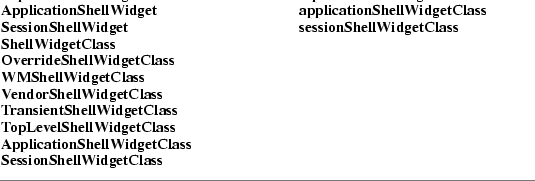
4.1.4. ShellPart Default Values
The default values for fields common to all classes of
public shells (filled in by the Shell resource lists and the
Shell initialize procedures) are:

The geometry field specifies the size and
position and is usually given only on a command line or in a
defaults file. If the geometry field is non-NULL when
a widget of class WMShell is realized, the geometry
specification is parsed using XWMGeometry with a
default geometry string constructed from the values of
x, y, width, height,
width_inc, and height_inc and the size and
position flags in the window manager size hints are set. If
the geometry specifies an x or y position, then
USPosition is set. If the geometry specifies a width
or height, then USSize is set. Any fields in the
geometry specification override the corresponding values in
the Core x, y, width, and height
fields. If geometry is NULL or contains only a
partial specification, then the Core x, y,
width, and height fields are used and
PPosition and PSize are set as appropriate.
The geometry string is not copied by any of the Intrinsics
Shell classes; a client specifying the string in an arglist
or varargs list must ensure that the value remains valid
until the shell widget is realized. For further information
on the geometry string, see Section 16.4 in Xlib —
C Language X Interface.
The create_popup_child_proc procedure is called
by the XtPopup procedure and may remain NULL. The
grab_kind, spring_loaded, and popped_up
fields maintain widget state information as described under
XtPopup, XtMenuPopup, XtPopdown, and
XtMenuPopdown. The allow_shell_resize field
controls whether the widget contained by the shell is
allowed to try to resize itself. If allow_shell_resize is
False, any geometry requests made by the child will
always return XtGeometryNo without interacting with
the window manager. Setting save_under True instructs
the server to attempt to save the contents of windows
obscured by the shell when it is mapped and to restore those
contents automatically when the shell is unmapped. It is
useful for pop-up menus. Setting override_redirect
True determines whether the window manager can intercede
when the shell window is mapped. For further information on
override_redirect, see Section 3.2 in Xlib — C
Language X Interface and Sections 4.1.10 and 4.2.2 in
the Inter-Client Communication Conventions Manual.
The pop-up and pop-down callbacks are called during
XtPopup and XtPopdown. The default value of
the visual resource is the symbolic value
CopyFromParent. The Intrinsics do not need to query
the parent’s visual type when the default value is
used; if a client using XtGetValues to examine the
visual type receives the value CopyFromParent, it
must then use XGetWindowAttributes if it needs the
actual visual type.
The default values for Shell fields in WMShell and its
subclasses are:

The title and title_encoding fields are
stored in the WM_NAME property on the shell’s
window by the WMShell realize procedure. If the
title_encoding field is None, the title
string is assumed to be in the encoding of the current
locale and the encoding of the WM_NAME property is
set to XStdICCTextStyle. If a language procedure has
not been set the default value of title_encoding is
XA_STRING, otherwise the default value is
None. The wm_timeout field specifies, in
milliseconds, the amount of time a shell is to wait for
confirmation of a geometry request to the window manager. If
none comes back within that time, the shell assumes the
window manager is not functioning properly and sets
wait_for_wm to False (later events may reset
this value). When wait_for_wm is False, the
shell does not wait for a response, but relies on
asynchronous notification. If transient is
True, the WM_TRANSIENT_FOR property will be
stored on the shell window with a value as specified below.
The interpretation of this property is specific to the
window manager under which the application is run; see the
Inter-Client Communication Conventions Manual for
more details.
The realize and set_values procedures of WMShell store
the WM_CLIENT_LEADER property on the shell window.
When client_leader is not NULL and the client leader
widget is realized, the property will be created with the
value of the window of the client leader widget. When
client_leader is NULL and the shell widget has a NULL
parent, the widget’s window is used as the value of
the property. When client_leader is NULL and the
shell widget has a non-NULL parent, a search is made for the
closest shell ancestor with a non-NULL client_leader,
and if none is found the shell ancestor with a NULL parent
is the result. If the resulting widget is realized, the
property is created with the value of the widget’s
window.
When the value of window_role is not NULL, the
realize and set_values procedures store the
WM_WINDOW_ROLE property on the shell’s window
with the value of the resource.
All other resources specify fields in the window manager
hints and the window manager size hints. The realize and
set_values procedures of WMShell set the corresponding flag
bits in the hints if any of the fields contain nondefault
values. In addition, if a flag bit is set that refers to a
field with the value XtUnspecifiedShellInt, the value
of the field is modified as follows:

If the shell widget has a non-NULL parent, then the
realize and set_values procedures replace the value
XtUnspecifiedWindow in the window_group field
with the window id of the root widget of the widget tree if
the root widget is realized. The symbolic constant
XtUnspecifiedWindowGroup may be used to indicate that
the window_group hint flag bit is not to be set. If
transient is True, the shell’s class is
not a subclass of TransientShell, and window_group is
not XtUnspecifiedWindowGroup, the WMShell realize and
set_values procedures then store the WM_TRANSIENT_FOR
property with the value of window_group.
Transient shells have the following additional
resource:

The realize and set_values procedures of TransientShell
store the WM_TRANSIENT_FOR property on the shell
window if transient is True. If
transient_for is non-NULL and the widget specified by
transient_for is realized, then its window is used as
the value of the WM_TRANSIENT_FOR property;
otherwise, the value of window_group is used.
TopLevel shells have the the following additional
resources:

The icon_name and icon_name_encoding
fields are stored in the WM_ICON_NAME property on the
shell’s window by the TopLevelShell realize procedure.
If the icon_name_encoding field is None, the
icon_name string is assumed to be in the encoding of
the current locale and the encoding of the
WM_ICON_NAME property is set to
XStdICCTextStyle. If a language procedure has not
been set, the default value of icon_name_encoding is
XA_STRING, otherwise the default value is
None. The iconic field may be used by a client
to request that the window manager iconify or deiconify the
shell; the TopLevelShell set_values procedure will send the
appropriate WM_CHANGE_STATE message (as specified by
the Inter-Client Communication Conventions Manual) if
this resource is changed from False to True
and will call XtPopup specifying grab_kind as
XtGrabNone if iconic is changed from
True to False. The XtNiconic resource is also
an alternative way to set the XtNinitialState resource to
indicate that a shell should be initially displayed as an
icon; the TopLevelShell initialize procedure will set
initial_state to IconicState if iconic
is True.
Application shells have the following additional
resources:

The argc and argv fields are used to
initialize the standard property WM_COMMAND. See the
Inter-Client Communication Conventions Manual for
more information.
The default values for the SessionShell instance fields,
which are filled in from the resource lists and by the
initialize procedure, are
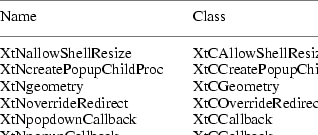
The connection field contains the session
connection object or NULL if a session connection is not
being managed by this widget.
The session_id is an identification assigned to
the session participant by the session manager. The
session_id will be passed to the session manager as
the client identifier of the previous session. When a
connection is established with the session manager, the
client id assigned by the session manager is stored in the
session_id field. When not NULL, the
session_id of the Session shell widget that is at the
root of the widget tree of the client leader widget will be
used to create the SM_CLIENT_ID property on the
client leader’s window.
If join_session is False, the widget will
not attempt to establish a connection to the session manager
at shell creation time. See Sections 4.2.1 and 4.2.4 for
more information on the functionality of this resource.
The restart_command, clone_command,
discard_command, resign_command,
shutdown_command, environment,
current_dir, program_path, and
restart_style fields contain standard session
properties.
When a session connection is established or newly
managed by the shell, the shell initialize and set_values
methods check the values of the restart_command,
clone_command, and program_path resources. At
that time, if restart_command is NULL, the value of
the argv resource will be copied to
restart_command. Whether or not
restart_command was NULL, if "-xtsessionID"
"<session id>" does not already appear in
the restart_command, it will be added by the
initialize and set_values methods at the beginning of the
command arguments; if the "-xtsessionID" argument
already appears with an incorrect session id in the
following argument, that argument will be replaced with the
current session id.
After this, the shell initialize and set_values
procedures check the clone_command. If
clone_command is NULL, restart_command will be
copied to clone_command, except the
"-xtsessionID" and following argument will not be
copied.
Finally, the shell initialize and set_values procedures
check the program_path. If program_path is
NULL, the first element of restart_command is copied
to program_path.
The possible values of restart_style are
SmRestartIfRunning, SmRestartAnyway,
SmRestartImmediately, and SmRestartNever. A
resource converter is registered for this resource; for the
strings that it recognizes, see Section 9.6.1.
The resource type EnvironmentArray is a NULL-terminated
array of pointers to strings; each string has the format
"name=value". The ‘=’ character may
not appear in the name, and the string is terminated by a
null character.
4.2. Session Participation
Applications can participate in a user’s session,
exchanging messages with the session manager as described in
the X Session Management Protocol and the X
Session Management Library.
When a widget of sessionShellWidgetClass or a
subclass is created, the widget provides support for the
application as a session participant and continues to
provide support until the widget is destroyed.
4.2.1. Joining a Session
When a Session shell is created, if connection is
NULL, and if join_session is True, and if
argv or restart_command is not NULL, and if in
POSIX environments the SESSION_MANAGER environment
variable is defined, the shell will attempt to establish a
new connection with the session manager.
To transfer management of an existing session connection
from an application to the shell at widget creation time,
pass the existing session connection ID as the
connection resource value when creating the Session
shell, and if the other creation-time conditions on session
participation are met, the widget will maintain the
connection with the session manager. The application must
ensure that only one Session shell manages the
connection.
In the Session shell set_values procedure, if
join_session changes from False to True
and connection is NULL and when in POSIX environments
the SESSION_MANAGER environment variable is defined,
the shell will attempt to open a connection to the session
manager. If connection changes from NULL to non-NULL,
the Session shell will take over management of that session
connection and will set join_session to True.
If join_session changes from False to
True and connection is not NULL, the Session
shell will take over management of the session
connection.
When a successful connection has been established,
connection contains the session connection ID for the
session participant. When the shell begins to manage the
connection, it will call XtAppAddInput to register
the handler which watches for protocol messages from the
session manager. When the attempt to connect fails, a
warning message is issued and connection is set to
NULL.
While the connection is being managed, if a
SaveYourself, SaveYourselfPhase2,
Interact, ShutdownCancelled,
SaveComplete, or Die message is received from
the session manager, the Session shell will call out to
application callback procedures registered on the respective
callback list of the Session shell and will send
SaveYourselfPhase2Request, InteractRequest,
InteractDone, SaveYourselfDone, and
ConnectionClosed messages as appropriate. Initially,
all of the client’s session properties are undefined.
When any of the session property resource values are defined
or change, the Session shell initialize and set_values
procedures will update the client’s session property
value by a SetProperties or a DeleteProperties
message, as appropriate. The session ProcessID and UserID
properties are always set by the shell when it is possible
to determine the value of these properties.
4.2.2. Saving Application State
The session manager instigates an application checkpoint
by sending a SaveYourself request. Applications are
responsible for saving their state in response to the
request.
When the SaveYourself request arrives, the
procedures registered on the Session shell’s save
callback list are called. If the application does not
register any save callback procedures on the save callback
list, the shell will report to the session manager that the
application failed to save its state. Each procedure on the
save callback list receives a token in the call_data
parameter.
The checkpoint token in the call_data parameter
is of type XtCheckpointToken.
__ │
typedef struct {
|
int
|
save_type;
|
|
|
int
|
interact_style;
|
|
|
Boolean
|
shutdown;
|
|
|
Boolean
|
fast;
|
|
|
Boolean
|
cancel_shutdown
|
|
|
int
|
phase;
|
|
|
int
|
interact_dialog_type;/* return */
|
|
|
Boolean
|
request_cancel;
|
/* return */
|
|
Boolean
|
request_next_phase;
|
/* return */
|
|
Boolean
|
save_success;
|
/* return */
|
} XtCheckpointTokenRec, *XtCheckpointToken;
│__
The save_type, interact_style,
shutdown, and fast fields of the token contain
the parameters of the SaveYourself message. The
possible values of save_type are SmSaveLocal,
SmSaveGlobal, and SmSaveBoth; these indicate
the type of information to be saved. The possible values of
interact_style are SmInteractStyleNone,
SmInteractStyleErrors, and SmInteractStyleAny;
these indicate whether user interaction would be permitted
and, if so, what kind of interaction. If shutdown is
True, the checkpoint is being performed in
preparation for the end of the session. If fast is
True, the client should perform the checkpoint as
quickly as possible. If cancel_shutdown is
True, a ShutdownCancelled message has been
received for the current save operation. (See Section
4.4.4.) The phase is used by manager clients, such as
a window manager, to distinguish between the first and
second phase of a save operation. The phase will be
either 1 or 2. The remaining fields in the checkpoint token
structure are provided for the application to communicate
with the shell.
Upon entry to the first application save callback
procedure, the return fields in the token have the following
initial values: interact_dialog_type is
SmDialogNormal; request_cancel is
False; request_next_phase is False; and
save_success is True. When a token is returned
with any of the four return fields containing a noninitial
value, and when the field is applicable, subsequent tokens
passed to the application during the current save operation
will always contain the noninitial value.
The purpose of the token’s save_success
field is to indicate the outcome of the entire operation to
the session manager and ultimately, to the user. Returning
False indicates some portion of the application state
could not be successfully saved. If any token is returned to
the shell with save_success False, tokens
subsequently received by the application for the current
save operation will show save_success as
False. When the shell sends the final status of the
checkpoint to the session manager, it will indicate failure
to save application state if any token was returned with
save_success False.
Session participants that manage and save the state of
other clients should structure their save or interact
callbacks to set request_next_phase to True
when phase is 1, which will cause the shell to send the
SaveYourselfPhase2Request when the first phase is
complete. When the SaveYourselfPhase2 message is
received, the shell will invoke the save callbacks a second
time with phase equal to 2. Manager clients should
save the state of other clients when the callbacks are
invoked the second time and phase equal to 2.
The application may request additional tokens while a
checkpoint is under way, and these additional tokens must be
returned by an explicit call.
To request an additional token for a save callback
response that has a deferred outcome, use
XtSessionGetToken.
__ │
XtCheckpointToken XtSessionGetToken(widget)
      Widget widget;
|
widget
|
|
Specifies the Session shell widget which manages session
participation.
|
│__
The XtSessionGetToken function will return NULL
if no checkpoint operation is currently under way.
To indicate the completion of checkpoint processing
including user interaction, the application must signal the
Session shell by returning all tokens. (See Sections 4.2.2.2
and 4.2.2.4). To return a token, use
XtSessionReturnToken.
__ │
void XtSessionReturnToken(token)
      XtCheckpointToken token;
|
token
|
|
Specifies a token that was received as the
call_data by a procedure on the interact callback
list or a token that was received by a call to
XtSessionGetToken.
|
│__
Tokens passed as call_data to save callbacks are
implicitly returned when the save callback procedure
returns. A save callback procedure should not call
XtSessionReturnToken on the token passed in its
call_data.
4.2.2.1. Requesting Interaction
When the token interact_style allows user
interaction, the application may interact with the user
during the checkpoint, but must wait for permission to
interact. Applications request permission to interact with
the user during the checkpointing operation by registering a
procedure on the Session shell’s interact callback
list. When all save callback procedures have returned, and
each time a token that was granted by a call to
XtSessionGetToken is returned, the Session shell
examines the interact callback list. If interaction is
permitted and the interact callback list is not empty, the
shell will send an InteractRequest to the session
manager when an interact request is not already outstanding
for the application.
The type of interaction dialog that will be requested is
specified by the interact_dialog_type field in the
checkpoint token. The possible values for
interact_dialog_type are SmDialogError and
SmDialogNormal. If a token is returned with
interact_dialog_type containing SmDialogError,
the interact request and any subsequent interact requests
will be for an error dialog; otherwise, the request will be
for a normal dialog with the user.
When a token is returned with save_success False
or interact_dialog_type SmDialogError, tokens
subsequently passed to callbacks during the same active
SaveYourself response will reflect these changed
values, indicating that an error condition has occurred
during the checkpoint.
The request_cancel field is a return value for
interact callbacks only. Upon return from a procedure on the
save callback list, the value of the token’s
request_cancel field is not examined by the shell.
This is also true of tokens received through a call to
XtSessionGetToken.
4.2.2.2. Interacting with the User during a Checkpoint
When the session manager grants the application’s
request for user interaction, the Session shell receives an
Interact message. The procedures registered on the
interact callback list are executed, but not as if executing
a typical callback list. These procedures are individually
executed in sequence, with a checkpoint token functioning as
the sequencing mechanism. Each step in the sequence begins
by removing a procedure from the interact callback list and
executing it with a token passed in the call_data.
The interact callback will typically pop up a dialog box and
return. When the user interaction and associated application
checkpointing has completed, the application must return the
token by calling XtSessionReturnToken. Returning the
token completes the current step and triggers the next step
in the sequence.
During interaction the client may request cancellation
of a shutdown. When a token passed as call_data to an
interact procedure is returned, if shutdown is
True and cancel_shutdown is False,
request_cancel indicates whether the application
requests that the pending shutdown be cancelled. If
request_cancel is True, the field will also be
True in any tokens subsequently granted during the
checkpoint operation. When a token is returned requesting
cancellation of the session shutdown, pending interact
procedures will still be called by the Session shell. When
all interact procedures have been removed from the interact
callback list, executed, and the final interact token
returned to the shell, an InteractDone message is
sent to the session manager, indicating whether a pending
session shutdown is requested to be cancelled.
4.2.2.3. Responding to a Shutdown Cancellation
Callbacks registered on the cancel callback list are
invoked when the Session shell processes a
ShutdownCancelled message from the session manager.
This may occur during the processing of save callbacks,
while waiting for interact permission, during user
interaction, or after the save operation is complete and the
application is expecting a SaveComplete or a
Die message. The call_data for these callbacks
is NULL.
When the shell notices that a pending shutdown has been
cancelled, the token cancel_shutdown field will be
True in tokens subsequently given to the
application.
Receiving notice of a shutdown cancellation does not
cancel the pending execution of save callbacks or interact
callbacks. After the cancel callbacks execute, if
interact_style is not SmInteractStyleNone and
the interact list is not empty, the procedures on the
interact callback list will be executed and passed a token
with interact_style SmInteractStyleNone. The
application should not interact with the user, and the
Session shell will not send an InteractDone
message.
4.2.2.4. Completing a Save
When there is no user interaction, the shell regards the
application as having finished saving state when all
callback procedures on the save callback list have returned,
and any additional tokens passed out by
XtSessionGetToken have been returned by corresponding
calls to XtSessionReturnToken. If the save operation
involved user interaction, the above completion conditions
apply, and in addition, all requests for interaction have
been granted or cancelled, and all tokens passed to interact
callbacks have been returned through calls to
XtSessionReturnToken. If the save operation involved
a manager client that requested the second phase, the above
conditions apply to both the first and second phase of the
save operation.
When the application has finished saving state, the
Session shell will report the result to the session manager
by sending the SaveYourselfDone message. If the
session is continuing, the shell will receive the
SaveComplete message when all applications have
completed saving state. This message indicates that
applications may again allow changes to their state. The
shell will execute the save_complete callbacks. The
call_data for these callbacks is NULL.
4.2.3. Responding to a Shutdown
Callbacks registered on the die callback list are
invoked when the session manager sends a Die message.
The callbacks on this list should do whatever is appropriate
to quit the application. Before executing procedures on the
die callback list, the Session shell will close the
connection to the session manager and will remove the
handler that watches for protocol messages. The
call_data for these callbacks is NULL.
4.2.4. Resigning from a Session
When the Session shell widget is destroyed, the destroy
method will close the connection to the session manager by
sending a ConnectionClosed protocol message and will
remove the input callback that was watching for session
protocol messages.
When XtSetValues is used to set
join_session to False, the set_values method
of the Session shell will close the connection to the
session manager if one exists by sending a
ConnectionClosed message, and connection will
be set to NULL.
Applications that exit in response to user actions and
that do not wait for phase 2 destroy to complete on the
Session shell should set join_session to False
before exiting.
When XtSetValues is used to set connection
to NULL, the Session shell will stop managing the
connection, if one exists. However, that session connection
will not be closed.
Applications that wish to ensure continuation of a
session connection beyond the destruction of the shell
should first retrieve the connection resource value,
then set the connection resource to NULL, and then
they may safely destroy the widget without losing control of
the session connection.
The error callback list will be called if an
unrecoverable communications error occurs while the shell is
managing the connection. The shell will close the
connection, set connection to NULL, remove the input
callback, and call the procedures registered on the error
callback list. The call_data for these callbacks is
NULL.
4
X Toolkit Intrinsics X11 Release 6.4
Chapter 5
Pop-Up Widgets
Pop-up widgets are used to create windows outside of the
window hierarchy defined by the widget tree. Each pop-up
child has a window that is a descendant of the root window,
so that the pop-up window is not clipped by the pop-up
widget’s parent window. Therefore, pop-ups are created
and attached differently to their widget parent than normal
widget children.
A parent of a pop-up widget does not actively manage its
pop-up children; in fact, it usually does not operate upon
them in any way. The popup_list field in the
CorePart structure contains the list of its pop-up
children. This pop-up list exists mainly to provide the
proper place in the widget hierarchy for the pop-up to get
resources and to provide a place for XtDestroyWidget
to look for all extant children.
A composite widget can have both normal and pop-up
children. A pop-up can be popped up from almost anywhere,
not just by its parent. The term child always refers
to a normal, geometry-managed widget on the composite
widget’s list of children, and the term pop-up
child always refers to a widget on the pop-up list.
5.1. Pop-Up Widget Types
There are three kinds of pop-up widgets:
|
A modeless pop-up (for example, a dialog box that does
not prevent continued interaction with the rest of the
application) can usually be manipulated by the window
manager and looks like any other application window from the
user’s point of view. The application main window
itself is a special case of a modeless pop-up.
|
|
A modal pop-up (for example, a dialog box that requires
user input to continue) can sometimes be manipulated by the
window manager, and except for events that occur in the
dialog box, it disables user-event distribution to the rest
of the application.
|
|
A spring-loaded pop-up (for example, a menu) can seldom
be manipulated by the window manager, and except for events
that occur in the pop-up or its descendants, it disables
user-event distribution to all other applications.
|
Modal pop-ups and spring-loaded pop-ups are very similar
and should be coded as if they were the same. In fact, the
same widget (for example, a ButtonBox or Menu widget) can be
used both as a modal pop-up and as a spring-loaded pop-up
within the same application. The main difference is that
spring-loaded pop-ups are brought up with the pointer and,
because of the grab that the pointer button causes, require
different processing by the Intrinsics. Furthermore, all
user input remap events occurring outside the spring-loaded
pop-up (e.g., in a descendant) are also delivered to the
spring-loaded pop-up after they have been dispatched to the
appropriate descendant, so that, for example, button-up can
take down a spring-loaded pop-up no matter where the
button-up occurs.
Any kind of pop-up, in turn, can pop up other widgets.
Modal and spring-loaded pop-ups can constrain user events to
the most recent such pop-up or allow user events to be
dispatched to any of the modal or spring-loaded pop-ups
currently mapped.
Regardless of their type, all pop-up widget classes are
responsible for communicating with the X window manager and
therefore are subclasses of one of the Shell widget
classes.
5.2. Creating a Pop-Up Shell
For a widget to be popped up, it must be the child of a
pop-up shell widget. None of the Intrinsics-supplied shells
will simultaneously manage more than one child. Both the
shell and child taken together are referred to as the
pop-up. When you need to use a pop-up, you always refer to
the pop-up by the pop-up shell, not the child.
To create a pop-up shell, use
XtCreatePopupShell.
__ │
Widget XtCreatePopupShell(name, widget_class, parent, args, num_args)
      String name;
      WidgetClass widget_class;
      Widget parent;
      ArgList args;
      Cardinal num_args;
|
name
|
|
Specifies the instance name for the created shell
widget.
|
widget_class Specifies the widget class pointer
for the created shell widget.
|
parent
|
|
Specifies the parent widget. Must be of class Core or
any subclass thereof.
|
|
args
|
|
Specifies the argument list to override any other
resource specifications.
|
|
num_args
|
|
Specifies the number of entries in the argument
list.
|
│__
The XtCreatePopupShell function ensures that the
specified class is a subclass of Shell and, rather than
using insert_child to attach the widget to the
parent’s children list, attaches the shell to
the parent’s popup_list directly.
The screen resource for this widget is determined by
first scanning args for the XtNscreen argument. If no
XtNscreen argument is found, the resource database
associated with the parent’s screen is queried for the
resource name.screen, class Class.Screen where
Class is the class_name field from the
CoreClassPart of the specified widget_class.
If this query fails, the parent’s screen is used. Once
the screen is determined, the resource database associated
with that screen is used to retrieve all remaining resources
for the widget not specified in args.
A spring-loaded pop-up invoked from a translation table
via XtMenuPopup must already exist at the time that
the translation is invoked, so the translation manager can
find the shell by name. Pop-ups invoked in other ways can be
created when the pop-up actually is needed. This delayed
creation of the shell is particularly useful when you pop up
an unspecified number of pop-ups. You can look to see if an
appropriate unused shell (that is, not currently popped up)
exists and create a new shell if needed.
To create a pop-up shell using varargs lists, use
XtVaCreatePopupShell.
__ │
Widget XtVaCreatePopupShell(name, widget_class, parent, ...)
      String name;
      WidgetClass widget_class;
      Widget parent;
|
name
|
|
Specifies the instance name for the created shell
widget.
|
widget_class Specifies the widget class pointer
for the created shell widget.
|
parent
|
|
Specifies the parent widget. Must be of class Core or
any subclass thereof.
|
|
Specifies the variable argument list to override any
other resource specifications.
|
│__
XtVaCreatePopupShell is identical in function to
XtCreatePopupShell with the args and
num_args parameters replaced by a varargs list as
described in Section 2.5.1.
5.3. Creating Pop-Up Children
Once a pop-up shell is created, the single child of the
pop-up shell can be created either statically or
dynamically.
At startup, an application can create the child of the
pop-up shell, which is appropriate for pop-up children
composed of a fixed set of widgets. The application can
change the state of the subparts of the pop-up child as the
application state changes. For example, if an application
creates a static menu, it can call XtSetSensitive
(or, in general, XtSetValues) on any of the buttons
that make up the menu. Creating the pop-up child early means
that pop-up time is minimized, especially if the application
calls XtRealizeWidget on the pop-up shell at startup.
When the menu is needed, all the widgets that make up the
menu already exist and need only be mapped. The menu should
pop up as quickly as the X server can respond.
Alternatively, an application can postpone the creation
of the child until it is needed, which minimizes application
startup time and allows the pop-up child to reconfigure
itself each time it is popped up. In this case, the pop-up
child creation routine might poll the application to find
out if it should change the sensitivity of any of its
subparts.
Pop-up child creation does not map the pop-up, even if
you create the child and call XtRealizeWidget on the
pop-up shell.
All shells have pop-up and pop-down callbacks, which
provide the opportunity either to make last-minute changes
to a pop-up child before it is popped up or to change it
after it is popped down. Note that excessive use of pop-up
callbacks can make popping up occur more slowly.
5.4. Mapping a Pop-Up Widget
Pop-ups can be popped up through several mechanisms:
|
•
|
|
A call to XtPopup or
XtPopupSpringLoaded.
|
|
|
•
|
|
One of the supplied callback procedures
XtCallbackNone, XtCallbackNonexclusive, or
XtCallbackExclusive.
|
|
•
|
|
The standard translation action XtMenuPopup.
|
|
Some of these routines take an argument of type
XtGrabKind, which is defined as
__ │
typedef enum {XtGrabNone, XtGrabNonexclusive, XtGrabExclusive} XtGrabKind;
│__
The create_popup_child_proc procedure pointer in the
shell widget instance record is of type
XtCreatePopupChildProc.
__ │
typedef void (*XtCreatePopupChildProc)(Widget);
      Widget w;
|
w
|
|
Specifies the shell widget being popped up.
|
│__
To map a pop-up from within an application, use
XtPopup.
__ │
void XtPopup(popup_shell, grab_kind)
      Widget popup_shell;
      XtGrabKind grab_kind;
popup_shell Specifies the shell widget.
|
grab_kind
|
|
Specifies the way in which user events should be
constrained.
|
│__
The XtPopup function performs the following:
|
•
|
|
Calls XtCheckSubclass to ensure
popup_shell’s class is a subclass of
shellWidgetClass.
|
|
•
|
|
Raises the window and returns if the shell’s
popped_up field is already True.
|
|
•
|
|
Calls the callback procedures on the shell’s
popup_callback list, specifying a pointer to the
value of grab_kind as the call_data
argument.
|
|
•
|
|
Sets the shell popped_up field to True,
the shell spring_loaded field to False, and
the shell grab_kind field from grab_kind.
|
|
•
|
|
If the shell’s create_popup_child_proc
field is non-NULL, XtPopup calls it with
popup_shell as the parameter.
|
|
•
|
|
If grab_kind is either XtGrabNonexclusive
or XtGrabExclusive, it calls
|
|
XtAddGrab(popup_shell, (grab_kind == XtGrabExclusive), False)
|
•
|
|
Calls XtRealizeWidget with popup_shell
specified.
|
|
•
|
|
Calls XMapRaised with the window of
popup_shell.
|
To map a spring-loaded pop-up from within an
application, use XtPopupSpringLoaded.
__ │
void XtPopupSpringLoaded(popup_shell)
      Widget popup_shell;
popup_shell Specifies the shell widget to be
popped up.
│__
The XtPopupSpringLoaded function performs exactly
as XtPopup except that it sets the shell
spring_loaded field to True and always calls
XtAddGrab with exclusive True and
spring-loaded True.
To map a pop-up from a given widget’s callback
list, you also can register one of the
XtCallbackNone, XtCallbackNonexclusive, or
XtCallbackExclusive convenience routines as
callbacks, using the pop-up shell widget as the client
data.
__ │
void XtCallbackNone(w, client_data, call_data)
      Widget w;
      XtPointer client_data;
      XtPointer call_data;
client_data Specifies the pop-up shell.
|
call_data
|
|
Specifies the callback data argument, which is not used
by this procedure.
|
void XtCallbackNonexclusive(w, client_data, call_data)
      Widget w;
      XtPointer client_data;
      XtPointer call_data;
client_data Specifies the pop-up shell.
|
call_data
|
|
Specifies the callback data argument, which is not used
by this procedure.
|
void XtCallbackExclusive(w, client_data, call_data)
      Widget w;
      XtPointer client_data;
      XtPointer call_data;
client_data Specifies the pop-up shell.
|
call_data
|
|
Specifies the callback data argument, which is not used
by this procedure.
|
│__
The XtCallbackNone,
XtCallbackNonexclusive, and
XtCallbackExclusive functions call XtPopup
with the shell specified by the client_data argument
and grab_kind set as the name specifies.
XtCallbackNone, XtCallbackNonexclusive, and
XtCallbackExclusive specify XtGrabNone,
XtGrabNonexclusive, and XtGrabExclusive,
respectively. Each function then sets the widget that
executed the callback list to be insensitive by calling
XtSetSensitive. Using these functions in callbacks is
not required. In particular, an application must provide
customized code for callbacks that create pop-up shells
dynamically or that must do more than desensitizing the
button.
Within a translation table, to pop up a menu when a key
or pointer button is pressed or when the pointer is moved
into a widget, use XtMenuPopup, or its synonym,
MenuPopup. From a translation writer’s point of
view, the definition for this translation action is
__ │
void XtMenuPopup(shell_name)
      String shell_name;
shell_name Specifies the name of the shell widget
to pop up.
│__
XtMenuPopup is known to the translation manager,
which registers the corresponding built-in action procedure
XtMenuPopupAction using XtRegisterGrabAction
specifying owner_events True, event_mask
ButtonPressMask | ButtonReleaseMask, and
pointer_mode and keyboard_mode
GrabModeAsync.
If XtMenuPopup is invoked on ButtonPress,
it calls XtPopupSpringLoaded on the specified shell
widget. If XtMenuPopup is invoked on KeyPress
or EnterWindow, it calls XtPopup on the
specified shell widget with grab_kind set to
XtGrabNonexclusive. Otherwise, the translation
manager generates a warning message and ignores the
action.
XtMenuPopup tries to find the shell by searching
the widget tree starting at the widget in which it is
invoked. If it finds a shell with the specified name in the
pop-up children of that widget, it pops up the shell with
the appropriate parameters. Otherwise, it moves up the
parent chain to find a pop-up child with the specified name.
If XtMenuPopup gets to the application top-level
shell widget and has not found a matching shell, it
generates a warning and returns immediately.
5.5. Unmapping a Pop-Up Widget
Pop-ups can be popped down through several
mechanisms:
|
•
|
|
The supplied callback procedure
XtCallbackPopdown
|
|
•
|
|
The standard translation action XtMenuPopdown
|
|
To unmap a pop-up from within an application, use
XtPopdown.
__ │
void XtPopdown(popup_shell)
      Widget popup_shell;
popup_shell Specifies the shell widget to pop
down.
│__
The XtPopdown function performs the
following:
|
•
|
|
Calls XtCheckSubclass to ensure
popup_shell’s class is a subclass of
shellWidgetClass.
|
|
•
|
|
Checks that the popped_up field of
popup_shell is True; otherwise, it returns
immediately.
|
|
•
|
|
Unmaps popup_shell’s window and, if
override_redirect is False, sends a synthetic
UnmapNotify event as specified by the Inter-Client
Communication Conventions Manual.
|
|
•
|
|
If popup_shell’s grab_kind is either
XtGrabNonexclusive or XtGrabExclusive, it
calls XtRemoveGrab.
|
|
•
|
|
Sets popup_shell’s popped_up field
to False.
|
|
|
•
|
|
Calls the callback procedures on the shell’s
popdown_callback list, specifying a pointer to the
value of the shell’s grab_kind field as the
call_data argument.
|
To pop down a pop-up from a callback list, you may use
the callback XtCallbackPopdown.
__ │
void XtCallbackPopdown(w, client_data, call_data)
      Widget w;
      XtPointer client_data;
      XtPointer call_data;
client_data Specifies a pointer to the
XtPopdownID structure.
|
call_data
|
|
Specifies the callback data argument, which is not used
by this procedure.
|
│__
The XtCallbackPopdown function casts the
client_data parameter to a pointer of type
XtPopdownID.
__ │
typedef struct {
|
Widget shell_widget;
|
|
|
Widget enable_widget;
|
|
} XtPopdownIDRec, *XtPopdownID;
│__
The shell_widget is the pop-up shell to pop down,
and the enable_widget is usually the widget that was
used to pop it up in one of the pop-up callback convenience
procedures.
XtCallbackPopdown calls XtPopdown with the
specified shell_widget and then calls
XtSetSensitive to resensitize
enable_widget.
Within a translation table, to pop down a spring-loaded
menu when a key or pointer button is released or when the
pointer is moved into a widget, use XtMenuPopdown or
its synonym, MenuPopdown. From a translation
writer’s point of view, the definition for this
translation action is
__ │
void XtMenuPopdown(shell_name)
      String shell_name;
shell_name Specifies the name of the shell widget
to pop down.
│__
If a shell name is not given, XtMenuPopdown calls
XtPopdown with the widget for which the translation
is specified. If shell_name is specified in the
translation table, XtMenuPopdown tries to find the
shell by looking up the widget tree starting at the widget
in which it is invoked. If it finds a shell with the
specified name in the pop-up children of that widget, it
pops down the shell; otherwise, it moves up the parent chain
to find a pop-up child with the specified name. If
XtMenuPopdown gets to the application top-level shell
widget and cannot find a matching shell, it generates a
warning and returns immediately.
5
X Toolkit Intrinsics X11 Release 6.4
Chapter 6
Geometry Management
A widget does not directly control its size and
location; rather, its parent is responsible for controlling
them. Although the position of children is usually left up
to their parent, the widgets themselves often have the best
idea of their optimal sizes and, possibly, preferred
locations.
To resolve physical layout conflicts between sibling
widgets and between a widget and its parent, the Intrinsics
provide the geometry management mechanism. Almost all
composite widgets have a geometry manager specified in the
geometry_manager field in the widget class record
that is responsible for the size, position, and stacking
order of the widget’s children. The only exception is
fixed boxes, which create their children themselves and can
ensure that their children will never make a geometry
request.
6.1. Initiating Geometry Changes
Parents, children, and clients each initiate geometry
changes differently. Because a parent has absolute control
of its children’s geometry, it changes the geometry
directly by calling XtMoveWidget,
XtResizeWidget, or XtConfigureWidget. A child
must ask its parent for a geometry change by calling
XtMakeGeometryRequest or XtMakeResizeRequest.
An application or other client code initiates a geometry
change by calling XtSetValues on the appropriate
geometry fields, thereby giving the widget the opportunity
to modify or reject the client request before it gets
propagated to the parent and the opportunity to respond
appropriately to the parent’s reply.
When a widget that needs to change its size, position,
border width, or stacking depth asks its parent’s
geometry manager to make the desired changes, the geometry
manager can allow the request, disallow the request, or
suggest a compromise.
When the geometry manager is asked to change the
geometry of a child, the geometry manager may also rearrange
and resize any or all of the other children that it
controls. The geometry manager can move children around
freely using XtMoveWidget. When it resizes a child
(that is, changes the width, height, or border width) other
than the one making the request, it should do so by calling
XtResizeWidget. The requesting child may be given
special treatment; see Section 6.5. It can simultaneously
move and resize a child with a single call to
XtConfigureWidget.
Often, geometry managers find that they can satisfy a
request only if they can reconfigure a widget that they are
not in control of; in particular, the composite widget may
want to change its own size. In this case, the geometry
manager makes a request to its parent’s geometry
manager. Geometry requests can cascade this way to arbitrary
depth.
Because such cascaded arbitration of widget geometry can
involve extended negotiation, windows are not actually
allocated to widgets at application startup until all
widgets are satisfied with their geometry; see Sections 2.5
and 2.6.
Notes
|
1.
|
|
The Intrinsics treatment of stacking requests is
deficient in several areas. Stacking requests for unrealized
widgets are granted but will have no effect. In addition,
there is no way to do an XtSetValues that will
generate a stacking geometry request.
|
|
2.
|
|
After a successful geometry request (one that returned
XtGeometryYes), a widget does not know whether its
resize procedure has been called. Widgets should have resize
procedures that can be called more than once without ill
effects.
|
6.2. General Geometry Manager Requests
When making a geometry request, the child specifies an
XtWidgetGeometry structure.
__ │
typedef unsigned long XtGeometryMask;


typedef struct {
|
XtGeometryMask request_mode;
|
|
|
Position x, y;
|
|
|
Dimension width, height;
|
|
|
Dimension border_width;
|
|
|
Widget sibling;
|
|
|
int stack_mode;
|
|
} XtWidgetGeometry;
│__
To make a general geometry manager request from a
widget, use XtMakeGeometryRequest.
__ │
XtGeometryResult XtMakeGeometryRequest(w, request, reply_return)
      Widget w;
      XtWidgetGeometry *request;
      XtWidgetGeometry *reply_return;
|
w
|
|
Specifies the widget making the request. Must be of
class RectObj or any subclass thereof.
|
|
request
|
|
Specifies the desired widget geometry (size, position,
border width, and stacking order).
|
reply_return Returns the allowed widget size, or
may be NULL if the requesting widget is not interested in
handling XtGeometryAlmost.
│__
Depending on the condition, XtMakeGeometryRequest
performs the following:
|
•
|
|
If the widget is unmanaged or the widget’s parent
is not realized, it makes the changes and returns
XtGeometryYes.
|
|
•
|
|
If the parent’s class is not a subclass of
compositeWidgetClass or the parent’s
geometry_manager field is NULL, it issues an
error.
|
|
•
|
|
If the widget’s being_destroyed field is
True, it returns XtGeometryNo.
|
|
•
|
|
If the widget x, y, width,
height, and border_width fields are all equal
to the requested values, it returns XtGeometryYes;
otherwise, it calls the parent’s geometry_manager
procedure with the given parameters.
|
|
•
|
|
If the parent’s geometry manager returns
XtGeometryYes and if XtCWQueryOnly is not set
in request->request_mode and if the widget is
realized, XtMakeGeometryRequest calls the
XConfigureWindow Xlib function to reconfigure the
widget’s window (set its size, location, and stacking
order as appropriate).
|
|
•
|
|
If the geometry manager returns XtGeometryDone,
the change has been approved and actually has been done. In
this case, XtMakeGeometryRequest does no configuring
and returns XtGeometryYes.
XtMakeGeometryRequest never returns
XtGeometryDone.
|
|
•
|
|
Otherwise, XtMakeGeometryRequest just returns the
resulting value from the parent’s geometry
manager.
|
Children of primitive widgets are always unmanaged;
therefore, XtMakeGeometryRequest always returns
XtGeometryYes when called by a child of a primitive
widget.
The return codes from geometry managers are
__ │
typedef enum {
|
XtGeometryYes,
|
|
|
XtGeometryNo,
|
|
|
XtGeometryAlmost,
|
|
|
XtGeometryDone
|
|
} XtGeometryResult;
│__
The request_mode definitions are from
<X11/X.h>.
__ │

│__
The Intrinsics also support the following value.
__ │

│__
XtCWQueryOnly indicates that the corresponding
geometry request is only a query as to what would happen if
this geometry request were made and that no widgets should
actually be changed.
XtMakeGeometryRequest, like the
XConfigureWindow Xlib function, uses
request_mode to determine which fields in the
XtWidgetGeometry structure the caller wants to
specify.
The stack_mode definitions are from
<X11/X.h>:
__ │

│__
The Intrinsics also support the following value.
__ │

│__
For definition and behavior of Above,
Below, TopIf, BottomIf, and
Opposite, see Section 3.7 in Xlib — C
Language X Interface. XtSMDontChange indicates
that the widget wants its current stacking order
preserved.
6.3. Resize Requests
To make a simple resize request from a widget, you can
use XtMakeResizeRequest as an alternative to
XtMakeGeometryRequest.
__ │
XtGeometryResult XtMakeResizeRequest(w, width, height, width_return, height_return)
      Widget w;
      Dimension width, height;
      Dimension *width_return, *height_return;
|
w
|
|
Specifies the widget making the request. Must be of
class RectObj or any subclass thereof.
|
|
width
|
|
Specify the desired widget width and height.
|
width_return Return the allowed widget width and
height.
height_return
│__
The XtMakeResizeRequest function, a simple
interface to XtMakeGeometryRequest, creates an
XtWidgetGeometry structure and specifies that width
and height should change by setting request_mode to
CWWidth | CWHeight. The geometry
manager is free to modify any of the other window attributes
(position or stacking order) to satisfy the resize request.
If the return value is XtGeometryAlmost,
width_return and height_return contain a
compromise width and height. If these are acceptable, the
widget should immediately call XtMakeResizeRequest
again and request that the compromise width and height be
applied. If the widget is not interested in
XtGeometryAlmost replies, it can pass NULL for
width_return and height_return.
6.4. Potential Geometry Changes
Sometimes a geometry manager cannot respond to a
geometry request from a child without first making a
geometry request to the widget’s own parent (the
original requestor’s grandparent). If the request to
the grandparent would allow the parent to satisfy the
original request, the geometry manager can make the
intermediate geometry request as if it were the originator.
On the other hand, if the geometry manager already has
determined that the original request cannot be completely
satisfied (for example, if it always denies position
changes), it needs to tell the grandparent to respond to the
intermediate request without actually changing the geometry
because it does not know if the child will accept the
compromise. To accomplish this, the geometry manager uses
XtCWQueryOnly in the intermediate request.
When XtCWQueryOnly is used, the geometry manager
needs to cache enough information to exactly reconstruct the
intermediate request. If the grandparent’s response to
the intermediate query was XtGeometryAlmost, the
geometry manager needs to cache the entire reply geometry in
the event the child accepts the parent’s
compromise.
If the grandparent’s response was
XtGeometryAlmost, it may also be necessary to cache
the entire reply geometry from the grandparent when
XtCWQueryOnly is not used. If the geometry manager is
still able to satisfy the original request, it may
immediately accept the grandparent’s compromise and
then act on the child’s request. If the
grandparent’s compromise geometry is insufficient to
allow the child’s request and if the geometry manager
is willing to offer a different compromise to the child, the
grandparent’s compromise should not be accepted until
the child has accepted the new compromise.
Note that a compromise geometry returned with
XtGeometryAlmost is guaranteed only for the next call
to the same widget; therefore, a cache of size 1 is
sufficient.
6.5. Child Geometry Management: The geometry_manager Procedure
The geometry_manager procedure pointer in a composite
widget class is of type XtGeometryHandler.
__ │
typedef XtGeometryResult (*XtGeometryHandler)(Widget, XtWidgetGeometry*, XtWidgetGeometry*);
      Widget w;
      XtWidgetGeometry *request;
      XtWidgetGeometry *geometry_return;
|
w
|
|
Passes the widget making the request.
|
|
|
request
|
|
Passes the new geometry the child desires.
|
geometry_return Passes a geometry structure in
which the geometry manager may store a compromise.
│__
A class can inherit its superclass’s geometry
manager during class initialization.
A bit set to zero in the request’s
request_mode field means that the child widget does
not care about the value of the corresponding field, so the
geometry manager can change this field as it wishes. A bit
set to 1 means that the child wants that geometry element
set to the value in the corresponding field.
If the geometry manager can satisfy all changes
requested and if XtCWQueryOnly is not specified, it
updates the widget’s x, y, width,
height, and border_width fields appropriately.
Then, it returns XtGeometryYes, and the values
pointed to by the geometry_return argument are
undefined. The widget’s window is moved and resized
automatically by XtMakeGeometryRequest.
Homogeneous composite widgets often find it convenient
to treat the widget making the request the same as any other
widget, including reconfiguring it using
XtConfigureWidget or XtResizeWidget as part of
its layout process, unless XtCWQueryOnly is
specified. If it does this, it should return
XtGeometryDone to inform XtMakeGeometryRequest
that it does not need to do the configuration itself.
Note
|
To remain compatible with layout techniques used in older
widgets (before XtGeometryDone was added to the
Intrinsics), a geometry manager should avoid using
XtResizeWidget or XtConfigureWidget on the
child making the request because the layout process of the
child may be in an intermediate state in which it is not
prepared to handle a call to its resize procedure. A
self-contained widget set may choose this alternative
geometry management scheme, however, provided that it
clearly warns widget developers of the compatibility
consequences.
|
Although XtMakeGeometryRequest resizes the
widget’s window (if the geometry manager returns
XtGeometryYes), it does not call the widget
class’s resize procedure. The requesting widget must
perform whatever resizing calculations are needed
explicitly.
If the geometry manager disallows the request, the
widget cannot change its geometry. The values pointed to by
geometry_return are undefined, and the geometry
manager returns XtGeometryNo.
Sometimes the geometry manager cannot satisfy the
request exactly but may be able to satisfy a similar
request. That is, it could satisfy only a subset of the
requests (for example, size but not position) or a lesser
request (for example, it cannot make the child as big as the
request but it can make the child bigger than its current
size). In such cases, the geometry manager fills in the
structure pointed to by geometry_return with the
actual changes it is willing to make, including an
appropriate request_mode mask, and returns
XtGeometryAlmost. If a bit in
geometry_return->request_mode is zero, the
geometry manager agrees not to change the corresponding
value if geometry_return is used immediately in a new
request. If a bit is 1, the geometry manager does change
that element to the corresponding value in
geometry_return. More bits may be set in
geometry_return->request_mode than in the original
request if the geometry manager intends to change other
fields should the child accept the compromise.
When XtGeometryAlmost is returned, the widget
must decide if the compromise suggested in
geometry_return is acceptable. If it is, the widget
must not change its geometry directly; rather, it must make
another call to XtMakeGeometryRequest.
If the next geometry request from this child uses the
geometry_return values filled in by the geometry
manager with an XtGeometryAlmost return and if there
have been no intervening geometry requests on either its
parent or any of its other children, the geometry manager
must grant the request, if possible. That is, if the child
asks immediately with the returned geometry, it should get
an answer of XtGeometryYes. However, dynamic behavior
in the user’s window manager may affect the final
outcome.
To return XtGeometryYes, the geometry manager
frequently rearranges the position of other managed children
by calling XtMoveWidget. However, a few geometry
managers may sometimes change the size of other managed
children by calling XtResizeWidget or
XtConfigureWidget. If XtCWQueryOnly is
specified, the geometry manager must return data describing
how it would react to this geometry request without actually
moving or resizing any widgets.
Geometry managers must not assume that the
request and geometry_return arguments point to
independent storage. The caller is permitted to use the same
field for both, and the geometry manager must allocate its
own temporary storage, if necessary.
6.6. Widget Placement and Sizing
To move a sibling widget of the child making the
geometry request, the parent uses XtMoveWidget.
__ │
void XtMoveWidget(w, x, y)
      Widget w;
      Position x;
      Position y;
|
w
|
|
Specifies the widget. Must be of class RectObj or any
subclass thereof.
|
|
y
|
|
Specify the new widget x and y coordinates.
|
│__
The XtMoveWidget function returns immediately if
the specified geometry fields are the same as the old
values. Otherwise, XtMoveWidget writes the new
x and y values into the object and, if the
object is a widget and is realized, issues an Xlib
XMoveWindow call on the widget’s window.
To resize a sibling widget of the child making the
geometry request, the parent uses XtResizeWidget.
__ │
void XtResizeWidget(w, width, height, border_width)
      Widget w;
      Dimension width;
      Dimension height;
      Dimension border_width;
|
w
|
|
Specifies the widget. Must be of class RectObj or any
subclass thereof.
|
border_width Specify the new widget size.
│__
The XtResizeWidget function returns immediately
if the specified geometry fields are the same as the old
values. Otherwise, XtResizeWidget writes the new
width, height, and border_width values
into the object and, if the object is a widget and is
realized, issues an XConfigureWindow call on the
widget’s window.
If the new width or height is different from the old
values, XtResizeWidget calls the object’s
resize procedure to notify it of the size change.
To move and resize the sibling widget of the child
making the geometry request, the parent uses
XtConfigureWidget.
__ │
void XtConfigureWidget(w, x, y, width, height, border_width)
      Widget w;
      Position x;
      Position y;
      Dimension width;
      Dimension height;
      Dimension border_width;
|
w
|
|
Specifies the widget. Must be of class RectObj or any
subclass thereof.
|
|
y
|
|
Specify the new widget x and y coordinates.
|
border_width Specify the new widget size.
│__
The XtConfigureWidget function returns
immediately if the specified new geometry fields are all
equal to the current values. Otherwise,
XtConfigureWidget writes the new x, y,
width, height, and border_width values
into the object and, if the object is a widget and is
realized, makes an Xlib XConfigureWindow call on the
widget’s window.
If the new width or height is different from its old
value, XtConfigureWidget calls the object’s
resize procedure to notify it of the size change; otherwise,
it simply returns.
To resize a child widget that already has the new values
of its width, height, and border width, the parent uses
XtResizeWindow.
__ │
void XtResizeWindow(w)
      Widget w;
|
w
|
|
Specifies the widget. Must be of class Core or any
subclass thereof.
|
│__
The XtResizeWindow function calls the
XConfigureWindow Xlib function to make the window of
the specified widget match its width, height, and border
width. This request is done unconditionally because there is
no inexpensive way to tell if these values match the current
values. Note that the widget’s resize procedure is not
called.
There are very few times to use XtResizeWindow;
instead, the parent should use XtResizeWidget.
6.7. Preferred Geometry
Some parents may be willing to adjust their layouts to
accommodate the preferred geometries of their children. They
can use XtQueryGeometry to obtain the preferred
geometry and, as they see fit, can use or ignore any portion
of the response.
To query a child widget’s preferred geometry, use
XtQueryGeometry.
__ │
XtGeometryResult XtQueryGeometry(w, intended, preferred_return)
     Widget w;
     XtWidgetGeometry *intended;
     XtWidgetGeometry *preferred_return;
|
w
|
|
Specifies the widget. Must be of class RectObj or any
subclass thereof.
|
|
intended
|
|
Specifies the new geometry the parent plans to give to
the child, or NULL.
|
preferred_return Returns the child widget’s
preferred geometry.
│__
To discover a child’s preferred geometry, the
child’s parent stores the new geometry in the
corresponding fields of the intended structure, sets the
corresponding bits in intended.request_mode, and
calls XtQueryGeometry. The parent should set only
those fields that are important to it so that the child can
determine whether it may be able to attempt changes to other
fields.
XtQueryGeometry clears all bits in the
preferred_return->request_mode field and checks
the query_geometry field of the specified
widget’s class record. If query_geometry is not
NULL, XtQueryGeometry calls the query_geometry
procedure and passes as arguments the specified widget,
intended, and preferred_return structures. If
the intended argument is NULL, XtQueryGeometry
replaces it with a pointer to an XtWidgetGeometry
structure with request_mode equal to zero before
calling the query_geometry procedure.
Note
|
If XtQueryGeometry is called from within a
geometry_manager procedure for the widget that issued
XtMakeGeometryRequest or XtMakeResizeRequest,
the results are not guaranteed to be consistent with the
requested changes. The change request passed to the geometry
manager takes precedence over the preferred geometry.
|
The query_geometry procedure pointer is of type
XtGeometryHandler.
__ │
typedef XtGeometryResult (*XtGeometryHandler)(Widget, XtWidgetGeometry*, XtWidgetGeometry*);
      Widget w;
      XtWidgetGeometry *request;
      XtWidgetGeometry *preferred_return;
|
w
|
|
Passes the child widget whose preferred geometry is
required.
|
|
request
|
|
Passes the geometry changes that the parent plans to
make.
|
preferred_return Passes a structure in which the
child returns its preferred geometry.
│__
The query_geometry procedure is expected to examine the
bits set in request->request_mode, evaluate the
preferred geometry of the widget, and store the result in
preferred_return (setting the bits in
preferred_return->request_mode corresponding to
those geometry fields that it cares about). If the proposed
geometry change is acceptable without modification, the
query_geometry procedure should return XtGeometryYes.
If at least one field in preferred_return with a bit
set in preferred_return->request_mode is different
from the corresponding field in request or if a bit
was set in preferred_return->request_mode that was
not set in the request, the query_geometry procedure should
return XtGeometryAlmost. If the preferred geometry is
identical to the current geometry, the query_geometry
procedure should return XtGeometryNo.
Note
|
The query_geometry procedure may assume that no
XtMakeResizeRequest or XtMakeGeometryRequest
is in progress for the specified widget; that is, it is not
required to construct a reply consistent with the requested
geometry if such a request were actually outstanding.
|
After calling the query_geometry procedure or if the
query_geometry field is NULL, XtQueryGeometry
examines all the unset bits in
preferred_return->request_mode and sets the
corresponding fields in preferred_return to the
current values from the widget instance. If
CWStackMode is not set, the stack_mode field
is set to XtSMDontChange. XtQueryGeometry
returns the value returned by the query_geometry procedure
or XtGeometryYes if the query_geometry field
is NULL.
Therefore, the caller can interpret a return of
XtGeometryYes as not needing to evaluate the contents
of the reply and, more important, not needing to modify its
layout plans. A return of XtGeometryAlmost means
either that both the parent and the child expressed interest
in at least one common field and the child’s
preference does not match the parent’s intentions or
that the child expressed interest in a field that the parent
might need to consider. A return value of
XtGeometryNo means that both the parent and the child
expressed interest in a field and that the child suggests
that the field’s current value in the widget instance
is its preferred value. In addition, whether or not the
caller ignores the return value or the reply mask, it is
guaranteed that the preferred_return structure
contains complete geometry information for the child.
Parents are expected to call XtQueryGeometry in
their layout routine and wherever else the information is
significant after change_managed has been called. The first
time it is invoked, the changed_managed procedure may assume
that the child’s current geometry is its preferred
geometry. Thus, the child is still responsible for storing
values into its own geometry during its initialize
procedure.
6.8. Size Change Management: The resize Procedure
A child can be resized by its parent at any time.
Widgets usually need to know when they have changed size so
that they can lay out their displayed data again to match
the new size. When a parent resizes a child, it calls
XtResizeWidget, which updates the geometry fields in
the widget, configures the window if the widget is realized,
and calls the child’s resize procedure to notify the
child. The resize procedure pointer is of type
XtWidgetProc.
If a class need not recalculate anything when a widget
is resized, it can specify NULL for the resize field
in its class record. This is an unusual case and should
occur only for widgets with very trivial display semantics.
The resize procedure takes a widget as its only argument.
The x, y, width, height, and
border_width fields of the widget contain the new
values. The resize procedure should recalculate the layout
of internal data as needed. (For example, a centered Label
in a window that changes size should recalculate the
starting position of the text.) The widget must obey resize
as a command and must not treat it as a request. A widget
must not issue an XtMakeGeometryRequest or
XtMakeResizeRequest call from its resize
procedure.
6
X Toolkit Intrinsics X11 Release 6.4
Chapter 7
Event Management
While Xlib allows the reading and processing of events
anywhere in an application, widgets in the X Toolkit neither
directly read events nor grab the server or pointer. Widgets
register procedures that are to be called when an event or
class of events occurs in that widget.
A typical application consists of startup code followed
by an event loop that reads events and dispatches them by
calling the procedures that widgets have registered. The
default event loop provided by the Intrinsics is
XtAppMainLoop.
The event manager is a collection of functions to
perform the following tasks:
|
•
|
|
Add or remove event sources other than X server events
(in particular, timer interrupts, file input, or POSIX
signals).
|
|
•
|
|
Query the status of event sources.
|
|
|
•
|
|
Add or remove procedures to be called when an event
occurs for a particular widget.
|
|
•
|
|
Enable and disable the dispatching of user-initiated
events (keyboard and pointer events) for a particular
widget.
|
|
•
|
|
Constrain the dispatching of events to a cascade of
pop-up widgets.
|
|
•
|
|
Register procedures to be called when specific events
arrive.
|
|
•
|
|
Register procedures to be called when the Intrinsics
will block.
|
|
•
|
|
Enable safe operation in a multi-threaded
environment.
|
Most widgets do not need to call any of the event
handler functions explicitly. The normal interface to X
events is through the higher-level translation manager,
which maps sequences of X events, with modifiers, into
procedure calls. Applications rarely use any of the event
manager routines besides XtAppMainLoop.
7.1. Adding and Deleting Additional Event Sources
While most applications are driven only by X events,
some applications need to incorporate other sources of input
into the Intrinsics event-handling mechanism. The event
manager provides routines to integrate notification of timer
events and file data pending into this mechanism.
The next section describes functions that provide input
gathering from files. The application registers the files
with the Intrinsics read routine. When input is pending on
one of the files, the registered callback procedures are
invoked.
7.1.1. Adding and Removing Input Sources
To register a new file as an input source for a given
application context, use XtAppAddInput.
__ │
XtInputId XtAppAddInput(app_context, source, condition, proc, client_data)
      XtAppContext app_context;
      int source;
      XtPointer condition;
      XtInputCallbackProc proc;
      XtPointer client_data;
app_context Specifies the application context
that identifies the application.
|
source
|
|
Specifies the source file descriptor on a POSIX-based
system or other operating-system-dependent device
specification.
|
|
condition
|
|
Specifies the mask that indicates a read, write, or
exception condition or some other operating-system-dependent
condition.
|
|
proc
|
|
Specifies the procedure to be called when the condition
is found.
|
client_data Specifies an argument passed to the
specified procedure when it is called.
│__
The XtAppAddInput function registers with the
Intrinsics read routine a new source of events, which is
usually file input but can also be file output. Note that
file should be loosely interpreted to mean any sink
or source of data. XtAppAddInput also specifies the
conditions under which the source can generate events. When
an event is pending on this source, the callback procedure
is called.
The legal values for the condition argument are
operating-system-dependent. On a POSIX-based system,
source is a file number and the condition is some
union of the following:
XtInputReadMask
|
Specifies that proc is to be called when
source has data to be read.
|
XtInputWriteMask
|
Specifies that proc is to be called when
source is ready for writing.
|
XtInputExceptMask
|
Specifies that proc is to be called when
source has exception data.
|
Callback procedure pointers used to handle file events
are of type XtInputCallbackProc.
__ │
typedef void (*XtInputCallbackProc)(XtPointer, int*, XtInputId*);
      XtPointer client_data;
      int *source;
      XtInputId *id;
client_data Passes the client data argument that
was registered for this procedure in
XtAppAddInput.
|
source
|
|
Passes the source file descriptor generating the
event.
|
|
id
|
|
Passes the id returned from the corresponding
XtAppAddInput call.
|
│__
See Section 7.12 for information regarding the use of
XtAppAddInput in multiple threads.
To discontinue a source of input, use
XtRemoveInput.
__ │
void XtRemoveInput(id)
      XtInputId id;
|
id
|
|
Specifies the id returned from the corresponding
XtAppAddInput call.
|
│__
The XtRemoveInput function causes the Intrinsics
read routine to stop watching for events from the file
source specified by id.
See Section 7.12 for information regarding the use of
XtRemoveInput in multiple threads.
7.1.2. Adding and Removing Blocking Notifications
Occasionally it is desirable for an application to
receive notification when the Intrinsics event manager
detects no pending input from file sources and no pending
input from X server event sources and is about to block in
an operating system call.
To register a hook that is called immediately prior to
event blocking, use XtAppAddBlockHook.
__ │
XtBlockHookId XtAppAddBlockHook(app_context, proc, client_data)
      XtAppContext app_context;
      XtBlockHookProc proc;
      XtPointer client_data;
app_context Specifies the application context
that identifies the application.
|
proc
|
|
Specifies the procedure to be called before
blocking.
|
client_data Specifies an argument passed to the
specified procedure when it is called.
│__
The XtAppAddBlockHook function registers the
specified procedure and returns an identifier for it. The
hook procedure proc is called at any time in the
future when the Intrinsics are about to block pending some
input.
The procedure pointers used to provide notification of
event blocking are of type XtBlockHookProc.
__ │
typedef void (*XtBlockHookProc)(XtPointer);
      XtPointer client_data;
client_data Passes the client data argument that
was registered for this procedure in XtApp-
AddBlockHook.
│__
To discontinue the use of a procedure for blocking
notification, use XtRemoveBlockHook.
__ │
void XtRemoveBlockHook(id)
      XtBlockHookId id;
|
id
|
|
Specifies the identifier returned from the corresponding
call to XtAppAddBlockHook.
|
│__
The XtRemoveBlockHook function removes the
specified procedure from the list of procedures that are
called by the Intrinsics read routine before blocking on
event sources.
7.1.3. Adding and Removing Timeouts
The timeout facility notifies the application or the
widget through a callback procedure that a specified time
interval has elapsed. Timeout values are uniquely identified
by an interval id.
To register a timeout callback, use
XtAppAddTimeOut.
__ │
XtIntervalId XtAppAddTimeOut(app_context, interval, proc, client_data)
      XtAppContext app_context;
      unsigned long interval;
      XtTimerCallbackProc proc;
      XtPointer client_data;
app_context Specifies the application context for
which the timer is to be set.
|
interval
|
|
Specifies the time interval in milliseconds.
|
|
proc
|
|
Specifies the procedure to be called when the time
expires.
|
client_data Specifies an argument passed to the
specified procedure when it is called.
│__
The XtAppAddTimeOut function creates a timeout
and returns an identifier for it. The timeout value is set
to interval. The callback procedure proc is
called when XtAppNextEvent or
XtAppProcessEvent is next called after the time
interval elapses, and then the timeout is removed.
Callback procedure pointers used with timeouts are of
type XtTimerCallbackProc.
__ │
typedef void (*XtTimerCallbackProc)(XtPointer, XtIntervalId*);
      XtPointer client_data;
      XtIntervalId *timer;
client_data Passes the client data argument that
was registered for this procedure in
XtAppAddTimeOut.
|
timer
|
|
Passes the id returned from the corresponding
XtAppAddTimeOut call.
|
│__
See Section 7.12 for information regarding the use of
XtAppAddTimeOut in multiple threads.
To clear a timeout value, use
XtRemoveTimeOut.
__ │
void XtRemoveTimeOut(timer)
      XtIntervalId timer;
|
timer
|
|
Specifies the id for the timeout request to be
cleared.
|
│__
The XtRemoveTimeOut function removes the pending
timeout. Note that timeouts are automatically removed once
they trigger.
Please refer to Section 7.12 for information regarding
the use of XtRemoveTimeOut in multiple threads.
7.1.4. Adding and Removing Signal Callbacks
The signal facility notifies the application or the
widget through a callback procedure that a signal or other
external asynchronous event has occurred. The registered
callback procedures are uniquely identified by a signal
id.
Prior to establishing a signal handler, the application
or widget should call XtAppAddSignal and store the
resulting identifier in a place accessible to the signal
handler. When a signal arrives, the signal handler should
call XtNoticeSignal to notify the Intrinsics that a
signal has occured. To register a signal callback use
XtAppAddSignal.
__ │
XtSignalId XtAppAddSignal(app_context, proc, client_data)
      XtAppContext app_context;
      XtSignalCallbackProc proc;
      XtPointer client_data;
app_context Specifies the application context
that identifies the application.
|
proc
|
|
Specifies the procedure to be called when the signal is
noticed.
|
client_data Specifies an argument passed to the
specified procedure when it is called.
│__
The callback procedure pointers used to handle signal
events are of type XtSignalCallbackProc.
__ │
typedef void (*XtSignalCallbackProc)(XtPointer, XtSignalId*);
|
XtPointer client_data;
|
|
|
XtSignalId *id;
|
|
client_data Passes the client data argument that
was registered for this procedure in
XtAppAddSignal.
|
id
|
|
Passes the id returned from the corresponding
XtAppAddSignal call.
|
│__
To notify the Intrinsics that a signal has occured, use
XtNoticeSignal.
__ │
void XtNoticeSignal(id)
      XtSignalId id;
|
id
|
|
Specifies the id returned from the corresponding
XtAppAddSignal call.
|
│__
On a POSIX-based system, XtNoticeSignal is the
only Intrinsics function that can safely be called from a
signal handler. If XtNoticeSignal is invoked multiple
times before the Intrinsics are able to invoke the
registered callback, the callback is only called once.
Logically, the Intrinsics maintain
‘‘pending’’ flag for each registered
callback. This flag is initially False and is set to
True by XtNoticeSignal. When
XtAppNextEvent or XtAppProcessEvent (with a
mask including XtIMSignal) is called, all registered
callbacks with ‘‘pending’’
True are invoked and the flags are reset to
False.
If the signal handler wants to track how many times the
signal has been raised, it can keep its own private counter.
Typically the handler would not do any other work; the
callback does the actual processing for the signal. The
Intrinsics never block signals from being raised, so if a
given signal can be raised multiple times before the
Intrinsics can invoke the callback for that signal, the
callback must be designed to deal with this. In another
case, a signal might be raised just after the Intrinsics
sets the pending flag to False but before the
callback can get control, in which case the pending flag
will still be True after the callback returns, and
the Intrinsics will invoke the callback again, even though
all of the signal raises have been handled. The callback
must also be prepared to handle this case.
To remove a registered signal callback, call
XtRemoveSignal.
__ │
void XtRemoveSignal(id)
      XtSignalId id;
|
id
|
|
Specifies the id returned by the corresponding call to
XtAppAddSignal.
|
│__
The client should typically disable the source of the
signal before calling XtRemoveSignal. If the signal
could have been raised again before the source was disabled
and the client wants to process it, then after disabling the
source but before calling XtRemoveSignal the client
can test for signals with XtAppPending and process
them by calling XtAppProcessEvent with the mask
XtIMSignal.
7.2. Constraining Events to a Cascade of Widgets
Modal widgets are widgets that, except for the input
directed to them, lock out user input to the
application.
When a modal menu or modal dialog box is popped up using
XtPopup, user events (keyboard and pointer events)
that occur outside the modal widget should be delivered to
the modal widget or ignored. In no case will user events be
delivered to a widget outside the modal widget.
Menus can pop up submenus, and dialog boxes can pop up
further dialog boxes to create a pop-up cascade. In this
case, user events may be delivered to one of several modal
widgets in the cascade.
Display-related events should be delivered outside the
modal cascade so that exposure events and the like keep the
application’s display up-to-date. Any event that
occurs within the cascade is delivered as usual. The user
events delivered to the most recent spring-loaded shell in
the cascade when they occur outside the cascade are called
remap events and are KeyPress, KeyRelease,
ButtonPress, and ButtonRelease. The user
events ignored when they occur outside the cascade are
MotionNotify and EnterNotify. All other events
are delivered normally. In particular, note that this is one
way in which widgets can receive LeaveNotify events
without first receiving EnterNotify events; they
should be prepared to deal with this, typically by ignoring
any unmatched LeaveNotify events.
XtPopup uses the XtAddGrab and
XtRemoveGrab functions to constrain user events to a
modal cascade and subsequently to remove a grab when the
modal widget is popped down.
To constrain or redirect user input to a modal widget,
use XtAddGrab.
__ │
void XtAddGrab(w, exclusive, spring_loaded)
      Widget w;
      Boolean exclusive;
      Boolean spring_loaded;
|
w
|
|
Specifies the widget to add to the modal cascade. Must
be of class Core or any subclass thereof.
|
|
exclusive
|
|
Specifies whether user events should be dispatched
exclusively to this widget or also to previous widgets in
the cascade.
|
spring_loaded Specifies whether this widget was
popped up because the user pressed a pointer button.
│__
The XtAddGrab function appends the widget to the
modal cascade and checks that exclusive is
True if spring_loaded is True. If this
condition is not met, XtAddGrab generates a warning
message.
The modal cascade is used by XtDispatchEvent when
it tries to dispatch a user event. When at least one modal
widget is in the widget cascade, XtDispatchEvent
first determines if the event should be delivered. It starts
at the most recent cascade entry and follows the cascade up
to and including the most recent cascade entry added with
the exclusive parameter True.
This subset of the modal cascade along with all
descendants of these widgets comprise the active subset.
User events that occur outside the widgets in this subset
are ignored or remapped. Modal menus with submenus generally
add a submenu widget to the cascade with exclusive
False. Modal dialog boxes that need to restrict user
input to the most deeply nested dialog box add a subdialog
widget to the cascade with exclusive True. User
events that occur within the active subset are delivered to
the appropriate widget, which is usually a child or further
descendant of the modal widget.
Regardless of where in the application they occur, remap
events are always delivered to the most recent widget in the
active subset of the cascade registered with
spring_loaded True, if any such widget exists. If the
event occurred in the active subset of the cascade but
outside the spring-loaded widget, it is delivered normally
before being delivered also to the spring-loaded widget.
Regardless of where it is dispatched, the Intrinsics do not
modify the contents of the event.
To remove the redirection of user input to a modal
widget, use XtRemoveGrab.
__ │
void XtRemoveGrab(w)
      Widget w;
|
w
|
|
Specifies the widget to remove from the modal
cascade.
|
│__
The XtRemoveGrab function removes widgets from
the modal cascade starting at the most recent widget up to
and including the specified widget. It issues a warning if
the specified widget is not on the modal cascade.
7.2.1. Requesting Key and Button Grabs
The Intrinsics provide a set of key and button grab
interfaces that are parallel to those provided by Xlib and
that allow the Intrinsics to modify event dispatching when
necessary. X Toolkit applications and widgets that need to
passively grab keys or buttons or actively grab the keyboard
or pointer should use the following Intrinsics routines
rather than the corresponding Xlib routines.
To passively grab a single key of the keyboard, use
XtGrabKey.
__ │
void XtGrabKey(widget, keycode, modifiers, owner_events, pointer_mode, keyboard_mode)
      Widget widget;
      KeyCode keycode;
      Modifiers modifiers;
      Boolean owner_events;
      int pointer_mode, keyboard_mode;
|
widget
|
|
Specifies the widget in whose window the key is to be
grabbed. Must be of class Core or any subclass thereof.
|
owner_events
pointer_mode
keyboard_mode Specify arguments to
XGrabKey; see Section 12.2 in Xlib — C
Language X Interface.
│__
XtGrabKey calls XGrabKey specifying the
widget’s window as the grab window if the widget is
realized. The remaining arguments are exactly as for
XGrabKey. If the widget is not realized, or is later
unrealized, the call to XGrabKey is performed (again)
when the widget is realized and its window becomes mapped.
In the future, if XtDispatchEvent is called with a
KeyPress event matching the specified keycode and
modifiers (which may be AnyKey or AnyModifier,
respectively) for the widget’s window, the Intrinsics
will call XtUngrabKeyboard with the timestamp from
the KeyPress event if either of the following
conditions is true:
|
•
|
|
There is a modal cascade and the widget is not in the
active subset of the cascade and the keyboard was not
previously grabbed, or
|
|
•
|
|
XFilterEvent returns True.
|
|
To cancel a passive key grab, use
XtUngrabKey.
__ │
void XtUngrabKey(widget, keycode, modifiers)
      Widget widget;
      KeyCode keycode;
      Modifiers modifiers;
|
widget
|
|
Specifies the widget in whose window the key was
grabbed.
|
|
modifiers
|
|
Specify arguments to XUngrabKey; see Section 12.2
in Xlib — C Language X Interface.
|
│__
The XtUngrabKey procedure calls XUngrabKey
specifying the widget’s window as the ungrab window if
the widget is realized. The remaining arguments are exactly
as for XUngrabKey. If the widget is not realized,
XtUngrabKey removes a deferred XtGrabKey
request, if any, for the specified widget, keycode, and
modifiers.
To actively grab the keyboard, use
XtGrabKeyboard.
__ │
int XtGrabKeyboard(widget, owner_events, pointer_mode, keyboard_mode, time)
      Widget widget;
      Boolean owner_events;
      int pointer_mode, keyboard_mode;
      Time time;
|
widget
|
|
Specifies the widget for whose window the keyboard is to
be grabbed. Must be of class Core or any subclass
thereof.
|
owner_events
pointer_mode
keyboard_mode
|
time
|
|
Specify arguments to XGrabKeyboard; see Section
12.2 in Xlib — C Language X Interface.
|
│__
If the specified widget is realized,
XtGrabKeyboard calls XGrabKeyboard specifying
the widget’s window as the grab window. The remaining
arguments and return value are exactly as for
XGrabKeyboard. If the widget is not realized,
XtGrabKeyboard immediately returns
GrabNotViewable. No future automatic ungrab is
implied by XtGrabKeyboard.
To cancel an active keyboard grab, use
XtUngrabKeyboard.
__ │
void XtUngrabKeyboard(widget, time)
      Widget widget;
      Time time;
|
widget
|
|
Specifies the widget that has the active keyboard
grab.
|
|
time
|
|
Specifies the additional argument to
XUngrabKeyboard; see Section 12.2 in Xlib —
C Language X Interface.
|
│__
XtUngrabKeyboard calls XUngrabKeyboard
with the specified time.
To passively grab a single pointer button, use
XtGrabButton.
__ │
void XtGrabButton(widget, button, modifiers, owner_events, event_mask, pointer_mode,
                  keyboard_mode, confine_to, cursor)
      Widget widget;
      int button;
      Modifiers modifiers;
      Boolean owner_events;
      unsigned int event_mask;
      int pointer_mode, keyboard_mode;
      Window confine_to;
      Cursor cursor;
|
widget
|
|
Specifies the widget in whose window the button is to be
grabbed. Must be of class Core or any subclass thereof.
|
owner_events
event_mask
pointer_mode
keyboard_mode
confine_to
|
cursor
|
|
Specify arguments to XGrabButton; see Section
12.1 in Xlib — C Language X Interface.
|
│__
XtGrabButton calls XGrabButton specifying
the widget’s window as the grab window if the widget
is realized. The remaining arguments are exactly as for
XGrabButton. If the widget is not realized, or is
later unrealized, the call to XGrabButton is
performed (again) when the widget is realized and its window
becomes mapped. In the future, if XtDispatchEvent is
called with a ButtonPress event matching the
specified button and modifiers (which may be
AnyButton or AnyModifier, respectively) for
the widget’s window, the Intrinsics will call
XtUngrabPointer with the timestamp from the
ButtonPress event if either of the following
conditions is true:
|
•
|
|
There is a modal cascade and the widget is not in the
active subset of the cascade and the pointer was not
previously grabbed, or
|
|
•
|
|
XFilterEvent returns True.
|
|
To cancel a passive button grab, use
XtUngrabButton.
__ │
void XtUngrabButton(widget, button, modifiers)
      Widget widget;
      unsigned int button;
      Modifiers modifiers;
|
widget
|
|
Specifies the widget in whose window the button was
grabbed.
|
|
modifiers
|
|
Specify arguments to XUngrabButton; see Section
12.1 in Xlib — C Language X Interface.
|
│__
The XtUngrabButton procedure calls
XUngrabButton specifying the widget’s window as
the ungrab window if the widget is realized. The remaining
arguments are exactly as for XUngrabButton. If the
widget is not realized, XtUngrabButton removes a
deferred XtGrabButton request, if any, for the
specified widget, button, and modifiers.
To actively grab the pointer, use
XtGrabPointer.
__ │
int XtGrabPointer(widget, owner_events, event_mask, pointer_mode, keyboard_mode,
                  confine_to, cursor, time)
      Widget widget;
      Boolean owner_events;
      unsigned int event_mask;
      int pointer_mode, keyboard_mode;
      Window confine_to;
      Cursor cursor;
      Time time;
|
widget
|
|
Specifies the widget for whose window the pointer is to
be grabbed. Must be of class Core or any subclass
thereof.
|
owner_events
event_mask
pointer_mode
keyboard_mode
confine_to
|
time
|
|
Specify arguments to XGrabPointer; see Section
12.1 in Xlib — C Language X Interface.
|
│__
If the specified widget is realized,
XtGrabPointer calls XGrabPointer, specifying
the widget’s window as the grab window. The remaining
arguments and return value are exactly as for
XGrabPointer. If the widget is not realized,
XtGrabPointer immediately returns
GrabNotViewable. No future automatic ungrab is
implied by XtGrabPointer.
To cancel an active pointer grab, use
XtUngrabPointer.
__ │
void XtUngrabPointer(widget, time)
      Widget widget;
      Time time;
|
widget
|
|
Specifies the widget that has the active pointer
grab.
|
|
time
|
|
Specifies the time argument to XUngrabPointer;
see Section 12.1 in Xlib — C Language X
Interface.
|
│__
XtUngrabPointer calls XUngrabPointer with
the specified time.
7.3. Focusing Events on a Child
To redirect keyboard input to a normal descendant of a
widget without calling XSetInputFocus, use
XtSetKeyboardFocus.
__ │
void XtSetKeyboardFocus(subtree descendant)
     Widget subtree, descendant;
|
subtree
|
|
Specifies the subtree of the hierarchy for which the
keyboard focus is to be set. Must be of class Core or any
subclass thereof.
|
descendant Specifies either the normal
(non-pop-up) descendant of subtree to which keyboard
events are logically directed, or None. It is not an
error to specify None when no input focus was
previously set. Must be of class Object or any subclass
thereof.
│__
XtSetKeyboardFocus causes XtDispatchEvent
to remap keyboard events occurring within the specified
subtree and dispatch them to the specified descendant widget
or to an ancestor. If the descendant’s class is not a
subclass of Core, the descendant is replaced by its closest
windowed ancestor.
When there is no modal cascade, keyboard events can be
dispatched to a widget in one of five ways. Assume the
server delivered the event to the window for widget E
(because of X input focus, key or keyboard grabs, or pointer
position).
|
•
|
|
If neither E nor any of E’s ancestors have
redirected the keyboard focus, or if the event activated a
grab for E as specified by a call to XtGrabKey with
any value of owner_events, or if the keyboard is
actively grabbed by E with owner_events False via
XtGrabKeyboard or XtGrabKey on a previous key
press, the event is dispatched to E.
|
|
•
|
|
Beginning with the ancestor of E closest to the root
that has redirected the keyboard focus or E if no such
ancestor exists, if the target of that focus redirection has
in turn redirected the keyboard focus, recursively follow
this focus chain to find a widget F that has not redirected
focus.
|
|
−
|
|
If E is the final focus target widget F or a descendant
of F, the event is dispatched to E.
|
|
−
|
|
If E is not F, an ancestor of F, or a descendant of F,
and the event activated a grab for E as specified by a call
to XtGrabKey for E, XtUngrabKeyboard is
called.
|
|
−
|
|
If E is an ancestor of F, and the event is a key press,
and either
|
|
+
|
|
E has grabbed the key with XtGrabKey and
owner_events False, or
|
|
|
+
|
|
E has grabbed the key with XtGrabKey and
owner_events True, and the coordinates of the event
are outside the rectangle specified by E’s
geometry,
|
|
then the event is dispatched to E.
|
|
−
|
|
Otherwise, define A as the closest common ancestor of E
and F:
|
|
+
|
|
If there is an active keyboard grab for any widget via
either XtGrabKeyboard or XtGrabKey on a
previous key press, or if no widget between F and A
(noninclusive) has grabbed the key and modifier combination
with XtGrabKey and any value of owner_events,
the event is dispatched to F.
|
|
+
|
|
Else, the event is dispatched to the ancestor of F
closest to A that has grabbed the key and modifier
combination with XtGrabKey.
|
When there is a modal cascade, if the final destination
widget as identified above is in the active subset of the
cascade, the event is dispatched; otherwise the event is
remapped to a spring-loaded shell or discarded. Regardless
of where it is dispatched, the Intrinsics do not modify the
contents of the event.
When subtree or one of its descendants acquires
the X input focus or the pointer moves into the subtree such
that keyboard events would now be delivered to the subtree,
a FocusIn event is generated for the descendant if
FocusChange events have been selected by the
descendant. Similarly, when subtree loses the X input
focus or the keyboard focus for one of its ancestors, a
FocusOut event is generated for descendant if
FocusChange events have been selected by the
descendant.
A widget tree may also actively manage the X server
input focus. To do so, a widget class specifies an
accept_focus procedure.
The accept_focus procedure pointer is of type
XtAcceptFocusProc.
__ │
typedef Boolean (*XtAcceptFocusProc)(Widget, Time*);
      Widget w;
      Time *time;
|
time
|
|
Specifies the X time of the event causing the accept
focus.
|
│__
Widgets that need the input focus can call
XSetInputFocus explicitly, pursuant to the
restrictions of the Inter-Client Communication
Conventions Manual. To allow outside agents, such as the
parent, to cause a widget to take the input focus, every
widget exports an accept_focus procedure. The widget returns
a value indicating whether it actually took the focus or
not, so that the parent can give the focus to another
widget. Widgets that need to know when they lose the input
focus must use the Xlib focus notification mechanism
explicitly (typically by specifying translations for
FocusIn and FocusOut events). Widgets classes
that never want the input focus should set the
accept_focus field to NULL.
To call a widget’s accept_focus procedure, use
XtCallAcceptFocus.
__ │
Boolean XtCallAcceptFocus(w, time)
       Widget w;
       Time *time;
|
w
|
|
Specifies the widget. Must be of class Core or any
subclass thereof.
|
|
time
|
|
Specifies the X time of the event that is causing the
focus change.
|
│__
The XtCallAcceptFocus function calls the
specified widget’s accept_focus procedure, passing it
the specified widget and time, and returns what the
accept_focus procedure returns. If accept_focus is
NULL, XtCallAcceptFocus returns False.
7.3.1. Events for Drawables That Are Not a Widget’s Window
Sometimes an application must handle events for
drawables that are not associated with widgets in its widget
tree. Examples include handling GraphicsExpose and
NoExpose events on Pixmaps, and handling
PropertyNotify events on the root window.
To register a drawable with the Intrinsics event
dispatching, use XtRegisterDrawable.
__ │
void XtRegisterDrawable(display, drawable, widget)
      Display *display;
      Drawable drawable;
      Widget widget;
|
display
|
|
Specifies the drawable’s display.
|
|
|
drawable
|
|
Specifies the drawable to register.
|
|
|
widget
|
|
Specifies the widget to register the drawable for.
|
│__
XtRegisterDrawable associates the specified
drawable with the specified widget so that future calls to
XtWindowToWidget with the drawable will return the
widget. The default event dispatcher will dispatch future
events that arrive for the drawable to the widget in the
same manner as events that contain the widget’s
window.
If the drawable is already registered with another
widget, or if the drawable is the window of a widget in the
client’s widget tree, the results of calling
XtRegisterDrawable are undefined.
To unregister a drawable with the Intrinsics event
dispatching, use XtUnregisterDrawable.
__ │
void XtUnregisterDrawable(display, drawable)
      Display *display;
      Drawable drawable;
|
display
|
|
Specifies the drawable’s display.
|
|
|
drawable
|
|
Specifies the drawable to unregister.
|
|
│__
XtUnregisterDrawable removes an association
created with XtRegisterDrawable. If the drawable is
the window of a widget in the client’s widget tree the
results of calling XtUnregisterDrawable are
undefined.
7.4. Querying Event Sources
The event manager provides several functions to examine
and read events (including file and timer events) that are
in the queue. The next three functions are Intrinsics
equivalents of the XPending, XPeekEvent, and
XNextEvent Xlib calls.
To determine if there are any events on the input queue
for a given application, use XtAppPending.
__ │
XtInputMask XtAppPending(app_context)
      XtAppContext app_context;
app_context Specifies the application context
that identifies the application to check.
│__
The XtAppPending function returns a nonzero value
if there are events pending from the X server, timer
pending, other input sources pending, or signal sources
pending. The value returned is a bit mask that is the OR of
XtIMXEvent, XtIMTimer,
XtIMAlternateInput, and XtIMSignal (see
XtAppProcessEvent). If there are no events pending,
XtAppPending flushes the output buffers of each
Display in the application context and returns zero.
To return the event from the head of a given
application’s input queue without removing input from
the queue, use XtAppPeekEvent.
__ │
Boolean XtAppPeekEvent(app_context, event_return)
      XtAppContext app_context;
      XEvent *event_return;
app_context Specifies the application context
that identifies the application.
event_return Returns the event information to the
specified event structure.
│__
If there is an X event in the queue,
XtAppPeekEvent copies it into event_return and
returns True. If no X input is on the queue,
XtAppPeekEvent flushes the output buffers of each
Display in the application context and blocks until some
input is available (possibly calling some timeout callbacks
in the interim). If the next available input is an X event,
XtAppPeekEvent fills in event_return and
returns True. Otherwise, the input is for an input
source registered with XtAppAddInput, and
XtAppPeekEvent returns False.

To remove and return the event from the head of a given
application’s X event queue, use
XtAppNextEvent.
__ │
void XtAppNextEvent(app_context, event_return)
      XtAppContext app_context;
      XEvent *event_return;
app_context Specifies the application context
that identifies the application.
event_return Returns the event information to the
specified event structure.
│__
If the X event queue is empty, XtAppNextEvent
flushes the X output buffers of each Display in the
application context and waits for an X event while looking
at the other input sources and timeout values and calling
any callback procedures triggered by them. This wait time
can be used for background processing; see Section 7.8.
7.5. Dispatching Events
The Intrinsics provide functions that dispatch events to
widgets or other application code. Every client interested
in X events on a widget uses XtAddEventHandler to
register which events it is interested in and a procedure
(event handler) to be called when the event happens in that
window. The translation manager automatically registers
event handlers for widgets that use translation tables; see
Chapter 10.
Applications that need direct control of the processing
of different types of input should use
XtAppProcessEvent.
__ │
void XtAppProcessEvent(app_context, mask)
      XtAppContext app_context;
      XtInputMask mask;
app_context Specifies the application context
that identifies the application for which to process
input.
|
mask
|
|
Specifies what types of events to process. The mask is
the bitwise inclusive OR of any combination of
XtIMXEvent, XtIMTimer,
XtIMAlternateInput, and XtIMSignal. As a
convenience, Intrinsic.h defines the symbolic name
XtIMAll to be the bitwise inclusive OR of these four
event types.
|
│__
The XtAppProcessEvent function processes one
timer, input source, signal source, or X event. If there is
no event or input of the appropriate type to process, then
XtAppProcessEvent blocks until there is. If there is
more than one type of input available to process, it is
undefined which will get processed. Usually, this procedure
is not called by client applications; see
XtAppMainLoop. XtAppProcessEvent processes
timer events by calling any appropriate timer callbacks,
input sources by calling any appropriate input callbacks,
signal source by calling any appropriate signal callbacks,
and X events by calling XtDispatchEvent.
When an X event is received, it is passed to
XtDispatchEvent, which calls the appropriate event
handlers and passes them the widget, the event, and
client-specific data registered with each procedure. If no
handlers for that event are registered, the event is ignored
and the dispatcher simply returns.
To dispatch an event returned by XtAppNextEvent,
retrieved directly from the Xlib queue, or synthetically
constructed, to any registered event filters or event
handlers, call XtDispatchEvent.
__ │
Boolean XtDispatchEvent(event)
      XEvent *event;
|
event
|
|
Specifies a pointer to the event structure to be
dispatched to the appropriate event handlers.
|
│__
The XtDispatchEvent function first calls
XFilterEvent with the event and the window of
the widget to which the Intrinsics intend to dispatch the
event, or the event window if the Intrinsics would not
dispatch the event to any handlers. If XFilterEvent
returns True and the event activated a server grab as
identified by a previous call to XtGrabKey or
XtGrabButton, XtDispatchEvent calls
XtUngrabKeyboard or XtUngrabPointer with the
timestamp from the event and immediately returns
True. If XFilterEvent returns True and
a grab was not activated, XtDispatchEvent just
immediately returns True. Otherwise,
XtDispatchEvent sends the event to the event handler
functions that have been previously registered with the
dispatch routine. XtDispatchEvent returns True
if XFilterEvent returned True, or if the event
was dispatched to some handler, and False if it found
no handler to which to dispatch the event.
XtDispatchEvent records the last timestamp in any
event that contains a timestamp (see
XtLastTimestampProcessed), regardless of whether it
was filtered or dispatched. If a modal cascade is active
with spring_loaded True, and if the event is a remap
event as defined by XtAddGrab, XtDispatchEvent
may dispatch the event a second time. If it does so,
XtDispatchEvent will call XFilterEvent again
with the window of the spring-loaded widget prior to the
second dispatch, and if XFilterEvent returns
True, the second dispatch will not be performed.
7.6. The Application Input Loop
To process all input from a given application in a
continuous loop, use the convenience procedure
XtAppMainLoop.
__ │
void XtAppMainLoop(app_context)
      XtAppContext app_context;
app_context Specifies the application context
that identifies the application.
│__
The XtAppMainLoop function first reads the next
incoming X event by calling XtAppNextEvent and then
dispatches the event to the appropriate registered procedure
by calling XtDispatchEvent. This constitutes the main
loop of X Toolkit applications. There is nothing special
about XtAppMainLoop; it simply calls
XtAppNextEvent and then XtDispatchEvent in a
conditional loop. At the bottom of the loop, it checks to
see if the specified application context’s destroy
flag is set. If the flag is set, the loop breaks. The whole
loop is enclosed between a matching XtAppLock and
XtAppUnlock.
Applications can provide their own version of this loop,
which tests some global termination flag or tests that the
number of top-level widgets is larger than zero before
circling back to the call to XtAppNextEvent.
7.7. Setting and Checking the Sensitivity State of a Widget
Many widgets have a mode in which they assume a
different appearance (for example, are grayed out or
stippled), do not respond to user events, and become
dormant.
When dormant, a widget is considered to be insensitive.
If a widget is insensitive, the event manager does not
dispatch any events to the widget with an event type of
KeyPress, KeyRelease, ButtonPress,
ButtonRelease, MotionNotify,
EnterNotify, LeaveNotify, FocusIn, or
FocusOut.
A widget can be insensitive because its sensitive
field is False or because one of its ancestors is
insensitive and thus the widget’s
ancestor_sensitive field also is False. A
widget can but does not need to distinguish these two cases
visually.
Note
|
Pop-up shells will have ancestor_sensitive False
if the parent was insensitive when the shell was created.
Since XtSetSensitive on the parent will not modify
the resource of the pop-up child, clients are advised to
include a resource specification of the form
‘‘*TransientShell.ancestorSensitive:
True’’ in the application defaults resource file
or to otherwise ensure that the parent is sensitive when
creating pop-up shells.
|
To set the sensitivity state of a widget, use
XtSetSensitive.
__ │
void XtSetSensitive(w, sensitive)
      Widget w;
      Boolean sensitive;
|
w
|
|
Specifies the widget. Must be of class RectObj or any
subclass thereof.
|
|
sensitive
|
|
Specifies whether the widget should receive keyboard,
pointer, and focus events.
|
│__
The XtSetSensitive function first calls
XtSetValues on the current widget with an argument
list specifying the XtNsensitive resource and the new value.
If sensitive is False and the widget’s
class is a subclass of Composite, XtSetSensitive
recursively propagates the new value down the child tree by
calling XtSetValues on each child to set
ancestor_sensitive to False. If
sensitive is True and the widget’s class
is a subclass of Composite and the widget’s
ancestor_sensitive field is True,
XtSetSensitive sets the ancestor_sensitive of
each child to True and then recursively calls
XtSetValues on each normal descendant that is now
sensitive to set ancestor_sensitive to
True.
XtSetSensitive calls XtSetValues to change
the sensitive and ancestor_sensitive fields of
each affected widget. Therefore, when one of these changes,
the widget’s set_values procedure should take whatever
display actions are needed (for example, graying out or
stippling the widget).
XtSetSensitive maintains the invariant that, if
the parent has either sensitive or
ancestor_sensitive False, then all children have
ancestor_sensitive False.
To check the current sensitivity state of a widget, use
XtIsSensitive.
__ │
Boolean XtIsSensitive(w)
     Widget w;
|
w
|
|
Specifies the object. Must be of class Object or any
subclass thereof.
|
│__
The XtIsSensitive function returns True or
False to indicate whether user input events are being
dispatched. If object’s class is a subclass of RectObj
and both sensitive and ancestor_sensitive are
True, XtIsSensitive returns True;
otherwise, it returns False.
7.8. Adding Background Work Procedures
The Intrinsics have some limited support for background
processing. Because most applications spend most of their
time waiting for input, you can register an idle-time work
procedure that is called when the toolkit would otherwise
block in XtAppNextEvent or XtAppProcessEvent.
Work procedure pointers are of type XtWorkProc.
__ │
typedef Boolean (*XtWorkProc)(XtPointer);
      XtPointer client_data;
client_data Passes the client data specified when
the work procedure was registered.
│__
This procedure should return True when it is done
to indicate that it should be removed. If the procedure
returns False, it will remain registered and called
again when the application is next idle. Work procedures
should be very judicious about how much they do. If they run
for more than a small part of a second, interactive feel is
likely to suffer.
To register a work procedure for a given application,
use XtAppAddWorkProc.
__ │
XtWorkProcId XtAppAddWorkProc(app_context, proc, client_data)
      XtAppContext app_context;
      XtWorkProc proc;
      XtPointer client_data;
app_context Specifies the application context
that identifies the application.
|
proc
|
|
Specifies the procedure to be called when the
application is idle.
|
client_data Specifies the argument passed to the
specified procedure when it is called.
│__
The XtAppAddWorkProc function adds the specified
work procedure for the application identified by
app_context and returns an opaque unique identifier
for this work procedure. Multiple work procedures can be
registered, and the most recently added one is always the
one that is called. However, if a work procedure adds
another work procedure, the newly added one has lower
priority than the current one.
To remove a work procedure, either return True
from the procedure when it is called or use
XtRemoveWorkProc outside of the procedure.
__ │
void XtRemoveWorkProc(id)
      XtWorkProcId id;
|
id
|
|
Specifies which work procedure to remove.
|
│__
The XtRemoveWorkProc function explicitly removes
the specified background work procedure.
7.9. X Event Filters
The event manager provides filters that can be applied
to specific X events. The filters, which screen out events
that are redundant or are temporarily unwanted, handle
pointer motion compression, enter/leave compression, and
exposure compression.
7.9.1. Pointer Motion Compression
Widgets can have a hard time keeping up with a rapid
stream of pointer motion events. Furthermore, they usually
do not care about every motion event. To throw out redundant
motion events, the widget class field compress_motion
should be True. When a request for an event would
return a motion event, the Intrinsics check if there are any
other motion events for the same widget immediately
following the current one and, if so, skip all but the last
of them.
7.9.2. Enter/Leave Compression
To throw out pairs of enter and leave events that have
no intervening events, as can happen when the user moves the
pointer across a widget without stopping in it, the widget
class field compress_enterleave should be
True. These enter and leave events are not delivered
to the client if they are found together in the input
queue.
7.9.3. Exposure Compression
Many widgets prefer to process a series of exposure
events as a single expose region rather than as individual
rectangles. Widgets with complex displays might use the
expose region as a clip list in a graphics context, and
widgets with simple displays might ignore the region
entirely and redisplay their whole window or might get the
bounding box from the region and redisplay only that
rectangle.
In either case, these widgets do not care about getting
partial exposure events. The compress_exposure field
in the widget class structure specifies the type and number
of exposure events that are dispatched to the widget’s
expose procedure. This field must be initialized to one of
the following values:
__ │
|
#define XtExposeNoCompress
|
((XtEnum)False)
|
#define XtExposeCompressSeries((XtEnum)True)
#define
XtExposeCompressMultiple<implementation-defined>
#define
XtExposeCompressMaximal<implementation-defined>
│__
optionally ORed with any combination of the following
flags (all with implementation-defined values):
XtExposeGraphicsExpose,
XtExposeGraphicsExposeMerged,
XtExposeNoExpose, and XtExposeNoRegion.
If the compress_exposure field in the widget
class structure does not specify XtExposeNoCompress,
the event manager calls the widget’s expose procedure
only once for a series of exposure events. In this case, all
Expose or GraphicsExpose events are
accumulated into a region. When the final event is received,
the event manager replaces the rectangle in the event with
the bounding box for the region and calls the widget’s
expose procedure, passing the modified exposure event and
(unless XtExposeNoRegion is specified) the region.
For more information on regions, see Section 16.5 in Xlib
— C Language X Interface.)
The values have the following interpretation:
XtExposeNoCompress
|
No exposure compression is performed; every selected
event is individually dispatched to the expose procedure
with a region argument of NULL.
|
XtExposeCompressSeries
|
Each series of exposure events is coalesced into a single
event, which is dispatched when an exposure event with count
equal to zero is reached.
|
XtExposeCompressMultiple
|
Consecutive series of exposure events are coalesced into
a single event, which is dispatched when an exposure event
with count equal to zero is reached and either the event
queue is empty or the next event is not an exposure event
for the same widget.
|
XtExposeCompressMaximal
|
All expose series currently in the queue for the widget
are coalesced into a single event without regard to
intervening nonexposure events. If a partial series is in
the end of the queue, the Intrinsics will block until the
end of the series is received.
|
The additional flags have the following meaning:
XtExposeGraphicsExpose
|
Specifies that GraphicsExpose events are also to
be dispatched to the expose procedure. GraphicsExpose
events are compressed, if specified, in the same manner as
Expose events.
|
XtExposeGraphicsExposeMerged
|
Specifies in the case of XtExposeCompressMultiple
and XtExposeCompressMaximal that series of
GraphicsExpose and Expose events are to be
compressed together, with the final event type determining
the type of the event passed to the expose procedure. If
this flag is not set, then only series of the same event
type as the event at the head of the queue are coalesced.
This flag also implies XtExposeGraphicsExpose.
|
XtExposeNoExpose
|
Specifies that NoExpose events are also to be
dispatched to the expose procedure. NoExpose events
are never coalesced with other exposure events or with each
other.
|
XtExposeNoRegion
|
Specifies that the final region argument passed to the
expose procedure is NULL. The rectangle in the event will
still contain bounding box information for the entire series
of compressed exposure events. This option saves processing
time when the region is not needed by the widget.
|
7.10. Widget Exposure and Visibility
Every primitive widget and some composite widgets
display data on the screen by means of direct Xlib calls.
Widgets cannot simply write to the screen and forget what
they have done. They must keep enough state to redisplay the
window or parts of it if a portion is obscured and then
reexposed.
7.10.1. Redisplay of a Widget: The expose Procedure
The expose procedure pointer in a widget class is of
type XtExposeProc.
__ │
typedef void (*XtExposeProc)(Widget, XEvent*, Region);
      Widget w;
      XEvent *event;
      Region region;
|
w
|
|
Specifies the widget instance requiring redisplay.
|
|
event
|
|
Specifies the exposure event giving the rectangle
requiring redisplay.
|
|
region
|
|
Specifies the union of all rectangles in this exposure
sequence.
|
│__
The redisplay of a widget upon exposure is the
responsibility of the expose procedure in the widget’s
class record. If a widget has no display semantics, it can
specify NULL for the expose field. Many composite
widgets serve only as containers for their children and have
no expose procedure.
Note
|
If the expose procedure is NULL,
XtRealizeWidget fills in a default bit gravity of
NorthWestGravity before it calls the widget’s
realize procedure.
|
If the widget’s compress_exposure class
field specifies XtExposeNoCompress or
XtExposeNoRegion, or if the event type is
NoExpose (see Section 7.9.3), region is NULL.
If XtExposeNoCompress is not specified and the event
type is not NoExpose, the event is the final event in
the compressed series but x, y, width,
and height contain the bounding box for all the
compressed events. The region is created and destroyed by
the Intrinsics, but the widget is permitted to modify the
region contents.
A small simple widget (for example, Label) can ignore
the bounding box information in the event and redisplay the
entire window. A more complicated widget (for example, Text)
can use the bounding box information to minimize the amount
of calculation and redisplay it does. A very complex widget
uses the region as a clip list in a GC and ignores the event
information. The expose procedure is not chained and is
therefore responsible for exposure of all superclass data as
well as its own.
However, it often is possible to anticipate the display
needs of several levels of subclassing. For example, rather
than implement separate display procedures for the widgets
Label, Pushbutton, and Toggle, you could write a single
display routine in Label that uses display state fields
like
     Boolean invert;
     Boolean highlight;
     Dimension highlight_width;
Label would have invert and highlight
always False and highlight_width zero.
Pushbutton would dynamically set highlight and
highlight_width, but it would leave invert
always False. Finally, Toggle would dynamically set
all three. In this case, the expose procedures for
Pushbutton and Toggle inherit their superclass’s
expose procedure; see Section 1.6.10.
7.10.2. Widget Visibility
Some widgets may use substantial computing resources to
produce the data they will display. However, this effort is
wasted if the widget is not actually visible on the screen,
that is, if the widget is obscured by another application or
is iconified.
The visible field in the core widget structure
provides a hint to the widget that it need not compute
display data. This field is guaranteed to be True by
the time an exposure event is processed if any part of the
widget is visible, but is False if the widget is
fully obscured.
Widgets can use or ignore the visible hint. If
they ignore it, they should have visible_interest in
their widget class record set False. In such cases,
the visible field is initialized True and
never changes. If visible_interest is True,
the event manager asks for VisibilityNotify events
for the widget and sets visible to True on
VisibilityUnobscured or
VisibilityPartiallyObscured events and False
on VisibilityFullyObscured events.
7.11. X Event Handlers
Event handlers are procedures called when specified
events occur in a widget. Most widgets need not use event
handlers explicitly. Instead, they use the Intrinsics
translation manager. Event handler procedure pointers are of
the type XtEventHandler.
__ │
typedef void (*XtEventHandler)(Widget, XtPointer, XEvent*, Boolean*);
      Widget w;
      XtPointer client_data;
      XEvent *event;
      Boolean *continue_to_dispatch;
|
w
|
|
Specifies the widget for which the event arrived.
|
client_data Specifies any client-specific
information registered with the event handler.
|
event
|
|
Specifies the triggering event.
|
|
continue_to_dispatch Specifies whether the
remaining event handlers registered for the current event
should be called.
│__
After receiving an event and before calling any event
handlers, the Boolean pointed to by
continue_to_dispatch is initialized to True.
When an event handler is called, it may decide that further
processing of the event is not desirable and may store
False in this Boolean, in which case any handlers
remaining to be called for the event are ignored.
The circumstances under which the Intrinsics may add
event handlers to a widget are currently
implementation-dependent. Clients must therefore be aware
that storing False into the
continue_to_dispatch argument can lead to portability
problems.
7.11.1. Event Handlers That Select Events
To register an event handler procedure with the dispatch
mechanism, use XtAddEventHandler.
__ │
void XtAddEventHandler(w, event_mask, nonmaskable, proc, client_data)
      Widget w;
      EventMask event_mask;
      Boolean nonmaskable;
      XtEventHandler proc;
      XtPointer client_data;
|
w
|
|
Specifies the widget for which this event handler is
being registered. Must be of class Core or any subclass
thereof.
|
event_mask Specifies the event mask for which to
call this procedure.
nonmaskable Specifies whether this procedure
should be called on the nonmaskable events
(GraphicsExpose, NoExpose,
SelectionClear, SelectionRequest,
SelectionNotify, ClientMessage, and
MappingNotify).
|
proc
|
|
Specifies the procedure to be called.
|
|
client_data Specifies additional data to be
passed to the event handler.
│__
The XtAddEventHandler function registers a
procedure with the dispatch mechanism that is to be called
when an event that matches the mask occurs on the specified
widget. Each widget has a single registered event handler
list, which will contain any procedure/client_data pair
exactly once regardless of the manner in which it is
registered. If the procedure is already registered with the
same client_data value, the specified mask augments
the existing mask. If the widget is realized,
XtAddEventHandler calls XSelectInput, if
necessary. The order in which this procedure is called
relative to other handlers registered for the same event is
not defined.
To remove a previously registered event handler, use
XtRemoveEventHandler.
__ │
void XtRemoveEventHandler(w, event_mask, nonmaskable, proc, client_data)
      Widget w;
      EventMask event_mask;
      Boolean nonmaskable;
      XtEventHandler proc;
      XtPointer client_data;
|
w
|
|
Specifies the widget for which this procedure is
registered. Must be of class Core or any subclass
thereof.
|
event_mask Specifies the event mask for which to
unregister this procedure.
nonmaskable Specifies whether this procedure
should be removed on the nonmaskable events
(GraphicsExpose, NoExpose,
SelectionClear, SelectionRequest,
SelectionNotify, ClientMessage, and
MappingNotify).
|
proc
|
|
Specifies the procedure to be removed.
|
|
client_data Specifies the registered client
data.
│__
The XtRemoveEventHandler function unregisters an
event handler registered with XtAddEventHandler or
XtInsertEventHandler for the specified events. The
request is ignored if client_data does not match the
value given when the handler was registered. If the widget
is realized and no other event handler requires the event,
XtRemoveEventHandler calls XSelectInput. If
the specified procedure has not been registered or if it has
been registered with a different value of
client_data, XtRemoveEventHandler returns
without reporting an error.
To stop a procedure registered with
XtAddEventHandler or XtInsertEventHandler from
receiving all selected events, call
XtRemoveEventHandler with an event_mask of
XtAllEvents and nonmaskable True. The
procedure will continue to receive any events that have been
specified in calls to XtAddRawEventHandler or
XtInsertRawEventHandler.
To register an event handler procedure that receives
events before or after all previously registered event
handlers, use XtInsertEventHandler.
__ │
typedef enum {XtListHead, XtListTail} XtListPosition;
void XtInsertEventHandler(w, event_mask, nonmaskable, proc, client_data, position)
      Widget w;
      EventMask event_mask;
      Boolean nonmaskable;
      XtEventHandler proc;
      XtPointer client_data;
      XtListPosition position;
|
w
|
|
Specifies the widget for which this event handler is
being registered. Must be of class Core or any subclass
thereof.
|
event_mask Specifies the event mask for which to
call this procedure.
nonmaskable Specifies whether this procedure
should be called on the nonmaskable events
(GraphicsExpose, NoExpose,
SelectionClear, SelectionRequest,
SelectionNotify, ClientMessage, and
MappingNotify).
|
proc
|
|
Specifies the procedure to be called.
|
|
client_data Specifies additional data to be
passed to the client’s event handler.
|
position
|
|
Specifies when the event handler is to be called
relative to other previously registered handlers.
|
│__
XtInsertEventHandler is identical to
XtAddEventHandler with the additional position
argument. If position is XtListHead, the event
handler is registered so that it is called before any event
handlers that were previously registered for the same
widget. If position is XtListTail, the event
handler is registered to be called after any previously
registered event handlers. If the procedure is already
registered with the same client_data value, the
specified mask augments the existing mask and the procedure
is repositioned in the list.
7.11.2. Event Handlers That Do Not Select Events
On occasion, clients need to register an event handler
procedure with the dispatch mechanism without explicitly
causing the X server to select for that event. To do this,
use XtAddRawEventHandler.
__ │
void XtAddRawEventHandler(w, event_mask, nonmaskable, proc, client_data)
      Widget w;
      EventMask event_mask;
      Boolean nonmaskable;
      XtEventHandler proc;
      XtPointer client_data;
|
w
|
|
Specifies the widget for which this event handler is
being registered. Must be of class Core or any subclass
thereof.
|
event_mask Specifies the event mask for which to
call this procedure.
nonmaskable Specifies whether this procedure
should be called on the nonmaskable events
(GraphicsExpose, NoExpose,
SelectionClear, SelectionRequest,
SelectionNotify, ClientMessage, and
MappingNotify).
|
proc
|
|
Specifies the procedure to be called.
|
|
client_data Specifies additional data to be
passed to the client’s event handler.
│__
The XtAddRawEventHandler function is similar to
XtAddEventHandler except that it does not affect the
widget’s event mask and never causes an
XSelectInput for its events. Note that the widget
might already have those mask bits set because of other
nonraw event handlers registered on it. If the procedure is
already registered with the same client_data, the
specified mask augments the existing mask. The order in
which this procedure is called relative to other handlers
registered for the same event is not defined.
To remove a previously registered raw event handler, use
XtRemoveRawEventHandler.
__ │
void XtRemoveRawEventHandler(w, event_mask, nonmaskable, proc, client_data)
      Widget w;
      EventMask event_mask;
      Boolean nonmaskable;
      XtEventHandler proc;
      XtPointer client_data;
|
w
|
|
Specifies the widget for which this procedure is
registered. Must be of class Core or any subclass
thereof.
|
event_mask Specifies the event mask for which to
unregister this procedure.
nonmaskable Specifies whether this procedure
should be removed on the nonmaskable events
(GraphicsExpose, NoExpose,
SelectionClear, SelectionRequest,
SelectionNotify, ClientMessage, and
MappingNotify).
|
proc
|
|
Specifies the procedure to be registered.
|
client_data Specifies the registered client
data.
│__
The XtRemoveRawEventHandler function unregisters
an event handler registered with XtAddRawEventHandler
or XtInsertRawEventHandler for the specified events
without changing the window event mask. The request is
ignored if client_data does not match the value given
when the handler was registered. If the specified procedure
has not been registered or if it has been registered with a
different value of client_data,
XtRemoveRawEventHandler returns without reporting an
error.
To stop a procedure registered with
XtAddRawEventHandler or
XtInsertRawEventHandler from receiving all
nonselected events, call XtRemoveRawEventHandler with
an event_mask of XtAllEvents and
nonmaskable True. The procedure will continue to
receive any events that have been specified in calls to
XtAddEventHandler or XtInsertEventHandler.
To register an event handler procedure that receives
events before or after all previously registered event
handlers without selecting for the events, use
XtInsertRawEventHandler.
__ │
void XtInsertRawEventHandler(w, event_mask, nonmaskable, proc, client_data, position)
      Widget w;
      EventMask event_mask;
      Boolean nonmaskable;
      XtEventHandler proc;
      XtPointer client_data;
      XtListPosition position;
|
w
|
|
Specifies the widget for which this event handler is
being registered. Must be of class Core or any subclass
thereof.
|
event_mask Specifies the event mask for which to
call this procedure.
nonmaskable Specifies whether this procedure
should be called on the nonmaskable events
(GraphicsExpose, NoExpose,
SelectionClear, SelectionRequest,
SelectionNotify, ClientMessage, and
MappingNotify).
|
proc
|
|
Specifies the procedure to be registered.
|
client_data Specifies additional data to be
passed to the client’s event handler.
|
position
|
|
Specifies when the event handler is to be called
relative to other previously registered handlers.
|
│__
The XtInsertRawEventHandler function is similar
to XtInsertEventHandler except that it does not
modify the widget’s event mask and never causes an
XSelectInput for the specified events. If the
procedure is already registered with the same
client_data value, the specified mask augments the
existing mask and the procedure is repositioned in the
list.
7.11.3. Current Event Mask
To retrieve the event mask for a given widget, use
XtBuildEventMask.
__ │
EventMask XtBuildEventMask(w)
      Widget w;
|
w
|
|
Specifies the widget. Must be of class Core or any
subclass thereof.
|
│__
The XtBuildEventMask function returns the event
mask representing the logical OR of all event masks for
event handlers registered on the widget with
XtAddEventHandler and XtInsertEventHandler and
all event translations, including accelerators, installed on
the widget. This is the same event mask stored into the
XSetWindowAttributes structure by
XtRealizeWidget and sent to the server when event
handlers and translations are installed or removed on the
realized widget.
7.11.4. Event Handlers for X11 Protocol Extensions
To register an event handler procedure with the
Intrinsics dispatch mechanism according to an event type,
use XtInsertEventTypeHandler.
__ │
void XtInsertEventTypeHandler(widget, event_type, select_data, proc, client_data, position)
      Widget widget;
      int event_type;
      XtPointer select_data;
      XtEventHandler proc;
      XtPointer client_data;
      XtListPosition position;
|
widget
|
|
Specifies the widget for which this event handler is
being registered. Must be of class Core or any subclass
thereof.
|
event_type Specifies the event type for which to
call this event handler.
select_data Specifies data used to request events
of the specified type from the server, or NULL.
|
proc
|
|
Specifies the event handler to be called.
|
client_data Specifies additional data to be
passed to the event handler.
|
position
|
|
Specifies when the event handler is to be called
relative to other previously registered handlers.
|
│__
XtInsertEventTypeHandler registers a procedure
with the dispatch mechanism that is to be called when an
event that matches the specified event_type is
dispatched to the specified widget.
If event_type specifies one of the core X
protocol events, then select_data must be a pointer
to a value of type EventMask, indicating the event
mask to be used to select for the desired event. This event
mask is included in the value returned by
XtBuildEventMask. If the widget is realized,
XtInsertEventTypeHandler calls XSelectInput if
necessary. Specifying NULL for select_data is
equivalent to specifying a pointer to an event mask
containing 0. This is similar to the
XtInsertRawEventHandler function.
If event_type specifies an extension event type,
then the semantics of the data pointed to by
select_data are defined by the extension selector
registered for the specified event type.
In either case the Intrinsics are not required to copy
the data pointed to by select_data, so the caller
must ensure that it remains valid as long as the event
handler remains registered with this value of
select_data.
The position argument allows the client to
control the order of invocation of event handlers registered
for the same event type. If the client does not care about
the order, it should normally specify XtListTail,
which registers this event handler after any previously
registered handlers for this event type.
Each widget has a single registered event handler list,
which will contain any procedure/client_data pair exactly
once if it is registered with
XtInsertEventTypeHandler, regardless of the manner in
which it is registered and regardless of the value(s) of
select_data. If the procedure is already registered
with the same client_data value, the specified mask
augments the existing mask and the procedure is repositioned
in the list.
To remove an event handler registered with
XtInsertEventTypeHandler, use
XtRemoveEventTypeHandler.
__ │
void XtRemoveEventTypeHandler(widget, event_type, select_data, proc, client_data)
      Widget widget;
      int event_type;
      XtPointer select_data;
      XtEventHandler proc;
      XtPointer client_data;
|
widget
|
|
Specifies the widget for which the event handler was
registered. Must be of class Core or any subclass
thereof.
|
event_type Specifies the event type for which the
handler was registered.
select_data Specifies data used to deselect
events of the specified type from the server, or NULL.
|
proc
|
|
Specifies the event handler to be removed.
|
client_data Specifies the additional client data
with which the procedure was registered.
│__
The XtRemoveEventTypeHandler function unregisters
an event handler registered with
XtInsertEventTypeHandler for the specified event
type. The request is ignored if client_data does not
match the value given when the handler was registered.
If event_type specifies one of the core X
protocol events, select_data must be a pointer to a
value of type EventMask,indicating mask to be used to
deselect for the appropriate event. If the widget is
realized, XtRemoveEventTypeHandler calls
XSelectInput if necessary. Specifying NULL for
select_data is equivalent to specifying a pointer to
an event mask containing 0. This is similar to the
XtRemoveRawEventHandler function.
If event_type specifies an extension event type,
then the semantics of the data pointed to by
select_data are defined by the extension selector
registered for the specified event type.
To register a procedure to select extension events for a
widget, use XtRegisterExtensionSelector.
__ │
void XtRegisterExtensionSelector(display, min_event_type, max_event_type, proc,
                                                     client_data)
      Display *display;
      int min_event_type;
      int max_event_type;
      XtExtensionSelectProc proc;
      XtPointer client_data;
|
display
|
|
Specifies the display for which the extension selector
is to be registered.
|
|
max_event_type
|
|
Specifies the range of event types for the
extension.
|
|
proc
|
|
Specifies the extension selector procedure.
|
|
client_data
|
|
Specifies additional data to be passed to the extension
selector.
|
│__
The XtRegisterExtensionSelector function
registers a procedure to arrange for the delivery of
extension events to widgets.
If min_event_type and max_event_type match
the parameters to a previous call to
XtRegisterExtensionSelector for the same
display, then proc and client_data
replace the previously registered values. If the range
specified by min_event_type and max_event_type
overlaps the range of the parameters to a previous call for
the same display in any other way, an error results.
When a widget is realized, after the core.realize
method is called, the Intrinsics check to see if any event
handler specifies an event type within the range of a
registered extension selector. If so, the Intrinsics call
each such selector. If an event type handler is added or
removed, the Intrinsics check to see if the event type falls
within the range of a registered extension selector, and if
it does, calls the selector. In either case the Intrinsics
pass a list of all the widget’s event types that are
within the selector’s range. The corresponding select
data are also passed. The selector is responsible for
enabling the delivery of extension events required by the
widget.
An extension selector is of type
XtExtensionSelectProc.
__ │
typedef void (*XtExtensionSelectProc)(Widget, int *, XtPointer *, int, XtPointer);
      Widget widget;
      int *event_types;
      XtPointer *select_data;
      int count;
      XtPointer client_data;
|
widget
|
|
Specifies the widget that is being realized or is having
an event handler added or removed.
|
event_types Specifies a list of event types that
the widget has registered event handlers for.
select_data Specifies a list of the select_data
parameters specified in XtInsertEventTypeHandler.
|
count
|
|
Specifies the number of entries in the
event_types and select_data lists.
|
client_data Specifies the additional client data
with which the procedure was registered.
│__
The event_types and select_data lists will
always have the same number of elements, specified by
count. Each event type/select data pair represents
one call to XtInsertEventTypeHandler.
To register a procedure to dispatch events of a specific
type within XtDispatchEvent, use
XtSetEventDispatcher.
__ │
XtEventDispatchProc XtSetEventDispatcher(display, event_type, proc)
      Display *display;
      int event_type;
      XtEventDispatchProc proc;
|
display
|
|
Specifies the display for which the event dispatcher is
to be registered.
|
event_type Specifies the event type for which the
dispatcher should be invoked.
|
proc
|
|
Specifies the event dispatcher procedure.
|
│__
The XtSetEventDispatcher function registers the
event dispatcher procedure specified by proc for
events with the type event_type. The previously
registered dispatcher (or the default dispatcher if there
was no previously registered dispatcher) is returned. If
proc is NULL, the default procedure is restored for
the specified type.
In the future, when XtDispatchEvent is called
with an event type of event_type, the specified
proc (or the default dispatcher) is invoked to
determine a widget to which to dispatch the event.
The default dispatcher handles the Intrinsics modal
cascade and keyboard focus mechanisms, handles the semantics
of compress_enterleave and compress_motion,
and discards all extension events.
An event dispatcher procedure pointer is of type
XtEventDispatchProc.
__ │
typedef Boolean (*XtEventDispatchProc)(XEvent*)
      XEvent *event;
|
event
|
|
Passes the event to be dispatched.
|
|
│__
The event dispatcher procedure should determine whether
this event is of a type that should be dispatched to a
widget.
If the event should be dispatched to a widget, the event
dispatcher procedure should determine the appropriate widget
to receive the event, call XFilterEvent with the
window of this widget, or None if the event is to be
discarded, and if XFilterEvent returns False,
dispatch the event to the widget using
XtDispatchEventToWidget. The procedure should return
True if either XFilterEvent or
XtDispatchEventToWidget returned True and
False otherwise.
If the event should not be dispatched to a widget, the
event dispatcher procedure should attempt to dispatch the
event elsewhere as appropriate and return True if it
successfully dispatched the event and False
otherwise.
Some dispatchers for extension events may wish to
forward events according to the Intrinsics’ keyboard
focus mechanism. To determine which widget is the end result
of keyboard event forwarding, use
XtGetKeyboardFocusWidget.
__ │
Widget XtGetKeyboardFocusWidget(widget)
      Widget widget;
|
widget
|
|
Specifies the widget to get forwarding information
for.
|
│__
The XtGetKeyboardFocusWidget function returns the
widget that would be the end result of keyboard event
forwarding for a keyboard event for the specified
widget.
To dispatch an event to a specified widget, use
XtDispatchEventToWidget.
__ │
Boolean XtDispatchEventToWidget(widget, event)
      Widget widget;
      XEvent *event;
|
widget
|
|
Specifies the widget to which to dispatch the event.
|
|
event
|
|
Specifies a pointer to the event to be dispatched.
|
│__
The XtDispatchEventToWidget function scans the
list of registered event handlers for the specified widget
and calls each handler that has been registered for the
specified event type, subject to the
continue_to_dispatch value returned by each handler.
The Intrinsics behave as if event handlers were registered
at the head of the list for Expose, NoExpose,
GraphicsExpose, and VisibilityNotify events to
invoke the widget’s expose procedure according to the
exposure compression rules and to update the widget’s
visible field if visible_interest is
True. These internal event handlers never set
continue_to_dispatch to False.
XtDispatchEventToWidget returns True if
any event handler was called and False otherwise.
7.12. Using the Intrinsics in a Multi-Threaded Environment
The Intrinsics may be used in environments that offer
multiple threads of execution within the context of a single
process. A multi-threaded application using the Intrinsics
must explicitly initialize the toolkit for mutually
exclusive access by calling
XtToolkitThreadInitialize.
7.12.1. Initializing a Multi-Threaded Intrinsics Application
To test and initialize Intrinsics support for mutually
exclusive thread access, call
XtToolkitThreadInitialize.
__ │
Boolean XtToolkitThreadInitialize()
│__
XtToolkitThreadInitialize returns True if
the Intrinsics support mutually exclusive thread access,
otherwise it returns False.
XtToolkitThreadInitialize must be called before
XtCreateApplicationContext, XtAppInitialize,
XtOpenApplication, or XtSetLanguageProc is
called. XtToolkitThreadInitialize may be called more
than once; however, the application writer must ensure that
it is not called simultaneously by two or more threads.
7.12.2. Locking X Toolkit Data Structures
The Intrinsics employs two levels of locking:
application context and process. Locking an application
context ensures mutually exclusive access by a thread to the
state associated with the application context, including all
displays and widgets associated with it. Locking a process
ensures mutually exclusive access by a thread to Intrinsics
process global data.
A client may acquire a lock multiple times and the
effect is cumulative. The client must ensure that the lock
is released an equal number of times in order for the lock
to be acquired by another thread.
Most application writers will have little need to use
locking as the Intrinsics performs the necessary locking
internally. Resource converters are an exception. They
require the application context or process to be locked
before the application can safely call them directly, for
example:
...
XtAppLock(app_context);
XtCvtStringToPixel(dpy, args, num_args, fromVal, toVal,
closure_ret);
XtAppUnlock(app_context);
...
When the application relies upon
XtConvertAndStore or a converter to provide the
storage for the results of a conversion, the application
should acquire the process lock before calling out and hold
the lock until the results have been copied.
Application writers who write their own utility
functions, such as one which retrieves the being_destroyed
field from a widget instance, must lock the application
context before accessing widget internal data. For
example:
     #include <X11/CoreP.h>
     Boolean BeingDestroyed (widget)
{
Boolean ret;
XtAppLock(XtWidgetToApplicationContext(widget));
ret = widget->core.being_destroyed;
XtAppUnlock(XtWidgetToApplicationContext(widget));
return ret;
}
A client that wishes to atomically call two or more
Intrinsics functions must lock the application context. For
example:
...
XtAppLock(XtWidgetToApplicationContext(widget));
XtUnmanageChild (widget1);
XtManageChild (widget2);
XtAppUnlock(XtWidgetToApplicationContext(widget));
...
7.12.2.1. Locking the Application Context
To ensure mutual exclusion of application context,
display, or widget internal state, use XtAppLock.
__ │
void XtAppLock(app_context)
      XtAppContext app_context;
app_context Specifies the application context to
lock.
│__
XtAppLock blocks until it is able to acquire the
lock. Locking the application context also ensures that only
the thread holding the lock makes Xlib calls from within Xt.
An application that makes its own direct Xlib calls must
either lock the application context around every call or
enable thread locking in Xlib.
To unlock a locked application context, use
XtAppUnlock.
__ │
void XtAppUnlock(app_context)
      XtAppContext app_context;
app_context Specifies the application context
that was previously locked.
│__
7.12.2.2. Locking the Process
To ensure mutual exclusion of X Toolkit process global
data, a widget writer must use XtProcessLock.
__ │
void XtProcessLock()
│__
XtProcessLock blocks until it is able to acquire
the lock. Widget writers may use XtProcessLock to guarantee
mutually exclusive access to widget static data.
To unlock a locked process, use
XtProcessUnlock.
__ │
void XtProcessUnlock()
│__
To lock both an application context and the process at
the same time, call XtAppLock first and then
XtProcessLock. To release both locks, call
XtProcessUnlock first and then XtAppUnlock.
The order is important to avoid deadlock.
7.12.3. Event Management in a Multi-Threaded Environment
In a nonthreaded environment an application writer could
reasonably assume that it is safe to exit the application
from a quit callback. This assumption may no longer hold
true in a multi-threaded environment; therefore it is
desirable to provide a mechanism to terminate an
event-processing loop without necessarily terminating its
thread.
To indicate that the event loop should terminate after
the current event dispatch has completed, use
XtAppSetExitFlag.
__ │
void XtAppSetExitFlag(app_context)
      XtAppContext app_context;
app_context Specifies the application
context.
│__
XtAppMainLoop tests the value of the flag and
will return if the flag is True.
Application writers who implement their own main loop
may test the value of the exit flag with
XtAppGetExitFlag.
__ │
Boolean XtAppGetExitFlag(app_context)
      XtAppContext app_context;
app_context Specifies the application
context.
│__
XtAppGetExitFlag will normally return
False, indicating that event processing may continue.
When XtAppGetExitFlag returns True, the loop
must terminate and return to the caller, which might then
destroy the application context.
Application writers should be aware that, if a thread is
blocked in XtAppNextEvent, XtAppPeekEvent, or
XtAppProcessEvent and another thread in the same
application context opens a new display, adds an alternate
input, or a timeout, any new source(s) will not normally be
"noticed" by the blocked thread. Any new sources
are "noticed" the next time one of these functions
is called.
The Intrinsics manage access to events on a last-in,
first-out basis. If multiple threads in the same application
context block in XtAppNextEvent,
XtAppPeekEvent, or XtAppProcessEvent, the last
thread to call one of these functions is the first thread to
return.
7
X Toolkit Intrinsics X11 Release 6.4
Chapter 8
Callbacks
Applications and other widgets often need to register a
procedure with a widget that gets called under certain
prespecified conditions. For example, when a widget is
destroyed, every procedure on the widget’s
destroy_callbacks list is called to notify clients of
the widget’s impending doom.
Every widget has an XtNdestroyCallbacks callback list
resource. Widgets can define additional callback lists as
they see fit. For example, the Pushbutton widget has a
callback list to notify clients when the button has been
activated.
Except where otherwise noted, it is the intent that all
Intrinsics functions may be called at any time, including
from within callback procedures, action routines, and event
handlers.
8.1. Using Callback Procedure and Callback List Definitions
Callback procedure pointers for use in callback lists
are of type XtCallbackProc.
__ │
typedef void (*XtCallbackProc)(Widget, XtPointer, XtPointer);
      Widget w;
      XtPointer client_data;
      XtPointer call_data;
|
w
|
|
Specifies the widget owning the list in which the
callback is registered.
|
client_data Specifies additional data supplied by
the client when the procedure was registered.
|
call_data
|
|
Specifies any callback-specific data the widget wants to
pass to the client. For example, when Scrollbar executes its
XtNthumbChanged callback list, it passes the new position of
the thumb.
|
│__
The client_data argument provides a way for the
client registering the callback procedure also to register
client-specific data, for example, a pointer to additional
information about the widget, a reason for invoking the
callback, and so on. The client_data value may be
NULL if all necessary information is in the widget. The
call_data argument is a convenience to avoid having
simple cases where the client could otherwise always call
XtGetValues or a widget-specific function to retrieve
data from the widget. Widgets should generally avoid putting
complex state information in call_data. The client
can use the more general data retrieval methods, if
necessary.
Whenever a client wants to pass a callback list as an
argument in an XtCreateWidget, XtSetValues, or
XtGetValues call, it should specify the address of a
NULL-terminated array of type XtCallbackList.
__ │
typedef struct {
|
XtCallbackProc callback;
|
|
|
XtPointer closure;
|
|
} XtCallbackRec, *XtCallbackList;
│__
For example, the callback list for procedures A and B
with client data clientDataA and clientDataB, respectively,
is
static XtCallbackRec callbacks[] = {
|
{A, (XtPointer) clientDataA},
|
|
|
{B, (XtPointer) clientDataB},
|
|
|
{(XtCallbackProc) NULL, (XtPointer) NULL}
|
|
};
Although callback lists are passed by address in
arglists and varargs lists, the Intrinsics recognize
callback lists through the widget resource list and will
copy the contents when necessary. Widget initialize and
set_values procedures should not allocate memory for the
callback list contents. The Intrinsics automatically do
this, potentially using a different structure for their
internal representation.
8.2. Identifying Callback Lists
Whenever a widget contains a callback list for use by
clients, it also exports in its public .h file the resource
name of the callback list. Applications and client widgets
never access callback list fields directly. Instead, they
always identify the desired callback list by using the
exported resource name. All the callback manipulation
functions described in this chapter except
XtCallCallbackList check to see that the requested
callback list is indeed implemented by the widget.
For the Intrinsics to find and correctly handle callback
lists, they must be declared with a resource type of
XtRCallback. The internal representation of a
callback list is implementation-dependent; widgets may make
no assumptions about the value stored in this resource if it
is non-NULL. Except to compare the value to NULL (which is
equivalent to XtCallbackStatus XtCallbackHasNone),
access to callback list resources must be made through other
Intrinsics procedures.
8.3. Adding Callback Procedures
To add a callback procedure to a widget’s callback
list, use XtAddCallback.
__ │
void XtAddCallback(w, callback_name, callback, client_data)
      Widget w;
      String callback_name;
      XtCallbackProc callback;
      XtPointer client_data;
|
w
|
|
Specifies the widget. Must be of class Object or any
subclass thereof.
|
callback_name Specifies the callback list to
which the procedure is to be appended.
|
callback
|
|
Specifies the callback procedure.
|
|
client_data Specifies additional data to be
passed to the specified procedure when it is invoked, or
NULL.
│__
A callback will be invoked as many times as it occurs in
the callback list.
To add a list of callback procedures to a given
widget’s callback list, use XtAddCallbacks.
__ │
void XtAddCallbacks(w, callback_name, callbacks)
      Widget w;
      String callback_name;
      XtCallbackList callbacks;
|
w
|
|
Specifies the widget. Must be of class Object or any
subclass thereof.
|
callback_name Specifies the callback list to
which the procedures are to be appended.
|
callbacks
|
|
Specifies the null-terminated list of callback
procedures and corresponding client data.
|
│__
8.4. Removing Callback Procedures
To delete a callback procedure from a widget’s
callback list, use XtRemoveCallback.
__ │
void XtRemoveCallback(w, callback_name, callback, client_data)
      Widget w;
      String callback_name;
      XtCallbackProc callback;
      XtPointer client_data;
|
w
|
|
Specifies the widget. Must be of class Object or any
subclass thereof.
|
callback_name Specifies the callback list from
which the procedure is to be deleted.
|
callback
|
|
Specifies the callback procedure.
|
|
client_data Specifies the client data to match
with the registered callback entry.
│__
The XtRemoveCallback function removes a callback
only if both the procedure and the client data match.
To delete a list of callback procedures from a given
widget’s callback list, use
XtRemoveCallbacks.
__ │
void XtRemoveCallbacks(w, callback_name, callbacks)
      Widget w;
      String callback_name;
      XtCallbackList callbacks;
|
w
|
|
Specifies the widget. Must be of class Object or any
subclass thereof.
|
callback_name Specifies the callback list from
which the procedures are to be deleted.
|
callbacks
|
|
Specifies the null-terminated list of callback
procedures and corresponding client data.
|
│__
To delete all callback procedures from a given
widget’s callback list and free all storage associated
with the callback list, use XtRemoveAllCallbacks.
__ │
void XtRemoveAllCallbacks(w, callback_name)
      Widget w;
      String callback_name;
|
w
|
|
Specifies the widget. Must be of class Object or any
subclass thereof.
|
callback_name Specifies the callback list to be
cleared.
│__
8.5. Executing Callback Procedures
To execute the procedures in a given widget’s
callback list, specifying the callback list by resource
name, use XtCallCallbacks.
__ │
void XtCallCallbacks(w, callback_name, call_data)
      Widget w;
      String callback_name;
      XtPointer call_data;
|
w
|
|
Specifies the widget. Must be of class Object or any
subclass thereof.
|
callback_name Specifies the callback list to be
executed.
|
call_data
|
|
Specifies a callback-list-specific data value to pass to
each of the callback procedure in the list, or NULL.
|
│__
XtCallCallbacks calls each of the callback
procedures in the list named by callback_name in the
specified widget, passing the client data registered with
the procedure and call-data.
To execute the procedures in a callback list, specifying
the callback list by address, use
XtCallCallbackList.
__ │
void XtCallCallbackList(widget, callbacks, call_data)
      Widget widget;
      XtCallbackList callbacks;
      XtPointer call_data;
|
widget
|
|
Specifies the widget instance that contains the callback
list. Must be of class Object or any subclass thereof.
|
|
callbacks
|
|
Specifies the callback list to be executed.
|
|
call_data
|
|
Specifies a callback-list-specific data value to pass to
each of the callback procedures in the list, or NULL.
|
│__
The callbacks parameter must specify the contents
of a widget or object resource declared with representation
type XtRCallback. If callbacks is NULL,
XtCallCallbackList returns immediately; otherwise it
calls each of the callback procedures in the list, passing
the client data and call_data.
8.6. Checking the Status of a Callback List
To find out the status of a given widget’s
callback list, use XtHasCallbacks.
__ │
typedef enum {XtCallbackNoList, XtCallbackHasNone, XtCallbackHasSome} XtCallbackStatus;


XtCallbackStatus XtHasCallbacks(w, callback_name)
      Widget w;
      String callback_name;
|
w
|
|
Specifies the widget. Must be of class Object or any
subclass thereof.
|
callback_name Specifies the callback list to be
checked.
│__
The XtHasCallbacks function first checks to see
if the widget has a callback list identified by
callback_name. If the callback list does not exist,
XtHasCallbacks returns XtCallbackNoList. If
the callback list exists but is empty, it returns
XtCallbackHasNone. If the callback list exists and
has at least one callback registered, it returns
XtCallbackHasSome.
8
X Toolkit Intrinsics X11 Release 6.4
Chapter 9
Resource Management
A resource is a field in the widget record with a
corresponding resource entry in the resources list of
the widget or any of its superclasses. This means that the
field is settable by XtCreateWidget (by naming the
field in the argument list), by an entry in a resource file
(by using either the name or class), and by
XtSetValues. In addition, it is readable by
XtGetValues. Not all fields in a widget record are
resources. Some are for bookkeeping use by the generic
routines (like managed and being_destroyed).
Others can be for local bookkeeping, and still others are
derived from resources (many graphics contexts and
pixmaps).
Widgets typically need to obtain a large set of
resources at widget creation time. Some of the resources
come from the argument list supplied in the call to
XtCreateWidget, some from the resource database, and
some from the internal defaults specified by the widget.
Resources are obtained first from the argument list, then
from the resource database for all resources not specified
in the argument list, and last, from the internal default,
if needed.
9.1. Resource Lists
A resource entry specifies a field in the widget, the
textual name and class of the field that argument lists and
external resource files use to refer to the field, and a
default value that the field should get if no value is
specified. The declaration for the XtResource
structure is
__ │
typedef struct {
|
String resource_name;
|
|
|
String resource_class;
|
|
|
String resource_type;
|
|
|
Cardinal resource_size;
|
|
|
Cardinal resource_offset;
|
|
|
String default_type;
|
|
|
XtPointer default_addr;
|
|
} XtResource, *XtResourceList;
│__
When the resource list is specified as the
CoreClassPart, ObjectClassPart,
RectObjClassPart, or ConstraintClassPart
resources field, the strings pointed to by
resource_name, resource_class,
resource_type, and default_type must be
permanently allocated prior to or during the execution of
the class initialization procedure and must not be
subsequently deallocated.
The resource_name field contains the name used by
clients to access the field in the widget. By convention, it
starts with a lowercase letter and is spelled exactly like
the field name, except all underscores (_) are deleted and
the next letter is replaced by its uppercase counterpart.
For example, the resource name for background_pixel becomes
backgroundPixel. Resource names beginning with the
two-character sequence ‘‘xt’’, and
resource classes beginning with the two-character sequence
‘‘Xt’’ are reserved to the
Intrinsics for future standard and implementation-dependent
uses. Widget header files typically contain a symbolic name
for each resource name. All resource names, classes, and
types used by the Intrinsics are named in
<X11/StringDefs.h>. The Intrinsics’s
symbolic resource names begin with
‘‘XtN’’ and are followed by the
string name (for example, XtNbackgroundPixel for
backgroundPixel).
The resource_class field contains the class
string used in resource specification files to identify the
field. A resource class provides two functions:
|
•
|
|
It isolates an application from different
representations that widgets can use for a similar
resource.
|
|
•
|
|
It lets you specify values for several actual resources
with a single name. A resource class should be chosen to
span a group of closely related fields.
|
For example, a widget can have several pixel resources:
background, foreground, border, block cursor, pointer
cursor, and so on. Typically, the background defaults to
white and everything else to black. The resource class for
each of these resources in the resource list should be
chosen so that it takes the minimal number of entries in the
resource database to make the background ivory and
everything else darkblue.
In this case, the background pixel should have a
resource class of ‘‘Background’’ and
all the other pixel entries a resource class of
‘‘Foreground’’. Then, the resource
file needs only two lines to change all pixels to ivory or
darkblue:
*Background: ivory
Similarly, a widget may have several font resources
(such as normal and bold), but all fonts should have the
class Font. Thus, changing all fonts simply requires only a
single line in the default resource file:
*Font: 6x13
By convention, resource classes are always spelled
starting with a capital letter to distinguish them from
resource names. Their symbolic names are preceded with
‘‘XtC’’ (for example,
XtCBackground).
The resource_type field gives the physical
representation type of the resource and also encodes
information about the specific usage of the field. By
convention, it starts with an uppercase letter and is
spelled identically to the type name of the field. The
resource type is used when resources are fetched to convert
from the resource database format (usually String) or
the format of the resource default value (almost anything,
but often String) to the desired physical
representation (see Section 9.6). The Intrinsics define the
following resource types:

<X11/StringDefs.h> also defines the
following resource types as a convenience for widgets,
although they do not have any corresponding data type
assigned: XtREditMode, XtRJustify, and
XtROrientation.
The resource_size field is the size of the
physical representation in bytes; you should specify it as
sizeof(type) so that the compiler fills in the
value. The resource_offset field is the offset in
bytes of the field within the widget. You should use the
XtOffsetOf macro to retrieve this value. The
default_type field is the representation type of the
default resource value. If default_type is different
from resource_type and the default value is needed,
the resource manager invokes a conversion procedure from
default_type to resource_type. Whenever
possible, the default type should be identical to the
resource type in order to minimize widget creation time.
However, there are sometimes no values of the type that the
program can easily specify. In this case, it should be a
value for which the converter is guaranteed to work (for
example, XtDefaultForeground for a pixel resource).
The default_addr field specifies the address of the
default resource value. As a special case, if
default_type is XtRString, then the value in
the default_addr field is the pointer to the string
rather than a pointer to the pointer. The default is used if
a resource is not specified in the argument list or in the
resource database or if the conversion from the
representation type stored in the resource database fails,
which can happen for various reasons (for example, a
misspelled entry in a resource file).
Two special representation types (XtRImmediate and
XtRCallProc) are usable only as default resource types.
XtRImmediate indicates that the value in the
default_addr field is the actual value of the
resource rather than the address of the value. The value
must be in the correct representation type for the resource,
coerced to an XtPointer. No conversion is possible,
since there is no source representation type. XtRCallProc
indicates that the value in the default_addr field is
a procedure pointer. This procedure is automatically invoked
with the widget, resource_offset, and a pointer to an
XrmValue in which to store the result. XtRCallProc
procedure pointers are of type
XtResourceDefaultProc.
__ │
typedef void (*XtResourceDefaultProc)(Widget, int, XrmValue*);
      Widget w;
      int offset;
      XrmValue *value;
|
w
|
|
Specifies the widget whose resource value is to be
obtained.
|
|
offset
|
|
Specifies the offset of the field in the widget
record.
|
|
value
|
|
Specifies the resource value descriptor to return.
|
│__
The XtResourceDefaultProc procedure should fill
in the value->addr field with a pointer to the
resource value in its correct representation type.
To get the resource list structure for a particular
class, use XtGetResourceList.
__ │
void XtGetResourceList(class, resources_return, num_resources_return);
      WidgetClass class;
      XtResourceList *resources_return;
      Cardinal *num_resources_return;
|
class
|
|
Specifies the object class to be queried. It must be
objectClass or any subclass thereof.
|
resources_return Returns the resource list.
num_resources_return Returns the number of
entries in the resource list.
│__
If XtGetResourceList is called before the class
is initialized, it returns the resource list as specified in
the class record. If it is called after the class has been
initialized, XtGetResourceList returns a merged
resource list that includes the resources for all
superclasses. The list returned by XtGetResourceList
should be freed using XtFree when it is no longer
needed.
To get the constraint resource list structure for a
particular widget class, use
XtGetConstraintResourceList.
__ │
void XtGetConstraintResourceList(class, resources_return, num_resources_return)
      WidgetClass class;
      XtResourceList *resources_return;
      Cardinal *num_resources_return;
|
class
|
|
Specifies the object class to be queried. It must be
objectClass or any subclass thereof.
|
resources_return Returns the constraint resource
list.
num_resources_return Returns the number of
entries in the constraint resource list.
│__
If XtGetConstraintResourceList is called before
the widget class is initialized, the resource list as
specified in the widget class Constraint part is returned.
If XtGetConstraintResourceList is called after the
widget class has been initialized, the merged resource list
for the class and all Constraint superclasses is returned.
If the specified class is not a subclass of
constraintWidgetClass, *resources_return is
set to NULL and *num_resources_return is set to zero.
The list returned by XtGetConstraintResourceList
should be freed using XtFree when it is no longer
needed.
The routines XtSetValues and XtGetValues
also use the resource list to set and get widget state; see
Sections 9.7.1 and 9.7.2.
Here is an abbreviated version of a possible resource
list for a Label widget:
     /* Resources specific to Label */
     static XtResource resources[] = {
     {XtNforeground, XtCForeground, XtRPixel, sizeof(Pixel),
        XtOffsetOf(LabelRec, label.foreground), XtRString, XtDefaultForeground},
     {XtNfont, XtCFont, XtRFontStruct, sizeof(XFontStruct*),
        XtOffsetOf(LabelRec, label.font), XtRString, XtDefaultFont},
     {XtNlabel, XtCLabel, XtRString, sizeof(String),
        XtOffsetOf(LabelRec, label.label), XtRString, NULL},
}
The complete resource name for a field of a widget
instance is the concatenation of the application shell name
(from XtAppCreateShell), the instance names of all
the widget’s parents up to the top of the widget tree,
the instance name of the widget itself, and the resource
name of the specified field of the widget. Similarly, the
full resource class of a field of a widget instance is the
concatenation of the application class (from
XtAppCreateShell), the widget class names of all the
widget’s parents up to the top of the widget tree, the
widget class name of the widget itself, and the resource
class of the specified field of the widget.
9.2. Byte Offset Calculations
To determine the byte offset of a field within a
structure type, use XtOffsetOf.
__ │
Cardinal XtOffsetOf(structure_type, field_name)
      Type structure_type;
      Field field_name;
structure_type Specifies a type that is declared
as a structure.
field_name Specifies the name of a member within
the structure.
│__
The XtOffsetOf macro expands to a constant
expression that gives the offset in bytes to the specified
structure member from the beginning of the structure. It is
normally used to statically initialize resource lists and is
more portable than XtOffset, which serves the same
function.
To determine the byte offset of a field within a
structure pointer type, use XtOffset.
__ │
Cardinal XtOffset(pointer_type, field_name)
      Type pointer_type;
      Field field_name;
pointer_type Specifies a type that is declared as
a pointer to a structure.
field_name Specifies the name of a member within
the structure.
│__
The XtOffset macro expands to a constant
expression that gives the offset in bytes to the specified
structure member from the beginning of the structure. It may
be used to statically initialize resource lists.
XtOffset is less portable than XtOffsetOf.
9.3. Superclass-to-Subclass Chaining of Resource Lists
The XtCreateWidget function gets resources as a
superclass-to-subclass chained operation. That is, the
resources specified in the objectClass resource list
are fetched, then those in rectObjClass, and so on
down to the resources specified for this widget’s
class. Within a class, resources are fetched in the order
they are declared.
In general, if a widget resource field is declared in a
superclass, that field is included in the superclass’s
resource list and need not be included in the
subclass’s resource list. For example, the Core class
contains a resource entry for background_pixel.
Consequently, the implementation of Label need not also have
a resource entry for background_pixel. However, a
subclass, by specifying a resource entry for that field in
its own resource list, can override the resource entry for
any field declared in a superclass. This is most often done
to override the defaults provided in the superclass with new
ones. At class initialization time, resource lists for that
class are scanned from the superclass down to the class to
look for resources with the same offset. A matching resource
in a subclass will be reordered to override the superclass
entry. If reordering is necessary, a copy of the superclass
resource list is made to avoid affecting other subclasses of
the superclass.
Also at class initialization time, the Intrinsics
produce an internal representation of the resource list to
optimize access time when creating widgets. In order to save
memory, the Intrinsics may overwrite the storage allocated
for the resource list in the class record; therefore,
widgets must allocate resource lists in writable storage and
must not access the list contents directly after the
class_initialize procedure has returned.
9.4. Subresources
A widget does not do anything to retrieve its own
resources; instead, XtCreateWidget does this
automatically before calling the class initialize
procedure.
Some widgets have subparts that are not widgets but for
which the widget would like to fetch resources. Such widgets
call XtGetSubresources to accomplish this.
__ │
void XtGetSubresources(w, base, name, class, resources, num_resources, args, num_args)
      Widget w;
      XtPointer base;
      String name;
      String class;
      XtResourceList resources;
      Cardinal num_resources;
      ArgList args;
      Cardinal num_args;
|
w
|
|
Specifies the object used to qualify the subpart
resource name and class. Must be of class Object or any
subclass thereof.
|
|
base
|
|
Specifies the base address of the subpart data structure
into which the resources will be written.
|
|
name
|
|
Specifies the name of the subpart.
|
|
|
class
|
|
Specifies the class of the subpart.
|
|
|
resources
|
|
Specifies the resource list for the subpart.
|
num_resources Specifies the number of entries in
the resource list.
|
args
|
|
Specifies the argument list to override any other
resource specifications.
|
|
num_args
|
|
Specifies the number of entries in the argument
list.
|
│__
The XtGetSubresources function constructs a name
and class list from the application name and class, the
names and classes of all the object’s ancestors, and
the object itself. Then it appends to this list the
name and class pair passed in. The resources
are fetched from the argument list, the resource database,
or the default values in the resource list. Then they are
copied into the subpart record. If args is NULL,
num_args must be zero. However, if num_args is
zero, the argument list is not referenced.
XtGetSubresources may overwrite the specified
resource list with an equivalent representation in an
internal format, which optimizes access time if the list is
used repeatedly. The resource list must be allocated in
writable storage, and the caller must not modify the list
contents after the call if the same list is to be used
again. Resources fetched by XtGetSubresources are
reference-counted as if they were referenced by the
specified object. Subresources might therefore be freed from
the conversion cache and destroyed when the object is
destroyed, but not before then.
To fetch resources for widget subparts using varargs
lists, use XtVaGetSubresources.
__ │
void XtVaGetSubresources(w, base, name, class, resources, num_resources, ...)
    Widget w;
    XtPointer base;
    String name;
    String class;
    XtResourceList resources;
    Cardinal num_resources;
|
w
|
|
Specifies the object used to qualify the subpart
resource name and class. Must be of class Object or any
subclass thereof.
|
|
base
|
|
Specifies the base address of the subpart data structure
into which the resources will be written.
|
|
name
|
|
Specifies the name of the subpart.
|
|
|
class
|
|
Specifies the class of the subpart.
|
|
|
resources
|
|
Specifies the resource list for the subpart.
|
num_resources Specifies the number of entries in
the resource list.
|
Specifies the variable argument list to override any
other resource specifications.
|
│__
XtVaGetSubresources is identical in function to
XtGetSubresources with the args and
num_args parameters replaced by a varargs list, as
described in Section 2.5.1.
9.5. Obtaining Application Resources
To retrieve resources that are not specific to a widget
but apply to the overall application, use
XtGetApplicationResources.
__ │
void XtGetApplicationResources(w, base, resources, num_resources, args, num_args)
      Widget w;
      XtPointer base;
      XtResourceList resources;
      Cardinal num_resources;
      ArgList args;
      Cardinal num_args;
|
w
|
|
Specifies the object that identifies the resource
database to search (the database is that associated with the
display for this object). Must be of class Object or any
subclass thereof.
|
|
base
|
|
Specifies the base address into which the resource
values will be written.
|
|
resources
|
|
Specifies the resource list.
|
|
num_resources Specifies the number of entries in
the resource list.
|
args
|
|
Specifies the argument list to override any other
resource specifications.
|
|
num_args
|
|
Specifies the number of entries in the argument
list.
|
│__
The XtGetApplicationResources function first uses
the passed object, which is usually an application shell
widget, to construct a resource name and class list. The
full name and class of the specified object (that is,
including its ancestors, if any) is logically added to the
front of each resource name and class. Then it retrieves the
resources from the argument list, the resource database, or
the resource list default values. After adding base to each
address, XtGetApplicationResources copies the
resources into the addresses obtained by adding base
to each offset in the resource list. If args
is NULL, num_args must be zero. However, if
num_args is zero, the argument list is not
referenced. The portable way to specify application
resources is to declare them as members of a structure and
pass the address of the structure as the base
argument.
XtGetApplicationResources may overwrite the
specified resource list with an equivalent representation in
an internal format, which optimizes access time if the list
is used repeatedly. The resource list must be allocated in
writable storage, and the caller must not modify the list
contents after the call if the same list is to be used
again. Any per-display resources fetched by
XtGetApplicationResources will not be freed from the
resource cache until the display is closed.
To retrieve resources for the overall application using
varargs lists, use XtVaGetApplicationResources.
__ │
void XtVaGetApplicationResources(w, base, resources, num_resources, ...)
      Widget w;
      XtPointer base;
      XtResourceList resources;
      Cardinal num_resources;
|
w
|
|
Specifies the object that identifies the resource
database to search (the database is that associated with the
display for this object). Must be of class Object or any
subclass thereof.
|
|
base
|
|
Specifies the base address into which the resource
values will be written.
|
|
resources
|
|
Specifies the resource list for the subpart.
|
num_resources Specifies the number of entries in
the resource list.
|
Specifies the variable argument list to override any
other resource specifications.
|
│__
XtVaGetApplicationResources is identical in
function to XtGetApplicationResources with the
args and num_args parameters replaced by a
varargs list, as described in Section 2.5.1.
9.6. Resource Conversions
The Intrinsics provide a mechanism for registering
representation converters that are automatically invoked by
the resource-fetching routines. The Intrinsics additionally
provide and register several commonly used converters. This
resource conversion mechanism serves several purposes:
|
•
|
|
It permits user and application resource files to
contain textual representations of nontextual values.
|
|
•
|
|
It allows textual or other representations of default
resource values that are dependent on the display, screen,
or colormap, and thus must be computed at runtime.
|
|
•
|
|
It caches conversion source and result data. Conversions
that require much computation or space (for example,
string-to-translation-table) or that require round-trips to
the server (for example, string-to-font or string-to-color)
are performed only once.
|
9.6.1. Predefined Resource Converters
The Intrinsics define all the representations used in
the Object, RectObj, Core, Composite, Constraint, and Shell
widget classes. The Intrinsics register the following
resource converters that accept input values of
representation type XtRString.

The String-to-Pixel conversion has two predefined
constants that are guaranteed to work and contrast with each
other: XtDefaultForeground and
XtDefaultBackground. They evaluate to the black and
white pixel values of the widget’s screen,
respectively. If the application resource reverseVideo is
True, they evaluate to the white and black pixel
values of the widget’s screen, respectively.
Similarly, the String-to-Font and String-to-FontStruct
converters recognize the constant XtDefaultFont and
evaluate this in the following manner:
|
•
|
|
Query the resource database for the resource whose full
name is ‘‘xtDefaultFont’’, class
‘‘XtDefaultFont’’ (that is, no
widget name/class prefixes), and use a type XtRString
value returned as the font name or a type XtRFont or
XtRFontStruct value directly as the resource
value.
|
|
•
|
|
If the resource database does not contain a value for
xtDefaultFont, class XtDefaultFont, or if the returned font
name cannot be successfully opened, an
implementation-defined font in ISO8859-1 character set
encoding is opened. (One possible algorithm is to perform an
XListFonts using a wildcard font name and use the
first font in the list. This wildcard font name should be as
broad as possible to maximize the probability of locating a
useable font; for example,
"-*-*-*-R-*-*-*-120-*-*-*-*-ISO8859-1".)
|
|
•
|
|
If no suitable ISO8859-1 font can be found, issue a
warning message and return False.
|
The String-to-FontSet converter recognizes the constant
XtDefaultFontSet and evaluate this in the following
manner:
|
•
|
|
Query the resource database for the resource whose full
name is ‘‘xtDefaultFontSet’’, class
‘‘XtDefaultFontSet’’ (that is, no
widget name/class prefixes), and use a type XtRString
value returned as the base font name list or a type
XtRFontSet value directly as the resource value.
|
|
•
|
|
If the resource database does not contain a value for
xtDefaultFontSet, class XtDefaultFontSet, or if a font set
cannot be successfully created from this resource, an
implementation-defined font set is created. (One possible
algorithm is to perform an XCreateFontSet using a
wildcard base font name. This wildcard base font name should
be as broad as possible to maximize the probability of
locating a useable font; for example,
"-*-*-*-R-*-*-*-120-*-*-*-*".)
|
|
•
|
|
If no suitable font set can be created, issue a warning
message and return False.
|
If a font set is created but missing_charset_list
is not empty, a warning is issued and the partial font set
is returned. The Intrinsics register the String-to-FontSet
converter with a conversion argument list that extracts the
current process locale at the time the converter is invoked.
This ensures that the converter is invoked again if the same
conversion is required in a different locale.
The String-to-Gravity conversion accepts string values
that are the names of window and bit gravities and their
numerical equivalents, as defined in Xlib — C
Language X Interface: ForgetGravity,
UnmapGravity, NorthWestGravity,
NorthGravity, NorthEastGravity,
WestGravity, CenterGravity,
EastGravity, SouthWestGravity,
SouthGravity, SouthEastGravity, and
StaticGravity. Alphabetic case is not significant in
the conversion.
The String-to-CommandArgArray conversion parses a String
into an array of strings. White space characters separate
elements of the command line. The converter recognizes the
backslash character ‘‘\’’ as an
escape character to allow the following white space
character to be part of the array element.
The String-to-DirectoryString conversion recognizes the
string ‘‘XtCurrentDirectory’’ and
returns the result of a call to the operating system to get
the current directory.
The String-to-RestartStyle conversion accepts the values
RestartIfRunning, RestartAnyway,
RestartImmediately, and RestartNever as
defined by the X Session Management Protocol.
The String-to-InitialState conversion accepts the values
NormalState or IconicState as defined by the
Inter-Client Communication Conventions Manual.
The String-to-Visual conversion calls
XMatchVisualInfo using the screen and
depth fields from the core part and returns the first
matching Visual on the list. The widget resource list must
be certain to specify any resource of type XtRVisual
after the depth resource. The allowed string values are the
visual class names defined in X Window System
Protocol, Section 8; StaticGray,
StaticColor, TrueColor, GrayScale,
PseudoColor, and DirectColor.
The Intrinsics register the following resource converter
that accepts an input value of representation type
XtRColor.

The Intrinsics register the following resource
converters that accept input values of representation type
XtRInt.

The Intrinsics register the following resource converter
that accepts an input value of representation type
XtRPixel.

9.6.2. New Resource Converters
Type converters use pointers to XrmValue
structures (defined in <X11/Xresource.h>; see
Section 15.4 in Xlib — C Language X Interface)
for input and output values.
__ │
typedef struct {
|
unsigned int size;
|
|
|
XPointer addr;
|
|
} XrmValue, *XrmValuePtr;
│__
The addr field specifies the address of the data,
and the size field gives the total number of
significant bytes in the data. For values of type
String, addr is the address of the first
character and size includes the NULL-terminating
byte.
A resource converter procedure pointer is of type
XtTypeConverter.
__ │
typedef Boolean (*XtTypeConverter)(Display*, XrmValue*, Cardinal*,
                              XrmValue*, XrmValue*, XtPointer*);
      Display *display;
      XrmValue *args;
      Cardinal *num_args;
      XrmValue *from;
      XrmValue *to;
      XtPointer *converter_data;
|
display
|
|
Specifies the display connection with which this
conversion is associated.
|
|
args
|
|
Specifies a list of additional XrmValue arguments
to the converter if additional context is needed to perform
the conversion, or NULL. For example, the String-to-Font
converter needs the widget’s display, and the
String-to-Pixel converter needs the widget’s
screen and colormap.
|
|
num_args
|
|
Specifies the number of entries in args.
|
|
|
from
|
|
Specifies the value to convert.
|
|
|
to
|
|
Specifies a descriptor for a location into which to
store the converted value.
|
converter_data Specifies a location into which
the converter may store converter-specific data associated
with this conversion.
│__
The display argument is normally used only when
generating error messages, to identify the application
context (with the function
XtDisplayToApplicationContext).
The to argument specifies the size and location
into which the converter should store the converted value.
If the addr field is NULL, the converter should
allocate appropriate storage and store the size and location
into the to descriptor. If the type converter
allocates the storage, it remains under the ownership of the
converter and must not be modified by the caller. The type
converter is permitted to use static storage for this
purpose, and therefore the caller must immediately copy the
data upon return from the converter. If the addr
field is not NULL, the converter must check the size
field to ensure that sufficient space has been allocated
before storing the converted value. If insufficient space is
specified, the converter should update the size field
with the number of bytes required and return False
without modifying the data at the specified location. If
sufficient space was allocated by the caller, the converter
should update the size field with the number of bytes
actually occupied by the converted value. For converted
values of type XtRString, the size should include the
NULL-terminating byte, if any. The converter may store any
value in the location specified in converter_data;
this value will be passed to the destructor, if any, when
the resource is freed by the Intrinsics.
The converter must return True if the conversion
was successful and False otherwise. If the conversion
cannot be performed because of an improper source value, a
warning message should also be issued with
XtAppWarningMsg.
Most type converters just take the data described by the
specified from argument and return data by writing
into the location specified in the to argument. A few
need other information, which is available in args. A
type converter can invoke another type converter, which
allows differing sources that may convert into a common
intermediate result to make maximum use of the type
converter cache.
Note that if an address is written into
to->addr, it cannot be that of a local variable of
the converter because the data will not be valid after the
converter returns. Static variables may be used, as in the
following example. If the converter modifies the resource
database, the changes affect any in-progress widget
creation, XtGetApplicationResources, or
XtGetSubresources in an implementation-defined
manner; however, insertion of new entries or changes to
existing entries is allowed and will not directly cause an
error.
The following is an example of a converter that takes a
string and converts it to a Pixel. Note that
the display parameter is used only to generate error
messages; the Screen conversion argument is still
required to inform the Intrinsics that the converted value
is a function of the particular display (and colormap).
#define done(type, value) \
|
{
|
|
|
|
|
|
\
|
|
|
if (toVal->addr != NULL) {
|
|
|
|
|
\
|
|
|
|
if (toVal->size < sizeof(type)) {\
|
|
|
|
|
|
|
|
|
toVal->size = sizeof(type);\
|
|
|
|
|
|
|
|
return False;
|
|
|
\
|
|
|
|
}
|
|
|
|
\
|
|
|
|
*(type*)(toVal->addr) = (value);\
|
|
|
|
|
|
|
}
|
|
|
|
|
\
|
|
|
else {
|
|
|
|
|
\
|
|
|
|
static type static_val;
|
|
|
|
\
|
|
|
|
static_val = (value);
|
|
|
|
\
|
|
|
|
toVal->addr = (XPointer)&static_val;\
|
|
|
|
|
|
|
}
|
|
|
|
|
\
|
|
|
toVal->size = sizeof(type);
|
|
|
|
|
\
|
|
|
return True;
|
|
|
|
|
\
|
|
}
|
|
|
|
|
|
|
static Boolean CvtStringToPixel(dpy, args, num_args,
fromVal, toVal, converter_data)
|
Display
|
|
*dpy;
|
|
|
XrmValue
|
|
*args;
|
|
|
Cardinal
|
|
*num_args;
|
|
|
XrmValue
|
|
*fromVal;
|
|
|
XrmValue
|
|
*toVal;
|
|
|
XtPointer
|
|
*converter_data;
|
|
{
|
static XColor
|
|
|
|
screenColor;
|
|
|
XColor
|
|
|
exactColor;
|
|
|
|
Screen
|
|
|
*screen;
|
|
|
|
Colormap
|
|
|
|
colormap;
|
|
|
Status
|
|
|
|
status;
|
|
|
if (*num_args != 2)
|
|
|
|
|
|
|
|
XtAppWarningMsg(XtDisplayToApplicationContext(dpy),
|
|
|
|
|
|
|
|
"wrongParameters",
"cvtStringToPixel",
"XtToolkitError",
|
|
|
|
|
|
|
"String to pixel conversion needs screen and
colormap arguments",
|
|
|
|
|
|
|
(String *)NULL, (Cardinal *)NULL);
|
|
|
|
|
screen = *((Screen**) args[0].addr);
|
|
|
|
|
|
|
colormap = *((Colormap *) args[1].addr);
|
|
|
|
|
|
|
if (CompareISOLatin1(str, XtDefaultBackground) == 0)
{
|
|
|
|
|
|
|
|
*closure_ret = False;
|
|
|
|
|
|
|
done(Pixel, WhitePixelOfScreen(screen));
|
|
|
|
|
|
}
|
|
|
|
|
|
|
if (CompareISOLatin1(str, XtDefaultForeground) == 0)
{
|
|
|
|
|
|
|
|
*closure_ret = False;
|
|
|
|
|
|
|
done(Pixel, BlackPixelOfScreen(screen));
|
|
|
|
|
|
}
|
|
|
|
|
|
|
status = XAllocNamedColor(DisplayOfScreen(screen),
colormap, (char*)fromVal->addr,
|
|
|
|
|
|
|
|
|
|
&screenColor, &exactColor);
|
|
|
|
if (status == 0) {
|
|
|
|
|
|
|
|
String params[1];
|
|
|
|
|
|
|
Cardinal num_params = 1;
|
|
|
|
|
|
|
params[0] = (String)fromVal->addr;
|
|
|
|
|
|
|
XtAppWarningMsg(XtDisplayToApplicationContext(dpy),
|
|
|
|
|
|
|
|
"noColormap", "cvtStringToPixel",
"XtToolkitError",
|
|
|
|
|
|
|
"Cannot allocate colormap entry for
\"%s\"", params, &num_params);
|
|
|
|
|
*converter_data = (char *) False;
|
|
|
|
|
|
return False;
*converter_data = (char *) True;
|
|
done(Pixel, &screenColor.pixel);
|
|
|
}
|
|
|
}
All type converters should define some set of conversion
values for which they are guaranteed to succeed so these can
be used in the resource defaults. This issue arises only
with conversions, such as fonts and colors, where there is
no string representation that all server implementations
will necessarily recognize. For resources like these, the
converter should define a symbolic constant in the same
manner as XtDefaultForeground,
XtDefaultBackground, and XtDefaultFont.
To allow the Intrinsics to deallocate resources produced
by type converters, a resource destructor procedure may also
be provided.
A resource destructor procedure pointer is of type
XtDestructor.
__ │
typedef void (*XtDestructor) (XtAppContext, XrmValue*, XtPointer, XrmValue*, Cardinal*);
      XtAppContext app;
      XrmValue *to;
      XtPointer converter_data;
      XrmValue *args;
      Cardinal *num_args;
|
app
|
|
Specifies an application context in which the resource
is being freed.
|
|
to
|
|
Specifies a descriptor for the resource produced by the
type converter.
|
converter_data Specifies the converter-specific
data returned by the type converter.
|
args
|
|
Specifies the additional converter arguments as passed
to the type converter when the conversion was performed.
|
|
num_args
|
|
Specifies the number of entries in args.
|
|
│__
The destructor procedure is responsible for freeing the
resource specified by the to argument, including any
auxiliary storage associated with that resource, but not the
memory directly addressed by the size and location in the
to argument or the memory specified by
args.
9.6.3. Issuing Conversion Warnings
The XtDisplayStringConversionWarning procedure is
a convenience routine for resource type converters that
convert from string values.
__ │
void XtDisplayStringConversionWarning(display, from_value, to_type)
      Display *display;
      String from_value, to_type;
|
display
|
|
Specifies the display connection with which the
conversion is associated.
|
from_value Specifies the string that could not be
converted.
|
to_type
|
|
Specifies the target representation type requested.
|
|
│__
The XtDisplayStringConversionWarning procedure
issues a warning message using XtAppWarningMsg with
name ‘‘conversionError’’,
type ‘‘string’’, class
‘‘XtToolkitError’’, and the default
message ‘‘Cannot convert
"from_value" to type
to_type’’.
To issue other types of warning or error messages, the
type converter should use XtAppWarningMsg or
XtAppErrorMsg.
To retrieve the application context associated with a
given display connection, use
XtDisplayToApplicationContext.
__ │
XtAppContext XtDisplayToApplicationContext( display )
      Display *display;
|
display
|
|
Specifies an open and initialized display
connection.
|
│__
The XtDisplayToApplicationContext function
returns the application context in which the specified
display was initialized. If the display is not known
to the Intrinsics, an error message is issued.
9.6.4. Registering a New Resource Converter
When registering a resource converter, the client must
specify the manner in which the conversion cache is to be
used when there are multiple calls to the converter.
Conversion cache control is specified via an
XtCacheType
argument.
__ │
typedef int XtCacheType;
│__
An XtCacheType field may contain one of the
following values:
XtCacheNone
|
Specifies that the results of a previous conversion may
not be reused to satisfy any other resource requests; the
specified converter will be called each time the converted
value is required.
|
XtCacheAll
|
Specifies that the results of a previous conversion
should be reused for any resource request that depends upon
the same source value and conversion arguments.
|
XtCacheByDisplay
|
Specifies that the results of a previous conversion
should be used as for XtCacheAll but the destructor
will be called, if specified, if XtCloseDisplay is
called for the display connection associated with the
converted value, and the value will be removed from the
conversion cache.
|
The qualifier XtCacheRefCount may be ORed with
any of the above values. If XtCacheRefCount is
specified, calls to XtCreateWidget,
XtCreateManagedWidget,
XtGetApplicationResources, and
XtGetSubresources that use the converted value will
be counted. When a widget using the converted value is
destroyed, the count is decremented, and, if the count
reaches zero, the destructor procedure will be called and
the converted value will be removed from the conversion
cache.
To register a type converter for all application
contexts in a process, use XtSetTypeConverter, and to
register a type converter in a single application context,
use XtAppSetTypeConverter.
__ │
void XtSetTypeConverter(from_type, to_type, converter, convert_args, num_args,
                        cache_type, destructor)
      String from_type;
      String to_type;
      XtTypeConverter converter;
      XtConvertArgList convert_args;
      Cardinal num_args;
      XtCacheType cache_type;
      XtDestructor destructor;
|
from_type
|
|
Specifies the source type.
|
|
|
to_type
|
|
Specifies the destination type.
|
|
|
converter
|
|
Specifies the resource type converter procedure.
|
convert_args Specifies additional conversion
arguments, or NULL.
|
num_args
|
|
Specifies the number of entries in
convert_args.
|
cache_type Specifies whether or not resources
produced by this converter are sharable or display-specific
and when they should be freed.
destructor Specifies a destroy procedure for
resources produced by this conversion, or NULL if no
additional action is required to deallocate resources
produced by the converter.
void XtAppSetTypeConverter(app_context, from_type, to_type, converter, convert_args,
                           num_args, cache_type, destructor)
      XtAppContext app_context;
      String from_type;
      String to_type;
      XtTypeConverter converter;
      XtConvertArgList convert_args;
      Cardinal num_args;
      XtCacheType cache_type;
      XtDestructor destructor;
app_context Specifies the application
context.
|
from_type
|
|
Specifies the source type.
|
|
|
to_type
|
|
Specifies the destination type.
|
|
|
converter
|
|
Specifies the resource type converter procedure.
|
convert_args Specifies additional conversion
arguments, or NULL.
|
num_args
|
|
Specifies the number of entries in
convert_args.
|
cache_type Specifies whether or not resources
produced by this converter are sharable or display-specific
and when they should be freed.
destructor Specifies a destroy procedure for
resources produced by this conversion, or NULL if no
additional action is required to deallocate resources
produced by the converter.
│__
XtSetTypeConverter registers the specified type
converter and destructor in all application contexts created
by the calling process, including any future application
contexts that may be created. XtAppSetTypeConverter
registers the specified type converter in the single
application context specified. If the same from_type
and to_type are specified in multiple calls to either
function, the most recent overrides the previous ones.
For the few type converters that need additional
arguments, the Intrinsics conversion mechanism provides a
method of specifying how these arguments should be computed.
The enumerated type XtAddressMode and the structure
XtConvertArgRec specify how each argument is derived.
These are defined in <X11/Intrinsic.h>.
__ │
typedef enum {
|
/* address mode
|
parameter representation */
|
|
XtAddress,
|
/* address */
|
|
XtBaseOffset,
|
/* offset */
|
|
XtImmediate,
|
/* constant */
|
|
XtResourceString,/* resource name string */
|
|
|
XtResourceQuark,
|
/* resource name quark */
|
|
XtWidgetBaseOffset,/* offset */
|
|
|
XtProcedureArg
|
/* procedure to call */
|
} XtAddressMode;
typedef struct {
|
XtAddressMode address_mode;
|
|
XtPointer address_id;
|
|
Cardinal size;
|
} XtConvertArgRec, *XtConvertArgList;
│__
The size field specifies the length of the data
in bytes. The address_mode field specifies how the
address_id field should be interpreted.
XtAddress causes address_id to be interpreted
as the address of the data. XtBaseOffset causes
address_id to be interpreted as the offset from the
widget base. XtImmediate causes address_id to
be interpreted as a constant. XtResourceString causes
address_id to be interpreted as the name of a
resource that is to be converted into an offset from the
widget base. XtResourceQuark causes address_id
to be interpreted as the result of an
XrmStringToQuark conversion on the name of a
resource, which is to be converted into an offset from the
widget base. XtWidgetBaseOffset is similar to
XtBaseOffset except that it searches for the closest
windowed ancestor if the object is not of a subclass of Core
(see Chapter 12). XtProcedureArg specifies that
address_id is a pointer to a procedure to be invoked
to return the conversion argument. If XtProcedureArg
is specified, address_id must contain the address of
a function of type XtConvertArgProc.
__ │
typedef void (*XtConvertArgProc)(Widget, Cardinal*, XrmValue*);
      Widget object;
      Cardinal *size;
      XrmValue *value;
|
object
|
|
Passes the object for which the resource is being
converted, or NULL if the converter was invoked by
XtCallConverter or XtDirectConvert.
|
|
size
|
|
Passes a pointer to the size field from the
XtConvertArgRec.
|
|
value
|
|
Passes a pointer to a descriptor into which the
procedure must store the conversion argument.
|
│__
When invoked, the XtConvertArgProc procedure must
derive a conversion argument and store the address and size
of the argument in the location pointed to by
value.
In order to permit reentrancy, the
XtConvertArgProc should return the address of storage
whose lifetime is no shorter than the lifetime of
object. If object is NULL, the lifetime of the
conversion argument must be no shorter than the lifetime of
the resource with which the conversion argument is
associated. The Intrinsics do not guarantee to copy this
storage but do guarantee not to reference it if the resource
is removed from the conversion cache.
The following example illustrates how to register the
CvtStringToPixel routine given earlier:
static XtConvertArgRec colorConvertArgs[] = {
{XtWidgetBaseOffset, (XtPointer)XtOffset(Widget,
core.screen), sizeof(Screen*)},
{XtWidgetBaseOffset, (XtPointer)XtOffset(Widget,
core.colormap),sizeof(Colormap)}
};
XtSetTypeConverter(XtRString, XtRPixel,
CvtStringToPixel,
colorConvertArgs, XtNumber(colorConvertArgs),
XtCacheByDisplay, NULL);
The conversion argument descriptors
colorConvertArgs and screenConvertArg are
predefined by the Intrinsics. Both take the values from the
closest windowed ancestor if the object is not of a subclass
of Core. The screenConvertArg descriptor puts the
widget’s screen field into args[0]. The
colorConvertArgs descriptor puts the widget’s
screen field into args[0], and the
widget’s colormap field into
args[1].
Conversion routines should not just put a descriptor for
the address of the base of the widget into args[0],
and use that in the routine. They should pass in the actual
values on which the conversion depends. By keeping the
dependencies of the conversion procedure specific, it is
more likely that subsequent conversions will find what they
need in the conversion cache. This way the cache is smaller
and has fewer and more widely applicable entries.
If any conversion arguments of type XtBaseOffset,
XtResourceString, XtResourceQuark, and
XtWidgetBaseOffset are specified for conversions
performed by XtGetApplicationResources,
XtGetSubresources,
XtVaGetApplicationResources, or
XtVaGetSubresources, the arguments are computed with
respect to the specified widget, not the base address or
resource list specified in the call.
If the XtConvertArgProc modifies the resource
database, the changes affect any in-progress widget
creation, XtGetApplicationResources, or
XtGetSubresources in an implementation-defined
manner; however, insertion of new entries or changes to
existing entries are allowed and will not directly cause an
error.
9.6.5. Resource Converter Invocation
All resource-fetching routines (for example,
XtGetSubresources, XtGetApplicationResources,
and so on) call resource converters if the resource database
or varargs list specifies a value that has a different
representation from the desired representation or if the
widget’s default resource value representation is
different from the desired representation.
To invoke explicit resource conversions, use
XtConvertAndStore or XtCallConverter.
__ │
typedef XtPointer XtCacheRef;
Boolean XtCallConverter(display, converter, conversion_args, num_args, from, to_in_out,
                                              cache_ref_return)
      Display* display;
      XtTypeConverter converter;
      XrmValuePtr conversion_args;
      Cardinal num_args;
      XrmValuePtr from;
      XrmValuePtr to_in_out;
      XtCacheRef *cache_ref_return;
|
display
|
|
Specifies the display with which the conversion is to be
associated.
|
|
converter
|
|
Specifies the conversion procedure to be called.
|
conversion_args Specifies the additional
conversion arguments needed to perform the conversion, or
NULL.
|
num_args
|
|
Specifies the number of entries in
conversion_args.
|
|
|
from
|
|
Specifies a descriptor for the source value.
|
|
to_in_out
|
|
Returns the converted value.
|
|
cache_ref_return Returns a conversion cache
id.
│__
The XtCallConverter function looks up the
specified type converter in the application context
associated with the display and, if the converter was not
registered or was registered with cache type
XtCacheAll or XtCacheByDisplay, looks in the
conversion cache to see if this conversion procedure has
been called with the specified conversion arguments. If so,
it checks the success status of the prior call, and if the
conversion failed, XtCallConverter returns
False immediately; otherwise it checks the size
specified in the to argument, and, if it is greater
than or equal to the size stored in the cache, copies the
information stored in the cache into the location specified
by to->addr, stores the cache size into
to->size, and returns True. If the size
specified in the to argument is smaller than the size
stored in the cache, XtCallConverter copies the cache
size into to->size and returns False. If
the converter was registered with cache type
XtCacheNone or no value was found in the conversion
cache, XtCallConverter calls the converter, and if it
was not registered with cache type XtCacheNone,
enters the result in the cache. XtCallConverter then
returns what the converter returned.
The cache_ref_return field specifies storage
allocated by the caller in which an opaque value will be
stored. If the type converter has been registered with the
XtCacheRefCount modifier and if the value returned in
cache_ref_return is non-NULL, then the caller should
store the cache_ref_return value in order to
decrement the reference count when the converted value is no
longer required. The cache_ref_return argument should
be NULL if the caller is unwilling or unable to store the
value.
To explicitly decrement the reference counts for
resources obtained from XtCallConverter, use
XtAppReleaseCacheRefs.
__ │
void XtAppReleaseCacheRefs(app_context, refs)
      XtAppContext app_context;
      XtCacheRef *refs;
app_context Specifies the application
context.
|
refs
|
|
Specifies the list of cache references to be
released.
|
│__
XtAppReleaseCacheRefs decrements the reference
count for the conversion entries identified by the
refs argument. This argument is a pointer to a
NULL-terminated list of XtCacheRef values. If any
reference count reaches zero, the destructor, if any, will
be called and the resource removed from the conversion
cache.
As a convenience to clients needing to explicitly
decrement reference counts via a callback function, the
Intrinsics define two callback procedures,
XtCallbackReleaseCacheRef and
XtCallbackReleaseCacheRefList.
__ │
void XtCallbackReleaseCacheRef(object, client_data, call_data)
      Widget object;
      XtPointer client_data;
      XtPointer call_data;
|
object
|
|
Specifies the object with which the resource is
associated.
|
client_data Specifies the conversion cache entry
to be released.
│__
This callback procedure may be added to a callback list
to release a previously returned XtCacheRef value.
When adding the callback, the callback client_data
argument must be specified as the value of the
XtCacheRef data cast to type XtPointer.
__ │
void XtCallbackReleaseCacheRefList(object, client_data, call_data)
      Widget object;
      XtPointer client_data;
      XtPointer call_data;
|
object
|
|
Specifies the object with which the resources are
associated.
|
client_data Specifies the conversion cache
entries to be released.
│__
This callback procedure may be added to a callback list
to release a list of previously returned XtCacheRef
values. When adding the callback, the callback
client_data argument must be specified as a pointer
to a NULL-terminated list of XtCacheRef values.
To lookup and call a resource converter, copy the
resulting value, and free a cached resource when a widget is
destroyed, use XtConvertAndStore.
__ │
Boolean XtConvertAndStore(object, from_type, from, to_type, to_in_out)
      Widget object;
      String from_type;
      XrmValuePtr from;
      String to_type;
      XrmValuePtr to_in_out;
|
object
|
|
Specifies the object to use for additional arguments, if
any are needed, and the destroy callback list. Must be of
class Object or any subclass thereof.
|
|
from_type
|
|
Specifies the source type.
|
|
|
from
|
|
Specifies the value to be converted.
|
|
|
to_type
|
|
Specifies the destination type.
|
|
|
to_in_out
|
|
Specifies a descriptor for storage into which the
converted value will be returned.
|
│__
The XtConvertAndStore function looks up the type
converter registered to convert from_type to
to_type, computes any additional arguments needed,
and then calls XtCallConverter (or
XtDirectConvert if an old-style converter was
registered with XtAddConverter or
XtAppAddConverter; see Appendix C) with the
from and to_in_out arguments. The
to_in_out argument specifies the size and location
into which the converted value will be stored and is passed
directly to the converter. If the location is specified as
NULL, it will be replaced with a pointer to private storage
and the size will be returned in the descriptor. The caller
is expected to copy this private storage immediately and
must not modify it in any way. If a non-NULL location is
specified, the caller must allocate sufficient storage to
hold the converted value and must also specify the size of
that storage in the descriptor. The size field will
be modified on return to indicate the actual size of the
converted data. If the conversion succeeds,
XtConvertAndStore returns True; otherwise, it
returns False.
XtConvertAndStore adds
XtCallbackReleaseCacheRef to the destroyCallback list
of the specified object if the conversion returns an
XtCacheRef value. The resulting resource should not
be referenced after the object has been destroyed.
XtCreateWidget performs processing equivalent to
XtConvertAndStore when initializing the object
instance. Because there is extra memory overhead required to
implement reference counting, clients may distinguish those
objects that are never destroyed before the application
exits from those that may be destroyed and whose resources
should be deallocated.
To specify whether reference counting is to be enabled
for the resources of a particular object when the object is
created, the client can specify a value for the
Boolean resource XtNinitialResourcesPersistent, class
XtCInitialResourcesPersistent.
When XtCreateWidget is called, if this resource
is not specified as False in either the arglist or
the resource database, then the resources referenced by this
object are not reference-counted, regardless of how the type
converter may have been registered. The effective default
value is True; thus clients that expect to destroy
one or more objects and want resources deallocated must
explicitly specify False for
XtNinitialResourcesPersistent.
The resources are still freed and destructors called
when XtCloseDisplay is called if the conversion was
registered as XtCacheByDisplay.
9.7. Reading and Writing Widget State
Any resource field in a widget can be read or written by
a client. On a write operation, the widget decides what
changes it will actually allow and updates all derived
fields appropriately.
9.7.1. Obtaining Widget State
To retrieve the current values of resources associated
with a widget instance, use XtGetValues.
__ │
void XtGetValues(object, args, num_args)
      Widget object;
      ArgList args;
      Cardinal num_args;
|
object
|
|
Specifies the object whose resource values are to be
returned. Must be of class Object or any subclass
thereof.
|
|
args
|
|
Specifies the argument list of name/address pairs that
contain the resource names and the addresses into which the
resource values are to be stored. The resource names are
widget-dependent.
|
|
num_args
|
|
Specifies the number of entries in the argument
list.
|
│__
The XtGetValues function starts with the
resources specified for the Object class and proceeds down
the subclass chain to the class of the object. The
value field of a passed argument list must contain
the address into which to copy the contents of the
corresponding object instance field. If the field is a
pointer type, the lifetime of the pointed-to data is defined
by the object class. For the Intrinsics-defined resources,
the following lifetimes apply:
|
•
|
|
Not valid following any operation that modifies the
resource:
|
|
−
|
|
XtNchildren resource of composite widgets.
|
|
|
−
|
|
All resources of representation type XtRCallback.
|
|
•
|
|
Remain valid at least until the widget is destroyed:
|
|
−
|
|
XtNaccelerators, XtNtranslations.
|
|
|
•
|
|
Remain valid until the Display is closed:
|
|
It is the caller’s responsibility to allocate and
deallocate storage for the copied data according to the size
of the resource representation type used within the
object.
If the class of the object’s parent is a subclass
of constraintWidgetClass, XtGetValues then
fetches the values for any constraint resources requested.
It starts with the constraint resources specified for
constraintWidgetClass and proceeds down the subclass
chain to the parent’s constraint resources. If the
argument list contains a resource name that is not found in
any of the resource lists searched, the value at the
corresponding address is not modified. If any
get_values_hook procedures in the object’s class or
superclass records are non-NULL, they are called in
superclass-to-subclass order after all the resource values
have been fetched by XtGetValues. Finally, if the
object’s parent is a subclass of
constraintWidgetClass, and if any of the
parent’s class or superclass records have declared
ConstraintClassExtension records in the Constraint
class part extension field with a record type of
NULLQUARK, and if the get_values_hook field in
the extension record is non-NULL, XtGetValues calls
the get_values_hook procedures in superclass-to-subclass
order. This permits a Constraint parent to provide
nonresource data via XtGetValues.
Get_values_hook procedures may modify the data stored at
the location addressed by the value field, including
(but not limited to) making a copy of data whose resource
representation is a pointer. None of the Intrinsics-defined
object classes copy data in this manner. Any operation that
modifies the queried object resource may invalidate the
pointed-to data.
To retrieve the current values of resources associated
with a widget instance using varargs lists, use
XtVaGetValues.
__ │
void XtVaGetValues(object, ...)
      Widget object;
|
object
|
|
Specifies the object whose resource values are to be
returned. Must be of class Object or any subclass
thereof.
|
|
Specifies the variable argument list for the resources
to be returned.
|
│__
XtVaGetValues is identical in function to
XtGetValues with the args and num_args
parameters replaced by a varargs list, as described in
Section 2.5.1. All value entries in the list must specify
pointers to storage allocated by the caller to which the
resource value will be copied. It is the caller’s
responsibility to ensure that sufficient storage is
allocated. If XtVaTypedArg is specified, the
type argument specifies the representation desired by
the caller and the size argument specifies the number
of bytes allocated to store the result of the conversion. If
the size is insufficient, a warning message is issued and
the list entry is skipped.
9.7.1.1. Widget Subpart Resource Data: The get_values_hook Procedure
Widgets that have subparts can return resource values
from them through XtGetValues by supplying a
get_values_hook procedure. The get_values_hook procedure
pointer is of type XtArgsProc.
__ │
typedef void (*XtArgsProc)(Widget, ArgList, Cardinal*);
Widget w;
ArgList args;
Cardinal *num_args;
|
w
|
|
Specifies the widget whose subpart resource values are
to be retrieved.
|
|
args
|
|
Specifies the argument list that was passed to
XtGetValues or the transformed varargs list passed to
XtVaGetValues.
|
|
num_args
|
|
Specifies the number of entries in the argument
list.
|
│__
The widget with subpart resources should call
XtGetSubvalues in the get_values_hook procedure and
pass in its subresource list and the args and
num_args parameters.
9.7.1.2. Widget Subpart State
To retrieve the current values of subpart resource data
associated with a widget instance, use
XtGetSubvalues. For a discussion of subpart
resources, see Section 9.4.
__ │
void XtGetSubvalues(base, resources, num_resources, args, num_args)
XtPointer base;
XtResourceList resources;
Cardinal num_resources;
ArgList args;
Cardinal num_args;
|
base
|
|
Specifies the base address of the subpart data structure
for which the resources should be retrieved.
|
|
resources
|
|
Specifies the subpart resource list.
|
|
num_resources Specifies the number of entries in
the resource list.
|
args
|
|
Specifies the argument list of name/address pairs that
contain the resource names and the addresses into which the
resource values are to be stored.
|
|
num_args
|
|
Specifies the number of entries in the argument
list.
|
│__
The XtGetSubvalues function obtains resource
values from the structure identified by base. The
value field in each argument entry must contain the
address into which to store the corresponding resource
value. It is the caller’s responsibility to allocate
and deallocate this storage according to the size of the
resource representation type used within the subpart. If the
argument list contains a resource name that is not found in
the resource list, the value at the corresponding address is
not modified.
To retrieve the current values of subpart resources
associated with a widget instance using varargs lists, use
XtVaGetSubvalues.
__ │
void XtVaGetSubvalues(base, resources, num_resources, ...)
XtPointer base;
XtResourceList resources;
Cardinal num_resources;
|
base
|
|
Specifies the base address of the subpart data structure
for which the resources should be retrieved.
|
|
resources
|
|
Specifies the subpart resource list.
|
|
num_resources Specifies the number of entries in
the resource list.
|
Specifies a variable argument list of name/address pairs
that contain the resource names and the addresses into which
the resource values are to be stored.
|
│__
XtVaGetSubvalues is identical in function to
XtGetSubvalues with the args and
num_args parameters replaced by a varargs list, as
described in Section 2.5.1. XtVaTypedArg is not
supported for XtVaGetSubvalues. If
XtVaTypedArg is specified in the list, a warning
message is issued and the entry is then ignored.
9.7.2. Setting Widget State
To modify the current values of resources associated
with a widget instance, use XtSetValues.
__ │
void XtSetValues(object, args, num_args)
Widget object;
ArgList args;
Cardinal num_args;
|
object
|
|
Specifies the object whose resources are to be modified.
Must be of class Object or any subclass thereof.
|
|
args
|
|
Specifies the argument list of name/value pairs that
contain the resources to be modified and their new
values.
|
|
num_args
|
|
Specifies the number of entries in the argument
list.
|
│__
The XtSetValues function starts with the
resources specified for the Object class fields and proceeds
down the subclass chain to the object. At each stage, it
replaces the object resource fields with any values
specified in the argument list. XtSetValues then
calls the set_values procedures for the object in
superclass-to-subclass order. If the object has any non-NULL
set_values_hook fields, these are called immediately
after the corresponding set_values procedure. This procedure
permits subclasses to set subpart data via
XtSetValues.
If the class of the object’s parent is a subclass
of constraintWidgetClass, XtSetValues also
updates the object’s constraints. It starts with the
constraint resources specified for
constraintWidgetClass and proceeds down the subclass
chain to the parent’s class. At each stage, it
replaces the constraint resource fields with any values
specified in the argument list. It then calls the constraint
set_values procedures from constraintWidgetClass down
to the parent’s class. The constraint set_values
procedures are called with widget arguments, as for all
set_values procedures, not just the constraint records, so
that they can make adjustments to the desired values based
on full information about the widget. Any arguments
specified that do not match a resource list entry are
silently ignored.
If the object is of a subclass of RectObj,
XtSetValues determines if a geometry request is
needed by comparing the old object to the new object. If any
geometry changes are required, XtSetValues restores
the original geometry and makes the request on behalf of the
widget. If the geometry manager returns
XtGeometryYes, XtSetValues calls the
object’s resize procedure. If the geometry manager
returns XtGeometryDone, XtSetValues continues,
as the object’s resize procedure should have been
called by the geometry manager. If the geometry manager
returns XtGeometryNo, XtSetValues ignores the
geometry request and continues. If the geometry manager
returns XtGeometryAlmost, XtSetValues calls
the set_values_almost procedure, which determines what
should be done. XtSetValues then repeats this
process, deciding once more whether the geometry manager
should be called.
Finally, if any of the set_values procedures returned
True, and the widget is realized, XtSetValues
causes the widget’s expose procedure to be invoked by
calling XClearArea on the widget’s window.
To modify the current values of resources associated
with a widget instance using varargs lists, use
XtVaSetValues.
__ │
void XtVaSetValues(object, ...)
Widget object;
|
object
|
|
Specifies the object whose resources are to be modified.
Must be of class Object or any subclass thereof.
|
|
Specifies the variable argument list of name/value pairs
that contain the resources to be modified and their new
values.
|
│__
XtVaSetValues is identical in function to
XtSetValues with the args and num_args
parameters replaced by a varargs list, as described in
Section 2.5.1.
9.7.2.1. Widget State: The set_values Procedure
The set_values procedure pointer in a widget class is of
type XtSetValuesFunc.
__ │
typedef Boolean (*XtSetValuesFunc)(Widget, Widget, Widget, ArgList, Cardinal*);
Widget current;
Widget request;
Widget new;
ArgList args;
Cardinal *num_args;
|
current
|
|
Specifies a copy of the widget as it was before the
XtSetValues call.
|
|
request
|
|
Specifies a copy of the widget with all values changed
as asked for by the XtSetValues call before any class
set_values procedures have been called.
|
|
new
|
|
Specifies the widget with the new values that are
actually allowed.
|
|
args
|
|
Specifies the argument list passed to XtSetValues
or the transformed argument list passed to
XtVaSetValues.
|
|
num_args
|
|
Specifies the number of entries in the argument
list.
|
│__
The set_values procedure should recompute any field
derived from resources that are changed (for example, many
GCs depend on foreground and background pixels). If no
recomputation is necessary, and if none of the resources
specific to a subclass require the window to be redisplayed
when their values are changed, you can specify NULL for the
set_values field in the class record.
Like the initialize procedure, set_values mostly deals
only with the fields defined in the subclass, but it has to
resolve conflicts with its superclass, especially conflicts
over width and height.
Sometimes a subclass may want to overwrite values filled
in by its superclass. In particular, size calculations of a
superclass are often incorrect for a subclass, and, in this
case, the subclass must modify or recalculate fields
declared and computed by its superclass.
As an example, a subclass can visually surround its
superclass display. In this case, the width and height
calculated by the superclass set_values procedure are too
small and need to be incremented by the size of the
surround. The subclass needs to know if its
superclass’s size was calculated by the superclass or
was specified explicitly. All widgets must place themselves
into whatever size is explicitly given, but they should
compute a reasonable size if no size is requested. How does
a subclass know the difference between a specified size and
a size computed by a superclass?
The request and new parameters provide the
necessary information. The request widget is a copy
of the widget, updated as originally requested. The
new widget starts with the values in the request, but
it has additionally been updated by all superclass
set_values procedures called so far. A subclass set_values
procedure can compare these two to resolve any potential
conflicts. The set_values procedure need not refer to the
request widget unless it must resolve conflicts
between the current and new widgets. Any
changes the widget needs to make, including geometry
changes, should be made in the new widget.
In the above example, the subclass with the visual
surround can see if the width and height in
the request widget are zero. If so, it adds its
surround size to the width and height fields
in the new widget. If not, it must make do with the
size originally specified. In this case, zero is a special
value defined by the class to permit the application to
invoke this behavior.
The new widget is the actual widget instance
record. Therefore, the set_values procedure should do all
its work on the new widget; the request widget
should never be modified. If the set_values procedure needs
to call any routines that operate on a widget, it should
specify new as the widget instance.
Before calling the set_values procedures, the Intrinsics
modify the resources of the request widget according
to the contents of the arglist; if the widget names all its
resources in the class resource list, it is never necessary
to examine the contents of args.
Finally, the set_values procedure must return a Boolean
that indicates whether the widget needs to be redisplayed.
Note that a change in the geometry fields alone does not
require the set_values procedure to return True; the
X server will eventually generate an Expose event, if
necessary. After calling all the set_values procedures,
XtSetValues forces a redisplay by calling
XClearArea if any of the set_values procedures
returned True. Therefore, a set_values procedure
should not try to do its own redisplaying.
Set_values procedures should not do any work in response
to changes in geometry because XtSetValues eventually
will perform a geometry request, and that request might be
denied. If the widget actually changes size in response to a
call to XtSetValues, its resize procedure is called.
Widgets should do any geometry-related work in their resize
procedure.
Note that it is permissible to call XtSetValues
before a widget is realized. Therefore, the set_values
procedure must not assume that the widget is realized.
9.7.2.2. Widget State: The set_values_almost Procedure
The set_values_almost procedure pointer in the widget
class record is of type XtAlmostProc.
__ │
typedef void (*XtAlmostProc)(Widget, Widget, XtWidgetGeometry*, XtWidgetGeometry*);
Widget old;
Widget new;
XtWidgetGeometry *request;
XtWidgetGeometry *reply;
|
old
|
|
Specifies a copy of the object as it was before the
XtSetValues call.
|
|
new
|
|
Specifies the object instance record.
|
|
|
request
|
|
Specifies the original geometry request that was sent to
the geometry manager that caused XtGeometryAlmost to
be returned.
|
|
reply
|
|
Specifies the compromise geometry that was returned by
the geometry manager with XtGeometryAlmost.
|
│__
Most classes inherit the set_values_almost procedure
from their superclass by specifying
XtInheritSetValuesAlmost in the class initialization.
The set_values_almost procedure in rectObjClass
accepts the compromise suggested.
The set_values_almost procedure is called when a client
tries to set a widget’s geometry by means of a call to
XtSetValues and the geometry manager cannot satisfy
the request but instead returns XtGeometryNo or
XtGeometryAlmost and a compromise geometry. The
new object is the actual instance record. The
x, y, width, height, and
border_width fields contain the original values as
they were before the XtSetValues call, and all other
fields contain the new values. The request parameter
contains the new geometry request that was made to the
parent. The reply parameter contains
reply->request_mode equal to zero if the parent
returned XtGeometryNo and contains the parent’s
compromise geometry otherwise. The set_values_almost
procedure takes the original geometry and the compromise
geometry and determines if the compromise is acceptable or
whether to try a different compromise. It returns its
results in the request parameter, which is then sent
back to the geometry manager for another try. To accept the
compromise, the procedure must copy the contents of the
reply geometry into the request geometry; to
attempt an alternative geometry, the procedure may modify
any part of the request argument; to terminate the
geometry negotiation and retain the original geometry, the
procedure must set request->request_mode to zero.
The geometry fields of the old and new
instances must not be modified directly.
9.7.2.3. Widget State: The ConstraintClassPart set_values Procedure
The constraint set_values procedure pointer is of type
XtSetValuesFunc. The values passed to the
parent’s constraint set_values procedure are the same
as those passed to the child’s class set_values
procedure. A class can specify NULL for the
set_values field of the ConstraintPart if it
need not compute anything.
The constraint set_values procedure should recompute any
constraint fields derived from constraint resources that are
changed. Furthermore, it may modify other widget fields as
appropriate. For example, if a constraint for the maximum
height of a widget is changed to a value smaller than the
widget’s current height, the constraint set_values
procedure may reset the height field in the
widget.
9.7.2.4. Widget Subpart State
To set the current values of subpart resources
associated with a widget instance, use
XtSetSubvalues. For a discussion of subpart
resources, see Section 9.4.
__ │
void XtSetSubvalues(base, resources, num_resources, args, num_args)
XtPointer base;
XtResourceList resources;
Cardinal num_resources;
ArgList args;
Cardinal num_args;
|
base
|
|
Specifies the base address of the subpart data structure
into which the resources should be written.
|
|
resources
|
|
Specifies the subpart resource list.
|
|
num_resources Specifies the number of entries in
the resource list.
|
args
|
|
Specifies the argument list of name/value pairs that
contain the resources to be modified and their new
values.
|
|
num_args
|
|
Specifies the number of entries in the argument
list.
|
│__
The XtSetSubvalues function updates the resource
fields of the structure identified by base. Any
specified arguments that do not match an entry in the
resource list are silently ignored.
To set the current values of subpart resources
associated with a widget instance using varargs lists, use
XtVaSetSubvalues.
__ │
void XtVaSetSubvalues(base, resources, num_resources, ...)
XtPointer base;
XtResourceList resources;
Cardinal num_resources;
|
base
|
|
Specifies the base address of the subpart data structure
into which the resources should be written.
|
|
resources
|
|
Specifies the subpart resource list.
|
|
num_resources Specifies the number of entries in
the resource list.
|
Specifies the variable argument list of name/value pairs
that contain the resources to be modified and their new
values.
|
│__
XtVaSetSubvalues is identical in function to
XtSetSubvalues with the args and
num_args parameters replaced by a varargs list, as
described in Section 2.5.1. XtVaTypedArg is not
supported for XtVaSetSubvalues. If an entry
containing XtVaTypedArg is specified in the list, a
warning message is issued and the entry is ignored.
9.7.2.5. Widget Subpart Resource Data: The set_values_hook Procedure
Note
|
The set_values_hook procedure is obsolete, as the same
information is now available to the set_values procedure.
The procedure has been retained for those widgets that used
it in versions prior to Release 4.
|
Widgets that have a subpart can set the subpart resource
values through XtSetValues by supplying a
set_values_hook procedure. The set_values_hook procedure
pointer in a widget class is of type XtArgsFunc.
__ │
typedef Boolean (*XtArgsFunc)(Widget, Arglist, Cardinal*);
Widget w;
Arglist args;
Cardinal *num_args;
|
w
|
|
Specifies the widget whose subpart resource values are
to be changed.
|
|
args
|
|
Specifies the argument list that was passed to
XtSetValues or the transformed varargs list passed to
XtVaSetValues.
|
|
num_args
|
|
Specifies the number of entries in the argument
list.
|
│__
The widget with subpart resources may call
XtSetValues from the set_values_hook procedure and
pass in its subresource list and the args and
num_args parameters.
9
X Toolkit Intrinsics X11 Release 6.4
Chapter 10
Translation
Management
Except under unusual circumstances, widgets do not
hardwire the mapping of user events into widget behavior by
using the event manager. Instead, they provide a default
mapping of events into behavior that you can override.
The translation manager provides an interface to specify
and manage the mapping of X event sequences into
widget-supplied functionality, for example, calling
procedure Abc when the y key is pressed.
The translation manager uses two kinds of tables to
perform translations:
|
•
|
|
The action tables, which are in the widget class
structure, specify the mapping of externally available
procedure name strings to the corresponding procedure
implemented by the widget class.
|
|
•
|
|
A translation table, which is in the widget class
structure, specifies the mapping of event sequences to
procedure name strings.
|
You can override the translation table in the class
structure for a specific widget instance by supplying a
different translation table for the widget instance. The
resources XtNtranslations and XtNbaseTranslations are used
to modify the class default translation table; see Section
10.3.
10.1. Action Tables
All widget class records contain an action table, an
array of XtActionsRec entries. In addition, an
application can register its own action tables with the
translation manager so that the translation tables it
provides to widget instances can access application
functionality directly. The translation action procedure
pointer is of type XtActionProc.
__ │
typedef void (*XtActionProc)(Widget, XEvent*, String*, Cardinal*);
Widget w;
XEvent *event;
String *params;
Cardinal *num_params;
|
w
|
|
Specifies the widget that caused the action to be
called.
|
|
event
|
|
Specifies the event that caused the action to be called.
If the action is called after a sequence of events, then the
last event in the sequence is used.
|
|
params
|
|
Specifies a pointer to the list of strings that were
specified in the translation table as arguments to the
action, or NULL.
|
num_params Specifies the number of entries in
params.
typedef struct _XtActionsRec {
|
String string;
|
|
|
XtActionProc proc;
|
|
} XtActionsRec, *XtActionList;
│__
The string field is the name used in translation
tables to access the procedure. The proc field is a
pointer to a procedure that implements the
functionality.
When the action list is specified as the
CoreClassPart actions field, the string pointed to by
string must be permanently allocated prior to or
during the execution of the class initialization procedure
and must not be subsequently deallocated.
Action procedures should not assume that the widget in
which they are invoked is realized; an accelerator
specification can cause an action procedure to be called for
a widget that does not yet have a window. Widget writers
should also note which of a widget’s callback lists
are invoked from action procedures and warn clients not to
assume the widget is realized in those callbacks.
For example, a Pushbutton widget has procedures to take
the following actions:
|
•
|
|
Set the button to indicate it is activated.
|
|
|
•
|
|
Unset the button back to its normal mode.
|
|
|
•
|
|
Highlight the button borders.
|
|
|
•
|
|
Unhighlight the button borders.
|
|
|
•
|
|
Notify any callbacks that the button has been
activated.
|
|
The action table for the Pushbutton widget class makes
these functions available to translation tables written for
Pushbutton or any subclass. The string entry is the name
used in translation tables. The procedure entry (usually
spelled identically to the string) is the name of the C
procedure that implements that function:
XtActionsRec actionTable[] = {
{"Set",
|
Set},
{"Unset",
|
|
|
Unset},
{"Highlight",Highlight},
{"Unhighlight",Unhighlight}
{"Notify",Notify},
|
|
};
The Intrinsics reserve all action names and parameters
starting with the characters ‘‘Xt’’
for future standard enhancements. Users, applications, and
widgets should not declare action names or pass parameters
starting with these characters except to invoke specified
built-in Intrinsics functions.
10.1.1. Action Table Registration
The actions and num_actions fields of
CoreClassPart specify the actions implemented by a
widget class. These are automatically registered with the
Intrinsics when the class is initialized and must be
allocated in writable storage prior to Core class_part
initialization, and never deallocated. To save memory and
optimize access, the Intrinsics may overwrite the storage in
order to compile the list into an internal
representation.
To declare an action table within an application and
register it with the translation manager, use
XtAppAddActions.
__ │
void XtAppAddActions(app_context, actions, num_actions)
XtAppContext app_context;
XtActionList actions;
Cardinal num_actions;
app_context Specifies the application
context.
|
actions
|
|
Specifies the action table to register.
|
|
num_actions Specifies the number of entries in
this action table.
│__
If more than one action is registered with the same
name, the most recently registered action is used. If
duplicate actions exist in an action table, the first is
used. The Intrinsics register an action table containing
XtMenuPopup and XtMenuPopdown as part of
XtCreateApplicationContext.
10.1.2. Action Names to Procedure Translations
The translation manager uses a simple algorithm to
resolve the name of a procedure specified in a translation
table into the actual procedure specified in an action
table. When the widget is realized, the translation manager
performs a search for the name in the following tables, in
order:
|
•
|
|
The widget’s class and all superclass action
tables, in subclass-to-superclass order.
|
|
•
|
|
The parent’s class and all superclass action
tables, in subclass-to-superclass order, then on up the
ancestor tree.
|
|
•
|
|
The action tables registered with XtAppAddActions
and XtAddActions from the most recently added table
to the oldest table.
|
As soon as it finds a name, the translation manager
stops the search. If it cannot find a name, the translation
manager generates a warning message.
10.1.3. Action Hook Registration
An application can specify a procedure that will be
called just before every action routine is dispatched by the
translation manager. To do so, the application supplies a
procedure pointer of type XtActionHookProc.
__ │
typedef void (*XtActionHookProc)(Widget, XtPointer, String, XEvent*, String*, Cardinal*);
Widget w;
XtPointer client_data;
String action_name;
XEvent* event;
String* params;
Cardinal* num_params;
|
w
|
|
Specifies the widget whose action is about to be
dispatched.
|
client_data Specifies the application-specific
closure that was passed to XtAppAddActionHook.
action_name Specifies the name of the action to
be dispatched.
|
event
|
|
Specifies the event argument that will be passed to the
action routine.
|
|
params
|
|
Specifies the action parameters that will be passed to
the action routine.
|
num_params Specifies the number of entries in
params.
│__
Action hooks should not modify any of the data pointed
to by the arguments other than the client_data
argument.
To add an action hook, use
XtAppAddActionHook.
__ │
XtActionHookId XtAppAddActionHook(app, proc, client_data)
XtAppContext app;
XtActionHookProc proc;
XtPointer client_data;
|
app
|
|
Specifies the application context.
|
|
|
proc
|
|
Specifies the action hook procedure.
|
|
client_data Specifies application-specific data
to be passed to the action hook.
│__
XtAppAddActionHook adds the specified procedure
to the front of a list maintained in the application
context. In the future, when an action routine is about to
be invoked for any widget in this application context,
either through the translation manager or via
XtCallActionProc, the action hook procedures will be
called in reverse order of registration just prior to
invoking the action routine.
Action hook procedures are removed automatically and the
XtActionHookIdis destroyed when the application
context in which they were added is destroyed.
To remove an action hook procedure without destroying
the application context, use XtRemoveActionHook.
__ │
void XtRemoveActionHook(id)
XtActionHookId id;
|
id
|
|
Specifies the action hook id returned by
XtAppAddActionHook.
|
|
│__
XtRemoveActionHook removes the specified action
hook procedure from the list in which it was registered.
10.2. Translation Tables
All widget instance records contain a translation table,
which is a resource with a default value specified elsewhere
in the class record. A translation table specifies what
action procedures are invoked for an event or a sequence of
events. A translation table is a string containing a list of
translations from an event sequence into one or more action
procedure calls. The translations are separated from one
another by newline characters (ASCII LF). The complete
syntax of translation tables is specified in Appendix B.
As an example, the default behavior of Pushbutton is
|
•
|
|
Highlight on enter window.
|
|
|
•
|
|
Unhighlight on exit window.
|
|
|
•
|
|
Invert on left button down.
|
|
|
•
|
|
Call callbacks and reinvert on left button up.
|
The following illustrates Pushbutton’s default
translation table:
static String defaultTranslations =
"<EnterWindow>:Highlight()\n\
<LeaveWindow>:Unhighlight()\n\
<Btn1Down>:Set()\n\
<Btn1Up>:
|
Notify() Unset()";
|
|
The tm_table field of the CoreClassPart
should be filled in at class initialization time with the
string containing the class’s default translations. If
a class wants to inherit its superclass’s
translations, it can store the special value
XtInheritTranslations into tm_table. In
Core’s class part initialization procedure, the
Intrinsics compile this translation table into an efficient
internal form. Then, at widget creation time, this default
translation table is combined with the XtNtranslations and
XtNbaseTranslations resources; see Section 10.3.
The resource conversion mechanism automatically compiles
string translation tables that are specified in the resource
database. If a client uses translation tables that are not
retrieved via a resource conversion, it must compile them
itself using XtParseTranslationTable.
The Intrinsics use the compiled form of the translation
table to register the necessary events with the event
manager. Widgets need do nothing other than specify the
action and translation tables for events to be processed by
the translation manager.
10.2.1. Event Sequences
An event sequence is a comma-separated list of X event
descriptions that describes a specific sequence of X events
to map to a set of program actions. Each X event description
consists of three parts: The X event type, a prefix
consisting of the X modifier bits, and an event-specific
suffix.
Various abbreviations are supported to make translation
tables easier to read. The events must match incoming events
in left-to-right order to trigger the action sequence.
10.2.2. Action Sequences
Action sequences specify what program or widget actions
to take in response to incoming X events. An action sequence
consists of space-separated action procedure call
specifications. Each action procedure call consists of the
name of an action procedure and a parenthesized list of zero
or more comma-separated string parameters to pass to that
procedure. The actions are invoked in left-to-right order as
specified in the action sequence.
10.2.3. Multi-Click Time
Translation table entries may specify actions that are
taken when two or more identical events occur consecutively
within a short time interval, called the multi-click time.
The multi-click time value may be specified as an
application resource with name
‘‘multiClickTime’’ and class
‘‘MultiClickTime’’ and may also be
modified dynamically by the application. The multi-click
time is unique for each Display value and is retrieved from
the resource database by XtDisplayInitialize. If no
value is specified, the initial value is 200
milliseconds.
To set the multi-click time dynamically, use
XtSetMultiClickTime.
__ │
void XtSetMultiClickTime(display, time)
Display *display;
int time;
|
display
|
|
Specifies the display connection.
|
|
|
time
|
|
Specifies the multi-click time in milliseconds.
|
│__
XtSetMultiClickTime sets the time interval used
by the translation manager to determine when multiple events
are interpreted as a repeated event. When a repeat count is
specified in a translation entry, the interval between the
timestamps in each pair of repeated events (e.g., between
two ButtonPress events) must be less than the
multi-click time in order for the translation actions to be
taken.
To read the multi-click time, use
XtGetMultiClickTime.
__ │
int XtGetMultiClickTime(display)
Display *display;
|
display
|
|
Specifies the display connection.
|
|
│__
XtGetMultiClickTime returns the time in
milliseconds that the translation manager uses to determine
if multiple events are to be interpreted as a repeated event
for purposes of matching a translation entry containing a
repeat count.
10.3. Translation Table Management
Sometimes an application needs to merge its own
translations with a widget’s translations. For
example, a window manager provides functions to move a
window. The window manager wishes to bind this operation to
a specific pointer button in the title bar without the
possibility of user override and bind it to other buttons
that may be overridden by the user.
To accomplish this, the window manager should first
create the title bar and then should merge the two
translation tables into the title bar’s translations.
One translation table contains the translations that the
window manager wants only if the user has not specified a
translation for a particular event or event sequence (i.e.,
those that may be overridden). The other translation table
contains the translations that the window manager wants
regardless of what the user has specified.
Three Intrinsics functions support this merging:

To compile a translation table, use
XtParseTranslationTable.
__ │
XtTranslations XtParseTranslationTable(table)
String table;
|
table
|
|
Specifies the translation table to compile.
|
│__
The XtParseTranslationTable function compiles the
translation table, provided in the format given in Appendix
B, into an opaque internal representation of type
XtTranslations. Note that if an empty translation
table is required for any purpose, one can be obtained by
calling XtParseTranslationTable and passing an empty
string.
To merge additional translations into an existing
translation table, use XtAugmentTranslations.
__ │
void XtAugmentTranslations(w, translations)
Widget w;
XtTranslations translations;
|
w
|
|
Specifies the widget into which the new translations are
to be merged. Must be of class Core or any subclass
thereof.
|
translations Specifies the compiled translation
table to merge in.
│__
The XtAugmentTranslations function merges the new
translations into the existing widget translations, ignoring
any #replace, #augment, or #override
directive that may have been specified in the translation
string. The translation table specified by
translations is not altered by this process.
XtAugmentTranslations logically appends the string
representation of the new translations to the string
representation of the widget’s current translations
and reparses the result with no warning messages about
duplicate left-hand sides, then stores the result back into
the widget instance; i.e., if the new translations contain
an event or event sequence that already exists in the
widget’s translations, the new translation is
ignored.
To overwrite existing translations with new
translations, use XtOverrideTranslations.
__ │
void XtOverrideTranslations(w, translations)
Widget w;
XtTranslations translations;
|
w
|
|
Specifies the widget into which the new translations are
to be merged. Must be of class Core or any subclass
thereof.
|
translations Specifies the compiled translation
table to merge in.
│__
The XtOverrideTranslations function merges the
new translations into the existing widget translations,
ignoring any #replace, #augment, or
#override directive that may have been specified in
the translation string. The translation table specified by
translations is not altered by this process.
XtOverrideTranslations logically appends the string
representation of the widget’s current translations to
the string representation of the new translations and
reparses the result with no warning messages about duplicate
left-hand sides, then stores the result back into the widget
instance; i.e., if the new translations contain an event or
event sequence that already exists in the widget’s
translations, the new translation overrides the
widget’s translation.
To replace a widget’s translations completely, use
XtSetValues on the XtNtranslations resource and
specify a compiled translation table as the value.
To make it possible for users to easily modify
translation tables in their resource files, the
string-to-translation-table resource type converter allows
the string to specify whether the table should replace,
augment, or override any existing translation table in the
widget. To specify this, a pound sign (#) is given as the
first character of the table followed by one of the keywords
‘‘replace’’,
‘‘augment’’, or
‘‘override’’ to indicate whether to
replace, augment, or override the existing table. The
replace or merge operation is performed during the Core
instance initialization. Each merge operation produces a new
translation resource value; if the original tables were
shared by other widgets, they are unaffected. If no
directive is specified, ‘‘#replace’’
is assumed.
At instance initialization the XtNtranslations resource
is first fetched. Then, if it was not specified or did not
contain ‘‘#replace’’, the resource
database is searched for the resource XtNbaseTranslations.
If XtNbaseTranslations is found, it is merged into the
widget class translation table. Then the widget
translations field is merged into the result or into
the class translation table if XtNbaseTranslations was not
found. This final table is then stored into the widget
translations field. If the XtNtranslations resource
specified ‘‘#replace’’, no merge is
done. If neither XtNbaseTranslations or XtNtranslations are
specified, the class translation table is copied into the
widget instance.
To completely remove existing translations, use
XtUninstallTranslations.
__ │
void XtUninstallTranslations(w)
Widget w;
|
w
|
|
Specifies the widget from which the translations are to
be removed. Must be of class Core or any subclass
thereof.
|
│__
The XtUninstallTranslations function causes the
entire translation table for the widget to be removed.
10.4. Using Accelerators
It is often desirable to be able to bind events in one
widget to actions in another. In particular, it is often
useful to be able to invoke menu actions from the keyboard.
The Intrinsics provide a facility, called accelerators, that
lets you accomplish this. An accelerator table is a
translation table that is bound with its actions in the
context of a particular widget, the source widget.
The accelerator table can then be installed on one or more
destination widgets. When an event sequence in the
destination widget would cause an accelerator action to be
taken, and if the source widget is sensitive, the actions
are executed as though triggered by the same event sequence
in the accelerator source widget. The event is passed to the
action procedure without modification. The action procedures
used within accelerators must not assume that the source
widget is realized nor that any fields of the event are in
reference to the source widget’s window if the widget
is realized.
Each widget instance contains that widget’s
exported accelerator table as a resource. Each class of
widget exports a method that takes a displayable string
representation of the accelerators so that widgets can
display their current accelerators. The representation is
the accelerator table in canonical translation table form
(see Appendix B). The display_accelerator procedure pointer
is of type XtStringProc.
__ │
typedef void (*XtStringProc)(Widget, String);
Widget w;
String string;
|
w
|
|
Specifies the source widget that supplied the
accelerators.
|
|
string
|
|
Specifies the string representation of the accelerators
for this widget.
|
│__
Accelerators can be specified in resource files, and the
string representation is the same as for a translation
table. However, the interpretation of the #augment
and #override directives applies to what will happen
when the accelerator is installed; that is, whether or not
the accelerator translations will override the translations
in the destination widget. The default is #augment,
which means that the accelerator translations have lower
priority than the destination translations. The
#replace directive is ignored for accelerator
tables.
To parse an accelerator table, use
XtParseAcceleratorTable.
__ │
XtAccelerators XtParseAcceleratorTable(source)
String source;
|
source
|
|
Specifies the accelerator table to compile.
|
│__
The XtParseAcceleratorTable function compiles the
accelerator table into an opaque internal representation.
The client should set the XtNaccelerators resource of each
widget that is to be activated by these translations to the
returned value.
To install accelerators from a widget on another widget,
use XtInstallAccelerators.
__ │
void XtInstallAccelerators(destination, source)
Widget destination;
Widget source;
destination Specifies the widget on which the
accelerators are to be installed. Must be of class Core or
any subclass thereof.
|
source
|
|
Specifies the widget from which the accelerators are to
come. Must be of class Core or any subclass thereof.
|
│__
The XtInstallAccelerators function installs the
accelerators resource value from source onto
destination by merging the source accelerators into
the destination translations. If the source
display_accelerator field is non-NULL,
XtInstallAccelerators calls it with the source widget
and a string representation of the accelerator table, which
indicates that its accelerators have been installed and that
it should display them appropriately. The string
representation of the accelerator table is its canonical
translation table representation.
As a convenience for installing all accelerators from a
widget and all its descendants onto one destination, use
XtInstallAllAccelerators.
__ │
void XtInstallAllAccelerators(destination, source)
Widget destination;
Widget source;
destination Specifies the widget on which the
accelerators are to be installed. Must be of class Core or
any subclass thereof.
|
source
|
|
Specifies the root widget of the widget tree from which
the accelerators are to come. Must be of class Core or any
subclass thereof.
|
│__
The XtInstallAllAccelerators function recursively
descends the widget tree rooted at source and
installs the accelerators resource value of each widget
encountered onto destination. A common use is to call
XtInstallAllAccelerators and pass the application
main window as the source.
10.5. KeyCode-to-KeySym Conversions
The translation manager provides support for
automatically translating KeyCodes in incoming key events
into KeySyms. KeyCode-to-KeySym translator procedure
pointers are of type XtKeyProc.
__ │
typedef void (*XtKeyProc)(Display*, KeyCode, Modifiers, Modifiers*, KeySym*);
Display *display;
KeyCode keycode;
Modifiers modifiers;
Modifiers *modifiers_return;
KeySym *keysym_return;
|
display
|
|
Specifies the display that the KeyCode is from.
|
|
keycode
|
|
Specifies the KeyCode to translate.
|
|
|
modifiers
|
|
Specifies the modifiers to the KeyCode.
|
|
modifiers_return Specifies a location in which to
store a mask that indicates the subset of all modifiers that
are examined by the key translator for the specified
keycode.
keysym_return Specifies a location in which to
store the resulting KeySym.
│__
This procedure takes a KeyCode and modifiers and
produces a KeySym. For any given key translator function and
keyboard encoding, modifiers_return will be a
constant per KeyCode that indicates the subset of all
modifiers that are examined by the key translator for that
KeyCode.
The KeyCode-to-KeySym translator procedure must be
implemented such that multiple calls with the same
display, keycode, and modifiers return
the same result until either a new case converter, an
XtCaseProc, is installed or a MappingNotify
event is received.
The Intrinsics maintain tables internally to map
KeyCodes to KeySyms for each open display. Translator
procedures and other clients may share a single copy of this
table to perform the same mapping.
To return a pointer to the KeySym-to-KeyCode mapping
table for a particular display, use
XtGetKeysymTable.
__ │
KeySym *XtGetKeysymTable(display, min_keycode_return, keysyms_per_keycode_return)
Display *display;
KeyCode *min_keycode_return;
int *keysyms_per_keycode_return;
|
display
|
|
Specifies the display whose table is required.
|
min_keycode_return Returns the minimum KeyCode
valid for the display.
keysyms_per_keycode_return Returns the number of
KeySyms stored for each KeyCode.
│__
XtGetKeysymTable returns a pointer to the
Intrinsics’ copy of the server’s
KeyCode-to-KeySym table. This table must not be modified.
There are keysyms_per_keycode_return KeySyms
associated with each KeyCode, located in the table with
indices starting at index
|
(test_keycode - min_keycode_return) *
keysyms_per_keycode_return
|
for KeyCode test_keycode. Any entries that have
no KeySyms associated with them contain the value
NoSymbol. Clients should not cache the KeySym table
but should call XtGetKeysymTable each time the value
is needed, as the table may change prior to dispatching each
event.
For more information on this table, see Section 12.7 in
Xlib — C Language X Interface.
To register a key translator, use
XtSetKeyTranslator.
__ │
void XtSetKeyTranslator(display, proc)
Display *display;
XtKeyProc proc;
|
display
|
|
Specifies the display from which to translate the
events.
|
|
proc
|
|
Specifies the procedure to perform key translations.
|
|
│__
The XtSetKeyTranslator function sets the
specified procedure as the current key translator. The
default translator is XtTranslateKey, an
XtKeyProc that uses the Shift, Lock, numlock, and
group modifiers with the interpretations defined in X
Window System Protocol, Section 5. It is provided so
that new translators can call it to get default
KeyCode-to-KeySym translations and so that the default
translator can be reinstalled.
To invoke the currently registered KeyCode-to-KeySym
translator, use XtTranslateKeycode.
__ │
void XtTranslateKeycode(display, keycode, modifiers, modifiers_return, keysym_return)
Display *display;
KeyCode keycode;
Modifiers modifiers;
Modifiers *modifiers_return;
KeySym *keysym_return;
|
display
|
|
Specifies the display that the KeyCode is from.
|
|
keycode
|
|
Specifies the KeyCode to translate.
|
|
|
modifiers
|
|
Specifies the modifiers to the KeyCode.
|
|
modifiers_return Returns a mask that indicates
the modifiers actually used to generate the KeySym.
keysym_return Returns the resulting KeySym.
│__
The XtTranslateKeycode function passes the
specified arguments directly to the currently registered
KeyCode-to-KeySym translator.
To handle capitalization of nonstandard KeySyms, the
Intrinsics allow clients to register case conversion
routines. Case converter procedure pointers are of type
XtCaseProc.
__ │
typedef void (*XtCaseProc)(Display*, KeySym, KeySym*, KeySym*);
Display *display;
KeySym keysym;
KeySym *lower_return;
KeySym *upper_return;
|
display
|
|
Specifies the display connection for which the
conversion is required.
|
|
keysym
|
|
Specifies the KeySym to convert.
|
|
lower_return Specifies a location into which to
store the lowercase equivalent for the KeySym.
upper_return Specifies a location into which to
store the uppercase equivalent for the KeySym.
│__
If there is no case distinction, this procedure should
store the KeySym into both return values.
To register a case converter, use
XtRegisterCaseConverter.
__ │
void XtRegisterCaseConverter(display, proc, start, stop)
Display *display;
XtCaseProc proc;
KeySym start;
KeySym stop;
|
display
|
|
Specifies the display from which the key events are to
come.
|
|
proc
|
|
Specifies the XtCaseProc to do the
conversions.
|
|
start
|
|
Specifies the first KeySym for which this converter is
valid.
|
|
stop
|
|
Specifies the last KeySym for which this converter is
valid.
|
│__
The XtRegisterCaseConverter registers the
specified case converter. The start and stop
arguments provide the inclusive range of KeySyms for which
this converter is to be called. The new converter overrides
any previous converters for KeySyms in that range. No
interface exists to remove converters; you need to register
an identity converter. When a new converter is registered,
the Intrinsics refresh the keyboard state if necessary. The
default converter understands case conversion for all Latin
KeySyms defined in X Window System Protocol, Appendix
A.
To determine uppercase and lowercase equivalents for a
KeySym, use XtConvertCase.
__ │
void XtConvertCase(display, keysym, lower_return, upper_return)
Display *display;
KeySym keysym;
KeySym *lower_return;
KeySym *upper_return;
|
display
|
|
Specifies the display that the KeySym came from.
|
|
keysym
|
|
Specifies the KeySym to convert.
|
|
lower_return Returns the lowercase equivalent of
the KeySym.
upper_return Returns the uppercase equivalent of
the KeySym.
│__
The XtConvertCase function calls the appropriate
converter and returns the results. A user-supplied
XtKeyProc may need to use this function.
10.6. Obtaining a KeySym in an Action Procedure
When an action procedure is invoked on a KeyPress
or KeyRelease event, it often has a need to retrieve
the KeySym and modifiers corresponding to the event that
caused it to be invoked. In order to avoid repeating the
processing that was just performed by the Intrinsics to
match the translation entry, the KeySym and modifiers are
stored for the duration of the action procedure and are made
available to the client.
To retrieve the KeySym and modifiers that matched the
final event specification in the translation table entry,
use XtGetActionKeysym.
__ │
KeySym XtGetActionKeysym(event, modifiers_return)
XEvent *event;
Modifiers *modifiers_return;
|
event
|
|
Specifies the event pointer passed to the action
procedure by the Intrinsics.
|
modifiers_return Returns the modifiers that
caused the match, if non-NULL.
│__
If XtGetActionKeysym is called after an action
procedure has been invoked by the Intrinsics and before that
action procedure returns, and if the event pointer has the
same value as the event pointer passed to that action
routine, and if the event is a KeyPress or
KeyRelease event, then XtGetActionKeysym
returns the KeySym that matched the final event
specification in the translation table and, if
modifiers_return is non-NULL, the modifier state
actually used to generate this KeySym; otherwise, if the
event is a KeyPress or KeyRelease event, then
XtGetActionKeysym calls XtTranslateKeycode and
returns the results; else it returns NoSymbol and
does not examine modifiers_return.
Note that if an action procedure invoked by the
Intrinsics invokes a subsequent action procedure (and so on)
via XtCallActionProc, the nested action procedure may
also call XtGetActionKeysym to retrieve the
Intrinsics’ KeySym and modifiers.
10.7. KeySym-to-KeyCode Conversions
To return the list of KeyCodes that map to a particular
KeySym in the keyboard mapping table maintained by the
Intrinsics, use XtKeysymToKeycodeList.
__ │
void XtKeysymToKeycodeList(display, keysym, keycodes_return, keycount_return)
Display *display;
KeySym keysym;
KeyCode **keycodes_return;
Cardinal *keycount_return;
|
display
|
|
Specifies the display whose table is required.
|
|
keysym
|
|
Specifies the KeySym for which to search.
|
keycodes_return Returns a list of KeyCodes that
have keysym associated with them, or NULL if
keycount_return is 0.
keycount_return Returns the number of KeyCodes in
the keycode list.
│__
The XtKeysymToKeycodeList procedure returns all
the KeyCodes that have keysym in their entry for the
keyboard mapping table associated with display. For
each entry in the table, the first four KeySyms (groups 1
and 2) are interpreted as specified by X Window System
Protocol, Section 5. If no KeyCodes map to the specified
KeySym, keycount_return is zero and
*keycodes_return is NULL.
The caller should free the storage pointed to by
keycodes_return using XtFree when it is no
longer useful. If the caller needs to examine the
KeyCode-to-KeySym table for a particular KeyCode, it should
call XtGetKeysymTable.
10.8. Registering Button and Key Grabs for Actions
To register button and key grabs for a widget’s
window according to the event bindings in the widget’s
translation table, use XtRegisterGrabAction.
__ │
void XtRegisterGrabAction(action_proc, owner_events, event_mask, pointer_mode, keyboard_mode)
XtActionProc action_proc;
Boolean owner_events;
unsigned int event_mask;
int pointer_mode, keyboard_mode;
action_proc Specifies the action procedure to
search for in translation tables.
owner_events
event_mask
pointer_mode
keyboard_mode Specify arguments to
XtGrabButton or XtGrabKey.
│__
XtRegisterGrabAction adds the specified
action_proc to a list known to the translation
manager. When a widget is realized, or when the translations
of a realized widget or the accelerators installed on a
realized widget are modified, its translation table and any
installed accelerators are scanned for action procedures on
this list. If any are invoked on ButtonPress or
KeyPress events as the only or final event in a
sequence, the Intrinsics will call XtGrabButton or
XtGrabKey for the widget with every button or KeyCode
which maps to the event detail field, passing the specified
owner_events, event_mask, pointer_mode,
and keyboard_mode. For ButtonPress events, the
modifiers specified in the grab are determined directly from
the translation specification and confine_to and
cursor are specified as None. For
KeyPress events, if the translation table entry
specifies colon (:) in the modifier list, the modifiers are
determined by calling the key translator procedure
registered for the display and calling XtGrabKey for
every combination of standard modifiers which map the
KeyCode to the specified event detail KeySym, and ORing any
modifiers specified in the translation table entry, and
event_mask is ignored. If the translation table entry
does not specify colon in the modifier list, the modifiers
specified in the grab are those specified in the translation
table entry only. For both ButtonPress and
KeyPress events, don’t-care modifiers are
ignored unless the translation entry explicitly specifies
‘‘Any’’ in the modifiers
field.
If the specified action_proc is already
registered for the calling process, the new values will
replace the previously specified values for any widgets that
become realized following the call, but existing grabs are
not altered on currently realized widgets.
When translations or installed accelerators are modified
for a realized widget, any previous key or button grabs
registered as a result of the old bindings are released if
they do not appear in the new bindings and are not
explicitly grabbed by the client with XtGrabKey or
XtGrabButton.
10.9. Invoking Actions Directly
Normally action procedures are invoked by the Intrinsics
when an event or event sequence arrives for a widget. To
invoke an action procedure directly, without generating (or
synthesizing) events, use XtCallActionProc.
__ │
void XtCallActionProc(widget, action, event, params, num_params)
Widget widget;
String action;
XEvent *event;
String *params;
Cardinal num_params;
|
widget
|
|
Specifies the widget in which the action is to be
invoked. Must be of class Core or any subclass thereof.
|
|
action
|
|
Specifies the name of the action routine.
|
|
event
|
|
Specifies the contents of the event passed to the
action routine.
|
|
params
|
|
Specifies the contents of the params passed to
the action routine.
|
num_params Specifies the number of entries in
params.
│__
XtCallActionProc searches for the named action
routine in the same manner and order as translation tables
are bound, as described in Section 10.1.2, except that
application action tables are searched, if necessary, as of
the time of the call to XtCallActionProc. If found,
the action routine is invoked with the specified widget,
event pointer, and parameters. It is the responsibility of
the caller to ensure that the contents of the event,
params, and num_params arguments are
appropriate for the specified action routine and, if
necessary, that the specified widget is realized or
sensitive. If the named action routine cannot be found,
XtCallActionProc generates a warning message and
returns.
10.10. Obtaining a Widget’s Action List
Occasionally a subclass will require the pointers to one
or more of its superclass’s action procedures. This
would be needed, for example, in order to envelop the
superclass’s action. To retrieve the list of action
procedures registered in the superclass’s
actions field, use XtGetActionList.
__ │
void XtGetActionList(widget_class, actions_return, num_actions_return)
WidgetClass widget_class;
XtActionList *actions_return;
Cardinal *num_actions_return;
|
widget_class
|
|
Specifies the widget class whose actions are to be
returned.
|
|
actions_return
|
|
Returns the action list.
|
|
num_actions_return Returns the number of action
procedures declared by the class.
│__
XtGetActionList returns the action table defined
by the specified widget class. This table does not include
actions defined by the superclasses. If widget_class
is not initialized, or is not coreWidgetClass or a
subclass thereof, or if the class does not define any
actions, *actions_return will be NULL and
*num_actions_return will be zero. If
*actions_return is non-NULL the client is responsible
for freeing the table using XtFree when it is no
longer needed.
10
X Toolkit Intrinsics X11 Release 6.4
Chapter 11
Utility Functions
The Intrinsics provide a number of utility functions
that you can use to
|
•
|
|
Determine the number of elements in an array.
|
|
|
•
|
|
Translate strings to widget instances.
|
|
|
•
|
|
Share graphics contexts.
|
|
|
•
|
|
Merge exposure events into a region.
|
|
|
•
|
|
Translate widget coordinates.
|
|
|
•
|
|
Locate a widget given a window id.
|
|
|
•
|
|
Set the WM_COLORMAP_WINDOWS property.
|
|
|
•
|
|
Locate files by name with string substitutions.
|
|
•
|
|
Register callback functions for external agents.
|
|
•
|
|
Locate all the displays of an application context.
|
11.1. Determining the Number of Elements in an Array
To determine the number of elements in a fixed-size
array, use XtNumber.
__ │
Cardinal XtNumber(array)
ArrayType array;
|
array
|
|
Specifies a fixed-size array of arbitrary type.
|
│__
The XtNumber macro returns the number of elements
allocated to the array.
11.2. Translating Strings to Widget Instances
To translate a widget name to a widget instance, use
XtNameToWidget.
__ │
Widget XtNameToWidget(reference, names)
Widget reference;
String names;
|
reference
|
|
Specifies the widget from which the search is to start.
Must be of class Core or any subclass thereof.
|
|
names
|
|
Specifies the partially qualified name of the desired
widget.
|
│__
The XtNameToWidget function searches for a
descendant of the reference widget whose name matches
the specified names. The names parameter specifies a
simple object name or a series of simple object name
components separated by periods or asterisks.
XtNameToWidget returns the descendant with the
shortest name matching the specification according to the
following rules, where child is either a pop-up child or a
normal child if the widget’s class is a subclass of
Composite :
|
•
|
|
Enumerate the object subtree rooted at the reference
widget in breadth-first order, qualifying the name of each
object with the names of all its ancestors up to, but not
including, the reference widget. The ordering between
children of a common parent is not defined.
|
|
•
|
|
Return the first object in the enumeration that matches
the specified name, where each component of names
matches exactly the corresponding component of the qualified
object name and asterisk matches any series of components,
including none.
|
|
•
|
|
If no match is found, return NULL.
|
|
Since breadth-first traversal is specified, the
descendant with the shortest matching name (i.e., the fewest
number of components), if any, will always be returned.
However, since the order of enumeration of children is
undefined and since the Intrinsics do not require that all
children of a widget have unique names,
XtNameToWidget may return any child that matches if
there are multiple objects in the subtree with the same
name. Consecutive separators (periods or asterisks)
including at least one asterisk are treated as a single
asterisk. Consecutive periods are treated as a single
period.
11.3. Managing Memory Usage
The Intrinsics memory management functions provide
uniform checking for null pointers and error reporting on
memory allocation errors. These functions are completely
compatible with their standard C language runtime
counterparts malloc, calloc, realloc,
and free with the following added functionality:
|
•
|
|
XtMalloc, XtCalloc, and XtRealloc
give an error if there is not enough memory.
|
|
•
|
|
XtFree simply returns if passed a NULL
pointer.
|
|
•
|
|
XtRealloc simply allocates new storage if passed
a NULL pointer.
|
See the standard C library documentation on
malloc, calloc, realloc, and
free for more information.
To allocate storage, use XtMalloc.
__ │
char *XtMalloc(size)
Cardinal size;
|
size
|
|
Specifies the number of bytes desired.
|
|
│__
The XtMalloc function returns a pointer to a
block of storage of at least the specified size
bytes. If there is insufficient memory to allocate the new
block, XtMalloc calls XtErrorMsg.
To allocate and initialize an array, use
XtCalloc.
__ │
char *XtCalloc(num, size)
Cardinal num;
Cardinal size;
|
num
|
|
Specifies the number of array elements to allocate.
|
|
size
|
|
Specifies the size of each array element in bytes.
|
│__
The XtCalloc function allocates space for the
specified number of array elements of the specified size and
initializes the space to zero. If there is insufficient
memory to allocate the new block, XtCalloc calls
XtErrorMsg. XtCalloc returns the address of
the allocated storage.
To change the size of an allocated block of storage, use
XtRealloc.
__ │
char *XtRealloc(ptr, num)
char *ptr;
Cardinal num;
|
ptr
|
|
Specifies a pointer to the old storage allocated with
XtMalloc, XtCalloc, or XtRealloc, or
NULL.
|
|
num
|
|
Specifies number of bytes desired in new storage.
|
│__
The XtRealloc function changes the size of a
block of storage, possibly moving it. Then it copies the old
contents (or as much as will fit) into the new block and
frees the old block. If there is insufficient memory to
allocate the new block, XtRealloc calls
XtErrorMsg. If ptr is NULL, XtRealloc
simply calls XtMalloc. XtRealloc then returns
the address of the new block.
To free an allocated block of storage, use
XtFree.
__ │
void XtFree(ptr)
char *ptr;
|
ptr
|
|
Specifies a pointer to a block of storage allocated with
XtMalloc, XtCalloc, or XtRealloc, or
NULL.
|
│__
The XtFree function returns storage, allowing it
to be reused. If ptr is NULL, XtFree returns
immediately.
To allocate storage for a new instance of a type, use
XtNew.
__ │
type *XtNew(type)
type t;
|
type
|
|
Specifies a previously declared type.
|
|
│__
XtNew returns a pointer to the allocated storage.
If there is insufficient memory to allocate the new block,
XtNew calls XtErrorMsg. XtNew is a
convenience macro that calls XtMalloc with the
following arguments specified:
((type *) XtMalloc((unsigned) sizeof(type)))
The storage allocated by XtNew should be freed
using XtFree.
To copy an instance of a string, use
XtNewString.
__ │
String XtNewString(string)
String string;
|
string
|
|
Specifies a previously declared string.
|
|
│__
XtNewString returns a pointer to the allocated
storage. If there is insufficient memory to allocate the new
block, XtNewString calls XtErrorMsg.
XtNewString is a convenience macro that calls
XtMalloc with the following arguments specified:
(strcpy(XtMalloc((unsigned)strlen(str) + 1), str))
The storage allocated by XtNewString should be
freed using XtFree.
11.4. Sharing Graphics Contexts
The Intrinsics provide a mechanism whereby cooperating
objects can share a graphics context (GC), thereby reducing
both the number of GCs created and the total number of
server calls in any given application. The mechanism is a
simple caching scheme and allows for clients to declare both
modifiable and nonmodifiable fields of the shared GCs.
To obtain a shareable GC with modifiable fields, use
XtAllocateGC.
__ │
GC XtAllocateGC(widget, depth, value_mask, values, dynamic_mask, unused_mask)
Widget object;
Cardinal depth;
XtGCMask value_mask;
XGCValues *values;
XtGCMask dynamic_mask;
XtGCMask unused_mask;
|
object
|
|
Specifies an object, giving the screen for which the
returned GC is valid. Must be of class Object or any
subclass thereof.
|
|
depth
|
|
Specifies the depth for which the returned GC is valid,
or 0.
|
value_mask Specifies fields of the GC that are
initialized from values.
|
values
|
|
Specifies the values for the initialized fields.
|
dynamic_mask Specifies fields of the GC that will
be modified by the caller.
unused_mask Specifies fields of the GC that will
not be needed by the caller.
│__
The XtAllocateGC function returns a shareable GC
that may be modified by the client. The screen field
of the specified widget or of the nearest widget ancestor of
the specified object and the specified depth argument
supply the root and drawable depths for which the GC is to
be valid. If depth is zero, the depth is taken from
the depth field of the specified widget or of the
nearest widget ancestor of the specified object.
The value_mask argument specifies fields of the
GC that are initialized with the respective member of the
values structure. The dynamic_mask argument
specifies fields that the caller intends to modify during
program execution. The caller must ensure that the
corresponding GC field is set prior to each use of the GC.
The unused_mask argument specifies fields of the GC
that are of no interest to the caller. The caller may make
no assumptions about the contents of any fields specified in
unused_mask. The caller may assume that at all times
all fields not specified in either dynamic_mask or
unused_mask have their default value if not specified
in value_mask or the value specified by
values. If a field is specified in both
value_mask and dynamic_mask, the effect is as
if it were specified only in dynamic_mask and then
immediately set to the value in values. If a field is
set in unused_mask and also in either
value_mask or dynamic_mask, the specification
in unused_mask is ignored.
XtAllocateGC tries to minimize the number of
unique GCs created by comparing the arguments with those of
previous calls and returning an existing GC when there are
no conflicts. XtAllocateGC may modify and return an
existing GC if it was allocated with a nonzero
unused_mask.
To obtain a shareable GC with no modifiable fields, use
XtGetGC.
__ │
GC XtGetGC(object, value_mask, values)
Widget object;
XtGCMask value_mask;
XGCValues *values;
|
object
|
|
Specifies an object, giving the screen and depth for
which the returned GC is valid. Must be of class Object or
any subclass thereof.
|
value_mask Specifies which fields of the
values structure are specified.
|
values
|
|
Specifies the actual values for this GC.
|
|
│__
The XtGetGC function returns a shareable,
read-only GC. The parameters to this function are the same
as those for XCreateGC except that an Object is
passed instead of a Display. XtGetGC is equivalent to
XtAllocateGC with depth, dynamic_mask,
and unused_mask all zero.
XtGetGC shares only GCs in which all values in
the GC returned by XCreateGC are the same. In
particular, it does not use the value_mask provided
to determine which fields of the GC a widget considers
relevant. The value_mask is used only to tell the
server which fields should be filled in from values
and which it should fill in with default values.
To deallocate a shared GC when it is no longer needed,
use XtReleaseGC.
__ │
void XtReleaseGC(object, gc)
Widget object;
GC gc;
|
object
|
|
Specifies any object on the Display for which the GC was
created. Must be of class Object or any subclass
thereof.
|
|
gc
|
|
Specifies the shared GC obtained with either
XtAllocateGC or XtGetGC.
|
│__
References to shareable GCs are counted and a free
request is generated to the server when the last user of a
given GC releases it.
11.5. Managing Selections
Arbitrary widgets in multiple applications can
communicate with each other by means of the Intrinsics
global selection mechanism, which conforms to the
specifications in the Inter-Client Communication
Conventions Manual. The Intrinsics supply functions for
providing and receiving selection data in one logical piece
(atomic transfers) or in smaller logical segments
(incremental transfers).
The incremental interface is provided for a selection
owner or selection requestor that cannot or prefers not to
pass the selection value to and from the Intrinsics in a
single call. For instance, either an application that is
running on a machine with limited memory may not be able to
store the entire selection value in memory or a selection
owner may already have the selection value available in
discrete chunks, and it would be more efficient not to have
to allocate additional storage to copy the pieces
contiguously. Any owner or requestor that prefers to deal
with the selection value in segments can use the incremental
interfaces to do so. The transfer between the selection
owner or requestor and the Intrinsics is not required to
match the underlying transport protocol between the
application and the X server; the Intrinsics will break too
large a selection into smaller pieces for transport if
necessary and will coalesce a selection transmitted
incrementally if the value was requested atomically.
11.5.1. Setting and Getting the Selection Timeout Value
To set the Intrinsics selection timeout, use
XtAppSetSelectionTimeout.
__ │
void XtAppSetSelectionTimeout(app_context, timeout)
XtAppContext app_context;
unsigned long timeout;
app_context Specifies the application
context.
|
timeout
|
|
Specifies the selection timeout in milliseconds.
|
│__
To get the current selection timeout value, use
XtAppGetSelectionTimeout.
__ │
unsigned long XtAppGetSelectionTimeout(app_context)
XtAppContext app_context;
app_context Specifies the application
context.
│__
The XtAppGetSelectionTimeout function returns the
current selection timeout value in milliseconds. The
selection timeout is the time within which the two
communicating applications must respond to one another. The
initial timeout value is set by the selectionTimeout
application resource as retrieved by
XtDisplayInitialize. If selectionTimeout is not
specified, the default is five seconds.
11.5.2. Using Atomic Transfers
When using atomic transfers, the owner will completely
process one selection request at a time. The owner may
consider each request individually, since there is no
possibility for overlap between evaluation of two
requests.
11.5.2.1. Atomic Transfer Procedures
The following procedures are used by the selection owner
when providing selection data in a single unit.
The procedure pointer specified by the owner to supply
the selection data to the Intrinsics is of type
XtConvertSelectionProc.
__ │
typedef Boolean (*XtConvertSelectionProc)(Widget, Atom*, Atom*, Atom*,
XtPointer*, unsigned long*, int*);
Widget w;
Atom *selection;
Atom *target;
Atom *type_return;
XtPointer *value_return;
unsigned long *length_return;
int *format_return;
|
w
|
|
Specifies the widget that currently owns this
selection.
|
|
selection
|
|
Specifies the atom naming the selection requested (for
example, XA_PRIMARY or XA_SECONDARY).
|
|
target
|
|
Specifies the target type of the selection that has been
requested, which indicates the desired information about the
selection (for example, File Name, Text, Window).
|
type_return Specifies a pointer to an atom into
which the property type of the converted value of the
selection is to be stored. For instance, either File Name or
Text might have property type XA_STRING.
value_return Specifies a pointer into which a
pointer to the converted value of the selection is to be
stored. The selection owner is responsible for allocating
this storage. If the selection owner has provided an
XtSelectionDoneProc for the selection, this storage
is owned by the selection owner; otherwise, it is owned by
the Intrinsics selection mechanism, which frees it by
calling XtFree when it is done with it.
length_return Specifies a pointer into which the
number of elements in value_return, each of size
indicated by format_return, is to be stored.
format_return Specifies a pointer into which the
size in bits of the data elements of the selection value is
to be stored.
│__
This procedure is called by the Intrinsics selection
mechanism to get the value of a selection as a given type
from the current selection owner. It returns True if
the owner successfully converted the selection to the target
type or False otherwise. If the procedure returns
False, the values of the return arguments are
undefined. Each XtConvertSelectionProc should respond
to target value TARGETS by returning a value
containing the list of the targets into which it is prepared
to convert the selection. The value returned in
format_return must be one of 8, 16, or 32 to allow
the server to byte-swap the data if necessary.
This procedure does not need to worry about responding
to the MULTIPLE or the TIMESTAMP target values (see Section
2.6.2 in the Inter-Client Communication Conventions
Manual). A selection request with the MULTIPLE target
type is transparently transformed into a series of calls to
this procedure, one for each target type, and a selection
request with the TIMESTAMP target value is answered
automatically by the Intrinsics using the time specified in
the call to XtOwnSelection or
XtOwnSelectionIncremental.
To retrieve the SelectionRequest event that
triggered the XtConvertSelectionProc procedure, use
XtGetSelectionRequest.
__ │
XSelectionRequestEvent *XtGetSelectionRequest(w, selection, request_id)
Widget w;
Atom selection;
XtRequestId request_id;
|
w
|
|
Specifies the widget that currently owns this selection.
Must be of class Core or any subclass thereof.
|
|
selection
|
|
Specifies the selection being processed.
|
|
request_id Specifies the requestor id in the case
of incremental selections, or NULL in the case of atomic
transfers.
│__
XtGetSelectionRequest may be called only from
within an XtConvertSelectionProc procedure and
returns a pointer to the SelectionRequest event that
caused the conversion procedure to be invoked.
Request_id specifies a unique id for the individual
request in the case that multiple incremental transfers are
outstanding. For atomic transfers, request_id must be
specified as NULL. If no SelectionRequest event is
being processed for the specified widget,
selection, and request_id,
XtGetSelectionRequest returns NULL.
The procedure pointer specified by the owner when it
desires notification upon losing ownership is of type
XtLoseSelectionProc.
__ │
typedef void (*XtLoseSelectionProc)(Widget, Atom*);
Widget w;
Atom *selection;
|
w
|
|
Specifies the widget that has lost selection
ownership.
|
|
selection
|
|
Specifies the atom naming the selection.
|
|
│__
This procedure is called by the Intrinsics selection
mechanism to inform the specified widget that it has lost
the given selection. Note that this procedure does not ask
the widget to relinquish the selection ownership; it is
merely informative.
The procedure pointer specified by the owner when it
desires notification of receipt of the data or when it
manages the storage containing the data is of type
XtSelectionDoneProc.
__ │
typedef void (*XtSelectionDoneProc)(Widget, Atom*, Atom*);
Widget w;
Atom *selection;
Atom *target;
|
w
|
|
Specifies the widget that owns the converted
selection.
|
|
selection
|
|
Specifies the atom naming the selection that was
converted.
|
|
target
|
|
Specifies the target type to which the conversion was
done.
|
│__
This procedure is called by the Intrinsics selection
mechanism to inform the selection owner that a selection
requestor has successfully retrieved a selection value. If
the selection owner has registered an
XtSelectionDoneProc, it should expect it to be called
once for each conversion that it performs, after the
converted value has been successfully transferred to the
requestor. If the selection owner has registered an
XtSelectionDoneProc, it also owns the storage
containing the converted selection value.
11.5.2.2. Getting the Selection Value
The procedure pointer specified by the requestor to
receive the selection data from the Intrinsics is of type
XtSelectionCallbackProc.
__ │
typedef void (*XtSelectionCallbackProc)(Widget, XtPointer, Atom*, Atom*, XtPointer, unsigned long*, int*);
Widget w;
XtPointer client_data;
Atom *selection;
Atom *type;
XtPointer value;
unsigned long *length;
int *format;
|
w
|
|
Specifies the widget that requested the selection
value.
|
client_data Specifies a value passed in by the
widget when it requested the selection.
|
selection
|
|
Specifies the name of the selection that was
requested.
|
|
type
|
|
Specifies the representation type of the selection value
(for example, XA_STRING). Note that it is not the
target that was requested (which the client must remember
for itself), but the type that is used to represent the
target. The special symbolic constant XT_CONVERT_FAIL
is used to indicate that the selection conversion failed
because the selection owner did not respond within the
Intrinsics selection timeout interval.
|
|
value
|
|
Specifies a pointer to the selection value. The
requesting client owns this storage and is responsible for
freeing it by calling XtFree when it is done with
it.
|
|
length
|
|
Specifies the number of elements in value.
|
|
format
|
|
Specifies the size in bits of the data in each element
of value.
|
│__
This procedure is called by the Intrinsics selection
mechanism to deliver the requested selection to the
requestor.
If the SelectionNotify event returns a property
of None, meaning the conversion has been refused
because there is no owner for the specified selection or the
owner cannot convert the selection to the requested target
for any reason, the procedure is called with a value of NULL
and a length of zero.
To obtain the selection value in a single logical unit,
use XtGetSelectionValue or
XtGetSelectionValues.
__ │
void XtGetSelectionValue(w, selection, target, callback, client_data, time)
Widget w;
Atom selection;
Atom target;
XtSelectionCallbackProc callback;
XtPointer client_data;
Time time;
|
w
|
|
Specifies the widget making the request. Must be of
class Core or any subclass thereof.
|
|
selection
|
|
Specifies the particular selection desired; for example,
XA_PRIMARY.
|
|
target
|
|
Specifies the type of information needed about the
selection.
|
|
callback
|
|
Specifies the procedure to be called when the selection
value has been obtained. Note that this is how the selection
value is communicated back to the client.
|
client_data Specifies additional data to be
passed to the specified procedure when it is called.
|
time
|
|
Specifies the timestamp that indicates when the
selection request was initiated. This should be the
timestamp of the event that triggered this request; the
value CurrentTime is not acceptable.
|
│__
The XtGetSelectionValue function requests the
value of the selection converted to the target type. The
specified callback is called at some time after
XtGetSelectionValue is called, when the selection
value is received from the X server. It may be called before
or after XtGetSelectionValue returns. For more
information about selection, target, and
time, see Section 2.6 in the Inter-Client
Communication Conventions Manual.
__ │
void XtGetSelectionValues(w, selection, targets, count, callback, client_data, time)
Widget w;
Atom selection;
Atom *targets;
int count;
XtSelectionCallbackProc callback;
XtPointer *client_data;
Time time;
|
w
|
|
Specifies the widget making the request. Must be of
class Core or any subclass thereof.
|
|
selection
|
|
Specifies the particular selection desired (that is,
primary or secondary).
|
|
targets
|
|
Specifies the types of information needed about the
selection.
|
|
count
|
|
Specifies the length of the targets and
client_data lists.
|
|
|
callback
|
|
Specifies the callback procedure to be called with each
selection value obtained. Note that this is how the
selection values are communicated back to the client.
|
client_data Specifies a list of additional data
values, one for each target type, that are passed to the
callback procedure when it is called for that target.
|
time
|
|
Specifies the timestamp that indicates when the
selection request was initiated. This should be the
timestamp of the event that triggered this request; the
value CurrentTime is not acceptable.
|
│__
The XtGetSelectionValues function is similar to
multiple calls to XtGetSelectionValue except that it
guarantees that no other client can assert ownership between
requests and therefore that all the conversions will refer
to the same selection value. The callback is invoked once
for each target value with the corresponding client data.
For more information about selection, target,
and time, see Section 2.6 in the Inter-Client
Communication Conventions Manual.
11.5.2.3. Setting the Selection Owner
To set the selection owner and indicate that the
selection value will be provided in one piece, use
XtOwnSelection.
__ │
Boolean XtOwnSelection(w, selection, time, convert_proc, lose_selection, done_proc)
Widget w;
Atom selection;
Time time;
XtConvertSelectionProc convert_proc;
XtLoseSelectionProc lose_selection;
XtSelectionDoneProc done_proc;
|
w
|
|
Specifies the widget that wishes to become the owner.
Must be of class Core or any subclass thereof.
|
|
selection
|
|
Specifies the name of the selection (for example,
XA_PRIMARY).
|
|
time
|
|
Specifies the timestamp that indicates when the
ownership request was initiated. This should be the
timestamp of the event that triggered ownership; the value
CurrentTime is not acceptable.
|
convert_proc Specifies the procedure to be called
whenever a client requests the current value of the
selection.
lose_selection Specifies the procedure to be
called whenever the widget has lost selection ownership, or
NULL if the owner is not interested in being called
back.
|
done_proc
|
|
Specifies the procedure called after the requestor has
received the selection value, or NULL if the owner is not
interested in being called back.
|
│__
The XtOwnSelection function informs the
Intrinsics selection mechanism that a widget wishes to own a
selection. It returns True if the widget successfully
becomes the owner and False otherwise. The widget may
fail to become the owner if some other widget has asserted
ownership at a time later than this widget. The widget can
lose selection ownership either because some other widget
asserted later ownership of the selection or because the
widget voluntarily gave up ownership of the selection. The
lose_selection procedure is not called if the widget fails
to obtain selection ownership in the first place.
If a done_proc is specified, the client owns the storage
allocated for passing the value to the Intrinsics. If
done_proc is NULL, the convert_proc must allocate
storage using XtMalloc, XtRealloc, or
XtCalloc, and the value specified is freed by the
Intrinsics when the transfer is complete.
Usually, a selection owner maintains ownership
indefinitely until some other widget requests ownership, at
which time the Intrinsics selection mechanism informs the
previous owner that it has lost ownership of the selection.
However, in response to some user actions (for example, when
a user deletes the information selected), the application
may wish to explicitly inform the Intrinsics by using
XtDisownSelection that it no longer is to be the
selection owner.
__ │
void XtDisownSelection(w, selection, time)
Widget w;
Atom selection;
Time time;
|
w
|
|
Specifies the widget that wishes to relinquish
ownership.
|
|
selection
|
|
Specifies the atom naming the selection being given
up.
|
|
time
|
|
Specifies the timestamp that indicates when the request
to relinquish selection ownership was initiated.
|
│__
The XtDisownSelection function informs the
Intrinsics selection mechanism that the specified widget is
to lose ownership of the selection. If the widget does not
currently own the selection, either because it lost the
selection or because it never had the selection to begin
with, XtDisownSelection does nothing.
After a widget has called XtDisownSelection, its
convert procedure is not called even if a request arrives
later with a timestamp during the period that this widget
owned the selection. However, its done procedure is called
if a conversion that started before the call to
XtDisownSelection finishes after the call to
XtDisownSelection.
11.5.3. Using Incremental Transfers
When using the incremental interface, an owner may have
to process more than one selection request for the same
selection, converted to the same target, at the same time.
The incremental functions take a request_id argument,
which is an identifier that is guaranteed to be unique among
all incremental requests that are active concurrently.
For example, consider the following:
|
•
|
|
Upon receiving a request for the selection value, the
owner sends the first segment.
|
|
•
|
|
While waiting to be called to provide the next segment
value but before sending it, the owner receives another
request from a different requestor for the same selection
value.
|
|
•
|
|
To distinguish between the requests, the owner uses the
request_id value. This allows the owner to distinguish
between the first requestor, which is asking for the second
segment, and the second requestor, which is asking for the
first segment.
|
11.5.3.1. Incremental Transfer Procedures
The following procedures are used by selection owners
who wish to provide the selection data in multiple
segments.
The procedure pointer specified by the incremental owner
to supply the selection data to the Intrinsics is of type
XtConvertSelectionIncrProc.
__ │
typedef XtPointer XtRequestId;
typedef Boolean (*XtConvertSelectionIncrProc)(Widget, Atom*, Atom*, Atom*, XtPointer*,
unsigned long*, int*, unsigned long*, XtPointer, XtRequestId*);
Widget w;
Atom *selection;
Atom *target;
Atom *type_return;
XtPointer *value_return;
unsigned long *length_return;
int *format_return;
unsigned long *max_length;
XtPointer client_data;
XtRequestId *request_id;
|
w
|
|
Specifies the widget that currently owns this
selection.
|
|
selection
|
|
Specifies the atom that names the selection
requested.
|
|
target
|
|
Specifies the type of information required about the
selection.
|
type_return Specifies a pointer to an atom into
which the property type of the converted value of the
selection is to be stored.
value_return Specifies a pointer into which a
pointer to the converted value of the selection is to be
stored. The selection owner is responsible for allocating
this storage.
length_return Specifies a pointer into which the
number of elements in value_return, each of size
indicated by format_return, is to be stored.
format_return Specifies a pointer into which the
size in bits of the data elements of the selection value is
to be stored so that the server may byte-swap the data if
necessary.
max_length Specifies the maximum number of bytes
which may be transferred at any one time.
client_data Specifies the value passed in by the
widget when it took ownership of the selection.
request_id Specifies an opaque identification for
a specific request.
│__
This procedure is called repeatedly by the Intrinsics
selection mechanism to get the next incremental chunk of
data from a selection owner who has called
XtOwnSelectionIncremental. It must return True
if the procedure has succeeded in converting the selection
data or False otherwise. On the first call with a
particular request id, the owner must begin a new
incremental transfer for the requested selection and target.
On subsequent calls with the same request id, the owner may
assume that the previously supplied value is no longer
needed by the Intrinsics; that is, a fixed transfer area may
be allocated and returned in value_return for each
segment to be transferred. This procedure should store a
non-NULL value in value_return and zero in
length_return to indicate that the entire selection
has been delivered. After returning this final segment, the
request id may be reused by the Intrinsics to begin a new
transfer.
To retrieve the SelectionRequest event that
triggered the selection conversion procedure, use
XtGetSelectionRequest, described in Section
11.5.2.1.
The procedure pointer specified by the incremental
selection owner when it desires notification upon no longer
having ownership is of type
XtLoseSelectionIncrProc.
__ │
typedef void (*XtLoseSelectionIncrProc)(Widget, Atom*, XtPointer);
Widget w;
Atom *selection;
XtPointer client_data;
|
w
|
|
Specifies the widget that has lost the selection
ownership.
|
|
selection
|
|
Specifies the atom that names the selection.
|
client_data Specifies the value passed in by the
widget when it took ownership of the selection.
│__
This procedure, which is optional, is called by the
Intrinsics to inform the selection owner that it no longer
owns the selection.
The procedure pointer specified by the incremental
selection owner when it desires notification of receipt of
the data or when it manages the storage containing the data
is of type XtSelectionDoneIncrProc.
__ │
typedef void (*XtSelectionDoneIncrProc)(Widget, Atom*, Atom*, XtRequestId*, XtPointer);
Widget w;
Atom *selection;
Atom *target;
XtRequestId *request_id;
XtPointer client_data;
|
w
|
|
Specifies the widget that owns the selection.
|
|
selection
|
|
Specifies the atom that names the selection being
transferred.
|
|
target
|
|
Specifies the target type to which the conversion was
done.
|
request_id Specifies an opaque identification for
a specific request.
client_data Specified the value passed in by the
widget when it took ownership of the selection.
│__
This procedure, which is optional, is called by the
Intrinsics after the requestor has retrieved the final
(zero-length) segment of the incremental transfer to
indicate that the entire transfer is complete. If this
procedure is not specified, the Intrinsics will free only
the final value returned by the selection owner using
XtFree.
The procedure pointer specified by the incremental
selection owner to notify it if a transfer should be
terminated prematurely is of type
XtCancelConvertSelectionProc.
__ │
typedef void (*XtCancelConvertSelectionProc)(Widget, Atom*, Atom*, XtRequestId*, XtPointer);
Widget w;
Atom *selection;
Atom *target;
XtRequestId *request_id;
XtPointer client_data;
|
w
|
|
Specifies the widget that owns the selection.
|
|
selection
|
|
Specifies the atom that names the selection being
transferred.
|
|
target
|
|
Specifies the target type to which the conversion was
done.
|
request_id Specifies an opaque identification for
a specific request.
client_data Specifies the value passed in by the
widget when it took ownership of the selection.
│__
This procedure is called by the Intrinsics when it has
been determined by means of a timeout or other mechanism
that any remaining segments of the selection no longer need
to be transferred. Upon receiving this callback, the
selection request is considered complete and the owner can
free the memory and any other resources that have been
allocated for the transfer.
11.5.3.2. Getting the Selection Value Incrementally
To obtain the value of the selection using incremental
transfers, use XtGetSelectionValueIncremental or
XtGetSelectionValuesIncremental.
__ │
void XtGetSelectionValueIncremental(w, selection, target, selection_callback, client_data, time)
Widget w;
Atom selection;
Atom target;
XtSelectionCallbackProc selection_callback;
XtPointer client_data;
Time time;
|
w
|
|
Specifies the widget making the request. Must be of
class Core or any subclass thereof.
|
|
selection
|
|
Specifies the particular selection desired.
|
|
target
|
|
Specifies the type of information needed about the
selection.
|
selection_callback Specifies the callback
procedure to be called to receive each data segment.
client_data Specifies client-specific data to be
passed to the specified callback procedure when it is
invoked.
|
time
|
|
Specifies the timestamp that indicates when the
selection request was initiated. This should be the
timestamp of the event that triggered this request; the
value CurrentTime is not acceptable.
|
│__
The XtGetSelectionValueIncremental function is
similar to XtGetSelectionValue except that the
selection_callback procedure will be called repeatedly upon
delivery of multiple segments of the selection value. The
end of the selection value is indicated when
selection_callback is called with a non-NULL value of
length zero, which must still be freed by the client. If the
transfer of the selection is aborted in the middle of a
transfer (for example, because of a timeout), the
selection_callback procedure is called with a type value
equal to the symbolic constant XT_CONVERT_FAIL so
that the requestor can dispose of the partial selection
value it has collected up until that point. Upon receiving
XT_CONVERT_FAIL, the requesting client must determine
for itself whether or not a partially completed data
transfer is meaningful. For more information about
selection, target, and time, see
Section 2.6 in the Inter-Client Communication Conventions
Manual.
__ │
void XtGetSelectionValuesIncremental(w, selection, targets, count, selection_callback, client_data, time)
Widget w;
Atom selection;
Atom *targets;
int count;
XtSelectionCallbackProc selection_callback;
XtPointer *client_data;
Time time;
|
w
|
|
Specifies the widget making the request. Must be of
class Core or any subclass thereof.
|
|
selection
|
|
Specifies the particular selection desired.
|
|
targets
|
|
Specifies the types of information needed about the
selection.
|
|
count
|
|
Specifies the length of the targets and
client_data lists.
|
|
selection_callback Specifies the callback
procedure to be called to receive each selection value.
client_data Specifies a list of client data (one
for each target type) values that are passed to the callback
procedure when it is invoked for the corresponding
target.
|
time
|
|
Specifies the timestamp that indicates when the
selection request was initiated. This should be the
timestamp of the event that triggered this request; the
value CurrentTime is not acceptable.
|
│__
The XtGetSelectionValuesIncremental function is
similar to XtGetSelectionValueIncremental except that
it takes a list of targets and client data.
XtGetSelectionValuesIncremental is equivalent to
calling XtGetSelectionValueIncremental successively
for each target/client_data pair except that
XtGetSelectionValuesIncremental does guarantee that
all the conversions will use the same selection value
because the ownership of the selection cannot change in the
middle of the list, as would be possible when calling
XtGetSelectionValueIncremental repeatedly. For more
information about selection, target, and
time, see Section 2.6 in the Inter-Client
Communication Conventions Manual.
11.5.3.3. Setting the Selection Owner for Incremental Transfers
To set the selection owner when using incremental
transfers, use XtOwnSelectionIncremental.
__ │
Boolean XtOwnSelectionIncremental(w, selection, time, convert_callback, lose_callback,
done_callback, cancel_callback, client_data)
Widget w;
Atom selection;
Time time;
XtConvertSelectionIncrProc convert_callback;
XtLoseSelectionIncrProc lose_callback;
XtSelectionDoneIncrProc done_callback;
XtCancelConvertSelectionProc cancel_callback;
XtPointer client_data;
|
w
|
|
Specifies the widget that wishes to become the owner.
Must be of class Core or any subclass thereof.
|
|
selection
|
|
Specifies the atom that names the selection.
|
|
time
|
|
Specifies the timestamp that indicates when the
selection ownership request was initiated. This should be
the timestamp of the event that triggered ownership; the
value CurrentTime is not acceptable.
|
convert_callback Specifies the procedure to be
called whenever the current value of the selection is
requested.
lose_callback Specifies the procedure to be
called whenever the widget has lost selection ownership, or
NULL if the owner is not interested in being notified.
done_callback Specifies the procedure called
after the requestor has received the entire selection, or
NULL if the owner is not interested in being notified.
cancel_callback Specifies the callback procedure
to be called when a selection request aborts because a
timeout expires, or NULL if the owner is not interested in
being notified.
|
client_data
|
|
Specifies the argument to be passed to each of the
callback procedures when they are called.
|
│__
The XtOwnSelectionIncremental procedure informs
the Intrinsics incremental selection mechanism that the
specified widget wishes to own the selection. It returns
True if the specified widget successfully becomes the
selection owner or False otherwise. For more
information about selection, target, and
time, see Section 2.6 in the Inter-Client
Communication Conventions Manual.
If a done_callback procedure is specified, the client
owns the storage allocated for passing the value to the
Intrinsics. If done_callback is NULL, the
convert_callback procedure must allocate storage using
XtMalloc, XtRealloc, or XtCalloc, and
the final value specified is freed by the Intrinsics when
the transfer is complete. After a selection transfer has
started, only one of the done_callback or cancel_callback
procedures is invoked to indicate completion of the
transfer.
The lose_callback procedure does not indicate completion
of any in-progress transfers; it is invoked at the time a
SelectionClear event is dispatched regardless of any
active transfers, which are still expected to continue.
A widget that becomes the selection owner using
XtOwnSelectionIncremental may use
XtDisownSelection to relinquish selection
ownership.
11.5.4. Setting and Retrieving Selection Target Parameters
To specify target parameters for a selection request
with a single target, use
XtSetSelectionParameters.
__ │
void XtSetSelectionParameters(requestor, selection, type, value, length, format)
Widget requestor;
Atom selection;
Atom type;
XtPointer value;
unsigned long length;
int format;
|
requestor
|
|
Specifies the widget making the request. Must be of
class Core or any subclass thereof.
|
|
selection
|
|
Specifies the atom that names the selection.
|
|
type
|
|
Specifies the type of the property in which the
parameters are passed.
|
|
value
|
|
Specifies a pointer to the parameters.
|
|
|
length
|
|
Specifies the number of elements containing data in
value, each element of a size indicated by
format.
|
|
format
|
|
Specifies the size in bits of the data in the elements
of value.
|
The specified parameters are copied and stored in a new
property of the specified type and format on the
requestor’s window. To initiate a selection request
with a target and these parameters, a subsequent call to
XtGetSelectionValue or to
XtGetSelectionValueIncremental specifying the same
requestor widget and selection atom will generate a
ConvertSelection request referring to the property
containing the parameters. If
XtSetSelectionParameters is called more than once
with the same widget and selection without a call to specify
a request, the most recently specified parameters are used
in the subsequent request.
│__
The possible values of format are 8, 16, or 32.
If the format is 8, the elements of value are assumed
to be sizeof(char); if 16, sizeof(short); if 32,
sizeof(long).
To generate a MULTIPLE target request with parameters
for any of the multiple targets of the selection request,
precede individual calls to XtGetSelectionValue and
XtGetSelectionValueIncremental with corresponding
individual calls to XtSetSelectionParameters, and
enclose these all within XtCreateSelectionRequest and
XtSendSelectionRequest. XtGetSelectionValues and
XtGetSelectionValuesIncremental cannot be used to
make selection requests with parameterized targets.
To retrieve any target parameters needed to perform a
selection conversion, the selection owner calls
XtGetSelectionParameters.
__ │
void XtGetSelectionParameters(owner, selection, request_id, type_return, value_return,
length_return, format_return)
Widget owner;
Atom selection;
XtRequestId request_id;
Atom *type_return;
XtPointer *value_return;
unsigned long *length_return;
int *format_return;
|
owner
|
|
Specifies the widget that owns the specified
selection.
|
|
selection
|
|
Specifies the selection being processed.
|
|
request_id Specifies the requestor id in the case
of incremental selections, or NULL in the case of atomic
transfers.
type_return Specifies a pointer to an atom in
which the property type of the parameters is stored.
value_return Specifies a pointer into which a
pointer to the parameters is to be stored. A NULL is stored
if no parameters accompany the request.
length_return Specifies a pointer into which the
number of data elements in value_return of size
indicated by format_return are stored.
format_return Specifies a pointer into which the
size in bits of the parameter data in the elements of
value is stored.
│__
XtGetSelectionParameters may be called only from
within an XtConvertSelectionProc or from within the
first call to an XtConvertSelectionIncrProc with a
new request_id.
It is the responsibility of the caller to free the
returned parameters using XtFree when the parameters
are no longer needed.
11.5.5. Generating MULTIPLE Requests
To have the Intrinsics bundle multiple calls to make
selection requests into a single request using a MULTIPLE
target, use XtCreateSelectionRequest and
XtSendSelectionRequest.
__ │
void XtCreateSelectionRequest(requestor, selection)
Widget requestor;
Atom selection;
|
requestor
|
|
Specifies the widget making the request. Must be of
class Core or any subclass thereof.
|
|
selection
|
|
Specifies the particular selection desired.
|
│__
When XtCreateSelectionRequest is called,
subsequent calls to XtGetSelectionValue,
XtGetSelectionValueIncremental,
XtGetSelectionValues, and
XtGetSelectionValuesIncremental, with the requestor
and selection as specified to
XtCreateSelectionRequest, are bundled into a single
selection request with multiple targets. The request is made
by calling XtSendSelectionRequest.
__ │
void XtSendSelectionRequest(requestor, selection, time)
Widget requestor;
Atom selection;
Time time;
|
requestor
|
|
Specifies the widget making the request. Must be of
class Core or any subclass thereof.
|
|
selection
|
|
Specifies the particular selection desired.
|
|
time
|
|
Specifies the timestamp that indicates when the
selection request was initiated. The value
CurrentTime is not acceptable.
|
│__
When XtSendSelectionRequest is called with a
value of requestor and selection matching a
previous call to XtCreateSelectionRequest, a
selection request is sent to the selection owner. If a
single target request is queued, that request is made. If
multiple targets are queued, they are bundled into a single
request with a target of MULTIPLE using the specified
timestamp. As the values are returned, the callbacks
specified in XtGetSelectionValue,
XtGetSelectionValueIncremental,
XtGetSelectionValues, and
XtGetSelectionValueIncremental are invoked.
Multi-threaded applications should lock the application
context before calling XtCreateSelectionRequest and
release the lock after calling XtSendSelectionRequest
to ensure that the thread assembling the request is safe
from interference by another thread assembling a different
request naming the same widget and selection.
To relinquish the composition of a MULTIPLE request
without sending it, use XtCancelSelectionRequest.
__ │
void XtCancelSelectionRequest(requestor, selection)
Widget requestor;
Atom selection;
|
requestor
|
|
Specifies the widget making the request. Must be of
class Core or any subclass thereof.
|
|
selection
|
|
Specifies the particular selection desired.
|
│__
When XtCancelSelectionRequest is called, any
requests queued since the last call to
XtCreateSelectionRequest for the same widget and
selection are discarded and any resources reserved are
released. A subsequent call to XtSendSelectionRequest
will not result in any request being made. Subsequent calls
to XtGetSelectionValue, XtGetSelectionValues,
XtGetSelectionValueIncremental, or
XtGetSelectionValuesIncremental will not be
deferred.
11.5.6. Auxiliary Selection Properties
Certain uses of parameterized selections require clients
to name other window properties within a selection
parameter. To permit reuse of temporary property names in
these circumstances and thereby reduce the number of unique
atoms created in the server, the Intrinsics provides two
interfaces for acquiring temporary property names.
To acquire a temporary property name atom for use in a
selection request, the client may call
XtReservePropertyAtom.
__ │
Atom XtReservePropertyAtom(w)
Widget w;
|
w
|
|
Specifies the widget making a selection request.
|
│__
XtReservePropertyAtom returns an atom that may be
used as a property name during selection requests involving
the specified widget. As long as the atom remains reserved,
it is unique with respect to all other reserved atoms for
the widget.
To return a temporary property name atom for reuse and
to delete the property named by that atom, use
XtReleasePropertyAtom.
__ │
void XtReleasePropertyAtom(w, atom)
Widget w;
Atom atom;
|
w
|
|
Specifies the widget used to reserve the property name
atom.
|
|
atom
|
|
Specifies the property name atom returned by
XtReservePropertyAtom that is to be released for
reuse.
|
│__
XtReleasePropertyAtom marks the specified
property name atom as no longer in use and ensures that any
property having that name on the specified widget’s
window is deleted. If atom does not specify a value
returned by XtReservePropertyAtom for the specified
widget, the results are undefined.
11.5.7. Retrieving the Most Recent Timestamp
To retrieve the timestamp from the most recent call to
XtDispatchEvent that contained a timestamp, use
XtLastTimestampProcessed.
__ │
Time XtLastTimestampProcessed(display)
Display *display;
|
display
|
|
Specifies an open display connection.
|
|
│__
If no KeyPress, KeyRelease,
ButtonPress, ButtonRelease,
MotionNotify, EnterNotify, LeaveNotify,
PropertyNotify, or SelectionClear event has
yet been passed to XtDispatchEvent for the specified
display, XtLastTimestampProcessed returns zero.
11.5.8. Retrieving the Most Recent Event
To retrieve the event from the most recent call to
XtDispatchEvent for a specific display, use
XtLastEventProcessed.
__ │
XEvent *XtLastEventProcessed(display)
Display *display;
|
display
|
|
Specifies the display connection from which to retrieve
the event.
|
│__
Returns the last event passed to XtDispatchEvent
for the specified display. Returns NULL if there is no such
event. The client must not modify the contents of the
returned event.
11.6. Merging Exposure Events into a Region
The Intrinsics provide an XtAddExposureToRegion
utility function that merges Expose and
GraphicsExpose events into a region for clients to
process at once rather than processing individual
rectangles. For further information about regions, see
Section 16.5 in Xlib — C Language X
Interface.
To merge Expose and GraphicsExpose events
into a region, use XtAddExposureToRegion.
__ │
void XtAddExposureToRegion(event, region)
XEvent *event;
Region region;
|
event
|
|
Specifies a pointer to the Expose or
GraphicsExpose event.
|
|
|
region
|
|
Specifies the region object (as defined in
<X11/Xutil.h>).
|
│__
The XtAddExposureToRegion function computes the
union of the rectangle defined by the exposure event and the
specified region. Then it stores the results back in
region. If the event argument is not an Expose
or GraphicsExpose event, XtAddExposureToRegion
returns without an error and without modifying
region.
This function is used by the exposure compression
mechanism; see Section 7.9.3.
11.7. Translating Widget Coordinates
To translate an x-y coordinate pair from widget
coordinates to root window absolute coordinates, use
XtTranslateCoords.
__ │
void XtTranslateCoords(w, x, y, rootx_return, rooty_return)
Widget w;
Position x, y;
Position *rootx_return, *rooty_return;
|
w
|
|
Specifies the widget. Must be of class RectObj or any
subclass thereof.
|
|
y
|
|
Specify the widget-relative x and y coordinates.
|
rootx_return
rooty_return Return the root-relative x and y
coordinates.
│__
While XtTranslateCoords is similar to the Xlib
XTranslateCoordinates function, it does not generate
a server request because all the required information
already is in the widget’s data structures.
11.8. Translating a Window to a Widget
To translate a given window and display pointer into a
widget instance, use XtWindowToWidget.
__ │
Widget XtWindowToWidget(display, window)
Display *display;
Window window;
|
display
|
|
Specifies the display on which the window is
defined.
|
|
window
|
|
Specifies the drawable for which you want the
widget.
|
│__
If there is a realized widget whose window is the
specified drawable on the specified display,
XtWindowToWidget returns that widget. If not and if
the drawable has been associated with a widget through
XtRegisterDrawable, XtWindowToWidget returns
the widget associated with the drawable. In other cases it
returns NULL.
11.9. Handling Errors
The Intrinsics allow a client to register procedures
that are called whenever a fatal or nonfatal error occurs.
These facilities are intended for both error reporting and
logging and for error correction or recovery.
Two levels of interface are provided:
|
•
|
|
A high-level interface that takes an error name and
class and retrieves the error message text from an error
resource database.
|
|
•
|
|
A low-level interface that takes a simple string to
display.
|
The high-level functions construct a string to pass to
the lower-level interface. The strings may be specified in
application code and are overridden by the contents of an
external systemwide file, the ‘‘error database
file’’. The location and name of this file are
implementation-dependent.
Note
|
The application-context-specific error handling is not
implemented on many systems, although the interfaces are
always present. Most implementations will have just one set
of error handlers for all application contexts within a
process. If they are set for different application contexts,
the ones registered last will prevail.
|
To obtain the error database (for example, to merge with
an application- or widget-specific database), use
XtAppGetErrorDatabase.
__ │
XrmDatabase *XtAppGetErrorDatabase(app_context)
XtAppContext app_context;
app_context Specifies the application
context.
│__
The XtAppGetErrorDatabase function returns the
address of the error database. The Intrinsics do a lazy
binding of the error database and do not merge in the
database file until the first call to
XtAppGetErrorDatabaseText.
For a complete listing of all errors and warnings that
can be generated by the Intrinsics, see Appendix D.
The high-level error and warning handler procedure
pointers are of type XtErrorMsgHandler.
__ │
typedef void (*XtErrorMsgHandler)(String, String, String, String, String*, Cardinal*);
String name;
String type;
String class;
String defaultp;
String *params;
Cardinal *num_params;
|
name
|
|
Specifies the name to be concatenated with the specified
type to form the resource name of the error message.
|
|
type
|
|
Specifies the type to be concatenated with the name to
form the resource name of the error message.
|
|
class
|
|
Specifies the resource class of the error message.
|
|
defaultp
|
|
Specifies the default message to use if no error
database entry is found.
|
|
params
|
|
Specifies a pointer to a list of parameters to be
substituted in the message.
|
num_params Specifies the number of entries in
params.
│__
The specified name can be a general kind of error, like
‘‘invalidParameters’’ or
‘‘invalidWindow’’, and the specified
type gives extra information such as the name of the routine
in which the error was detected. Standard printf
notation is used to substitute the parameters into the
message.
An error message handler can obtain the error database
text for an error or a warning by calling
XtAppGetErrorDatabaseText.
__ │
void XtAppGetErrorDatabaseText(app_context, name, type, class, default, buffer_return, nbytes, database)
XtAppContext app_context;
String name, type, class;
String default;
String buffer_return;
int nbytes;
XrmDatabase database;
app_context Specifies the application
context.
|
type
|
|
Specify the name and type concatenated to form the
resource name of the error message.
|
|
class
|
|
Specifies the resource class of the error message.
|
|
default
|
|
Specifies the default message to use if an error
database entry is not found.
|
buffer_return Specifies the buffer into which the
error message is to be returned.
|
nbytes
|
|
Specifies the size of the buffer in bytes.
|
|
database
|
|
Specifies the name of the alternative database to be
used, or NULL if the application context’s error
database is to be used.
|
│__
The XtAppGetErrorDatabaseText returns the
appropriate message from the error database or returns the
specified default message if one is not found in the error
database. To form the full resource name and class when
querying the database, the name and type are
concatenated with a single ‘‘.’’
between them and the class is concatenated with
itself with a single ‘‘.’’ if it
does not already contain a
‘‘.’’.
To return the application name and class as passed to
XtDisplayInitialize for a particular Display, use
XtGetApplicationNameAndClass.
__ │
void XtGetApplicationNameAndClass(display, name_return, class_return)
Display* display;
String* name_return;
String* class_return;
|
display
|
|
Specifies an open display connection that has been
initialized with XtDisplayInitialize.
|
name_return Returns the application name.
class_return Returns the application class.
│__
XtGetApplicationNameAndClass returns the
application name and class passed to
XtDisplayInitialize for the specified display. If the
display was never initialized or has been closed, the result
is undefined. The returned strings are owned by the
Intrinsics and must not be modified or freed by the
caller.
To register a procedure to be called on fatal error
conditions, use XtAppSetErrorMsgHandler.
__ │
XtErrorMsgHandler XtAppSetErrorMsgHandler(app_context, msg_handler)
XtAppContext app_context;
XtErrorMsgHandler msg_handler;
app_context Specifies the application
context.
msg_handler Specifies the new fatal error
procedure, which should not return.
│__
XtAppSetErrorMsgHandler returns a pointer to the
previously installed high-level fatal error handler. The
default high-level fatal error handler provided by the
Intrinsics is named _XtDefaultErrorMsg and constructs
a string from the error resource database and calls
XtError. Fatal error message handlers should not
return. If one does, subsequent Intrinsics behavior is
undefined.
To call the high-level error handler, use
XtAppErrorMsg.
__ │
void XtAppErrorMsg(app_context, name, type, class, default, params, num_params)
XtAppContext app_context;
String name;
String type;
String class;
String default;
String *params;
Cardinal *num_params;
app_context Specifies the application
context.
|
name
|
|
Specifies the general kind of error.
|
|
|
type
|
|
Specifies the detailed name of the error.
|
|
class
|
|
Specifies the resource class.
|
|
|
default
|
|
Specifies the default message to use if an error
database entry is not found.
|
|
params
|
|
Specifies a pointer to a list of values to be stored in
the message.
|
num_params Specifies the number of entries in
params.
│__
The Intrinsics internal errors all have class
‘‘XtToolkitError’’.
To register a procedure to be called on nonfatal error
conditions, use XtAppSetWarningMsgHandler.
__ │
XtErrorMsgHandler XtAppSetWarningMsgHandler(app_context, msg_handler)
XtAppContext app_context;
XtErrorMsgHandler msg_handler;
app_context Specifies the application
context.
msg_handler Specifies the new nonfatal error
procedure, which usually returns.
│__
XtAppSetWarningMsgHandler returns a pointer to
the previously installed high-level warning handler. The
default high-level warning handler provided by the
Intrinsics is named _XtDefaultWarningMsg and
constructs a string from the error resource database and
calls XtWarning.
To call the installed high-level warning handler, use
XtAppWarningMsg.
__ │
void XtAppWarningMsg(app_context, name, type, class, default, params, num_params)
XtAppContext app_context;
String name;
String type;
String class;
String default;
String *params;
Cardinal *num_params;
app_context Specifies the application
context.
|
name
|
|
Specifies the general kind of error.
|
|
|
type
|
|
Specifies the detailed name of the error.
|
|
class
|
|
Specifies the resource class.
|
|
|
default
|
|
Specifies the default message to use if an error
database entry is not found.
|
|
params
|
|
Specifies a pointer to a list of values to be stored in
the message.
|
num_params Specifies the number of entries in
params.
│__
The Intrinsics internal warnings all have class
‘‘XtToolkitError’’.
The low-level error and warning handler procedure
pointers are of type XtErrorHandler.
__ │
typedef void (*XtErrorHandler)(String);
String message;
|
message
|
|
Specifies the error message.
|
|
│__
The error handler should display the message string in
some appropriate fashion.
To register a procedure to be called on fatal error
conditions, use XtAppSetErrorHandler.
__ │
XtErrorHandler XtAppSetErrorHandler(app_context, handler)
XtAppContext app_context;
XtErrorHandler handler;
app_context Specifies the application
context.
|
handler
|
|
Specifies the new fatal error procedure, which should
not return.
|
│__
XtAppSetErrorHandler returns a pointer to the
previously installed low-level fatal error handler. The
default low-level error handler provided by the Intrinsics
is _XtDefaultError. On POSIX-based systems, it prints
the message to standard error and terminates the
application. Fatal error message handlers should not return.
If one does, subsequent Intrinsics behavior is
undefined.
To call the installed fatal error procedure, use
XtAppError.
__ │
void XtAppError(app_context, message)
XtAppContext app_context;
String message;
app_context Specifies the application
context.
|
message
|
|
Specifies the message to be reported.
|
|
│__
Most programs should use XtAppErrorMsg, not
XtAppError, to provide for customization and
internationalization of error messages.
To register a procedure to be called on nonfatal error
conditions, use XtAppSetWarningHandler.
__ │
XtErrorHandler XtAppSetWarningHandler(app_context, handler)
XtAppContext app_context;
XtErrorHandler handler;
app_context Specifies the application
context.
|
handler
|
|
Specifies the new nonfatal error procedure, which
usually returns.
|
│__
XtAppSetWarningHandler returns a pointer to the
previously installed low-level warning handler. The default
low-level warning handler provided by the Intrinsics is
_XtDefaultWarning. On POSIX-based systems, it prints
the message to standard error and returns to the caller.
To call the installed nonfatal error procedure, use
XtAppWarning.
__ │
void XtAppWarning(app_context, message)
XtAppContext app_context;
String message;
app_context Specifies the application
context.
|
message
|
|
Specifies the nonfatal error message to be reported.
|
│__
Most programs should use XtAppWarningMsg, not
XtAppWarning, to provide for customization and
internationalization of warning messages.
11.10. Setting WM_COLORMAP_WINDOWS
A client may set the value of the WM_COLORMAP_WINDOWS
property on a widget’s window by calling
XtSetWMColormapWindows.
__ │
void XtSetWMColormapWindows(widget, list, count)
Widget widget;
Widget* list;
Cardinal count;
|
widget
|
|
Specifies the widget on whose window the
WM_COLORMAP_WINDOWS property is stored. Must be of class
Core or any subclass thereof.
|
|
list
|
|
Specifies a list of widgets whose windows are
potentially to be listed in the WM_COLORMAP_WINDOWS
property.
|
|
count
|
|
Specifies the number of widgets in list.
|
|
│__
XtSetWMColormapWindows returns immediately if
widget is not realized or if count is 0.
Otherwise, XtSetWMColormapWindows constructs an
ordered list of windows by examining each widget in
list in turn and ignoring the widget if it is not
realized, or adding the widget’s window to the window
list if the widget is realized and if its colormap resource
is different from the colormap resources of all widgets
whose windows are already on the window list.
Finally, XtSetWMColormapWindows stores the
resulting window list in the WM_COLORMAP_WINDOWS property on
the specified widget’s window. Refer to Section 4.1.8
in the Inter-Client Communication Conventions Manual
for details of the semantics of the WM_COLORMAP_WINDOWS
property.
11.11. Finding File Names
The Intrinsics provide procedures to look for a file by
name, allowing string substitutions in a list of file
specifications. Two routines are provided for this:
XtFindFile and XtResolvePathname.
XtFindFile uses an arbitrary set of client-specified
substitutions, and XtResolvePathname uses a set of
standard substitutions corresponding to the X/Open
Portability Guide language localization conventions.
Most applications should use XtResolvePathname.
A string substitution is defined by a list of
Substitution entries.
__ │
typedef struct {
|
char match;
|
|
|
String substitution;
|
|
} SubstitutionRec, *Substitution;
│__
File name evaluation is handled in an
operating-system-dependent fashion by an
XtFilePredicate procedure.
__ │
typedef Boolean (*XtFilePredicate)(String);
String filename;
|
filename
|
|
Specifies a potential filename.
|
|
│__
A file predicate procedure is called with a string that
is potentially a file name. It should return True if
this string specifies a file that is appropriate for the
intended use and False otherwise.
To search for a file using substitutions in a path list,
use XtFindFile.
__ │
String XtFindFile(path, substitutions, num_substitutions, predicate)
String path;
Substitution substitutions;
Cardinal num_substitutions;
XtFilePredicate predicate;
|
path
|
|
Specifies a path of file names, including substitution
characters.
|
substitutions Specifies a list of substitutions
to make into the path.
num_substitutions Specifies the number of
substitutions passed in.
|
predicate
|
|
Specifies a procedure called to judge each potential
file name, or NULL.
|
│__
The path parameter specifies a string that
consists of a series of potential file names delimited by
colons. Within each name, the percent character specifies a
string substitution selected by the following character. The
character sequence ‘‘%:’’ specifies
an embedded colon that is not a delimiter; the sequence is
replaced by a single colon. The character sequence
‘‘%%’’ specifies a percent character
that does not introduce a substitution; the sequence is
replaced by a single percent character. If a percent
character is followed by any other character,
XtFindFile looks through the specified
substitutions for that character in the match
field and, if found, replaces the percent and match
characters with the string in the corresponding
substitution field. A substitution field entry
of NULL is equivalent to a pointer to an empty string. If
the operating system does not interpret multiple embedded
name separators in the path (i.e.,
‘‘/’’ in POSIX) the same way as a
single separator, XtFindFile will collapse multiple
separators into a single one after performing all string
substitutions. Except for collapsing embedded separators,
the contents of the string substitutions are not interpreted
by XtFindFile and may therefore contain any
operating-system-dependent characters, including additional
name separators. Each resulting string is passed to the
predicate procedure until a string is found for which the
procedure returns True; this string is the return
value for XtFindFile. If no string yields a
True return from the predicate, XtFindFile
returns NULL.
If the predicate parameter is NULL, an internal
procedure that checks if the file exists, is readable, and
is not a directory is used.
It is the responsibility of the caller to free the
returned string using XtFree when it is no longer
needed.
To search for a file using standard substitutions in a
path list, use XtResolvePathname.
__ │
String XtResolvePathname(display, type, filename, suffix, path, substitutions, num_substitutions, predicate)
Display *display;
String type, filename, suffix, path;
Substitution substitutions;
Cardinal num_substitutions;
XtFilePredicate predicate;
|
display
|
|
Specifies the display to use to find the language for
language substitutions.
|
|
suffix
|
|
Specify values to substitute into the path.
|
|
path
|
|
Specifies the list of file specifications, or NULL.
|
substitutions Specifies a list of additional
substitutions to make into the path, or NULL.
num_substitutions Specifies the number of entries
in substitutions.
|
predicate
|
|
Specifies a procedure called to judge each potential
file name, or NULL.
|
│__
The substitutions specified by XtResolvePathname
are determined from the value of the language string
retrieved by XtDisplayInitialize for the specified
display. To set the language for all applications specify
‘‘*xnlLanguage: lang’’ in the
resource database. The format and content of the language
string are implementation-defined. One suggested syntax is
to compose the language string of three parts; a
‘‘language part’’, a
‘‘territory part’’ and a
‘‘codeset part’’. The manner in
which this composition is accomplished is
implementation-defined, and the Intrinsics make no
interpretation of the parts other than to use them in
substitutions as described below.
XtResolvePathname calls XtFindFile with
the following substitutions in addition to any passed by the
caller and returns the value returned by
XtFindFile:
|
%N
|
|
The value of the filename parameter, or the
application’s class name if filename is
NULL.
|
|
|
%T
|
|
The value of the type parameter.
|
|
|
%S
|
|
The value of the suffix parameter.
|
|
|
%L
|
|
The language string associated with the specified
display.
|
|
%l
|
|
The language part of the display’s language
string.
|
|
%t
|
|
The territory part of the display’s language
string.
|
|
%c
|
|
The codeset part of the display’s language
string.
|
|
%C
|
|
The customization string retrieved from the resource
database associated with display.
|
|
%D
|
|
The value of the implementation-specific default
path.
|
If a path is passed to XtResolvePathname, it is
passed along to XtFindFile. If the path
argument is NULL, the value of the XFILESEARCHPATH
environment variable is passed to XtFindFile. If
XFILESEARCHPATH is not defined, an
implementation-specific default path is used that contains
at least six entries. These entries must contain the
following substitutions:
1. %C, %N, %S, %T, %L or%C, %N, %S, %T, %l, %t, %c
|
2.
|
%C, %N, %S, %T, %l
|
|
|
|
3.
|
%C, %N, %S, %T
|
|
|
|
4.
|
%N, %S, %T, %L
|
or
|
%N, %S, %T, %l, %t, %c
|
|
5.
|
%N, %S, %T, %l
|
|
|
|
6.
|
%N, %S, %T
|
|
|
The order of these six entries within the path must be
as given above. The order and use of substitutions within a
given entry are implementation-dependent. If the path begins
with a colon, it is preceded by %N%S. If the path includes
two adjacent colons, %N%S is inserted between
them.
The type parameter is intended to be a category
of files, usually being translated into a directory in the
pathname. Possible values might include
‘‘app-defaults’’,
‘‘help’’, and
‘‘bitmap’’.
The suffix parameter is intended to be appended
to the file name. Possible values might include
‘‘.txt’’,
‘‘.dat’’, and
‘‘.bm’’.
A suggested value for the default path on POSIX-based
systems is
|
/usr/lib/X11/%L/%T/%N%C%S:/usr/lib/X11/%l/%T/%N%C%S:\
/usr/lib/X11/%T/%N%C%S:/usr/lib/X11/%L/%T/%N%S:\
/usr/lib/X11/%l/%T/%N%S:/usr/lib/X11/%T/%N%S
|
Using this example, if the user has specified a
language, it is used as a subdirectory of /usr/lib/X11 that
is searched for other files. If the desired file is not
found there, the lookup is tried again using just the
language part of the specification. If the file is not
there, it is looked for in /usr/lib/X11. The type
parameter is used as a subdirectory of the language
directory or of /usr/lib/X11, and suffix is appended
to the file name.
The %D substitution allows the addition of path elements
to the implementation-specific default path, typically to
allow additional directories to be searched without
preventing resources in the system directories from being
found. For example, a user installing resource files under a
directory called ‘‘ourdir’’ might
set XFILESEARCHPATH to
|
%D:ourdir/%T/%N%C:ourdir/%T/%N
|
The customization string is obtained by querying the
resource database currently associated with the display (the
database returned by XrmGetDatabase) for the resource
application_name.customization, class
application_class.Customization, where
application_name and application_class are the
values returned by XtGetApplicationNameAndClass. If
no value is specified in the database, the empty string is
used.
It is the responsibility of the caller to free the
returned string using XtFree when it is no longer
needed.
11.12. Hooks for External Agents
Applications may register functions that are called at a
particular control points in the Intrinsics. These functions
are intended to be used to provide notification of an
"X Toolkit event", such as widget creation, to an
external agent, such as an interactive resource editor,
drag-and-drop server, or an aid for physically challenged
users. The control points containing such registration hooks
are identified in a "hook registration"
object.
To retrieve the hook registration widget, use
XtHooksOfDisplay.
__ │
Widget XtHooksOfDisplay(display)
Display *display;
|
display
|
|
Specifies the desired display.
|
|
│__
The class of this object is a private,
implementation-dependent subclass of Object. The hook
object has no parent. The resources of this object are the
callback lists for hooks and the read-only resources for
getting a list of parentless shells. All of the callback
lists are initially empty. When a display is closed, the
hook object associated with it is destroyed.
The following procedures can be called with the hook
registration object as an argument:
|
XtAddCallback, XtAddCallbacks,
XtRemoveCallback, XtRemoveCallbacks,
XtRemoveAllCallbacks, XtCallCallbacks,
XtHasCallbacks, XtCallCallbackList
XtClass, XtSuperclass, XtIsSubclass,
XtCheckSubclass, XtIsObject,
XtIsRectObj, XtIsWidget, XtIsComposite,
XtIsConstraint, XtIsShell,
XtIsOverrideShell, XtIsWMShell,
XtIsVendorShell, XtIsTransientShell,
XtIsToplevelShell, XtIsApplicationShell,
XtIsSessionShell
XtWidgetToApplicationContext
XtName, XtParent, XtDisplayOfObject,
XtScreenOfObject
XtSetValues, XtGetValues,
XtVaSetValues, XtVaGetValues
|
11.12.1. Hook Object Resources
The resource names, classes, and representation types
that are specified in the hook object resource list are:

Descriptions of each of these resources:
The XtNcreateHook callback list is called from:
XtCreateWidget, XtCreateManagedWidget,
XtCreatePopupShell, XtAppCreateShell, and
their corresponding varargs versions.
The call_data parameter in a createHook callback
may be cast to type XtCreateHookData.
__ │
typedef struct {
|
String type;
|
|
|
Widget widget;
|
|
|
ArgList args;
|
|
|
Cardinal num_args;
|
|
} XtCreateHookDataRec, *XtCreateHookData;
│__
The type is set to XtHcreate,
widget is the newly created widget, and args
and num_args are the arguments passed to the create
function. The callbacks are called before returning from the
create function.
The XtNchangeHook callback list is called from:
|
XtSetValues, XtVaSetValues
XtManageChild, XtManageChildren,
XtUnmanageChild, XtUnmanageChildren
XtRealizeWidget, XtUnrealizeWidget
XtAddCallback, XtRemoveCallback,
XtAddCallbacks, XtRemoveCallbacks,
XtRemoveAllCallbacks
XtAugmentTranslations,
XtOverrideTranslations,
XtUninstallTranslations
XtSetKeyboardFocus,
XtSetWMColormapWindows
XtSetMappedWhenManaged, XtMapWidget,
XtUnmapWidget
XtPopup, XtPopupSpringLoaded,
XtPopdown
|
The call_data parameter in a changeHook callback
may be cast to type XtChangeHookData.
__ │
typedef struct {
|
String type;
|
|
|
Widget widget;
|
|
|
XtPointer event_data;
|
|
|
Cardinal num_event_data;
|
|
} XtChangeHookDataRec, *XtChangeHookData;
│__
When the changeHook callbacks are called as a result of
a call to XtSetValues or XtVaSetValues,
type is set to XtHsetValues, widget is
the new widget passed to the set_values procedure, and
event_data may be cast to type
XtChangeHookSetValuesData.
__ │
typedef struct {
|
Widget old, req;
|
|
|
ArgList args;
|
|
|
Cardinal num_args;
|
|
} XtChangeHookSetValuesDataRec,
*XtChangeHookSetValuesData;
│__
The old, req, args, and
num_args are the parameters passed to the set_values
procedure. The callbacks are called after the set_values and
constraint set_values procedures have been called.
When the changeHook callbacks are called as a result of
a call to XtManageChild or XtManageChildren,
type is set to XtHmanageChildren,
widget is the parent, event_data may be cast
to type WidgetList and is the list of children being
managed, and num_event_data is the length of the
widget list. The callbacks are called after the children
have been managed.
When the changeHook callbacks are called as a result of
a call to XtUnmanageChild or
XtUnmanageChildren, type is set to
XtHunmanageChildren, widget is the parent,
event_data may be cast to type WidgetList and is a
list of the children being unmanaged, and
num_event_data is the length of the widget list. The
callbacks are called after the children have been
unmanaged.
The changeHook callbacks are called twice as a result of
a call to XtChangeManagedSet, once after unmanaging
and again after managing. When the callbacks are called the
first time, type is set to XtHunmanageSet,
widget is the parent, event_data may be cast
to type WidgetList and is a list of the children being
unmanaged, and num_event_data is the length of the
widget list. When the callbacks are called the second time,
the type is set to XtHmanageSet, widget
is the parent, event_data may be cast to type
WidgetList and is a list of the children being managed, and
num_event_data is the length of the widget list.
When the changeHook callbacks are called as a result of
a call to XtRealizeWidget, the type is set to
XtHrealizeWidget and widget is the widget
being realized. The callbacks are called after the widget
has been realized.
When the changeHook callbacks are called as a result of
a call to XtUnrealizeWidget, the type is set
to XtHunrealizeWidget, and widget is the
widget being unrealized. The callbacks are called after the
widget has been unrealized.
When the changeHook callbacks are called as a result of
a call to XtAddCallback, type is set to
XtHaddCallback, widget is the widget to which
the callback is being added, and event_data may be
cast to type String and is the name of the callback being
added. The callbacks are called after the callback has been
added to the widget.
When the changeHook callbacks are called as a result of
a call to XtAddCallbacks, the type is set to
XtHaddCallbacks, widget is the widget to which
the callbacks are being added, and event_data may be
cast to type String and is the name of the callbacks being
added. The callbacks are called after the callbacks have
been added to the widget.
When the changeHook callbacks are called as a result of
a call to XtRemoveCallback, the type is set to
XtHremoveCallback, widget is the widget from
which the callback is being removed, and event_data
may be cast to type String and is the name of the callback
being removed. The callbacks are called after the callback
has been removed from the widget.
When the changeHook callbacks are called as a result of
a call to XtRemoveCallbacks, the type is set
to XtHremoveCallbacks, widget is the widget
from which the callbacks are being removed, and
event_data may be cast to type String and is the name
of the callbacks being removed. The callbacks are called
after the callbacks have been removed from the widget.
When the changeHook callbacks are called as a result of
a call to XtRemoveAllCallbacks, the type is
set to XtHremoveAllCallbacks and widget is the
widget from which the callbacks are being removed. The
callbacks are called after the callbacks have been removed
from the widget.
When the changeHook callbacks are called as a result of
a call to XtAugmentTranslations, the type is
set to XtHaugmentTranslations and widget is
the widget whose translations are being modified. The
callbacks are called after the widget’s translations
have been modified.
When the changeHook callbacks are called as a result of
a call to XtOverrideTranslations, the type is
set to XtHoverrideTranslations and widget is
the widget whose translations are being modified. The
callbacks are called after the widget’s translations
have been modified.
When the changeHook callbacks are called as a result of
a call to XtUninstallTranslations, The type is
XtHuninstallTranslations and widget is the
widget whose translations are being uninstalled. The
callbacks are called after the widget’s translations
have been uninstalled.
When the changeHook callbacks are called as a result of
a call to XtSetKeyboardFocus, the type is set
to XtHsetKeyboardFocus and event_data may be
cast to type Widget and is the value of the descendant
argument passed to XtSetKeyboardFocus. The callbacks
are called before returning from
XtSetKeyboardFocus.
When the changeHook callbacks are called as a result of
a call to XtSetWMColormapWindows, type is set
to XtHsetWMColormapWindows, event_data may be
cast to type WidgetList and is the value of the list
argument passed to XtSetWMColormapWindows, and
num_event_data is the length of the list. The
callbacks are called before returning from
XtSetWMColormapWindows.
When the changeHook callbacks are called as a result of
a call to XtSetMappedWhenManaged, the type is
set to XtHsetMappedWhenManaged and event_data
may be cast to type Boolean and is the value of the
mapped_when_managed argument passed to
XtSetMappedWhenManaged. The callbacks are called
after setting the widget’s mapped_when_managed field
and before realizing or unrealizing the widget.
When the changeHook callbacks are called as a result of
a call to XtMapWidget, the type is set to
XtHmapWidget and widget is the widget being
mapped. The callbacks are called after mapping the
widget.
When the changeHook callbacks are called as a result of
a call to XtUnmapWidget, the type is set to
XtHunmapWidget and widget is the widget being
unmapped. The callbacks are called after unmapping the
widget.
When the changeHook callbacks are called as a result of
a call to XtPopup, the type is set to
XtHpopup, widget is the widget being popped
up, and event_data may be cast to type XtGrabKind and
is the value of the grab_kind argument passed to
XtPopup. The callbacks are called before returning
from XtPopup.
When the changeHook callbacks are called as a result of
a call to XtPopupSpringLoaded, the type is set
to XtHpopupSpringLoaded and widget is the
widget being popped up. The callbacks are called before
returning from XtPopupSpringLoaded.
When the changeHook callbacks are called as a result of
a call to XtPopdown, the type is set to
XtHpopdown and widget is the widget being
popped down. The callbacks are called before returning from
XtPopdown.
A widget set that exports interfaces that change
application state without employing the Intrinsics library
should invoke the change hook itself. This is done by:
XtCallCallbacks(XtHooksOfDisplay(dpy), XtNchangeHook, call_data);
The XtNconfigureHook callback list is called any time
the Intrinsics move, resize, or configure a widget and when
XtResizeWindow is called.
The call_data parameter may be cast to type
XtConfigureHookData.
__ │
typedef struct {
|
String type;
|
|
|
Widget widget;
|
|
|
XtGeometryMask changeMask;
|
|
|
XWindowChanges changes;
|
|
} XtConfigureHookDataRec, *XtConfigureHookData;
│__
When the configureHook callbacks are called, the
type is XtHconfigure, widget is the
widget being configured, and changeMask and
changes reflect the changes made to the widget. The
callbacks are called after changes have been made to the
widget.
The XtNgeometryHook callback list is called from
XtMakeGeometryRequest and XtMakeResizeRequest
once before and once after geometry negotiation occurs.
The call_data parameter may be cast to type
XtGeometryHookData.
__ │
typedef struct {
|
String type;
|
|
|
Widget widget;
|
|
|
XtWidgetGeometry* request;
|
|
|
XtWidgetGeometry* reply;
|
|
|
XtGeometryResult result;
|
|
} XtGeometryHookDataRec, *XtGeometryHookData;
│__
When the geometryHook callbacks are called prior to
geometry negotiation, the type is
XtHpreGeometry, widget is the widget for which
the request is being made, and request is the
requested geometry. When the geometryHook callbacks are
called after geometry negotiation, the type is
XtHpostGeometry, widget is the widget for
which the request was made, request is the requested
geometry, reply is the resulting geometry granted,
and result is the value returned from the geometry
negotiation.
The XtNdestroyHook callback list is called when a widget
is destroyed. The call_data parameter may be cast to
type XtDestroyHookData.
__ │
typedef struct {
|
String type;
|
|
|
Widget widget;
|
|
} XtDestroyHookDataRec, *XtDestroyHookData;
│__
When the destroyHook callbacks are called as a result of
a call to XtDestroyWidget, the type is
XtHdestroy and widget is the widget being
destroyed. The callbacks are called upon completion of phase
one destroy for a widget.
The XtNshells and XtnumShells are read-only resources
that report a list of all parentless shell widgets
associated with a display.
Clients who use these hooks must exercise caution in
calling Intrinsics functions in order to avoid
recursion.
11.12.2. Querying Open Displays
To retrieve a list of the Displays associated with an
application context, use XtGetDisplays.
__ │
void XtGetDisplays(app_context, dpy_return, num_dpy_return)
XtAppContext app_context;
Display ***dpy_return;
Cardinal *num_dpy_return;
|
app_context
|
|
Specifies the application context.
|
|
|
dpy_return
|
|
Returns a list of open Display connections in the
specified application context.
|
|
num_dpy_return
|
|
Returns the count of open Display connections in
dpy_return.
|
│__
XtGetDisplays may be used by an external agent to
query the list of open displays that belong to an
application context. To free the list of displays, use
XtFree.
11
X Toolkit Intrinsics X11 Release 6.4
Chapter 12
Nonwidget Objects
Although widget writers are free to treat Core as the
base class of the widget hierarchy, there are actually three
classes above it. These classes are Object, RectObj
(Rectangle Object), and (unnamed), and members of
these classes are referred to generically as objects.
By convention, the term widget refers only to objects
that are a subclass of Core, and the term nonwidget
refers to objects that are not a subclass of Core. In the
preceding portion of this specification, the interface
descriptions indicate explicitly whether the generic
widget argument is restricted to particular
subclasses of Object. Sections 12.2.5, 12.3.5, and 12.5
summarize the permissible classes of the arguments to, and
return values from, each of the Intrinsics routines.
12.1. Data Structures
In order not to conflict with previous widget code, the
data structures used by nonwidget objects do not follow all
the same conventions as those for widgets. In particular,
the class records are not composed of parts but instead are
complete data structures with filler for the widget fields
they do not use. This allows the static class initializers
for existing widgets to remain unchanged.
12.2. Object Objects
The Object object contains the definitions of fields
common to all objects. It encapsulates the mechanisms for
resource management. All objects and widgets are members of
subclasses of Object, which is defined by the
ObjectClassPart and ObjectPart structures.
12.2.1. ObjectClassPart Structure
The common fields for all object classes are defined in
the ObjectClassPart structure. All fields have the
same purpose, function, and restrictions as the
corresponding fields in CoreClassPart; fields whose
names are obj n for some integer
n are not used for Object, but exist to
pad the data structure so that it matches Core’s class
record. The class record initialization must fill all obj
n fields with NULL or zero as appropriate
to the type.
__ │
typedef struct _ObjectClassPart {
|
WidgetClass superclass;
|
|
|
String class_name;
|
|
|
Cardinal widget_size;
|
|
|
XtProc class_initialize;
|
|
|
XtWidgetClassProc class_part_initialize;
|
|
|
XtEnum class_inited;
|
|
|
XtInitProc initialize;
|
|
|
XtArgsProc initialize_hook;
|
|
|
XtProc obj1;
|
|
|
XtPointer obj2;
|
|
|
Cardinal obj3;
|
|
|
XtResourceList resources;
|
|
|
Cardinal num_resources;
|
|
|
XrmClass xrm_class;
|
|
|
Boolean obj4;
|
|
|
XtEnum obj5;
|
|
|
Boolean obj6;
|
|
|
Boolean obj7;
|
|
|
XtWidgetProc destroy;
|
|
|
XtProc obj8;
|
|
|
XtProc obj9;
|
|
|
XtSetValuesFunc set_values;
|
|
|
XtArgsFunc set_values_hook;
|
|
|
XtProc obj10;
|
|
|
XtArgsProc get_values_hook;
|
|
|
XtProc obj11;
|
|
|
XtVersionType version;
|
|
|
XtPointer callback_private;
|
|
|
String obj12;
|
|
|
XtProc obj13;
|
|
|
XtProc obj14;
|
|
|
XtPointer extension;
|
|
} ObjectClassPart;
│__
The extension record defined for ObjectClassPart
with a record_type equal to NULLQUARK is
ObjectClassExtensionRec.
__ │
typedef struct {
|
XtPointer next_extension;See Section 1.6.12
|
|
|
XrmQuark record_type;
|
See Section 1.6.12
|
|
long version;
|
See Section 1.6.12
|
|
Cardinal record_size;
|
See Section 1.6.12
|
|
XtAllocateProc allocate;
|
See Section 2.5.5.
|
|
XtDeallocateProc deallocate;See Section 2.8.4.
|
|
} ObjectClassExtensionRec, *ObjectClassExtension;
│__
The prototypical ObjectClass consists of just the
ObjectClassPart.
__ │
typedef struct _ObjectClassRec {
|
ObjectClassPart object_class;
|
|
} ObjectClassRec, *ObjectClass;
│__
The predefined class record and pointer for
ObjectClassRec are
In IntrinsicP.h:
__ │
extern ObjectClassRec objectClassRec;
│__
In Intrinsic.h:
__ │
extern WidgetClass objectClass;
│__
The opaque types Object and ObjectClass
and the opaque variable objectClass are defined for
generic actions on objects. The symbolic constant for the
ObjectClassExtension version identifier is
XtObjectExtensionVersion (see Section 1.6.12).
Intrinsic.h uses an incomplete structure definition
to ensure that the compiler catches attempts to access
private data:
__ │
typedef struct _ObjectClassRec* ObjectClass;
│__
12.2.2. ObjectPart Structure
The common fields for all object instances are defined
in the ObjectPart structure. All fields have the same
meaning as the corresponding fields in CorePart.
__ │
typedef struct _ObjectPart {
|
Widget self;
|
|
|
WidgetClass widget_class;
|
|
|
Widget parent;
|
|
|
Boolean being_destroyed;
|
|
|
XtCallbackList destroy_callbacks;
|
|
|
XtPointer constraints;
|
|
} ObjectPart;
│__
All object instances have the Object fields as their
first component. The prototypical type Object is
defined with only this set of fields. Various routines can
cast object pointers, as needed, to specific object
types.
In IntrinsicP.h:
__ │
typedef struct _ObjectRec {
} ObjectRec, *Object;
│__
In Intrinsic.h:
__ │
typedef struct _ObjectRec *Object;
│__
12.2.3. Object Resources
The resource names, classes, and representation types
specified in the objectClassRec resource list
are:

12.2.4. ObjectPart Default Values
All fields in ObjectPart have the same default
values as the corresponding fields in CorePart.
12.2.5. Object Arguments to Intrinsics Routines
The WidgetClass arguments to the following procedures
may be objectClass or any subclass:
|
XtInitializeWidgetClass, XtCreateWidget,
XtVaCreateWidget
XtIsSubclass, XtCheckSubclass
XtGetResourceList,
XtGetConstraintResourceList
|
The Widget arguments to the following procedures may be
of class Object or any subclass:
|
XtCreateWidget, XtVaCreateWidget
XtAddCallback, XtAddCallbacks,
XtRemoveCallback, XtRemoveCallbacks,
XtRemoveAllCallbacks, XtCallCallbacks,
XtHasCallbacks, XtCallCallbackList
XtClass, XtSuperclass, XtIsSubclass,
XtCheckSubclass, XtIsObject,
XtIsRectObj, XtIsWidget, XtIsComposite,
XtIsConstraint, XtIsShell,
XtIsOverrideShell, XtIsWMShell,
XtIsVendorShell, XtIsTransientShell,
XtIsToplevelShell, XtIsApplicationShell,
XtIsSessionShell
XtIsManaged, XtIsSensitive
(both will return False if argument is not a subclass
of RectObj)
XtIsRealized
(returns the state of the nearest windowed ancestor if class
of argument is not a subclass of Core)
XtWidgetToApplicationContext
XtDestroyWidget
XtParent, XtDisplayOfObject,
XtScreenOfObject, XtWindowOfObject
XtSetKeyboardFocus (descendant)
XtGetGC, XtReleaseGC
XtName
XtSetValues, XtGetValues,
XtVaSetValues, XtVaGetValues
XtGetSubresources,
XtGetApplicationResources,
XtVaGetSubresources,
XtVaGetApplicationResources
XtConvert, XtConvertAndStore
|
The return value of the following procedures will be of
class Object or a subclass:
|
XtCreateWidget, XtVaCreateWidget
XtParent
XtNameToWidget
|
The return value of the following procedures will be
objectClass or a subclass:
12.2.6. Use of Objects
The Object class exists to enable programmers to use the
Intrinsics’ classing and resource-handling mechanisms
for things smaller and simpler than widgets. Objects make
obsolete many common uses of subresources as described in
Sections 9.4, 9.7.2.4, and 9.7.2.5.
Composite widget classes that wish to accept nonwidget
children must set the accepts_objects field in the
CompositeClassExtension structure to True.
XtCreateWidget will otherwise generate an error
message on an attempt to create a nonwidget child.
Of the classes defined by the Intrinsics,
ApplicationShell and SessionShell accept nonwidget children,
and the class of any nonwidget child must not be
rectObjClass or any subclass. The intent of allowing
Object children of ApplicationShell and SessionShell is to
provide clients a simple mechanism for establishing the
resource-naming root of an object hierarchy.
12.3. Rectangle Objects
The class of rectangle objects is a subclass of Object
that represents rectangular areas. It encapsulates the
mechanisms for geometry management and is called RectObj to
avoid conflict with the Xlib Rectangle data type.
12.3.1. RectObjClassPart Structure
As with the ObjectClassPart structure, all fields
in the RectObjClassPart structure have the same
purpose and function as the corresponding fields in
CoreClassPart; fields whose names are rect
n for some integer n are
not used for RectObj, but exist to pad the data structure so
that it matches Core’s class record. The class record
initialization must fill all rect n fields
with NULL or zero as appropriate to the type.
__ │
typedef struct _RectObjClassPart {
|
WidgetClass superclass;
|
|
|
String class_name;
|
|
|
Cardinal widget_size;
|
|
|
XtProc class_initialize;
|
|
|
XtWidgetClassProc class_part_initialize;
|
|
|
XtEnum class_inited;
|
|
|
XtInitProc initialize;
|
|
|
XtArgsProc initialize_hook;
|
|
|
XtProc rect1;
|
|
|
XtPointer rect2;
|
|
|
Cardinal rect3;
|
|
|
XtResourceList resources;
|
|
|
Cardinal num_resources;
|
|
|
XrmClass xrm_class;
|
|
|
Boolean rect4;
|
|
|
XtEnum rect5;
|
|
|
Boolean rect6;
|
|
|
Boolean rect7;
|
|
|
XtWidgetProc destroy;
|
|
|
XtWidgetProc resize;
|
|
|
XtExposeProc expose;
|
|
|
XtSetValuesFunc set_values;
|
|
|
XtArgsFunc set_values_hook;
|
|
|
XtAlmostProc set_values_almost;
|
|
|
XtArgsProc get_values_hook;
|
|
|
XtProc rect9;
|
|
|
XtVersionType version;
|
|
|
XtPointer callback_private;
|
|
|
String rect10;
|
|
|
XtGeometryHandler query_geometry;
|
|
|
XtProc rect11;
|
|
|
XtPointer extension ;
|
|
} RectObjClassPart;
│__
The RectObj class record consists of just the
RectObjClassPart.
__ │
typedef struct _RectObjClassRec {
|
RectObjClassPart rect_class;
|
|
} RectObjClassRec, *RectObjClass;
│__
The predefined class record and pointer for
RectObjClassRec are
In Intrinsic.h:
__ │
extern RectObjClassRec rectObjClassRec;
│__
In Intrinsic.h:
__ │
extern WidgetClass rectObjClass;
│__
The opaque types RectObj and RectObjClass
and the opaque variable rectObjClass are defined for
generic actions on objects whose class is RectObj or a
subclass of RectObj. Intrinsic.h uses an incomplete
structure definition to ensure that the compiler catches
attempts to access private data:
__ │
typedef struct _RectObjClassRec* RectObjClass;
│__
12.3.2. RectObjPart Structure
In addition to the ObjectPart fields, RectObj
objects have the following fields defined in the
RectObjPart structure. All fields have the same
meaning as the corresponding field in CorePart.
__ │
typedef struct _RectObjPart {
|
Position x, y;
|
|
|
Dimension width, height;
|
|
|
Dimension border_width;
|
|
|
Boolean managed;
|
|
|
Boolean sensitive;
|
|
|
Boolean ancestor_sensitive;
|
|
} RectObjPart;
│__
RectObj objects have the RectObj fields immediately
following the Object fields.
__ │
typedef struct _RectObjRec {
|
ObjectPart object;
|
|
|
RectObjPart rectangle;
|
|
} RectObjRec, *RectObj;
│__
In Intrinsic.h:
__ │
typedef struct _RectObjRec* RectObj;
│__
12.3.3. RectObj Resources
The resource names, classes, and representation types
that are specified in the rectObjClassRec resource
list are:

12.3.4. RectObjPart Default Values
All fields in RectObjPart have the same default
values as the corresponding fields in CorePart.
12.3.5. Widget Arguments to Intrinsics Routines
The WidgetClass arguments to the following procedures
may be rectObjClass or any subclass:
|
XtCreateManagedWidget,
XtVaCreateManagedWidget
|
The Widget arguments to the following procedures may be
of class RectObj or any subclass:
|
XtConfigureWidget, XtMoveWidget,
XtResizeWidget
XtMakeGeometryRequest,
XtMakeResizeRequest
XtManageChildren, XtManageChild,
XtUnmanageChildren, XtUnmanageChild,
XtChangeManagedSet
XtQueryGeometry
XtSetSensitive
XtTranslateCoords
|
The return value of the following procedures will be of
class RectObj or a subclass:
|
XtCreateManagedWidget,
XtVaCreateManagedWidget
|
12.3.6. Use of Rectangle Objects
RectObj can be subclassed to provide widgetlike objects
(sometimes called gadgets) that do not use windows and do
not have those features that are seldom used in simple
widgets. This can save memory resources both in the server
and in applications but requires additional support code in
the parent. In the following discussion, rectobj
refers only to objects whose class is RectObj or a subclass
of RectObj, but not Core or a subclass of Core.
Composite widget classes that wish to accept rectobj
children must set the accepts_objects field in the
CompositeClassExtension extension structure to
True. XtCreateWidget or
XtCreateManagedWidget will otherwise generate an
error if called to create a nonwidget child. If the
composite widget supports only children of class RectObj or
a subclass (i.e., not of the general Object class), it must
declare an insert_child procedure and check the subclass of
each new child in that procedure. None of the classes
defined by the Intrinsics accept rectobj children.
If gadgets are defined in an object set, the parent is
responsible for much more than the parent of a widget. The
parent must request and handle input events that occur for
the gadget and is responsible for making sure that when it
receives an exposure event the gadget children get drawn
correctly. Rectobj children may have expose procedures
specified in their class records, but the parent is free to
ignore them, instead drawing the contents of the child
itself. This can potentially save graphics context
switching. The precise contents of the exposure event and
region arguments to the RectObj expose procedure are not
specified by the Intrinsics; a particular rectangle object
is free to define the coordinate system origin
(self-relative or parent-relative) and whether or not the
rectangle or region is assumed to have been intersected with
the visible region of the object.
In general, it is expected that a composite widget that
accepts nonwidget children will document those children it
is able to handle, since a gadget cannot be viewed as a
completely self-contained entity, as can a widget. Since a
particular composite widget class is usually designed to
handle nonwidget children of only a limited set of classes,
it should check the classes of newly added children in its
insert_child procedure to make sure that it can deal with
them.
The Intrinsics will clear areas of a parent window
obscured by rectobj children, causing exposure events, under
the following circumstances:
|
•
|
|
A rectobj child is managed or unmanaged.
|
|
|
•
|
|
In a call to XtSetValues on a rectobj child, one
or more of the set_values procedures returns
True.
|
|
•
|
|
In a call to XtConfigureWidget on a rectobj
child, areas will be cleared corresponding to both the old
and the new child geometries, including the border, if the
geometry changes.
|
|
•
|
|
In a call to XtMoveWidget on a rectobj child,
areas will be cleared corresponding to both the old and the
new child geometries, including the border, if the geometry
changes.
|
|
•
|
|
In a call to XtResizeWidget on a rectobj child, a
single rectangle will be cleared corresponding to the larger
of the old and the new child geometries if they are
different.
|
|
•
|
|
In a call to XtMakeGeometryRequest (or
XtMakeResizeRequest) on a rectobj child with
XtQueryOnly not set, if the manager returns
XtGeometryYes, two rectangles will be cleared
corresponding to both the old and the new child
geometries.
|
Stacking order is not supported for rectobj children.
Composite widgets with rectobj children are free to define
any semantics desired if the child geometries overlap,
including making this an error.
When a rectobj is playing the role of a widget,
developers must be reminded to avoid making assumptions
about the object passed in the Widget argument to a callback
procedure.
12.4. Undeclared Class
The Intrinsics define an unnamed class between RectObj
and Core for possible future use by the X Consortium. The
only assumptions that may be made about the unnamed class
are
|
•
|
|
The core_class.superclass field of
coreWidgetClassRec contains a pointer to the unnamed
class record.
|
|
•
|
|
A pointer to the unnamed class record when dereferenced
as an ObjectClass will contain a pointer to
rectObjClassRec in its object_class.superclass
field.
|
Except for the above, the contents of the class record
for this class and the result of an attempt to subclass or
to create a widget of this unnamed class are undefined.
12.5. Widget Arguments to Intrinsics Routines
The WidgetClass arguments to the following procedures
must be of class Shell or a subclass:
|
XtCreatePopupShell, XtVaCreatePopupShell,
XtAppCreateShell, XtVaAppCreateShell,
XtOpenApplication, XtVaOpenApplication
|
The Widget arguments to the following procedures must be
of class Core or any subclass:
|
XtCreatePopupShell,
XtVaCreatePopupShell
XtAddEventHandler, XtAddRawEventHandler,
XtRemoveEventHandler,
XtRemoveRawEventHandler, XtInsertEventHandler,
XtInsertRawEventHandler
XtInsertEventTypeHandler,
XtRemoveEventTypeHandler,
XtRegisterDrawable XtDispatchEventToWidget
XtAddGrab, XtRemoveGrab, XtGrabKey,
XtGrabKeyboard, XtUngrabKey,
XtUngrabKeyboard, XtGrabButton,
XtGrabPointer, XtUngrabButton,
XtUngrabPointer
XtBuildEventMask
XtCreateWindow, XtDisplay, XtScreen,
XtWindow
XtNameToWidget
XtGetSelectionValue, XtGetSelectionValues,
XtOwnSelection, XtDisownSelection,
XtOwnSelectionIncremental,
XtGetSelectionValueIncremental,
XtGetSelectionValuesIncremental,
XtGetSelectionRequest
XtInstallAccelerators,
XtInstallAllAccelerators (both destination and
source)
XtAugmentTranslations,
XtOverrideTranslations,
XtUninstallTranslations,
XtCallActionProc
XtMapWidget, XtUnmapWidget
XtRealizeWidget, XtUnrealizeWidget
XtSetMappedWhenManaged
XtCallAcceptFocus, XtSetKeyboardFocus
(subtree)
XtResizeWindow
XtSetWMColormapWindows
|
The Widget arguments to the following procedures must be
of class Composite or any subclass:
|
XtCreateManagedWidget,
XtVaCreateManagedWidget
|
The Widget arguments to the following procedures must be
of a subclass of Shell:
|
XtPopdown, XtCallbackPopdown,
XtPopup, XtCallbackNone,
XtCallbackNonexclusive, XtCallbackExclusive,
XtPopupSpringLoaded
|
The return value of the following procedure will be of
class Core or a subclass:
The return value of the following procedures will be of
a subclass of Shell:
|
XtAppCreateShell, XtVaAppCreateShell,
XtAppInitialize, XtVaAppInitialize,
XtCreatePopupShell, XtVaCreatePopupShell
|
12
X Toolkit Intrinsics X11 Release 6.4
Chapter 13
Evolution of the
Intrinsics
The interfaces described by this specification have
undergone several sets of revisions in the course of
adoption as an X Consortium standard specification. Having
now been adopted by the Consortium as a standard part of the
X Window System, it is expected that this and future
revisions will retain backward compatibility in the sense
that fully conforming implementations of these
specifications may be produced that provide source
compatibility with widgets and applications written to
previous Consortium standard revisions.
The Intrinsics do not place any special requirement on
widget programmers to retain source or binary compatibility
for their widgets as they evolve, but several conventions
have been established to assist those developers who want to
provide such compatibility.
In particular, widget programmers may wish to conform to
the convention described in Section 1.6.12 when defining
class extension records.
13.1. Determining Specification Revision Level
Widget and application developers who wish to maintain a
common source pool that will build properly with
implementations of the Intrinsics at different revision
levels of these specifications but that take advantage of
newer features added in later revisions may use the symbolic
macro XtSpecificationRelease.
#define XtSpecificationRelease 6
As the symbol XtSpecificationRelease was new to
Release 4, widgets and applications desiring to build
against earlier implementations should test for the presence
of this symbol and assume only Release 3 interfaces if the
definition is not present.
13.2. Release 3 to Release 4 Compatibility
At the data structure level, Release 4 retains binary
compatibility with Release 3 (the first X Consortium
standard release) for all data structures except
WMShellPart, TopLevelShellPart, and
TransientShellPart. Release 4 changed the argument
type to most procedures that now take arguments of type
XtPointer and structure members that are now of type
XtPointer in order to avoid potential ANSI C
conformance problems. It is expected that most
implementations will be binary compatible with the previous
definition.
Two fields in CoreClassPart were changed from
Boolean to XtEnum to allow implementations
additional freedom in specifying the representations of
each. This change should require no source modification.
13.2.1. Additional Arguments
Arguments were added to the procedure definitions for
XtInitProc, XtSetValuesFunc, and
XtEventHandler to provide more information and to
allow event handlers to abort further dispatching of the
current event (caution is advised!). The added arguments to
XtInitProc and XtSetValuesFunc make the
initialize_hook and set_values_hook methods obsolete, but
the hooks have been retained for those widgets that used
them in Release 3.
13.2.2. set_values_almost Procedures
The use of the arguments by a set_values_almost
procedure was poorly described in Release 3 and was
inconsistent with other conventions.
The current specification for the manner in which a
set_values_almost procedure returns information to the
Intrinsics is not compatible with the Release 3
specification, and all widget implementations should verify
that any set_values_almost procedures conform to the current
interface.
No known implementation of the Intrinsics correctly
implemented the Release 3 interface, so it is expected that
the impact of this specification change is small.
13.2.3. Query Geometry
A composite widget layout routine that calls
XtQueryGeometry is now expected to store the complete
new geometry in the intended structure; previously the
specification said ‘‘store the changes it
intends to make’’. Only by storing the complete
geometry does the child have any way to know what other
parts of the geometry may still be flexible. Existing
widgets should not be affected by this, except to take
advantage of the new information.
13.2.4. unrealizeCallback Callback List
In order to provide a mechanism for widgets to be
notified when they become unrealized through a call to
XtUnrealizeWidget, the callback list name
‘‘unrealizeCallback’’ has been
defined by the Intrinsics. A widget class that requires
notification on unrealize may declare a callback list
resource by this name. No class is required to declare this
resource, but any class that did so in a prior revision may
find it necessary to modify the resource name if it does not
wish to use the new semantics.
13.2.5. Subclasses of WMShell
The formal adoption of the Inter-Client Communication
Conventions Manual as an X Consortium standard has meant
the addition of four fields to WMShellPart and one
field to TopLevelShellPart. In deference to some
widget libraries that had developed their own additional
conventions to provide binary compatibility, these five new
fields were added at the end of the respective data
structures.
To provide more convenience for TransientShells, a field
was added to the previously empty TransientShellPart.
On some architectures the size of the part structure will
not have changed as a result of this.
Any widget implementation whose class is a subclass of
TopLevelShell or TransientShell must at minimum be
recompiled with the new data structure declarations. Because
WMShellPart no longer contains a contiguous
XSizeHints data structure, a subclass that expected
to do a single structure assignment of an XSizeHints
structure to the size_hints field of
WMShellPart must be revised, though the old fields
remain at the same positions within WMShellPart.
13.2.6. Resource Type Converters
A new interface declaration for resource type converters
was defined to provide more information to converters, to
support conversion cache cleanup with resource reference
counting, and to allow additional procedures to be declared
to free resources. The old interfaces remain (in the
compatibility section), and a new set of procedures was
defined that work only with the new type converter
interface.
In the now obsolete old type converter interface,
converters are reminded that they must return the size of
the converted value as well as its address. The example
indicated this, but the description of XtConverter
was incomplete.
13.2.7. KeySym Case Conversion Procedure
The specification for the XtCaseProc function
type has been changed to match the Release 3 implementation,
which included necessary additional information required by
the function (a pointer to the display connection), and
corrects the argument type of the source KeySym parameter.
No known implementation of the Intrinsics implemented the
previously documented interface.
13.2.8. Nonwidget Objects
Formal support for nonwidget objects is new to Release
4. A prototype implementation was latent in at least one
Release 3 implementation of the Intrinsics, but the
specification has changed somewhat. The most significant
change is the requirement for a composite widget to declare
the CompositeClassExtension record with the
accepts_objects field set to True in order to
permit a client to create a nonwidget child.
The addition of this extension field ensures that
composite widgets written under Release 3 will not encounter
unexpected errors if an application attempts to create a
nonwidget child. In Release 4 there is no requirement that
all composite widgets implement the extra functionality
required to manage windowless children, so the
accept_objects field allows a composite widget to
declare that it is not prepared to do so.
13.3. Release 4 to Release 5 Compatibility
At the data structure level, Release 5 retains complete
binary compatibility with Release 4. The specification of
the ObjectPart, RectObjPart, CorePart,
CompositePart, ShellPart, WMShellPart,
TopLevelShellPart, and ApplicationShellPart
instance records was made less strict to permit
implementations to add internal fields to these structures.
Any implementation that chooses to do so would, of course,
force a recompilation. The Xlib specification for
XrmValue and XrmOptionDescRec was updated to
use a new type, XPointer, for the addr and
value fields, respectively, to avoid ANSI C
conformance problems. The definition of XPointer is
binary compatible with the previous implementation.
13.3.1. baseTranslations Resource
A new pseudo-resource, XtNbaseTranslations, was defined
to permit application developers to specify translation
tables in application defaults files while still giving end
users the ability to augment or override individual event
sequences. This change will affect only those applications
that wish to take advantage of the new functionality or
those widgets that may have previously defined a resource
named ‘‘baseTranslations’’.
Applications wishing to take advantage of the new
functionality would change their application defaults file,
e.g., from
app.widget.translations: value
to
app.widget.baseTranslations: value
If it is important to the application to preserve
complete compatibility of the defaults file between
different versions of the application running under Release
4 and Release 5, the full translations can be replicated in
both the ‘‘translations’’ and the
‘‘baseTranslations’’ resource.
13.3.2. Resource File Search Path
The current specification allows implementations greater
flexibility in defining the directory structure used to hold
the application class and per-user application defaults
files. Previous specifications required the substitution
strings to appear in the default path in a certain order,
preventing sites from collecting all the files for a
specific application together in one directory. The Release
5 specification allows the default path to specify the
substitution strings in any order within a single path
entry. Users will need to pay close attention to the
documentation for the specific implementation to know where
to find these files and how to specify their own
XFILESEARCHPATH and XUSERFILESEARCHPATH values
when overriding the system defaults.
13.3.3. Customization Resource
XtResolvePathname supports a new substitution
string, %C, for specifying separate application class
resource files according to arbitrary user-specified
categories. The primary motivation for this addition was
separate monochrome and color application class defaults
files. The substitution value is obtained by querying the
current resource database for the application resource name
‘‘customization’’, class
‘‘Customization’’. Any application
that previously used this resource name and class will need
to be aware of the possibly conflicting semantics.
13.3.4. Per-Screen Resource Database
To allow a user to specify separate preferences for each
screen of a display, a per-screen resource specification
string has been added and multiple resource databases are
created; one for each screen. This will affect any
application that modified the (formerly unique) resource
database associated with the display subsequent to the
Intrinsics database initialization. Such applications will
need to be aware of the particular screen on which each
shell widget is to be created.
Although the wording of the specification changed
substantially in the description of the process by which the
resource database(s) is initialized, the net effect is the
same as in prior releases with the exception of the added
per-screen resource specification and the new customization
substitution string in XtResolvePathname.
13.3.5. Internationalization of Applications
Internationalization as defined by ANSI is a technology
that allows support of an application in a single locale. In
adding support for internationalization to the Intrinsics
the restrictions of this model have been followed. In
particular, the new Intrinsics interfaces are designed not
to preclude an application from using other alternatives.
For this reason, no Intrinsics routine makes a call to
establish the locale. However, a convenience routine to
establish the locale at initialize time has been provided,
in the form of a default procedure that must be explicitly
installed if the application desires ANSI C locale
behavior.
As many objects in X, particularly resource databases,
now inherit the global locale when they are created,
applications wishing to use the ANSI C locale model should
use the new function XtSetLanguageProc to do so.
The internationalization additions also define event
filters as a part of the Xlib Input Method specifications.
The Intrinsics enable the use of event filters through
additions to XtDispatchEvent. Applications that may
not be dispatching all events through XtDispatchEvent
should be reviewed in the context of this new input method
mechanism.
In order to permit internationalization of error
messages, the name and path of the error database file are
now allowed to be implementation-dependent. No adequate
standard mechanism has yet been suggested to allow the
Intrinsics to locate the database from localization
information supplied by the client.
The previous specification for the syntax of the
language string specified by xnlLanguage has been
dropped to avoid potential conflicts with other standards.
The language string syntax is now implementation-defined.
The example syntax cited is consistent with the previous
specification.
13.3.6. Permanently Allocated Strings
In order to permit additional memory savings, an Xlib
interface was added to allow the resource manager to avoid
copying certain string constants. The Intrinsics
specification was updated to explicitly require the Object
class_name, resource_name,
resource_class, resource_type,
default_type in resource tables, Core actions
string field, and Constraint resource_name,
resource_class, resource_type, and
default_type resource fields to be permanently
allocated. This explicit requirement is expected to affect
only applications that may create and destroy classes on the
fly.
13.3.7. Arguments to Existing Functions
The args argument to XtAppInitialize,
XtVaAppInitialize, XtOpenDisplay,
XtDisplayInitialize, and XtInitialize were
changed from Cardinal* to int* to conform to
pre-existing convention and avoid otherwise annoying
typecasting in ANSI C environments.
13.4. Release 5 to Release 6 Compatibility
At the data structure level, Release 6 retains binary
compatibility with Release 5 for all data structures except
WMShellPart. Three resources were added to the
specification. The known implementations had unused space in
the data structure, therefore on some architectures and
implementations, the size of the part structure will not
have changed as a result of this.
13.4.1. Widget Internals
Two new widget methods for instance allocation and
deallocation were added to the Object class. These new
methods allow widgets to be treated as C++ objects in the
C++ environment when an appropriate allocation method is
specified or inherited by the widget class.
The textual descriptions of the processes of widget
creation and widget destruction have been edited to provide
clarification to widget writers. Widgets writers may have
reason to rely on the specific order of the stages of widget
creation and destruction; with that motivation, the
specification now more exactly describes the process.
As a convenience, an interface to locate a widget class
extension record on a linked list,
XtGetClassExtension, has been added.
A new option to allow bundled changes to the managed set
of a Composite widget is introduced in the Composite class
extension record. Widgets that define a change_managed
procedure that can accommodate additions and deletions to
the managed set of children in a single invocation should
set allows_change_managed_set to True in the
extension record.
The wording of the process followed by
XtUnmanageChildren has changed slightly to better
handle changes to the managed set during phase 2 destroy
processing.
A new exposure event compression flag,
XtExposeNoRegion, was added. Many widgets specify
exposure compression, but either ignore the actual damage
region passed to the core expose procedure or use only the
cumulative bounding box data available in the event. Widgets
with expose procedures that do not make use of exact
exposure region information can indicate that the Intrinsics
need not compute the region.
13.4.2. General Application Development
XtOpenApplication is a new convenience procedure
to initialize the toolkit, create an application context,
open an X display connection, and create the root of the
widget instance tree. It is identical to the interface it
replaces, XtAppInitialize, in all respects except
that it takes an additional argument specifying the widget
class of the root shell to create. This interface is now the
recommended one so that clients may easily become session
participants. The old convenience procedures appear in the
compatibility section.
The toolkit initialization function
XtToolkitInitialize may be called multiple times
without penalty.
In order to optimize changes in geometry to a set of
geometry-managed children, a new interface,
XtChangeManagedSet, has been added.
13.4.3. Communication with Window and Session Managers
The revision of the Inter-Client Communication
Conventions Manual as an X Consortium standard has
resulted in the addition of three fields to the
specification of WMShellPart. These are
urgency, client_leader, and
window_role.
The adoption of the X Session Management Protocol
as an X Consortium standard has resulted in the addition of
a new shell widget, SessionShell, and an accompanying
subclass verification interface, XtIsSessionShell.
This widget provides support for communication between an
application and a session manager, as well as a window
manager. In order to preserve compatibility with existing
subclasses of ApplicationShell, the
ApplicationShell was subclassed to create the new
widget class. The session protocol requires a modal response
to certain checkpointing operations by participating
applications. The SessionShell structures the
application’s notification of and responses to
messages from the session manager by use of various callback
lists and by use of the new interfaces
XtSessionGetToken and XtSessionReturnToken.
There is also a new command line argument, -xtsessionID,
which facilitates the session manager in restarting
applications based on the Intrinsics.
The resource name and class strings defined by the
Intrinsics shell widgets in <X11/Shell.h> are
now listed in Appendix E. The addition of a new symbol for
the WMShell wait_for_wm resource was made to bring
the external symbol and the string it represents into
agreement. The actual resource name string in WMShell
has not changed. The resource representation type of the
XtNwinGravity resource of the WMShell was changed to
XtRGravity in order to register a type converter so that
window gravity resource values could be specified by
name.
13.4.4. Geometry Management
A clarification to the specification was made to
indicate that geometry requests may include current values
along with the requested changes.
13.4.5. Event Management
In Release 6, support is provided for registering
selectors and event handlers for events generated by X
protocol extensions and for dispatching those events to the
appropriate widget. The new event handler registration
interfaces are XtInsertEventTypeHandler and
XtRemoveEventTypeHandler. Since the mechanism to
indicate selection of extension events is specific to the
extension being used, the Intrinsics introduces
XtRegisterExtensionSelector, which allows the
application to select for the events of interest. In order
to change the dispatching algorithm to accommodate extension
events as well as core X protocol events, the Intrinsics
event dispatcher may now be replaced or enveloped by the
application with XtSetEventDispatcher. The dispatcher
may wish to call XtGetKeyboardFocusWidget to
determine the widget with the current Intrinsics keyboard
focus. A dispatcher, after determining the destination
widget, may use XtDispatchEventToWidget to cause the
event to be dispatched to the event handlers registered by a
specific widget.
To permit the dispatching of events for nonwidget
drawables, such as pixmaps that are not associated with a
widget’s window, XtRegisterDrawable and
XtUnregisterDrawable have been added to the library.
A related update was made to the description of
XtWindowToWidget.
The library is now thread-safe, allowing one thread at a
time to enter the library and protecting global data as
necessary from concurrent use. Threaded toolkit applications
are supported by the new interfaces
XtToolkitThreadInitialize, XtAppLock,
XtAppUnlock, XtAppSetExitFlag, and
XtAppGetExitFlag. Widget writers may also use
XtProcessLock and XtProcessUnlock.
Safe handling of POSIX signals and other asynchronous
notifications is now provided by use of
XtAppAddSignal, XtNoticeSignal, and
XtRemoveSignal.
The application can receive notification of an impending
block in the Intrinsics event manager by registering
interest through XtAppAddBlockHook and
XtRemoveBlockHook.
XtLastEventProcessed returns the most recent
event passed to XtDispatchEvent for a specified
display.
13.4.6. Resource Management
Resource converters are registered by the Intrinsics for
window gravity and for three new resource types associated
with session participation: RestartStyle, CommandArgArray
and DirectoryString.
The file search path syntax has been extended to make it
easier to include the default search path, which controls
resource database construction, by using the new
substitution string, %D.
13.4.7. Translation Management
The default key translator now recognizes the NumLock
modifier. If NumLock is on and the second keysym is a keypad
keysym (a standard keysym named with a
‘‘KP’’ prefix or a vendor-specific
keysym in the hexadecimal range 0x11000000 to 0x1100FFFF),
then the default key translator will use the first keysym if
Shift and/or ShiftLock is on and will use the second keysym
if neither is on. Otherwise, it will ignore NumLock and
apply the normal protocol semantics.
13.4.8. Selections
The targets of selection requests may be parameterized,
as described by the revised Inter-Client Communication
Conventions Manual. When such requests are made,
XtSetSelectionParameters is used by the requestor to
specify the target parameters and
XtGetSelectionParameters is used by the selection
owner to retrieve the parameters. When a parameterized
target is specified in the context of a bundled request for
multiple targets, XtCreateSelectionRequest,
XtCancelSelectionRequest, and
XtSendSelectionRequest are used to envelop the
assembly of the request. When the parameters themselves are
the names of properties, the Intrinsics provides support for
the economical use of property atom names; see
XtReservePropertyAtom and
XtReleasePropertyAtom.
13.4.9. External Agent Hooks
External agent hooks were added for the benefit of
applications that instrument other applications for purposes
of accessibility, testing, and customization. The external
agent and the application communicate by a shared protocol
which is transparent to the application. The hook callbacks
permit the external agent to register interest in groups or
classes of toolkit activity and to be notified of the type
and details of the activity as it occurs. The new interfaces
related to this effort are XtHooksOfDisplay, which
returns the hook registration widget, and
XtGetDisplays, which returns a list of the X displays
associated with an application context.
13
X Toolkit Intrinsics X11 Release 6.4
Appendix A
Resource File Format
A resource file contains text representing the default
resource values for an application or set of
applications.
The format of resource files is defined by Xlib
— C Language X Interface and is reproduced here
for convenience only.
The format of a resource specification is

Elements separated by vertical bar (|) are alternatives.
Curly braces ({...}) indicate zero or more repetitions of
the enclosed elements. Square brackets ([...]) indicate that
the enclosed element is optional. Quotes
(‘‘...’’) are used around literal
characters.
If the last character on a line is a backslash (\), that
line is assumed to continue on the next line.
To allow a Value to begin with whitespace, the
two-character sequence
‘‘\space’’ (backslash
followed by space) is recognized and replaced by a space
character, and the two-character sequence
‘‘\tab’’ (backslash followed
by horizontal tab) is recognized and replaced by a
horizontal tab character.
To allow a Value to contain embedded newline characters,
the two-character sequence ‘‘\n’’ is
recognized and replaced by a newline character. To allow a
Value to be broken across multiple lines in a text file, the
two-character sequence
‘‘\newline’’ (backslash
followed by newline) is recognized and removed from the
value.
To allow a Value to contain arbitrary character codes,
the four-character sequence
‘‘\nnn’’, where each n
is a digit character in the range of
‘‘0’’−‘‘7’’,
is recognized and replaced with a single byte that contains
the octal value specified by the sequence. Finally, the
two-character sequence ‘‘\\’’ is
recognized and replaced with a single backslash.
14
X Toolkit Intrinsics X11 Release 6.4
Appendix B
Translation Table
Syntax
Notation
Syntax is specified in EBNF notation with the following
conventions:

All terminals are enclosed in double quotation marks
(‘‘ ’’). Informal descriptions are
enclosed in angle brackets (< >).
Syntax
The syntax of a translation table is

The params field is parsed into a list of
String values that will be passed to the named action
procedure. A quoted string may contain an embedded
quotation mark if the quotation mark is preceded by a single
backslash (\). The three-character sequence
‘‘\\"’’ is interpreted as
‘‘single backslash followed by
end-of-string’’.
Modifier Names
The modifier field is used to specify standard X
keyboard and button modifier mask bits. Modifiers are legal
on event types KeyPress, KeyRelease,
ButtonPress, ButtonRelease,
MotionNotify, EnterNotify, LeaveNotify,
and their abbreviations. An error is generated when a
translation table that contains modifiers for any other
events is parsed.
|
•
|
|
If the modifier list has no entries and is not
‘‘None’’, it means
‘‘don’t care’’ on all
modifiers.
|
|
•
|
|
If an exclamation point (!) is specified at the
beginning of the modifier list, it means that the listed
modifiers must be in the correct state and no other
modifiers can be asserted.
|
|
•
|
|
If any modifiers are specified and an exclamation point
(!) is not specified, it means that the listed modifiers
must be in the correct state and ‘‘don’t
care’’ about any other modifiers.
|
|
•
|
|
If a modifier is preceded by a tilde (~), it means that
that modifier must not be asserted.
|
|
•
|
|
If ‘‘None’’ is specified, it
means no modifiers can be asserted.
|
|
•
|
|
If a colon (:) is specified at the beginning of the
modifier list, it directs the Intrinsics to apply any
standard modifiers in the event to map the event keycode
into a KeySym. The default standard modifiers are Shift and
Lock, with the interpretation as defined in X Window
System Protocol, Section 5. The resulting KeySym must
exactly match the specified KeySym, and the nonstandard
modifiers in the event must match the modifier list. For
example, ‘‘:<Key>a’’ is
distinct from ‘‘:<Key>A’’, and
‘‘:Shift<Key>A’’ is distinct
from ‘‘:<Key>A’’.
|
|
•
|
|
If both an exclamation point (!) and a colon (:) are
specified at the beginning of the modifier list, it means
that the listed modifiers must be in the correct state and
that no other modifiers except the standard modifiers can be
asserted. Any standard modifiers in the event are applied as
for colon (:) above.
|
|
•
|
|
If a colon (:) is not specified, no standard modifiers
are applied. Then, for example,
‘‘<Key>A’’ and
‘‘<Key>a’’ are equivalent.
|
In key sequences, a circumflex (^) is an abbreviation
for the Control modifier, a dollar sign ($) is an
abbreviation for Meta, and a backslash (\) can be used to
quote any character, in particular a double quote ("),
a circumflex (^), a dollar sign ($), and another backslash
(\). Briefly:
No modifiers: None <event> detail
|
Any modifiers:
|
<event> detail
|
|
Only these modifiers:
|
! mod1 mod2 <event> detail
|
These modifiers and any others:mod1 mod2 <event>
detail
The use of ‘‘None’’ for a
modifier list is identical to the use of an exclamation
point with no modifers.

A key modifier is any modifier bit one of whose
corresponding KeyCodes contains the corresponding left or
right KeySym. For example, ‘‘m’’ or
‘‘Meta’’ means any modifier bit
mapping to a KeyCode whose KeySym list contains XK_Meta_L or
XK_Meta_R. Note that this interpretation is for each
display, not global or even for each application context.
The Control, Shift, and Lock modifier names refer explicitly
to the corresponding modifier bits; there is no additional
interpretation of KeySyms for these modifiers.
Because it is possible to associate arbitrary KeySyms
with modifiers, the set of key modifiers is extensible. The
‘‘@’’ <keysym> syntax means
any modifier bit whose corresponding KeyCode contains the
specified KeySym name.
A modifier_list/KeySym combination in a translation
matches a modifiers/KeyCode combination in an event in the
following ways:
|
1.
|
|
If a colon (:) is used, the Intrinsics call the
display’s XtKeyProc with the KeyCode and
modifiers. To match, (modifiers &
~modifiers_return) must equal modifier_list,
and keysym_return must equal the given KeySym.
|
|
2.
|
|
If (:) is not used, the Intrinsics mask off all
don’t-care bits from the modifiers. This value must be
equal to modifier_list. Then, for each possible
combination of don’t-care modifiers in the modifier
list, the Intrinsics call the display’s
XtKeyProc with the KeyCode and that combination ORed
with the cared-about modifier bits from the event.
Keysym_return must match the KeySym in the
translation.
|
Event Types
The event-type field describes XEvent types. In addition
to the standard Xlib symbolic event type names, the
following event type synonyms are defined:

The supported abbreviations are:

The detail field is event-specific and normally
corresponds to the detail field of the corresponding event
as described by X Window System Protocol, Section 11.
The detail field is supported for the following event
types:

If the event type is KeyPress or
KeyRelease, the detail field specifies a KeySym name
in standard format which is matched against the event as
described above, for example, <Key>A.
For the PropertyNotify, SelectionClear,
SelectionRequest, SelectionNotify, and
ClientMessage events the detail field is specified as
an atom name; for example, <Message>WM_PROTOCOLS. For
the MotionNotify, EnterNotify,
LeaveNotify, FocusIn, FocusOut, and
MappingNotify events, either the symbolic constants
as defined by X Window System Protocol, Section 11,
or the numeric values may be specified.
If no detail field is specified, then any value in the
event detail is accepted as a match.
A KeySym can be specified as any of the standard KeySym
names, a hexadecimal number prefixed with
‘‘0x’’ or
‘‘0X’’, an octal number prefixed
with ‘‘0’’, or a decimal number. A
KeySym expressed as a single digit is interpreted as the
corresponding Latin 1 KeySym, for example,
‘‘0’’ is the KeySym XK_0. Other
single character KeySyms are treated as literal constants
from Latin 1, for example, ‘‘!’’ is
treated as 0x21. Standard KeySym names are as defined in
<X11/keysymdef.h> with the
‘‘XK_’’ prefix removed.
Canonical Representation
Every translation table has a unique, canonical text
representation. This representation is passed to a
widget’s display_accelerator procedure to
describe the accelerators installed on that widget. The
canonical representation of a translation table is (see also
‘‘Syntax’’)
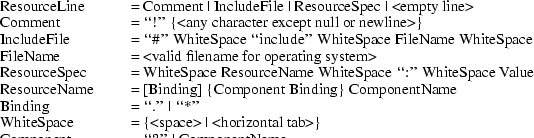
The canonical modifier names are
Ctrl Mod1 Button1
Shift
|
Mod2
|
Button2
Lock
|
|
|
Mod3
|
Button3
|
|
|
Mod4
|
Button4
|
|
|
Mod5
|
Button5
|
|
The canonical event types are

Examples
|
•
|
|
Always put more specific events in the table before more
general ones:
|
Shift <Btn1Down> : twas()\n\
<Btn1Down> : brillig()
|
•
|
|
For double-click on Button1 Up with Shift, use this
specification:
|
|
Shift<Btn1Up>(2) : and()
This is equivalent to the following line with appropriate
timers set between events:
Shift<Btn1Down>,Shift<Btn1Up>,Shift<Btn1Down>,Shift<Btn1Up> : and()
|
|
•
|
|
For double-click on Button1 Down with Shift, use this
specification:
|
|
Shift<Btn1Down>(2) : the()
This is equivalent to the following line with appropriate
timers set between events:
Shift<Btn1Down>,Shift<Btn1Up>,Shift<Btn1Down> : the()
|
|
•
|
|
Mouse motion is always discarded when it occurs between
events in a table where no motion event is specified:
|
|
<Btn1Down>,<Btn1Up> : slithy()
This is taken, even if the pointer moves a bit between
the down and up events. Similarly, any motion event
specified in a translation matches any number of motion
events. If the motion event causes an action procedure to be
invoked, the procedure is invoked after each motion
event.
|
|
•
|
|
If an event sequence consists of a sequence of events
that is also a noninitial subsequence of another
translation, it is not taken if it occurs in the context of
the longer sequence. This occurs mostly in sequences like
the following:
|
|
<Btn1Down>,<Btn1Up> : toves()\n\
<Btn1Up> : did()
The second translation is taken only if the button
release is not preceded by a button press or if there are
intervening events between the press and the release. Be
particularly aware of this when using the repeat notation,
above, with buttons and keys, because their expansion
includes additional events; and when specifying motion
events, because they are implicitly included between any two
other events. In particular, pointer motion and double-click
translations cannot coexist in the same translation
table.
|
|
•
|
|
For single click on Button1 Up with Shift and Meta, use
this specification:
|
|
Shift Meta <Btn1Down>, Shift Meta<Btn1Up>: gyre()
|
|
•
|
|
For multiple clicks greater or equal to a minimum
number, a plus sign (+) may be appended to the final
(rightmost) count in an event sequence. The actions will be
invoked on the count-th click and each subsequent one
arriving within the multi-click time interval. For
example:
|
|
Shift <Btn1Up>(2+) : and()
|
|
•
|
|
To indicate EnterNotify with any modifiers, use
this specification:
|
|
•
|
|
To indicate EnterNotify with no modifiers, use
this specification:
|
|
•
|
|
To indicate EnterNotify with Button1 Down and
Button2 Up and ‘‘don’t care’’
about the other modifiers, use this specification:
|
|
Button1 ~Button2 <Enter> : the()
|
|
•
|
|
To indicate EnterNotify with Button1 down and
Button2 down exclusively, use this specification:
|
|
! Button1 Button2 <Enter> : wabe()
You do not need to use a tilde (~) with an exclamation
point (!).
|
15
X Toolkit Intrinsics X11 Release 6.4
Appendix C
Compatibility
Functions

In prototype versions of the X Toolkit each widget class
implemented an Xt<Widget>Create (for example,
XtLabelCreate) function, in which most of the code
was identical from widget to widget. In the Intrinsics, a
single generic XtCreateWidget performs most of the
common work and then calls the initialize procedure
implemented for the particular widget class.
Each Composite class also implemented the procedures
Xt<Widget>Add and an
Xt<Widget>Delete (for example,
XtButtonBoxAddButton and
XtButtonBoxDeleteButton). In the Intrinsics, the
Composite generic procedures XtManageChildren and
XtUnmanageChildren perform error checking and
screening out of certain children. Then they call the
change_managed procedure implemented for the widget’s
Composite class. If the widget’s parent has not yet
been realized, the call to the change_managed procedure is
delayed until realization time.
Old-style calls can be implemented in the X Toolkit by
defining one-line procedures or macros that invoke a generic
routine. For example, you could define the macro
XtLabelCreate as:
|
#define XtLabelCreate(name, parent, args, num_args) \
((LabelWidget) XtCreateWidget(name, labelWidgetClass, parent, args, num_args))
|
Pop-up shells in some of the prototypes automatically
performed an XtManageChild on their child within
their insert_child procedure. Creators of pop-up children
need to call XtManageChild themselves.
XtAppInitialize and XtVaAppInitialize have
been replaced by XtOpenApplication and
XtVaOpenApplication.
To initialize the Intrinsics internals, create an
application context, open and initialize a display, and
create the initial application shell instance, an
application may use XtAppInitialize or
XtVaAppInitialize.
__ │
Widget XtAppInitialize(app_context_return, application_class, options, num_options,
argc_in_out, argv_in_out, fallback_resources, args, num_args)
XtAppContext *app_context_return;
String application_class;
XrmOptionDescList options;
Cardinal num_options;
int *argc_in_out;
String *argv_in_out;
String *fallback_resources;
ArgList args;
Cardinal num_args;
app_context_return Returns the application
context, if non-NULL.
application_class Specifies the class name of the
application.
|
options
|
|
Specifies the command line options table.
|
|
num_options
|
|
Specifies the number of entries in options.
|
|
argc_in_out
|
|
Specifies a pointer to the number of command line
arguments.
|
|
argv_in_out
|
|
Specifies a pointer to the command line arguments.
|
fallback_resources Specifies resource values to
be used if the application class resource file cannot be
opened or read, or NULL.
|
args
|
|
Specifies the argument list to override any other
resource specifications for the created shell widget.
|
|
num_args
|
|
Specifies the number of entries in the argument
list.
|
│__
The XtAppInitialize function calls
XtToolkitInitialize followed by
XtCreateApplicationContext, then calls
XtOpenDisplay with display_string NULL and
application_name NULL, and finally calls
XtAppCreateShell with application_name NULL,
widget_class applicationShellWidget- Class, and the
specified args and num_args and returns the
created shell. The modified argc and argv
returned by XtDisplayInitialize are returned in
argc_in_out and argv_in_out. If
app_context_return is not NULL, the created
application context is also returned. If the display
specified by the command line cannot be opened, an error
message is issued and XtAppInitialize terminates the
application. If fallback_resources is non-NULL,
XtAppSetFallbackResources is called with the value
prior to calling XtOpenDisplay.
__ │
Widget XtVaAppInitialize(app_context_return, application_class, options, num_options,
argc_in_out, argv_in_out, fallback_resources, ...)
XtAppContext *app_context_return;
String application_class;
XrmOptionDescList options;
Cardinal num_options;
int *argc_in_out;
String *argv_in_out;
String *fallback_resources;
app_context_return Returns the application
context, if non-NULL.
application_class Specifies the class name of the
application.
|
options
|
|
Specifies the command line options table.
|
|
num_options
|
|
Specifies the number of entries in options.
|
|
argc_in_out
|
|
Specifies a pointer to the number of command line
arguments.
|
|
argv_in_out
|
|
Specifies the command line arguments array.
|
fallback_resources Specifies resource values to
be used if the application class resource file cannot be
opened, or NULL.
|
Specifies the variable argument list to override any
other resource specifications for the created shell.
|
│__
The XtVaAppInitialize procedure is identical in
function to XtAppInitialize with the args and
num_args parameters replaced by a varargs list, as
described in Section 2.5.1.
As a convenience to people converting from earlier
versions of the toolkit without application contexts, the
following routines exist: XtInitialize,
XtMainLoop, XtNextEvent,
XtProcessEvent, XtPeekEvent, XtPending,
XtAddInput, XtAddTimeOut,
XtAddWorkProc, XtCreateApplicationShell,
XtAddActions, XtSetSelectionTimeout, and
XtGetSelectionTimeout.
__ │
Widget XtInitialize(shell_name, application_class, options, num_options, argc, argv)
String shell_name;
String application_class;
XrmOptionDescRec options[];
Cardinal num_options;
int *argc;
String argv[];
shell_name This parameter is ignored; therefore,
you can specify NULL.
application_class Specifies the class name of
this application.
|
options
|
|
Specifies how to parse the command line for any
application-specific resources. The options argument
is passed as a parameter to XrmParseCommand.
|
num_options Specifies the number of entries in
the options list.
|
argc
|
|
Specifies a pointer to the number of command line
parameters.
|
|
argv
|
|
Specifies the command line parameters.
|
|
│__
XtInitialize calls XtToolkitInitialize to
initialize the toolkit internals, creates a default
application context for use by the other convenience
routines, calls XtOpenDisplay with
display_string NULL and application_name NULL,
and finally calls XtAppCreateShell with
application_name NULL and returns the created shell.
The semantics of calling XtInitialize more than once
are undefined. This routine has been replaced by
XtOpenApplication.
void XtMainLoop(void)
│__
XtMainLoop first reads the next alternate input,
timer, or X event by calling XtNextEvent. Then it
dispatches this to the appropriate registered procedure by
calling XtDispatchEvent. This routine has been
replaced by XtAppMainLoop.
__ │
void XtNextEvent(event_return)
XEvent *event_return;
event_return Returns the event information to the
specified event structure.
│__
If no input is on the X input queue for the default
application context, XtNextEvent flushes the X output
buffer and waits for an event while looking at the alternate
input sources and timeout values and calling any callback
procedures triggered by them. This routine has been replaced
by XtAppNextEvent. XtInitialize must be called
before using this routine.
void XtProcessEvent(mask)
XtInputMask mask;
|
mask
|
|
Specifies the type of input to process.
|
|
│__
XtProcessEvent processes one X event, timeout, or
alternate input source (depending on the value of
mask), blocking if necessary. It has been replaced by
XtAppProcessEvent. XtInitialize must be called
before using this function.
Boolean XtPeekEvent(event_return)
XEvent *event_return;
event_return Returns the event information to the
specified event structure.
│__
If there is an event in the queue for the default
application context, XtPeekEvent fills in the event
and returns a nonzero value. If no X input is on the queue,
XtPeekEvent flushes the output buffer and blocks
until input is available, possibly calling some timeout
callbacks in the process. If the input is an event,
XtPeekEvent fills in the event and returns a nonzero
value. Otherwise, the input is for an alternate input
source, and XtPeekEvent returns zero. This routine
has been replaced by XtAppPeekEvent.
XtInitialize must be called before using this
routine.
Boolean XtPending()
│__
XtPending returns a nonzero value if there are
events pending from the X server or alternate input sources
in the default application context. If there are no events
pending, it flushes the output buffer and returns a zero
value. It has been replaced by XtAppPending.
XtInitialize must be called before using this
routine.
__ │
XtInputId XtAddInput(source, condition, proc, client_data)
int source;
XtPointer condition;
XtInputCallbackProc proc;
XtPointer client_data;
|
source
|
|
Specifies the source file descriptor on a POSIX-based
system or other operating-system-dependent device
specification.
|
|
condition
|
|
Specifies the mask that indicates either a read, write,
or exception condition or some operating-system-dependent
condition.
|
|
proc
|
|
Specifies the procedure called when input is
available.
|
client_data Specifies the parameter to be passed
to proc when input is available.
│__
The XtAddInput function registers in the default
application context a new source of events, which is usually
file input but can also be file output. (The word
file should be loosely interpreted to mean any sink
or source of data.) XtAddInput also specifies the
conditions under which the source can generate events. When
input is pending on this source in the default application
context, the callback procedure is called. This routine has
been replaced by XtAppAddInput. XtInitialize
must be called before using this routine.
XtIntervalId XtAddTimeOut(interval, proc, client_data)
unsigned long interval;
XtTimerCallbackProc proc;
XtPointer client_data;
|
interval
|
|
Specifies the time interval in milliseconds.
|
|
proc
|
|
Specifies the procedure to be called when time
expires.
|
client_data Specifies the parameter to be passed
to proc when it is called.
│__
The XtAddTimeOut function creates a timeout in
the default application context and returns an identifier
for it. The timeout value is set to interval. The
callback procedure will be called after the time interval
elapses, after which the timeout is removed. This routine
has been replaced by XtAppAddTimeOut.
XtInitialize must be called before using this
routine.
XtWorkProcId XtAddWorkProc(proc, client_data)
XtWorkProc proc;
XtPointer client_data;
|
proc
|
|
Procedure to call to do the work.
|
|
client_data Client data to pass to proc
when it is called.
│__
This routine registers a work procedure in the default
application context. It has been replaced by
XtAppAddWorkProc. XtInitialize must be called
before using this routine.
Widget XtCreateApplicationShell(name, widget_class, args, num_args)
String name;
WidgetClass widget_class;
ArgList args;
Cardinal num_args;
|
name
|
|
This parameter is ignored; therefore, you can specify
NULL.
|
widget_class Specifies the widget class pointer
for the created application shell widget. This will usually
be topLevelShellWidgetClass or a subclass
thereof.
|
args
|
|
Specifies the argument list to override any other
resource specifications.
|
|
num_args
|
|
Specifies the number of entries in args.
|
|
│__
The procedure XtCreateApplicationShell calls
XtAppCreateShell with application_name NULL,
the application class passed to XtInitialize, and the
default application context created by XtInitialize.
This routine has been replaced by
XtAppCreateShell.
An old-format resource type converter procedure pointer
is of type XtConverter.
__ │
typedef void (*XtConverter)(XrmValue*, Cardinal*, XrmValue*, XrmValue*);
XrmValue *args;
Cardinal *num_args;
XrmValue *from;
XrmValue *to;
|
args
|
|
Specifies a list of additional XrmValue arguments
to the converter if additional context is needed to perform
the conversion, or NULL.
|
|
num_args
|
|
Specifies the number of entries in args.
|
|
|
from
|
|
Specifies the value to convert.
|
|
|
to
|
|
Specifies the descriptor to use to return the converted
value.
|
│__
Type converters should perform the following
actions:
|
•
|
|
Check to see that the number of arguments passed is
correct.
|
|
•
|
|
Attempt the type conversion.
|
|
|
•
|
|
If successful, return the size and pointer to the data
in the to argument; otherwise, call
XtWarningMsg and return without modifying the
to argument.
|
Most type converters just take the data described by the
specified from argument and return data by writing
into the specified to argument. A few need other
information, which is available in the specified argument
list. A type converter can invoke another type converter,
which allows differing sources that may convert into a
common intermediate result to make maximum use of the type
converter cache.
Note that the address returned in to->addr
cannot be that of a local variable of the converter because
this is not valid after the converter returns. It should be
a pointer to a static variable.
The procedure type XtConverter has been replaced
by XtTypeConverter.
The XtStringConversionWarning function is a
convenience routine for old-format resource converters that
convert from strings.
__ │
void XtStringConversionWarning(src, dst_type)
String src, dst_type;
|
src
|
|
Specifies the string that could not be converted.
|
|
dst_type
|
|
Specifies the name of the type to which the string could
not be converted.
|
│__
The XtStringConversionWarning function issues a
warning message with name
‘‘conversionError’’, type
‘‘string’’, class
‘‘XtToolkitError, and the default message string
‘‘Cannot convert "src" to type
dst_type’’. This routine has been
superseded by XtDisplayStringConversionWarning.
To register an old-format converter, use
XtAddConverter or XtAppAddConverter.
__ │
void XtAddConverter(from_type, to_type, converter, convert_args, num_args)
String from_type;
String to_type;
XtConverter converter;
XtConvertArgList convert_args;
Cardinal num_args;
|
from_type
|
|
Specifies the source type.
|
|
|
to_type
|
|
Specifies the destination type.
|
|
|
converter
|
|
Specifies the type converter procedure.
|
|
convert_args Specifies how to compute the
additional arguments to the converter, or NULL.
|
num_args
|
|
Specifies the number of entries in
convert_args.
|
│__
XtAddConverter is equivalent in function to
XtSetTypeConverter with cache_type equal to
XtCacheAll for old-format type converters. It has
been superseded by XtSetTypeConverter.
void XtAppAddConverter(app_context, from_type, to_type, converter, convert_args, num_args)
XtAppContext app_context;
String from_type;
String to_type;
XtConverter converter;
XtConvertArgList convert_args;
Cardinal num_args;
app_context Specifies the application
context.
|
from_type
|
|
Specifies the source type.
|
|
|
to_type
|
|
Specifies the destination type.
|
|
|
converter
|
|
Specifies the type converter procedure.
|
|
convert_args Specifies how to compute the
additional arguments to the converter, or NULL.
|
num_args
|
|
Specifies the number of entries in
convert_args.
|
│__
XtAppAddConverter is equivalent in function to
XtAppSetTypeConverter with cache_type equal to
XtCacheAll for old-format type converters. It has
been superseded by XtAppSetTypeConverter.
To invoke resource conversions, a client may use
XtConvert or, for old-format converters only,
XtDirectConvert.
__ │
void XtConvert(w, from_type, from, to_type, to_return)
Widget w;
String from_type;
XrmValuePtr from;
String to_type;
XrmValuePtr to_return;
|
w
|
|
Specifies the widget to use for additional arguments, if
any are needed.
|
|
from_type
|
|
Specifies the source type.
|
|
|
from
|
|
Specifies the value to be converted.
|
|
|
to_type
|
|
Specifies the destination type.
|
|
|
to_return
|
|
Returns the converted value.
|
|
void XtDirectConvert(converter, args, num_args, from, to_return)
XtConverter converter;
XrmValuePtr args;
Cardinal num_args;
XrmValuePtr from;
XrmValuePtr to_return;
|
converter
|
|
Specifies the conversion procedure to be called.
|
|
args
|
|
Specifies the argument list that contains the additional
arguments needed to perform the conversion (often NULL).
|
|
num_args
|
|
Specifies the number of entries in args.
|
|
|
from
|
|
Specifies the value to be converted.
|
|
|
to_return
|
|
Returns the converted value.
|
|
│__
The XtConvert function looks up the type
converter registered to convert from_type to
to_type, computes any additional arguments needed,
and then calls XtDirectConvert or
XtCallConverter. The XtDirectConvert function
looks in the converter cache to see if this conversion
procedure has been called with the specified arguments. If
so, it returns a descriptor for information stored in the
cache; otherwise, it calls the converter and enters the
result in the cache.
Before calling the specified converter,
XtDirectConvert sets the return value size to zero
and the return value address to NULL. To determine if the
conversion was successful, the client should check
to_return.addr for non-NULL. The data returned by
XtConvert must be copied immediately by the caller,
as it may point to static data in the type converter.
XtConvert has been replaced by
XtConvertAndStore, and XtDirectConvert has
been superseded by XtCallConverter.
To deallocate a shared GC when it is no longer needed,
use XtDestroyGC.
__ │
void XtDestroyGC(w, gc)
Widget w;
GC gc;
|
w
|
|
Specifies any object on the display for which the shared
GC was created. Must be of class Object or any subclass
thereof.
|
|
gc
|
|
Specifies the shared GC to be deallocated.
|
│__
References to sharable GCs are counted and a free
request is generated to the server when the last user of a
given GC destroys it. Note that some earlier versions of
XtDestroyGC had only a gc argument. Therefore,
this function is not very portable, and you are encouraged
to use XtReleaseGC instead.
To declare an action table in the default application
context and register it with the translation manager, use
XtAddActions.
__ │
void XtAddActions(actions, num_actions)
XtActionList actions;
Cardinal num_actions;
|
actions
|
|
Specifies the action table to register.
|
|
num_actions Specifies the number of entries in
actions.
│__
If more than one action is registered with the same
name, the most recently registered action is used. If
duplicate actions exist in an action table, the first is
used. The Intrinsics register an action table for
XtMenuPopup and XtMenuPopdown as part of X
Toolkit initialization. This routine has been replaced by
XtAppAddActions. XtInitialize must be called
before using this routine.
To set the Intrinsics selection timeout in the default
application context, use XtSetSelectionTimeout.
__ │
void XtSetSelectionTimeout(timeout)
unsigned long timeout;
|
timeout
|
|
Specifies the selection timeout in milliseconds. This
routine has been replaced by
XtAppSetSelectionTimeout. XtInitialize must be
called before using this routine.
|
│__
To get the current selection timeout value in the
default application context, use
XtGetSelectionTimeout.
__ │
unsigned long XtGetSelectionTimeout()
│__
The selection timeout is the time within which the two
communicating applications must respond to one another. If
one of them does not respond within this interval, the
Intrinsics abort the selection request.
This routine has been replaced by
XtAppGetSelectionTimeout. XtInitialize must be
called before using this routine.
To obtain the global error database (for example, to
merge with an application- or widget-specific database), use
XtGetErrorDatabase.
__ │
XrmDatabase *XtGetErrorDatabase()
│__
The XtGetErrorDatabase function returns the
address of the error database. The Intrinsics do a lazy
binding of the error database and do not merge in the
database file until the first call to
XtGetErrorDatbaseText. This routine has been replaced
by XtAppGetErrorDatabase.
An error message handler can obtain the error database
text for an error or a warning by calling
XtGetErrorDatabaseText.
__ │
void XtGetErrorDatabaseText(name, type, class, default, buffer_return, nbytes)
String name, type, class;
String default;
String buffer_return;
int nbytes;
|
type
|
|
Specify the name and type that are concatenated to form
the resource name of the error message.
|
|
class
|
|
Specifies the resource class of the error message.
|
|
default
|
|
Specifies the default message to use if an error
database entry is not found.
|
buffer_return Specifies the buffer into which the
error message is to be returned.
|
nbytes
|
|
Specifies the size of the buffer in bytes.
|
│__
The XtGetErrorDatabaseText returns the
appropriate message from the error database associated with
the default application context or returns the specified
default message if one is not found in the error database.
To form the full resource name and class when querying the
database, the name and type are concatenated
with a single ‘‘.’’ between them and
the class is concatenated with itself with a single
‘‘.’’ if it does not already contain
a ‘‘.’’. This routine has been
superseded by XtAppGetErrorDatabaseText.
To register a procedure to be called on fatal error
conditions, use XtSetErrorMsgHandler.
__ │
void XtSetErrorMsgHandler(msg_handler)
XtErrorMsgHandler msg_handler;
msg_handler Specifies the new fatal error
procedure, which should not return.
│__
The default error handler provided by the Intrinsics
constructs a string from the error resource database and
calls XtError. Fatal error message handlers should
not return. If one does, subsequent Intrinsics behavior is
undefined. This routine has been superseded by
XtAppSetErrorMsgHandler.
To call the high-level error handler, use
XtErrorMsg.
__ │
void XtErrorMsg(name, type, class, default, params, num_params)
String name;
String type;
String class;
String default;
String *params;
Cardinal *num_params;
|
name
|
|
Specifies the general kind of error.
|
|
|
type
|
|
Specifies the detailed name of the error.
|
|
class
|
|
Specifies the resource class.
|
|
|
default
|
|
Specifies the default message to use if an error
database entry is not found.
|
|
params
|
|
Specifies a pointer to a list of values to be stored in
the message.
|
num_params Specifies the number of entries in
params.
│__
This routine has been superseded by
XtAppErrorMsg.
To register a procedure to be called on nonfatal error
conditions, use XtSetWarningMsgHandler.
__ │
void XtSetWarningMsgHandler(msg_handler)
XtErrorMsgHandler msg_handler;
msg_handler Specifies the new nonfatal error
procedure, which usually returns.
│__
The default warning handler provided by the Intrinsics
constructs a string from the error resource database and
calls XtWarning. This routine has been superseded by
XtAppSetWarningMsgHandler.
To call the installed high-level warning handler, use
XtWarningMsg.
__ │
void XtWarningMsg(name, type, class, default, params, num_params)
String name;
String type;
String class;
String default;
String *params;
Cardinal *num_params;
|
name
|
|
Specifies the general kind of error.
|
|
|
type
|
|
Specifies the detailed name of the error.
|
|
class
|
|
Specifies the resource class.
|
|
|
default
|
|
Specifies the default message to use if an error
database entry is not found.
|
|
params
|
|
Specifies a pointer to a list of values to be stored in
the message.
|
num_params Specifies the number of entries in
params.
│__
This routine has been superseded by
XtAppWarningMsg.
To register a procedure to be called on fatal error
conditions, use XtSetErrorHandler.
__ │
void XtSetErrorHandler(handler)
XtErrorHandler handler;
|
handler
|
|
Specifies the new fatal error procedure, which should
not return.
|
│__
The default error handler provided by the Intrinsics is
_XtError. On POSIX-based systems, it prints the
message to standard error and terminates the application.
Fatal error message handlers should not return. If one does,
subsequent X Toolkit behavior is undefined. This routine has
been superseded by XtAppSetErrorHandler.
To call the installed fatal error procedure, use
XtError.
__ │
void XtError(message)
String message;
|
message
|
|
Specifies the message to be reported.
|
|
│__
Most programs should use XtAppErrorMsg, not
XtError, to provide for customization and
internationalization of error messages. This routine has
been superseded by XtAppError.
To register a procedure to be called on nonfatal error
conditions, use XtSetWarningHandler.
__ │
void XtSetWarningHandler(handler)
XtErrorHandler handler;
|
handler
|
|
Specifies the new nonfatal error procedure, which
usually returns.
|
│__
The default warning handler provided by the Intrinsics
is _XtWarning. On POSIX-based systems, it prints the
message to standard error and returns to the caller. This
routine has been superseded by
XtAppSetWarningHandler.
To call the installed nonfatal error procedure, use
XtWarning.
__ │
void XtWarning(message)
String message;
|
message
|
|
Specifies the nonfatal error message to be reported.
|
│__
Most programs should use XtAppWarningMsg, not
XtWarning, to provide for customization and
internationalization of warning messages. This routine has
been superseded by XtAppWarning.
16
X Toolkit Intrinsics X11 Release 6.4
Appendix D
Intrinsics Error
Messages
All Intrinsics errors and warnings have class
‘‘XtToolkitError’’. The following
two tables summarize the common errors and warnings that can
be generated by the Intrinsics. Additional
implementation-dependent messages are permitted.
Error Messages

Warning Messages


17
X Toolkit Intrinsics X11 Release 6.4
Appendix E
Defined Strings
The StringDefs.h header file contains definitions
for the following resource name, class, and representation
type symbolic constants.
Resource names:
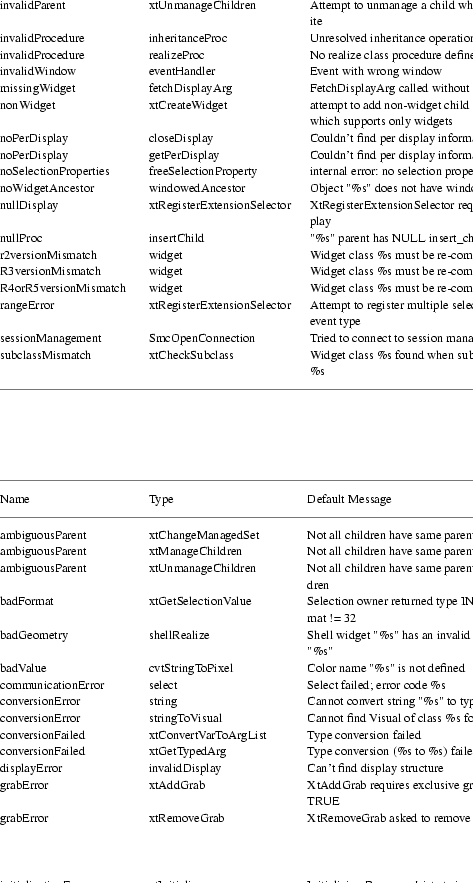
Resource classes:
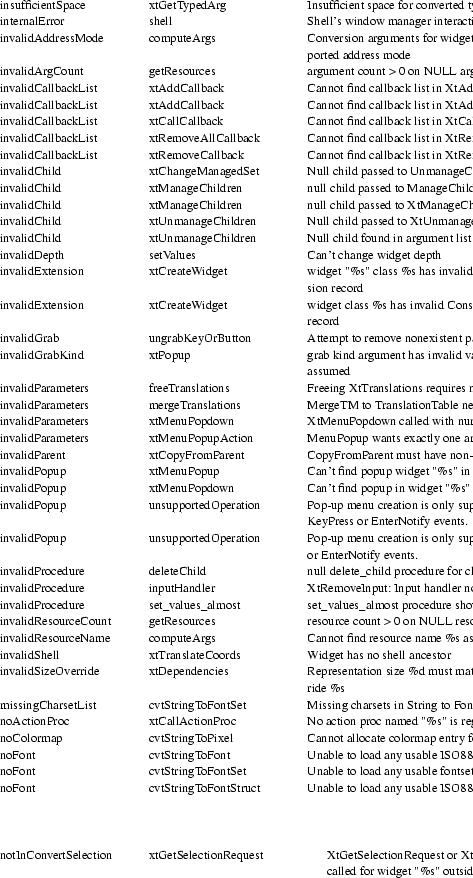
Resource representation types:
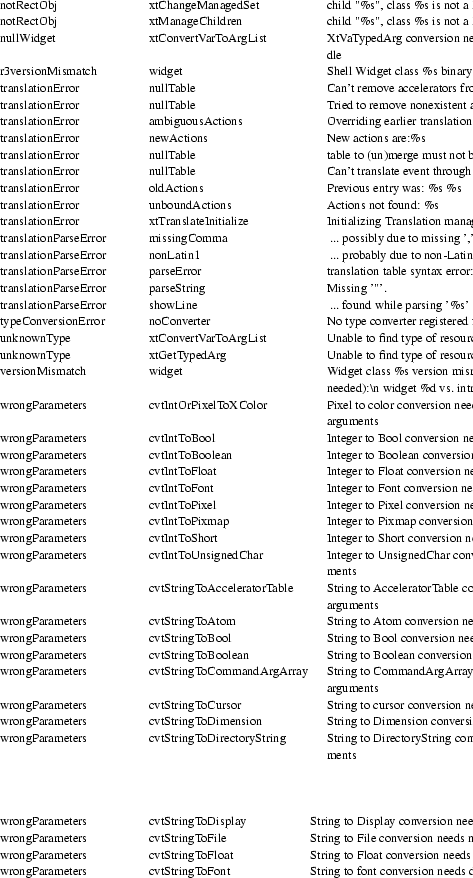
Boolean enumeration constants:
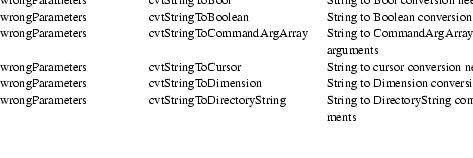
Orientation enumeration constants:

Text edit enumeration constants:
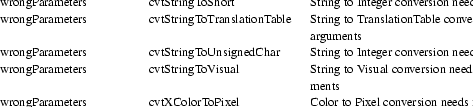
Color enumeration constants:

Font constant:

Hooks for External Agents constants:
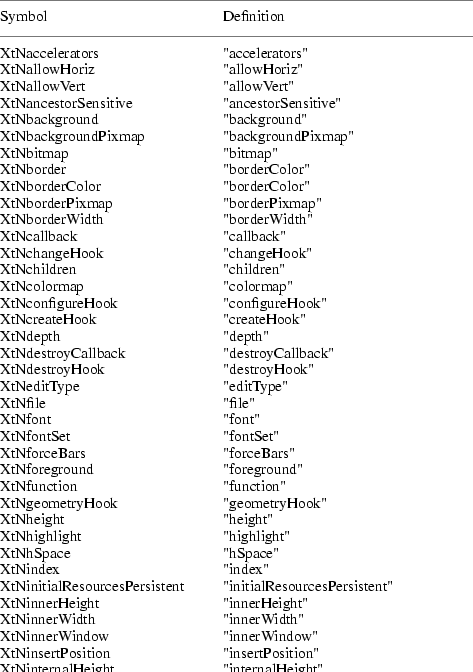
The Shell.h header file contains definitions for
the following resource name, class, and representation type
symbolic constants.
Resource names:
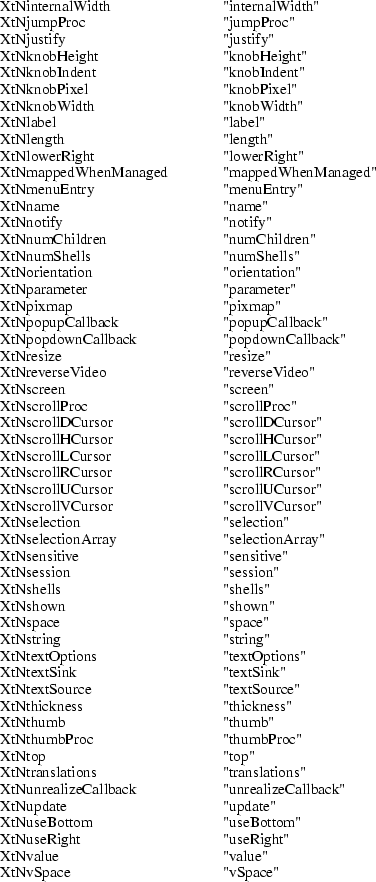
Resource classes:
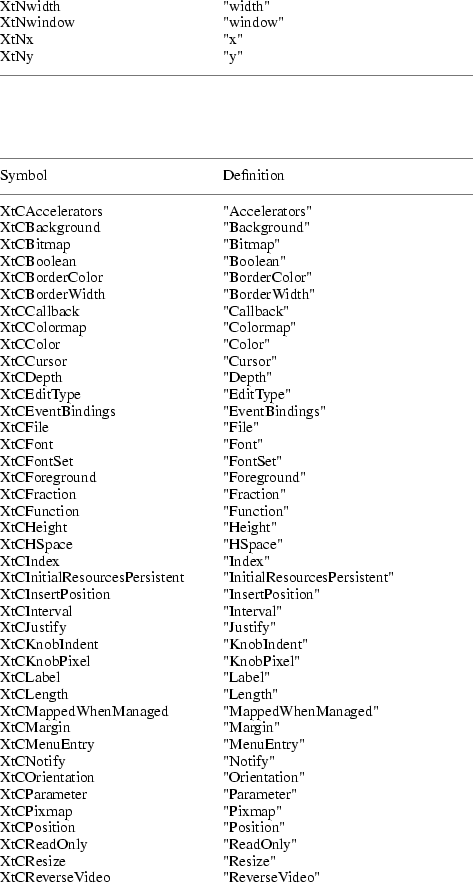
Resource representation types:

18
X Toolkit Intrinsics X11 Release 6.4
Appendix F
Resource Configuration
Management
Setting and changing resources in X applications can be
difficult for both the application programmer and the end
user. Resource Configuration Management (RCM)
addresses this problem by changing the X Intrinsics
to immediately modify a resource for a specified widget and
each child widget in the hierarchy. In this context,
immediate means: no sourcing of a resource file is required;
the application does not need to be restarted for the new
resource values to take effect; and the change occurs
immediately.
The main difference between RCM and the
Editres protocol is that the RCM customizing
hooks reside in the Intrinsics and thus are linked
with other toolkits such as Motif and the Athena widgets.
However, the EditRes protocol requires the
application to link with the EditRes routines in the
Xmu library and Xmu is not used by all applications that use
Motif. Also, the EditRes protocol uses ClientMessage,
whereas the RCM Intrinsics hooks use
PropertyNotify events.
X Properties and the PropertyNotify events are
used to implement RCM and allow on-the-fly resource
customization. When the X Toolkit is initialized, two atoms
are interned with the strings Custom Init and
Custom Data. Both _XtCreatePopupShell and
_XtAppCreateShell register a PropertyNotify
event handler to handle these properties.
A customization tool uses the Custom Init
property to ping an application to get the
application’s toplevel window. When the
application’s property notify event handler is
invoked, the handler deletes the property. No data is
transferred in this property.
A customization tool uses the Custom Data
property to tell an application that it should change a
resource’s value. The data in the property contains
the length of the resource name (the number of bytes in the
resource name), the resource name and the new value for the
resource. This property’s type is XA_STRING and
the format of the string is:
|
1.
|
|
The length of the resource name (the number of bytes in
the resource name)
|
When setting the application’s resource, the event
handler calls functions to walk the application’s
widget tree, determining which widgets are affected by the
resource string, and then applying the value with
XtSetValues. As the widget tree is recursively
descended, at each level in the widget tree a resource part
is tested for a match. When the entire resource string has
been matched, the value is applied to the widget or
widgets.
Before a value is set on a widget, it is first
determined if the last part of the resource is a valid
resource for that widget. It must also add the resource to
the application’s resource database and then query it
using specific resource strings that is builds from the
widget information.
19
20
Table of Contents
|
Acknowledgments . . . . . . . . . . . . . . . . .
. . .
|
|
|
|
|
|
ix
|
About This Manual . . . . . . . . . . . . . . . .
. . . xii
Chapter 1 — Intrinsics and Widgets .
. . . . . . . . . . 1
1.1. Intrinsics . . . . . . . . . . . . .
. . . . . . . 1
1.2. Languages . . . . . . . . . . . . . .
. . . . . . . 1
1.3. Procedures and Macros . . . . . . . .
. . . . . . . 1
1.4. Widgets . . . . . . . . . . . . . . .
. . . . . . . 1
1.4.1. Core Widgets . . . . . . . . . . . . . . .
. . . 1
1.4.1.1. CoreClassPart Structure . . . . . . . .
. . . . 1
1.4.1.2. CorePart Structure . . . . . . . . . . .
. . . 1
1.4.1.3. Core Resources . . . . . . . . .
. . . . . . . 1
1.4.1.4. CorePart Default Values . . . . . . . .
. . . . 1
1.4.2. Composite Widgets . . . . . . . . . . . .
. . . . 1
1.4.2.1. CompositeClassPart Structure . . . . . .
. . . 1
1.4.2.2. CompositePart Structure . . . . . . . .
. . . . 1
1.4.2.3. Composite Resources . . . . . . .
. . . . . . . 1
1.4.2.4. CompositePart Default Values . . . . . .
. . . 1
1.4.3. Constraint Widgets . . . . . . . . . . . .
. . . 1
1.4.3.1. ConstraintClassPart Structure . . . . .
. . . . 1
1.4.3.2. ConstraintPart Structure . . . . . . . .
. . . 1
1.4.3.3. Constraint Resources . . . . . .
. . . . . . . 1
1.5. Implementation-Specific Types . . . .
. . . . . . . 1
1.6. Widget Classing . . . . . . . . . . .
. . . . . . . 1
1.6.1. Widget Naming Conventions . . . . .
. . . . . . . 1
1.6.2. Widget Subclassing in Public .h Files . .
. . . . 1
1.6.3. Widget Subclassing in Private .h Files . .
. . . 1
1.6.4. Widget Subclassing in .c Files . . . . . .
. . . 1
1.6.5. Widget Class and Superclass Look Up . . .
. . . . 1
1.6.6. Widget Subclass Verification . . . . . . .
. . . 1
1.6.7. Superclass Chaining . . . . . . . . . . .
. . . . 1
1.6.8. Class Initialization: class_initialize and
class_part_initialize Procedures . . . . . . . . . . . .
1
1.6.9. Initializing a Widget Class . . . .
. . . . . . . 1
1.6.10. Inheritance of Superclass Operations . .
. . . . 1
1.6.11. Invocation of Superclass Operations . . .
. . . 1
1.6.12. Class Extension Records . . . . . . . . .
. . . 1
Chapter 2 — Widget Instantiation . . . . .
. . . . . . . 2
2.1. Initializing the X Toolkit . . . . .
. . . . . . . 2
2.2. Establishing the Locale . . . . . . .
. . . . . . . 2
2.3. Loading the Resource Database . . . .
. . . . . . . 2
2.4. Parsing the Command Line . . . . . .
. . . . . . . 2
2.5. Creating Widgets . . . . . . . . . .
. . . . . . . 2
2.5.1. Creating and Merging Argument Lists
. . . . . . . 2
2.5.2. Creating a Widget Instance . . . .
. . . . . . . 2
2.5.3. Creating an Application Shell
Instance . . . . . 2
2.5.4. Convenience Procedure to Initialize an
Application . . . . . . . . . . . . . . . . . . . . . .
2
2.5.5. Widget Instance Allocation: The allocate
Procedure . . . . . . . . . . . . . . . . . . . . . . .
2
2.5.6. Widget Instance Initialization: The
initialize Procedure . . . . . . . . . . . . . . . . . .
2
2.5.7. Constraint Instance Initialization: The
ConstraintClassPart initialize Procedure . . . . . . . .
2
2.5.8. Nonwidget Data Initialization: The
initialize_hook Procedure . . . . . . . . . . . . . . .
2
2.6. Realizing Widgets . . . . . . . . . .
. . . . . . . 2
2.6.1. Widget Instance Window Creation: The
realize Procedure . . . . . . . . . . . . . . . . . . . . .
. . 2
2.6.2. Window Creation Convenience Routine . . .
. . . . 2
2.7. Obtaining Window Information from a
Widget . . . . 2
2.7.1. Unrealizing Widgets . . . . . . . .
. . . . . . . 2
2.8. Destroying Widgets . . . . . . . . .
. . . . . . . 2
2.8.1. Adding and Removing Destroy
Callbacks . . . . . . 2
2.8.2. Dynamic Data Deallocation: The destroy
Procedure . . . . . . . . . . . . . . . . . . . . . . .
2
2.8.3. Dynamic Constraint Data Deallocation: The
ConstraintClassPart destroy Procedure . . . . . . . . .
2
2.8.4. Widget Instance Deallocation: The
deallocate Procedure . . . . . . . . . . . . . . . . . . . .
. . . 2
2.9. Exiting from an Application . . . . .
. . . . . . . 2
Chapter 3 — Composite Widgets and Their
Children . . . . 3
3.1. Addition of Children to a Composite Widget:
The insert_child Procedure . . . . . . . . . . . . . . . . .
3
3.2. Insertion Order of Children: The
insert_position Procedure . . . . . . . . . . . . . . .
3
3.3. Deletion of Children: The delete_child
Procedure . . . . . . . . . . . . . . . . . . . . . . .
3
3.4. Adding and Removing Children from the
Managed Set . . . . . . . . . . . . . . . . . . . . . .
. . . . 3
3.4.1. Managing Children . . . . . . . . .
. . . . . . . 3
3.4.2. Unmanaging Children . . . . . . . .
. . . . . . . 3
3.4.3. Bundling Changes to the Managed Set
. . . . . . . 3
3.4.4. Determining if a Widget Is Managed
. . . . . . . 3
3.5. Controlling When Widgets Get Mapped .
. . . . . . . 3
3.6. Constrained Composite Widgets . . . . . . .
. . . . 3
Chapter 4 — Shell Widgets . . . . . . . . .
. . . . . . 4
4.1. Shell Widget Definitions . . . . . . . . . .
. . . 4
4.1.1. ShellClassPart Definitions . . . . . . . .
. . . 4
4.1.2. ShellPart Definition . . . . . . . . . . .
. . . 4
4.1.3. Shell Resources . . . . . . . . . .
. . . . . . . 4
4.1.4. ShellPart Default Values . . . . .
. . . . . . . 4
4.2. Session Participation . . . . . . . .
. . . . . . . 4
4.2.1. Joining a Session . . . . . . . . .
. . . . . . . 4
4.2.2. Saving Application State . . . . .
. . . . . . . 4
4.2.2.1. Requesting Interaction . . . . .
. . . . . . . 4
4.2.2.2. Interacting with the User during a
Checkpoint . . . . . . . . . . . . . . . . . . . . . . .
4
4.2.2.3. Responding to a Shutdown
Cancellation . . . . . 4
4.2.2.4. Completing a Save . . . . . . . .
. . . . . . . 4
4.2.3. Responding to a Shutdown . . . . .
. . . . . . . 4
4.2.4. Resigning from a Session . . . . .
. . . . . . . 4
Chapter 5 — Pop-Up Widgets . . . . . . . .
. . . . . . . 5
5.1. Pop-Up Widget Types . . . . . . . . .
. . . . . . . 5
5.2. Creating a Pop-Up Shell . . . . . . .
. . . . . . . 5
5.3. Creating Pop-Up Children . . . . . .
. . . . . . . 5
5.4. Mapping a Pop-Up Widget . . . . . . .
. . . . . . . 5
5.5. Unmapping a Pop-Up Widget . . . . . .
. . . . . . . 5
Chapter 6 — Geometry Management . . . . . .
. . . . . . 6
6.1. Initiating Geometry Changes . . . . . . . .
. . . . 6
6.2. General Geometry Manager Requests . . . . .
. . . . 6
6.3. Resize Requests . . . . . . . . . . . . . .
. . . . 6
6.4. Potential Geometry Changes . . . . . . . . .
. . . 6
6.5. Child Geometry Management: The
geometry_manager Procedure . . . . . . . . . . . . . . . . .
. . . . . . 6
6.6. Widget Placement and Sizing . . . . . . . .
. . . . 6
6.7. Preferred Geometry . . . . . . . . . . . . .
. . . 6
6.8. Size Change Management: The resize Procedure
. . . 6
Chapter 7 — Event Management . . . . . . .
. . . . . . . 7
7.1. Adding and Deleting Additional Event
Sources . . . 7
7.1.1. Adding and Removing Input Sources .
. . . . . . . 7
7.1.2. Adding and Removing Blocking
Notifications . . . 7
7.1.3. Adding and Removing Timeouts . . .
. . . . . . . 7
7.1.4. Adding and Removing Signal
Callbacks . . . . . . 7
7.2. Constraining Events to a Cascade of
Widgets . . . . 7
7.2.1. Requesting Key and Button Grabs . .
. . . . . . . 7
7.3. Focusing Events on a Child . . . . .
. . . . . . . 7
7.3.1. Events for Drawables That Are Not a
Widget’s Window . . . . . . . . . . . . . . . . .
. . . . . . . . 7
7.4. Querying Event Sources . . . . . . .
. . . . . . . 7
7.5. Dispatching Events . . . . . . . . .
. . . . . . . 7
7.6. The Application Input Loop . . . . .
. . . . . . . 7
7.7. Setting and Checking the Sensitivity
State of a Widget . . . . . . . . . . . . . . . . . . .
. . . . . . 7
7.8. Adding Background Work Procedures . .
. . . . . . . 7
7.9. X Event Filters . . . . . . . . . . . . . .
. . . . 7
7.9.1. Pointer Motion Compression . . . . . . . .
. . . 7
7.9.2. Enter/Leave Compression . . . . . . . . .
. . . . 7
7.9.3. Exposure Compression . . . . . . . . . . .
. . . 7
7.10. Widget Exposure and Visibility . . . . . .
. . . . 7
7.10.1. Redisplay of a Widget: The expose
Procedure . . . . . . . . . . . . . . . . . . . . . . . . .
. . . 7
7.10.2. Widget Visibility . . . . . . . . . . . .
. . . 7
7.11. X Event Handlers . . . . . . . . . . . . .
. . . . 7
7.11.1. Event Handlers That Select Events . . . .
. . . 7
7.11.2. Event Handlers That Do Not Select Events
. . . . 7
7.11.3. Current Event Mask . . . . . . . . . . .
. . . . 7
7.11.4. Event Handlers for X11 Protocol
Extensions . . . 7
7.12. Using the Intrinsics in a Multi-Threaded
Environment . . . . . . . . . . . . . . . . . . . . . .
7
7.12.1. Initializing a Multi-Threaded
Intrinsics Application . . . . . . . . . . . . . . . . .
. . . . . 7
7.12.2. Locking X Toolkit Data Structures
. . . . . . . 7
7.12.2.1. Locking the Application Context
. . . . . . . 7
7.12.2.2. Locking the Process . . . . . . . . . .
. . . 7
7.12.3. Event Management in a Multi-Threaded
Environment . . . . . . . . . . . . . . . . . . . . . .
7
Chapter 8 — Callbacks . . . . . . . . . . .
. . . . . . 8
8.1. Using Callback Procedure and Callback
List Definitions . . . . . . . . . . . . . . . . . . . .
. . 8
8.2. Identifying Callback Lists . . . . .
. . . . . . . 8
8.3. Adding Callback Procedures . . . . .
. . . . . . . 8
8.4. Removing Callback Procedures . . . .
. . . . . . . 8
8.5. Executing Callback Procedures . . . . . . .
. . . . 8
8.6. Checking the Status of a Callback List . . .
. . . 8
Chapter 9 — Resource Management . . . . . .
. . . . . . 9
9.1. Resource Lists . . . . . . . . . . . . . . .
. . . 9
9.2. Byte Offset Calculations . . . . . . . . . .
. . . 9
9.3. Superclass-to-Subclass Chaining of Resource
Lists . . . . . . . . . . . . . . . . . . . . . . . . .
9
9.4. Subresources . . . . . . . . . . . . . . . .
. . . 9
9.5. Obtaining Application Resources . . .
. . . . . . . 9
9.6. Resource Conversions . . . . . . . . . . . .
. . . 9
9.6.1. Predefined Resource Converters . . . . . .
. . . 9
9.6.2. New Resource Converters . . . . . . . . .
. . . . 9
9.6.3. Issuing Conversion Warnings . . . . . . .
. . . . 9
9.6.4. Registering a New Resource
Converter . . . . . . 9
9.6.5. Resource Converter Invocation . . .
. . . . . . . 9
9.7. Reading and Writing Widget State . .
. . . . . . . 9
9.7.1. Obtaining Widget State . . . . . .
. . . . . . . 9
9.7.1.1. Widget Subpart Resource Data: The
get_values_hook Procedure . . . . . . . . . . . . . . .
9
9.7.1.2. Widget Subpart State . . . . . . . . . .
. . . 9
9.7.2. Setting Widget State . . . . . . .
. . . . . . . 9
9.7.2.1. Widget State: The set_values Procedure .
. . . 9
9.7.2.2. Widget State: The set_values_almost
Procedure . . . . . . . . . . . . . . . . . . . . . . .
9
9.7.2.3. Widget State: The ConstraintClassPart
set_values Procedure . . . . . . . . . . . . . . . . . .
9
9.7.2.4. Widget Subpart State . . . . . . . . . .
. . . 9
9.7.2.5. Widget Subpart Resource Data: The
set_values_hook Procedure . . . . . . . . . . . . . . .
9
Chapter 10 — Translation Management . . . .
. . . . . . 10
10.1. Action Tables . . . . . . . . . . .
. . . . . . . 10
10.1.1. Action Table Registration . . . .
. . . . . . . 10
10.1.2. Action Names to Procedure
Translations . . . . . 10
10.1.3. Action Hook Registration . . . . .
. . . . . . . 10
10.2. Translation Tables . . . . . . . . .
. . . . . . . 10
10.2.1. Event Sequences . . . . . . . . .
. . . . . . . 10
10.2.2. Action Sequences . . . . . . . . .
. . . . . . . 10
10.2.3. Multi-Click Time . . . . . . . . .
. . . . . . . 10
10.3. Translation Table Management . . . .
. . . . . . . 10
10.4. Using Accelerators . . . . . . . . .
. . . . . . . 10
10.5. KeyCode-to-KeySym Conversions . . . . . . .
. . . 10
10.6. Obtaining a KeySym in an Action
Procedure . . . . 10
10.7. KeySym-to-KeyCode Conversions . . . . . . .
. . . 10
10.8. Registering Button and Key Grabs for
Actions . . . . . . . . . . . . . . . . . . . . . . . .
. . . . 10
10.9. Invoking Actions Directly . . . . .
. . . . . . . 10
10.10. Obtaining a Widget’s Action List . .
. . . . . . 10
Chapter 11 — Utility Functions . . . . . .
. . . . . . . 11
11.1. Determining the Number of Elements in an
Array . . . . . . . . . . . . . . . . . . . . . . . . .
. . . 11
11.2. Translating Strings to Widget
Instances . . . . . 11
11.3. Managing Memory Usage . . . . . . .
. . . . . . . 11
11.4. Sharing Graphics Contexts . . . . .
. . . . . . . 11
11.5. Managing Selections . . . . . . . . . . . .
. . . 11
11.5.1. Setting and Getting the Selection
Timeout Value . . . . . . . . . . . . . . . . . . . . .
. . . . 11
11.5.2. Using Atomic Transfers . . . . . . . . .
. . . . 11
11.5.2.1. Atomic Transfer Procedures . . . . . .
. . . . 11
11.5.2.2. Getting the Selection Value . . . . . .
. . . 11
11.5.2.3. Setting the Selection Owner . . . . . .
. . . 11
11.5.3. Using Incremental Transfers . . . . . . .
. . . 11
11.5.3.1. Incremental Transfer Procedures . . . .
. . . 11
11.5.3.2. Getting the Selection Value
Incrementally . . . . . . . . . . . . . . . . . . . . . . .
. . . . . 11
11.5.3.3. Setting the Selection Owner for
Incremental Transfers . . . . . . . . . . . . . . . . .
11
11.5.4. Setting and Retrieving Selection Target
Parameters . . . . . . . . . . . . . . . . . . . . . . .
11
11.5.5. Generating MULTIPLE Requests . . . . . .
. . . . 11
11.5.6. Auxiliary Selection Properties . . . . .
. . . . 11
11.5.7. Retrieving the Most Recent Timestamp . .
. . . . 11
11.5.8. Retrieving the Most Recent Event . . . .
. . . . 11
11.6. Merging Exposure Events into a Region . . .
. . . 11
11.7. Translating Widget Coordinates . . .
. . . . . . . 11
11.8. Translating a Window to a Widget . .
. . . . . . . 11
11.9. Handling Errors . . . . . . . . . .
. . . . . . . 11
11.10. Setting WM_COLORMAP_WINDOWS . . . .
. . . . . . . 11
11.11. Finding File Names . . . . . . . .
. . . . . . . 11
11.12. Hooks for External Agents . . . . .
. . . . . . . 11
11.12.1. Hook Object Resources . . . . . .
. . . . . . . 11
11.12.2. Querying Open Displays . . . . .
. . . . . . . 11
Chapter 12 — Nonwidget Objects . . . . . .
. . . . . . . 12
12.1. Data Structures . . . . . . . . . . . . . .
. . . 12
12.2. Object Objects . . . . . . . . . . .
. . . . . . . 12
12.2.1. ObjectClassPart Structure . . . . . . . .
. . . 12
12.2.2. ObjectPart Structure . . . . . . . . . .
. . . . 12
12.2.3. Object Resources . . . . . . . . .
. . . . . . . 12
12.2.4. ObjectPart Default Values . . . .
. . . . . . . 12
12.2.5. Object Arguments to Intrinsics Routines .
. . . 12
12.2.6. Use of Objects . . . . . . . . . .
. . . . . . . 12
12.3. Rectangle Objects . . . . . . . . .
. . . . . . . 12
12.3.1. RectObjClassPart Structure . . . . . . .
. . . . 12
12.3.2. RectObjPart Structure . . . . . . . . . .
. . . 12
12.3.3. RectObj Resources . . . . . . . .
. . . . . . . 12
12.3.4. RectObjPart Default Values . . . .
. . . . . . . 12
12.3.5. Widget Arguments to Intrinsics
Routines . . . . 12
12.3.6. Use of Rectangle Objects . . . . . . . .
. . . . 12
12.4. Undeclared Class . . . . . . . . . . . . .
. . . . 12
12.5. Widget Arguments to Intrinsics Routines . .
. . . 12
Chapter 13 — Evolution of the Intrinsics .
. . . . . . . 13
13.1. Determining Specification Revision
Level . . . . . 13
13.2. Release 3 to Release 4 Compatibility
. . . . . . . 13
13.2.1. Additional Arguments . . . . . . . . . .
. . . . 13
13.2.2. set_values_almost Procedures . . . . . .
. . . . 13
13.2.3. Query Geometry . . . . . . . . . . . . .
. . . . 13
13.2.4. unrealizeCallback Callback List . . . . .
. . . 13
13.2.5. Subclasses of WMShell . . . . . . . . . .
. . . 13
13.2.6. Resource Type Converters . . . . . . . .
. . . . 13
13.2.7. KeySym Case Conversion Procedure . . . .
. . . . 13
13.2.8. Nonwidget Objects . . . . . . . . . . . .
. . . 13
13.3. Release 4 to Release 5 Compatibility
. . . . . . . 13
13.3.1. baseTranslations Resource . . . .
. . . . . . . 13
13.3.2. Resource File Search Path . . . .
. . . . . . . 13
13.3.3. Customization Resource . . . . . .
. . . . . . . 13
13.3.4. Per-Screen Resource Database . . .
. . . . . . . 13
13.3.5. Internationalization of
Applications . . . . . . 13
13.3.6. Permanently Allocated Strings . . . . . .
. . . 13
13.3.7. Arguments to Existing Functions .
. . . . . . . 13
13.4. Release 5 to Release 6 Compatibility
. . . . . . . 13
13.4.1. Widget Internals . . . . . . . . . . . .
. . . . 13
13.4.2. General Application Development . . . . .
. . . 13
13.4.3. Communication with Window and Session
Managers . . . . . . . . . . . . . . . . . . . . . . . .
13
13.4.4. Geometry Management . . . . . . . . . . .
. . . 13
13.4.5. Event Management . . . . . . . . . . . .
. . . . 13
13.4.6. Resource Management . . . . . . . . . . .
. . . 13
13.4.7. Translation Management . . . . . . . . .
. . . . 13
13.4.8. Selections . . . . . . . . . . . . . . .
. . . . 13
13.4.9. External Agent Hooks . . . . . . . . . .
. . . . 13
Appendix A — Resource File Format .
. . . . . . . . . . 14
Appendix B — Translation Table
Syntax . . . . . . . . . 15
Appendix C — Compatibility Functions
. . . . . . . . . . 16
Appendix D — Intrinsics Error
Messages . . . . . . . . . 17
Appendix E — Defined Strings . . . .
. . . . . . . . . . 18
Appendix F — Resource Configuration
Management . . . . . 19
Index . . . . . . . . . . . . . . . . . . . . . .
. . . 21
iii
| 